Other features
Ease of use
Keychron M3 Mini
5.0
Simple operation and easy configuration make the mouse approachable for everyday users.
G-Wolves LYCANNo score yet
Accessory compatibility
Keychron M3 MiniNo score yet
G-Wolves LYCAN
2.0
Aftermarket skate compatibility is limited to the original shapes or small dots because of the narrow mounting surfaces.
Charger compatibility
Keychron M3 MiniNo score yet
G-Wolves LYCAN
5.0
The USB-C port works with many replacement cables, avoiding a proprietary charging connection.
Color options
Keychron M3 MiniNo score yet
G-Wolves LYCAN
4.0
The range of solid and translucent finishes gives buyers attractive choices, with some colors carrying a premium.
Dedicated DPI switch
Keychron M3 Mini
4.5
The underside DPI switch makes sensitivity changes possible without a software visit.
G-Wolves LYCANNo score yet
Device switching
Keychron M3 Mini
4.0
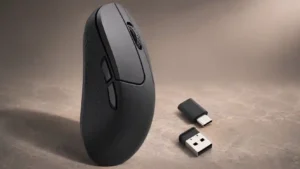
Separate USB-A and USB-C receivers simplify moving between computers, although manually disconnecting a receiver may be necessary.
G-Wolves LYCANNo score yet
DPI range
Keychron M3 Mini
4.5
The adjustable sensitivity spans a wide range, up to 26,000 DPI.
G-Wolves LYCANNo score yet
Dust resistance
Keychron M3 MiniNo score yet
G-Wolves LYCAN
2.0
The exposed underside allows dust and debris to reach the internals more readily than an enclosed mouse.
FPS gaming suitability
Keychron M3 MiniNo score yet
G-Wolves LYCAN
5.0
Low latency and minimal mass make this an excellent shooter mouse, particularly for quick flicks.
Included arm sleeve quality
Keychron M3 MiniNo score yet
G-Wolves LYCAN
3.0
The supplied sleeves are adequate on hard pads but can drag on soft pads and fray easily.
Included grip tape quality
Keychron M3 MiniNo score yet
G-Wolves LYCAN
4.3
The included tape is exceptionally grippy and reusable, though its thick, nonmodular pieces can widen the shell.
Launch quality control
Keychron M3 Mini
2.5
Early units have exhibited minor shell imperfections and occasional receiver quality-control problems.
G-Wolves LYCANNo score yet
Learning curve
Keychron M3 MiniNo score yet
G-Wolves LYCAN
3.0
The extreme lightness and forward sensor may require an adjustment period; some adapt easily, others find the sensitivity persistently demanding.
Long-distance wireless mode
Keychron M3 MiniNo score yet
G-Wolves LYCAN
2.0
Extended-distance mode can increase wireless reach but consumes extra battery without improving gaming performance.
MacOS compatibility
Keychron M3 Mini
4.6
MacBook owners frequently praise the smooth response and easy compatibility, particularly with USB-C receivers, though receiver failures are possible.
G-Wolves LYCANNo score yet
Maintenance frequency
Keychron M3 MiniNo score yet
G-Wolves LYCAN
2.0
The open underside collects debris faster, so the sensor lens needs more frequent cleaning.
Middle click quality
Keychron M3 MiniNo score yet
G-Wolves LYCAN
3.3
Middle click is usable, though some find its rebound too spongy or slow for repeated presses.
Model naming clarity
Keychron M3 Mini
2.0
The Mini name can be misleading because the body is only slightly smaller than the original M3.
G-Wolves LYCANNo score yet
Motion latency
Keychron M3 MiniNo score yet
G-Wolves LYCAN
5.0
Sensor movement registers very quickly, with latency comfortably in competitive territory.
Onboard memory
Keychron M3 Mini
5.0
Settings and profiles remain stored on the mouse, so the configuration app need not stay open.
G-Wolves LYCANNo score yet
Open underside protection
Keychron M3 MiniNo score yet
G-Wolves LYCAN
2.7
The open bottom helps achieve extraordinary weight savings but exposes circuitry and can introduce rocking; included covers offer some protection.
Overall satisfaction
Keychron M3 MiniNo score yet
G-Wolves LYCAN
4.2
Several testers were delighted by the speed, solid shell and accessories, while one found the extreme sensitivity too demanding for daily gaming.
Portability
Keychron M3 Mini
5.0
A light, compact body slips easily into a laptop bag or briefcase.
G-Wolves LYCANNo score yet
Profile management
Keychron M3 Mini
4.7
Five stored profiles allow detailed configuration for different preferences and tasks.
G-Wolves LYCANNo score yet
Scroll wheel grip texture
Keychron M3 MiniNo score yet
G-Wolves LYCAN
5.0
The rubber wheel's recessed texture is preferred over earlier raised-dot designs.
Scroll wheel precision
Keychron M3 MiniNo score yet
G-Wolves LYCAN
4.0
Pronounced wheel detents make scrolling predictable and easy to control.
Sensor angle adjustment
Keychron M3 MiniNo score yet
G-Wolves LYCAN
5.0
Sensor angle adjustment is a welcome option for tailoring aim and ergonomics.
Sensor placement
Keychron M3 MiniNo score yet
G-Wolves LYCAN
4.7
The forward sensor makes small movements feel direct and fast, though the effect varies with hand size and can feel overly sensitive.
Skate spacer effectiveness
Keychron M3 MiniNo score yet
G-Wolves LYCAN
3.0
Spacers can raise dot skates to reduce bottoming out, but better aftermarket skates may be more effective.
Specification clarity
Keychron M3 MiniNo score yet
G-Wolves LYCAN
2.0
The box and website do not always agree on weight and sensor specifications, making exact configuration details harder to determine.
Unit-to-unit quality control
Keychron M3 MiniNo score yet
G-Wolves LYCAN
5.0
The inspected unit had excellent assembly quality, with well-implemented buttons and wheel; it was supplied directly by the manufacturer.
USB receiver storage
Keychron M3 Mini
2.0
There is no convenient onboard storage for the small receivers, making them easier to misplace.
G-Wolves LYCANNo score yet
Virtual sensor position adjustment
Keychron M3 MiniNo score yet
G-Wolves LYCAN
3.0
Virtual sensor-position adjustment can make the mouse feel more centered, but it does not fully reproduce the benefits of moving the physical sensor.
Wireless latency
Keychron M3 Mini
5.0
The receiver connection can feel effectively lag-free during play.
G-Wolves LYCANNo score yet
Controls and connectivity
Bluetooth support
Keychron M3 Mini
3.9
Bluetooth is convenient for laptops and travel, although it feels less smooth than the receiver and some owners experience disconnects.
G-Wolves LYCANNo score yet
Button count
Keychron M3 Mini
4.7
The simple layout provides useful side buttons without a redundant top-mounted DPI control.
G-Wolves LYCANNo score yet
Button travel
Keychron M3 MiniNo score yet
G-Wolves LYCAN
4.5
Main and side button travel is generally short and well controlled, with extra movement possible under firm edge pressure.
Physical controls
Keychron M3 Mini
4.5
Dedicated underside controls are convenient, although the small switches can be stiff to operate.
G-Wolves LYCANNo score yet
Polling rate customization
Keychron M3 Mini
4.8
Polling rate can be changed directly on the mouse, without opening the configuration program.
G-Wolves LYCANNo score yet
Software resource usage
Keychron M3 Mini
5.0
The lightweight configuration program does not need to run continuously in the background.
G-Wolves LYCANNo score yet
Battery and charging
Charging speed
Keychron M3 Mini
3.0
A full charge takes around two hours in one test, which is acceptable rather than especially quick.
G-Wolves LYCANNo score yet
Comfort and build
Chassis height comfort
Keychron M3 MiniNo score yet
G-Wolves LYCAN
3.5
The very low front gives direct control and natural finger posture, but shallow sidewalls can leave fingers dragging on the pad.
Durability over time
Keychron M3 Mini
2.3
Some mice hold up well over months of daily use, while others develop charging, connection or button failures within months.
G-Wolves LYCANNo score yet
Hot-swappable switch design
Keychron M3 MiniNo score yet
G-Wolves LYCAN
2.0
Switches are soldered rather than hot-swappable, making replacements more involved.
Skate durability
Keychron M3 MiniNo score yet
G-Wolves LYCAN
2.0
The included PTFE skates can wear quickly on hard surfaces.
Performance
Cleaning ease
Keychron M3 MiniNo score yet
G-Wolves LYCAN
4.0
Compressed air makes cleaning the exposed sensor area relatively easy.
Productivity performance
Keychron M3 Mini
4.0
It works well for ordinary office tasks, but the basic wheel and click feel are less suitable for some productivity workflows.
G-Wolves LYCANNo score yet
Scroll wheel noise
Keychron M3 Mini
4.0
The 4K scroll wheel operates relatively quietly.
G-Wolves LYCANNo score yet
Ownership and support
Dongle-free setup
Keychron M3 Mini
5.0
Bluetooth offers a convenient way to use the mouse without plugging in a receiver.
G-Wolves LYCANNo score yet
Double-click reliability
Keychron M3 MiniNo score yet
G-Wolves LYCAN
4.3
SPDT switches and adjustable debounce help avoid unwanted double clicks; testers generally had no issues at their chosen settings.
Macro support
Keychron M3 MiniNo score yet
G-Wolves LYCAN
5.0
The web driver provides flexible macro customization.
Multi-device support
Keychron M3 Mini
4.5
The updated software can manage multiple compatible devices conveniently.
G-Wolves LYCANNo score yet
Plug-and-play support
Keychron M3 Mini
5.0
Several owners report that it works immediately without fiddly configuration.
G-Wolves LYCANNo score yet
Replacement parts availability
Keychron M3 Mini
2.0
The unusual skate outline limits the choice of exact-fit aftermarket feet.
G-Wolves LYCANNo score yet
Setup ease
Keychron M3 Mini
2.9
Initial pairing is often quick, but defective receivers and repeated Bluetooth pairing failures can make setup frustrating.
G-Wolves LYCANNo score yet
Upgrade value
Keychron M3 Mini
5.0
The lighter design improves on the original M3, and the 4K version's better battery life and polling options can justify the premium.
G-Wolves LYCANNo score yet
Warranty
Keychron M3 MiniNo score yet
G-Wolves LYCAN
2.0
A one-year warranty is included, but concerns about claiming it reduce its reassurance.