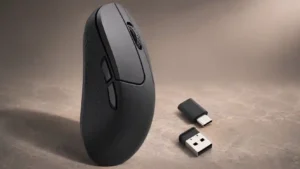
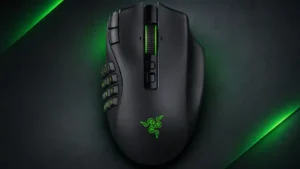
Other features
Accessory compatibility
Keychron M3 MiniNo score yet
Razer Naga V3 Pro
2.0
The recessed USB connector may be picky about cable compatibility.
AI Prompt Master
Keychron M3 MiniNo score yet
Razer Naga V3 Pro
2.7
The AI Prompt Master shortcut divides opinion: some appreciate workflow efficiencies, while others disable it or find it unnecessary and limited.
Automatic scroll mode switching
Keychron M3 MiniNo score yet
Razer Naga V3 Pro
3.7
Smart-Reel is convenient for some, but oversensitive free spin, audible transitions and occasional mode-switch delays make others prefer manual modes.
Built-in RGB lighting
Keychron M3 MiniNo score yet
Razer Naga V3 Pro
3.9
RGB complements the black design, but only the full twelve-button panel is illuminated.
Color options
Keychron M3 MiniNo score yet
Razer Naga V3 Pro
2.0
Black is the only color available, and an additional finish would have been welcome.
Connectivity versatility
Keychron M3 MiniNo score yet
Razer Naga V3 Pro
5.0
Wired USB, Bluetooth and 2.4GHz wireless make it easy to move between work and gaming setups.
Firmware updateability
Keychron M3 Mini
2.3
Firmware updates are more cumbersome than necessary because the configuration software does not directly handle them.
Razer Naga V3 ProNo score yet
FPS gaming suitability
Keychron M3 MiniNo score yet
Razer Naga V3 Pro
3.4
Shooter performance is technically strong and the two-button layout helps, but weight and bulk limit fast competitive movement for many players.
Free-spin scrolling
Keychron M3 MiniNo score yet
Razer Naga V3 Pro
4.5
Free spin is excellent for long pages and spreadsheets, but it can feel too sensitive or accelerate unexpectedly.
Handedness options
Keychron M3 Mini
4.0
The symmetrical body accommodates either hand, although the extra buttons are on the left side only.
Razer Naga V3 ProNo score yet
Horizontal scrolling
Keychron M3 MiniNo score yet
Razer Naga V3 Pro
5.0
Horizontal wheel tilt makes spreadsheets, wide webpages and editing timelines easier to navigate.
Interchangeable side panels
Keychron M3 MiniNo score yet
Razer Naga V3 Pro
4.9
Three magnetic side panels make it easy to switch between two, six and twelve thumb buttons. The secure attachment and quick recognition make this flexibility genuinely practical.
Launch quality control
Keychron M3 Mini
2.5
Early units have exhibited minor shell imperfections and occasional receiver quality-control problems.
Razer Naga V3 ProNo score yet
Learning curve
Keychron M3 MiniNo score yet
Razer Naga V3 Pro
3.1
The dense twelve-button grid takes practice and muscle memory, although the sculpted six-button layout is easier to learn.
Lift-off distance
Keychron M3 MiniNo score yet
Razer Naga V3 Pro
5.0
Adjustable lift-off behavior helps keep the crosshair stable during wide sweeps.
MacOS compatibility
Keychron M3 Mini
4.6
MacBook owners frequently praise the smooth response and easy compatibility, particularly with USB-C receivers, though receiver failures are possible.
Razer Naga V3 ProNo score yet
MMO gaming suitability
Keychron M3 MiniNo score yet
Razer Naga V3 Pro
4.9
The twelve-button grid and extra modifiers make complex MMO abilities easier to reach without stretching to keyboard shortcuts.
MOBA gaming suitability
Keychron M3 MiniNo score yet
Razer Naga V3 Pro
4.7
Six- and twelve-button panels work well for MOBA abilities and customizable shortcuts.
Model naming clarity
Keychron M3 Mini
2.0
The Mini name can be misleading because the body is only slightly smaller than the original M3.
Razer Naga V3 ProNo score yet
Motion latency
Keychron M3 MiniNo score yet
Razer Naga V3 Pro
5.0
Motion response is fast and smooth with little perceptible lag.
Mouse sensitivity matching
Keychron M3 MiniNo score yet
Razer Naga V3 Pro
5.0
The sensitivity-matching tool works well for transferring familiar sensitivity settings from another mouse.
Receiver quality
Keychron M3 Mini
1.8
Receiver failures have affected some units, including a defective 4K dongle and a nonfunctional USB-C receiver.
Razer Naga V3 ProNo score yet
Repairability
Keychron M3 MiniNo score yet
Razer Naga V3 Pro
4.0
The wheel uses separately replaceable microswitches, which is helpful for repairs.
RGB features
Keychron M3 MiniNo score yet
Razer Naga V3 Pro
3.6
Customizable RGB looks attractive, although the six-button panel lacks backlighting and some lighting effects can distract.
Scroll acceleration
Keychron M3 MiniNo score yet
Razer Naga V3 Pro
2.5
Free-spin acceleration can feel excessively fast, making scrolling harder to control.
Scroll wheel precision
Keychron M3 MiniNo score yet
Razer Naga V3 Pro
4.8
Precision tactile mode gives finer control over scroll steps and weapon selection, though some prefer standard notches.
Scroll wheel usefulness in games
Keychron M3 MiniNo score yet
Razer Naga V3 Pro
4.9
The precision tactile mode is especially useful for weapon swaps and skill cycling.
Sleep mode
Keychron M3 MiniNo score yet
Razer Naga V3 Pro
1.5
An idle or sleep transition can cause unwanted cursor movement or delayed inputs, according to one detailed account.
Battery and charging
Battery health controls
Keychron M3 MiniNo score yet
Razer Naga V3 Pro
4.8
The optional charging setup includes a charge limit to help manage battery health.
Battery indicator
Keychron M3 Mini
2.9
The charge indicator is handy when working correctly, but its tiny LED is difficult to see and one unit gave premature low-battery warnings.
Razer Naga V3 ProNo score yet
Charging speed
Keychron M3 Mini
3.0
A full charge takes around two hours in one test, which is acceptable rather than especially quick.
Razer Naga V3 ProNo score yet
Replaceable battery support
Keychron M3 Mini
4.5
The internal rechargeable battery can be replaced with some disassembly.
Razer Naga V3 ProNo score yet
Wireless charging support
Keychron M3 MiniNo score yet
Razer Naga V3 Pro
4.7
Optional wireless charging accessories can keep the mouse powered continuously and pair easily.
Comfort and build
Button legend durability
Keychron M3 MiniNo score yet
Razer Naga V3 Pro
4.7
Double-shot molded legends are a welcome upgrade over printed labels and should resist fading with repeated use.
Skate durability
Keychron M3 MiniNo score yet
Razer Naga V3 Pro
3.0
Visible marks on the feet after little use raise concerns about wear.
Switch durability
Keychron M3 MiniNo score yet
Razer Naga V3 Pro
4.0
The rated 100-million-click lifespan inspires confidence, but it is not a demonstrated long-term result.
Ownership and support
Customer support
Keychron M3 Mini
1.3
Support is a weak point for some owners, including long waits for replacement receivers and unhelpful email responses.
Razer Naga V3 ProNo score yet
Dongle-free setup
Keychron M3 Mini
5.0
Bluetooth offers a convenient way to use the mouse without plugging in a receiver.
Razer Naga V3 ProNo score yet
Macro support
Keychron M3 MiniNo score yet
Razer Naga V3 Pro
4.2
Macros and modifier layers expand the available commands considerably. Automation can be against the rules of some online games.
Product support lifespan
Keychron M3 MiniNo score yet
Razer Naga V3 Pro
2.5
Long-term usefulness depends partly on ongoing companion software support, a concern for a mouse with so many programmable controls.
Tilt wheel support
Keychron M3 MiniNo score yet
Razer Naga V3 Pro
4.8
The tilt wheel is useful for horizontal navigation and can also be remapped to in-game commands.
Controls and connectivity
Debounce customization
Keychron M3 Mini
4.0
Debounce timing can be adjusted to suit gaming, though changing the factory setting is recommended by one tester.
Razer Naga V3 ProNo score yet
Haptic controls
Keychron M3 MiniNo score yet
Razer Naga V3 Pro
5.0
Tactile wheel feedback gives more control over rapid scrolling and item selection.
Lockable ring-finger button
Keychron M3 MiniNo score yet
Razer Naga V3 Pro
4.7
The extra ring-finger button is useful for modifiers and shortcuts, but some hands press it unintentionally. A physical lock turns it into a solid finger rest.
Physical controls
Keychron M3 Mini
4.5
Dedicated underside controls are convenient, although the small switches can be stiff to operate.
Razer Naga V3 ProNo score yet
Scroll wheel customization
Keychron M3 MiniNo score yet
Razer Naga V3 Pro
4.6
Distinct wheel modes offer useful flexibility and fine control, although manual mode switching can have a brief delay.
Side button tactile indexing
Keychron M3 MiniNo score yet
Razer Naga V3 Pro
3.5
Sculpted buttons make the grid easier to navigate by touch, especially the six-button layout. Some players still miss a tactile home marker on the twelve-button grid.
Software and driver support
Keychron M3 MiniNo score yet
Razer Naga V3 Pro
2.1
Desktop Synapse support is extensive, but the web configurator is unavailable in several accounts, limiting software flexibility.
Software stability
Keychron M3 MiniNo score yet
Razer Naga V3 Pro
2.5
Software stability varies: some experience immediate, reliable changes while others lose bindings, encounter profile failures or see sleep-related bugs.
Performance
Weight specification accuracy
Keychron M3 Mini
2.5
Measured weights can run a few grams above the advertised figure, and the 1K packaging and documentation did not consistently agree.
Razer Naga V3 ProNo score yet