Compare TP-Link Archer BE900 vs ARRIS SURFboard G54

TP-Link Archer BE900

TP-Link Archer BE900

Overall score 4.1 / 5

Based on 12 scored reviews

vs
ARRIS SURFboard G54

ARRIS SURFboard G54

Overall score 3.7 / 5

Based on 6 scored reviews

How we score

Scorata scores summarize analyzed review evidence on a 1–5 scale; they are not laboratory measurements or a simple average of customer star ratings. Feature scores summarize the reviews covering that feature. The overall score averages feature scores within each review, then combines review averages. When both expert and customer evidence are available, those two groups receive equal weight. Products can have different review coverage, so small score gaps do not establish a winner.

Recommendations prioritize important features for the category, with a score of at least 3.5, a gap of at least 0.25 points and at least two supporting reviews per product. Features with widely varying scores or broad connectivity contexts are excluded from recommendations. These safeguards do not establish statistical significance.

Quick verdict

What each product is best for

The review evidence points to a tradeoff: design and appearance and multi-gig Ethernet support versus usage schedules and whole-home coverage. Choose according to which strengths matter more to you; the overall score alone does not settle that choice.

Choose TP-Link Archer BE900 for design and appearance and multi-gig Ethernet support.

Choose ARRIS SURFboard G54 for usage schedules and whole-home coverage.

Why these recommendations?

TP-Link Archer BE900

Where It Has the Edge

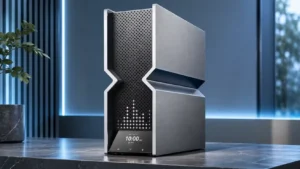
  • design and appearance is 4.8 vs 3.5. The vertical hourglass housing and hidden antennas look distinctive and modern rather than like a conventional antenna-covered router.
  • multi-gig Ethernet support is 4.9 vs 3.6. A pair of 10Gbps connections alongside four 2.5Gbps ports provides unusually flexible multi-gig networking.
  • range is 4.4 vs 3.7. Range is often excellent, with strong reception far from the router, though building layout and band choice can...

ARRIS SURFboard G54

Where It Has the Edge

  • usage schedules is 4.0 vs 3.0. Internet access schedules and scheduled URL blocking help manage when devices can access the network.
  • whole-home coverage is 4.5 vs 4.0. Whole-home coverage can be good with central placement, including a reported successful test in a 3,000-square-foot house. Layout...
  • download performance is 4.8 vs 4.5. Downloads are fast, with one wired test sustaining nearly 1 Gbps on an 800 Mbps cable plan.
TP-Link Archer BE900 4.1 overall score
ARRIS SURFboard G54 3.7 overall score

Compare features

Scores are out of 5. Missing scores mean missing review evidence, not a missing feature.

Scored on both products

Other features

Ease of use
TP-Link Archer BE900
4.5

Simple device connection options make everyday use approachable.

ARRIS SURFboard G54
3.5

Everyday app management can be intuitive, though the early configuration workflow was made awkward by password rules and CAPTCHA checks.

Guest network
TP-Link Archer BE900
4.8

Guest networks are easy to share using an on-screen QR code and keep visitors separate from the main network.

ARRIS SURFboard G54
2.0

The guest network is isolated by default, but early firmware imposed the same restrictive password rules as the main network.

LAN port speed
TP-Link Archer BE900
5.0

Fast LAN connections can keep up with multi-gigabit internet service.

ARRIS SURFboard G54
2.5

Four 1 Gbps sockets limit fast wired clients; a separate multi-gig switch may be needed for multiple high-speed connections.

Configuration flexibility
TP-Link Archer BE900
4.6

There is considerable flexibility to separate bands and fine-tune settings, with advanced controls available in the browser.

ARRIS SURFboard G54
2.5

Early configuration was hampered by mandatory password complexity and unusual security checks, although subsequent firmware removed the password rules on Comcast.

Heat management
TP-Link Archer BE900
2.5

The housing can become quite warm under testing, even with active cooling.

ARRIS SURFboard G54
4.5

The gateway remained relatively cool throughout hands-on testing.

Band steering
TP-Link Archer BE900
2.0

Phones sometimes struggle to change bands when moving around the house.

ARRIS SURFboard G54
3.5

Automatic band selection is convenient in ordinary use, but splitting SSIDs may be necessary to resolve some 6 GHz client issues.

Long-range speed
TP-Link Archer BE900
4.0

High-band downloads can remain impressively fast at 80–100 feet, but distant bedrooms and lower floors sometimes see much slower speeds.

ARRIS SURFboard G54
2.5

Throughput on 5 GHz drops noticeably farther away from the gateway.

Outdoor coverage
TP-Link Archer BE900
4.0

Some tests maintained excellent speeds outdoors, while a balcony in another layout had weak coverage.

ARRIS SURFboard G54
2.5

The signal weakens farther into the yard, making it less appealing for demanding outdoor coverage.

Security features
TP-Link Archer BE900
3.0

VPN support is useful, while advanced HomeShield security tools are behind a subscription.

ARRIS SURFboard G54
1.5

Early security settings imposed frustrating password complexity and CAPTCHA checks. A later Comcast firmware update removed the Wi-Fi password requirements.

Usage schedules
TP-Link Archer BE900
3.0

Basic scheduling is available for free, but more detailed schedules and usage restrictions require a subscription.

ARRIS SURFboard G54
4.0

Internet access schedules and scheduled URL blocking help manage when devices can access the network.

Latency
TP-Link Archer BE900
4.2

Latency is adequate to very good for ordinary tasks, although measured wireless latency is not exceptional among routers.

ARRIS SURFboard G54
5.0

Online gaming produced little noticeable lag in one hands-on test.

Range
TP-Link Archer BE900
4.4

Range is often excellent, with strong reception far from the router, though building layout and band choice can change results considerably.

ARRIS SURFboard G54
3.7

Range is generally adequate for modest homes, but distant rooms and outdoor areas can be more challenging than with expandable mesh systems.

Multi-Link Operation
TP-Link Archer BE900
2.6

MLO results depend on revision and client: some tests found little benefit or failed to connect, while another reported fast, stable operation. Alternating MLO is more limited than simultaneous links.

ARRIS SURFboard G54
2.0

Multi-Link Operation was unavailable on the tested unit despite its Wi-Fi 7 designation. Availability may vary with region and provider firmware.

Device compatibility
TP-Link Archer BE900
3.8

Broad device support is useful, but MLO compatibility and wireless speeds on particular phones can vary.

ARRIS SURFboard G54
3.3

Older clients can see speed improvements, but some legacy security protocols are unsupported and newer devices benefit most from 6 GHz.

Ethernet port count
TP-Link Archer BE900
5.0

The extensive Ethernet selection accommodates many wired devices and may eliminate the need for a separate switch.

ARRIS SURFboard G54
4.5

Four additional gigabit Ethernet sockets offer practical flexibility for ordinary wired devices.

Future upgrade readiness
TP-Link Archer BE900
4.0

The fast ports and Wi-Fi 7 capabilities offer headroom for future upgrades, but the early implementation drew criticism for immaturity.

ARRIS SURFboard G54
4.5

Wi-Fi 7 offers room to benefit from newer client devices over time, even though the gateway has limited physical expansion options.

Included accessories
TP-Link Archer BE900
2.5

The included flat Ethernet cable was disliked by one user who preferred to use a different cable.

ARRIS SURFboard G54
3.0

The unboxing revealed a minimal accessory bundle with no Ethernet cable included.

Network monitoring
TP-Link Archer BE900
5.0

The touchscreen makes live client counts and CPU and memory usage easy to monitor without opening a separate interface.

ARRIS SURFboard G54
4.5

Real-time monitoring offers a convenient way to keep tabs on network performance and security.

Settings organization
TP-Link Archer BE900
4.0

The app's settings are arranged in a relatively clear, intuitive interface.

ARRIS SURFboard G54
3.5

Granular menus and self-explanatory sections make the browser interface relatively easy to navigate.

WAN port speed
TP-Link Archer BE900
5.0

The 10Gbps WAN option provides headroom for fast broadband connections.

ARRIS SURFboard G54
4.5

The 10 Gbps WAN/LAN capability is attractive for fast service, though actual cable speeds depend on the provider.

Whole-home coverage
TP-Link Archer BE900
4.0

A single unit can deliver strong speeds throughout a home, but some distant rooms or balconies may still benefit from mesh expansion.

ARRIS SURFboard G54
4.5

Whole-home coverage can be good with central placement, including a reported successful test in a 3,000-square-foot house. Layout matters.

Close-range speed
TP-Link Archer BE900
4.7

Nearby throughput is frequently outstanding, although older client devices may fall well short of a fast internet plan's full speed.

ARRIS SURFboard G54
5.0

The gateway delivers excellent throughput close to the router.

ISP compatibility
TP-Link Archer BE900
4.5

A tested 2Gbps fiber connection reached its full speed over Ethernet.

ARRIS SURFboard G54
4.3

It is an attractive replacement for compatible cable rental equipment, provided the exact provider and service tier approve the model.

Network stability
TP-Link Archer BE900
5.0

A busy network with dozens of devices ran without connection drops in one test.

ARRIS SURFboard G54
4.8

The gateway completed a three-day stress test without disconnecting, and another tester also found it dependable.

Floor-to-floor coverage
TP-Link Archer BE900
4.0

A single unit can serve multiple floors, but reinforced floors and basements may weaken certain bands considerably.

ARRIS SURFboard G54
4.0

The standalone router is considered suitable for multi-level homes, although its distant 5 GHz speeds taper off.

Ownership and support

Upgrade value
TP-Link Archer BE900
2.8

A move from an older router can improve throughput, but the extra cost over less expensive Wi-Fi 7 models is difficult to justify for many homes.

ARRIS SURFboard G54
5.0

It represents a substantial speed and technology upgrade over the earlier G36, particularly with newer wireless clients.

Multi-gig Ethernet support
TP-Link Archer BE900
4.9

A pair of 10Gbps connections alongside four 2.5Gbps ports provides unusually flexible multi-gig networking.

ARRIS SURFboard G54
3.6

The single 10 Gbps port is valuable, but additional multi-gigabit connections require a switch. The remaining four sockets are gigabit-only.

Customer support
TP-Link Archer BE900
4.5

Free expert setup assistance is a welcome option for buyers who need extra help.

ARRIS SURFboard G54
3.3

Phone and chat availability are reassuring, but one launch-era app issue remained unresolved despite contacting the manufacturer.

Quad-band support
TP-Link Archer BE900
3.6

The four-band layout adds capacity, but its split 5GHz design can be less flexible than a second 6GHz band.

ARRIS SURFboard G54
4.5

The four-band architecture contributes to a substantial speed upgrade over older dual-band gateways.

Value for money
TP-Link Archer BE900
3.1

The high price is easier to justify for dual 10Gbps connectivity or the interactive screens; cheaper routers and mesh alternatives offer better value for many households.

ARRIS SURFboard G54
4.0

High speeds and avoided rental fees can justify the price, although dedicated routers at similar prices can offer more networking capability.

Setup ease
TP-Link Archer BE900
4.6

Initial setup is consistently described as quick and straightforward.

ARRIS SURFboard G54
3.8

Setup experiences differ: guided activation can be very easy, but early firmware and app problems made configuration frustrating for another tester.

10 GbE support
TP-Link Archer BE900
5.0

Dual 10Gbps ports are a major selling point, allowing a fast WAN connection without sacrificing a 10Gbps wired LAN.

ARRIS SURFboard G54
4.4

The 10 Gbps Ethernet socket is a standout specification, though some would prefer multiple 2.5 Gbps ports for greater flexibility.

Setup guidance
TP-Link Archer BE900
4.5

Step-by-step prompts and QR codes help guide users through the initial setup.

ARRIS SURFboard G54
5.0

The app offers clear guidance through activation and Wi-Fi customization when it works properly.

Installation process
TP-Link Archer BE900
4.8

Getting the router running is quick, particularly through Tether's step-by-step setup.

ARRIS SURFboard G54
5.0

One hands-on account found installation remarkably straightforward, even without much technical experience.

160 MHz support
TP-Link Archer BE900
2.0

Splitting 5GHz into two bands restricts the room available for wide 160MHz channels, particularly when DFS channels are involved.

ARRIS SURFboard G54
2.0

The lack of 160 MHz channels on the tested 5 GHz bands holds back performance.

Channel width support
TP-Link Archer BE900
2.0

The two 5GHz radios divide the available spectrum, making wide channels harder to accommodate.

ARRIS SURFboard G54
2.0

The tested 5 GHz radios are limited to 80 MHz channels, constraining their potential throughput.

Connection reliability
TP-Link Archer BE900
4.8

Stable operation is a strength, including a week with roughly 80 connected devices and no reported drops.

ARRIS SURFboard G54
4.8

Once configured, the gateway can maintain a dependable connection during extended use.

Controls and connectivity

App setup quality
TP-Link Archer BE900
4.8

Tether makes initial configuration straightforward, with guided steps and QR-assisted onboarding.

ARRIS SURFboard G54
3.0

The app can guide activation smoothly, but it failed to recognize the gateway in one launch-era Android test.

Mobile app quality
TP-Link Archer BE900
4.5

The Tether app is clear, convenient and covers most common adjustments, with deeper settings available elsewhere.

ARRIS SURFboard G54
3.0

Opinions on SURFboard Central differ sharply: one tester found it intuitive, while another could not get it to recognize the gateway at launch.

Wi-Fi 7 support
TP-Link Archer BE900
3.3

Wi-Fi 7 delivers excellent speeds with compatible clients; early implementations were less mature and MLO is not always reliable.

ARRIS SURFboard G54
4.5

Wi-Fi 7 gives the gateway strong peak performance and useful future readiness, but the tested unit lacks MLO.

Web interface quality
TP-Link Archer BE900
4.3

The browser interface offers a broad selection of advanced network controls beyond what is accessible in Tether.

ARRIS SURFboard G54
3.5

The local web interface has straightforward menus, but early password and CAPTCHA requirements made changes unnecessarily awkward.

Wi-Fi speed
TP-Link Archer BE900
4.7

Peak and local Wi-Fi speeds are consistently impressive, including multi-gigabit transfers with suitable hardware.

ARRIS SURFboard G54
4.4

Peak Wi-Fi speeds are a major draw, although some testing found the older bands modest compared with the newer 6 GHz band.

Parental controls
TP-Link Archer BE900
3.8

Free parental controls are useful for basic filtering and schedules; more advanced controls require HomeShield.

ARRIS SURFboard G54
4.0

Website and app filtering, blocking and schedules are useful, although daily per-device time limits are missing.

Performance

Multi-device performance
TP-Link Archer BE900
4.5

Substantial wireless capacity makes simultaneous household activity a promising strength.

ARRIS SURFboard G54
3.0

More complex networks with numerous devices spread across a large area may be better served by mesh equipment.

5 GHz performance
TP-Link Archer BE900
4.1

5GHz throughput is often exceptional, although dividing the spectrum can restrict channel options and distance reduces speeds.

ARRIS SURFboard G54
2.8

The 5 GHz bands are only modest in some tests, and throughput falls off with distance.

6 GHz performance
TP-Link Archer BE900
4.5

6GHz can deliver multi-gigabit local transfers and impressive nearby speeds, but some floor layouts sharply reduce reception.

ARRIS SURFboard G54
4.0

The 6 GHz band is a key speed advantage for compatible clients, although some devices may encounter single-SSID interoperability problems.

Content filtering
TP-Link Archer BE900
3.5

Basic website filtering is available, but more advanced app filtering requires a paid plan.

ARRIS SURFboard G54
4.0

Website filtering and scheduled URL blocking give families useful control over online access.

Wireless performance
TP-Link Archer BE900
4.8

Wireless throughput is a standout strength, with excellent results in many tests and some variation across devices, distance and building layouts.

ARRIS SURFboard G54
4.4

Wireless performance is generally strong, especially with newer clients. Older 5 GHz clients and longer distances can produce less impressive results.

2.4 GHz performance
TP-Link Archer BE900
3.8

The 2.4GHz band can provide excellent speeds throughout an apartment, but basement and outdoor results vary considerably.

ARRIS SURFboard G54
4.0

The 2.4 GHz band is particularly useful for reaching the corners of a centrally covered home.

Download performance
TP-Link Archer BE900
4.5

Downloads are often extremely fast even at distance, though one fiber test found inconsistent wireless download results across devices and test services.

ARRIS SURFboard G54
4.8

Downloads are fast, with one wired test sustaining nearly 1 Gbps on an 800 Mbps cable plan.

Advertised speed accuracy
TP-Link Archer BE900
2.0

The aggregate bandwidth figure is ambitious; splitting a band can inflate the headline number without a comparable practical benefit.

ARRIS SURFboard G54
2.0

The advertised aggregate bandwidth and cable plan limits deserve caution: tested channel widths and contradictory specifications raise questions about the headline speeds.

Operating noise
TP-Link Archer BE900
5.0

The active cooling fan was inaudible in use.

ARRIS SURFboard G54
5.0

The gateway was completely silent during hands-on testing.

Wired device performance
TP-Link Archer BE900
5.0

Wired testing reached full 2Gbps and 5Gbps internet speeds, and Ethernet offers greater gaming stability.

ARRIS SURFboard G54
5.0

Wired broadband performance was excellent in one test, sustaining nearly 1 Gbps on an 800 Mbps Comcast plan.

Comfort and build

Design and appearance
TP-Link Archer BE900
4.8

The vertical hourglass housing and hidden antennas look distinctive and modern rather than like a conventional antenna-covered router.

ARRIS SURFboard G54
3.5

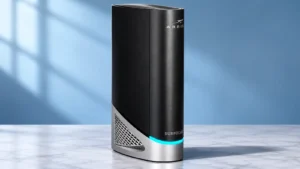
The cylindrical enclosure and LED strip look sleek to some, while others consider the styling merely functional.

Size and footprint
TP-Link Archer BE900
3.2

Hidden antennas make the tower less sprawling than some rivals, but it is still a large, tall router that needs dedicated space.

ARRIS SURFboard G54
2.8

The slender base saves space, but the enclosure is noticeably tall and bulky for a combined gateway.

Evidence available for one product

Ownership and support

2.5 GbE support
TP-Link Archer BE900
5.0

Four 2.5Gbps ports give fast wired devices more room to connect without an extra switch.

ARRIS SURFboard G54No score yet
320 MHz support
TP-Link Archer BE900
4.5

Ultra-wide 320MHz channels contribute to its high-speed appeal for compatible clients.

ARRIS SURFboard G54No score yet
Dual-WAN support
TP-Link Archer BE900No score yet
ARRIS SURFboard G54
1.5

Dual-WAN operation was unavailable in the tested configuration, limiting users who need redundant internet connections.

Product support lifespan
TP-Link Archer BE900
1.5

The original V1 revision's reported end-of-life status is disappointing for early adopters; check the hardware revision before buying.

ARRIS SURFboard G54No score yet
Security update support
TP-Link Archer BE900
2.0

The V1 revision was reported to have reached the end of firmware support, a concern for ongoing security maintenance.

ARRIS SURFboard G54No score yet
USB port support
TP-Link Archer BE900
4.5

Extra USB connectivity is handy for households with external devices and wired network needs.

ARRIS SURFboard G54No score yet
Warranty
TP-Link Archer BE900No score yet
ARRIS SURFboard G54
4.0

The one-year warranty provides some peace of mind.

Controls and connectivity

Access controls
TP-Link Archer BE900No score yet
ARRIS SURFboard G54
4.5

Device blocking provides useful control over which clients can access the network.

Companion software dependence
TP-Link Archer BE900No score yet
ARRIS SURFboard G54
2.0

The initial setup pushed users toward an app that failed to recognize the hardware in one launch-era test.

On-router display customization
TP-Link Archer BE900
4.2

Custom messages, animations and graphics are fun to personalize, but may not justify the extra cost on their own.

ARRIS SURFboard G54No score yet
Touchscreen responsiveness
TP-Link Archer BE900
4.0

The touchscreen is easy to interact with, but its scrolling is not as fluid as a smartphone's.

ARRIS SURFboard G54No score yet
Web interface setup
TP-Link Archer BE900No score yet
ARRIS SURFboard G54
2.5

Browser-based setup is familiar in structure but was hampered by unusual restrictions and blocked options in early testing.

Wi-Fi 6E support
TP-Link Archer BE900
4.0

Wi-Fi 6E clients can achieve fast speeds, though results vary across devices and may not match newer Wi-Fi 7 hardware.

ARRIS SURFboard G54No score yet
Wi-Fi standard support
TP-Link Archer BE900
4.5

Support for modern and older wireless standards makes the router versatile for a mix of client devices.

ARRIS SURFboard G54No score yet

Other features

Auto-sensing Ethernet ports
TP-Link Archer BE900
4.5

Automatic detection of the connected Ethernet cable simplifies initial setup.

ARRIS SURFboard G54No score yet
Channel selection
TP-Link Archer BE900
2.0

The split 5GHz spectrum reduces the number of usable channel choices.

ARRIS SURFboard G54No score yet
Client steering
TP-Link Archer BE900
2.5

Some phones do not switch bands smoothly as they move between rooms.

ARRIS SURFboard G54No score yet
Congestion handling
TP-Link Archer BE900
4.5

The second 5GHz band is useful for distributing traffic and reducing congestion, although this benefit depends on the network.

ARRIS SURFboard G54No score yet
Connected-device management
TP-Link Archer BE900No score yet
ARRIS SURFboard G54
4.5

App-based management can make adding and managing connected devices straightforward.

Cross-brand mesh compatibility
TP-Link Archer BE900
1.5

A tested D-Link EasyMesh node could be added but failed to serve clients; matching TP-Link equipment worked instead.

ARRIS SURFboard G54No score yet
Dead-zone elimination
TP-Link Archer BE900
4.5

Strong wireless reach helps reduce weak spots, and compatible extenders can fill remaining gaps.

ARRIS SURFboard G54No score yet
Device capacity
TP-Link Archer BE900
4.7

The router is designed for demanding households, and one test with around 80 connected devices ran without drops.

ARRIS SURFboard G54No score yet
Expandability
TP-Link Archer BE900No score yet
ARRIS SURFboard G54
1.8

Lack of native mesh support limits expansion; buyers with growing coverage needs may prefer separate or mesh-capable hardware.

Firmware stability
TP-Link Archer BE900No score yet
ARRIS SURFboard G54
2.5

Some 6 GHz clients may encounter interoperability issues with a unified SSID, making the provider's firmware version important.

Firmware updateability
TP-Link Archer BE900No score yet
ARRIS SURFboard G54
3.0

Manual firmware downloads were unavailable during one test, so updates depend on the provider rather than a readily accessible file.

Firmware update process
TP-Link Archer BE900No score yet
ARRIS SURFboard G54
3.0

Firmware is handled through the cable provider; one tester could not find a manual download when troubleshooting launch issues.

IoT device compatibility
TP-Link Archer BE900
4.8

A separate IoT network and stable operation with many smart devices make it useful for connected homes.

ARRIS SURFboard G54No score yet
IoT network
TP-Link Archer BE900
4.5

Dedicated IoT Wi-Fi helps keep smart devices organized and separate from other household traffic.

ARRIS SURFboard G54No score yet
Latency consistency
TP-Link Archer BE900
4.0

Jitter is decent for ordinary wireless gaming and communication; Ethernet is preferable for greater stability.

ARRIS SURFboard G54No score yet
Launch quality control
TP-Link Archer BE900
2.0

The original early-release Wi-Fi 7 implementation was criticized as unfinished.

ARRIS SURFboard G54No score yet
Link aggregation
TP-Link Archer BE900
5.0

Combining two 2.5Gbps links for NAS connectivity helped increase local transfer performance.

ARRIS SURFboard G54No score yet
Mesh scalability
TP-Link Archer BE900No score yet
ARRIS SURFboard G54
1.8

Native mesh expansion is not a strength, making it difficult to extend coverage seamlessly as needs grow.

Mid-range speed
TP-Link Archer BE900
4.5

Midrange wireless speeds remain strong in testing, although throughput depends on the device and band.

ARRIS SURFboard G54No score yet
Model naming clarity
TP-Link Archer BE900No score yet
ARRIS SURFboard G54
2.0

The modem-and-router naming was criticized as confusing for a device that is actually an integrated cable gateway.

Network migration ease
TP-Link Archer BE900No score yet
ARRIS SURFboard G54
1.5

Early password complexity rules could force owners to reconnect existing devices when replacing equipment; later Comcast firmware removed those requirements.

Network segmentation
TP-Link Archer BE900
4.5

Guest network separation helps keep visitors away from the main home network.

ARRIS SURFboard G54No score yet
Overall satisfaction
TP-Link Archer BE900No score yet
ARRIS SURFboard G54
4.2

The gateway is appealing for cable users who prioritize speed, reliability and rental savings, provided they can accept its configuration and expansion limitations.

Packaging quality and presentation
TP-Link Archer BE900
5.0

The substantial packaging makes for a pleasing unboxing experience and presents the router neatly.

ARRIS SURFboard G54No score yet
Power consumption
TP-Link Archer BE900
2.5

Power consumption is higher than typical routers, especially during downloads and heavier activity.

ARRIS SURFboard G54No score yet
Remote management
TP-Link Archer BE900
4.5

Tether makes remote monitoring and management convenient after account setup.

ARRIS SURFboard G54No score yet
SFP+ connectivity
TP-Link Archer BE900
4.8

The SFP+ combo port adds flexibility for compatible fiber connections.

ARRIS SURFboard G54No score yet
Specification clarity
TP-Link Archer BE900No score yet
ARRIS SURFboard G54
2.0

The manufacturer's technical information left questions about radio bandwidth and offered conflicting cable plan speed limits.

Status light control
TP-Link Archer BE900
4.8

Both front screens can be dimmed or disabled, and can be scheduled to turn off overnight.

ARRIS SURFboard G54No score yet
Status light usefulness
TP-Link Archer BE900
5.0

The display-based approach avoids the annoyance of conventional blinking status lights.

ARRIS SURFboard G54No score yet
Subscription requirements
TP-Link Archer BE900
2.3

HomeShield charges extra for more advanced parental controls, scheduling and security functions.

ARRIS SURFboard G54No score yet
USB storage sharing
TP-Link Archer BE900
3.0

USB storage sharing is useful, though configuration requires the browser and transfer speeds should not be expected to rival dedicated fast storage.

ARRIS SURFboard G54No score yet
Wall penetration
TP-Link Archer BE900
4.0

Performance through walls can be impressive, but 6GHz and basement coverage vary considerably with construction and layout.

ARRIS SURFboard G54No score yet
Weight and handling
TP-Link Archer BE900
3.3

The unit is heavy compared with some alternatives, although one buyer found much of the unboxing weight came from the packaging.

ARRIS SURFboard G54No score yet
Wireless backhaul
TP-Link Archer BE900
2.0

A dedicated wired backhaul is preferable when mesh bandwidth demands are high; the split 5GHz band is not necessarily a strong wireless backhaul solution.

ARRIS SURFboard G54No score yet

Comfort and build

Build quality
TP-Link Archer BE900No score yet
ARRIS SURFboard G54
3.8

The plastic housing feels solid, but the tall, narrow enclosure can topple when a stiff coax cable pulls on it.

Power adapter size
TP-Link Archer BE900
2.0

The external power brick can be awkward to position around the router.

ARRIS SURFboard G54No score yet

Performance

Mesh performance
TP-Link Archer BE900
4.0

EasyMesh worked with another TP-Link router, while a tested third-party node failed to connect clients.

ARRIS SURFboard G54No score yet
On-router display usefulness
TP-Link Archer BE900
4.4

Dual front screens provide useful status information, easy touch controls and guest QR codes, although some buyers view them as expensive extras.

ARRIS SURFboard G54No score yet
Performance under load
TP-Link Archer BE900No score yet
ARRIS SURFboard G54
5.0

The gateway held its connection throughout a three-day stress test.

Upload performance
TP-Link Archer BE900
4.3

Upload speeds are often fast, although some tests show a greater drop at distance than downloads.

ARRIS SURFboard G54No score yet

Other Top Routers to Consider

#1 D-Link Aquila Pro AI R95
4.8

Choose the R95 for a busy home that needs fast Wi-Fi 7, strong range, multi-gig ports, and low-lag gaming. Skip it for a small, lightly connected space or if advanced...

Pros: Wi-Fi 7 support, Wi-Fi speed

#2 GL.iNet GL-BE3600 Slate 7
4.5

Best for frequent travel, fast VPNs, dual 2.5GbE and resilient multi-WAN. Skip it if you need full 6GHz/320MHz Wi‑Fi 7, mesh, or desktop-class USB storage and long-range indoor coverage.

Pros: VPN client support, value for money

Cons: 6 GHz performance, USB storage sharing

#3 GL.iNet Flint 2 (GL-MT6000)
4.4

Exceptional VPN speeds, strong Wi-Fi 6 coverage and extensive OpenWrt controls make the Flint 2 a compelling value. Its advanced setup, missing 6GHz band and firmware-specific caveats matter if you...

Pros: setup ease, configuration flexibility

Cons: Wi-Fi 7 support, USB storage sharing

#4 GL.iNet Beryl AX (GL-MT3000)
4.4

The Beryl AX packs exceptionally flexible VPN and networking tools into a pocket-sized router. It is a great travel companion, but hotel login issues, limited whole-home range and a single...

Pros: Overall satisfaction, size and footprint

Cons: Captive portal handling, Ethernet port count