
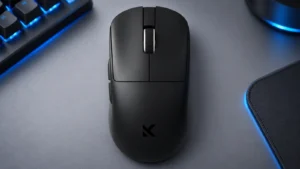
McHose L7 Ultra Feature Scores
Overall Scorata score: 4.2/5
Based on 9 analyzed reviews · View source samples
Explore all 87 feature scores for McHose L7 Ultra, organized into pros and cons.
Scores by Feature
Summary
87 reviewed features-
Very positive 4.5-5.041 (47%)
-
Positive 3.5-4.422 (25%)
-
Neutral 2.5-3.416 (18%)
-
Negative 1.5-2.48 (9%)
Pros
Sort
-
Flagship-class tracking and high polling at a budget price are the central appeal.
-
Overall satisfaction is high, particularly for buyers prioritizing performance and value over premium extras.
-
The PAW3950 delivers excellent practical tracking and competitive performance, although its lower lift-off setting is not a compelling upgrade for everyone.
-
Low mass makes quick movements easy; the heavier configuration trades a few grams for greater battery capacity.
-
The coating is widely praised for its comfortable, grippy finish and dependable traction.
-
The compact rear-hump shape feels natural for claw and fingertip grips and supports fine adjustments.
-
A rear hump and low front make claw grip particularly comfortable for smaller and medium hands.
-
Gaming performance is exceptional for the price, with accurate aim and responsive input.
-
The grippy surface offers secure traction without tape and performs well even in humidity.
-
Optical switches are tactile and crisp, though their feel can become heavier or hollow toward the rear.
-
Click latency is exceptionally low, especially after lowering the default debounce setting.
-
The compact body works very well for fingertip control, including for some larger hands.
-
Fast tracking, low mass and extremely low latency make this an excellent shooter mouse.
-
Sensor latency is exceptionally low, rivaling significantly more expensive gaming mice.
-
Dual 8K polling is a standout at this price. The difference from 1K can be subtle, and maximum polling increases power use.
-
Main clicks are generally sharp and satisfying, but some units exhibit mushy post-travel.
-
Low button height and a lightweight body make fine aim corrections easier.
-
The included grip tape and high-polling receiver add value; spare skates would have been welcome.
-
The web driver is straightforward, with clear settings and easy navigation, though polish is not universally praised.
-
Wireless performance is generally excellent, though one setup experienced odd latency and worked better wired.
-
Small and medium hands are the best match; larger hands may still find a fingertip or claw grip workable.
-
Fast flicks and slow micro-adjustments remain accurate, with clean tracking and little unwanted jitter.
-
The included grip tape adds traction and is a welcome extra for fingertip or claw grip.
-
The bundled high-polling receiver adds value and feels well made.
-
Many units feel rigid and rattle-free in ordinary use, but some thin shells flex noticeably under pressure.
-
Reducing debounce to zero worked well with the optical switches.
-
The TTC Gold wheel has a balanced tactile feel, but some owners want more distinct steps.
-
The configuration tools are functional and often easy to use, though occasional software frustrations and less mature polish remain.
-
Optical actuation offers a durability advantage over conventional mechanical contacts, although actual lifespan is not established.
-
Low-latency wireless response is a strength, with one isolated report of unusual latency in a crowded setup.
-
Middle click feels good on several samples, though it can be a little stiff.
-
The clean, minimal solid-shell styling and understated logo are appealing.
-
Weight distribution feels balanced, despite a slight forward bias on one sample.
-
Wired operation performs well and provides a useful fallback for charging or wireless issues.
-
The upgraded sensor and optical switches make the Ultra appealing, but the lighter Pro can be preferable for performance-focused users.
-
Firmware updates work well for some users, though a separate downloaded file can add inconvenience.
-
Side buttons are generally firm with little play and acceptable travel, though not quite as sharp as some premium alternatives.
-
Measured weights closely match some listings, but conflicting configurations mean buyers should confirm the exact revision.
-
The 2.4 GHz connection is the preferred option for low-latency gaming.
-
The buttons feel well constructed and largely free of wobble.
-
Optical switches respond well to rapid repeated clicks with moderate force.
-
The included USB-C paracord cable feels high quality.
-
Low button height supports fingertip micro-adjustments and precise aim.
-
One owner experienced flawless wireless operation without random stutters or lag.
-
Bluetooth, 2.4 GHz and wired options offer flexibility for gaming and everyday work.
-
The compact shell feels comfortable and allows secure, accurate flicks.
-
Tracking stays steady through rapid flicks and slower precise movements.
-
The packaging feels sturdy and neatly presented.
-
Bluetooth and USB-C make this a convenient secondary or travel mouse.
-
A clean matte solid shell gives the mouse a surprisingly premium feel for the price.
-
Flicks and small corrections feel immediately responsive.
-
The base offers plenty of room to position replacement dot skates.
-
One player found the lightweight mouse comfortable without wrist discomfort.
-
Optical main switches avoid traditional mechanical contact chatter, though this does not guarantee every button will remain trouble-free.
-
The larger-battery version can last a long time at 1K, but 8K drains it faster and runtime differs by revision.
-
Bluetooth adds casual-use flexibility, although the 2.4 GHz receiver is preferable for competitive play.
-
Button remapping adds flexibility for gaming and general work.
-
Macros help make the limited button layout more useful for MMO and MOBA play.
-
Adjustable polling settings allow a practical balance between speed and battery use.
-
Hardware reliability complaints are reported to be relatively uncommon, but long-term ownership remains less certain.
-
One account praises the sensor placement for fingertip aiming.
-
The wheel can sound slightly louder, although its tactile feedback and reliability help offset that.
-
Some owners experience software frustrations while others report flawless connection and updating.
Cons
Sort
-
Conflicting weight, battery and switch specifications make checking the precise seller SKU important.
-
The one-year warranty is less reassuring than protection from pricier established brands.
-
There is no free-spin mode, making lengthy office scrolling less convenient.
-
The wheel lacks left-right tilt, limiting productivity shortcuts.
-
The dyed stock feet are a frequent compromise, with scratchy glide for some owners and smoother movement after break-in for others.
-
The software ecosystem and support maturity lag those of established peripheral brands.
-
Two side buttons limit suitability for MMO games requiring many bindings.
-
Similar names across the L7 family make it easy to confuse compact and larger variants.
-
Wheel steps could feel more distinct for users who prefer stronger tactile indexing.
-
Rear-hump contact works well for claw grip, but the compact body offers limited relaxed palm support.
-
General work is possible, but the lack of free scrolling and tilt inputs reduces office versatility.
-
Stock feet can feel scratchy compared with premium alternatives, although some samples glide smoothly or improve after break-in.
-
Relaxed palm grip is generally a poor fit, though very small hands and palm-claw hybrid users may find it comfortable.
-
High polling rates increase power consumption, so lower settings are preferable when runtime matters.
-
Most samples feel solid in normal use, but shell rigidity and components can vary between units or production batches.
-
Two side buttons suffice for basic gaming and navigation, but not for extensive MMO bindings.
-
Click feel can become heavier and more hollow toward the rear of the buttons.
-
The symmetrical shell is undermined for left-handed use by the side buttons being positioned for the right hand.
-
Maximum polling can increase system workload and battery consumption, making lower rates more practical on some setups.
-
The 0.7 mm lift-off setting offers little noticeable advantage over the higher setting for some players.
-
Remapping and macros help with MOBA play, but the two side buttons limit available shortcuts.
-
The model has returned to production after interruptions, but stock history is not entirely stable.
-
Some samples have very little extra click travel, while others exhibit noticeably mushier post-travel.
-
Thin plastic keeps mass low; rigidity under pressure varies between samples.
Use Cases
Best for
Sort
-
Budget-conscious gamers can get low latency, excellent tracking and high polling without flagship pricing.
-
The compact rear-hump design is an excellent fit for small-handed claw and fingertip players.
-
Low weight, precise tracking and excellent latency make it outstanding for FPS gaming, although the lighter Pro is preferred by one reviewer.
-
Wireless use is typically responsive and stable, with one crowded setup benefiting from switching to a cable.
-
Competitive players benefit from low latency, fast tracking and a lightweight shape.
-
Medium-handed players using claw or fingertip grip are well served by the compact body.
-
Casual players can use Bluetooth or lower polling settings; the larger-battery revision is especially attractive for this purpose.
-
Wired use is an excellent fallback for charging, troubleshooting or avoiding wireless variables.
-
Aim training benefits from the compact low-mass design, though one reviewer prefers the lighter Pro for extensive practice.
-
The lightweight shape works well for flicks and fine corrections at low sensitivity.
-
The solid base leaves plenty of room for aftermarket dot skates.
-
Bluetooth and USB-C make it convenient as a travel mouse or secondary device.
-
The low weight may help users who find heavier mice tiring on the wrist.
-
Bluetooth adds flexibility for ordinary work and secondary-device use.
Conditional or not ideal for
Sort
-
Large-handed usersLarge hands can use fingertip grip and sometimes claw grip, but relaxed palm grip is generally awkward.
-
MMO gamingThe two side buttons are insufficient for MMO players who need many readily accessible bindings.
-
Desktop productivityIt can handle desktop work, but the lack of free scrolling and tilt makes it less versatile than an office mouse.
-
Left-handed usersThe shell is symmetrical, but right-handed side-button placement limits left-handed usability.
-
MOBA gamingMOBA play is feasible with macros and remapping, but the small number of buttons restricts shortcuts.