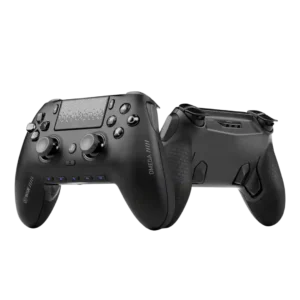
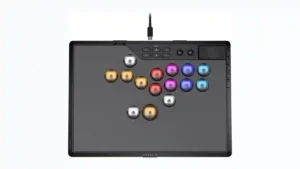
Scuf Omega PS5 Controller
Where It Has the Edge
No clear scored advantage over the other product.

Scorata scores summarize analyzed review evidence on a 1–5 scale; they are not laboratory measurements or a simple average of customer star ratings. Feature scores summarize the reviews covering that feature. The overall score averages feature scores within each review, then combines review averages. When both expert and customer evidence are available, those two groups receive equal weight. Products can have different review coverage, so small score gaps do not establish a winner.
Recommendations prioritize important features for the category, with a score of at least 3.5, a gap of at least 0.25 points and at least two supporting reviews per product. Features with widely varying scores or broad connectivity contexts are excluded from recommendations. These safeguards do not establish statistical significance.
Quick verdict
The available evidence supports the recommendation below, but does not establish an overall winner. Check the remaining features against your priorities.
There is not enough comparable review evidence to recommend Scuf Omega PS5 Controller over the other product.
Choose Corsair Novablade Pro for RGB lighting usefulness and wired performance.
No clear scored advantage over the other product.
Scores are out of 5. Missing scores mean missing review evidence, not a missing feature.
Battery life is one of the strongest advantages over DualSense-style controllers. Reviewers reported multi-day use, double-digit hours, and far less need to reach for a cable.
One long-term tester confirmed roughly 40 hours of wireless play with RGB at full brightness, matching the stated figure. That result supports strong real-world battery performance.
The dongle enables the Omega’s fast wireless play, but one customer reported random disconnects while using it. The feature looks strong in expert hands and less certain in all customer setups.
The 2.4GHz dongle is a standout feature, with testers calling it fantastic, exceptionally fast, and effectively free of noticeable latency. It is the preferred wireless mode in the reviews.
Wired performance is treated as reliable and low-latency, with the USB-C lock adding confidence for tournament-style play. One buyer disliked needing USB on PS5 when ports were already occupied.
Wired play is consistently treated as the lowest-latency, tournament-safe option, and the locking USB-C design keeps the cable secure. The included cable sits snugly during serious play.
Software customization is deep enough for stick curves, dead zones, lighting, profiles, and button maps. Reviewers generally found it practical rather than overwhelming.
Software customization is a clear weakness because the controller lacks a desktop configuration app. One reviewer specifically criticized the absence of software for checking and managing settings from a PC.
The companion app is usually praised for making setup and customization easier, with fast real-time changes. A small number of users had trouble connecting or updating through it.
Reviewers wanted a companion app or screen to make the controller's many settings easier to understand. The lack of one leaves users relying on button combinations, lights, and the manual.
Software support is better than older iCue-dependent setups for some users, but the lack of a desktop app bothers PC players. The mobile app helps, yet it does not satisfy every workflow.
The lack of iCUE integration is a notable omission for a Corsair peripheral with so many settings. Reviewers felt software support could make configuration much easier to verify and manage.
Programmable buttons give the Omega much of its pro-controller appeal. The limitation is that PlayStation mode does not unlock every G-key the way PC mode does.
The extra programmable buttons give fighting-game players useful places for parry, tag, jump, and other actions. Reviewers generally liked the flexibility, especially for moves that would otherwise require awkward finger reaches.
Button remapping is extensive, especially on PC and through the app. PS5 users still get useful remapping, though not the full freedom of PC mode.
Remapping is usually considered quick and easy directly on the controller, with several reviewers calling it a major advantage. One reviewer disliked that certain remaps disable the original input, but the overall sentiment is strongly positive.
The clicky mechanical buttons are a highlight for many reviewers, who find them tactile and fast. A few users dislike the same clickiness or found one stick-click input less consistent.
Most reviewers liked the buttons' feel, reliability, click, and smoothness, with several calling them especially satisfying. The main dissent comes from concerns about their tall shape and one review that felt the physical design undermined otherwise fast response.
Face-button response is widely praised as quick, precise, and more immediate than standard membrane buttons. Even a returned unit received credit for responsive front buttons.
Face-button response is a major strength, with reviewers describing inputs as smooth, sensitive, reliable, and extremely quick. Several testers said execution felt cleaner or easier once actuation was tuned.
Customization depth is one of the Omega’s defining strengths, spanning faceplates, sticks, buttons, profiles, paddles, triggers, and software settings. The depth is best on PC.
Customization is exceptionally deep, covering actuation, SOCD behavior, profiles, mappings, lighting, and more. The tradeoff is complexity: several reviewers love the control, while others say the abundance of settings becomes a blessing and a curse.
Touchpad usefulness depends heavily on platform. It works well enough on PS5 in some reviews, but PC behavior drew complaints because it does not always act like a PlayStation touchpad.
The touchpad is useful for PlayStation navigation and training functions, and on PC it can act as a mouse surface. Reviewers who discussed it consistently treated it as a welcome convenience.
PlayStation use is generally strong once connected, but some users dislike relying on USB or the dongle instead of fully native behavior. It is a PS5-focused controller with a few platform caveats.
Official PS4 and PS5 licensing is considered a meaningful advantage over unlicensed leverless controllers that need authentication adapters. The native console support adds convenience and value for PlayStation players.
RGB lighting is tasteful but limited. Reviewers liked the subtle look, while PS5 users get less customization than PC users.
RGB is broadly praised for looks and for showing settings such as actuation or mode status. A few reviewers wanted finer color control or found some effects distracting, but the overall reception is strongly positive.
Material impressions range from excellent to flimsy. Spanish-language and expert reviews praise the materials, but a critical expert found individual removable parts cheap when handled separately.
Reviewers liked the mix of metal, plastic, rubber, and protective detailing, with the aluminum surface receiving particular praise. The materials consistently read as high quality rather than cheap.
Accessories are mostly a plus, especially the hard case, braided USB-C cable, spare sticks, blanks, and dongle. One customer complaint says the replacement joystick kit arrived incomplete.
The protective shell or cover is widely appreciated for guarding the buttons in a bag, even if its styling is not universally loved. Reviewers also valued the practical travel protection it provides.
Onboard profiles are useful for switching between games and keeping settings on the controller. PC-focused reviewers especially liked saving macros or configurations without background software.
Five onboard profiles are a meaningful strength, letting players keep multiple setups without external software. The storage is useful, though profile management contributes to the controller’s configuration complexity for one reviewer.
The Smoke design and magnetic faceplate often make the Omega feel premium at first glance. Complaints mostly come from buyers who expected a denser, more luxurious feel for the money.
The controller is repeatedly described as premium, sturdy, and high-end, with metal construction, substantial weight, and polished details. Even reviewers with setup or price complaints generally agreed it feels expensive in hand.
The extra controls and aggressive competitive layout can take time to learn. Once adapted, reviewers often found the controller faster and more efficient.
The leverless layout and shortcut-heavy settings system take time to learn. Some reviewers adjusted quickly, but others needed the manual repeatedly or found even basic configuration frustrating.
Repairability gets a modest positive note because the battery can be removed after disassembly. This is a useful detail, but not a major theme across reviews.
Repairability is mixed. Several reviewers worry about proprietary caps, switch availability, or hard-to-source replacements, while one tester found the switch and keycap area easy to access and compatible with standard-style parts.
Wireless latency is praised around the 2.4GHz connection and competitive use. The strongest comments come from reviewers who value low-latency play on PS5 or PC.
Reviewers consistently found 2.4GHz latency extremely low, often describing it as indistinguishable from wired play. Difficult fighting-game inputs and combos worked reliably over the dongle.
USB-C is useful for wired play, charging, and the cable-lock accessory. Reviewers liked the tournament-style lock because it helps prevent accidental unplugging.
The locking USB-C connection is frequently praised for keeping the cable secure in tournament play. The main caveat is that one reviewer disliked how the lock can conflict with some third-party cables.
Many owners simply describe the Omega as a controller they love or would buy again. A few positive notes are broad rather than feature-specific, but the overall sentiment from those short reviews is enthusiastic.
Overall sentiment is strongly positive: most reviewers recommend the Novablade Pro, call it premium, or choose it as a regular controller. A small minority are mixed or sharply negative, mainly over complexity and button-travel design.
Wireless stability is mostly positive in expert testing, with several reviewers reporting smooth dongle use. A few customer reviews mention drops or random disconnects, so trust is not unanimous.
Retail 2.4GHz wireless was repeatedly described as stable and problem-free, including month-long use. One prototype reviewer had a dongle failure, so the only significant negative report came from preproduction hardware.
Fighting-game feedback is positive, especially around clicky inputs and a responsive D-pad. The Omega appeals to players who want precise, fast command entry.
The controller is overwhelmingly praised for fighting games, especially Street Fighter, Tekken, and other execution-heavy titles. Most reviewers rate it among the strongest premium leverless options, though one critic strongly disliked the button-travel design.
Polling-rate comments are very positive for PC, where 1,000Hz support is repeatedly called out. Reviewers note that the advantage is less meaningful on PS5.
One review highlighted the 1,000Hz polling rate available over wired and 2.4GHz on PC as a strong performance feature. Console use has more connection-specific limits.
Casual suitability is more limited. Some reviewers say it is fine for everyday play, but others call it overkill or less enjoyable for relaxed story-driven games.
Casual appeal is mixed: wireless couch play is convenient, but the $250 price and specialized leverless layout are hard to justify for newcomers or general gaming. It makes most sense for casual players already invested in fighting games.
The Omega feels noticeably light, which competitive players often welcomed. Some reviewers saw that lightness as a tradeoff because it also makes the controller feel less substantial or less immersive.
The Novablade Pro is heavy for a leverless controller, but many reviewers liked the planted, substantial feel. A few considered it among the heaviest options and near the upper limit they would want to carry.
Competitive suitability is the Omega’s strongest identity. Reviewers repeatedly recommend it for shooters, Fortnite, Warzone, fighting games, and players chasing faster inputs.
Tournament-oriented features are a major strength, including Game Mode, SOCD controls, extra mappings, fast input response, and wired or low-latency wireless options. Reviewers consistently see the Novablade Pro as built for serious competitive fighting-game play.
Consistency is generally positive when the controller works as intended, with some owners reporting no issues or no mid-game disconnects. The main exceptions are firmware and dongle complaints.
One month-long user reported no noticeable performance issues and kept using the controller as a daily driver. That longer stint supports strong consistency across repeated sessions.
Input response is a standout theme, from instant buttons to fast trigger behavior. Shooter and fighting-game players describe it as a major reason the controller feels competitive.
Overall input response is one of the product's strongest performance traits. Reviewers repeatedly described the controller as snappy, fast, and responsive with no meaningful sense of delay.
Build quality is divisive: some reviewers call the controller sturdy and high-end, while others say removable parts or the shell feel cheaper than the price suggests. This is one of the clearest split opinions.
Build quality is one of the clearest strengths: reviewers repeatedly described the chassis as tank-like, solid, and exceptionally well constructed. The metal top and rigid body reinforce that premium impression.
Comfort is one of the Omega’s clearer strengths, with several reviewers saying it feels great in hand and works well for longer play. A minority found the shape or fit too small or not universal.
Most reviewers found the Novablade Pro comfortable on a lap or desk, with good palm space and a shape that works for long sessions. Comfort praise is broad even though a couple of users reported hand discomfort during adaptation.
Durability optimism centers on TMR sticks, shorter triggers, and lessons from earlier Scuf designs. Long-term proof is still limited, so the confidence is promising rather than settled.
One review highlighted the switch design as built for an unusually high number of presses, presenting longevity as a major strength. Long-term real-world wear was not otherwise deeply tested.
Reviewers generally liked the ergonomic shape, especially the way it sits in the hand during longer sessions. The strongest praise comes from competitive-focused users who value the controller’s secure, natural hold.
The full non-slip base, stable desk footprint, and slightly angled chassis make the controller feel planted and easy to use on a lap. Reviewers repeatedly liked how little it moves during play.
Size works well for some players because the controller is small and easy to grip. Others found the smaller fit part of why the back controls did not land comfortably.
One smaller-handed reviewer liked most of the spacing but found a particular thumb reach uncomfortable. Larger hands may have an easier time with that part of the layout.
Value depends on whether the buyer wants competitive features badly enough. Enthusiasts see the price as justifiable or sale-worthy, while skeptics say too many compromises remain for the cost.
The $250 price is undeniably premium, but most reviewers think the feature set, PS5 support, wireless performance, and build justify it within the high-end leverless market. Beginners and price-sensitive players are the main group likely to question the value.
Firmware support is mixed in customer feedback. Updating helped one owner’s connection, while another struggled for hours to update or connect through the app.
Firmware updating drew criticism for requiring a supported browser, PC, and internet connection. One prototype tester also experienced failed update attempts, making the process feel less robust than the hardware.
Macro support is useful for PC players who want push-to-talk, recording, or keyboard-style shortcuts. Fortnite-focused feedback notes that missing scroll-wheel mapping keeps it from being perfect.
Macros can be handy for training and advanced customization, but the implementation is not universally loved. Real-time recording and PC-only limits make the feature more cumbersome for some players.
Setup is mixed: pairing and app-guided configuration can be simple, but hidden switches under the faceplate annoy users who move between PS5, PC, wired, and wireless modes.
Ease of setup is mixed. Hardware mode switching and basic remapping can be straightforward, but several reviewers found the shortcut system confusing, hard to remember, or frustrating until they learned it.
Adaptive triggers are absent, and reviewers who value DualSense immersion call that a drawback. Competitive players are more willing to accept the omission in exchange for faster instant triggers.
The D-pad is praised for reducing misinputs and helping with fighting-game inputs. Reviewers who like clicky controls see it as a meaningful upgrade over softer stock pads.
FPS performance is consistently strong. Reviewers praise fast triggers, accurate sticks, anti-drift technology, and rear controls for shooters like Warzone, Fortnite, Battlefield, and Call of Duty.
Reviewers treat the TMR sticks as a serious upgrade, describing them as precise, durable, and built to avoid drift. The technology is a core reason several competitive players prefer the Omega.
Rapid Trigger is usually praised for quicker releases, sharper movement, and easier execution, especially in Street Fighter. Its value is not universal: one casual tester barely noticed it, while one critic strongly disliked how it interacts with the tall button travel.
Stick precision is a major selling point, especially for aiming in shooters. TMR sticks are repeatedly described as accurate, smooth, and more confidence-inspiring than older Hall-effect implementations.
The included braided USB cable receives direct praise for being long, sturdy, and unusually high quality. Reviewers who mentioned it treated it as a premium accessory.
PC compatibility draws mixed reactions. Some reviewers say it works great or better than the DualSense Edge, while others dislike Xbox-style recognition, missing touchpad behavior, or poor PC support.
Control placement is mixed: the core layout and centered jump position get praise, while some extra buttons can be accidentally hit or feel too far away. Hand size and preferred fighting-game binds strongly affect the experience.
D-pad feel comes across as crisp, clicky, and easy to customize. The removable magnetic design also made swapping or inspecting the D-pad feel approachable.
The grip texture gets frequent praise for feeling secure, rubbery, and less slippery than standard controllers. It helps the lightweight body feel controlled during faster play.
Two reviewers reported hand discomfort or cramping during use, although both were also adapting to leverless play. This makes fatigue a possible concern for players changing input styles.
Haptics are the biggest immersion sacrifice. Reviewers focused on God of War, Spider-Man, racing, and other DualSense-friendly games say the Omega feels flatter without them.
Microphone-related feedback is mostly about controls and limitations. Reviewers liked headset mute and volume controls, while one customer noted the controller itself lacks a microphone.
Mobile compatibility is mentioned as part of the Omega’s broader flexibility. Reviewers mainly frame it as a useful extra rather than a central reason to buy.
Paddle feel ranges from firm and easy to use to too hard to press, depending on grip and hand shape. The inner and outer paddle arrangement works well for some players and poorly for others.
Despite its heavy build, the controller is repeatedly considered easy to carry because it is thin, compact, and backpack-friendly. Several reviewers specifically liked it for tournaments and travel.
Racing use is a tradeoff: full trigger travel helps, but the lack of rumble and haptics removes terrain and grip feedback. It can work, but it is not the ideal immersive racing pad.
Stick drift resistance is one of the most consistently praised traits. Reviewers repeatedly point to TMR technology as the reason they worry less about long-term drift.
Reviewers repeatedly found the thin chassis easy to carry to locals or majors, even with its substantial weight. Several specifically described it as a strong or ideal travel leverless.
Trigger response is very strong, with reviewers repeatedly describing instant, mouse-like actuation. The short-click mode is especially appreciated for shooters.
The trigger stops are one of the Omega’s best-loved features because they let players switch between full travel and instant clicks. Reviewers like that they no longer have to choose one trigger style at purchase.
The lack of vibration is an intentional competitive tradeoff, but not everyone likes it. Shooter players often do not mind, while racing and story-game players miss the extra feel.
Wireless flexibility is a major differentiator, especially the 2.4GHz option for PC and PlayStation. Reviewers like the freedom from cables for home use, while serious tournament play still tends to favor wired connections.
Back and side button placement is polarizing. Some reviewers love where the paddles fall, while others complain about accidental presses, hard actuation, or hand placement that does not match the controls.
Rear paddles are often considered genuinely useful for keeping thumbs on the sticks in shooters and competitive games. Their value is strongest once the user has adapted to the layout.
Bluetooth is the weakest connection option in the coverage. Reviewers noted higher latency than 2.4GHz or wired and criticized its PC-only limitation.
Visible button labels are appreciated because they make remapping and learning the leverless layout easier. Reviewers specifically contrasted this with unlabeled controllers that are harder to configure.
Button sound is polarizing. Several reviewers call the main buttons loud or distracting, while others enjoy the clicky sound or find it satisfying and rhythmic.
The adjustable 0.1-4.0mm actuation range is widely praised, but the physical 4mm travel is polarizing. Some enjoy the deeper press, while others find the tall buttons slower for slides or wish the total travel were much shorter.
Charging dock support is poor for users expecting Sony-style dock convenience. One reviewer said it physically will not fit or connect to the official dock.
Charging speed receives a positive long-term note, with one reviewer saying a short charge restored a large chunk of battery. It is not as widely discussed as battery life itself.
Connection reliability is mixed. Some long-term impressions reported no mid-game drops, while others had disconnects over dongle use that made the controller harder to trust.
One reviewer coming from a cheaper leverless called the Novablade Pro a significant upgrade, especially in materials, features, layout, and wireless response.
The black aluminum look, sleek shape, and lighting are widely praised as premium and attractive. Minor complaints include fingerprints, limited faceplate options, and some RGB effects that can distract.
The pause and top-panel controls are easier to reach than on the reviewer’s previous controller, making menu access a meaningful quality-of-life improvement.

Best for precise TMR sticks, fast trigger stops, low-latency 2.4GHz play, and deep tuning. Skip it if you want a cheaper all-rounder, softer buttons for long sessions, or painless console-only...
Pros: overall satisfaction, button quality
Cons: d-pad accuracy, charging dock support

Best for a comfortable, affordable Xbox/PC pad with precise Hall sticks, a PlayStation-style layout, and useful rear buttons. Skip it if wireless play, deep software tuning, or consistently top-tier D-pad...
Pros: overall satisfaction, value for money
Cons: wired performance, vibration quality

Choose the GameSir Cyclone 2 if you want a low-cost PC/Switch/mobile controller with precise sticks, deep customization, and a dock. Skip it if Xbox/PS5 support, premium buttons, or flawless dock/battery...
Pros: value for money, charging dock support
Cons: d-pad feel, compatibility with Xbox
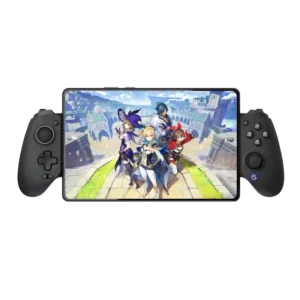
Best for console-like comfort, precise Hall controls, reliable wired play, and iPhone or iPad mini support. Skip it if you need pocketable hardware, Switch compatibility, polished software, or dependable mobile...
Pros: value for money, phone grip and fit
Cons: companion app quality, vibration quality