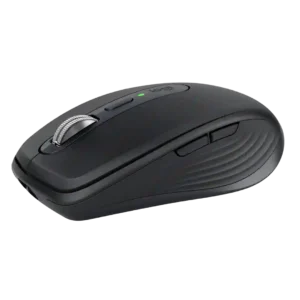
Compare Logitech G Pro Wireless vs Logitech MX Anywhere 3S

Logitech G Pro Wireless

Logitech G Pro Wireless

Overall score 4.3 / 5

Based on 25 scored reviews

vs
Logitech MX Anywhere 3S

Logitech MX Anywhere 3S

Overall score 4.5 / 5

Based on 32 scored reviews

How we score

Scorata scores summarize analyzed review evidence on a 1–5 scale; they are not laboratory measurements or a simple average of customer star ratings. Feature scores summarize the reviews covering that feature. The overall score averages feature scores within each review, then combines review averages. When both expert and customer evidence are available, those two groups receive equal weight. Products can have different review coverage, so small score gaps do not establish a winner.

Recommendations prioritize important features for the category, with a score of at least 3.5, a gap of at least 0.25 points and at least two supporting reviews per product. Features with widely varying scores or broad connectivity contexts are excluded from recommendations. These safeguards do not establish statistical significance.

Quick verdict

What each product is best for

The review evidence points to a tradeoff: side button quality and wireless latency versus durability over time and Bluetooth support. Choose according to which strengths matter more to you; the overall score alone does not settle that choice.

Choose Logitech G Pro Wireless for side button quality and wireless latency.

Choose Logitech MX Anywhere 3S for durability over time and Bluetooth support.

Why these recommendations?

Logitech G Pro Wireless

Where It Has the Edge

  • side button quality is 4.6 vs 3.5. Side button quality was highly praised for placement, click feel, modularity, and ambidextrous flexibility.
  • wireless latency is 5.0 vs 4.0. Wireless latency was consistently praised as wired-like, lag-free, or impossible to notice in play.
  • handedness options is 4.6 vs 4.0. Handedness options were consistently praised because the mouse is truly ambidextrous with swappable side buttons.

Logitech MX Anywhere 3S

Where It Has the Edge

  • durability over time is 4.9 vs 2.2. The mouse holds up well to transport and daily handling, with little visible wear or damage reported after...
  • Bluetooth support is 4.9 vs 2.3. Bluetooth pairing is generally quick, stable, and practical for travel, letting the mouse work without occupying a USB...
  • grip texture is 4.8 vs 3.6. Textured or rubberized side surfaces generally improve hold and comfort, helping the small mouse feel secure during travel...
Logitech G Pro Wireless 4.3 overall score
Logitech MX Anywhere 3S 4.5 overall score

Compare features

Scores are out of 5. Missing scores mean missing review evidence, not a missing feature.

Scored on both products

Battery and charging

Battery life
Logitech G Pro Wireless
4.6

Battery life was broadly praised as excellent for a rechargeable wireless gaming mouse, though one long-term reviewer found it needed charging too often.

Logitech MX Anywhere 3S
4.8

Battery endurance is a major strength, with weeks of use between charges and multiple tests showing only modest drain. The advertised 70-day figure is considered plausible, even if heavy users may recharge sooner.

Charging convenience
Logitech G Pro Wireless
4.3

Charging convenience was mostly positive, helped by fast charging, wired-use capability, and PowerPlay support, though micro-USB was viewed as dated.

Logitech MX Anywhere 3S
4.9

Front-mounted USB-C charging is easy to live with because the mouse remains usable while plugged in. That placement avoids the downtime associated with mice that charge from the underside.

Comfort and build

Palm grip comfort
Logitech G Pro Wireless
5.0

Palm grip comfort was strong for some hand sizes, though larger-hand palm users may not find the low profile ideal.

Logitech MX Anywhere 3S
1.7

Palm-grip comfort is the clearest ergonomic weakness: larger hands do not get enough hand-filling support from the low, compact shell. Finger-led grips suit the shape much better.

Durability over time
Logitech G Pro Wireless
2.2

Durability over time was mixed: the shell and long-term use often held up, but double-click, middle-click, coating, and skate wear concerns appeared.

Logitech MX Anywhere 3S
4.9

The mouse holds up well to transport and daily handling, with little visible wear or damage reported after repeated bag use and minor drops. The build inspires confidence as a long-term travel tool.

Fingertip grip comfort
Logitech G Pro Wireless
3.7

Fingertip comfort was mixed, with some reviewers finding it tailor-made and others finding taper or size less ideal.

Logitech MX Anywhere 3S
4.7

Fingertip grip is a strong match for the small, light body, especially for smaller hands and travel setups where quick repositioning matters.

Ergonomic design
Logitech G Pro Wireless
5.0

Ergonomic design was praised for a safe, adaptable shape that does not force one grip style.

Logitech MX Anywhere 3S
4.0

Comfort is good for a travel mouse and often excellent for small-to-medium hands, but the compact shape is not universally ergonomic. Large-handed users and full-day palm grippers may prefer a larger mouse.

Materials quality
Logitech G Pro Wireless
3.5

Materials quality was not strongly separated from build, but plastic material comments supported a mixed view of smooth lightweight materials versus limited premium finish.

Logitech MX Anywhere 3S
4.3

Materials are mostly praised for their practical grip and durability, but opinion is split on the plastic shell. Some find it premium and soft, while one account strongly dislikes its artificial, cheap-feeling texture.

Long-session comfort
Logitech G Pro Wireless
4.9

Long-session comfort was repeatedly praised, with reviewers reporting no fatigue, cramping, or discomfort after extended sessions.

Logitech MX Anywhere 3S
4.3

Small-to-medium hands can use it comfortably for long stretches, and several accounts report no fatigue. Larger hands are more likely to tire during all-day use because the compact body offers limited palm support.

Claw grip comfort
Logitech G Pro Wireless
4.5

Claw grip comfort was strong, with reviewers saying the mouse suited claw grips well and caused little discomfort during long play.

Logitech MX Anywhere 3S
5.0

The compact shell works particularly well for claw grip, where its low shape and easy repositioning feel natural rather than cramped.

Shape comfort
Logitech G Pro Wireless
4.4

Shape comfort was broadly praised as safe, comfortable, and adaptable, though a few reviewers wanted different hump, width, or taper details.

Logitech MX Anywhere 3S
4.8

The rounded, low-profile shape is comfortable for many users and works especially well as a compact travel design. Its comfort is more dependent on hand size than a full-size mouse.

Build quality
Logitech G Pro Wireless
4.6

Build quality drew strong praise for a light shell that still felt robust, solid, and free of flex, with a few durability caveats elsewhere.

Logitech MX Anywhere 3S
4.7

Construction is widely described as solid, durable, and well finished for a compact mouse. The shell resists flex and wear, although not every user feels the plastic itself looks truly premium.

Other features

Click latency
Logitech G Pro Wireless
4.9

Click latency was consistently praised as imperceptible or effectively wired-like.

Logitech MX Anywhere 3S
2.0

Click latency is a weakness for gaming-oriented use, particularly over Bluetooth, even though it is not a noticeable problem for everyday productivity.

Premium feel
Logitech G Pro Wireless
3.1

Premium feel was mixed: some called it luxurious, while others felt the plain plastic design lacked polish for the price.

Logitech MX Anywhere 3S
4.4

The metal wheel, solid controls, and well-weighted body often make the mouse feel upscale. The premium impression is weakened for users who dislike the plastic shell texture.

Grip texture
Logitech G Pro Wireless
3.6

Grip texture was mixed: the matte plastic was comfortable and sometimes grippy enough, but several reviewers wanted more texture or noticed slipping.

Logitech MX Anywhere 3S
4.8

Textured or rubberized side surfaces generally improve hold and comfort, helping the small mouse feel secure during travel and longer work sessions.

Ecosystem integration
Logitech G Pro Wireless
4.0

Ecosystem integration evidence was limited but positive where Logitech device lighting sync was demonstrated.

Logitech MX Anywhere 3S
5.0

Logitech Flow and compatibility with other MX gear make the mouse especially useful in a multi-computer Logitech setup. Cursor movement, clipboard sharing, and coordinated device switching can make separate machines feel like one workspace.

Polling rate
Logitech G Pro Wireless
5.0

Polling/report-rate evidence was positive where reviewers connected 1ms reporting with smooth, responsive cursor behavior.

Logitech MX Anywhere 3S
4.0

The standard report rate is considered fully adequate for office and travel use, but it is not competitive with high-polling gaming mice.

Wireless latency
Logitech G Pro Wireless
5.0

Wireless latency was consistently praised as wired-like, lag-free, or impossible to notice in play.

Logitech MX Anywhere 3S
4.0

Wireless latency is fine for office work, and Logi Bolt can feel effectively immediate in normal use. Competitive gaming exposes the limits of Bluetooth and the productivity-focused wireless implementation.

Glide smoothness
Logitech G Pro Wireless
4.1

Glide smoothness was mostly positive, though one reviewer found the stock feet less impressive than competitor PTFE skates.

Logitech MX Anywhere 3S
4.8

The compact body glides smoothly and is easy to lift or reposition, helped by low-friction feet that suit small desks and travel surfaces.

Handedness options
Logitech G Pro Wireless
4.6

Handedness options were consistently praised because the mouse is truly ambidextrous with swappable side buttons.

Logitech MX Anywhere 3S
4.0

The symmetrical body can be used with either hand, which broadens its appeal. The left-side thumb buttons are less convenient for left-handed use, so the design is not perfectly ambidextrous in practice.

Scroll wheel quality
Logitech G Pro Wireless
4.4

Scroll wheel quality was generally positive, praised for tactile, quiet, precise steps, although one reviewer wanted more defined steps.

Logitech MX Anywhere 3S
4.9

The MagSpeed metal wheel is one of the most consistently praised parts of the mouse. It feels substantial and precise, with effortless switching between controlled ratcheting and rapid free-spin scrolling.

Balance and weight distribution
Logitech G Pro Wireless
4.5

Weight distribution was generally praised as even, central, or perfectly balanced, supporting the mouse's light and controlled feel.

Logitech MX Anywhere 3S
5.0

Its modest heft is well judged for day-to-day control, adding stability without making the travel-focused mouse feel cumbersome.

Portability
Logitech G Pro Wireless
4.5

Portability was helped by receiver storage and travel-friendly design, which reviewers found convenient.

Logitech MX Anywhere 3S
4.9

Portability is the strongest consensus: the mouse is compact, light, easy to slip into a bag or pocket, and unusually capable on improvised work surfaces. It is repeatedly favored as a travel companion over a full-size desk mouse.

Connection stability
Logitech G Pro Wireless
4.7

Connection stability was usually excellent, with several reviewers reporting no stutter or dropouts, though one long-term owner noted past dropouts.

Logitech MX Anywhere 3S
5.0

Bluetooth connectivity is consistently described as stable and dependable, including across multiple paired devices and ordinary work environments.

Cross-platform compatibility
Logitech G Pro Wireless
4.5

Cross-platform compatibility was only lightly covered but positively described when the software and OS range were mentioned.

Logitech MX Anywhere 3S
4.7

Basic mouse operation spans a broad mix of desktop, tablet, and mobile operating systems, which suits multi-device travel use well. Advanced software features remain more limited outside Windows and macOS.

DPI range
Logitech G Pro Wireless
4.2

DPI range and adjustment were praised as broad and easy to customize, even if bottom-button placement was divisive.

Logitech MX Anywhere 3S
4.0

The 200–8,000 DPI range gives plenty of speed for large or high-resolution displays, though several users consider the top end excessive for ordinary office work. It is broad enough for casual gaming but not positioned as an esports feature.

Switch feel
Logitech G Pro Wireless
5.0

Switch feel evidence was very positive in the PvP review, emphasizing unusually light mechanical switches.

Logitech MX Anywhere 3S
4.8

The quiet main switches retain crisp, tactile feedback despite the heavily reduced click sound. They avoid the mushy feel that can make some silent switches less satisfying.

Weight
Logitech G Pro Wireless
4.6

Weight was a major strength; most reviewers praised the 80g class as exceptionally light, though ultralight trends made it less dominant later.

Logitech MX Anywhere 3S
4.5

The mouse is light enough for travel while retaining enough heft to feel stable and controlled. A few users note that it is heavier than ultra-light gaming mice, but the weight suits productivity use well.

Surface compatibility
Logitech G Pro Wireless
4.8

Surface compatibility was positive where discussed, with calibration or pad testing producing strong sensor behavior.

Logitech MX Anywhere 3S
4.9

Any-surface tracking lives up to the product's name: glass, fabric, wood, glossy surfaces, and even improvised workspaces generally pose little trouble. Only extreme reflective surfaces are noted as an edge case.

Left and right click quality
Logitech G Pro Wireless
4.7

Left and right click quality was a standout strength, often described as crisp, satisfying, light, and precise.

Logitech MX Anywhere 3S
4.7

The primary buttons feel tactile and comfortable while staying exceptionally quiet. Their soft, controlled action is repeatedly described as a quality improvement for shared workspaces.

Motion consistency
Logitech G Pro Wireless
5.0

Motion consistency was excellent in testing, with reviewers reporting no spinouts and smooth, consistent tracking.

Logitech MX Anywhere 3S
5.0

Tracking stays consistent and artifact-free across ordinary work surfaces, with no meaningful compromise from the mouse's compact body.

Controls and connectivity

Bluetooth support
Logitech G Pro Wireless
2.3

Bluetooth support was a limitation where discussed; reviewers noted the mouse relies on its receiver and wished Bluetooth were included.

Logitech MX Anywhere 3S
4.9

Bluetooth pairing is generally quick, stable, and practical for travel, letting the mouse work without occupying a USB port. It is the preferred connection for many mobile setups.

Software stability
Logitech G Pro Wireless
3.0

Software stability was mixed because G Hub was useful but described as buggy or needing fixes.

Logitech MX Anywhere 3S
5.0

Logi Options+ earns praise for running reliably without the crashes or headaches often associated with peripheral software.

Programmable buttons
Logitech G Pro Wireless
3.8

Programmable buttons were praised for useful remapping and G-Shift style layers, though minimalist button count limited some use cases.

Logitech MX Anywhere 3S
5.0

The programmable controls add useful shortcuts to a compact body and can be tailored to common productivity tasks.

Side button quality
Logitech G Pro Wireless
4.6

Side button quality was highly praised for placement, click feel, modularity, and ambidextrous flexibility.

Logitech MX Anywhere 3S
3.5

The side buttons are useful and easy to remap, but their feel is less universally praised than the main clicks. Some find them stiff or slightly hollow, while others like their shape and control.

Button customization
Logitech G Pro Wireless
4.3

Button customization was a consistent strength thanks to removable side buttons and software remapping options.

Logitech MX Anywhere 3S
4.7

Logi Options+ makes the available buttons highly flexible, including app-specific assignments and shortcuts. The main limitation is simply that the compact mouse has fewer physical controls than larger productivity models.

Software usability
Logitech G Pro Wireless
4.3

Software usability was generally praised as easy, functional, and flexible for DPI, macros, lighting, and profiles.

Logitech MX Anywhere 3S
4.6

Logi Options+ is generally clean, intuitive, and easy to configure, making advanced features approachable. The main usability caveat is that some key adjustments, such as DPI changes, depend on opening the software.

Ownership and support

Macro support
Logitech G Pro Wireless
4.0

Macro support was positively mentioned through Logitech software and G-Shift style customization.

Logitech MX Anywhere 3S
4.8

Smart Actions can turn a single mouse control into a multi-step workflow, making repetitive office tasks much faster. The feature is praised as a meaningful productivity addition rather than a novelty.

Value for money
Logitech G Pro Wireless
3.7

Value for money was mixed: many reviewers felt performance justified the price or sale value, but the premium launch price drew repeated criticism.

Logitech MX Anywhere 3S
4.0

Value depends heavily on how much the travel-focused features matter. Many consider the sensor, MagSpeed wheel, battery life, and software worth the premium, while others think the price is high for such a compact, button-light office mouse.

Performance

Click noise
Logitech G Pro Wireless
4.8

Click noise was viewed favorably in the few reviews that addressed it, with comments about quiet or pleasant-sounding clicks.

Logitech MX Anywhere 3S
4.9

The Quiet Click switches are extremely quiet while preserving useful tactile feedback. They are especially well suited to libraries, shared offices, calls, and other places where normal mouse clicks can be distracting.

Sensor performance
Logitech G Pro Wireless
4.9

Sensor performance was one of the clearest strengths, repeatedly described as flawless, high tier, accurate, and responsive.

Logitech MX Anywhere 3S
4.9

The Darkfield sensor is one of the mouse's standout strengths, combining fast response with reliable tracking across difficult surfaces. Its 8,000 DPI ceiling is especially useful on high-resolution displays.

Wireless performance
Logitech G Pro Wireless
5.0

Wireless performance was one of the strongest areas, with reviewers repeatedly saying the connection felt flawless, responsive, and liberating.

Logitech MX Anywhere 3S
5.0

Wireless use is smooth and dependable for ordinary productivity, with Bluetooth and Logi Bolt both providing responsive day-to-day control.

Tracking and training

Accuracy and tracking precision
Logitech G Pro Wireless
4.9

Tracking accuracy was a major strength across reviews, with reviewers calling it extremely accurate, outstanding, and precise in real gameplay.

Logitech MX Anywhere 3S
4.9

Pointer tracking is consistently praised as smooth and precise, including on glass and other unconventional surfaces. The sensor remains controlled enough for detailed office and creative work.

Evidence available for one product

Ownership and support

Reliability
Logitech G Pro WirelessNo score yet
Logitech MX Anywhere 3S
4.9

Day-to-day reliability is a consistent strength, covering tracking, connections, controls, and general work use. The mouse is repeatedly described as dependable enough to be a regular travel companion or workhorse.

Customer support
Logitech G Pro WirelessNo score yet
Logitech MX Anywhere 3S
4.5

Logitech's support reputation is viewed positively, adding confidence for buyers considering the MX line as a longer-term purchase.

Dongle-free setup
Logitech G Pro WirelessNo score yet
Logitech MX Anywhere 3S
2.4

The missing bundled Logi Bolt receiver is a recurring annoyance, especially at this price and for people who prefer USB connectivity. Bluetooth works well enough that some users may never miss the dongle.

Hand support
Logitech G Pro WirelessNo score yet
Logitech MX Anywhere 3S
1.8

The low travel-focused shell provides limited support for the heel and full palm of a large hand. Users seeking a relaxed, fully supported desk grip are better served by a larger ergonomic shape.

Multi-device support
Logitech G Pro WirelessNo score yet
Logitech MX Anywhere 3S
5.0

Pairing with up to three devices is one of the mouse's best workflow features. It suits people moving among laptops, desktops, tablets, or multiple operating systems without maintaining separate mice.

Plug-and-play support
Logitech G Pro WirelessNo score yet
Logitech MX Anywhere 3S
5.0

Basic receiver use is genuinely plug-and-play on supported desktop systems, requiring no driver installation before normal pointing and clicking.

Setup ease
Logitech G Pro WirelessNo score yet
Logitech MX Anywhere 3S
4.4

Initial Bluetooth and receiver setup is usually quick and straightforward. A notable exception is Bolt pairing through Options+, which one user found needlessly cumbersome.

Warranty
Logitech G Pro WirelessNo score yet
Logitech MX Anywhere 3S
4.5

The available limited hardware warranty adds reassurance to a mouse otherwise praised for solid construction and dependable daily use.

Other features

2.4GHz connectivity
Logitech G Pro WirelessNo score yet
Logitech MX Anywhere 3S
4.8

Logi Bolt gives a stable, lower-latency alternative to Bluetooth and can share a receiver with compatible Logitech gear. The main drawback is that the receiver is often sold separately.

Acceleration control
Logitech G Pro Wireless
4.7

Reviewers who discussed acceleration were positive, repeatedly describing no acceleration or prediction and framing this as part of the sensor's clean competitive tracking.

Logitech MX Anywhere 3SNo score yet
Cable flexibility
Logitech G Pro Wireless
3.4

Cable feedback was mixed: some liked its flexibility or quality, while others complained it dragged, felt sticky, or was heavy and stiff.

Logitech MX Anywhere 3SNo score yet
Cable quality
Logitech G Pro WirelessNo score yet
Logitech MX Anywhere 3S
5.0

The supplied charging cable is viewed positively as a useful, well-made accessory for the USB-C charging setup.

ChromeOS compatibility
Logitech G Pro WirelessNo score yet
Logitech MX Anywhere 3S
4.0

ChromeOS handles the mouse reliably for basic use, but the lack of full Options+ support limits advanced customization compared with Windows or macOS.

Click consistency
Logitech G Pro WirelessNo score yet
Logitech MX Anywhere 3S
4.5

The buttons feel consistent through their travel and maintain a dependable, uniform response during regular use.

Coating quality
Logitech G Pro WirelessNo score yet
Logitech MX Anywhere 3S
3.0

The matte coating resists fingerprints and provides decent grip, but it feels more functional than luxurious.

Cursor control
Logitech G Pro WirelessNo score yet
Logitech MX Anywhere 3S
4.9

Cursor movement is smooth, fast, and easy to control, with enough precision for detailed selections and enough speed for large displays or multi-monitor work.

Device switching
Logitech G Pro WirelessNo score yet
Logitech MX Anywhere 3S
4.9

Switching among stored devices is fast and reliable, making multi-computer work far less cumbersome. The only recurring ergonomic complaint is that the selector sits on the underside.

Dock compatibility
Logitech G Pro Wireless
3.7

PowerPlay or wireless-charging compatibility was treated as a useful convenience, though micro-USB charging itself felt dated to one reviewer.

Logitech MX Anywhere 3SNo score yet
Feet quality
Logitech G Pro WirelessNo score yet
Logitech MX Anywhere 3S
4.8

The low-friction feet let the mouse move smoothly across varied surfaces and contribute to easy repositioning in tight workspaces.

FPS gaming suitability
Logitech G Pro Wireless
4.7

FPS suitability was one of the strongest themes, with reviewers praising the mouse for fast-paced shooters, tracking, flicks, and competitive play.

Logitech MX Anywhere 3SNo score yet
Free-spin scrolling
Logitech G Pro WirelessNo score yet
Logitech MX Anywhere 3S
4.8

Free-spin mode is a standout productivity feature for long pages, documents, and spreadsheets. Automatic switching is usually seamless, though a few users need time to adapt to SmartShift behavior.

Gaming suitability
Logitech G Pro WirelessNo score yet
Logitech MX Anywhere 3S
2.1

The 8,000 DPI sensor is fast enough for casual or temporary gaming, but the mouse is not built for competitive play. Bluetooth latency, limited controls, and productivity-focused ergonomics keep it from being a serious gaming choice.

Horizontal scrolling
Logitech G Pro WirelessNo score yet
Logitech MX Anywhere 3S
3.1

Horizontal scrolling works through a side-button modifier rather than a dedicated thumb wheel. It is useful for spreadsheets and timelines but feels less direct and convenient than the hardware solution on larger MX models.

Lift-off distance
Logitech G Pro Wireless
4.6

Lift-off distance was praised as low and unobtrusive where tested, though software adjustment was absent.

Logitech MX Anywhere 3SNo score yet
MacOS compatibility
Logitech G Pro WirelessNo score yet
Logitech MX Anywhere 3S
5.0

macOS works smoothly with the mouse and Logi Options+, giving Mac users full customization and Flow support alongside strong basic Bluetooth performance.

MMO gaming suitability
Logitech G Pro Wireless
2.7

MMO suitability was mixed-to-negative: extra functions are possible, but several reviewers said the limited button count is not ideal for MMO users.

Logitech MX Anywhere 3SNo score yet
MOBA gaming suitability
Logitech G Pro Wireless
2.0

MOBA suitability received limited negative evidence because the mouse lacks extra buttons for that genre.

Logitech MX Anywhere 3SNo score yet
Onboard memory
Logitech G Pro Wireless
4.3

Onboard memory was useful for carrying profiles and settings between computers or tournament setups.

Logitech MX Anywhere 3SNo score yet
Profile management
Logitech G Pro WirelessNo score yet
Logitech MX Anywhere 3S
4.9

Per-application profiles are a major productivity benefit, letting the same controls perform different jobs in spreadsheets, browsers, creative apps, and conferencing tools.

Profile switching
Logitech G Pro Wireless
4.3

Profile and DPI switching were useful when remapped, but bottom placement made quick switching less convenient for some users.

Logitech MX Anywhere 3SNo score yet
Receiver quality
Logitech G Pro WirelessNo score yet
Logitech MX Anywhere 3S
3.3

Logi Bolt is valued for a stable, low-latency connection, but the receiver experience is undermined by separate-purchase requirements and incompatibility with older Logitech receiver standards.

Responsiveness
Logitech G Pro WirelessNo score yet
Logitech MX Anywhere 3S
4.9

For productivity, the mouse feels quick and responsive across normal surfaces and applications. Its immediacy is strong enough for office and creative work, though gaming-focused latency demands are a different standard.

RGB features
Logitech G Pro Wireless
3.1

RGB features were usually considered basic or restrained, with some appreciating battery savings and others wishing for more or none at all.

Logitech MX Anywhere 3SNo score yet
Scroll wheel precision
Logitech G Pro WirelessNo score yet
Logitech MX Anywhere 3S
4.9

The MagSpeed wheel combines rapid movement with excellent fine control, stopping accurately for line-by-line or even very small adjustments after high-speed scrolling.

Scroll wheel resistance
Logitech G Pro WirelessNo score yet
Logitech MX Anywhere 3S
4.5

Adjustable ratchet force lets users tune the wheel from light to satisfyingly firm. Most find a moderate setting comfortable, while stronger resistance can add a pleasing tactile feel.

Sustainability
Logitech G Pro WirelessNo score yet
Logitech MX Anywhere 3S
5.0

The use of post-consumer recycled plastic is viewed positively, giving the compact mouse a more eco-conscious design without an obvious sacrifice in feel or usability.

Switch quality
Logitech G Pro WirelessNo score yet
Logitech MX Anywhere 3S
4.5

The switches feel solid and controlled, supporting the mouse's overall impression of dependable construction.

USB-C connectivity
Logitech G Pro WirelessNo score yet
Logitech MX Anywhere 3S
5.0

USB-C charging is a welcome modern convenience that fits easily into travel setups and reduces the need for a dedicated legacy cable.

USB receiver storage
Logitech G Pro WirelessNo score yet
Logitech MX Anywhere 3S
3.0

Receiver handling is a weak spot because the mouse is commonly used without a bundled Bolt dongle and does not consistently offer convenient onboard storage. This can be frustrating for travelers who prefer a USB receiver.

Weight tuning
Logitech G Pro Wireless
3.3

Weight tuning evidence was mixed, with one review wishing for added weights and another noting a 10g weight option.

Logitech MX Anywhere 3SNo score yet
Windows compatibility
Logitech G Pro WirelessNo score yet
Logitech MX Anywhere 3S
5.0

Windows support is excellent, with straightforward pairing and full access to Logitech's customization software and productivity features.

Wired connectivity
Logitech G Pro WirelessNo score yet
Logitech MX Anywhere 3S
3.0

The USB-C port is fundamentally for charging rather than true wired data use. Being able to keep using the mouse while charging is convenient, but it does not replace a real wired mode.

Comfort and build

Aesthetic design
Logitech G Pro WirelessNo score yet
Logitech MX Anywhere 3S
4.6

The restrained, modern styling is widely liked, with clean color options and a compact shape that fits professional setups. It looks premium without adopting an aggressive gaming aesthetic.

Grip comfort
Logitech G Pro WirelessNo score yet
Logitech MX Anywhere 3S
4.8

The textured sides and compact curves make the mouse secure and comfortable for many hands, especially when used as a mobile mouse. Comfort drops as hand size increases.

Hand size compatibility
Logitech G Pro WirelessNo score yet
Logitech MX Anywhere 3S
3.2

Fit is the main dividing line: small and medium hands generally suit the compact body very well, while large hands often feel cramped or under-supported. Grip style can partly offset the size issue.

Size
Logitech G Pro WirelessNo score yet
Logitech MX Anywhere 3S
4.6

The tiny footprint is excellent for travel, small desks, and laptop bags without making the mouse feel like a bare-bones mini model. That same size is the source of most comfort complaints from larger-handed users.

Skate durability
Logitech G Pro Wireless
3.3

Skate durability had limited mixed evidence, with long-term wear or movement noted but replacements considered easy.

Logitech MX Anywhere 3SNo score yet
Switch durability
Logitech G Pro Wireless
2.6

Switch durability was sharply mixed: several reviewers had no double-clicking, while others reported or emphasized double-click failures.

Logitech MX Anywhere 3SNo score yet

Controls and connectivity

Button count
Logitech G Pro WirelessNo score yet
Logitech MX Anywhere 3S
3.7

The compact six-button layout is enough for most office workflows, but power users can miss the deeper control set found on larger productivity mice or feature-heavy competitors.

Button placement
Logitech G Pro WirelessNo score yet
Logitech MX Anywhere 3S
2.7

Button placement is a mixed area. The underside device-switch control and rearward side button can require awkward hand movement, and some users would prefer easier top-side access.

Button quality
Logitech G Pro WirelessNo score yet
Logitech MX Anywhere 3S
4.8

The available buttons feel solid and tactile, with the primary controls especially well judged for quiet productivity use.

Button responsiveness
Logitech G Pro Wireless
4.7

Button responsiveness was rated highly, with reviewers repeatedly describing crisp, stable, light, and precise clicks.

Logitech MX Anywhere 3SNo score yet
DPI customization
Logitech G Pro WirelessNo score yet
Logitech MX Anywhere 3S
3.8

DPI can be tuned precisely in Logi Options+, but changing it is less convenient than on mice with a dedicated hardware selector. Users who switch sensitivity often can find the software dependence annoying.

Gesture controls
Logitech G Pro WirelessNo score yet
Logitech MX Anywhere 3S
3.2

Gestures can be recreated through programmable buttons and software, but the experience is less effortless than a dedicated gesture control or touch-sensitive mouse. Setup can also become repetitive across apps.

Haptic controls
Logitech G Pro WirelessNo score yet
Logitech MX Anywhere 3S
5.0

The adjustable ratchet feel gives the scroll wheel satisfying tactile feedback and lets users tune how pronounced each scrolling step feels.

Software quality
Logitech G Pro WirelessNo score yet
Logitech MX Anywhere 3S
5.0

Logi Options+ adds substantial value with polished controls, app-specific mappings, Flow, and Smart Actions. It is repeatedly treated as a strength of the overall productivity experience.

Battery and charging

Charging speed
Logitech G Pro WirelessNo score yet
Logitech MX Anywhere 3S
5.0

Quick charging is excellent: roughly a minute on the cable can provide hours of use. That makes an unexpectedly low battery a minor interruption rather than a work-stopping problem.

Rechargeable battery
Logitech G Pro WirelessNo score yet
Logitech MX Anywhere 3S
5.0

The built-in rechargeable battery is convenient for travel and pairs well with the mouse's long endurance and USB-C charging.

Performance

Productivity performance
Logitech G Pro WirelessNo score yet
Logitech MX Anywhere 3S
5.0

Productivity is where the mouse excels, combining precise tracking, fast scrolling, customizable controls, and multi-device tools in a travel-size body. It handles browsing, spreadsheets, editing, and general office work particularly well.


Other Top Gaming Mice to Consider

#1 ASUS ROG Harpe II Ace
4.6

Choose the ROG Harpe II Ace for ultralight FPS play, precise tracking, smooth glide, and web-based tuning. Skip it if you need palm-grip support, MMO buttons, onboard profiles, or long...

Pros: glide smoothness, weight

Cons: handedness options

#2 Razer Viper V4 Pro
4.4

Best for ultra-light, competition-focused speed, precise tracking, stable wireless, and long battery life. Skip it if you need quieter clicks, left-handed support, Bluetooth, more buttons, or better value for casual...

Pros: value for money, weight

Cons: click noise, RGB features

#3 Corsair Scimitar Elite Wireless SE
4.4

Choose it if you want a premium MMO/productivity mouse with 12 adjustable side buttons, strong battery life, and Stream Deck integration. Skip it if you need an ultralight FPS mouse,...

Pros: button customization, MMO gaming suitability

Cons: FPS gaming suitability

#4 MSI Versa 300 Wireless 8K
4.4

Best for precise wireless tracking, smooth glide, strong battery life, and unusually good 8K value. Skip it if you need polished software, quiet snappy clicks, true left-handed controls, or gentle...

Pros: software usability, sensor performance

Cons: RGB features, scroll wheel quality