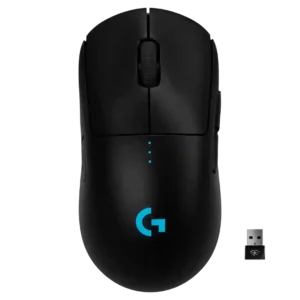
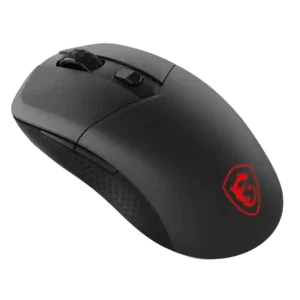
Compare Logitech G Pro Wireless vs Razer Basilisk V3

Logitech G Pro Wireless

Logitech G Pro Wireless

Overall score 4.3 / 5

Based on 25 scored reviews

vs
Razer Basilisk V3

Razer Basilisk V3

Overall score 4.5 / 5

Based on 34 scored reviews

How we score

Scorata scores summarize analyzed review evidence on a 1–5 scale; they are not laboratory measurements or a simple average of customer star ratings. Feature scores summarize the reviews covering that feature. The overall score averages feature scores within each review, then combines review averages. When both expert and customer evidence are available, those two groups receive equal weight. Products can have different review coverage, so small score gaps do not establish a winner.

Recommendations prioritize important features for the category, with a score of at least 3.5, a gap of at least 0.25 points and at least two supporting reviews per product. Features with widely varying scores or broad connectivity contexts are excluded from recommendations. These safeguards do not establish statistical significance.

Quick verdict

What each product is best for

The review evidence points to a tradeoff: handedness options and DPI range versus software stability and RGB features. Choose according to which strengths matter more to you; the overall score alone does not settle that choice.

Choose Logitech G Pro Wireless for handedness options and DPI range.

Choose Razer Basilisk V3 for software stability and RGB features.

Why these recommendations?

Logitech G Pro Wireless

Where It Has the Edge

  • handedness options is 4.6 vs 1.6. Handedness options were consistently praised because the mouse is truly ambidextrous with swappable side buttons.
  • DPI range is 4.2 vs 3.6. DPI range and adjustment were praised as broad and easy to customize, even if bottom-button placement was divisive.
  • claw grip comfort is 4.5 vs 4.2. Claw grip comfort was strong, with reviewers saying the mouse suited claw grips well and caused little discomfort...

Razer Basilisk V3

Where It Has the Edge

  • software stability is 5.0 vs 3.0. Several reviewers found Synapse stable and reliable in use, with no problems configuring settings.
  • RGB features is 4.8 vs 3.1. Chroma provides extensive customization and an attractive underglow that complements other compatible peripherals.
  • cable flexibility is 4.6 vs 3.4. The soft braided Speedflex cable usually moves freely with little drag, though a few testers report stiffness or...
Logitech G Pro Wireless 4.3 overall score
Razer Basilisk V3 4.5 overall score

Compare features

Scores are out of 5. Missing scores mean missing review evidence, not a missing feature.

Scored on both products

Other features

Handedness options
Logitech G Pro Wireless
4.6

Handedness options were consistently praised because the mouse is truly ambidextrous with swappable side buttons.

Razer Basilisk V3
1.6

The asymmetric design is dedicated to right-handed users, leaving left-handed buyers without an equivalent orientation.

Portability
Logitech G Pro Wireless
4.5

Portability was helped by receiver storage and travel-friendly design, which reviewers found convenient.

Razer Basilisk V3
2.0

A broad shell and permanently attached cable make it less convenient to carry between devices than compact wireless mice.

MOBA gaming suitability
Logitech G Pro Wireless
2.0

MOBA suitability received limited negative evidence because the mouse lacks extra buttons for that genre.

Razer Basilisk V3
4.3

Configurable controls work well in MOBA titles, though a genre-specific mouse may be preferable for more demanding layouts.

Premium feel
Logitech G Pro Wireless
3.1

Premium feel was mixed: some called it luxurious, while others felt the plain plastic design lacked polish for the price.

Razer Basilisk V3
5.0

The substantial thumb rest and textured grips contribute to a premium look and feel.

RGB features
Logitech G Pro Wireless
3.1

RGB features were usually considered basic or restrained, with some appreciating battery savings and others wishing for more or none at all.

Razer Basilisk V3
4.8

Chroma provides extensive customization and an attractive underglow that complements other compatible peripherals.

MMO gaming suitability
Logitech G Pro Wireless
2.7

MMO suitability was mixed-to-negative: extra functions are possible, but several reviewers said the limited button count is not ideal for MMO users.

Razer Basilisk V3
4.0

It can handle MMOs well, but dedicated MMO mice have a more specialized array of thumb controls.

Polling rate
Logitech G Pro Wireless
5.0

Polling/report-rate evidence was positive where reviewers connected 1ms reporting with smooth, responsive cursor behavior.

Razer Basilisk V3
3.8

The standard 1,000Hz polling rate feels responsive compared with office mice, but lacks the higher rates some esports enthusiasts seek.

Cable flexibility
Logitech G Pro Wireless
3.4

Cable feedback was mixed: some liked its flexibility or quality, while others complained it dragged, felt sticky, or was heavy and stiff.

Razer Basilisk V3
4.6

The soft braided Speedflex cable usually moves freely with little drag, though a few testers report stiffness or kinks.

Weight
Logitech G Pro Wireless
4.6

Weight was a major strength; most reviewers praised the 80g class as exceptionally light, though ultralight trends made it less dominant later.

Razer Basilisk V3
3.4

At roughly 101 grams, the mouse is substantial compared with modern ultralights. Its shape and smooth feet help offset the heft for many users.

Grip texture
Logitech G Pro Wireless
3.6

Grip texture was mixed: the matte plastic was comfortable and sometimes grippy enough, but several reviewers wanted more texture or noticed slipping.

Razer Basilisk V3
4.7

Textured rubber side grips and subtle button texture provide secure control without a cheap feel.

Weight tuning
Logitech G Pro Wireless
3.3

Weight tuning evidence was mixed, with one review wishing for added weights and another noting a 10g weight option.

Razer Basilisk V3
2.3

There is no adjustable weight system, which disappoints people who prefer tuning mouse weight themselves.

Ecosystem integration
Logitech G Pro Wireless
4.0

Ecosystem integration evidence was limited but positive where Logitech device lighting sync was demonstrated.

Razer Basilisk V3
4.9

Chroma lighting can synchronize with other Razer peripherals and supported games, making it attractive for matching setups.

Glide smoothness
Logitech G Pro Wireless
4.1

Glide smoothness was mostly positive, though one reviewer found the stock feet less impressive than competitor PTFE skates.

Razer Basilisk V3
4.9

PTFE feet offer smooth, easy movement that helps compensate for the weight; one reviewer noticed slight drag along the right edge.

DPI range
Logitech G Pro Wireless
4.2

DPI range and adjustment were praised as broad and easy to customize, even if bottom-button placement was divisive.

Razer Basilisk V3
3.6

The broad sensitivity range accommodates individual preferences; the extreme maximum is generally viewed as unnecessary rather than a reason to upgrade.

Lift-off distance
Logitech G Pro Wireless
4.6

Lift-off distance was praised as low and unobtrusive where tested, though software adjustment was absent.

Razer Basilisk V3
5.0

Very low lift-off distance is a strength, with adjustable cutoff settings for players who frequently reposition the mouse.

Acceleration control
Logitech G Pro Wireless
4.7

Reviewers who discussed acceleration were positive, repeatedly describing no acceleration or prediction and framing this as part of the sensor's clean competitive tracking.

Razer Basilisk V3
5.0

Cursor motion follows hand movements accurately without unwanted acceleration.

FPS gaming suitability
Logitech G Pro Wireless
4.7

FPS suitability was one of the strongest themes, with reviewers praising the mouse for fast-paced shooters, tracking, flicks, and competitive play.

Razer Basilisk V3
5.0

Accurate tracking and fast clicks make it an excellent shooter mouse, with weight the principal competitive compromise.

Onboard memory
Logitech G Pro Wireless
4.3

Onboard memory was useful for carrying profiles and settings between computers or tournament setups.

Razer Basilisk V3
4.6

Five stored profiles help retain settings across computers; lighting customizations may not carry over.

Surface compatibility
Logitech G Pro Wireless
4.8

Surface compatibility was positive where discussed, with calibration or pad testing producing strong sensor behavior.

Razer Basilisk V3
5.0

The mouse glides smoothly over a range of mousepads and desk surfaces.

Balance and weight distribution
Logitech G Pro Wireless
4.5

Weight distribution was generally praised as even, central, or perfectly balanced, supporting the mouse's light and controlled feel.

Razer Basilisk V3
4.7

The weight distribution feels balanced in hand, avoiding the front-heavy sensation some wired mice have.

Profile switching
Logitech G Pro Wireless
4.3

Profile and DPI switching were useful when remapped, but bottom placement made quick switching less convenient for some users.

Razer Basilisk V3
4.4

The underside switch makes changing saved profiles straightforward, although flipping the mouse over can interrupt use.

Left and right click quality
Logitech G Pro Wireless
4.7

Left and right click quality was a standout strength, often described as crisp, satisfying, light, and precise.

Razer Basilisk V3
4.8

Main clicks feel crisp and satisfying with minimal travel, although one tester noticed slightly different feel between left and right.

Click latency
Logitech G Pro Wireless
4.9

Click latency was consistently praised as imperceptible or effectively wired-like.

Razer Basilisk V3
5.0

Optical switches deliver notably low click latency, with quick actuation and little perceived delay.

Switch feel
Logitech G Pro Wireless
5.0

Switch feel evidence was very positive in the PvP review, emphasizing unusually light mechanical switches.

Razer Basilisk V3
4.9

The second-generation optical switches have a crisp, tactile feel, with a pleasing balance of pressure and responsiveness.

Scroll wheel quality
Logitech G Pro Wireless
4.4

Scroll wheel quality was generally positive, praised for tactile, quiet, precise steps, although one reviewer wanted more defined steps.

Razer Basilisk V3
4.4

Tactile and free-spin modes are major strengths. Automatic switching is divisive, while a few users report wheel wobble or faults.

Motion consistency
Logitech G Pro Wireless
5.0

Motion consistency was excellent in testing, with reviewers reporting no spinouts and smooth, consistent tracking.

Razer Basilisk V3
5.0

Tracking remains consistent through fast flicks and sweeping movements, without obvious stuttering or jitter.

Controls and connectivity

Software stability
Logitech G Pro Wireless
3.0

Software stability was mixed because G Hub was useful but described as buggy or needing fixes.

Razer Basilisk V3
5.0

Several reviewers found Synapse stable and reliable in use, with no problems configuring settings.

Programmable buttons
Logitech G Pro Wireless
3.8

Programmable buttons were praised for useful remapping and G-Shift style layers, though minimalist button count limited some use cases.

Razer Basilisk V3
4.8

Numerous remappable buttons and HyperShift provide more control options than most conventional gaming mice.

Button customization
Logitech G Pro Wireless
4.3

Button customization was a consistent strength thanks to removable side buttons and software remapping options.

Razer Basilisk V3
4.9

Synapse supports a wide range of button assignments and secondary commands, though not every scrolling option can be assigned directly to a button.

Side button quality
Logitech G Pro Wireless
4.6

Side button quality was highly praised for placement, click feel, modularity, and ambidextrous flexibility.

Razer Basilisk V3
4.2

Side buttons are often easy and satisfying to press, but some find the sensitivity trigger mushy or slightly wobbly.

Software usability
Logitech G Pro Wireless
4.3

Software usability was generally praised as easy, functional, and flexible for DPI, macros, lighting, and profiles.

Razer Basilisk V3
4.7

Synapse is generally easy to navigate and offers deep customization, although its many options can take time to learn.

Button responsiveness
Logitech G Pro Wireless
4.7

Button responsiveness was rated highly, with reviewers repeatedly describing crisp, stable, light, and precise clicks.

Razer Basilisk V3
5.0

Buttons respond quickly, making rapid actions feel immediate during games.

Comfort and build

Switch durability
Logitech G Pro Wireless
2.6

Switch durability was sharply mixed: several reviewers had no double-clicking, while others reported or emphasized double-click failures.

Razer Basilisk V3
4.6

Optical switches are rated for many clicks and are expected to avoid mechanical contact problems; multi-year testing was also favorable.

Durability over time
Logitech G Pro Wireless
2.2

Durability over time was mixed: the shell and long-term use often held up, but double-click, middle-click, coating, and skate wear concerns appeared.

Razer Basilisk V3
3.3

Long-term experiences differ: one multi-year test found no durability issues, but an embedded customer account described repeated middle-button failures.

Materials quality
Logitech G Pro Wireless
3.5

Materials quality was not strongly separated from build, but plastic material comments supported a mixed view of smooth lightweight materials versus limited premium finish.

Razer Basilisk V3
4.6

Matte plastic and grippy rubber feel durable and pleasant, although the plastic scroll wheel can feel less premium than metal alternatives.

Palm grip comfort
Logitech G Pro Wireless
5.0

Palm grip comfort was strong for some hand sizes, though larger-hand palm users may not find the low profile ideal.

Razer Basilisk V3
4.5

Palm grip is a particularly strong match for the thumb rest and broad body, though outer finger support or rear width can be limiting for some hands.

Claw grip comfort
Logitech G Pro Wireless
4.5

Claw grip comfort was strong, with reviewers saying the mouse suited claw grips well and caused little discomfort during long play.

Razer Basilisk V3
4.2

Many users find claw grip comfortable, but the forward trigger can be harder to reach and some prefer a different shape.

Shape comfort
Logitech G Pro Wireless
4.4

Shape comfort was broadly praised as safe, comfortable, and adaptable, though a few reviewers wanted different hump, width, or taper details.

Razer Basilisk V3
4.7

The sculpted shape feels natural to many hands, though the generous width and right-handed contours are personal preferences.

Build quality
Logitech G Pro Wireless
4.6

Build quality drew strong praise for a light shell that still felt robust, solid, and free of flex, with a few durability caveats elsewhere.

Razer Basilisk V3
4.9

The sturdy shell and solid construction inspire confidence, with occasional minor flex or wheel rattle.

Ergonomic design
Logitech G Pro Wireless
5.0

Ergonomic design was praised for a safe, adaptable shape that does not force one grip style.

Razer Basilisk V3
4.8

The sculpted right-handed shell, thumb rest and grippy surfaces consistently earn praise for comfort.

Fingertip grip comfort
Logitech G Pro Wireless
3.7

Fingertip comfort was mixed, with some reviewers finding it tailor-made and others finding taper or size less ideal.

Razer Basilisk V3
3.8

Fingertip grip works for some users thanks to the side grips, but smaller hands and those preferring compact mice may struggle.

Long-session comfort
Logitech G Pro Wireless
4.9

Long-session comfort was repeatedly praised, with reviewers reporting no fatigue, cramping, or discomfort after extended sessions.

Razer Basilisk V3
4.9

The comfortable shell and thumb support help reduce hand fatigue over many hours of use.

Ownership and support

Macro support
Logitech G Pro Wireless
4.0

Macro support was positively mentioned through Logitech software and G-Shift style customization.

Razer Basilisk V3
4.9

Macros and secondary mappings let users build extensive shortcuts for games and other tasks.

Value for money
Logitech G Pro Wireless
3.7

Value for money was mixed: many reviewers felt performance justified the price or sale value, but the premium launch price drew repeated criticism.

Razer Basilisk V3
4.5

Most consider the mouse excellent value for its performance and extensive controls. Price comparisons against discounted older models are less favorable.

Performance

Click noise
Logitech G Pro Wireless
4.8

Click noise was viewed favorably in the few reviews that addressed it, with comments about quiet or pleasant-sounding clicks.

Razer Basilisk V3
4.6

Main clicks have a crisp, satisfying sound; some find them slightly more audible than earlier switches, but not excessively loud.

Sensor performance
Logitech G Pro Wireless
4.9

Sensor performance was one of the clearest strengths, repeatedly described as flawless, high tier, accurate, and responsive.

Razer Basilisk V3
4.9

The Focus+ sensor performs exceptionally well in practice, even though its headline 26,000 DPI is more than most people need.

Tracking and training

Accuracy and tracking precision
Logitech G Pro Wireless
4.9

Tracking accuracy was a major strength across reviews, with reviewers calling it extremely accurate, outstanding, and precise in real gameplay.

Razer Basilisk V3
5.0

Tracking is consistently smooth and accurate, with little reported jitter or unwanted acceleration during gameplay.

Evidence available for one product

Battery and charging

Battery life
Logitech G Pro Wireless
4.6

Battery life was broadly praised as excellent for a rechargeable wireless gaming mouse, though one long-term reviewer found it needed charging too often.

Razer Basilisk V3No score yet
Charging convenience
Logitech G Pro Wireless
4.3

Charging convenience was mostly positive, helped by fast charging, wired-use capability, and PowerPlay support, though micro-USB was viewed as dated.

Razer Basilisk V3No score yet

Ownership and support

Reliability
Logitech G Pro WirelessNo score yet
Razer Basilisk V3
3.5

Tracking and overall operation are reliable in most testing, but an embedded customer report described repeated middle-click failure.

Customer support
Logitech G Pro WirelessNo score yet
Razer Basilisk V3
1.0

One customer reported being denied manufacturer assistance because the mouse came from an unauthorized seller.

Double-click reliability
Logitech G Pro WirelessNo score yet
Razer Basilisk V3
4.5

Optical switches are favored for their potential to avoid double-click faults, though some praise is based on design rather than long-term testing.

Hand support
Logitech G Pro WirelessNo score yet
Razer Basilisk V3
4.7

The thumb rest prevents drag and supports the hand, though ring and little finger support could be more generous.

Tilt wheel support
Logitech G Pro WirelessNo score yet
Razer Basilisk V3
4.8

Left and right tilt inputs add two useful commands, with some reviewers preferring their tactile response over competing wheels.

Upgrade value
Logitech G Pro WirelessNo score yet
Razer Basilisk V3
3.9

The wheel and RGB are worthwhile refinements, especially for first-time buyers. Upgrading from the V2 is harder to justify unless those changes matter to you.

Warranty
Logitech G Pro WirelessNo score yet
Razer Basilisk V3
4.5

The included two-year limited warranty was viewed favorably.

Controls and connectivity

Accidental button activation
Logitech G Pro WirelessNo score yet
Razer Basilisk V3
5.0

Well-judged button resistance and placement help prevent accidental presses while keeping commands easy to access.

Bluetooth support
Logitech G Pro Wireless
2.3

Bluetooth support was a limitation where discussed; reviewers noted the mouse relies on its receiver and wished Bluetooth were included.

Razer Basilisk V3No score yet
Button count
Logitech G Pro WirelessNo score yet
Razer Basilisk V3
4.7

The 10+1 layout offers many more inputs than standard gaming mice without needing a full MMO keypad.

Button placement
Logitech G Pro WirelessNo score yet
Razer Basilisk V3
3.9

Many controls fall naturally under the fingers, but the forward thumb trigger can be awkward for smaller hands and some grip styles.

Button quality
Logitech G Pro WirelessNo score yet
Razer Basilisk V3
4.3

Most buttons feel crisp and solid with good feedback; the middle-click reliability complaint and occasional mushy thumb trigger are caveats.

DPI customization
Logitech G Pro WirelessNo score yet
Razer Basilisk V3
4.8

Fine CPI steps, multiple sensitivity stages and separate X/Y adjustment give users precise control over cursor speed.

Polling rate customization
Logitech G Pro WirelessNo score yet
Razer Basilisk V3
4.5

Adjustable polling rate adds another layer of control for users who prefer to fine-tune performance.

Scroll wheel customization
Logitech G Pro WirelessNo score yet
Razer Basilisk V3
4.8

Multiple scrolling modes are easy to select and tune, making the wheel more adaptable than a conventional notched design.

Software and driver support
Logitech G Pro WirelessNo score yet
Razer Basilisk V3
2.3

Synapse unlocks extensive configuration but some features require it to remain running, and Mac users miss out on customization.

Software quality
Logitech G Pro WirelessNo score yet
Razer Basilisk V3
4.8

Synapse offers detailed customization for sensitivity, macros, lighting and scrolling, and most testers find it intuitive.

Software resource usage
Logitech G Pro WirelessNo score yet
Razer Basilisk V3
2.5

Synapse offers deep customization at the cost of software bloat and relatively high memory usage.

Software update frequency
Logitech G Pro WirelessNo score yet
Razer Basilisk V3
2.3

Frequent Synapse updates can be intrusive despite its useful customization options.

Comfort and build

Aesthetic design
Logitech G Pro WirelessNo score yet
Razer Basilisk V3
4.8

The angular matte-black shell and glowing underside give the mouse a distinctive appearance without overwhelming the desk.

Grip comfort
Logitech G Pro WirelessNo score yet
Razer Basilisk V3
4.9

The rubber side panels and sculpted grip make the mouse comfortable to hold for extended periods.

Hand size compatibility
Logitech G Pro WirelessNo score yet
Razer Basilisk V3
4.2

The shape accommodates many hands, especially medium and large sizes; smaller hands often struggle with the forward thumb button.

Size
Logitech G Pro WirelessNo score yet
Razer Basilisk V3
3.6

The relatively broad body is more substantial than compact mice, but some testers found it less bulky than it initially appears.

Skate durability
Logitech G Pro Wireless
3.3

Skate durability had limited mixed evidence, with long-term wear or movement noted but replacements considered easy.

Razer Basilisk V3No score yet

Other features

Automatic scroll mode switching
Logitech G Pro WirelessNo score yet
Razer Basilisk V3
4.0

Smart-Reel makes long-page navigation easier, but experiences vary widely: some find it intuitive while others disable it because it activates too readily.

Built-in RGB lighting
Logitech G Pro WirelessNo score yet
Razer Basilisk V3
4.9

The underglow, illuminated logo and wheel make the mouse stand out, particularly in dark setups.

Cable quality
Logitech G Pro WirelessNo score yet
Razer Basilisk V3
4.7

The braided cable is generally light, flexible and resistant to tangles, though it can retain some stiffness.

Click consistency
Logitech G Pro WirelessNo score yet
Razer Basilisk V3
3.2

Main clicks generally feel consistent, but one tester noticed slightly different click feel and a customer reported unreliable middle clicks.

Coating quality
Logitech G Pro WirelessNo score yet
Razer Basilisk V3
4.7

Textured surfaces provide comfortable traction and help keep fingers from slipping during use.

Connection stability
Logitech G Pro Wireless
4.7

Connection stability was usually excellent, with several reviewers reporting no stutter or dropouts, though one long-term owner noted past dropouts.

Razer Basilisk V3No score yet
Console compatibility
Logitech G Pro WirelessNo score yet
Razer Basilisk V3
4.0

Basic input works on the tested PS5 and Xbox Series X, though console button mapping is limited.

Cross-platform compatibility
Logitech G Pro Wireless
4.5

Cross-platform compatibility was only lightly covered but positively described when the software and OS range were mentioned.

Razer Basilisk V3No score yet
Cursor control
Logitech G Pro WirelessNo score yet
Razer Basilisk V3
3.5

Precise tracking aids aim and cursor movement, though one embedded customer complaint reported recurring sensitivity problems.

Device switching
Logitech G Pro WirelessNo score yet
Razer Basilisk V3
4.4

Saved profiles help when changing computers, though software-dependent scrolling features and the cable can complicate moving between setups.

Dock compatibility
Logitech G Pro Wireless
3.7

PowerPlay or wireless-charging compatibility was treated as a useful convenience, though micro-USB charging itself felt dated to one reviewer.

Razer Basilisk V3No score yet
Feet quality
Logitech G Pro WirelessNo score yet
Razer Basilisk V3
4.9

Large PTFE skates deliver very smooth movement, although one reviewer would have liked another foot on the right side.

Fingerprint and smudge resistance
Logitech G Pro WirelessNo score yet
Razer Basilisk V3
2.0

Glossy accents pick up fingerprints readily, even though the main shell has a matte finish.

Free-spin scrolling
Logitech G Pro WirelessNo score yet
Razer Basilisk V3
4.8

Free spin excels at getting through long pages, documents and spreadsheets without repeated finger movements.

Horizontal scrolling
Logitech G Pro WirelessNo score yet
Razer Basilisk V3
5.0

Side-to-side wheel input is valuable for large spreadsheets and can also be mapped to shortcuts such as changing browser tabs.

MacOS compatibility
Logitech G Pro WirelessNo score yet
Razer Basilisk V3
1.8

Synapse customization is not available on macOS, reducing the appeal for Apple users.

Model naming clarity
Logitech G Pro WirelessNo score yet
Razer Basilisk V3
2.5

The wired original is easy to confuse with similarly named wireless and updated sensor variants; check the exact model.

Motion latency
Logitech G Pro WirelessNo score yet
Razer Basilisk V3
5.0

Movement feels immediate even during large sweeps and quick turns, with virtually no noticeable lag in testing.

Mouse cable detachability
Logitech G Pro WirelessNo score yet
Razer Basilisk V3
2.0

The cable cannot be detached, so it is unsuitable for those who like swapping or replacing mouse cables easily.

Packaging quality and presentation
Logitech G Pro WirelessNo score yet
Razer Basilisk V3
4.0

The packaging is simple but adequately protects the mouse during shipping.

Power cable length
Logitech G Pro WirelessNo score yet
Razer Basilisk V3
5.0

The six-foot cable provides enough reach for most desktop arrangements.

Profile management
Logitech G Pro WirelessNo score yet
Razer Basilisk V3
4.8

Profiles make it easy to keep different controls and sensitivities for games and desktop applications.

Removable thumb trigger
Logitech G Pro WirelessNo score yet
Razer Basilisk V3
2.9

The fixed trigger is sturdy and cannot get lost, but losing the removable paddle makes fit and reach less flexible.

Responsiveness
Logitech G Pro WirelessNo score yet
Razer Basilisk V3
4.9

Sensor tracking and button actions feel responsive both in games and during routine use.

Scroll acceleration
Logitech G Pro WirelessNo score yet
Razer Basilisk V3
4.3

Accelerated scrolling makes lengthy pages easier to traverse, but can be too aggressive for detailed work or gaming.

Scroll wheel precision
Logitech G Pro WirelessNo score yet
Razer Basilisk V3
4.8

The tactile mode provides clearly defined steps for precise item selection or controlled scrolling.

Scroll wheel resistance
Logitech G Pro WirelessNo score yet
Razer Basilisk V3
4.4

Tactile and free-spin modes feel useful and easy to select, though some miss the continuously adjustable resistance dial from the V2.

Scroll wheel usefulness in games
Logitech G Pro WirelessNo score yet
Razer Basilisk V3
4.1

Tactile steps and tilt inputs work well for selecting weapons and abilities. Automatic free spin is less useful in some games and can cause accidental changes.

Sensitivity clutch usefulness
Logitech G Pro WirelessNo score yet
Razer Basilisk V3
4.5

The sensitivity clutch is handy for precise shots and can be remapped, though some players prefer in-game sensitivity settings and smaller hands can struggle to reach it.

Surface calibration
Logitech G Pro WirelessNo score yet
Razer Basilisk V3
4.9

Automatic surface tracking and optional manual calibration help the sensor perform accurately across different setups.

Switch quality
Logitech G Pro WirelessNo score yet
Razer Basilisk V3
5.0

The optical switches are fast and tactile, with the design avoiding the mechanical debounce delay of traditional switches.

Windows compatibility
Logitech G Pro WirelessNo score yet
Razer Basilisk V3
4.0

Windows users get the full range of Synapse customization, though the software can feel bloated.

Wired connectivity
Logitech G Pro WirelessNo score yet
Razer Basilisk V3
4.0

Wired connectivity delivers a dependable, responsive experience without battery concerns, but it is a compromise for wireless fans.

Wireless latency
Logitech G Pro Wireless
5.0

Wireless latency was consistently praised as wired-like, lag-free, or impossible to notice in play.

Razer Basilisk V3No score yet

Performance

Gaming performance
Logitech G Pro WirelessNo score yet
Razer Basilisk V3
5.0

Strong sensor performance, fast switches and versatile controls make it a capable gaming mouse across many genres.

Productivity performance
Logitech G Pro WirelessNo score yet
Razer Basilisk V3
4.8

Free-spin and accelerated scrolling plus programmable controls are especially useful for office tasks and general navigation.

Scroll wheel noise
Logitech G Pro WirelessNo score yet
Razer Basilisk V3
3.8

Free spin can be nearly silent, but some testers find the wheel fairly loud or rattly in normal operation.

Wireless performance
Logitech G Pro Wireless
5.0

Wireless performance was one of the strongest areas, with reviewers repeatedly saying the connection felt flawless, responsive, and liberating.

Razer Basilisk V3No score yet

Other Top Gaming Mice to Consider

#1 ASUS ROG Harpe II Ace
4.6

Choose the ROG Harpe II Ace for ultralight FPS play, precise tracking, smooth glide, and web-based tuning. Skip it if you need palm-grip support, MMO buttons, onboard profiles, or long...

Pros: glide smoothness, weight

Cons: handedness options

#3 Razer Viper V4 Pro
4.4

Best for ultra-light, competition-focused speed, precise tracking, stable wireless, and long battery life. Skip it if you need quieter clicks, left-handed support, Bluetooth, more buttons, or better value for casual...

Pros: value for money, weight

Cons: click noise, RGB features

#4 Corsair Scimitar Elite Wireless SE
4.4

Choose it if you want a premium MMO/productivity mouse with 12 adjustable side buttons, strong battery life, and Stream Deck integration. Skip it if you need an ultralight FPS mouse,...

Pros: button customization, MMO gaming suitability

Cons: FPS gaming suitability

#5 MSI Versa 300 Wireless 8K
4.4

Best for precise wireless tracking, smooth glide, strong battery life, and unusually good 8K value. Skip it if you need polished software, quiet snappy clicks, true left-handed controls, or gentle...

Pros: software usability, sensor performance

Cons: RGB features, scroll wheel quality