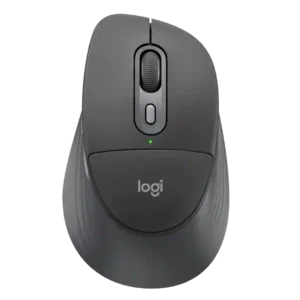
Compare Turtle Beach Kone II Air vs Logitech Signature Comfort Plus M850 L

Turtle Beach Kone II Air

Turtle Beach Kone II Air

Overall score 4.3 / 5

Based on 19 scored reviews

vs
Logitech Signature Comfort Plus M850 L

Logitech Signature Comfort Plus M850 L

Overall score 4.3 / 5

Based on 11 scored reviews

How we score

Scorata scores summarize analyzed review evidence on a 1–5 scale; they are not laboratory measurements or a simple average of customer star ratings. Feature scores summarize the reviews covering that feature. The overall score averages feature scores within each review, then combines review averages. When both expert and customer evidence are available, those two groups receive equal weight. Products can have different review coverage, so small score gaps do not establish a winner.

Recommendations prioritize important features for the category, with a score of at least 3.5, a gap of at least 0.25 points and at least two supporting reviews per product. Features with widely varying scores or broad connectivity contexts are excluded from recommendations. These safeguards do not establish statistical significance.

Quick verdict

What each product is best for

The review evidence points to a tradeoff: 2.4GHz connectivity and portability versus weight and build quality. Choose according to which strengths matter more to you; the overall score alone does not settle that choice.

Choose Turtle Beach Kone II Air for 2.4GHz connectivity and portability.

Choose Logitech Signature Comfort Plus M850 L for weight and build quality.

Why these recommendations?

Turtle Beach Kone II Air

Where It Has the Edge

  • 2.4GHz connectivity is 4.9 vs 2.3. 2.4GHz connectivity was praised as the preferred low-latency, high-performance wireless mode for gaming.
  • portability is 3.8 vs 2.3. Portability was mixed: dongle storage, Bluetooth, and profiles helped, but size and an unsecured dongle slot reduced confidence.
  • ergonomic design is 4.8 vs 4.4. Ergonomic design was a standout strength, repeatedly described as comfortable, supremely ergonomic, and well suited to larger hands.

Logitech Signature Comfort Plus M850 L

Where It Has the Edge

  • weight is 4.0 vs 3.1. The mouse is on the heavier side, but several reviewers like the substantial feel and find the weight...
  • build quality is 4.9 vs 4.6. Build quality is consistently strong, with reviewers describing the chassis as solid, sturdy, well-built, and free of creaks...
Turtle Beach Kone II Air 4.3 overall score
Logitech Signature Comfort Plus M850 L 4.3 overall score

Compare features

Scores are out of 5. Missing scores mean missing review evidence, not a missing feature.

Scored on both products

Battery and charging

Battery life
Turtle Beach Kone II Air
4.7

Battery life was heavily praised across reviews, often lasting a week or more, though one reviewer measured less than the advertised 130 hours.

Logitech Signature Comfort Plus M850 L
4.7

Battery life is a major strength. Reviewers repeatedly praise the long runtime from a single replaceable cell, with short-term testing showing very slow drain.

Other features

Onboard memory
Turtle Beach Kone II Air
4.5

Onboard memory was praised in one review for saving settings directly to the mouse for use on other computers.

Logitech Signature Comfort Plus M850 L
1.5

The lack of onboard memory is a meaningful limitation because customizations cannot travel with the mouse without Logitech software installed.

2.4GHz connectivity
Turtle Beach Kone II Air
4.9

2.4GHz connectivity was praised as the preferred low-latency, high-performance wireless mode for gaming.

Logitech Signature Comfort Plus M850 L
2.3

The standard package draws criticism for leaving out a 2.4GHz receiver, so buyers who want dongle-based wireless may need an extra purchase.

Cross-platform compatibility
Turtle Beach Kone II Air
2.8

Cross-platform compatibility was limited because full customization was described as Windows-only.

Logitech Signature Comfort Plus M850 L
4.5

Broad operating-system support makes the mouse a versatile choice for people who switch among Windows, macOS, and other platforms.

Portability
Turtle Beach Kone II Air
3.8

Portability was mixed: dongle storage, Bluetooth, and profiles helped, but size and an unsecured dongle slot reduced confidence.

Logitech Signature Comfort Plus M850 L
2.3

The high-backed, larger design is better suited to a desk than travel, with reviewers calling it bulky and discouraging it for trips.

Wireless latency
Turtle Beach Kone II Air
4.0

Wireless latency was mixed: some reviewers praised low-latency or lag-free use, while one measured noticeable latency and wavering during quick movement.

Logitech Signature Comfort Plus M850 L
5.0

Bluetooth responsiveness was excellent in one test, with no noticeable input lag or latency during productivity use.

Connection stability
Turtle Beach Kone II Air
4.9

Connection stability was one of the clearest strengths, with reviewers reporting no hitches, no input delay, flawless switching, and no letdowns.

Logitech Signature Comfort Plus M850 L
4.0

Wireless stability is generally good, including hiccup-free Bluetooth testing, although one reviewer found Bolt more reliable and sensitive to obstructions.

Weight
Turtle Beach Kone II Air
3.1

Weight was the most divisive trait: some reviewers accepted or liked the planted feel, while many found 110g heavy, bulky, or less versatile.

Logitech Signature Comfort Plus M850 L
4.0

The mouse is on the heavier side, but several reviewers like the substantial feel and find the weight manageable; lightweight-mouse fans may disagree.

Glide smoothness
Turtle Beach Kone II Air
5.0

Glide smoothness was consistently praised, with reviewers describing smooth, responsive, fluid, and amazing glide on mousepads and other surfaces.

Logitech Signature Comfort Plus M850 L
4.1

Most reviewers found the mouse smooth or effortless across surfaces, but one reported noticeably choppy, rougher-than-expected movement.

Ecosystem integration
Turtle Beach Kone II Air
4.5

Ecosystem integration was praised in one review for syncing effects across Roccat/Turtle Beach devices.

Logitech Signature Comfort Plus M850 L
5.0

Logitech Flow worked smoothly in testing, allowing text to move between two computers without manually changing Bluetooth sources.

Left and right click quality
Turtle Beach Kone II Air
5.0

Left and right clicks were strongly praised for feeling perfect, balanced, fast, and responsive.

Logitech Signature Comfort Plus M850 L
4.5

The main clicks feel tactile without requiring much force, giving good feedback while remaining quiet.

Surface compatibility
Turtle Beach Kone II Air
4.5

Surface compatibility had limited but positive evidence from one reviewer who found the sensor tracked easily across different surfaces.

Logitech Signature Comfort Plus M850 L
4.2

The mouse works well across many surfaces in most testing, including desks, pads, glass, and rubber mats, though one reviewer found movement rough on both a pad and tabletop.

Switch feel
Turtle Beach Kone II Air
4.2

Switch feel was mostly positive for tactile, clicky, snappy presses, though some reviewers found the feel mushier or fatiguing in frantic moments.

Logitech Signature Comfort Plus M850 L
4.0

Button feel is generally positive, with distinct side-button feedback, though the softer main-switch actuation can feel unusual at first.

DPI range
Turtle Beach Kone II Air
4.6

DPI range was viewed positively because reviewers found the 26K ceiling and fine adjustment easy to tailor, even if extreme DPI was impractical for some.

Logitech Signature Comfort Plus M850 L
4.5

The 4,000-DPI ceiling is more than sufficient for fast productivity work, even if it is not aimed at serious gaming.

Scroll wheel quality
Turtle Beach Kone II Air
4.4

The scroll wheel was a major strength overall, with praise for smooth/free-spin usefulness and satisfying feel, balanced by a few complaints about loud clicks or excess play.

Logitech Signature Comfort Plus M850 L
4.5

SmartWheel is generally a standout productivity feature for quick, adaptive scrolling, though one reviewer found it less refined than Logitech's premium wheels.

Polling rate
Turtle Beach Kone II Air
2.5

Polling rate drew criticism: multiple reviewers noted the 1000Hz ceiling or inconsistency as a weak point versus higher-end competitive mice.

Logitech Signature Comfort Plus M850 L
2.5

The office-level polling rate is adequate for productivity but can look choppy to sensitive users and is too slow for competitive gaming.

Comfort and build

Materials quality
Turtle Beach Kone II Air
3.2

Materials quality was mixed in limited evidence, with one reviewer saying the plastic finish drew divided reactions.

Logitech Signature Comfort Plus M850 L
5.0

The plastic construction feels notably high quality and contributes to a sturdy, substantial impression.

Ergonomic design
Turtle Beach Kone II Air
4.8

Ergonomic design was a standout strength, repeatedly described as comfortable, supremely ergonomic, and well suited to larger hands.

Logitech Signature Comfort Plus M850 L
4.4

The overall sculpted shape is widely comfortable, especially for long desk work, but reviewers disagree sharply on whether the built-in cushion adds meaningful ergonomic benefit.

Build quality
Turtle Beach Kone II Air
4.6

Build quality was consistently praised as sturdy, solid, flex-free, and improved versus older Roccat/Turtle Beach hardware.

Logitech Signature Comfort Plus M850 L
4.9

Build quality is consistently strong, with reviewers describing the chassis as solid, sturdy, well-built, and free of creaks or flex.

Long-session comfort
Turtle Beach Kone II Air
4.7

Long-session comfort was strongly positive for larger hands, with reviewers reporting no strain, secure grip, and hours of comfortable use, though one noticed fatigue.

Logitech Signature Comfort Plus M850 L
4.7

Long-session comfort is generally excellent, with multiple reviewers reporting comfortable all-day or eight-to-ten-hour use; the main dissent centers on whether the cushion itself deserves credit.

Performance

Click noise
Turtle Beach Kone II Air
3.2

Click noise was mixed-low in one review because the clicks were described as hollow sounding.

Logitech Signature Comfort Plus M850 L
4.9

Quiet clicking is one of the most consistent wins. The main buttons are repeatedly described as barely audible or pleasantly subdued for office use.

Sensor performance
Turtle Beach Kone II Air
4.7

The Owl-Eye sensor was usually praised as excellent, upgraded, and top-tier for most use, though comments focused more on comfort than esports-grade speed.

Logitech Signature Comfort Plus M850 L
3.0

The sensor handles normal productivity tasks adequately, but one reviewer considered the underlying hardware basic for the price.

Controls and connectivity

Bluetooth support
Turtle Beach Kone II Air
4.0

Bluetooth support was useful for versatility and long battery life, but reviewers warned it is not the best mode for competitive performance.

Logitech Signature Comfort Plus M850 L
3.5

Bluetooth is considered perfectly adequate for typical home use, though one comparison found a Bolt connection more dependable.

Button customization
Turtle Beach Kone II Air
4.6

Button customization was consistently praised, especially Easy-Shift and profile-based control, though one review wanted more useful default secondary functions.

Logitech Signature Comfort Plus M850 L
4.8

Logi Options+ gives the mouse extensive shortcut and button remapping flexibility, including app-specific functions and Actions Ring controls that can meaningfully streamline work.

Software usability
Turtle Beach Kone II Air
4.6

Software usability was a major strength: SWARM II was repeatedly called clean, intuitive, easy, powerful, and much improved.

Logitech Signature Comfort Plus M850 L
4.5

Logi Options+ is praised as clean and intuitive, though some advanced features require a few minutes of setup before they become useful.

Side button quality
Turtle Beach Kone II Air
4.5

Side buttons were usually praised for placement and reachability, although a few reviewers found some Easy-Shift combinations awkward or dependent on hand size.

Logitech Signature Comfort Plus M850 L
4.5

The side buttons have distinct, reassuring tactile feedback and are easy to recognize by feel.

Tracking and training

Accuracy and tracking precision
Turtle Beach Kone II Air
4.5

Reviewers generally found tracking accurate and precise, with praise for smooth tracking and pinpoint control, though one noted only modest accuracy and another reported minor jitter.

Logitech Signature Comfort Plus M850 L
5.0

Tracking stayed stable even on uneven surfaces, with no precision problems noted in that testing.

Ownership and support

Value for money
Turtle Beach Kone II Air
3.7

Value for money was mixed: reviewers liked the feature set and pricing versus some rivals, but several found it pricey, best on sale, or less compelling than the wired model.

Logitech Signature Comfort Plus M850 L
3.8

Value opinions vary by price and alternatives: some reviewers call it outstanding budget value, while others find it pricey or hard to justify against better-equipped mice.

Evidence available for one product

Other features

Acceleration control
Turtle Beach Kone II Air
4.5

Acceleration control was praised in one review through the mouse's balanced handling, which helped acceleration and stopping feel controlled.

Logitech Signature Comfort Plus M850 LNo score yet
Balance and weight distribution
Turtle Beach Kone II Air
4.0

Weight distribution was mixed-positive, with praise for balance and low center of gravity but one reviewer finding the rear-heavy feel unbalanced.

Logitech Signature Comfort Plus M850 LNo score yet
Cable flexibility
Turtle Beach Kone II Air
4.4

Cable flexibility was praised in most evidence, especially for lightweight, flexible charging or wired use, though one reviewer questioned durability and length.

Logitech Signature Comfort Plus M850 LNo score yet
Click latency
Turtle Beach Kone II Air
4.5

Click latency evidence was positive in one review, where the optical switches were described as quick and responsive during play.

Logitech Signature Comfort Plus M850 LNo score yet
Device switching
Turtle Beach Kone II AirNo score yet
Logitech Signature Comfort Plus M850 L
4.8

Switching among paired devices is consistently easy and convenient, with reviewers moving between computers without hiccups.

FPS gaming suitability
Turtle Beach Kone II Air
3.4

FPS gaming suitability was mixed: some reviewers found shooters fine or enjoyable, while others said the size, weight, and performance ceiling hurt faster competitive play.

Logitech Signature Comfort Plus M850 LNo score yet
Free-spin scrolling
Turtle Beach Kone II AirNo score yet
Logitech Signature Comfort Plus M850 L
4.8

Adaptive fast scrolling is a productivity highlight, making long spreadsheets, documents, and message lists much faster to navigate without manual mode switching.

Gaming suitability
Turtle Beach Kone II AirNo score yet
Logitech Signature Comfort Plus M850 L
3.0

The mouse is fine for occasional or casual games, but its office-focused polling and sensor setup are not suited to competitive play.

Grip texture
Turtle Beach Kone II Air
3.9

Grip texture was mixed: the shape and optional tape helped, but several reviewers found the smooth plastic slippery, polarizing, or less grippy than expected.

Logitech Signature Comfort Plus M850 LNo score yet
Horizontal scrolling
Turtle Beach Kone II AirNo score yet
Logitech Signature Comfort Plus M850 L
2.5

Side scrolling is possible through a button-and-wheel combination, but the workaround is less convenient than a true tilt wheel.

Lift-off distance
Turtle Beach Kone II Air
3.0

Lift-off distance customization was mixed because the software offered calibration, but one reviewer disliked that it did not clearly show the resulting distance.

Logitech Signature Comfort Plus M850 LNo score yet
MMO gaming suitability
Turtle Beach Kone II Air
4.6

MMO gaming suitability was strong, with reviewers praising the command count and customization for RPG/MMO-style ability access.

Logitech Signature Comfort Plus M850 LNo score yet
Motion consistency
Turtle Beach Kone II Air
3.0

Motion consistency was mixed due to one reviewer noticing minor low-speed tracking jitter despite otherwise strong performance.

Logitech Signature Comfort Plus M850 LNo score yet
Premium feel
Turtle Beach Kone II Air
4.2

Premium feel was mostly positive, with praise for a more premium chassis and premium mouse feel, but one review preferred the older Kone XP Air's feel.

Logitech Signature Comfort Plus M850 LNo score yet
Profile switching
Turtle Beach Kone II Air
4.6

Profile switching was praised for five profiles and work/game setups, especially for users who move between games or devices.

Logitech Signature Comfort Plus M850 LNo score yet
Repairability
Turtle Beach Kone II AirNo score yet
Logitech Signature Comfort Plus M850 L
5.0

A teardown found the mouse fairly simple to disassemble, making cleaning or basic part replacement approachable.

RGB features
Turtle Beach Kone II Air
4.3

RGB features were generally liked for sharp, bold, or gorgeous lighting, though a few reviewers wanted more flair or noticed choppy transitions.

Logitech Signature Comfort Plus M850 LNo score yet
Scroll wheel precision
Turtle Beach Kone II AirNo score yet
Logitech Signature Comfort Plus M850 L
5.0

The wheel was praised as precise and satisfying, even if it does not match Logitech's premium magnetic wheel.

Sustainability
Turtle Beach Kone II AirNo score yet
Logitech Signature Comfort Plus M850 L
4.5

Recycled plastics and paper-based packaging are welcome sustainability touches, although the broader battery design still uses disposable cells.

Comfort and build

Aesthetic design
Turtle Beach Kone II AirNo score yet
Logitech Signature Comfort Plus M850 L
4.7

The restrained, contemporary styling earns consistent praise, with the Graphite finish in particular described as fantastic and understated.

Claw grip comfort
Turtle Beach Kone II Air
4.5

Claw grip comfort was positive for medium-to-large hands, with reviewers able to claw it easily despite the large shell.

Logitech Signature Comfort Plus M850 LNo score yet
Durability over time
Turtle Beach Kone II Air
4.4

Durability over time was positive but limited, with reviewers noting months of sturdy use and reliable scroll wheel behavior.

Logitech Signature Comfort Plus M850 LNo score yet
Fingertip grip comfort
Turtle Beach Kone II Air
3.9

Fingertip grip comfort was more context-dependent: one reviewer found it maneuverable, while another experienced fatigue with a fingertip/claw hybrid.

Logitech Signature Comfort Plus M850 LNo score yet
Grip comfort
Turtle Beach Kone II AirNo score yet
Logitech Signature Comfort Plus M850 L
5.0

Rubberized, textured side grips receive strong praise for keeping the hand secure and the thumb comfortable.

Hand size compatibility
Turtle Beach Kone II AirNo score yet
Logitech Signature Comfort Plus M850 L
4.0

Fit depends on hand size: several reviewers with medium-to-large hands liked it, while another large-handed reviewer found the body too compact.

Palm grip comfort
Turtle Beach Kone II Air
4.8

Palm grip comfort was praised strongly, with reviewers repeatedly saying the large Kone shape suits palm grip especially well.

Logitech Signature Comfort Plus M850 LNo score yet
Shape comfort
Turtle Beach Kone II Air
4.5

Shape comfort was one of the strongest themes for medium-to-large hands, though smaller-hand reviewers sometimes found the shape too large to feel natural.

Logitech Signature Comfort Plus M850 LNo score yet
Size
Turtle Beach Kone II AirNo score yet
Logitech Signature Comfort Plus M850 L
4.0

Sizing is somewhat subjective: one reviewer found it just right and another ideal for small-to-medium hands, while a large-handed reviewer wanted a longer body.

Switch durability
Turtle Beach Kone II Air
4.5

Switch durability received positive but limited evidence, with one reviewer saying the mouse felt built to last.

Logitech Signature Comfort Plus M850 LNo score yet

Controls and connectivity

Button placement
Turtle Beach Kone II AirNo score yet
Logitech Signature Comfort Plus M850 L
3.5

Most controls are easy to reach and identify, but the Actions Ring button drew criticism for sitting too close to the scroll wheel.

Button responsiveness
Turtle Beach Kone II Air
4.6

Button responsiveness was widely praised, with reviewers calling clicks quick, responsive, purposeful, soft, and fast enough for gaming.

Logitech Signature Comfort Plus M850 LNo score yet
Debounce customization
Turtle Beach Kone II Air
4.8

Debounce customization was praised in one review because SWARM II explained debounce and related settings clearly.

Logitech Signature Comfort Plus M850 LNo score yet
DPI customization
Turtle Beach Kone II AirNo score yet
Logitech Signature Comfort Plus M850 L
3.5

DPI control is inconsistent: one reviewer criticized the lack of sensor-DPI adjustment in Logi Options+, while another liked the two selectable DPI levels.

Programmable buttons
Turtle Beach Kone II Air
4.9

Programmable buttons were praised for expanding commands and making the mouse versatile for work, FPS, MMO, and macro-heavy use.

Logitech Signature Comfort Plus M850 LNo score yet
Software quality
Turtle Beach Kone II AirNo score yet
Logitech Signature Comfort Plus M850 L
4.8

Logi Options+ is a major strength, adding flexible shortcuts, Actions Ring features, and productivity tools that reviewers found highly useful.

Software stability
Turtle Beach Kone II Air
5.0

Software stability had limited but strong evidence from one reviewer who reported no crashes or issues.

Logitech Signature Comfort Plus M850 LNo score yet
Tilt gesture controls
Turtle Beach Kone II Air
4.5

Tilt gesture controls received positive limited evidence because the 4D wheel tilt added another layer of control for navigation.

Logitech Signature Comfort Plus M850 LNo score yet

Battery and charging

Charging convenience
Turtle Beach Kone II Air
4.6

Charging convenience was praised for flexible cables, easy wired charging, and the ability to keep playing while charging.

Logitech Signature Comfort Plus M850 LNo score yet
Rechargeable battery
Turtle Beach Kone II AirNo score yet
Logitech Signature Comfort Plus M850 L
2.0

The lack of a built-in rechargeable battery disappoints some reviewers, especially those concerned about disposable-cell waste.

Replaceable battery support
Turtle Beach Kone II AirNo score yet
Logitech Signature Comfort Plus M850 L
5.0

The replaceable cell is easy to swap, and one reviewer liked avoiding the long-term wear associated with built-in batteries.

Ownership and support

Hand support
Turtle Beach Kone II AirNo score yet
Logitech Signature Comfort Plus M850 L
3.5

The palm cushion is the most divisive feature. Some reviewers loved the softer support and pressure relief, while others barely contacted it or found its support negligible.

Macro support
Turtle Beach Kone II Air
4.5

Macro support was viewed positively because SWARM II made macro creation or recording accessible, with built-in and custom macro options.

Logitech Signature Comfort Plus M850 LNo score yet
Tilt wheel support
Turtle Beach Kone II AirNo score yet
Logitech Signature Comfort Plus M850 L
2.0

The missing tilt wheel is a clear ergonomic and workflow drawback for users who frequently scroll sideways.

Performance

Productivity performance
Turtle Beach Kone II AirNo score yet
Logitech Signature Comfort Plus M850 L
4.7

Productivity is a major strength thanks to comfortable operation, customizable shortcuts, adaptive scrolling, and reliable everyday performance.

Wireless performance
Turtle Beach Kone II Air
4.8

Wireless performance was strongly positive overall, with reviewers reporting reliable wireless behavior and favorite-mouse-level performance, though size limited gaming appeal for one.

Logitech Signature Comfort Plus M850 LNo score yet

Other Top Gaming Mice to Consider

#1 ASUS ROG Harpe II Ace
4.6

Choose the ROG Harpe II Ace for ultralight FPS play, precise tracking, smooth glide, and web-based tuning. Skip it if you need palm-grip support, MMO buttons, onboard profiles, or long...

Pros: acceleration control, wireless latency

Cons: onboard memory, MMO gaming suitability

#2 Razer Viper V4 Pro
4.4

Best for ultra-light, competition-focused speed, precise tracking, stable wireless, and long battery life. Skip it if you need quieter clicks, left-handed support, Bluetooth, more buttons, or better value for casual...

Pros: balance and weight distribution, build quality

Cons: dock compatibility, Bluetooth support

#3 Corsair Scimitar Elite Wireless SE
4.4

Choose it if you want a premium MMO/productivity mouse with 12 adjustable side buttons, strong battery life, and Stream Deck integration. Skip it if you need an ultralight FPS mouse,...

Pros: click latency, macro support

Cons: firmware reliability, tilt gesture controls

#4 MSI Versa 300 Wireless 8K
4.4

Best for precise wireless tracking, smooth glide, strong battery life, and unusually good 8K value. Skip it if you need polished software, quiet snappy clicks, true left-handed controls, or gentle...

Pros: Accuracy and tracking precision, click latency

Cons: software stability, profile switching