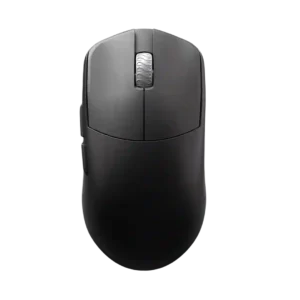
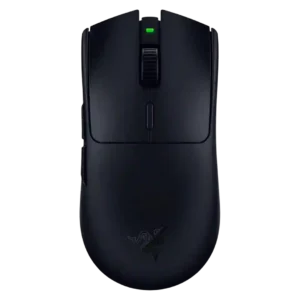
Compare LAMZU Maya X vs Razer Viper V3 HyperSpeed

LAMZU Maya X

LAMZU Maya X

Overall score 4.3 / 5

Based on 9 scored reviews

vs
Razer Viper V3 HyperSpeed

Razer Viper V3 HyperSpeed

Overall score 4.1 / 5

Based on 20 scored reviews

How we score

Scorata scores summarize analyzed review evidence on a 1–5 scale; they are not laboratory measurements or a simple average of customer star ratings. Feature scores summarize the reviews covering that feature. The overall score averages feature scores within each review, then combines review averages. When both expert and customer evidence are available, those two groups receive equal weight. Products can have different review coverage, so small score gaps do not establish a winner.

Recommendations prioritize important features for the category, with a score of at least 3.5, a gap of at least 0.25 points and at least two supporting reviews per product. Features with widely varying scores or broad connectivity contexts are excluded from recommendations. These safeguards do not establish statistical significance.

Quick verdict

What each product is best for

The review evidence points to a tradeoff: weight and switch feel versus battery life and lift-off distance. Choose according to which strengths matter more to you; the overall score alone does not settle that choice.

Choose LAMZU Maya X for weight and switch feel.

Choose Razer Viper V3 HyperSpeed for battery life and lift-off distance.

Why these recommendations?

LAMZU Maya X

Where It Has the Edge

  • weight is 4.6 vs 3.0. Weight is a defining strength, repeatedly praised around 47 g, though one reviewer warned micro movements may need...
  • switch feel is 4.6 vs 3.9. Switch feel is generally excellent, especially Omron optical crispness, though one reviewer found the implementation lackluster.
  • claw grip comfort is 4.8 vs 4.2. Claw grip comfort is consistently strong, with reviewers describing the shape as excellent for claw, relaxed claw, or...

Razer Viper V3 HyperSpeed

Where It Has the Edge

  • battery life is 4.1 vs 3.6. Battery life was generally praised as long, sometimes mindblowing, but higher polling rates and AA dependence created caveats.
  • lift-off distance is 4.7 vs 3.8. Lift-off and landing customization earned strong praise where reviewed, especially asymmetric cut-off and granular height adjustment.
  • palm grip comfort is 4.2 vs 3.5. Palm grip comfort improved versus flatter Viper shapes and suited many reviewers, though not every hand size or...
LAMZU Maya X 4.3 overall score
Razer Viper V3 HyperSpeed 4.1 overall score

Compare features

Scores are out of 5. Missing scores mean missing review evidence, not a missing feature.

Scored on both products

Battery and charging

Battery life
LAMZU Maya X
3.6

Battery life is the main performance caveat: acceptable at lower polling, but below some rivals and quick to drain at higher polling rates.

Razer Viper V3 HyperSpeed
4.1

Battery life was generally praised as long, sometimes mindblowing, but higher polling rates and AA dependence created caveats.

Charging convenience
LAMZU Maya X
2.0

Charging convenience is weak because the included cable makes using the mouse while charging difficult.

Razer Viper V3 HyperSpeed
2.5

Charging and power convenience was a major tradeoff: reviewers disliked AA dependence and no wired fallback, though some liked quick battery swaps.

Comfort and build

Durability over time
LAMZU Maya X
4.3

Durability over time is cautiously positive based on weeks of use without decay and a reviewer sense that the shell would hold up longer.

Razer Viper V3 HyperSpeed
2.5

Durability over time evidence was limited and slightly negative, focused on click grinding after some use.

Palm grip comfort
LAMZU Maya X
3.5

Palm grip comfort is mixed: one reviewer found palm support good, while others said large-hand palm users may want other options.

Razer Viper V3 HyperSpeed
4.2

Palm grip comfort improved versus flatter Viper shapes and suited many reviewers, though not every hand size or palm style was ideal.

Build quality
LAMZU Maya X
4.5

Build quality is broadly praised as sturdy, premium, and solid, with one notable review flagging a small creaking/QC issue.

Razer Viper V3 HyperSpeed
3.9

Build quality was mostly solid, but several reviewers reported rattles, a lopsided base, or less-than-Pro feel.

Claw grip comfort
LAMZU Maya X
4.8

Claw grip comfort is consistently strong, with reviewers describing the shape as excellent for claw, relaxed claw, or aggressive claw grips.

Razer Viper V3 HyperSpeed
4.2

Claw grip comfort was usually positive, with the revised hump and shell fitting relaxed claw users well.

Fingertip grip comfort
LAMZU Maya X
3.3

Fingertip grip comfort is conditional, with reviewers generally steering smaller-hand fingertip users toward smaller or flatter alternatives.

Razer Viper V3 HyperSpeed
3.6

Fingertip grip comfort was more mixed: some found it workable or comfortable, while others preferred smaller/lighter Viper-style shapes.

Shape comfort
LAMZU Maya X
4.6

Shape comfort is one of the strongest themes, especially for a larger, formed ambidextrous shape that several reviewers enjoyed.

Razer Viper V3 HyperSpeed
4.3

Shape comfort was broadly praised for the redesigned hump and fuller support, though a few reviewers disliked it for their grip or game style.

Long-session comfort
LAMZU Maya X
4.6

Long-session comfort is positive, with reviewers calling the mouse comfortable to play with and suitable as a daily driver.

Razer Viper V3 HyperSpeed
4.5

Long-session comfort was supported by praise for palm support and comfort over extended play, though it overlapped with shape and grip evidence.

Ergonomic design
LAMZU Maya X
4.4

Ergonomic design is positively received for multi-grip flexibility, ergonomic button shaping, and broad grip-style support.

Razer Viper V3 HyperSpeed
4.5

Ergonomic design was generally praised for the revised hump, curves, and hand support, with some caveats around side support.

Materials quality
LAMZU Maya X
4.1

Materials quality trends positive, though reviewers treat the coating as a tradeoff because grip can bring cleaning or wear concerns.

Razer Viper V3 HyperSpeed
4.1

Materials and finish felt premium to many reviewers, though the coating could show marks or smudges.

Skate durability
LAMZU Maya X
4.5

Skate durability has limited but positive evidence, with one reviewer saying the newer skates were definitely better than prior Maya skates.

Razer Viper V3 HyperSpeed
4.5

Skate durability/quality evidence was limited but positive, with reviewers saying the PTFE feet felt smooth, great, or long-lasting.

Other features

Balance and weight distribution
LAMZU Maya X
5.0

Balance and weight distribution receive focused praise from one reviewer who said the balancing was on point.

Razer Viper V3 HyperSpeed
3.3

Balance evidence was mixed, ranging from even and predictable to rear-heavy, unbalanced, or affected by battery inertia.

Weight
LAMZU Maya X
4.6

Weight is a defining strength, repeatedly praised around 47 g, though one reviewer warned micro movements may need adjustment.

Razer Viper V3 HyperSpeed
3.0

Weight was the most divisive physical trait: some liked the controlled mid-weight feel, while others found the AA-battery weight heavy or brick-like.

DPI range
LAMZU Maya X
5.0

The DPI range receives positive evidence because it is considered more than enough even for very high-sensitivity players.

Razer Viper V3 HyperSpeed
4.0

The 30K DPI ceiling was considered powerful for FPS use, though one reviewer viewed extreme DPI as more buzzword than necessity.

Lift-off distance
LAMZU Maya X
3.8

Lift-off distance is mixed: one review praises steadier movement, while another says the 1 mm setting did not feel consistent with other mice.

Razer Viper V3 HyperSpeed
4.7

Lift-off and landing customization earned strong praise where reviewed, especially asymmetric cut-off and granular height adjustment.

Switch feel
LAMZU Maya X
4.6

Switch feel is generally excellent, especially Omron optical crispness, though one reviewer found the implementation lackluster.

Razer Viper V3 HyperSpeed
3.9

Switch feel split reviewers: many liked the crisp or snappy Gen-2 mechanical feel, while others found it mushy or less sharp than premium opticals.

Click latency
LAMZU Maya X
4.5

Click latency evidence is positive but limited, with one reviewer saying the light optical clicks would not affect reaction time.

Razer Viper V3 HyperSpeed
3.8

Click latency evidence was mixed: reviewers found the clicks usable and often fast, but some noticed slower actuation than optical-switch competitors.

Motion consistency
LAMZU Maya X
4.5

Motion consistency is praised in-game, with the mouse described as planted, stable, and consistent in performance.

Razer Viper V3 HyperSpeed
5.0

Motion consistency was praised where reviewed, especially consistent tracking and stable performance during play.

Left and right click quality
LAMZU Maya X
4.7

Left and right click quality is strongly praised for clean implementation, bounce, lightness, and a close-to-perfect feel.

Razer Viper V3 HyperSpeed
4.3

Left and right clicks were often praised for crispness and solidity, though a few units or grip positions felt mushy or merely average.

Grip texture
LAMZU Maya X
4.1

Grip texture is positive overall for coating grip, but black finish smudging and dry-coating feel make it somewhat user-dependent.

Razer Viper V3 HyperSpeed
4.5

Grip texture/coating was strongly praised for grippiness, though reviewers often noted fingerprints, sweat marks, or preference for rubber sides.

Polling rate
LAMZU Maya X
4.1

Polling-rate support is valued, especially 8K wireless, though reviewers note 8K may not be useful to everyone and can trade off against battery life.

Razer Viper V3 HyperSpeed
4.3

Polling was generally viewed positively: 1,000Hz was enough for most, while 4K/8K support was valuable but battery-hungry or dongle-dependent.

Connection stability
LAMZU Maya X
4.8

Connection stability receives positive evidence from no-anomaly testing and a very good wireless feel.

Razer Viper V3 HyperSpeed
5.0

Connection stability was a strong positive, with reviewers reporting no lag, jitter, signal loss, or testing issues.

Scroll wheel quality
LAMZU Maya X
4.2

Scroll wheel quality is mostly positive for lightness, tactility, and safe tuning, but one review reported an intermittent registration issue.

Razer Viper V3 HyperSpeed
4.4

The scroll wheel drew mostly positive notes for tactile steps, grip, and control, with a few reviewers calling it merely fine or muted.

FPS gaming suitability
LAMZU Maya X
4.7

FPS gaming suitability is strong, with reviewers tying the mouse to top-tier performance, locked-in aim, and high-performance gaming.

Razer Viper V3 HyperSpeed
4.5

FPS gaming suitability was strong overall, especially for competitive shooters, though weight and click speed were caveats for elite players.

Glide smoothness
LAMZU Maya X
4.8

Glide smoothness is a major consensus strength, with stock skates repeatedly called smooth, excellent, and among the best.

Razer Viper V3 HyperSpeed
4.6

Glide smoothness was consistently praised, with reviewers noting smooth motion, strong feet/skates, and effortless movement.

Surface compatibility
LAMZU Maya X
4.7

Surface compatibility is praised through smooth behavior across surfaces and compatibility with any mouse pad.

Razer Viper V3 HyperSpeed
4.6

Surface compatibility was a strong positive where tested, including smooth tracking across desks, mats, wood, and glass.

Performance

Click noise
LAMZU Maya X
2.0

Click noise has negative evidence focused on loud, unpleasant side-click sound.

Razer Viper V3 HyperSpeed
3.5

Click noise was mixed but generally acceptable: one reviewer found the click louder, while another said the mouse kept noise muted.

Wireless performance
LAMZU Maya X
4.9

Wireless performance is praised for top-tier or elite implementation, with reviewers placing it among the best or describing it as very good.

Razer Viper V3 HyperSpeed
4.7

Wireless performance was widely praised for cable-free use, reliability, and professional-level responsiveness.

Sensor performance
LAMZU Maya X
4.9

Sensor performance is described as stellar or perfectly well-working, with reviewers treating the PAW3950 implementation as a standout strength.

Razer Viper V3 HyperSpeed
4.9

The Focus Pro 30K sensor was one of the strongest consensus positives, described as accurate, reliable, snappy, and premium-grade.

Controls and connectivity

Side button quality
LAMZU Maya X
3.3

Side button quality is the clearest split: some reviewers found them crisp and accessible, while others complained of stiffness, mushiness, or post-click travel.

Razer Viper V3 HyperSpeed
4.7

Side buttons were one of the most consistent positives, with reviewers calling them easier to reach, premium, and among Razer's best.

Software usability
LAMZU Maya X
3.9

Software usability is mixed: web-based Aurora is often liked for simplicity, but one companion-app experience was slow and laggy.

Razer Viper V3 HyperSpeed
3.3

Software usability was mixed: Synapse enabled useful customization and was often straightforward, but battery readings and setup requirements frustrated some reviewers.

Software stability
LAMZU Maya X
3.7

Software stability is mixed-to-positive, ranging from perfectly fine and quick-loading web UI to one app performance complaint.

Razer Viper V3 HyperSpeed
3.5

Software stability evidence was limited and mixed, with one reviewer saying Synapse improved but still had hiccups.

Button responsiveness
LAMZU Maya X
4.8

Button responsiveness is a major strength, with repeated praise for fast, crisp, light, spammable, and precise actuation.

Razer Viper V3 HyperSpeed
4.6

Button response was typically praised as snappy, responsive, satisfying, and reliable in play.

Ownership and support

Macro support
LAMZU Maya X
3.5

Macro support is present through software and judged useful, though the same review criticized the app's lag.

Razer Viper V3 HyperSpeed
3.3

Macro support was limited by the simple button layout, but HyperShift expanded options for reviewers who wanted extra commands.

Value for money
LAMZU Maya X
4.4

Value for money is broadly favorable, with reviewers citing price, bundled extras, and strong performance, though some acknowledge it costs more than budget competitors.

Razer Viper V3 HyperSpeed
4.5

Value for money was one of the strongest positives, with reviewers repeatedly calling the mouse affordable, budget-friendly, or outstanding for its specs.

Tracking and training

Accuracy and tracking precision
LAMZU Maya X
4.7

Tracking precision is consistently praised, with no anomalies at 8000 Hz, predictable movement, strong pad tracking, and one reviewer reporting a personal-best result.

Razer Viper V3 HyperSpeed
4.7

Reviewers repeatedly praised tracking accuracy, with only a few preference-based caveats around the forward sensor placement.

Evidence available for one product

Other features

2.4GHz connectivity
LAMZU Maya XNo score yet
Razer Viper V3 HyperSpeed
4.0

2.4GHz connectivity was seen as simple and effective, with limited but positive opinionated evidence.

Cable flexibility
LAMZU Maya X
2.5

Cable flexibility is a weakness, with multiple reviewers calling the USB-C cable stiff or draggy during wired use.

Razer Viper V3 HyperSpeedNo score yet
Ecosystem integration
LAMZU Maya XNo score yet
Razer Viper V3 HyperSpeed
4.0

Ecosystem integration was positive but narrow, focused on HyperSpeed multi-device dongle sharing and saving USB ports.

Handedness options
LAMZU Maya XNo score yet
Razer Viper V3 HyperSpeed
2.0

Handedness was a negative where discussed because the design is effectively right-handed and could be a problem for left-handed players.

MOBA gaming suitability
LAMZU Maya X
5.0

MOBA gaming suitability has one strong supporting review from League of Legends ranked use.

Razer Viper V3 HyperSpeedNo score yet
Onboard memory
LAMZU Maya XNo score yet
Razer Viper V3 HyperSpeed
2.3

Onboard memory was a recurring limitation because reviewers noted it stores only one profile or one preset slot.

Portability
LAMZU Maya XNo score yet
Razer Viper V3 HyperSpeed
4.0

Portability evidence was limited but positive, mainly that the receiver can be stored safely in the mouse.

Premium feel
LAMZU Maya XNo score yet
Razer Viper V3 HyperSpeed
3.7

Premium feel was mixed: several reviewers said it felt high-end or more expensive than it was, while others said it lacked true Pro feel.

Profile switching
LAMZU Maya XNo score yet
Razer Viper V3 HyperSpeed
4.5

Profile switching was praised when the reviewer could quickly see or cycle DPI/profile states, though evidence was limited.

RGB features
LAMZU Maya XNo score yet
Razer Viper V3 HyperSpeed
3.1

RGB opinions were mostly neutral: reviewers noted the no-RGB design as minimalist or acceptable, not a major functional loss.

Water and dust resistance
LAMZU Maya X
4.0

Dust resistance is only partially supported, but one reviewer praised the dust-proof encoder and reduced concern about debris.

Razer Viper V3 HyperSpeedNo score yet
Weight tuning
LAMZU Maya XNo score yet
Razer Viper V3 HyperSpeed
4.8

Weight tuning received positive evidence from reviewers using AAA/lithium battery mods to cut substantial weight.

Wireless latency
LAMZU Maya XNo score yet
Razer Viper V3 HyperSpeed
5.0

Wireless latency received limited but strong praise, especially around low-latency 2.4GHz use.

Controls and connectivity

Bluetooth support
LAMZU Maya XNo score yet
Razer Viper V3 HyperSpeed
2.5

Bluetooth support was weak because reviewers noted its absence, though at least one said it was unlikely to be a dealbreaker.

Button customization
LAMZU Maya XNo score yet
Razer Viper V3 HyperSpeed
4.3

Button customization through Synapse was seen as useful and accessible, including remapping and DPI-related controls.

Programmable buttons
LAMZU Maya XNo score yet
Razer Viper V3 HyperSpeed
4.3

Programmable controls were easy to reach and sufficient for most reviewers, reinforcing the mouse's simple FPS-first layout.

Comfort and build

Switch durability
LAMZU Maya XNo score yet
Razer Viper V3 HyperSpeed
3.5

Switch durability evidence was mixed: rated lifecycle was considered respectable for the price, but one reviewer warned mechanical switches can develop double-clicks.

Other Top Gaming Mice to Consider

#1 ASUS ROG Harpe II Ace
4.6

Choose the ROG Harpe II Ace for ultralight FPS play, precise tracking, smooth glide, and web-based tuning. Skip it if you need palm-grip support, MMO buttons, onboard profiles, or long...

Pros: glide smoothness, weight

Cons: handedness options

#2 Razer Basilisk V3

4.5

Excellent tracking, comfortable right-handed ergonomics and a versatile scroll wheel make the Basilisk V3 a strong gaming and productivity mouse. Its substantial weight, fixed cable and sometimes over-sensitive automatic scrolling...

Pros: scroll wheel quality, RGB features

Cons: weight, handedness options

#3 McHose L7 Pro

4.5

The L7 Pro delivers remarkably light handling, precise aiming and a grippy shell at a budget price. Stock skates are less impressive, and conflicting click-latency measurements warrant caution for latency-sensitive...

Pros: value for money, weight

Cons: wired connectivity

#4 Razer Viper V4 Pro

4.4

Best for ultra-light, competition-focused speed, precise tracking, stable wireless, and long battery life. Skip it if you need quieter clicks, left-handed support, Bluetooth, more buttons, or better value for casual...

Pros: value for money, weight

Cons: click noise, RGB features