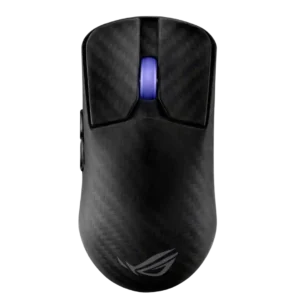
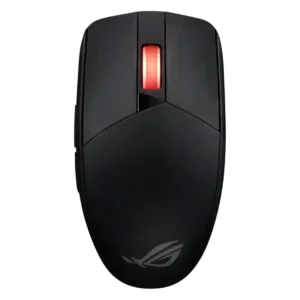
Scorata scores summarize analyzed review evidence on a 1–5 scale; they are not laboratory measurements or a simple average of customer star ratings. Feature scores summarize the reviews covering that feature. The overall score averages feature scores within each review, then combines review averages. When both expert and customer evidence are available, those two groups receive equal weight. Products can have different review coverage, so small score gaps do not establish a winner.
Recommendations prioritize important features for the category, with a score of at least 3.5, a gap of at least 0.25 points and at least two supporting reviews per product. Features with widely varying scores or broad connectivity contexts are excluded from recommendations. These safeguards do not establish statistical significance.
Quick verdict
What each product is best for
The review evidence points to a tradeoff: cable flexibility and surface compatibility versus battery life and value for money. Choose according to which strengths matter more to you; the overall score alone does not settle that choice.
Choose ROG Harpe Ace Extreme for cable flexibility and surface compatibility.
Choose ASUS ROG Strix Impact III Wireless for battery life and value for money.
Why these recommendations?
ROG Harpe Ace Extreme
Where It Has the Edge
cable flexibility is 3.6 vs 2.4. Cable impressions were mixed: some found it flexible and lightweight, while others thought it was stiff or simply...
surface compatibility is 4.7 vs 4.1. Surface compatibility was strong, with reliable tracking and calibration across several desk, pad, and material types.
weight is 4.6 vs 4.2. Weight was a major strength, with reviewers praising the roughly 47g body as extremely light for its size...
ASUS ROG Strix Impact III Wireless
Where It Has the Edge
battery life is 4.6 vs 3.4. Battery life is one of the strongest repeated positives, with reviewers reporting held-up estimates, no dwindling after weeks,...
value for money is 4.6 vs 2.3. Value for money is a major strength, with reviewers calling it excellent for the price, a great deal,...
2.4GHz connectivity is 4.7 vs 3.8. 2.4GHz connectivity is praised for stable SpeedNova/Omni performance, a strong signal, and responsive operation.
ROG Harpe Ace Extreme4.0 overall score
ASUS ROG Strix Impact III Wireless4.2 overall score
Compare features
Scores are out of 5. Missing scores mean missing review evidence, not a missing feature.
Scored on both products
Battery and charging
Battery life
ROG Harpe Ace Extreme
3.4
Battery life was mixed: acceptable to strong at lower polling rates, but clearly reduced at 8K and behind some flagship competitors.
ASUS ROG Strix Impact III Wireless
4.6
Battery life is one of the strongest repeated positives, with reviewers reporting held-up estimates, no dwindling after weeks, and extremely long runtime.
Charging convenience
ROG Harpe Ace Extreme
3.0
Charging convenience was only lightly discussed, with USB-C charging working but the included cable feeling somewhat stiff to one reviewer.
ASUS ROG Strix Impact III Wireless
3.6
Power and charging convenience is mixed: some reviewers like easy-to-buy batteries, while others dislike needing spares or missing an internal rechargeable battery.
Ownership and support
Value for money
ROG Harpe Ace Extreme
2.3
Value for money was the most consistent weakness because reviewers repeatedly questioned the extreme $250 price.
ASUS ROG Strix Impact III Wireless
4.6
Value for money is a major strength, with reviewers calling it excellent for the price, a great deal, and strong value despite some caveats.
Controls and connectivity
Programmable buttons
ROG Harpe Ace Extreme
2.8
Programmable buttons were functional but limited, with reviewers repeatedly noting the basic five-button layout.
ASUS ROG Strix Impact III Wireless
4.4
Programmable buttons are framed as useful because the configurable buttons add gameplay versatility through Armoury Crate.
Software usability
ROG Harpe Ace Extreme
3.4
Software usability improved with Armoury Crate Gear, but reviewers still found it overkill, basic, or troublesome depending on setup.
ASUS ROG Strix Impact III Wireless
4.4
Software usability is generally positive, with reviewers calling it user-friendly, easy to set up, and broad enough to control key settings.
Button customization
ROG Harpe Ace Extreme
4.0
Button remapping and assignment were available and generally treated as straightforward, especially through the lighter Armoury Crate Gear software.
ASUS ROG Strix Impact III Wireless
4.5
Button customization is a strength, with reviewers highlighting unusually good customization for the price, gameplay versatility, and broad control in software.
Side button quality
ROG Harpe Ace Extreme
3.8
Side button quality was highly split, with praise for tactility and implementation but criticism of size, force, and forward placement.
ASUS ROG Strix Impact III Wireless
4.1
Side buttons are mostly liked for clear actuation and placement, but one reviewer found them mushier than the main clicks.
Bluetooth support
ROG Harpe Ace Extreme
4.3
Bluetooth was treated as a useful convenience and notable inclusion on such a lightweight esports-focused mouse.
ASUS ROG Strix Impact III Wireless
4.4
Bluetooth support is positive for everyday flexibility and long battery life, though one reviewer notes lower Bluetooth polling compared with 2.4GHz.
Button responsiveness
ROG Harpe Ace Extreme
4.7
Button responsiveness was usually praised as crisp, fast, and immediate, though one reviewer found the switches less spammable.
ASUS ROG Strix Impact III Wireless
4.7
Button responsiveness is repeatedly praised, especially for fast, accurate, light, crisp clicks that register reliably.
Comfort and build
Fingertip grip comfort
ROG Harpe Ace Extreme
3.4
Fingertip comfort depended heavily on hand size, with some reviewers finding it workable and others saying the mouse was too large.
ASUS ROG Strix Impact III Wireless
4.8
Fingertip grip comfort is one of the clearest comfort strengths, especially for users who hold the mouse with fingers rather than palm contact.
Long-session comfort
ROG Harpe Ace Extreme
3.5
Long-session comfort depended on use: the shape could support longer play, but the stiff scroll wheel or hump bothered some reviewers.
ASUS ROG Strix Impact III Wireless
2.8
Long-session comfort is a recurring caveat, especially for larger hands or users needing more ergonomic support during long gaming sessions.
Switch durability
ROG Harpe Ace Extreme
4.0
Switch durability was supported by the reviewer’s description of durable 100-million-actuation optical switches.
ASUS ROG Strix Impact III Wireless
4.6
Switch durability is strong in reviewer evidence thanks to long-life switches and replaceable sockets that can extend usable life or fix dead clickers.
Palm grip comfort
ROG Harpe Ace Extreme
3.1
Palm grip comfort was polarizing: large-hand users could find support, while several reviewers found the shape too short, high, or irritating.
ASUS ROG Strix Impact III Wireless
2.6
Palm grip comfort is weak because reviewers say full palm grip only suits very small hands or is not suitable for large-hand full coverage.
Claw grip comfort
ROG Harpe Ace Extreme
3.9
Claw grip comfort was generally good for medium to large hands, but smaller-handed reviewers found some button and hump geometry awkward.
ASUS ROG Strix Impact III Wireless
4.4
Claw grip comfort is positive, with reviewers repeatedly identifying claw or partial claw as an ideal or suitable grip style.
Materials quality
ROG Harpe Ace Extreme
4.4
Materials quality was generally a highlight because of the carbon fiber shell, though some disliked the plastic side contrast.
ASUS ROG Strix Impact III Wireless
4.5
Materials quality is strong, with reviewers praising practical plastics, PBT, pleasant matte texture, and high-quality material feel.
Durability over time
ROG Harpe Ace Extreme
4.5
Durability over time was supported mainly by the carbon-fiber shell and secure grip, but long-term skate durability remained more uncertain.
ASUS ROG Strix Impact III Wireless
4.6
Durability over time is positive, supported by long-life switch evidence, reliability comments, and one reviewer’s expectation that it will last a long time.
Build quality
ROG Harpe Ace Extreme
4.6
Build quality was one of the strongest areas, with most reviewers praising the solid carbon-fiber structure and lack of flex, aside from isolated defects.
ASUS ROG Strix Impact III Wireless
4.7
Build quality is repeatedly praised as high, sturdy, well-fitted, reliable, and free of wobble or looseness.
Ergonomic design
ROG Harpe Ace Extreme
3.5
Ergonomics split by hand size and preference: some praised prolonged comfort, while others found the elongated hump restrictive.
ASUS ROG Strix Impact III Wireless
3.5
Ergonomic design is mixed: the size suits many grips, but reviewers also cite flatness, limited support, and right-click leverage issues for some users.
Shape comfort
ROG Harpe Ace Extreme
3.6
Shape comfort was one of the most preference-dependent areas, praised as safe and comfortable by some but too long or awkward by others.
ASUS ROG Strix Impact III Wireless
3.6
Shape comfort is mixed: several smaller-hand users found it comfortable, while others disliked the flat or stubby shape.
Other features
Cable flexibility
ROG Harpe Ace Extreme
3.6
Cable impressions were mixed: some found it flexible and lightweight, while others thought it was stiff or simply not very good.
ASUS ROG Strix Impact III Wireless
2.4
Cable flexibility scores poorly because reviewers point out that the wireless model cannot be used in wired mode.
2.4GHz connectivity
ROG Harpe Ace Extreme
3.8
Reviewers liked that 2.4 GHz mode unlocked the mouse’s strongest gaming performance, though one reviewer reported a connection issue.
ASUS ROG Strix Impact III Wireless
4.7
2.4GHz connectivity is praised for stable SpeedNova/Omni performance, a strong signal, and responsive operation.
DPI range
ROG Harpe Ace Extreme
4.0
DPI/CPI range was technically extreme and often praised, though some reviewers viewed the 42,000 DPI figure as excessive marketing.
ASUS ROG Strix Impact III Wireless
4.7
The DPI range is treated as more than enough for high-resolution and fast gaming use, though one reviewer’s praise ties the range mainly to precision.
Handedness options
ROG Harpe Ace Extreme
3.0
Handedness was mixed because the shell is symmetrical, but side-button placement limits true left-handed usability.
ASUS ROG Strix Impact III Wireless
3.7
Handedness options are mixed because the symmetrical shell can work left-handed, but side buttons mainly favor right-handed use.
Grip texture
ROG Harpe Ace Extreme
3.8
Grip texture was mixed: carbon fiber and grooves helped, but some reviewers still found the plastic sides slippery.
ASUS ROG Strix Impact III Wireless
4.4
Grip texture is a strength, with reviewers saying textured or rough side surfaces improve grip and prevent slipping.
Scroll wheel quality
ROG Harpe Ace Extreme
3.9
Scroll wheel quality varied widely, from precise and well-defined to stiff, small, fatiguing, or underwhelming.
ASUS ROG Strix Impact III Wireless
4.5
The scroll wheel is generally praised for no wobble, clear cutoffs, precise resistance, and a nice feel.
Switch feel
ROG Harpe Ace Extreme
3.9
Switch feel was mostly positive but not unanimous, with praise for tactile optical clicks alongside complaints about squish or slow rebound.
ASUS ROG Strix Impact III Wireless
4.5
Switch feel is described as clear, informative, tactile, crisp, and clicky, giving the main buttons a satisfying feel.
Ecosystem integration
ROG Harpe Ace Extreme
4.0
Ecosystem integration was seen as a useful bonus for users already invested in Asus gear, especially shared receiver support.
ASUS ROG Strix Impact III Wireless
4.6
Ecosystem integration is positive thanks to the ROG Omni Receiver and SpeedNova compatibility with other ROG peripherals.
Surface compatibility
ROG Harpe Ace Extreme
4.7
Surface compatibility was strong, with reliable tracking and calibration across several desk, pad, and material types.
ASUS ROG Strix Impact III Wireless
4.1
Surface compatibility is mixed-positive: non-glass desks and pads worked well, but glass caused noticeable control loss.
Lift-off distance
ROG Harpe Ace Extreme
3.8
Lift-off distance support was considered useful, but limited setting depth kept it from being universally praised.
ASUS ROG Strix Impact III Wireless
4.3
Lift-off distance is viewed positively where tested, with one reviewer pleased by surface performance without extra adjustment and another satisfied with the low setting.
Left and right click quality
ROG Harpe Ace Extreme
4.1
Main click quality ranged from exceptional praise to isolated complaints about pre-travel, post-travel, or a defective left click.
ASUS ROG Strix Impact III Wireless
4.6
Left and right click quality is a clear strength, with reviewers praising softness, precision, tactile response, and nice PBT click feel.
Weight
ROG Harpe Ace Extreme
4.6
Weight was a major strength, with reviewers praising the roughly 47g body as extremely light for its size and construction.
ASUS ROG Strix Impact III Wireless
4.2
Weight is mostly praised as light or featherweight, though multiple reviewers caution that the advertised 57g excludes the battery and is somewhat misleading.
Motion consistency
ROG Harpe Ace Extreme
4.5
Motion consistency was praised through consistent tracking, Motion Sync, and stable sensor behavior.
ASUS ROG Strix Impact III Wireless
4.9
Motion consistency is praised through comments about stability, no jitter, no disruption, and no noticeable lag or stuttering.
Balance and weight distribution
ROG Harpe Ace Extreme
4.7
Balance feedback was consistently positive where mentioned, with reviewers saying the light shell stayed well distributed in hand.
ASUS ROG Strix Impact III Wireless
4.3
Weight distribution has limited but positive evidence, with one reviewer saying the AA setup felt normal and did not tilt when lifted.
RGB features
ROG Harpe Ace Extreme
3.1
RGB was mixed: reviewers liked that lighting remained on an ultralight mouse, but the single scroll-wheel zone was limited or distracting.
ASUS ROG Strix Impact III Wireless
3.5
RGB feedback is mixed: reviewers like the subtle personalization, but several note that lighting is limited, not very bright, or only on the wheel.
Connection stability
ROG Harpe Ace Extreme
4.4
Connection stability was mostly strong, but a few reviewers reported receiver dropouts or 8K-related interruptions.
ASUS ROG Strix Impact III Wireless
4.7
Connection stability is strong where tested, with reviewers reporting no signal loss, no connectivity issues, and a strong signal.
FPS gaming suitability
ROG Harpe Ace Extreme
4.6
FPS suitability was strong, with reviewers linking its low weight, fast sensor, and responsive inputs to competitive shooter use.
ASUS ROG Strix Impact III Wireless
4.3
FPS gaming suitability is generally strong because reviewers praise fast shooters, fast FPS use, and flick-shot tracking, though one multi-user review was more cautious.
Click latency
ROG Harpe Ace Extreme
4.5
Click latency was praised as very low, although high polling gains were often framed as marginal in real-world play.
ASUS ROG Strix Impact III Wireless
4.8
Click-latency comments are strongly positive, with reviewers pointing to near-zero latency and very little gap or travel before actuation.
Polling rate
ROG Harpe Ace Extreme
4.0
Polling rate was a headline strength, but reviewers often questioned the practical value of 8K versus its battery cost.
ASUS ROG Strix Impact III Wireless
4.3
Polling-rate evidence is positive overall: 1000Hz is praised as high performance, while Bluetooth polling is described as lower but still usable.
Premium feel
ROG Harpe Ace Extreme
4.5
Premium feel was strong overall, driven by the carbon fiber finish, packaging, accessories, and showpiece presentation.
ASUS ROG Strix Impact III Wireless
4.7
Premium feel is supported by reviewers describing it as top-tier, extremely reliable, accurate, and fantastic-feeling.
Wireless latency
ROG Harpe Ace Extreme
4.5
Wireless latency was generally praised as very low or responsive, though reviewers questioned how much 8K improves real gameplay.
ASUS ROG Strix Impact III Wireless
4.7
Wireless latency is praised as very low, with several reviewers reporting wired-like responsiveness or no delay issues.
Profile switching
ROG Harpe Ace Extreme
4.5
Profile switching was useful because profiles and key settings could be handled on-mouse or saved without keeping software open.
ASUS ROG Strix Impact III Wireless
4.4
Profile switching is positively supported by the ability to switch saved profiles easily.
Glide smoothness
ROG Harpe Ace Extreme
4.5
Glide was widely praised on PTFE and glass feet, though the very smooth glass feet sometimes required adjustment.
ASUS ROG Strix Impact III Wireless
4.5
Glide smoothness is consistently positive, with reviewers describing easy, smooth, uninterrupted movement on suitable surfaces.
Onboard memory
ROG Harpe Ace Extreme
4.5
Onboard memory was appreciated because settings could be saved and the software avoided after setup.
ASUS ROG Strix Impact III Wireless
4.5
Onboard memory is treated positively because reviewers connect it with saved presets, calibration, profile storage, and portability across devices.
Portability
ROG Harpe Ace Extreme
4.4
Portability was praised because of the included carrying case and travel-focused accessory setup.
ASUS ROG Strix Impact III Wireless
4.4
Portability is positive thanks to receiver storage, travel use, and a small travel bag, though evidence is not as broad as performance-related attributes.
Performance
Click noise
ROG Harpe Ace Extreme
3.0
Click noise was a caveat: reviewers found the switches crisp or pleasant but often not quiet, and sometimes quite loud.
ASUS ROG Strix Impact III Wireless
3.9
Click noise is moderate rather than silent, with reviewers describing crisp audible clicks or minimal noise depending on the review.
Wireless performance
ROG Harpe Ace Extreme
4.4
Wireless performance was mostly excellent, with strong SpeedNova praise and stable performance, offset by a few connection complaints.
ASUS ROG Strix Impact III Wireless
4.7
Wireless performance is a major strength, with reviewers saying the wireless signal is stable, smooth, responsive, and close to wired feel.
Sensor performance
ROG Harpe Ace Extreme
4.7
Sensor performance was consistently strong, with reviewers calling it top-tier, flawless, responsive, and worry-free.
ASUS ROG Strix Impact III Wireless
4.7
The sensor receives broad praise as excellent, capable, and exceptionally accurate, with only glass surfaces called out as a weakness in one review.
Tracking and training
Accuracy and tracking precision
ROG Harpe Ace Extreme
5.0
Tracking precision drew strong praise across tests, with reviewers repeatedly describing accurate, responsive, and reliable movement across games and surfaces.
ASUS ROG Strix Impact III Wireless
4.8
Reviewers consistently describe the mouse as precise and accurate, with fast shot alignment, responsive tracking, and no obvious tracking issues.
Evidence available for one product
Other features
Cross-platform compatibility
ROG Harpe Ace ExtremeNo score yet
ASUS ROG Strix Impact III Wireless
4.5
Cross-platform compatibility has limited but positive evidence from stored settings that allow easier use across different PCs and devices.
Weight tuning
ROG Harpe Ace ExtremeNo score yet
ASUS ROG Strix Impact III Wireless
4.3
Weight tuning is positive where reviewers discuss AA/AAA battery flexibility, especially because they like being able to use either battery size.
Ownership and support
Firmware reliability
ROG Harpe Ace Extreme
2.5
Firmware reliability had limited but important criticism, with one reviewer reporting random shutoffs at 8K despite firmware updates.
ASUS ROG Strix Impact III WirelessNo score yet
Macro support
ROG Harpe Ace ExtremeNo score yet
ASUS ROG Strix Impact III Wireless
4.3
Macro support is supported by the software evidence, where macro creation sits alongside profiles and other user-friendly customization tools.
Comfort and build
Skate durability
ROG Harpe Ace Extreme
3.1
Skate durability and skate impressions were mixed: PTFE and glass skates felt good, while glass longevity and control raised caveats.
ASUS ROG Strix Impact III WirelessNo score yet
Controls and connectivity
Software stability
ROG Harpe Ace Extreme
2.3
Software stability was a repeated weakness, including pop-ups, broken download flow, setup issues, and older software not working.
Choose the ROG Harpe II Ace for ultralight FPS play, precise tracking, smooth glide, and web-based tuning. Skip it if you need palm-grip support, MMO buttons, onboard profiles, or long...
Excellent tracking, comfortable right-handed ergonomics and a versatile scroll wheel make the Basilisk V3 a strong gaming and productivity mouse. Its substantial weight, fixed cable and sometimes over-sensitive automatic scrolling...
The L7 Pro delivers remarkably light handling, precise aiming and a grippy shell at a budget price. Stock skates are less impressive, and conflicting click-latency measurements warrant caution for latency-sensitive...
Best for ultra-light, competition-focused speed, precise tracking, stable wireless, and long battery life. Skip it if you need quieter clicks, left-handed support, Bluetooth, more buttons, or better value for casual...