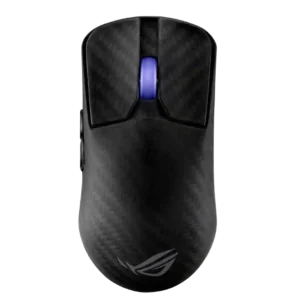
Compare ROG Harpe Ace Extreme vs Razer Viper V3 HyperSpeed

ROG Harpe Ace Extreme

ROG Harpe Ace Extreme

Overall score 4.0 / 5

Based on 15 scored reviews

vs
Razer Viper V3 HyperSpeed

Razer Viper V3 HyperSpeed

Overall score 4.1 / 5

Based on 20 scored reviews

How we score

Scorata scores summarize analyzed review evidence on a 1–5 scale; they are not laboratory measurements or a simple average of customer star ratings. Feature scores summarize the reviews covering that feature. The overall score averages feature scores within each review, then combines review averages. When both expert and customer evidence are available, those two groups receive equal weight. Products can have different review coverage, so small score gaps do not establish a winner.

Recommendations prioritize important features for the category, with a score of at least 3.5, a gap of at least 0.25 points and at least two supporting reviews per product. Features with widely varying scores or broad connectivity contexts are excluded from recommendations. These safeguards do not establish statistical significance.

Quick verdict

What each product is best for

The review evidence points to a tradeoff: onboard memory and weight versus battery life and value for money. Choose according to which strengths matter more to you; the overall score alone does not settle that choice.

Choose ROG Harpe Ace Extreme for onboard memory and weight.

Choose Razer Viper V3 HyperSpeed for battery life and value for money.

Why these recommendations?

ROG Harpe Ace Extreme

Where It Has the Edge

  • onboard memory is 4.5 vs 2.3. Onboard memory was appreciated because settings could be saved and the software avoided after setup.
  • weight is 4.6 vs 3.0. Weight was a major strength, with reviewers praising the roughly 47g body as extremely light for its size...
  • balance and weight distribution is 4.7 vs 3.3. Balance feedback was consistently positive where mentioned, with reviewers saying the light shell stayed well distributed in hand.

Razer Viper V3 HyperSpeed

Where It Has the Edge

  • battery life is 4.1 vs 3.4. Battery life was generally praised as long, sometimes mindblowing, but higher polling rates and AA dependence created caveats.
  • value for money is 4.5 vs 2.3. Value for money was one of the strongest positives, with reviewers repeatedly calling the mouse affordable, budget-friendly, or...
  • programmable buttons is 4.3 vs 2.8. Programmable controls were easy to reach and sufficient for most reviewers, reinforcing the mouse's simple FPS-first layout.
ROG Harpe Ace Extreme 4.0 overall score
Razer Viper V3 HyperSpeed 4.1 overall score

Compare features

Scores are out of 5. Missing scores mean missing review evidence, not a missing feature.

Scored on both products

Battery and charging

Battery life
ROG Harpe Ace Extreme
3.4

Battery life was mixed: acceptable to strong at lower polling rates, but clearly reduced at 8K and behind some flagship competitors.

Razer Viper V3 HyperSpeed
4.1

Battery life was generally praised as long, sometimes mindblowing, but higher polling rates and AA dependence created caveats.

Charging convenience
ROG Harpe Ace Extreme
3.0

Charging convenience was only lightly discussed, with USB-C charging working but the included cable feeling somewhat stiff to one reviewer.

Razer Viper V3 HyperSpeed
2.5

Charging and power convenience was a major tradeoff: reviewers disliked AA dependence and no wired fallback, though some liked quick battery swaps.

Ownership and support

Value for money
ROG Harpe Ace Extreme
2.3

Value for money was the most consistent weakness because reviewers repeatedly questioned the extreme $250 price.

Razer Viper V3 HyperSpeed
4.5

Value for money was one of the strongest positives, with reviewers repeatedly calling the mouse affordable, budget-friendly, or outstanding for its specs.

Other features

Onboard memory
ROG Harpe Ace Extreme
4.5

Onboard memory was appreciated because settings could be saved and the software avoided after setup.

Razer Viper V3 HyperSpeed
2.3

Onboard memory was a recurring limitation because reviewers noted it stores only one profile or one preset slot.

Weight
ROG Harpe Ace Extreme
4.6

Weight was a major strength, with reviewers praising the roughly 47g body as extremely light for its size and construction.

Razer Viper V3 HyperSpeed
3.0

Weight was the most divisive physical trait: some liked the controlled mid-weight feel, while others found the AA-battery weight heavy or brick-like.

Balance and weight distribution
ROG Harpe Ace Extreme
4.7

Balance feedback was consistently positive where mentioned, with reviewers saying the light shell stayed well distributed in hand.

Razer Viper V3 HyperSpeed
3.3

Balance evidence was mixed, ranging from even and predictable to rear-heavy, unbalanced, or affected by battery inertia.

Handedness options
ROG Harpe Ace Extreme
3.0

Handedness was mixed because the shell is symmetrical, but side-button placement limits true left-handed usability.

Razer Viper V3 HyperSpeed
2.0

Handedness was a negative where discussed because the design is effectively right-handed and could be a problem for left-handed players.

Lift-off distance
ROG Harpe Ace Extreme
3.8

Lift-off distance support was considered useful, but limited setting depth kept it from being universally praised.

Razer Viper V3 HyperSpeed
4.7

Lift-off and landing customization earned strong praise where reviewed, especially asymmetric cut-off and granular height adjustment.

Premium feel
ROG Harpe Ace Extreme
4.5

Premium feel was strong overall, driven by the carbon fiber finish, packaging, accessories, and showpiece presentation.

Razer Viper V3 HyperSpeed
3.7

Premium feel was mixed: several reviewers said it felt high-end or more expensive than it was, while others said it lacked true Pro feel.

Grip texture
ROG Harpe Ace Extreme
3.8

Grip texture was mixed: carbon fiber and grooves helped, but some reviewers still found the plastic sides slippery.

Razer Viper V3 HyperSpeed
4.5

Grip texture/coating was strongly praised for grippiness, though reviewers often noted fingerprints, sweat marks, or preference for rubber sides.

Click latency
ROG Harpe Ace Extreme
4.5

Click latency was praised as very low, although high polling gains were often framed as marginal in real-world play.

Razer Viper V3 HyperSpeed
3.8

Click latency evidence was mixed: reviewers found the clicks usable and often fast, but some noticed slower actuation than optical-switch competitors.

Connection stability
ROG Harpe Ace Extreme
4.4

Connection stability was mostly strong, but a few reviewers reported receiver dropouts or 8K-related interruptions.

Razer Viper V3 HyperSpeed
5.0

Connection stability was a strong positive, with reviewers reporting no lag, jitter, signal loss, or testing issues.

Scroll wheel quality
ROG Harpe Ace Extreme
3.9

Scroll wheel quality varied widely, from precise and well-defined to stiff, small, fatiguing, or underwhelming.

Razer Viper V3 HyperSpeed
4.4

The scroll wheel drew mostly positive notes for tactile steps, grip, and control, with a few reviewers calling it merely fine or muted.

Motion consistency
ROG Harpe Ace Extreme
4.5

Motion consistency was praised through consistent tracking, Motion Sync, and stable sensor behavior.

Razer Viper V3 HyperSpeed
5.0

Motion consistency was praised where reviewed, especially consistent tracking and stable performance during play.

Wireless latency
ROG Harpe Ace Extreme
4.5

Wireless latency was generally praised as very low or responsive, though reviewers questioned how much 8K improves real gameplay.

Razer Viper V3 HyperSpeed
5.0

Wireless latency received limited but strong praise, especially around low-latency 2.4GHz use.

Portability
ROG Harpe Ace Extreme
4.4

Portability was praised because of the included carrying case and travel-focused accessory setup.

Razer Viper V3 HyperSpeed
4.0

Portability evidence was limited but positive, mainly that the receiver can be stored safely in the mouse.

Polling rate
ROG Harpe Ace Extreme
4.0

Polling rate was a headline strength, but reviewers often questioned the practical value of 8K versus its battery cost.

Razer Viper V3 HyperSpeed
4.3

Polling was generally viewed positively: 1,000Hz was enough for most, while 4K/8K support was valuable but battery-hungry or dongle-dependent.

2.4GHz connectivity
ROG Harpe Ace Extreme
3.8

Reviewers liked that 2.4 GHz mode unlocked the mouse’s strongest gaming performance, though one reviewer reported a connection issue.

Razer Viper V3 HyperSpeed
4.0

2.4GHz connectivity was seen as simple and effective, with limited but positive opinionated evidence.

Left and right click quality
ROG Harpe Ace Extreme
4.1

Main click quality ranged from exceptional praise to isolated complaints about pre-travel, post-travel, or a defective left click.

Razer Viper V3 HyperSpeed
4.3

Left and right clicks were often praised for crispness and solidity, though a few units or grip positions felt mushy or merely average.

FPS gaming suitability
ROG Harpe Ace Extreme
4.6

FPS suitability was strong, with reviewers linking its low weight, fast sensor, and responsive inputs to competitive shooter use.

Razer Viper V3 HyperSpeed
4.5

FPS gaming suitability was strong overall, especially for competitive shooters, though weight and click speed were caveats for elite players.

Glide smoothness
ROG Harpe Ace Extreme
4.5

Glide was widely praised on PTFE and glass feet, though the very smooth glass feet sometimes required adjustment.

Razer Viper V3 HyperSpeed
4.6

Glide smoothness was consistently praised, with reviewers noting smooth motion, strong feet/skates, and effortless movement.

Switch feel
ROG Harpe Ace Extreme
3.9

Switch feel was mostly positive but not unanimous, with praise for tactile optical clicks alongside complaints about squish or slow rebound.

Razer Viper V3 HyperSpeed
3.9

Switch feel split reviewers: many liked the crisp or snappy Gen-2 mechanical feel, while others found it mushy or less sharp than premium opticals.

Surface compatibility
ROG Harpe Ace Extreme
4.7

Surface compatibility was strong, with reliable tracking and calibration across several desk, pad, and material types.

Razer Viper V3 HyperSpeed
4.6

Surface compatibility was a strong positive where tested, including smooth tracking across desks, mats, wood, and glass.

RGB features
ROG Harpe Ace Extreme
3.1

RGB was mixed: reviewers liked that lighting remained on an ultralight mouse, but the single scroll-wheel zone was limited or distracting.

Razer Viper V3 HyperSpeed
3.1

RGB opinions were mostly neutral: reviewers noted the no-RGB design as minimalist or acceptable, not a major functional loss.

DPI range
ROG Harpe Ace Extreme
4.0

DPI/CPI range was technically extreme and often praised, though some reviewers viewed the 42,000 DPI figure as excessive marketing.

Razer Viper V3 HyperSpeed
4.0

The 30K DPI ceiling was considered powerful for FPS use, though one reviewer viewed extreme DPI as more buzzword than necessity.

Ecosystem integration
ROG Harpe Ace Extreme
4.0

Ecosystem integration was seen as a useful bonus for users already invested in Asus gear, especially shared receiver support.

Razer Viper V3 HyperSpeed
4.0

Ecosystem integration was positive but narrow, focused on HyperSpeed multi-device dongle sharing and saving USB ports.

Profile switching
ROG Harpe Ace Extreme
4.5

Profile switching was useful because profiles and key settings could be handled on-mouse or saved without keeping software open.

Razer Viper V3 HyperSpeed
4.5

Profile switching was praised when the reviewer could quickly see or cycle DPI/profile states, though evidence was limited.

Comfort and build

Durability over time
ROG Harpe Ace Extreme
4.5

Durability over time was supported mainly by the carbon-fiber shell and secure grip, but long-term skate durability remained more uncertain.

Razer Viper V3 HyperSpeed
2.5

Durability over time evidence was limited and slightly negative, focused on click grinding after some use.

Skate durability
ROG Harpe Ace Extreme
3.1

Skate durability and skate impressions were mixed: PTFE and glass skates felt good, while glass longevity and control raised caveats.

Razer Viper V3 HyperSpeed
4.5

Skate durability/quality evidence was limited but positive, with reviewers saying the PTFE feet felt smooth, great, or long-lasting.

Palm grip comfort
ROG Harpe Ace Extreme
3.1

Palm grip comfort was polarizing: large-hand users could find support, while several reviewers found the shape too short, high, or irritating.

Razer Viper V3 HyperSpeed
4.2

Palm grip comfort improved versus flatter Viper shapes and suited many reviewers, though not every hand size or palm style was ideal.

Ergonomic design
ROG Harpe Ace Extreme
3.5

Ergonomics split by hand size and preference: some praised prolonged comfort, while others found the elongated hump restrictive.

Razer Viper V3 HyperSpeed
4.5

Ergonomic design was generally praised for the revised hump, curves, and hand support, with some caveats around side support.

Long-session comfort
ROG Harpe Ace Extreme
3.5

Long-session comfort depended on use: the shape could support longer play, but the stiff scroll wheel or hump bothered some reviewers.

Razer Viper V3 HyperSpeed
4.5

Long-session comfort was supported by praise for palm support and comfort over extended play, though it overlapped with shape and grip evidence.

Build quality
ROG Harpe Ace Extreme
4.6

Build quality was one of the strongest areas, with most reviewers praising the solid carbon-fiber structure and lack of flex, aside from isolated defects.

Razer Viper V3 HyperSpeed
3.9

Build quality was mostly solid, but several reviewers reported rattles, a lopsided base, or less-than-Pro feel.

Shape comfort
ROG Harpe Ace Extreme
3.6

Shape comfort was one of the most preference-dependent areas, praised as safe and comfortable by some but too long or awkward by others.

Razer Viper V3 HyperSpeed
4.3

Shape comfort was broadly praised for the redesigned hump and fuller support, though a few reviewers disliked it for their grip or game style.

Switch durability
ROG Harpe Ace Extreme
4.0

Switch durability was supported by the reviewer’s description of durable 100-million-actuation optical switches.

Razer Viper V3 HyperSpeed
3.5

Switch durability evidence was mixed: rated lifecycle was considered respectable for the price, but one reviewer warned mechanical switches can develop double-clicks.

Materials quality
ROG Harpe Ace Extreme
4.4

Materials quality was generally a highlight because of the carbon fiber shell, though some disliked the plastic side contrast.

Razer Viper V3 HyperSpeed
4.1

Materials and finish felt premium to many reviewers, though the coating could show marks or smudges.

Claw grip comfort
ROG Harpe Ace Extreme
3.9

Claw grip comfort was generally good for medium to large hands, but smaller-handed reviewers found some button and hump geometry awkward.

Razer Viper V3 HyperSpeed
4.2

Claw grip comfort was usually positive, with the revised hump and shell fitting relaxed claw users well.

Fingertip grip comfort
ROG Harpe Ace Extreme
3.4

Fingertip comfort depended heavily on hand size, with some reviewers finding it workable and others saying the mouse was too large.

Razer Viper V3 HyperSpeed
3.6

Fingertip grip comfort was more mixed: some found it workable or comfortable, while others preferred smaller/lighter Viper-style shapes.

Controls and connectivity

Bluetooth support
ROG Harpe Ace Extreme
4.3

Bluetooth was treated as a useful convenience and notable inclusion on such a lightweight esports-focused mouse.

Razer Viper V3 HyperSpeed
2.5

Bluetooth support was weak because reviewers noted its absence, though at least one said it was unlikely to be a dealbreaker.

Programmable buttons
ROG Harpe Ace Extreme
2.8

Programmable buttons were functional but limited, with reviewers repeatedly noting the basic five-button layout.

Razer Viper V3 HyperSpeed
4.3

Programmable controls were easy to reach and sufficient for most reviewers, reinforcing the mouse's simple FPS-first layout.

Software stability
ROG Harpe Ace Extreme
2.3

Software stability was a repeated weakness, including pop-ups, broken download flow, setup issues, and older software not working.

Razer Viper V3 HyperSpeed
3.5

Software stability evidence was limited and mixed, with one reviewer saying Synapse improved but still had hiccups.

Side button quality
ROG Harpe Ace Extreme
3.8

Side button quality was highly split, with praise for tactility and implementation but criticism of size, force, and forward placement.

Razer Viper V3 HyperSpeed
4.7

Side buttons were one of the most consistent positives, with reviewers calling them easier to reach, premium, and among Razer's best.

Button customization
ROG Harpe Ace Extreme
4.0

Button remapping and assignment were available and generally treated as straightforward, especially through the lighter Armoury Crate Gear software.

Razer Viper V3 HyperSpeed
4.3

Button customization through Synapse was seen as useful and accessible, including remapping and DPI-related controls.

Software usability
ROG Harpe Ace Extreme
3.4

Software usability improved with Armoury Crate Gear, but reviewers still found it overkill, basic, or troublesome depending on setup.

Razer Viper V3 HyperSpeed
3.3

Software usability was mixed: Synapse enabled useful customization and was often straightforward, but battery readings and setup requirements frustrated some reviewers.

Button responsiveness
ROG Harpe Ace Extreme
4.7

Button responsiveness was usually praised as crisp, fast, and immediate, though one reviewer found the switches less spammable.

Razer Viper V3 HyperSpeed
4.6

Button response was typically praised as snappy, responsive, satisfying, and reliable in play.

Performance

Click noise
ROG Harpe Ace Extreme
3.0

Click noise was a caveat: reviewers found the switches crisp or pleasant but often not quiet, and sometimes quite loud.

Razer Viper V3 HyperSpeed
3.5

Click noise was mixed but generally acceptable: one reviewer found the click louder, while another said the mouse kept noise muted.

Wireless performance
ROG Harpe Ace Extreme
4.4

Wireless performance was mostly excellent, with strong SpeedNova praise and stable performance, offset by a few connection complaints.

Razer Viper V3 HyperSpeed
4.7

Wireless performance was widely praised for cable-free use, reliability, and professional-level responsiveness.

Sensor performance
ROG Harpe Ace Extreme
4.7

Sensor performance was consistently strong, with reviewers calling it top-tier, flawless, responsive, and worry-free.

Razer Viper V3 HyperSpeed
4.9

The Focus Pro 30K sensor was one of the strongest consensus positives, described as accurate, reliable, snappy, and premium-grade.

Tracking and training

Accuracy and tracking precision
ROG Harpe Ace Extreme
5.0

Tracking precision drew strong praise across tests, with reviewers repeatedly describing accurate, responsive, and reliable movement across games and surfaces.

Razer Viper V3 HyperSpeed
4.7

Reviewers repeatedly praised tracking accuracy, with only a few preference-based caveats around the forward sensor placement.

Evidence available for one product

Other features

Cable flexibility
ROG Harpe Ace Extreme
3.6

Cable impressions were mixed: some found it flexible and lightweight, while others thought it was stiff or simply not very good.

Razer Viper V3 HyperSpeedNo score yet
Weight tuning
ROG Harpe Ace ExtremeNo score yet
Razer Viper V3 HyperSpeed
4.8

Weight tuning received positive evidence from reviewers using AAA/lithium battery mods to cut substantial weight.

Ownership and support

Firmware reliability
ROG Harpe Ace Extreme
2.5

Firmware reliability had limited but important criticism, with one reviewer reporting random shutoffs at 8K despite firmware updates.

Razer Viper V3 HyperSpeedNo score yet
Macro support
ROG Harpe Ace ExtremeNo score yet
Razer Viper V3 HyperSpeed
3.3

Macro support was limited by the simple button layout, but HyperShift expanded options for reviewers who wanted extra commands.

Other Top Gaming Mice to Consider

#1 ASUS ROG Harpe II Ace
4.6

Choose the ROG Harpe II Ace for ultralight FPS play, precise tracking, smooth glide, and web-based tuning. Skip it if you need palm-grip support, MMO buttons, onboard profiles, or long...

Pros: glide smoothness, weight

Cons: handedness options

#2 Razer Viper V4 Pro

4.4

Best for ultra-light, competition-focused speed, precise tracking, stable wireless, and long battery life. Skip it if you need quieter clicks, left-handed support, Bluetooth, more buttons, or better value for casual...

Pros: value for money, weight

Cons: click noise, RGB features

#3 Corsair Scimitar Elite Wireless SE

4.4

Choose it if you want a premium MMO/productivity mouse with 12 adjustable side buttons, strong battery life, and Stream Deck integration. Skip it if you need an ultralight FPS mouse,...

Pros: button customization, MMO gaming suitability

Cons: FPS gaming suitability

#4 MSI Versa 300 Wireless 8K

4.4

Best for precise wireless tracking, smooth glide, strong battery life, and unusually good 8K value. Skip it if you need polished software, quiet snappy clicks, true left-handed controls, or gentle...

Pros: software usability, sensor performance

Cons: RGB features, scroll wheel quality