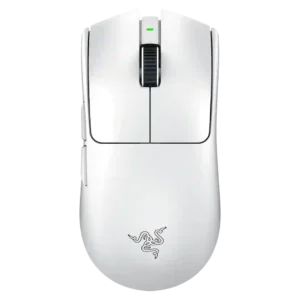
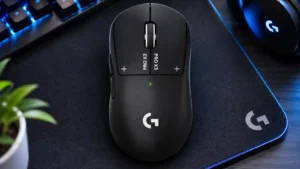
Compare Razer Viper V3 Pro vs Logitech G PRO X3 SUPERSTRIKE

Razer Viper V3 Pro

Razer Viper V3 Pro

Overall score 4.2 / 5

Based on 33 scored reviews

vs
Logitech G PRO X3 SUPERSTRIKE

Logitech G PRO X3 SUPERSTRIKE

Overall score 3.8 / 5

Based on 28 scored reviews

How we score

Scorata scores summarize analyzed review evidence on a 1–5 scale; they are not laboratory measurements or a simple average of customer star ratings. Feature scores summarize the reviews covering that feature. The overall score averages feature scores within each review, then combines review averages. When both expert and customer evidence are available, those two groups receive equal weight. Products can have different review coverage, so small score gaps do not establish a winner.

Recommendations prioritize important features for the category, with a score of at least 3.5, a gap of at least 0.25 points and at least two supporting reviews per product. Features with widely varying scores or broad connectivity contexts are excluded from recommendations. These safeguards do not establish statistical significance.

Quick verdict

What each product is best for

The review evidence points to a tradeoff: side button quality and ergonomic design versus software stability and click noise. Choose according to which strengths matter more to you; the overall score alone does not settle that choice.

Choose Razer Viper V3 Pro for side button quality and ergonomic design.

Choose Logitech G PRO X3 SUPERSTRIKE for software stability and click noise.

Why these recommendations?

Razer Viper V3 Pro

Where It Has the Edge

  • side button quality is 4.6 vs 2.2. Side buttons were generally a strength, often called well placed, firm, separated, and easy to identify, though one...
  • ergonomic design is 4.7 vs 2.5. Ergonomics were broadly praised for comfort and hand support, with reviewers highlighting long-session usability and a safe symmetrical...
  • handedness options is 3.8 vs 2.0. Handedness was mixed: the symmetrical shell helped left-handed use, but left-side-only thumb buttons limited true ambidextrous comfort.

Logitech G PRO X3 SUPERSTRIKE

Where It Has the Edge

  • software stability is 4.5 vs 2.0. G Hub is generally described as stable during configuration.
  • click noise is 4.9 vs 3.0. The haptic main buttons are exceptionally quiet, even with strong feedback enabled.
  • switch durability is 5.0 vs 4.0. Contactless sensing eliminates traditional electrical contact wear, an appealing durability advantage of the main triggers.
Razer Viper V3 Pro 4.2 overall score
Logitech G PRO X3 SUPERSTRIKE 3.8 overall score

Compare features

Scores are out of 5. Missing scores mean missing review evidence, not a missing feature.

Scored on both products

Battery and charging

Battery life
Razer Viper V3 Pro
3.6

Battery life was context-dependent: strong at 1K polling, acceptable at mid polling, and repeatedly criticized at 8K polling.

Logitech G PRO X3 SUPERSTRIKE
4.7

Battery endurance is substantially improved, with several hands-on accounts reporting days or a week between charges. Higher polling and stronger haptics shorten runtime.

Charging convenience
Razer Viper V3 Pro
3.0

Charging convenience was only lightly covered, but reviewers appreciated fast or usable charging while wishing for a dock or stand.

Logitech G PRO X3 SUPERSTRIKE
3.8

Longer runtime reduces charging interruptions, but charging can still require a cable without an optional compatible mat.

Controls and connectivity

Software stability
Razer Viper V3 Pro
2.0

Software stability was inconsistent, with a few reviewers reporting Synapse loading issues, crashes, or slow wake behavior.

Logitech G PRO X3 SUPERSTRIKE
4.5

G Hub is generally described as stable during configuration.

Side button quality
Razer Viper V3 Pro
4.6

Side buttons were generally a strength, often called well placed, firm, separated, and easy to identify, though one review found tactility only decent.

Logitech G PRO X3 SUPERSTRIKE
2.2

The thumb buttons are a recurring weakness: soft, mushy feedback and travel feel out of place on a flagship mouse.

Button customization
Razer Viper V3 Pro
4.0

Button customization was considered strong because Synapse supports remapping, HyperShift layers, and profile-specific setup.

Logitech G PRO X3 SUPERSTRIKE
4.8

Extensive per-button HITS controls and remapping let players customize inputs to their games and preferences.

Software usability
Razer Viper V3 Pro
4.0

Software usability was mixed: Synapse offers deep, useful tuning, but some reviewers disliked its bloat, ads, crashes, or general feel.

Logitech G PRO X3 SUPERSTRIKE
3.7

G Hub makes many adjustments easy, but its layout and onboard-memory workflow can be counterintuitive.

Button responsiveness
Razer Viper V3 Pro
4.7

Button responsiveness was widely praised, with clicks described as fast, immediate, smooth, and dependable in competitive play.

Logitech G PRO X3 SUPERSTRIKE
4.7

Tuned main triggers respond rapidly and make repeated inputs easier; the conventional side buttons are much less crisp.

Other features

MOBA gaming suitability
Razer Viper V3 Pro
2.5

MOBA suitability was similarly limited; reviewers framed it as an FPS-first mouse rather than a button-rich MOBA tool.

Logitech G PRO X3 SUPERSTRIKE
5.0

Rapid reset and repeat clicking are particularly appealing for MOBA players who issue inputs quickly.

Glide smoothness
Razer Viper V3 Pro
4.6

Glide was one of the strongest areas, with large PTFE feet repeatedly praised for smooth, effortless movement on many pads and surfaces.

Logitech G PRO X3 SUPERSTRIKE
2.3

Stock feet are often described as scratchy or slower than premium PTFE alternatives, although one user liked the glide out of the box.

Cable flexibility
Razer Viper V3 Pro
2.4

Cable feedback was negative to mixed because wired use felt stiff, draggy, or less flexible than expected for such a light wireless mouse.

Logitech G PRO X3 SUPERSTRIKE
4.5

The included cable is light and flexible enough to use while playing wired.

Handedness options
Razer Viper V3 Pro
3.8

Handedness was mixed: the symmetrical shell helped left-handed use, but left-side-only thumb buttons limited true ambidextrous comfort.

Logitech G PRO X3 SUPERSTRIKE
2.0

The mouse has a symmetrical outline but no left-handed variant or equivalent right-side thumb buttons.

Left and right click quality
Razer Viper V3 Pro
4.6

Primary clicks were praised for speed, low travel, tactility, and reduced misclick risk, with several reviewers preferring their feel to rivals.

Logitech G PRO X3 SUPERSTRIKE
3.1

Main clicks are adjustable and generally well implemented, although weaker haptics and lateral paddle movement detract on some units.

RGB features
Razer Viper V3 Pro
4.0

The lack of RGB was often treated as an esports-minded tradeoff that saves weight and battery, though some users may miss the flash.

Logitech G PRO X3 SUPERSTRIKE
5.0

The absence of RGB is welcome to players who prefer an understated, battery-conscious design.

Onboard memory
Razer Viper V3 Pro
3.3

Onboard memory was valued for carrying settings between PCs, but the single-profile limitation drew criticism.

Logitech G PRO X3 SUPERSTRIKE
4.2

Onboard profiles keep settings portable and reduce dependence on G Hub, although saving configurations can be counterintuitive.

Motion consistency
Razer Viper V3 Pro
4.3

Motion was usually described as buttery, smooth, and accurate, though one reviewer found micro-adjustments jerky with certain large feet and pads.

Logitech G PRO X3 SUPERSTRIKE
5.0

Tracking remains consistent and avoids skipping across varied surfaces.

Surface compatibility
Razer Viper V3 Pro
4.5

Surface compatibility was praised where tested, including cloth, wood, glass, leather, concrete, and other mousepad surfaces.

Logitech G PRO X3 SUPERSTRIKE
3.9

The sensor tracks well across many surfaces, including cloth and glass, but glass settings and textured-pad glide can require attention.

Click latency
Razer Viper V3 Pro
5.0

Latency feedback was extremely positive, with reviewers describing the mouse as class-leading, delay-free, or nearly predictive in competitive play.

Logitech G PRO X3 SUPERSTRIKE
4.4

Click processing is extremely fast, and shorter actuation can reduce reaction delay. Measured personal reaction gains range from noticeable to negligible.

Polling rate
Razer Viper V3 Pro
3.4

The 8K polling capability impressed reviewers technically, but many found its real-world benefit subtle, hardware-dependent, or not worth constant use.

Logitech G PRO X3 SUPERSTRIKE
4.0

Up to 8K polling over both wired and wireless connections offers flexibility, but the highest rate costs battery life and may cause stutter in some games.

Switch feel
Razer Viper V3 Pro
4.4

Switch feel was mostly praised as firm, crisp, snappy, and satisfying, with a few reviewers noting softness or loudness preferences.

Logitech G PRO X3 SUPERSTRIKE
3.8

Adjustable simulated clicks can feel satisfying and very light, but some prefer the snap of a mechanical switch and cannot find a comfortable haptic setting.

Weight
Razer Viper V3 Pro
4.7

Weight was one of the clearest strengths: reviewers repeatedly called the 54g body featherlight, fatigue-reducing, and easy to move.

Logitech G PRO X3 SUPERSTRIKE
4.2

The lightweight shell is easy to flick, especially with improved balance, but rivals can be noticeably lighter and the actual weight reduction is small.

Scroll wheel quality
Razer Viper V3 Pro
3.2

Scroll wheel feedback was split: reviewers liked its tactility for gaming, but several found it stiff or uncomfortable for heavy everyday scrolling.

Logitech G PRO X3 SUPERSTRIKE
2.8

The wheel works reliably for many users but its soft middle click and indistinct notches feel dated.

Grip texture
Razer Viper V3 Pro
4.1

Grip texture was a common strength, praised for secure smooth-touch traction, though a few reviewers found it slippery or prone to grime and fingerprints.

Logitech G PRO X3 SUPERSTRIKE
4.5

The lightly rubberized coating provides a steady grip without being excessively sticky or slippery; included tape adds optional grip.

FPS gaming suitability
Razer Viper V3 Pro
4.7

FPS and esports suitability was the strongest consensus: reviewers repeatedly called it a top-tier competitive shooter mouse.

Logitech G PRO X3 SUPERSTRIKE
5.0

Precise tracking and rapid clicks make this an elite FPS mouse, particularly for players who can exploit short trigger travel.

Balance and weight distribution
Razer Viper V3 Pro
5.0

Balance was praised by several video reviewers, who found the light body planted and evenly balanced without front or rear tipping.

Logitech G PRO X3 SUPERSTRIKE
4.8

Redistributed internal weight is the standout handling improvement, making lifts and sweeps feel more natural. Some users still detect slight front bias.

DPI range
Razer Viper V3 Pro
3.7

Reviewers treated the 35K DPI ceiling and single-step adjustment as technically impressive, though often more than most players need.

Logitech G PRO X3 SUPERSTRIKE
3.8

The very high DPI ceiling provides ample sensitivity headroom, although most players never need anything close to the maximum.

Comfort and build

Ergonomic design
Razer Viper V3 Pro
4.7

Ergonomics were broadly praised for comfort and hand support, with reviewers highlighting long-session usability and a safe symmetrical design.

Logitech G PRO X3 SUPERSTRIKE
2.5

The safe symmetrical design suits numerous grips but lacks specialized ergonomic support, and one palm-grip user experienced wrist discomfort.

Skate durability
Razer Viper V3 Pro
4.0

Skate durability had limited evidence, but larger PTFE pads were expected to wear slower and feel more stable.

Logitech G PRO X3 SUPERSTRIKE
2.0

The stock feet may wear down quickly on hard surfaces.

Palm grip comfort
Razer Viper V3 Pro
4.3

Palm support received some positive notes thanks to the rear hump and larger shell, though the mouse is primarily tuned for claw and fingertip users.

Logitech G PRO X3 SUPERSTRIKE
2.9

Palm grip comfort varies considerably: some find the familiar shape natural, while others prefer a more supportive ergonomic shell.

Switch durability
Razer Viper V3 Pro
4.0

Switch durability was mainly supported by praise around optical switches avoiding double-click risk and long click life, though long-term proof was limited.

Logitech G PRO X3 SUPERSTRIKE
5.0

Contactless sensing eliminates traditional electrical contact wear, an appealing durability advantage of the main triggers.

Long-session comfort
Razer Viper V3 Pro
4.6

Long-session comfort was praised thanks to low weight, supportive shape, smooth glide, and reduced fatigue in long work or gaming sessions.

Logitech G PRO X3 SUPERSTRIKE
4.0

Better balance and secure grip help extended play, though palm-grip users who need an ergonomic shape may experience discomfort.

Shape comfort
Razer Viper V3 Pro
3.9

Shape comfort was mostly positive for medium-to-large hands, but not universal; some reviewers preferred earlier shapes or found sizing narrow or specialized.

Logitech G PRO X3 SUPERSTRIKE
4.4

The familiar rounded shape is broadly comfortable and easy to pick up, but it is generic rather than a tailored ergonomic fit.

Fingertip grip comfort
Razer Viper V3 Pro
3.8

Fingertip comfort was positive for some reviewers but less consistent, as the larger, taller V3 Pro was not ideal for all fingertip users.

Logitech G PRO X3 SUPERSTRIKE
4.1

Better weight distribution helps fingertip players lift and flick the mouse, though smaller or lower-profile alternatives may fit some hands better.

Materials quality
Razer Viper V3 Pro
2.8

Materials were mixed: the lightweight shell and coating helped performance, but some reviewers found it cheap-feeling, grimy, or fingerprint-prone.

Logitech G PRO X3 SUPERSTRIKE
2.5

Plastic construction feels less impressive to buyers expecting more exotic materials for $200.

Build quality
Razer Viper V3 Pro
4.5

Build quality drew strong agreement, with most reviewers reporting a solid shell, little flex, no creaking, and high-quality construction.

Logitech G PRO X3 SUPERSTRIKE
4.6

The enclosed shell generally feels sturdy with minimal flex or creaking, though button wobble varies between units.

Claw grip comfort
Razer Viper V3 Pro
4.6

Claw grip support was a major strength, with multiple reviewers calling the shape ideal or especially comfortable for claw variants.

Logitech G PRO X3 SUPERSTRIKE
4.5

The gradual hump and familiar symmetrical shape generally suit claw grips.

Performance

Click noise
Razer Viper V3 Pro
3.0

Click noise was mixed; reviewers liked the click feel but some found the optical clicks loud or potentially distracting.

Logitech G PRO X3 SUPERSTRIKE
4.9

The haptic main buttons are exceptionally quiet, even with strong feedback enabled.

Wireless performance
Razer Viper V3 Pro
4.7

Wireless performance was a major strength, with reviewers describing it as stellar, flawless, snappy, and effectively wired-like.

Logitech G PRO X3 SUPERSTRIKE
5.0

LIGHTSPEED wireless performance is excellent, providing fast, reliable response for competitive play.

Sensor performance
Razer Viper V3 Pro
4.8

The Focus Pro sensor was consistently praised as accurate, smooth, and high-end, with several reviewers calling it among the best or flawless in use.

Logitech G PRO X3 SUPERSTRIKE
4.6

HERO 2 delivers excellent, reliable tracking; its higher headline specifications add little perceptible improvement over already excellent sensors.

Ownership and support

Value for money
Razer Viper V3 Pro
3.3

Value was the main tradeoff: reviewers loved the performance but often questioned the high price and bundled dongle for non-elite users.

Logitech G PRO X3 SUPERSTRIKE
2.1

The approximately $200 asking price is the dominant objection. HITS is distinctive, but many rivals provide similar practical performance for less.

Macro support
Razer Viper V3 Pro
4.5

Macro and custom action support was described as useful for assigning extra in-game controls to the side buttons.

Logitech G PRO X3 SUPERSTRIKE
4.3

G Hub supports macros and customized input assignments.

Tracking and training

Accuracy and tracking precision
Razer Viper V3 Pro
4.8

Reviewers repeatedly described tracking and aim translation as precise, reliable, or noticeably confidence-building in shooters and aim trainers.

Logitech G PRO X3 SUPERSTRIKE
4.7

The HERO 2 tracks accurately through flicks, sweeps and rapid adjustments. The sensor upgrade itself is rarely noticeable in ordinary play.

Evidence available for one product

Ownership and support

Reliability
Razer Viper V3 ProNo score yet
Logitech G PRO X3 SUPERSTRIKE
4.0

A hands-on test reported normal operation without issues during the review period.

Double-click reliability
Razer Viper V3 ProNo score yet
Logitech G PRO X3 SUPERSTRIKE
5.0

The contactless design avoids conventional switch-contact double-click wear; one tester also found shallow actuation more reliable than on their X2.

Upgrade value
Razer Viper V3 ProNo score yet
Logitech G PRO X3 SUPERSTRIKE
2.6

Better balance and substantially longer battery life are meaningful improvements, but most X2 owners should keep their existing mouse.

Other features

2.4GHz connectivity
Razer Viper V3 Pro
2.0

The HyperPolling receiver supports elite wireless performance, but lack of a simpler 2.4GHz USB dongle was criticized as inconvenient.

Logitech G PRO X3 SUPERSTRIKENo score yet
Acceleration control
Razer Viper V3 ProNo score yet
Logitech G PRO X3 SUPERSTRIKE
2.0

Advanced acceleration-curve customization is missing, despite the higher maximum acceleration specification.

Accessory compatibility
Razer Viper V3 ProNo score yet
Logitech G PRO X3 SUPERSTRIKE
2.5

PowerPlay 2 can charge the mouse but cannot serve as its receiver, and the original PowerPlay is incompatible.

Adjustable click actuation
Razer Viper V3 ProNo score yet
Logitech G PRO X3 SUPERSTRIKE
4.6

Ten actuation levels let users choose hair-trigger or deliberate clicks. Faster registration is appealing, but extremely shallow settings can cause misclicks.

Cable quality
Razer Viper V3 ProNo score yet
Logitech G PRO X3 SUPERSTRIKE
4.0

The included rubberized cable is usable as a wired mouse cable despite lacking a paracord covering.

Click consistency
Razer Viper V3 ProNo score yet
Logitech G PRO X3 SUPERSTRIKE
4.3

Measured click latency is highly consistent, but the physical haptic feel can vary between individual copies.

Coating quality
Razer Viper V3 ProNo score yet
Logitech G PRO X3 SUPERSTRIKE
3.9

The smooth, slightly rubberized finish grips well, but some users find it unremarkable and prone to fingerprints.

Color options
Razer Viper V3 ProNo score yet
Logitech G PRO X3 SUPERSTRIKE
2.8

Black and hot magenta offer a distinctive choice, but the absence of a white version disappoints some buyers.

Connection stability
Razer Viper V3 Pro
4.3

Connection stability was mostly strong, with no drops in several tests, but a few reviewers reported slow wake or brief connection behavior.

Logitech G PRO X3 SUPERSTRIKENo score yet
Cursor control
Razer Viper V3 ProNo score yet
Logitech G PRO X3 SUPERSTRIKE
4.8

Improved balance and accurate tracking make micro-adjustments and quick sweeps predictable.

Dedicated DPI switch
Razer Viper V3 ProNo score yet
Logitech G PRO X3 SUPERSTRIKE
1.9

A dedicated DPI switch is absent, making immediate sensitivity changes unnecessarily inconvenient on a premium mouse.

Feet quality
Razer Viper V3 ProNo score yet
Logitech G PRO X3 SUPERSTRIKE
2.3

Factory skates are a frequent complaint because they feel scratchy or slow compared with premium alternatives, particularly on textured pads.

Fingerprint and smudge resistance
Razer Viper V3 ProNo score yet
Logitech G PRO X3 SUPERSTRIKE
2.3

The black finish readily shows fingerprints and hand oils; magenta may conceal them better.

Included accessories
Razer Viper V3 ProNo score yet
Logitech G PRO X3 SUPERSTRIKE
3.3

Optional grip tape is useful, but premium pricing makes the lack of spare or alternative skates disappointing.

Launch quality control
Razer Viper V3 ProNo score yet
Logitech G PRO X3 SUPERSTRIKE
2.0

Testing two units revealed inconsistent haptic strength and button feel, an unwelcome variation at this price.

Learning curve
Razer Viper V3 ProNo score yet
Logitech G PRO X3 SUPERSTRIKE
4.0

The familiar shell is easy to adapt to, while unusually sensitive triggers need practice; presets help simplify configuration.

Lift-off distance
Razer Viper V3 Pro
4.3

Lift-off and landing distance controls were viewed as useful parts of the precise sensor package, especially for different surfaces.

Logitech G PRO X3 SUPERSTRIKENo score yet
MMO gaming suitability
Razer Viper V3 Pro
2.5

MMO suitability was weak because the mouse is genre-specific and lacks the extra buttons many MMO players want.

Logitech G PRO X3 SUPERSTRIKENo score yet
Motion latency
Razer Viper V3 ProNo score yet
Logitech G PRO X3 SUPERSTRIKE
4.5

Sensor latency is exceptionally low and slightly improved over the previous generation, though the difference is difficult to feel.

Mouse sensitivity matching
Razer Viper V3 ProNo score yet
Logitech G PRO X3 SUPERSTRIKE
5.0

Sensitivity matching helps recreate the feel of a previous mouse even when the same nominal DPI produces different tracking behavior.

Portability
Razer Viper V3 Pro
2.0

Portability suffered because the required receiver-and-cable setup was considered awkward for travel despite the light mouse body.

Logitech G PRO X3 SUPERSTRIKENo score yet
Power efficiency
Razer Viper V3 ProNo score yet
Logitech G PRO X3 SUPERSTRIKE
4.9

The new chipset markedly improves power efficiency without needing a larger battery, extending runtime despite the lightweight shell.

Premium feel
Razer Viper V3 Pro
3.0

Premium feel was mostly positive, but a few reviewers felt the featherlight plastic made it seem less premium than its price suggests.

Logitech G PRO X3 SUPERSTRIKENo score yet
Professional player presets
Razer Viper V3 ProNo score yet
Logitech G PRO X3 SUPERSTRIKE
4.7

Professional player presets offer a useful starting point for experimenting with HITS rather than configuring everything from scratch.

Profile management
Razer Viper V3 ProNo score yet
Logitech G PRO X3 SUPERSTRIKE
5.0

Custom game configurations and preset profiles simplify switching between different input preferences.

Profile switching
Razer Viper V3 Pro
3.0

Profile switching was mixed because software profiles are useful, but bottom-mounted DPI/profile control felt awkward or finicky to some reviewers.

Logitech G PRO X3 SUPERSTRIKENo score yet
Rapid Trigger
Razer Viper V3 ProNo score yet
Logitech G PRO X3 SUPERSTRIKE
4.7

Rapid Trigger enables faster repeat inputs without fully releasing the button. Its real benefit depends on the game, player and input limits.

Responsiveness
Razer Viper V3 ProNo score yet
Logitech G PRO X3 SUPERSTRIKE
4.7

The mouse responds quickly and accurately, with especially snappy clicks. The improvement in responsiveness over its predecessor can be difficult to notice during gameplay.

Scroll wheel precision
Razer Viper V3 ProNo score yet
Logitech G PRO X3 SUPERSTRIKE
5.0

The wheel can scroll reliably without missed or ghost steps.

Scroll wheel resistance
Razer Viper V3 ProNo score yet
Logitech G PRO X3 SUPERSTRIKE
3.3

Wheel tension can prevent accidental clicks, but some users find the notches loose or insufficiently defined.

Scroll wheel usefulness in games
Razer Viper V3 ProNo score yet
Logitech G PRO X3 SUPERSTRIKE
5.0

BHOP scroll filtering can prevent stray weapon swaps while preserving deliberate inputs.

Surface calibration
Razer Viper V3 ProNo score yet
Logitech G PRO X3 SUPERSTRIKE
4.0

Surface settings can help address cursor jumps on glass mousepads.

Switch quality
Razer Viper V3 ProNo score yet
Logitech G PRO X3 SUPERSTRIKE
4.9

The HITS system is the standout innovation, offering compelling adjustment and speed without traditional switch contacts.

USB receiver storage
Razer Viper V3 ProNo score yet
Logitech G PRO X3 SUPERSTRIKE
4.5

The internal dongle storage compartment is a useful inclusion for a lightweight gaming mouse.

Wired connectivity
Razer Viper V3 ProNo score yet
Logitech G PRO X3 SUPERSTRIKE
4.8

The updated chipset enables full 8K polling while plugged in, removing the previous model's wired-rate limitation.

Wireless latency
Razer Viper V3 Pro
4.8

Wireless latency was widely praised as near-zero or virtually lag-free, though reviewers often framed 8K gains as only relevant to elite players.

Logitech G PRO X3 SUPERSTRIKENo score yet

Controls and connectivity

Accidental button activation
Razer Viper V3 ProNo score yet
Logitech G PRO X3 SUPERSTRIKE
3.2

The shallowest trigger settings can cause unintended clicks; careful tuning can reduce them without sacrificing much responsiveness.

Angle snapping
Razer Viper V3 ProNo score yet
Logitech G PRO X3 SUPERSTRIKE
2.0

G Hub lacks angle snapping, a feature available in some competing configuration software.

Bluetooth support
Razer Viper V3 Pro
2.2

Bluetooth support was a clear limitation; reviewers repeatedly noted its absence reduces versatility outside dedicated esports setups.

Logitech G PRO X3 SUPERSTRIKENo score yet
Button count
Razer Viper V3 ProNo score yet
Logitech G PRO X3 SUPERSTRIKE
2.5

The minimal five-button layout suits esports but leaves few spare controls for assigning DPI changes.

Button placement
Razer Viper V3 ProNo score yet
Logitech G PRO X3 SUPERSTRIKE
2.0

Left-side buttons are inconvenient for left-handed users.

Button quality
Razer Viper V3 ProNo score yet
Logitech G PRO X3 SUPERSTRIKE
3.0

Main paddles can feel solid with little grinding, but excessive side-to-side movement is noticeable on some units.

Companion software dependence
Razer Viper V3 ProNo score yet
Logitech G PRO X3 SUPERSTRIKE
2.2

G Hub is needed for initial configuration and can be inconvenient for DPI changes. Onboard settings reduce reliance after setup.

DPI customization
Razer Viper V3 ProNo score yet
Logitech G PRO X3 SUPERSTRIKE
4.8

DPI profiles and sensitivity-matching tools give players fine control over tracking preferences.

Haptic controls
Razer Viper V3 ProNo score yet
Logitech G PRO X3 SUPERSTRIKE
4.0

Adjustable haptic feedback can simulate a click at the selected actuation point. It is softer than the X2 on several units and opinions differ on the feel.

Polling rate customization
Razer Viper V3 ProNo score yet
Logitech G PRO X3 SUPERSTRIKE
4.5

Selectable wired and wireless polling rates make it easy to choose between responsiveness and battery endurance.

Programmable buttons
Razer Viper V3 Pro
4.0

Programmable controls and remapping were seen as useful through Synapse, though the esports-focused button count limits broader genre flexibility.

Logitech G PRO X3 SUPERSTRIKENo score yet
Scroll wheel customization
Razer Viper V3 ProNo score yet
Logitech G PRO X3 SUPERSTRIKE
4.8

BHOP mode provides configurable scroll delays to prevent unwanted wheel inputs, useful for games with scroll-bound actions.

Software and driver support
Razer Viper V3 ProNo score yet
Logitech G PRO X3 SUPERSTRIKE
2.3

G Hub is functional, but the lack of a browser-based configuration tool frustrates users who prefer lightweight drivers.

Software quality
Razer Viper V3 ProNo score yet
Logitech G PRO X3 SUPERSTRIKE
4.1

G Hub offers extensive HITS controls and profiles, but rivals have more advanced sensor adjustments and some users dislike its layout.

Software resource usage
Razer Viper V3 ProNo score yet
Logitech G PRO X3 SUPERSTRIKE
2.0

G Hub is considered a heavy application for what is primarily a mouse configuration task.

Comfort and build

Aesthetic design
Razer Viper V3 ProNo score yet
Logitech G PRO X3 SUPERSTRIKE
4.7

The familiar understated silhouette and bold cross markings are distinctive, with the hot-pink color especially popular among several reviewers.

Durability over time
Razer Viper V3 Pro
4.5

Durability over time had limited but positive long-term evidence, with a year-later reviewer reporting few issues across units.

Logitech G PRO X3 SUPERSTRIKENo score yet
Grip comfort
Razer Viper V3 ProNo score yet
Logitech G PRO X3 SUPERSTRIKE
4.5

The safe shell shape accommodates many grips comfortably without a lengthy adjustment period.

Hand size compatibility
Razer Viper V3 ProNo score yet
Logitech G PRO X3 SUPERSTRIKE
4.0

The medium-sized shell is suitable for a wide range of hands, but extremes of hand size may need a different shape.

Battery and charging

Battery hot-swap system
Razer Viper V3 ProNo score yet
Logitech G PRO X3 SUPERSTRIKE
2.3

There is no hot-swap system for uninterrupted wireless use, unlike some competing premium mice.

Wireless charging support
Razer Viper V3 ProNo score yet
Logitech G PRO X3 SUPERSTRIKE
2.1

PowerPlay compatibility is useful for some users, but its added weight and proprietary mat requirement are unpopular with several competitive players.

Performance

Gaming performance
Razer Viper V3 ProNo score yet
Logitech G PRO X3 SUPERSTRIKE
4.6

Gaming performance is widely praised, but faster clicking does not guarantee better scores or overcome in-game firing limits.

Scroll wheel noise
Razer Viper V3 ProNo score yet
Logitech G PRO X3 SUPERSTRIKE
4.5

The scroll wheel has a muted sound rather than a loud click.

Other Top Gaming Mice to Consider

#1 ASUS ROG Harpe II Ace
4.6

Choose the ROG Harpe II Ace for ultralight FPS play, precise tracking, smooth glide, and web-based tuning. Skip it if you need palm-grip support, MMO buttons, onboard profiles, or long...

Pros: glide smoothness, weight

Cons: handedness options

#2 Razer Basilisk V3
4.5

Excellent tracking, comfortable right-handed ergonomics and a versatile scroll wheel make the Basilisk V3 a strong gaming and productivity mouse. Its substantial weight, fixed cable and sometimes over-sensitive automatic scrolling...

Pros: scroll wheel quality, RGB features

Cons: weight, handedness options

#3 McHose L7 Pro
4.5

The L7 Pro delivers remarkably light handling, precise aiming and a grippy shell at a budget price. Stock skates are less impressive, and conflicting click-latency measurements warrant caution for latency-sensitive...

Pros: value for money, weight

Cons: wired connectivity

#4 Razer Viper V4 Pro
4.4

Best for ultra-light, competition-focused speed, precise tracking, stable wireless, and long battery life. Skip it if you need quieter clicks, left-handed support, Bluetooth, more buttons, or better value for casual...

Pros: value for money, weight

Cons: click noise, RGB features