Scorata scores summarize analyzed review evidence on a 1–5 scale; they are not laboratory measurements or a simple average of customer star ratings. Feature scores summarize the reviews covering that feature. The overall score averages feature scores within each review, then combines review averages. When both expert and customer evidence are available, those two groups receive equal weight. Products can have different review coverage, so small score gaps do not establish a winner.
Recommendations prioritize important features for the category, with a score of at least 3.5, a gap of at least 0.25 points and at least two supporting reviews per product. Features with widely varying scores or broad connectivity contexts are excluded from recommendations. These safeguards do not establish statistical significance.
Quick verdict
What each product is best for
The review evidence points to a tradeoff: battery life and RGB features versus cable flexibility and side button quality. Choose according to which strengths matter more to you; the overall score alone does not settle that choice.
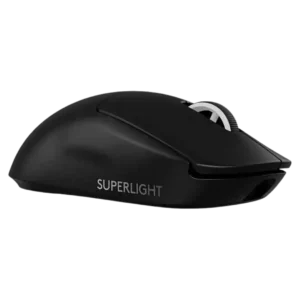
Choose Logitech G PRO X Superlight 2 for battery life and RGB features.
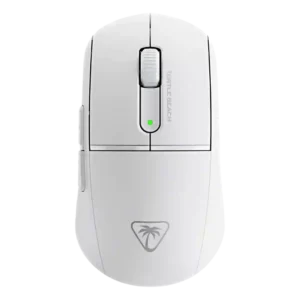
Choose Turtle Beach Burst II Air for cable flexibility and side button quality.
Why these recommendations?
Logitech G PRO X Superlight 2
Where It Has the Edge
battery life is 4.7 vs 4.4. Battery life was generally praised as long-lasting, though reviewers noted it drops with higher polling rates.
RGB features is 4.3 vs 2.7. The lack of RGB was generally accepted as a worthwhile tradeoff for battery life, weight, and the mouse’s...
premium feel is 4.5 vs 3.3. Premium feel was positive overall, with reviewers saying the mouse feels sturdy, premium, and high quality.
Turtle Beach Burst II Air
Where It Has the Edge
cable flexibility is 4.5 vs 2.0. Cable flexibility was a consistent positive, with reviewers calling the included cable flexible, soft, light, and low-drag.
side button quality is 4.4 vs 2.6. Side buttons were usually easy to reach and press, but one reviewer found them a little mushier than...
value for money is 4.2 vs 3.1. Value was divided: several reviewers called the price fair or a strong deal, while others questioned it due...
Logitech G PRO X Superlight 24.0 overall score
Turtle Beach Burst II Air4.3 overall score
Compare features
Scores are out of 5. Missing scores mean missing review evidence, not a missing feature.
Scored on both products
Battery and charging
Battery life
Logitech G PRO X Superlight 2
4.7
Battery life was generally praised as long-lasting, though reviewers noted it drops with higher polling rates.
Turtle Beach Burst II Air
4.4
Battery life was broadly liked, especially over Bluetooth, though several reviewers noted 2.4GHz endurance was shorter than some competitors.
Charging convenience
Logitech G PRO X Superlight 2
4.6
Charging convenience was praised for USB-C, faster charging, and fewer desk cables.
Turtle Beach Burst II Air
4.7
Charging convenience was positive thanks to quick charging, rapid USB-C top-ups, and the ability to charge without much disruption.
Other features
Cable flexibility
Logitech G PRO X Superlight 2
2.0
Cable quality was a recurring complaint, with reviewers criticizing drag, resistance, and the dated rubber cable.
Turtle Beach Burst II Air
4.5
Cable flexibility was a consistent positive, with reviewers calling the included cable flexible, soft, light, and low-drag.
Profile switching
Logitech G PRO X Superlight 2
3.0
Profile behavior was mixed: app-linked settings were useful, but onboard-profile handling was described as confusing in G Hub.
Turtle Beach Burst II Air
4.6
Profile switching evidence was limited but positive, with one reviewer saying profiles made it easy to change settings by game.
RGB features
Logitech G PRO X Superlight 2
4.3
The lack of RGB was generally accepted as a worthwhile tradeoff for battery life, weight, and the mouse’s clean look.
Turtle Beach Burst II Air
2.7
RGB sentiment was mixed to negative: some accepted the omission for weight savings, while others treated the lack of lighting as a style or feature loss.
Glide smoothness
Logitech G PRO X Superlight 2
3.5
Glide smoothness was highly mixed: some reviewers praised effortless glide, while others disliked stock-skate drag or control-heavy movement.
Turtle Beach Burst II Air
4.7
Glide smoothness was one of the strongest positives, with repeated praise for effortless movement, smooth skates, and easy desktop control.
Premium feel
Logitech G PRO X Superlight 2
4.5
Premium feel was positive overall, with reviewers saying the mouse feels sturdy, premium, and high quality.
Turtle Beach Burst II Air
3.3
Premium feel was mixed, with some satisfying build impressions offset by multiple comments that the shell felt cheap or hollow.
Polling rate
Logitech G PRO X Superlight 2
4.1
Polling-rate opinions were mixed: several reviewers felt clear responsiveness gains, while others saw 2,000Hz as fine but not industry-leading.
Turtle Beach Burst II Air
3.0
Polling rate was the clearest performance limitation: some reviewers accepted the 1,000Hz cap, but many called it a drawback versus higher-end gaming mice.
Scroll wheel quality
Logitech G PRO X Superlight 2
3.0
Scroll wheel feedback was mixed, with some praise for tactility but repeated criticism that it felt stiff, mushy, vague, or less precise.
Turtle Beach Burst II Air
4.0
Scroll wheel opinions were mixed-positive: reviewers liked its feel and control, while some wished for smoother or larger wheel behavior.
Surface compatibility
Logitech G PRO X Superlight 2
3.8
Surface compatibility was mixed, with good results across many surfaces but complaints on softer pads and warnings to tune surface modes.
Turtle Beach Burst II Air
4.8
Surface compatibility evidence was positive but limited, with reviewers saying it glided well on almost any surface.
DPI range
Logitech G PRO X Superlight 2
3.7
DPI coverage was seen as technically strong and granular, but one reviewer felt the extreme ceiling is more marketing than everyday value.
Turtle Beach Burst II Air
4.3
The DPI range was seen as broad and flexible, though one reviewer found the very high settings excessive for normal use.
Onboard memory
Logitech G PRO X Superlight 2
4.0
Onboard memory was supported by the ability to save multiple profiles, though evidence was more about usefulness than enthusiasm.
Turtle Beach Burst II Air
4.5
Onboard memory was viewed positively because stored profiles supported extra use cases and game/task-specific setups.
2.4GHz connectivity
Logitech G PRO X Superlight 2
5.0
The 2.4GHz connection was praised through an instant, fast connection experience with the included dongle.
Turtle Beach Burst II Air
4.5
2.4GHz connectivity was praised for easy setup, low-latency use, and stronger gaming-oriented signal behavior.
Balance and weight distribution
Logitech G PRO X Superlight 2
4.5
Weight distribution received positive evidence from a reviewer who specifically praised the balance.
Turtle Beach Burst II Air
4.9
Balance and weight distribution received limited but very strong praise, with reviewers calling the mouse well balanced and perfectly centered.
Switch feel
Logitech G PRO X Superlight 2
4.2
Switch feel split reviewers: many loved the crisp, tactile Lightforce feel, while others found the clicks heavier or too tactile.
Turtle Beach Burst II Air
4.6
Switch feel drew strong praise for tactility, snappiness, satisfying sound, and solid implementation, with only one reviewer noting a slightly heavier feel.
Connection stability
Logitech G PRO X Superlight 2
5.0
Connection stability was praised in one review for not faltering even in a difficult RF environment.
Turtle Beach Burst II Air
4.7
Connection stability was praised in the reviews that tested it, with no random disconnects and seamless switching reported.
Grip texture
Logitech G PRO X Superlight 2
4.4
Grip texture was well received, with reviewers praising the grippy surface, recessed sides, or usefulness for clammy hands.
Turtle Beach Burst II Air
4.1
Grip texture was mixed: tape and satin texture helped many users, while some found the untextured shell slippery.
Click latency
Logitech G PRO X Superlight 2
4.2
Click latency was praised as very low by some reviewers, though one technical reviewer found it merely good rather than flagship-leading.
Turtle Beach Burst II Air
4.5
Click-speed evidence was favorable, with reviewers tying the optical switches to quick response, optical speed, and minimal pre-travel.
Ecosystem integration
Logitech G PRO X Superlight 2
4.5
Ecosystem integration was praised for Logitech presets, backward compatibility, and community/profile support.
Turtle Beach Burst II Air
4.8
Ecosystem integration evidence was limited but positive, with existing Turtle Beach/ROCCAT settings moving over seamlessly.
FPS gaming suitability
Logitech G PRO X Superlight 2
5.0
FPS suitability was one of the strongest areas, with repeated praise for speed, responsiveness, and competitive first-person shooter use.
Turtle Beach Burst II Air
4.7
FPS suitability was a clear strength, with reviewers praising shooter performance, competitive use, and flick-shot benefits.
Left and right click quality
Logitech G PRO X Superlight 2
4.8
Left and right clicks were praised for satisfying tactility, light rapid tapping, and improved main-button feel.
Turtle Beach Burst II Air
4.5
Main click quality was generally strong, with praise for tactile feedback, satisfying actuation, and minimal travel, though one review sample had uneven pre-travel.
Weight
Logitech G PRO X Superlight 2
4.7
Reviewers strongly praised the low weight, calling it excellent, effortless, and well balanced for the mouse size.
Turtle Beach Burst II Air
4.9
Weight was the strongest consensus strength, with reviewers repeatedly emphasizing the 47g body as exceptionally, even surprisingly, light.
Wireless latency
Logitech G PRO X Superlight 2
5.0
Wireless latency was praised directly, with reviewers reporting no latency issues or seemingly no latency at all.
Turtle Beach Burst II Air
4.9
Wireless latency evidence was positive, especially over 2.4GHz, where reviewers reported no perceivable latency or delivered performance.
Handedness options
Logitech G PRO X Superlight 2
3.5
Handedness support was mixed because the symmetrical shape helps lefties, but the side buttons remain left-side only.
Turtle Beach Burst II Air
3.6
Handedness evidence was mixed: the shell is symmetrical, but right-side button absence makes it more right-hand oriented.
Portability
Logitech G PRO X Superlight 2
4.5
Portability was supported by the dongle-storage cover, which one reviewer framed as essential for esports travel.
Turtle Beach Burst II Air
4.6
Portability was praised through dongle storage, device switching, Bluetooth, and battery life suitable for travel.
Motion consistency
Logitech G PRO X Superlight 2
4.8
Motion consistency was described positively, with reviewers calling motion smooth, sharp, and accurate.
Turtle Beach Burst II Air
4.7
Motion consistency evidence was limited but positive, with one reviewer reporting consistent tracking and no spin-out.
Cross-platform compatibility
Logitech G PRO X Superlight 2
4.5
Cross-platform compatibility was praised through G Hub support for both Windows and macOS.
Turtle Beach Burst II Air
4.5
Cross-platform compatibility was positive at the basic mouse level, with one review reporting issue-free Windows, Mac, and Android use.
Controls and connectivity
Side button quality
Logitech G PRO X Superlight 2
2.6
Side button quality was the most contested control area, ranging from well-placed and improved to repeatedly described as mushy.
Turtle Beach Burst II Air
4.4
Side buttons were usually easy to reach and press, but one reviewer found them a little mushier than the rest of the mouse.
Software stability
Logitech G PRO X Superlight 2
4.5
Software stability had limited but positive evidence from one review calling the G Hub interface stable.
Turtle Beach Burst II Air
2.8
Software stability was a concern in a few reviews, including bugs, glitches, and app detection issues.
Button responsiveness
Logitech G PRO X Superlight 2
4.0
Button responsiveness was mostly praised for tactile, responsive clicks, though one reviewer disliked the heavier actuation for spam clicking.
Turtle Beach Burst II Air
4.6
Button responsiveness was widely praised, with reviewers calling clicks precise, satisfying, light, and responsive during use.
Button customization
Logitech G PRO X Superlight 2
4.7
Customization drew positive comments for granular controls and strong software-hardware integration, though it still depends heavily on G Hub.
Turtle Beach Burst II Air
4.3
Button customization was considered useful and easy in Swarm II, though one review called the limited remappable options a constraint.
Software usability
Logitech G PRO X Superlight 2
3.9
Software usability was split sharply: some reviewers found G Hub easy and powerful, while others called it unintuitive or frustrating.
Turtle Beach Burst II Air
4.2
Software usability was mixed: several reviewers found Swarm II clear or simple, while others called it clunky or Windows-limited.
Programmable buttons
Logitech G PRO X Superlight 2
4.5
Programmable side buttons were useful to one reviewer for DPI adjustment, especially because the mouse lacks a dedicated DPI button.
Turtle Beach Burst II Air
4.6
Programmable-button evidence was positive where Easy Shift, reassignment, and layered functions added utility despite the limited physical button count.
Comfort and build
Palm grip comfort
Logitech G PRO X Superlight 2
2.5
Palm grip comfort was limited by one review saying palm-grip players may be better served elsewhere.
Turtle Beach Burst II Air
4.2
Palm grip comfort was viable and supported for some hands, though evidence suggested it was not the mouse's strongest grip style.
Materials quality
Logitech G PRO X Superlight 2
4.5
Materials quality was praised for a cool, soft matte plastic feel.
Turtle Beach Burst II Air
3.3
Materials quality was mixed, ranging from satisfying satin plastic to criticism that the shell felt cheap and hollow.
Build quality
Logitech G PRO X Superlight 2
4.8
Build quality was repeatedly praised as solid, squeak-free, well put together, and elite despite the light shell.
Turtle Beach Burst II Air
3.8
Build quality split reviewers: some praised solidity despite the low weight, while others noticed flex, rattle, or fall concerns.
Durability over time
Logitech G PRO X Superlight 2
4.5
Durability over time had limited but positive evidence from a longer-use reviewer whose unit remained rock solid.
Turtle Beach Burst II Air
3.8
Durability over time was mixed: one reviewer was unconcerned, another expected normal-care longevity, and another worried about abuse.
Ergonomic design
Logitech G PRO X Superlight 2
4.0
Ergonomics were generally positive for comfort and contouring, but one review noted large hands may find the shape less ergonomic.
Turtle Beach Burst II Air
4.6
Ergonomics were praised for comfort, hand fit, and a speedy full-size feel, with only minor shape reservations.
Long-session comfort
Logitech G PRO X Superlight 2
5.0
Long-session comfort was strongly positive in one review that reported almost no hand fatigue after long sessions.
Turtle Beach Burst II Air
4.6
Long-session comfort evidence was positive but limited, with reviewers citing pleasant sessions and easy daily computing use.
Fingertip grip comfort
Logitech G PRO X Superlight 2
5.0
Fingertip grip comfort was praised by reviewers who found the shape comfortable for fingertip use.
Turtle Beach Burst II Air
4.6
Fingertip grip comfort was also strong, with reviewers calling it a good alternative and enjoying it more with use.
Switch durability
Logitech G PRO X Superlight 2
4.7
Switch durability evidence centered on optical-switch reliability and reduced double-click concerns, with reviewers treating it as a meaningful benefit.
Turtle Beach Burst II Air
4.4
Switch durability evidence was favorable but mostly tied to confidence in the rated lifecycle and expected long-term switch life.
Claw grip comfort
Logitech G PRO X Superlight 2
4.6
Claw grip comfort was broadly positive, with reviewers calling the mouse comfortable or easy to use for claw grip.
Turtle Beach Burst II Air
4.7
Claw grip comfort was a strong fit, with reviewers praising the rear arch and overall shape for claw-style control.
Shape comfort
Logitech G PRO X Superlight 2
4.4
Shape comfort was broadly praised as safe, familiar, and very comfortable, though a few reviewers disliked the rounded shape personally.
Turtle Beach Burst II Air
4.3
Shape comfort was mostly positive across reviews, especially for the stubby rear-hump form, though some hands found the sides or size less comfortable.
Ownership and support
Value for money
Logitech G PRO X Superlight 2
3.1
Value was mixed: reviewers praised the performance tier but often questioned the price and upgrade value from the original Superlight.
Turtle Beach Burst II Air
4.2
Value was divided: several reviewers called the price fair or a strong deal, while others questioned it due to missing premium features.
Macro support
Logitech G PRO X Superlight 2
5.0
Macro support was praised for an easy-to-use macro tool that guides users through setup.
Turtle Beach Burst II Air
4.3
Macro support was present and useful for games or device control, with Easy Shift adding utility beyond basic commands.
Performance
Wireless performance
Logitech G PRO X Superlight 2
5.0
Wireless performance was praised as seamless and flawless, with no cable-related compromise in use.
Turtle Beach Burst II Air
4.6
Wireless performance was generally praised as reliable, fast, flexible, and minimally compromised.
Click noise
Logitech G PRO X Superlight 2
3.3
Click noise was mixed: some liked the satisfying click sound, while others found it loud or high-pitched.
Turtle Beach Burst II Air
3.7
Click noise evidence was limited and mixed, with one reviewer noting the clicks were a bit loud but not worse than some alternatives.
Sensor performance
Logitech G PRO X Superlight 2
4.9
The HERO 2 sensor was widely praised as crisp, precise, fast, and close to flawless, though some reviewers framed the higher specs as incremental.
Turtle Beach Burst II Air
4.7
Sensor impressions were strongly positive: reviewers praised the Owl-Eye sensor for clean tracking, swift movement handling, and flawless general performance.
Tracking and training
Accuracy and tracking precision
Logitech G PRO X Superlight 2
4.9
Reviewers consistently described the mouse as accurate in games, with especially strong praise for tracking, pointer accuracy, and shot control.
Turtle Beach Burst II Air
4.8
Reviewers consistently described tracking as precise, accurate, and dependable in games and testing, with no faltering or lag noted in the strongest reports.
Evidence available for one product
Other features
Acceleration control
Logitech G PRO X Superlight 2
4.5
Acceleration feel received direct praise in one review, where the reviewer enjoyed its smoothness in Diablo IV.
Turtle Beach Burst II AirNo score yet
Dock compatibility
Logitech G PRO X Superlight 2
4.3
PowerPlay compatibility was viewed positively, though one reviewer called the accessory expensive.
Turtle Beach Burst II AirNo score yet
Lift-off distance
Logitech G PRO X Superlight 2
4.2
Lift-off distance control was viewed as useful and noticeably adjustable, especially for players who fine-tune mouse behavior.
Turtle Beach Burst II AirNo score yet
MOBA gaming suitability
Logitech G PRO X Superlight 2
2.5
MOBA suitability was weaker because one reviewer found the heavier clicks worse for spam-click games.
Turtle Beach Burst II AirNo score yet
Water and dust resistance
Logitech G PRO X Superlight 2No score yet
Turtle Beach Burst II Air
2.4
Dust-resistance evidence was limited and negative, with one reviewer disliking exposed bottom openings where dust could enter.
Weight tuning
Logitech G PRO X Superlight 2
2.0
Weight tuning was weakly received because the swappable cover options were seen as features most people would not find useful.
Turtle Beach Burst II AirNo score yet
Controls and connectivity
Bluetooth support
Logitech G PRO X Superlight 2No score yet
Turtle Beach Burst II Air
4.3
Bluetooth support was appreciated for flexibility, portability, and device switching, though it was not always preferred for peak gaming.
Debounce customization
Logitech G PRO X Superlight 2No score yet
Turtle Beach Burst II Air
4.6
Debounce customization was viewed positively where tested, helping prevent accidental double clicks or supporting faster recognition.
Ownership and support
Drag click support
Logitech G PRO X Superlight 2
4.0
Drag click support had limited positive evidence from one reviewer who called drag clicking pretty awesome.
Turtle Beach Burst II AirNo score yet
Firmware reliability
Logitech G PRO X Superlight 2No score yet
Turtle Beach Burst II Air
4.7
Firmware reliability was mostly positive, with seamless or easy updates and good firmware upkeep reported.
Comfort and build
Skate durability
Logitech G PRO X Superlight 2
2.0
Skate durability was a repeated concern, with reviewers calling the PTFE feet thin, meh, or unlikely to last long.
Choose the ROG Harpe II Ace for ultralight FPS play, precise tracking, smooth glide, and web-based tuning. Skip it if you need palm-grip support, MMO buttons, onboard profiles, or long...
Excellent tracking, comfortable right-handed ergonomics and a versatile scroll wheel make the Basilisk V3 a strong gaming and productivity mouse. Its substantial weight, fixed cable and sometimes over-sensitive automatic scrolling...
The L7 Pro delivers remarkably light handling, precise aiming and a grippy shell at a budget price. Stock skates are less impressive, and conflicting click-latency measurements warrant caution for latency-sensitive...
Best for ultra-light, competition-focused speed, precise tracking, stable wireless, and long battery life. Skip it if you need quieter clicks, left-handed support, Bluetooth, more buttons, or better value for casual...