Other features
Ease of use
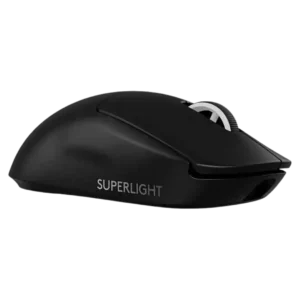
Logitech G PRO X Superlight 2No score yet
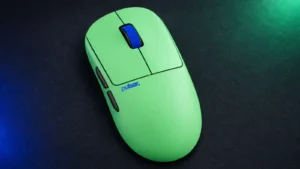
Pulsar X2 CrazyLight
5.0
The compact mouse is easy to pick up and handle.
2.4GHz connectivity
Logitech G PRO X Superlight 2
5.0
The 2.4GHz connection was praised through an instant, fast connection experience with the included dongle.
Pulsar X2 CrazyLightNo score yet
Acceleration control
Logitech G PRO X Superlight 2
4.5
Acceleration feel received direct praise in one review, where the reviewer enjoyed its smoothness in Diablo IV.
Pulsar X2 CrazyLightNo score yet
Accessory compatibility
Logitech G PRO X Superlight 2No score yet
Pulsar X2 CrazyLight
5.0
The larger skate recesses accommodate a wider range of aftermarket feet, including donut skates.
Cable drag
Logitech G PRO X Superlight 2No score yet
Pulsar X2 CrazyLight
2.0
The stiff cable can interfere with handling during wired use.
Cable quality
Logitech G PRO X Superlight 2No score yet
Pulsar X2 CrazyLight
2.0
The included cable is a downgrade from earlier versions because of its thicker, rougher construction.
Click consistency
Logitech G PRO X Superlight 2No score yet
Pulsar X2 CrazyLight
4.0
Main click actuation is generally consistent, although pressing farther up the button increases the force needed.
Coating quality
Logitech G PRO X Superlight 2No score yet
Pulsar X2 CrazyLight
4.0
The chalky coating is a major improvement for some players, though others find it slightly slippery.
Color options
Logitech G PRO X Superlight 2No score yet
Pulsar X2 CrazyLight
4.5
Distinctive color options stand out, and lighter finishes hide grime better.
Cross-platform compatibility
Logitech G PRO X Superlight 2
4.5
Cross-platform compatibility was praised through G Hub support for both Windows and macOS.
Pulsar X2 CrazyLightNo score yet
Cursor control
Logitech G PRO X Superlight 2No score yet
Pulsar X2 CrazyLight
4.7
The low weight and compact grip can improve aim control, particularly when paired with a control pad.
Dock compatibility
Logitech G PRO X Superlight 2
4.3
PowerPlay compatibility was viewed positively, though one reviewer called the accessory expensive.
Pulsar X2 CrazyLightNo score yet
DPI range
Logitech G PRO X Superlight 2
3.7
DPI coverage was seen as technically strong and granular, but one reviewer felt the extreme ceiling is more marketing than everyday value.
Pulsar X2 CrazyLightNo score yet
Dust resistance
Logitech G PRO X Superlight 2No score yet
Pulsar X2 CrazyLight
2.0
The open underside exposes internals and battery adhesive to dust and debris.
Ecosystem integration
Logitech G PRO X Superlight 2
4.5
Ecosystem integration was praised for Logitech presets, backward compatibility, and community/profile support.
Pulsar X2 CrazyLightNo score yet
Feet quality
Logitech G PRO X Superlight 2No score yet
Pulsar X2 CrazyLight
4.8
The larger stock PTFE skates are smooth and generally good enough to keep, while aftermarket options remain attractive.
Fingerprint and smudge resistance
Logitech G PRO X Superlight 2No score yet
Pulsar X2 CrazyLight
2.0
The grippy coating readily attracts oils and grime, especially on darker finishes.
Firmware updateability
Logitech G PRO X Superlight 2No score yet
Pulsar X2 CrazyLight
5.0
Firmware updates for the mouse and receiver can be handled directly within the software.
Gaming suitability
Logitech G PRO X Superlight 2No score yet
Pulsar X2 CrazyLight
4.7
This is an excellent gaming mouse for players who prioritize light, quick movement and a compact grip.
Included accessories
Logitech G PRO X Superlight 2No score yet
Pulsar X2 CrazyLight
5.0
The included high-polling receiver and alternate skates make the package more complete without a separate dongle purchase.
Learning curve
Logitech G PRO X Superlight 2No score yet
Pulsar X2 CrazyLight
4.0
Adapting to the shape can be quick, but players coming from much heavier mice may need time to adjust their aim.
Lift-off distance
Logitech G PRO X Superlight 2
4.2
Lift-off distance control was viewed as useful and noticeably adjustable, especially for players who fine-tune mouse behavior.
Pulsar X2 CrazyLightNo score yet
Middle click quality
Logitech G PRO X Superlight 2No score yet
Pulsar X2 CrazyLight
3.5
Middle-click force is reasonable, but the pillar switch has less satisfying rebound than full-size switches.
MOBA gaming suitability
Logitech G PRO X Superlight 2
2.5
MOBA suitability was weaker because one reviewer found the heavier clicks worse for spam-click games.
Pulsar X2 CrazyLightNo score yet
Model naming clarity
Logitech G PRO X Superlight 2No score yet
Pulsar X2 CrazyLight
2.0
The numerous X2 variants differ substantially in size, shape and specifications, making the lineup confusing.
Motion latency
Logitech G PRO X Superlight 2No score yet
Pulsar X2 CrazyLight
5.0
Sensor latency is exceptionally low for fast competitive movements.
Onboard memory
Logitech G PRO X Superlight 2
4.0
Onboard memory was supported by the ability to save multiple profiles, though evidence was more about usefulness than enthusiasm.
Pulsar X2 CrazyLightNo score yet
Overall satisfaction
Logitech G PRO X Superlight 2No score yet
Pulsar X2 CrazyLight
4.6
Overall satisfaction is high thanks to the solid lightweight construction, responsive controls and excellent gaming feel, with minor fit and feature caveats.
Portability
Logitech G PRO X Superlight 2
4.5
Portability was supported by the dongle-storage cover, which one reviewer framed as essential for esports travel.
Pulsar X2 CrazyLightNo score yet
Power efficiency
Logitech G PRO X Superlight 2No score yet
Pulsar X2 CrazyLight
5.0
Power optimization is unusually good for the small 200 mAh battery.
Profile switching
Logitech G PRO X Superlight 2
3.0
Profile behavior was mixed: app-linked settings were useful, but onboard-profile handling was described as confusing in G Hub.
Pulsar X2 CrazyLightNo score yet
Receiver quality
Logitech G PRO X Superlight 2No score yet
Pulsar X2 CrazyLight
4.0
The transparent receiver housing is visually appealing.
Repairability
Logitech G PRO X Superlight 2No score yet
Pulsar X2 CrazyLight
4.0
Opening the mouse for maintenance is fairly straightforward, although complete disassembly is more restricted than on earlier models.
Responsiveness
Logitech G PRO X Superlight 2No score yet
Pulsar X2 CrazyLight
5.0
Low input delay gives the mouse a very responsive feel.
RGB features
Logitech G PRO X Superlight 2
4.3
The lack of RGB was generally accepted as a worthwhile tradeoff for battery life, weight, and the mouse’s clean look.
Pulsar X2 CrazyLightNo score yet
Scroll wheel grip texture
Logitech G PRO X Superlight 2No score yet
Pulsar X2 CrazyLight
3.0
The revised dotted wheel surface provides adequate grip for some players, but others prefer the more rounded texture of earlier models.
Scroll wheel precision
Logitech G PRO X Superlight 2No score yet
Pulsar X2 CrazyLight
4.5
Scroll steps provide enough definition to control movement and avoid unwanted scrolling during middle clicks.
Scroll wheel resistance
Logitech G PRO X Superlight 2No score yet
Pulsar X2 CrazyLight
3.0
The wheel is controllable but its detents may feel weaker than preferred.
Scroll wheel usefulness in games
Logitech G PRO X Superlight 2No score yet
Pulsar X2 CrazyLight
4.0
The wheel feels safe and comfortable during gaming, with little risk of unwanted scroll inputs.
Sensor angle adjustment
Logitech G PRO X Superlight 2No score yet
Pulsar X2 CrazyLight
2.0
Sensor rotation adjustment is missing, a drawback for players with angled grips.
Sensor placement
Logitech G PRO X Superlight 2No score yet
Pulsar X2 CrazyLight
5.0
The centrally positioned sensor avoids the unusual offset found on some competing mice.
Specification clarity
Logitech G PRO X Superlight 2No score yet
Pulsar X2 CrazyLight
2.0
The headline 35 g figure can mislead buyers because installed skates bring actual weight closer to 36–38 g.
Surface compatibility
Logitech G PRO X Superlight 2
3.8
Surface compatibility was mixed, with good results across many surfaces but complaints on softer pads and warnings to tune surface modes.
Pulsar X2 CrazyLightNo score yet
Switch quality
Logitech G PRO X Superlight 2No score yet
Pulsar X2 CrazyLight
4.5
The optical switches are a marked improvement over previous Pulsar implementations and feel excellent in games.
Unit-to-unit quality control
Logitech G PRO X Superlight 2No score yet
Pulsar X2 CrazyLight
3.7
Early samples are generally solid, though some have minor click wobble and retail consistency is less certain.
Weight tuning
Logitech G PRO X Superlight 2
2.0
Weight tuning was weakly received because the swappable cover options were seen as features most people would not find useful.
Pulsar X2 CrazyLightNo score yet
Wired connectivity
Logitech G PRO X Superlight 2No score yet
Pulsar X2 CrazyLight
2.0
Wired polling is limited to 1,000 Hz despite much higher wireless rates.
Wireless latency
Logitech G PRO X Superlight 2
5.0
Wireless latency was praised directly, with reviewers reporting no latency issues or seemingly no latency at all.
Pulsar X2 CrazyLightNo score yet
Ownership and support
Reliability
Logitech G PRO X Superlight 2No score yet
Pulsar X2 CrazyLight
5.0
A month of use was trouble-free for the owner who reported their experience.
Hand support
Logitech G PRO X Superlight 2No score yet
Pulsar X2 CrazyLight
4.0
The rear hump can lock the palm in place with claw grip, but its support is minimal for some hands.
Macro support
Logitech G PRO X Superlight 2
5.0
Macro support was praised for an easy-to-use macro tool that guides users through setup.
Pulsar X2 CrazyLightNo score yet
Skate replacement ease
Logitech G PRO X Superlight 2No score yet
Pulsar X2 CrazyLight
5.0
Integrated removal ramps make replacing the stock skates straightforward.
Upgrade value
Logitech G PRO X Superlight 2No score yet
Pulsar X2 CrazyLight
4.3
The weight and click improvements are worthwhile for some existing users, but owners of a good lightweight mouse may not need to upgrade.
Controls and connectivity
Accidental button activation
Logitech G PRO X Superlight 2No score yet
Pulsar X2 CrazyLight
3.5
Light clicks can avoid accidental presses, but too-low debounce may cause false inputs.
Button customization
Logitech G PRO X Superlight 2
4.7
Customization drew positive comments for granular controls and strong software-hardware integration, though it still depends heavily on G Hub.
Pulsar X2 CrazyLightNo score yet
Button quality
Logitech G PRO X Superlight 2No score yet
Pulsar X2 CrazyLight
5.0
Buttons are well implemented without grinding or loose movement on the tested sample.
Button travel
Logitech G PRO X Superlight 2No score yet
Pulsar X2 CrazyLight
3.7
Button travel varies: side buttons can be very responsive, while some main and rear side clicks have more post-travel.
Debounce customization
Logitech G PRO X Superlight 2No score yet
Pulsar X2 CrazyLight
3.0
A 3 ms debounce setting may be needed to prevent unintended clicks on the new optical switches.
DPI customization
Logitech G PRO X Superlight 2No score yet
Pulsar X2 CrazyLight
4.0
Fine DPI increments give players useful control over sensitivity.
Physical controls
Logitech G PRO X Superlight 2No score yet
Pulsar X2 CrazyLight
4.0
Simplified underside controls help shave weight without eliminating necessary adjustments.
Programmable buttons
Logitech G PRO X Superlight 2
4.5
Programmable side buttons were useful to one reviewer for DPI adjustment, especially because the mouse lacks a dedicated DPI button.
Pulsar X2 CrazyLightNo score yet
Software quality
Logitech G PRO X Superlight 2No score yet
Pulsar X2 CrazyLight
4.0
Software is generally straightforward and capable, including a well-liked browser option, though battery readouts can be inconsistent.
Comfort and build
Aesthetic design
Logitech G PRO X Superlight 2No score yet
Pulsar X2 CrazyLight
4.0
Distinctive color choices and the transparent receiver contribute to an appealing design.
Grip comfort
Logitech G PRO X Superlight 2No score yet
Pulsar X2 CrazyLight
4.0
Grip is generally secure, although the flat, relatively wide sides are not ideal for everyone.
Hand size compatibility
Logitech G PRO X Superlight 2No score yet
Pulsar X2 CrazyLight
3.3
Fit depends heavily on hand size and grip style, with the compact shell favoring small and medium hands.
Size
Logitech G PRO X Superlight 2No score yet
Pulsar X2 CrazyLight
3.0
The small size is excellent for fingertip movement but restrictive for users who need more palm support.
Skate durability
Logitech G PRO X Superlight 2
2.0
Skate durability was a repeated concern, with reviewers calling the PTFE feet thin, meh, or unlikely to last long.
Pulsar X2 CrazyLightNo score yet
Switch durability
Logitech G PRO X Superlight 2
4.7
Switch durability evidence centered on optical-switch reliability and reduced double-click concerns, with reviewers treating it as a meaningful benefit.
Pulsar X2 CrazyLightNo score yet
Battery and charging
Battery indicator
Logitech G PRO X Superlight 2No score yet
Pulsar X2 CrazyLight
2.0
The displayed battery percentage can fluctuate unexpectedly, making the remaining charge less trustworthy.
Charging convenience
Logitech G PRO X Superlight 2
4.6
Charging convenience was praised for USB-C, faster charging, and fewer desk cables.
Pulsar X2 CrazyLightNo score yet
Performance
Cleaning ease
Logitech G PRO X Superlight 2No score yet
Pulsar X2 CrazyLight
4.0
Surface grime can be removed easily with a microfiber cloth.
Gaming performance
Logitech G PRO X Superlight 2No score yet
Pulsar X2 CrazyLight
4.8
Gaming performance is excellent, with smooth tracking, low latency and effortless movement helping players aim confidently.
Weight specification accuracy
Logitech G PRO X Superlight 2No score yet
Pulsar X2 CrazyLight
4.0
Measured weight is close to the advertised specifications once the installed skate configuration is considered.