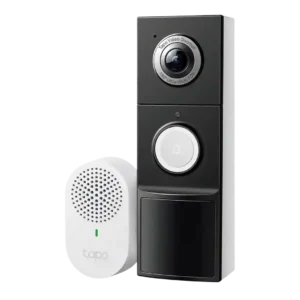

Tapo D225 Smart Video Doorbell Camera with Chime
Where It Has the Edge
No clear scored advantage over the other product.

Scorata scores summarize analyzed review evidence on a 1–5 scale; they are not laboratory measurements or a simple average of customer star ratings. Feature scores summarize the reviews covering that feature. The overall score averages feature scores within each review, then combines review averages. When both expert and customer evidence are available, those two groups receive equal weight. Products can have different review coverage, so small score gaps do not establish a winner.
Recommendations prioritize important features for the category, with a score of at least 3.5, a gap of at least 0.25 points and at least two supporting reviews per product. Features with widely varying scores or broad connectivity contexts are excluded from recommendations. These safeguards do not establish statistical significance.
Quick verdict
There is not enough consistent, comparable evidence for a clear recommendation. Use the feature details and supporting reviews to weigh the tradeoffs.
There is not enough comparable review evidence to recommend Tapo D225 Smart Video Doorbell Camera with Chime over the other product.
There is not enough comparable review evidence to recommend TP-Link Archer BE550 over the other product.
No clear scored advantage over the other product.
No clear scored advantage over the other product.
Scores are out of 5. Missing scores mean missing review evidence, not a missing feature.
The Tether interface makes routine monitoring and network changes straightforward.
Traffic and usage reports are useful for tracking devices and family activity, although detailed parental histories may be paid features.
Reviewers liked the free AI detection and generally found smart detection strong, though one reviewer reported some false alerts.
The app's network optimization scan is useful for finding a less congested channel.
Automatic router detection helps streamline setup.
Automation evidence was positive, especially with Amazon/Alexa routines that triggered reliably and with little delay.
Separate 6 GHz network names can make automatic selection less convenient than a single unified SSID.
The D225 earned praise for offering continuous/local-style functionality without needing a separate hub.
Internal beamforming antennas are praised for helping devices maintain strong connections.
The included chime was loud, customizable, and quick to set up, but Always On/CVR limits use of an existing chime.
Close-range performance is a major strength, with several tests approaching multi-gigabit throughput.
The LED color customization was treated as a small but enjoyable way to change the doorbell’s appearance.
The included hardware was praised as complete enough for installation without hunting for extra basics.
The app and web interface offer substantial flexibility, although specialist networking platforms provide more granular control.
The additional 6 GHz spectrum and optimization tools help distribute traffic and avoid congested channels.
The app makes it easy to inspect, limit and manage individual clients.
EasyMesh expansion can help address weak spots instead of replacing the router outright.
Package monitoring was praised for keeping packages in frame and producing quick package-related alerts.
Dozens of devices can be handled in some installations, but an owner reported a recurring limit on connections per band.
Most existing devices connect without issue, and newer clients can use the faster bands. Some older devices have had compatibility or stability problems.
Connected devices are easy to identify by their active wireless band.
Device prioritization is useful for work, streaming and gaming when bandwidth is shared.
The basic scan helps highlight potentially insecure router settings.
Multiple Ethernet ports allow several wired clients to connect without immediately needing a switch.
EasyMesh compatibility lets owners extend coverage with compatible routers or extenders, though model and firmware support vary.
Face recognition was a weak point because reviewers explicitly noted it is missing.
The wide, head-to-toe field of view was one of the most consistently praised strengths across reviews.
Some tests find polished, stable firmware; other experiences reveal QoS bugs and recurring instability.
Multi-floor results vary widely, from strong third-floor speeds to weak upstairs coverage. Additional nodes may be needed.
Guest isolation is useful for protecting private devices; leaving guest access enabled unnecessarily can introduce risk.
Ventilation is generally praised and tested units are reported to remain cool under load.
The included Ethernet cable is appreciated, although the dedicated reset pin adds little convenience.
The printed guide complements the app's step-by-step instructions.
Smart lights, cameras, plugs and other IoT equipment operated without issues in a large-device installation.
Separate IoT networks offer a convenient way to isolate smart devices from the main network.
Lag evidence was mostly positive when hardwired or integrated with Amazon, while battery mode showed more delay.
The 2.5 Gbps LAN ports deliver strong real-world wired throughput and support fast local transfers.
Latency is generally low enough for gaming and calls, though it is not guaranteed to improve every setup.
Some owners experience steady latency or improvement over older routers; others report sudden spikes.
The lens was considered usable but imperfect, with reviewers noting fisheye distortion or soft edges.
Light controls were useful, but color-night-vision lighting could add distortion and was not universally ideal.
Performance at a distance varies considerably: open-space tests are impressive, while walls and awkward layouts can cause significant losses.
Night vision was generally useful, especially infrared or color night modes, but reviewers criticized weak spotlight illumination and color-night tradeoffs.
HomeShield's ability to block harmful websites is appreciated.
Adding compatible units can extend coverage effectively; a two-router test was especially positive.
Speeds tend to hold up well at moderate distances when obstructions are limited.
BE9300 branding and regional variants can obscure actual port speeds and supported Wi-Fi standards.
Initial modem connection can require a reset or diagnostic assistance, but setup can ultimately succeed.
Motion detection was broadly seen as strong and quick, though false alerts kept it from being perfect.
MLO can improve connection stability and performance in some setups, but alternating implementation, client support and early speed tests reveal limitations.
Existing TP-Link network names and passwords can carry over, simplifying upgrades.
The dashboard provides useful live device, bandwidth and network-status information.
Device isolation is appreciated for keeping smart devices and guests away from private network resources.
Many tests found stable operation under normal or heavy use, but some owners experienced serious wireless instability and reboots.
Object and person detection was often praised for identifying people, packages, vehicles, or pets, but false alerts appeared in one review.
Open-space outdoor tests maintained impressive download speeds even far from the router.
The unboxing experience and packaging were positively received.
Reviewers connected the doorbell’s monitoring and communication features with added household peace of mind.
Per-device speed limits are easy to access and useful when sharing a slower connection.
Personalization was a positive, especially LED appearance changes and extensive app customization.
Dual-power flexibility was a major strength, especially for buyers who can hardwire while keeping battery backup.
Pre-roll was praised for capturing context before motion and helping avoid incomplete event clips.
The included default network credentials make it convenient for beginners to connect without configuring everything first.
Privacy-related evidence focused on useful privacy-mode behavior rather than a full audit of data practices.
QoS is useful in everyday settings, but an owner reported that enabling it with a VLAN configuration broke internet access.
Quick replies were treated as useful for communicating when the owner cannot or does not want to talk live.
Range is highly dependent on layout and band. Good single-floor and open-space results coexist with disappointing coverage in obstructed homes.
A few owners report frequent unexpected reboots or repeated resets to restore normal functionality.
Reviewer recommendations were broadly positive, especially for buyers prioritizing value, local storage, and wide 2K coverage.
Recording was a headline strength thanks to wired 24/7 recording and strong clip controls, though one review found CVR not fully Nest-like.
The app enables convenient management away from the home network through a TP-Link account.
Remaining V1 stock warrants clearance-price and condition checks rather than assuming normal current-model availability.
RTSP was a downside because one reviewer specifically called out its absence.
Handoffs are less sophisticated than those on a purpose-built mesh platform.
Security ecosystem integration was positive, with reviewers pointing to Tapo’s broader ecosystem and smart-home connections.
Basic protection and security scanning are useful, while more sophisticated HomeShield protection requires an upgrade.
Clearly labeled menus and accessible settings help keep routine management uncomplicated.
Snapshot capture was treated as optional rather than essential because the reviewer felt the camera loaded quickly without rich snapshots.
Physical and software controls make it easy to disable or dim the prominent LEDs.
The front light strip communicates status and looks attractive to some, but others find it distracting.
Storage was a major strength, especially free local microSD recording and the ability to avoid cloud dependence.
Subscription value was a major strength because smart alerts and local recording are largely available without mandatory monthly fees.
Advanced security and parental controls require subscriptions, which frustrates some buyers; others find the free essentials sufficient.
System completeness was praised because reviewers saw the feature set as comprehensive for a doorbell at this price.
Theft and tamper protection was viewed positively because anti-theft behavior and reset protection were called out as useful.
Priority settings can reserve bandwidth for important devices, although one reported QoS bug disrupted connectivity.
Built-in diagnostics can resolve initial connection problems, though support-led reboot suggestions did not solve every bug.
Bedtime restrictions and scheduling are helpful for managing children's online time.
USB storage works well for basic file and media sharing; a dedicated NAS is preferable for more advanced requirements.
Video quality was consistently praised for sharp 2K detail, though one comparison found it close to the cheaper D210.
The 6 GHz signal weakens more through walls than 5 GHz; some users nonetheless achieved impressive speeds through a wall.
The 2.5 Gbps WAN port is well suited to gigabit and 2-gigabit service, but limits faster internet plans.
Weather tolerance had limited but positive evidence through CNET’s pro-level mention of the high IP66 rating.
The enclosure is surprisingly light despite its bulky appearance.
A single unit can cover some homes well, but difficult floor plans can leave weak areas that need additional nodes.
Activity zones were praised for narrowing notifications and customizing alert types, though one review wondered whether the feature could be overkill.
2.4 GHz results are mixed: some tests show improvement, while others report weaker range and slower speeds than older models.
5 GHz can reach gigabit speeds, but some older high-end routers perform better at longer distances.
The 6 GHz band is particularly fast nearby, but its advantage shrinks through walls or at longer distances.
The advertised aggregate bandwidth should not be mistaken for single-client or internet throughput.
Two-way talk was viewed as useful and clear overall, with one caveat that recorded conversation audio captured only the doorbell side.
Dedicated mesh systems provide more advanced backhaul management than this router's EasyMesh implementation.
Internal antennas make the enclosure easier to wipe down.
Content and website filtering provide useful basic controls for families.
Download speeds are consistently strong, with gigabit-plus results on compatible clients and usable speeds even at considerable distances.
EasyMesh can work well for basic expansion, but more sophisticated dedicated mesh platforms offer better management and roaming.
Many wired and wireless clients can operate concurrently, although occasional device-per-band limits have been reported.
One owner found the internal cooling fan very quiet.
It generally handles simultaneous streaming, browsing and downloads well, with little slowdown in tested busy networks.
Porch/spotlight brightness was mixed to weak: it could be too bright close-up yet still insufficient for distant night detail.
Roaming is functional but less polished than dedicated Deco mesh systems.
Uploads can be very fast nearby, but tend to fall off faster than downloads as distance increases.
Wired tests show strong throughput, often reaching the practical limits of the 2.5 Gbps ports.
Strong benchmark throughput and wired performance contrast with some reports of wireless instability and slower legacy-client speeds.
Five 2.5 GbE ports on the standard model are unusually generous and useful for future wired upgrades.
Lack of 5 GbE is not a major concern for owners whose internet and wired equipment are slower.
There is no 10 GbE port, making this a less suitable platform for very fast broadband or high-end wired networks.
Wide 320 MHz channels can deliver impressive nearby throughput with compatible clients and clear spectrum.
Connections are often reliable across multiple devices, although some households have experienced disruptive dropouts.
Support was unable to resolve recurring connection limits promptly in one reported case.
An early owner criticized the absence of DNS-over-HTTPS support.
One early access-point installation experienced recurrent reboots, although the cause was not established.
Installation was mostly described as easy, though one reviewer was briefly confused by the mounting bracket setup.
Installation is generally completed within minutes; initial modem connectivity occasionally requires troubleshooting.
Full multi-gigabit connectivity is a standout feature for this price range.
Ownership costs were viewed favorably because local storage and optional subscription plans reduce recurring-cost pressure.
Price and value were among the strongest themes, with reviewers repeatedly calling the D225 affordable, feature-packed, or a bargain.
V1 has reached end of sale according to the supplied 2026 coverage; verify revision and remaining support before purchasing old stock.
General reliability was positive, with reviewers reporting good performance and only a few hiccups.
Setup is usually quick and easy with Tether, although some users encounter initial connection problems or separate SSID requirements.
Guided prompts and straightforward configuration make it easy to get a new network running.
Three bands provide more capacity and access to 6 GHz than cheaper dual-band alternatives.
Wi-Fi 7 and multi-gigabit Ethernet provide a useful upgrade path, but a good existing Wi-Fi 6 network may see little improvement.
Upgrade value was context-dependent: the D225 is worth more for wired/CVR use, but less compelling if used only on battery.
The USB connection is useful for attaching storage and achieved respectable file-sharing throughput in tests.
Excellent performance and generous wired connectivity make it a strong value when priced below higher-end tri-band models. Older stock should be meaningfully discounted.
The VPN client is useful for routing individual devices through a selected VPN, and one test found respectable throughput.
Built-in VPN server functionality is convenient for remote access; WireGuard availability differs across reports and firmware versions.
The enclosure lacks a convenient wall-mounting provision.
Wired backhaul experiences and reports vary with model and firmware, so compatibility should be checked before purchase.
Some firmware versions offer well-regarded WireGuard support, while early reports noted its absence. Verify support for the exact revision.
The app was praised for useful controls, quick loading, and a nice interface, but reviewers also noted old-school setup, minor bugs, and app-fit caveats.
Tether's guided setup receives consistent praise for simplicity and quick completion.
Individual bandwidth controls help prevent particular devices from consuming too much capacity.
Physical controls were partly praised for reducing app dependence, but the doorbell button/icon visibility drew criticism.
The web interface responds quickly during management and configuration.
Tether is widely liked for its clear layout, accessible controls and network overview.
Pairing compatible EasyMesh nodes is straightforward through the app or WPS.
Notifications were commonly praised as quick, accurate, or relevant, with occasional false-alert caveats.
Basic parental controls cover common needs; more granular restrictions and app controls may require payment.
Ring Call was a standout communication feature because it made answering the door faster and harder to miss.
Physical controls make pairing and switching wireless or LED functions convenient.
Device isolation helps protect local privacy, though the optional cloud-linked app introduces a separate privacy tradeoff.
Smart-home integration was useful with Alexa, Google, Amazon, and Tapo, but HomeKit limitations reduced the score.
The router can serve busy smart homes with many devices and offers separate IoT networking.
Third-party firmware is unsupported, limiting options for more demanding software customization.
Cloud-linked app access carries potential privacy tradeoffs compared with local-only administration.
The local web interface is responsive and offers more extensive controls than the app.
Older Wi-Fi 6 clients can work smoothly, though some tests found slower speeds and shorter range than older routers.
Compatible Wi-Fi 7 clients see excellent throughput, but implementation and client support determine the actual benefits.
Wi-Fi evidence was limited and mixed because one reviewer flagged 2.4GHz-only support as a constraint.
Wi-Fi 7 clients can reach very high real-world speeds near the router, often approaching the 2.5 Gbps wired limit.
Battery life was praised as strong, but charging is less convenient because the whole doorbell must be removed.
The housing feels robust and its upright design sits securely on a surface.
Design was the clearest aesthetic weakness, with reviewers calling it homely, garish, awkward, bulky, or not as nice looking.
The modern antenna-free enclosure appeals to many, though some prefer a less prominent design.
The AC adapter is notably bulky, which is inconvenient for compact setups and travel.
The upright format is convenient for shelves, but opinions on the relatively tall, thick enclosure are divided.
Size and form factor were criticized because the unit is bulky, large, or a honker compared with some rivals.
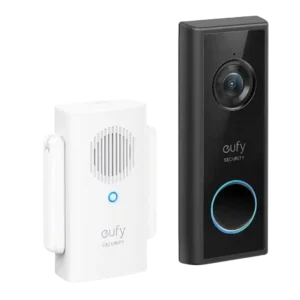
Choose the Eufy C210 if you want a no-fee, battery-friendly doorbell with local storage and good 1080p video. Skip it if you need hardwired charging, HomeKit, or consistently instant motion...
Pros: Installation and Mounting, Video resolution and detail
Cons: Power Options and Compatibility
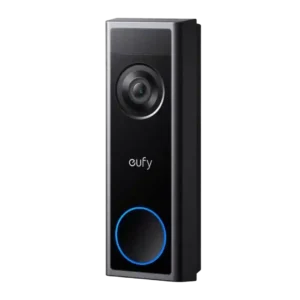
Good if you want an easy, no-fee doorbell with wired/battery power, local storage, and solid 2K coverage. Skip it if you need premium video bitrates, effortless chime coexistence, or built-in...
Pros: Installation and Mounting, App, software and firmware
Cons: Chime
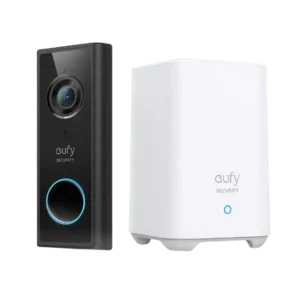
Good if you want sharp video, local storage and no required subscription. Skip it if you need 24/7 recording, flawless AI alerts, broad smart-home support or true six-month battery life.
Pros: Video resolution and detail, Recommendation for new buyers
Cons: Recording, Battery and Charging
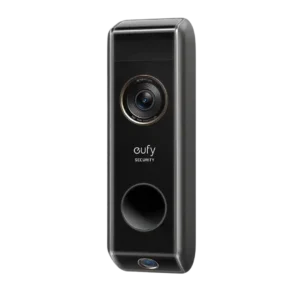
Choose the Eufy S330 if package monitoring, local storage, and no subscription matter most. Skip it if you need slim hardware, HomeKit, consistently fast live view, or stronger night vision.
Pros: Delivery package monitoring, Video resolution and detail
Cons: lag), Smart-home integration (Alexa, Google, Siri, HomeKit, Matter, Thread)