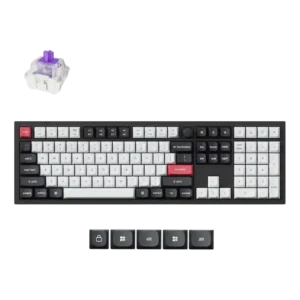
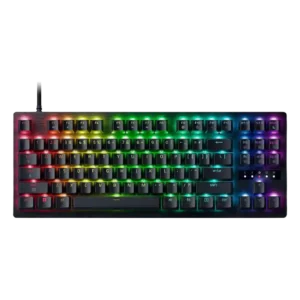
Scorata scores summarize analyzed review evidence on a 1–5 scale; they are not laboratory measurements or a simple average of customer star ratings. Feature scores summarize the reviews covering that feature. The overall score averages feature scores within each review, then combines review averages. When both expert and customer evidence are available, those two groups receive equal weight. Products can have different review coverage, so small score gaps do not establish a winner.
Recommendations prioritize important features for the category, with a score of at least 3.5, a gap of at least 0.25 points and at least two supporting reviews per product. Features with widely varying scores or broad connectivity contexts are excluded from recommendations. These safeguards do not establish statistical significance.
Quick verdict
What each product is best for
The review evidence points to a tradeoff: ergonomics and latency versus rapid trigger support and analog input support. Choose according to which strengths matter more to you; the overall score alone does not settle that choice.
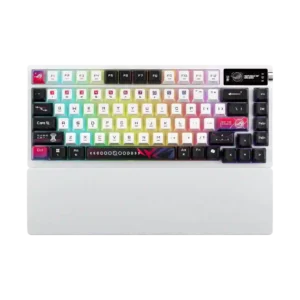
Choose ASUS ROG Azoth X for ergonomics and latency.
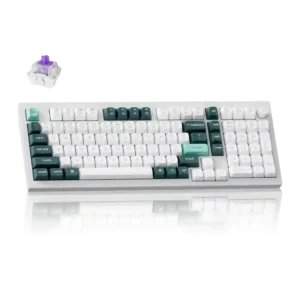
Choose Keychron Q5 HE for rapid trigger support and analog input support.
Why these recommendations?
ASUS ROG Azoth X
Where It Has the Edge
ergonomics is 4.8 vs 3.4. Ergonomics were positive where covered, mainly due to the wrist rest and FR4/typing changes that improved comfort.
latency is 5.0 vs 4.4. Latency evidence was strongly positive, with reviewers reporting delay-free input and no wireless latency problems in testing.
Keychron Q5 HE
Where It Has the Edge
rapid trigger support is 4.7 vs 2.0. Rapid trigger support was consistently praised as useful for fast inputs, quick reset, and competitive gaming responsiveness.
analog input support is 4.5 vs 2.1. Analog input support was viewed as a strong gaming feature, with reviewers highlighting joystick-like behavior, gamepad emulation, and...
materials quality is 4.8 vs 3.2. Materials quality was praised for the machined aluminum or metal body and the premium feel that comes from...
ASUS ROG Azoth X4.1 overall score
Keychron Q5 HE4.5 overall score
Compare features
Scores are out of 5. Missing scores mean missing review evidence, not a missing feature.
Scored on both products
Comfort and build
Ergonomics
ASUS ROG Azoth X
4.8
Ergonomics were positive where covered, mainly due to the wrist rest and FR4/typing changes that improved comfort.
Keychron Q5 HE
3.4
Ergonomics were mixed: reviewers liked the angle or typing posture in some cases, but others criticized the high profile and lack of feet or included wrist rest.
Materials quality
ASUS ROG Azoth X
3.2
Materials quality was mixed: PBT caps and metal elements helped, while plastic construction and finish complaints hurt the premium impression.
Keychron Q5 HE
4.8
Materials quality was praised for the machined aluminum or metal body and the premium feel that comes from it.
Durability
ASUS ROG Azoth X
4.1
Durability evidence was positive but limited, mainly tied to durable dye-sub legends and premium construction.
Keychron Q5 HE
4.9
Durability impressions were positive, with reviewers connecting the heavy aluminum build to long-term stability and durability.
Build quality
ASUS ROG Azoth X
4.3
Build quality was generally sturdy and solid, but the plastic base, premium-price expectations, and scratch-prone finish produced mixed marks.
Keychron Q5 HE
4.9
Build quality was one of the strongest points, with reviewers repeatedly calling the keyboard sturdy, premium, solid, and exceptionally well built.
Design aesthetics
ASUS ROG Azoth X
4.3
Design aesthetics were divisive but mostly positive: reviewers often liked the bold sci-fi white theme, while acknowledging it will not suit every desk setup.
Keychron Q5 HE
4.7
Design aesthetics were widely praised, with reviewers calling the board clean, lovely, stunning, beautiful, and more refined than many gaming keyboards.
Typing comfort
ASUS ROG Azoth X
4.6
Typing comfort was strong, with reviewers describing long sessions as comfortable, pleasant, and easy.
Keychron Q5 HE
4.9
Typing comfort was praised for low fatigue, productivity gains, and faster-feeling typing once actuation was tuned.
Size and form factor
ASUS ROG Azoth X
4.8
The 75% size was praised as practical, with reviewers calling it a useful and near-perfect form factor for gaming desks.
Keychron Q5 HE
4.7
Size and form factor were broadly praised for combining a number pad and useful keys in a practical 96% layout, though the board remains large and heavy.
Battery and charging
Battery life
ASUS ROG Azoth X
4.9
Battery life drew near-universal praise, with many reviewers calling it impressive even when RGB or OLED reduced rated endurance.
Keychron Q5 HE
3.0
Battery life received mixed evidence: it was usable in testing, but one reviewer said it pales beside other Keychron keyboards.
Ownership and support
Rapid trigger support
ASUS ROG Azoth X
2.0
Rapid trigger support was a repeated weakness because reviewers noted the Azoth X lacks true rapid trigger or relies on Speed Tap instead.
Keychron Q5 HE
4.7
Rapid trigger support was consistently praised as useful for fast inputs, quick reset, and competitive gaming responsiveness.
Analog input support
ASUS ROG Azoth X
2.1
Analog input support was consistently marked down because reviewers repeatedly called out the absence of Hall-effect or analog switch features.
Keychron Q5 HE
4.5
Analog input support was viewed as a strong gaming feature, with reviewers highlighting joystick-like behavior, gamepad emulation, and pressure-sensitive controls.
Value for money
ASUS ROG Azoth X
2.7
Value for money was the most common concern, with many reviewers calling the high price hard to justify despite the strong typing and wireless experience.
Keychron Q5 HE
4.1
Value for money was mixed: reviewers praised the premium package, but several also criticized the high price against cheaper or faster competitors.
Other features
Portability
ASUS ROG Azoth X
4.5
Portability had limited positive support, mainly from long battery life making the board better for LAN parties or mobile work.
Keychron Q5 HE
2.2
Portability was a clear weakness because reviewers repeatedly emphasized the keyboard's heavy, desk-bound build.
Switch options
ASUS ROG Azoth X
4.0
Switch choice received limited but positive coverage, with reviewers noting the option between tactile/clicky and smooth linear ROG NX V2 switches.
Keychron Q5 HE
2.2
Switch choice was one of the clearest weaknesses: reviewers repeatedly said the magnetic switch ecosystem is limited or proprietary.
Extra gaming features
ASUS ROG Azoth X
3.7
Extra gaming features were mixed: Speed Tap and the OLED were useful or fun, but reviewers questioned the OLED’s value and noted missing Hall-effect features.
Keychron Q5 HE
4.9
Extra gaming features were praised as plentiful and useful, especially quad actuation, Rapid Trigger, Snap Tap-style behavior, and analog-style controls.
Cable quality
ASUS ROG Azoth X
4.0
Cable quality had limited positive evidence: reviewers liked the sleeved/braided cable, though one noted its gray color did not match the white board.
Keychron Q5 HE
5.0
Cable quality was praised in the unboxing evidence as premium.
Keycap quality
ASUS ROG Azoth X
3.9
Keycap quality was mixed-positive: many liked the texture, printing, durability, and RGB diffusion, while some disliked the smooth or tacky feel.
Keychron Q5 HE
4.7
Keycap quality was praised for PBT construction, durability, premium feel, and good overall execution.
Acoustics
ASUS ROG Azoth X
4.2
Acoustics were usually praised as crisp, deep, creamy, or fantastic, although the spacebar inconsistency kept this from being universally excellent.
Keychron Q5 HE
4.9
Acoustics were a standout strength, with reviewers repeatedly praising the keyboard's sound as excellent, pleasing, thocky, and free of rattle or ping.
Latency
ASUS ROG Azoth X
5.0
Latency evidence was strongly positive, with reviewers reporting delay-free input and no wireless latency problems in testing.
Keychron Q5 HE
4.4
Latency impressions were positive overall, with reviewers reporting no noticeable input lag, while still acknowledging some competitors measure faster.
Typing feel
ASUS ROG Azoth X
4.4
Typing feel was the product’s strongest attribute: most reviewers found it smooth, satisfying, comfortable, and close to custom-keyboard quality, though one found it clunkier.
Keychron Q5 HE
4.8
Typing feel drew strong praise across reviews, with comments emphasizing bounce, smoothness, quietness, and productivity-friendly comfort.
Stabilizer quality
ASUS ROG Azoth X
4.5
Stabilizers were consistently praised, with reviewers noting no rattle, tuned large keys, and clatter-free stability.
Keychron Q5 HE
4.9
Stabilizer quality was praised where discussed, with reviewers calling the stock stabilizers excellent, lubed, or brilliant.
Frame rigidity
ASUS ROG Azoth X
4.6
Frame rigidity was a strength, with reviewers repeatedly noting no deck flex, no rattle, and a stable body.
Keychron Q5 HE
4.9
Frame rigidity was strongly praised, with reviewers pointing to a solid metal body, sturdy construction, and zero flex.
Wrist rest quality
ASUS ROG Azoth X
4.3
The wrist rest was broadly welcomed as comfortable and useful, though some disliked the lack of magnets or found it harder than alternatives.
Keychron Q5 HE
4.5
Wrist rest evidence was positive where reviewers discussed the separate palm rest, describing it as premium-feeling and welcome.
Key responsiveness
ASUS ROG Azoth X
4.6
Key response was consistently praised as snappy, fast, and responsive across typing and gaming, especially with the light linear switches.
Keychron Q5 HE
4.8
Key responsiveness was a major strength, with reviewers describing the switches as incredibly responsive, precise, and free of noticeable lag in use.
Layout options
ASUS ROG Azoth X
4.5
Layout evidence was limited but positive, with one reviewer saying the layout made sense and was clearly labeled.
Keychron Q5 HE
4.7
Layout options were praised because the 96% layout preserves productivity keys while remaining more compact than a full-size board.
RGB lighting quality
ASUS ROG Azoth X
4.3
RGB lighting quality was widely praised for its soft glow, strong brightness, and distinctive translucent-side effect, despite a few muted-lighting complaints.
Keychron Q5 HE
4.5
RGB lighting quality was viewed positively where reviewers discussed it, especially for brightness, underglow, and general lighting appeal.
Compatibility
ASUS ROG Azoth X
4.6
Compatibility was strong thanks to Mac support, PC/Mac switching, MX-style switch compatibility, and south-facing PCB keycap compatibility.
Keychron Q5 HE
4.7
Compatibility was praised for working across Mac and Windows, with reviewers noting Mac-friendly behavior and OS support.
Connectivity
ASUS ROG Azoth X
4.8
Connectivity was highly praised: reviewers liked tri-mode support, dongle convenience, and smooth switching between wireless modes or devices.
Keychron Q5 HE
4.7
Connectivity was praised for Bluetooth, 2.4GHz, wired use, easy setup, and multi-device wireless options.
Actuation consistency
ASUS ROG Azoth X
4.5
Actuation consistency was praised where discussed, with reviewers noting consistent switch feel and minimal friction across keypresses.
Keychron Q5 HE
4.6
Adjustable actuation was praised for stability, precision, and false-press control, although one reviewer saw a slight gaming disadvantage versus faster rivals.
Desk space efficiency
ASUS ROG Azoth X
4.5
Desk space efficiency was praised because the keyboard stayed compact without feeling cramped and saved space versus larger layouts.
Keychron Q5 HE
4.6
Desk space efficiency was viewed positively because the compact full-size layout saves width and gives more mouse-side room.
Polling rate
ASUS ROG Azoth X
3.7
Most reviewers found the 1,000Hz polling rate adequate, but several treated the paid 8,000Hz booster requirement as a caveat.
Keychron Q5 HE
3.7
Polling rate was treated as adequate rather than elite: reviewers said 1,000Hz is fine for most gamers but noted rivals with higher polling rates.
Key stability
ASUS ROG Azoth X
4.8
Key stability was praised through minimal stem wobble, stable keypresses, and no wobble or echo in typing tests.
Keychron Q5 HE
4.8
Key stability was praised thanks to the double-rail switch design, with reviewers noting reduced wobble and near-zero stem movement.
Switch feel
ASUS ROG Azoth X
4.6
Reviewers generally liked the ROG NX Snow V2 switches, describing them as smooth, consistent, and pleasant, with a few noting they still lack Hall-effect gaming behavior.
Keychron Q5 HE
4.6
Reviewers mostly praised the Hall Effect switch feel as smooth, pre-lubed, responsive, and pleasant, though one review noted it lacks the tactile feel of traditional switches.
Performance
Noise level
ASUS ROG Azoth X
3.2
Noise level was mixed: dampening helped keep the board acceptable, but several reviewers complained about a loud or thunky spacebar and higher overall volume.
Keychron Q5 HE
4.6
Noise level was generally praised as office-friendly, quiet, or not invasive while still sounding pleasant.
Gaming performance
ASUS ROG Azoth X
4.2
Gaming performance was positive for casual and mainstream play, but reviewers noted it is less compelling for players seeking Hall-effect or esports-focused features.
Keychron Q5 HE
4.6
Gaming performance was widely positive, especially for shooters and fast-paced play, though one reviewer said it is not the absolute best gaming performer.
Sound dampening
ASUS ROG Azoth X
4.4
Sound dampening was a clear strength, with reviewers crediting the foam stack and damping layers for reducing ping and improving sound.
Keychron Q5 HE
4.7
Sound dampening was viewed positively, with reviewers linking foam, gasket design, and dampening layers to bounce, reduced ping, and a softer typing experience.
Wireless performance
ASUS ROG Azoth X
5.0
Wireless performance was one of the strongest areas, with reviewers repeatedly reporting stable, drop-free, low-latency operation.
Keychron Q5 HE
4.8
Wireless performance was praised as lag-free or effectively free of noticeable input lag in reviewer testing.
Backlight brightness
ASUS ROG Azoth X
4.3
Backlight brightness split reviewers: several found it exceptional or very bright, while one reviewer felt the lighting was underwhelming.
Keychron Q5 HE
4.5
Backlight brightness received positive evidence from a reviewer who described the lighting as bright with excellent underglow.
Controls and connectivity
Hot-swappable switches
ASUS ROG Azoth X
4.2
Hot-swappable switches were seen as a meaningful enthusiast-friendly advantage, especially for users who want to experiment or replace switches.
Keychron Q5 HE
4.8
One supplied review praised hot-swappable switch flexibility, though most Q5 HE-specific switch discussion focused on limited magnetic switch options.
Software quality
ASUS ROG Azoth X
3.9
Software quality was sharply mixed: Gear Link was praised as lightweight and easy, while Armoury Crate drew complaints about bloat, crashes, and setup friction.
Keychron Q5 HE
4.4
Software quality was mostly praised for power, web-based convenience, and ease of use, with one review noting confusing programming and another noting a small bug.
Media controls
ASUS ROG Azoth X
4.1
Media controls were generally useful through the OLED and knob, but some reviewers wanted a more conventional or more satisfying control.
Keychron Q5 HE
4.5
Media controls were praised through positive comments about the rotary wheel, dedicated controls, and customizable knob behavior.
Customization options
ASUS ROG Azoth X
4.6
Customization options were a major strength, covering disassembly, OLED settings, RGB, macros, web tools, and component tinkering.
Keychron Q5 HE
4.8
Customization options were a major strength, with reviewers praising actuation tuning, RGB control, macros, layers, and broad remapping.
Macro customization
ASUS ROG Azoth X
4.5
Macro customization was positive where discussed, with reviewers noting easy macro creation and broad remapping support.
Keychron Q5 HE
4.6
Macro customization was praised for multi-action keys, comprehensive macro recording, and useful one-key command combinations.
RGB customization
ASUS ROG Azoth X
4.5
RGB customization had limited but positive support, with one reviewer highlighting bold color behavior and preset variety.
Keychron Q5 HE
4.5
RGB customization was praised in the context of full RGB control and customization through the software.
Evidence available for one product
Ownership and support
Reliability
ASUS ROG Azoth X
4.4
Reliability was mixed: wireless operation was stable, but software instability and finish scratching hurt confidence.
Keychron Q5 HENo score yet
Ease of switch replacement
ASUS ROG Azoth X
4.7
Switch replacement was praised as straightforward, with reviewers describing access or removal as quick and easy.
Keychron Q5 HENo score yet
Other features
Key spacing
ASUS ROG Azoth X
3.5
Key spacing had limited mixed evidence, with one first-impression review noting the smaller-feeling keys may require adjustment.
Keychron Q5 HENo score yet
Profile management
ASUS ROG Azoth X
4.5
Profile management had limited positive evidence, with one reviewer saying profile switching was quick and easy.
Keychron Q5 HENo score yet
Volume control
ASUS ROG Azoth X
4.0
Volume control was useful for most reviewers, though the toggle implementation was less satisfying to some than a dedicated knob or roller.
Keychron Q5 HENo score yet
Performance
Legend visibility
ASUS ROG Azoth X
4.4
Legend visibility was mostly praised thanks to clear labeling, visible lettering, and sharper printing, though small display icons and stylized legends had caveats.
Choose it if competitive gaming speed, Rapid Trigger, and deep per-key customization matter more than extras. Skip it if you need wireless, dedicated arrows/media keys, adjustable height, or a lower-cost...
Good if you want a premium, quiet TKL Hall Effect keyboard for typing and gaming. Skip it if price, portability, 8,000Hz polling, or broad switch choice matters most.
Good if you want a premium full-size Hall Effect keyboard with smooth switches, quiet sound, and deep customization. Skip it if you need a portable, budget-friendly board or broad switch...