Scorata scores summarize analyzed review evidence on a 1–5 scale; they are not laboratory measurements or a simple average of customer star ratings. Feature scores summarize the reviews covering that feature. The overall score averages feature scores within each review, then combines review averages. When both expert and customer evidence are available, those two groups receive equal weight. Products can have different review coverage, so small score gaps do not establish a winner.
Recommendations prioritize important features for the category, with a score of at least 3.5, a gap of at least 0.25 points and at least two supporting reviews per product. Features with widely varying scores or broad connectivity contexts are excluded from recommendations. These safeguards do not establish statistical significance.
Quick verdict
What each product is best for
The review evidence points to a tradeoff: rapid trigger support and key responsiveness versus reliability and switch options. Choose according to which strengths matter more to you; the overall score alone does not settle that choice.
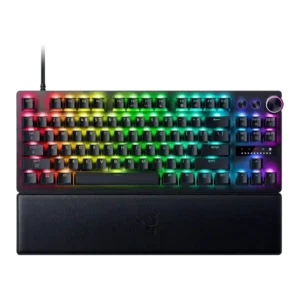
Choose Razer Huntsman V3 Pro for rapid trigger support and key responsiveness.
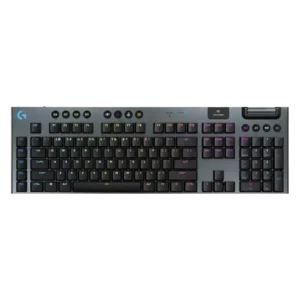
Choose Logitech G915 X Lightspeed for reliability and switch options.
Why these recommendations?
Razer Huntsman V3 Pro
Where It Has the Edge
rapid trigger support is 4.5 vs 2.7. Rapid Trigger was one of the most consistently praised features, described as palpable, fast, and effective for repeated...
key responsiveness is 5.0 vs 4.3. Responsiveness was a clear strength, with reviewers describing exceptional gaming responsiveness, more responsive feel in A/B testing, and...
desk space efficiency is 4.5 vs 3.8. Desk space efficiency was a strength for compact models and TKL layouts, especially for mouse room and cramped...
Logitech G915 X Lightspeed
Where It Has the Edge
reliability is 4.1 vs 2.0. Reliability evidence was generally positive for spill survival and issue-free use, though wake-from-sleep sluggishness was a minor frustration.
switch options is 4.1 vs 2.0. Switch options were appreciated for offering tactile, linear, and clicky choices, though buyers must choose before purchase.
backlight brightness is 4.6 vs 3.5. Backlighting brightness was praised as bright and useful, especially with per-key lighting, though it directly affected battery expectations.
Razer Huntsman V3 Pro3.9 overall score
Logitech G915 X Lightspeed4.1 overall score
Compare features
Scores are out of 5. Missing scores mean missing review evidence, not a missing feature.
Scored on both products
Comfort and build
Ergonomics
Razer Huntsman V3 Pro
5.0
Ergonomics were praised in one 8K review for comfortable spacing, angle, and low-strain long sessions.
Logitech G915 X Lightspeed
3.7
Ergonomics were mixed: low-profile typing and adjustable feet helped some reviewers, while shallow tilt or sensitivity frustrated others.
Typing comfort
Razer Huntsman V3 Pro
3.5
Typing comfort was mixed, with some reviewers finding the board comfortable or a good all-rounder and others not enjoying long typing sessions.
Logitech G915 X Lightspeed
4.2
Typing comfort was generally positive for low-profile use and long sessions, but cramped layout, shallow angle, and enthusiast feel concerns created mixed opinions.
Size and form factor
Razer Huntsman V3 Pro
4.7
Size and form factor were positive overall, with reviewers praising the 60% model and TKL as practical gaming-friendly sizes.
Logitech G915 X Lightspeed
4.1
Size and form factor were praised for slimness and compact TKL efficiency, but some reviewers still found layouts cramped or moderately sized.
Materials quality
Razer Huntsman V3 Pro
4.5
Materials quality was praised for doubleshot PBT plastic that resists wear and finger oils.
Logitech G915 X Lightspeed
4.3
Materials quality was mostly praised for aluminum, PBT, and premium finishes, though one reviewer felt the light body still seemed plasticky.
Build quality
Razer Huntsman V3 Pro
4.5
Build quality was usually praised for premium materials, sturdy construction, and solid feel, though a few reviewers found the plastic-heavy body cheaper than expected.
Logitech G915 X Lightspeed
4.3
Build quality was generally praised for a sturdy, premium body, though a few reviewers felt it was only mediocre or less premium than rivals.
Design aesthetics
Razer Huntsman V3 Pro
4.5
Design aesthetics were mostly positive, with reviewers describing the board as sleek, refined, premium-looking, tame, or stylish.
Logitech G915 X Lightspeed
4.6
Design aesthetics were consistently praised for a sleek, premium, low-profile look that fit both gaming and professional desks.
Durability
Razer Huntsman V3 Pro
4.5
Durability was supported by positive comments about PBT keycaps offering better long-term durability than ABS.
Logitech G915 X Lightspeed
4.6
Durability evidence focused on improved PBT keycaps and stronger long-term wear resistance, with reviewers expecting better resistance to shine and damage.
Ownership and support
Reliability
Razer Huntsman V3 Pro
2.0
Reliability concerns came from RGB failures in one review and occasional spacebar double tapping in another.
Logitech G915 X Lightspeed
4.1
Reliability evidence was generally positive for spill survival and issue-free use, though wake-from-sleep sluggishness was a minor frustration.
Rapid trigger support
Razer Huntsman V3 Pro
4.5
Rapid Trigger was one of the most consistently praised features, described as palpable, fast, and effective for repeated inputs, though a few reviewers said casual players may not notice or may need tuning.
Logitech G915 X Lightspeed
2.7
Rapid trigger support was a weakness because reviewers noted the G915 X lacks rapid trigger while competitors offer it.
Ease of switch replacement
Razer Huntsman V3 Pro
3.5
Ease of switch replacement was mixed-positive only for Razer optical parts, with one reviewer saying the switch mechanism can be replaced easily.
Logitech G915 X Lightspeed
1.8
Ease of switch replacement was a clear weakness because reviewers repeatedly criticized soldered, non-hot-swappable switches.
Analog input support
Razer Huntsman V3 Pro
3.3
Analog input support was highly mixed: some reviewers loved controller-like precision, while others found game support limited, inconsistent, or too much hassle.
Logitech G915 X Lightspeed
2.5
Analog input support was a weakness because reviewers noted competing boards offered analog functionality while the G915 X did not.
Value for money
Razer Huntsman V3 Pro
3.3
Value for money was the broadest tradeoff: reviewers respected the performance and upgrades but often questioned the high price for casual players.
Logitech G915 X Lightspeed
3.5
Value for money was the most divided area: some reviewers said the feature set justified the price, while others found it overpriced against rivals.
Other features
Switch options
Razer Huntsman V3 Pro
2.0
Switch choice was a weakness: reviewers noted proprietary or non-swappable switch limitations, making the board less flexible for users who prefer changing switch types.
Logitech G915 X Lightspeed
4.1
Switch options were appreciated for offering tactile, linear, and clicky choices, though buyers must choose before purchase.
Connectivity
Razer Huntsman V3 Pro
2.5
Connectivity drew criticism from one reviewer because the USB connection and cable routing could be better.
Logitech G915 X Lightspeed
4.5
Connectivity was widely praised for tri-mode flexibility and easy switching, with the main caveat being limited multi-device Bluetooth support.
Compatibility
Razer Huntsman V3 Pro
2.5
Compatibility was mixed because Mac users lack Synapse and some games fought keyboard/controller input switching.
Logitech G915 X Lightspeed
3.4
Compatibility was mixed: reviewers liked Windows, macOS, Bluetooth, and USB use, but called out missing Bolt/Unifying support, Linux gaps, and limited Bluetooth switching.
Frame rigidity
Razer Huntsman V3 Pro
3.8
Frame rigidity was split by version and reviewer, ranging from minimal or zero flex to a complaint that the chassis gave under twisting.
Logitech G915 X Lightspeed
4.6
Frame rigidity was one of the strongest areas, with reviewers repeatedly reporting little to no flex and a rigid aluminum-reinforced frame.
Key spacing
Razer Huntsman V3 Pro
4.5
Key spacing was praised in the 8K TKL review for helping typing feel comfortable.
Logitech G915 X Lightspeed
3.7
Key spacing was mixed: roomy spacing helped typing for some, while the left-side G keys and cramped TKL layout caused awkwardness for others.
Stabilizer quality
Razer Huntsman V3 Pro
4.0
Stabilizer quality was generally positive but not perfect, with reviewers noting lubrication and tuning while also mentioning noise on some stabilizers.
Logitech G915 X Lightspeed
4.8
Stabilizer quality received limited but strong praise, with the space bar described as solid no matter where it was pressed.
Acoustics
Razer Huntsman V3 Pro
2.6
Acoustics were one of the most disputed areas: 8K updates sounded improved to some reviewers, but many others criticized ping, hollow tone, or poor sound.
Logitech G915 X Lightspeed
3.3
Reviewers were split on acoustics: tactile/clicky sounds were sometimes satisfying or improved, but rattling, ping, and membrane-like notes bothered enthusiasts.
Key responsiveness
Razer Huntsman V3 Pro
5.0
Responsiveness was a clear strength, with reviewers describing exceptional gaming responsiveness, more responsive feel in A/B testing, and latency-free input.
Logitech G915 X Lightspeed
4.3
Key responsiveness was generally praised for shallow actuation and snappy inputs, though one negative reviewer found the tactile switch actuation unclear.
Actuation consistency
Razer Huntsman V3 Pro
5.0
Actuation precision was praised where discussed, with reviewers calling the switches incredibly accurate and the press measurement impressive.
Logitech G915 X Lightspeed
4.3
Actuation consistency received limited but positive evidence, with the linear switches described as smooth and consistent.
Desk space efficiency
Razer Huntsman V3 Pro
4.5
Desk space efficiency was a strength for compact models and TKL layouts, especially for mouse room and cramped desks.
Logitech G915 X Lightspeed
3.8
Desk space efficiency depended on layout: TKL models were praised for saving space, while the full-size model was criticized for taking more room.
Onboard memory
Razer Huntsman V3 Pro
4.0
Onboard memory was positively noted because four editable onboard profiles were enough for the reviewer.
Logitech G915 X Lightspeed
3.3
Onboard memory was mixed: one reviewer valued portable saved profiles, while another found onboard support too limited for complex macros.
Portability
Razer Huntsman V3 Pro
4.5
Portability was praised in one TKL review because the board was light, sturdy, and easy to carry to LAN events.
Logitech G915 X Lightspeed
3.9
Portability was better on TKL models, which reviewers said could travel easily, while full-size and fragile-feeling concerns reduced enthusiasm.
RGB lighting quality
Razer Huntsman V3 Pro
4.9
RGB lighting quality was a consistent positive, with reviewers calling it outstanding, excellent, vivid, precise, and strong-looking.
Logitech G915 X Lightspeed
4.3
RGB lighting quality was mostly praised for brightness and evenness, though uneven legend illumination and reliance on RGB for visibility were drawbacks.
Layout options
Razer Huntsman V3 Pro
5.0
Layout options were praised on the Mini because its dual-step arrow-key implementation felt intuitive and useful.
Logitech G915 X Lightspeed
4.4
Layout options received limited positive evidence, with the full-size layout described as sensible and complete.
Switch feel
Razer Huntsman V3 Pro
4.5
Reviewers generally liked the analog optical switch feel once tuned, often calling it smooth, controlled, or butter-smooth, though one reviewer found the light presses awkward for daily typing.
Logitech G915 X Lightspeed
4.1
Switch feel was mixed but leaned positive: many liked the tactile, smooth, or balanced feel, while detractors found the switches mushy or resistant.
Per-key lighting control
Razer Huntsman V3 Pro
5.0
Per-key lighting control was specifically praised because lighting patterns can be applied on a per-key basis.
Logitech G915 X Lightspeed
4.6
Per-key lighting control was well supported, with reviewers praising individual key lighting and detailed color control through G Hub.
Key stability
Razer Huntsman V3 Pro
4.2
Key stability was mostly positive because reviewers noted reduced stem wobble or well-controlled stabilizing, though larger keys could still wobble on the Mini.
Logitech G915 X Lightspeed
4.5
Key stability improved over prior models, with reviewers noting reduced wobble, stable keys, and less rattling.
Extra gaming features
Razer Huntsman V3 Pro
4.7
Extra gaming features such as Snap Tap and competitive movement tools were praised as game-changing, helpful, or edge-giving for shooters.
Logitech G915 X Lightspeed
4.5
Extra gaming features received limited but positive evidence, especially for configurable Game Mode and key blocking.
Polling rate
Razer Huntsman V3 Pro
3.5
Polling-rate feedback split by version: several reviewers criticized or downplayed 1,000Hz models, while 8K reviewers praised the headline reporting speed but sometimes questioned its practical impact.
Logitech G915 X Lightspeed
3.3
Polling rate was mixed: one reviewer found 1,000 Hz steady and suitable, while another criticized it as capped versus newer high-end boards.
Profile management
Razer Huntsman V3 Pro
4.7
Profile management was praised for saved gaming and general-use profiles, onboard custom profiles, and quick switching between work and game actuation.
Logitech G915 X Lightspeed
4.5
Profile management was generally useful for app and game-specific setups, but some dependence on G Hub remained a limitation.
Cable quality
Razer Huntsman V3 Pro
4.0
Cable quality was mildly positive, with the included cable judged good enough for most users.
Logitech G915 X Lightspeed
4.2
Cable feedback was mostly positive for length, USB-C charging, and acceptable quality, with one reviewer noting the loss of the old braided cable.
Keycap quality
Razer Huntsman V3 Pro
4.5
Keycap quality was broadly praised for textured PBT feel, grip, shine resistance, and premium feel, with only one reviewer more mildly positive.
Logitech G915 X Lightspeed
4.4
Keycap quality was mostly praised for PBT texture, durability, and resistance to shine, though some reviewers still found the feel cheap or scratchy.
Latency
Razer Huntsman V3 Pro
4.6
Latency impressions were mostly excellent, especially on 8K models, though one reviewer argued the measured advantage was too small for humans to feel.
Logitech G915 X Lightspeed
4.7
Latency was consistently praised in Lightspeed or wired use, with reviewers reporting no noticeable lag and very low input delay.
Typing feel
Razer Huntsman V3 Pro
4.1
Typing feel varied strongly by reviewer and version: some found it smooth, satisfying, or much improved, while others called it mediocre or less satisfying than premium mechanical boards.
Logitech G915 X Lightspeed
4.2
Typing feel was often praised as satisfying and tactile, though one negative reviewer found it poor and mushy.
Volume control
Razer Huntsman V3 Pro
4.5
Volume control was usually praised for tactile grip, quality metal feel, or convenient dial operation.
Logitech G915 X Lightspeed
4.4
Volume control was consistently praised for the large smooth roller, its responsiveness, and its daily convenience.
Wrist rest quality
Razer Huntsman V3 Pro
3.1
Wrist rest quality was highly divisive: a few reviewers loved the support, but many criticized the firm, thin, or uncomfortable design.
Logitech G915 X Lightspeed
3.1
Wrist rest feedback was mixed because the low profile reduced the need for one, but multiple reviewers disliked that no palm or wrist support was included.
Performance
Sound dampening
Razer Huntsman V3 Pro
3.9
Sound dampening was mixed by model: reviewers praised added foam or reduced vibrations on some versions, while the Mini was criticized for needing more padding.
Logitech G915 X Lightspeed
2.2
Sound dampening was a weakness in the limited evidence, with one reviewer saying Logitech lacked the foam and tuning used by more enthusiast boards.
Legend visibility
Razer Huntsman V3 Pro
5.0
Legend visibility scored well where discussed, with reviewers praising strong, even illumination and clear coverage across key legends.
Logitech G915 X Lightspeed
3.6
Legend visibility was mixed: some reviewers found the legends legible and durable, while others said visibility suffers when RGB is off or uneven.
Noise level
Razer Huntsman V3 Pro
2.2
Noise level was a recurring concern; many reviewers called the keyboard loud, noisy, or unsuitable for shared spaces, despite one positive note about minimal noise.
Logitech G915 X Lightspeed
3.4
Noise level was mixed: some found tactile switches muted or mic-friendly, while others called the board clicky, loud, or mushy-sounding.
Backlight brightness
Razer Huntsman V3 Pro
3.5
Backlight brightness was mixed: reviewers praised bright shine-through lighting, but one found the lighting dimmer than expected and another noted a whine.
Logitech G915 X Lightspeed
4.6
Backlighting brightness was praised as bright and useful, especially with per-key lighting, though it directly affected battery expectations.
Gaming performance
Razer Huntsman V3 Pro
4.8
Gaming performance was the strongest consensus point, with many reviewers calling it exceptional, dreamlike, best-in-class, or especially suited to competitive play.
Logitech G915 X Lightspeed
4.6
Gaming performance was broadly positive, with reviewers describing the keyboard as responsive, capable, and suitable even for competitive play, despite some rival-performance caveats.
Controls and connectivity
Macro customization
Razer Huntsman V3 Pro
3.0
Macro customization was only lightly supported, with one reviewer noting that three custom macro buttons is not a huge number.
Logitech G915 X Lightspeed
4.6
Macro customization was a major strength, especially on the full-size model with G keys, app-specific macros, and deep assignment layers.
RGB customization
Razer Huntsman V3 Pro
5.0
RGB customization was praised for seemingly endless options through Chroma and Synapse.
Logitech G915 X Lightspeed
4.2
RGB customization was strong overall, with many lighting effects and per-key options, but some reviewers found G Hub lighting tools limited or underwhelming.
Media controls
Razer Huntsman V3 Pro
3.4
Media controls were mixed: some reviewers liked the dial and buttons, but others found buttons stiff, unclear, awkward, or unsatisfying.
Logitech G915 X Lightspeed
4.2
Media controls were usually praised, especially the dedicated top controls, though some reviewers found them wasteful or less tactile than main switches.
Software quality
Razer Huntsman V3 Pro
3.3
Software quality was mixed: Synapse enables deep tuning and profiles, but reviewers repeatedly called it bloated, confusing, finicky, or overwhelming.
Logitech G915 X Lightspeed
3.6
Software quality was highly mixed: some reviewers liked G Hub's interface and power, while others called it awful, convoluted, unintuitive, or limited.
Hot-swappable switches
Razer Huntsman V3 Pro
2.0
Hot-swappable switches were a weakness where discussed because the keyboard is not hot-swappable at the switch level.
Logitech G915 X Lightspeed
1.8
Hot-swappable switch support was consistently criticized because the switches are soldered and cannot be easily replaced.
Customization options
Razer Huntsman V3 Pro
4.8
Customization options were a major strength, with reviewers praising actuation tuning, onboard controls, deep Synapse options, and flexible per-game settings.
Logitech G915 X Lightspeed
4.6
Customization options were a major strength thanks to remapping layers, G-Shift, Keycontrol, lighting controls, and broad key assignment options.
Evidence available for one product
Battery and charging
Battery life
Razer Huntsman V3 ProNo score yet
Logitech G915 X Lightspeed
4.4
Battery life was one of the strongest recurring positives, usually described as solid to excellent depending on RGB brightness.
Other features
Passthrough features
Razer Huntsman V3 Pro
2.2
Passthrough features were a weakness, with reviewers wishing for extra ports or noting the lack of USB passthrough.
Logitech G915 X LightspeedNo score yet
Performance
Wireless performance
Razer Huntsman V3 ProNo score yet
Logitech G915 X Lightspeed
4.7
Wireless performance was one of the strongest positives, with reviewers repeatedly describing Lightspeed as low-latency, stable, and close to wired.
Good if you want a premium 96% Hall Effect keyboard for work and gaming with excellent build, sound, and customization. Skip it if you need cheaper esports-first speed, 8,000Hz polling,...
Choose it if competitive gaming speed, Rapid Trigger, and deep per-key customization matter more than extras. Skip it if you need wireless, dedicated arrows/media keys, adjustable height, or a lower-cost...
Good if you want a premium, quiet TKL Hall Effect keyboard for typing and gaming. Skip it if price, portability, 8,000Hz polling, or broad switch choice matters most.
Good if you want a premium full-size Hall Effect keyboard with smooth switches, quiet sound, and deep customization. Skip it if you need a portable, budget-friendly board or broad switch...