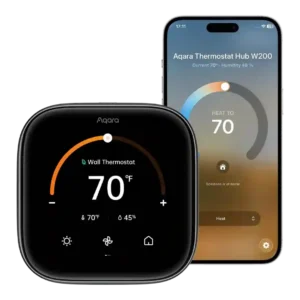
Aqara Hub W200
Where It Has the Edge
- design and finish quality is 4.3 vs 3.4. Design and finish were generally praised as clean, compact, and attractive.

Scorata scores summarize analyzed review evidence on a 1–5 scale; they are not laboratory measurements or a simple average of customer star ratings. Feature scores summarize the reviews covering that feature. The overall score averages feature scores within each review, then combines review averages. When both expert and customer evidence are available, those two groups receive equal weight. Products can have different review coverage, so small score gaps do not establish a winner.
Recommendations prioritize important features for the category, with a score of at least 3.5, a gap of at least 0.25 points and at least two supporting reviews per product. Features with widely varying scores or broad connectivity contexts are excluded from recommendations. These safeguards do not establish statistical significance.
Quick verdict
The review evidence points to a tradeoff: design and finish quality versus on-device control usability and display readability. Choose according to which strengths matter more to you; the overall score alone does not settle that choice.
Choose Aqara Hub W200 for design and finish quality.
Choose Honeywell Home X2S for on-device control usability and display readability.
Scores are out of 5. Missing scores mean missing review evidence, not a missing feature.
Local automation behavior was viewed favorably because routines can still work during an internet outage.
Outage recovery is a weak point in the limited reports available. One failed unit would not return after a power cycle, while another lost time and scheduling after power failure.
Utility demand-response support is limited because provider availability was described as narrow.
Utility-program support can add real value, with owners using rebates or savings programs alongside normal schedules and app control. Enrollment can be a little finicky inside the app.
Alexa/Amazon support was described as solid for app and voice control, though Apple support received more enthusiasm.
Alexa support is inconsistent. Some owners have it working, but others could not link Alexa at all after the app transition, and another found setup difficult.
Google support was described as solid for app and voice control, but not as differentiated as Apple Home integration.
Google Assistant support is part of the X2S’s broad voice-platform compatibility, with hands-free control described as simple in the expert evaluation.
The guided installation instructions were praised as clear and manageable for handy homeowners.
The written directions are usually praised as clear and easy to follow, and several owners completed wiring directly from them. One manual was called confusing, and another setup guide had a QR-code issue.
Matter support was praised both as a compatibility bridge and as part of the thermostat's hub role.
Matter is usually viewed as a strong feature that broadens platform choice and may reduce dependence on one cloud service. One Home Assistant owner reported a failed Honeywell Matter implementation, so interoperability is not flawless.
Geofencing reliability was praised for consistently recognizing when the reviewer left home.
Home/away geofencing is a valued convenience for owners who want temperatures to adjust automatically when they leave or return.
Installation was consistently described as easy, especially for swaps from an existing smart thermostat.
Installation is one of the X2S’s biggest strengths, with many owners calling the swap unusually easy and fast. More complex wiring or heat-pump configurations can still require extra work or professional help.
Value for money was a major strength because reviewers saw premium features at a lower or competitive price.
Value is one of the strongest themes: many owners see the X2S as an affordable way to get reliable Wi-Fi control, scheduling, and broad compatibility. The value falls apart for buyers who hit hardware, wiring, or sensor limitations.
Coverage is broadly positioned, but one reviewer warned that heat-pump-specific control depth needs research before buying.
Compatibility is broad enough for typical forced-air, heat-pump, and boiler setups. A boiler owner and an expert both found the supported system range practical.
Heat pump support drew the strongest compatibility criticism because compressor and auxiliary heat controls felt unclear or inadequate.
Heat-pump owners generally get good results, including two-stage systems. A few needed extra fiddling, special instructions, or a support call before everything worked correctly.
External Aqara sensors were viewed as meaningful companions for room-based control.
Room-sensor support is a clear limitation: the X2S does not work with Honeywell remote room sensors. Some buyers accept that tradeoff at this price, while others consider it a major reason to choose a higher-end model.
Wall fit can be imperfect when replacing a larger thermostat because the smaller base may leave visible unpainted edges.
The Honeywell UWP connection makes swaps and future upgrades especially easy for compatible homes. One used unit had broken retaining clips and would not stay secured to the wall plate.
Reviewers noted the box is nearly complete, but the C-wire adapter is not included.
A buyer without the needed power wiring was frustrated that the required adapter was sold separately rather than included in the box.
Presence-based automation was broadly useful, though one reviewer found the practical value room-dependent.
The lack of aggressive in-home monitoring can actually suit buyers who want a simpler thermostat. One owner specifically preferred that the X2S not monitor the house or make unwanted automatic changes.
On-device controls were useful as a wall controller, though one reviewer struggled with gestures and menu access.
Physical buttons are a major usability strength for people who prefer straightforward controls over touchscreens. Most find them simple, though deeper menu navigation can become tedious.
Humidity support earned a positive note because the W200 can use an external humidity source.
Humidity readout is a small but well-liked feature. Owners appreciate being able to check indoor humidity in the app, including while away from home.
Multi-room balancing is a weakness because reviewers noted the W200 lacks simultaneous multi-sensor averaging.
Multi-room results are mixed. Scheduled blower circulation helped stale rooms dramatically in one home, while a temperature-reading problem in another left the rest of the house cold.
Manual override flexibility is limited by the absence of temperature set-limit controls.
Manual control is generally straightforward, but hold behavior is not as flexible as some owners expect. One user disliked being unable to choose a custom hold-until time, while another valued having direct control instead of learning automation.
General 24V conventional compatibility came across as suitable for common household systems.
Conventional HVAC support is presented as a strong fit for common home systems, with flexible staging that covers typical heating and cooling setups.
Auto-adjustment and learning-style behavior were praised as smarter and more accurate than typical reactive thermostats.
The X2S suits people who want control without an overbearing learning system. One owner found its automatic learning improved, while another specifically liked that it does not force a learning-thermostat experience.
Away mode worked well in review testing, with automatic temperature adjustments after leaving home.
Vacation and away controls are consistently useful, including schedules created after leaving home. Owners report successful remote checks, comfortable returns, and less worry about wasting heat or cooling while away.
Energy reports lag behind competitors because the runtime presentation was judged too simple.
Energy reporting is basic and often disappointing for shoppers who want detailed analytics. One rental owner likes the daily boiler-runtime report, but others criticize delayed, incomplete, or inaccurate run-time metrics.
Basic scheduling and modes were considered more than sufficient for everyday thermostat control.
Daily, weekly, weekday/weekend, and vacation scheduling are broadly useful and often easy to program. Complaints include awkward editing, incorrect saved temperatures, and setups that behave poorly unless configured carefully.
C-wire flexibility is limited because no-C-wire systems need an adapter rather than working cleanly out of the box.
The C-wire requirement is one of the clearest installation caveats. Some homes need new wiring or an adapter, though several owners found those workarounds manageable.
Voice control was treated as convenient across major assistants.
Voice control is one of the shakier smart features. Siri missed the requested temperature for one reviewer, while multiple owners reported Alexa commands unavailable despite advertised compatibility.
Smart-home ecosystem compatibility was one of the W200's clearest strengths across reviewers.
Broad ecosystem ambitions are a selling point, especially through Matter, but real-world compatibility is uneven. Home Assistant can work very well for some users while Hubitat, older AlarmNet, and other integrations can fail badly.
Apple Home and HomeKit support stood out as a major advantage, especially because of Apple-only thermostat features.
Apple Home control generally works, and several owners found iPhone linking easy. Setup can be hidden behind the Matter menu, Home controls are basic, and one buyer was surprised by the need for a home hub.
The app was praised as robust overall, but heat-pump and auxiliary-heat wording created real confusion.
The First Alert app is easy and reliable for many owners, especially for temperature changes, schedules, and setup. Others dislike the app branding, configuration flow, limited features, or confusing migration from older Honeywell apps.
Wi-Fi connectivity was described positively, with reviewers pointing to reliable dual-band support.
Wi-Fi is easy to connect for many owners, helped by dual-band support and Bluetooth-assisted setup. A minority report severe dropouts or network-specific incompatibility, so reliability is not uniformly strong.
Filter reminders are present, but one reviewer disliked the minimum alert interval.
Filter-change reminders are simple but practical, fitting the X2S’s focus on everyday automation rather than premium extras.
The display is bright and sharp, but glossy fingerprints and limited visual options keep impressions from being uniformly excellent.
The monochrome display is widely praised for clear, easy-to-read temperature information, especially when lit. The main caveat is that some secondary text can look small to older eyes.
Adaptive recovery intelligence was a standout because Apple Adaptive Temperature anticipates returns and improves comfort.
Adaptive recovery generally works as intended, starting early enough to hit the target temperature on schedule. The owner who tested it said it can occasionally be a little too aggressive.
Design and finish were generally praised as clean, compact, and attractive.
Styling is functional rather than premium, and several descriptions call it basic or utilitarian. Still, owners often find the unit sturdier or better-looking in person than expected.
Comfort consistency was a high point, with a reviewer reporting a more comfortable home after switching.
Heating and cooling performance is usually dependable, with several owners reporting stable comfort and reliable operation. A minority report short cycling or setup-related behavior that can undermine consistency.
Automatic heat/cool switching is a repeated frustration. Several owners say they cannot set the temperature bracket they expect from a smart thermostat, or find switching behavior unreliable.
There is no desktop web-control option in the cited owner experience, which was a dealbreaker for a buyer who did not want smartphone-only remote access.
Energy-saving guidance was generally viewed as useful for saving money or energy without harming comfort.
Some owners report meaningful savings after gaining better schedule and remote control, including one who said the electric bill dropped dramatically.
Equipment/runtime diagnostics were considered less detailed than Ecobee-style reporting.
Fan control is useful both for ordinary on/off operation and scheduled circulation that can freshen stale rooms. Hubitat-based fan control failed for one owner.
A couple of owners noticed unusual timing behavior, including slightly slow starts or recovery that felt too aggressive. Both reports were qualified rather than outright failures.
Shared access works well for households and multi-user properties. One church installation specifically praised the ability to share the app with multiple users.
The stripped-back design appeals to buyers who want smart control without intrusive monitoring or unnecessary automation.
One owner criticized the upgrade path because the suggested higher-end replacement would not remain compatible with the other X2S units already installed.
Support experiences vary widely. Some owners describe fast, excellent help, while others faced long waits or felt support did not resolve their setup problem.
Long-term reliability is mixed rather than uniform. Some units run flawlessly for months, while others arrived faulty, failed after weeks, or had hardware problems out of the box.
Multi-stage support is a useful strength for homes that need two-stage heating or cooling. Setup can take a little extra work on some heat-pump systems, but owners report successful operation.
Remote temperature monitoring and adjustment are among the most consistently praised features, especially for vacations, garages, churches, and rentals. A few third-party or network-specific setups caused inaccurate or unavailable remote control.
Notifications were praised for consistently appearing when the reviewer left home.
Privacy controls were praised because Apple Adaptive Temperature processing stays local/on-device.
Room prioritization through Aqara sensors was seen as a useful way to heat or cool based on a preferred room.
Touchscreen feedback was mixed: one reviewer found temperature changes fiddly, while others called the screen intuitive or highly responsive.
The mmWave occupancy sensor earned strong praise for detecting presence more accurately than basic motion sensing.
The relay click is a recurring complaint and can be very loud when heating or cooling switches on or off. It may be especially distracting in a bedroom or other quiet space.
Most short-form owner impressions are strongly positive, describing the thermostat as simple, convenient, and effective. A smaller group encountered enough problems to abandon it or recommend against it.
Temperature accuracy is inconsistent across the reports. One multi-unit installation found the thermostats accurate, but other owners saw schedule errors or readings two to five degrees high.
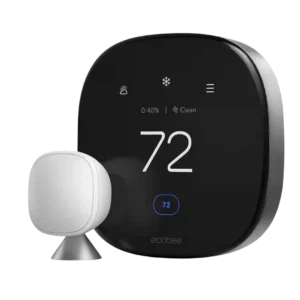
Best for polished design, easy controls, strong sensors, and useful energy data. Skip it if you want the cheapest thermostat or do not need premium extras like air quality, voice...
Pros: Room Sensor, value for money
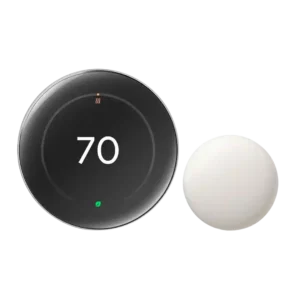
Choose it if you want a premium-looking thermostat with Matter, strong learning, room sensors, and polished controls. Skip it if the price, Google-account dependence, or occasional setup/presence-sensing hiccups outweigh the...
Pros: design and finish quality, display readability
Cons: touchscreen responsiveness
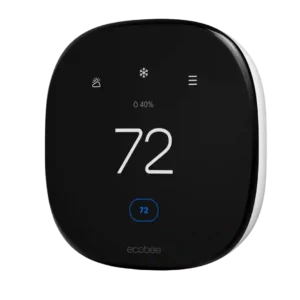
Good if you want an easy, clear smart thermostat with strong app, display, scheduling, and ecosystem support. Skip it if you need Premium-only sensors, built-in Alexa, air-quality monitoring, or deeper...
Pros: display readability, value for money
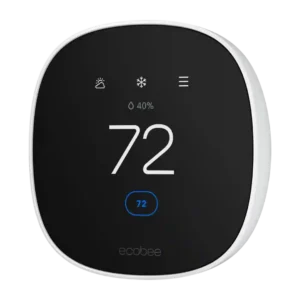
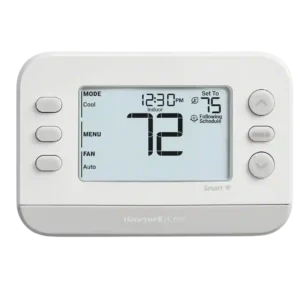
Best for easy controls, strong smart-home support, and budget value. Skip it if you need Matter, bundled room sensors, advanced learning, or a no-C-wire install without extra parts.
Pros: on-device control usability, smart-home ecosystem compatibility
Cons: C-wire requirement flexibility, Room Sensor