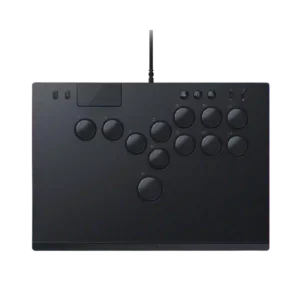
Razer Kitsune Controller
Where It Has the Edge
No clear scored advantage over the other product.

Scorata scores summarize analyzed review evidence on a 1–5 scale; they are not laboratory measurements or a simple average of customer star ratings. Feature scores summarize the reviews covering that feature. The overall score averages feature scores within each review, then combines review averages. When both expert and customer evidence are available, those two groups receive equal weight. Products can have different review coverage, so small score gaps do not establish a winner.
Recommendations prioritize important features for the category, with a score of at least 3.5, a gap of at least 0.25 points and at least two supporting reviews per product. Features with widely varying scores or broad connectivity contexts are excluded from recommendations. These safeguards do not establish statistical significance.
Quick verdict
The available evidence supports the recommendation below, but does not establish an overall winner. Check the remaining features against your priorities.
There is not enough comparable review evidence to recommend Razer Kitsune Controller over the other product.
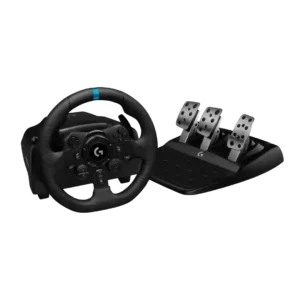
Choose Logitech G923 for learning curve and included accessories.
No clear scored advantage over the other product.
Scores are out of 5. Missing scores mean missing review evidence, not a missing feature.
Long-session fatigue evidence was positive, with reviewers reporting no pain and less effort during play.
Most reviewers found the wheel comfortable, but rough thumb-area stitching caused soreness during multi-hour sessions for one user.
Grip feedback was consistently positive, with rubber padding and the underside mat helping the controller stay planted.
The leather rim is generally pleasant, but one long-session review found the thumb-area stitching rough enough to cause soreness without gloves.
The learning curve was a repeated drawback, especially for players coming from sticks or standard controllers.
The wheel is approachable for first-time sim racers and helps translate real driving instincts into games. New users without driving experience may still need time to coordinate steering and three pedals.
Included accessories were a weakness, with reviewers wishing for a shorter cable or bundled carrying case.
The box includes the wheel, three pedals, power supply, and mounting hardware, while a broad accessory ecosystem supports expansion. A shifter and handbrake are not included, and Logitech offers no dedicated handbrake.
Material quality was mixed: reviewers liked the aluminum and smooth plate, but one complained about smell and another about fingerprints.
Metal pedals, leather or synthetic-leather wrapping, and sturdy plastics create a durable, convincing package. The finish generally feels above its entry-level positioning.
PlayStation compatibility was mixed: reviewers valued licensed PS5 support but repeatedly criticized the lack of native PS4 support.
The PlayStation version works across supported PlayStation generations and PC, giving console racers a broad and familiar game library.
Accessibility evidence was positive, with the all-button layout framed as helpful for players who find arcade sticks a barrier.
For one disabled reviewer, the wheel recreated a meaningful sense of driving that a standard controller could not provide.
Competitive suitability was strong, with reviewers highlighting tournament appeal and competitive edge.
The wheel supplies enough handling detail for fast laps and competition, though stronger systems offer greater precision.
Premium feel was often praised, though one reviewer felt the plain black model did not look like a $300 product.
Leather wrapping, metal trim, substantial weight, and clean finishing give the G923 a more premium feel than many entry-level wheels.
Portability was one of the strongest points, with reviewers praising the slim, light, backpack-friendly design.
The relatively light base is easy to move, store, and remount between sessions.
Casual gaming suitability was mixed: casual 1v1s and beat-'em-ups could work well, but some non-fighting uses required adjustment.
The G923 is easy to recommend for casual racers who want more immersion without committing to a complex rig.
PC compatibility was praised with no reported compatibility problems and plug-and-play use.
The wheel connected and operated immediately on the tested Windows gaming laptop, with G Hub available for deeper tuning.
Consistency evidence was positive, with reviewers reporting smooth performance across games and no issues after setup.
The G923 provides a familiar, predictable feel across simulation titles, reducing the need to relearn steering behavior whenever the game changes.
Input lag evidence was positive, with one reviewer saying they felt no lag or delay.
Updated processing made steering reactions noticeably quicker than previous Logitech generations.
Repairability and maintenance were positive where discussed, especially easy cap removal and fast button replacement.
The long-running Logitech ecosystem has adapters, replacement parts, pedal modifications, and upgrade paths that can extend the useful life of the hardware.
Brand software support had limited but positive evidence, with Razer described as listening to player feedback.
G Hub can unlock the wheel’s features, but both long-term tests reported frustrating driver conflicts or reinstalls. Tech-savvy users can recover, while beginners may find troubleshooting discouraging.
Programmable support drew criticism from one reviewer who wanted more useful front-facing aux functions.
Wheel buttons can be assigned through G Hub for game-specific functions.
Button quality was a major strength overall, but stock switch feel drew some criticism for limited feedback or mushiness.
Button impressions are split: some reviewers found the controls solid and tactile, while others criticized the cheap D-pad, delicate small buttons, and unreliable rotary dial.
Software customization was mixed: reviewers criticized an early SOCD constraint, while firmware later improved configuration.
G Hub offers useful button mapping, wheel range, pedal sensitivity, force settings, macros, and per-game profiles. Console users get far fewer adjustment options, and a few reviewers wanted deeper controls.
Customization depth was mixed: switch and keycap compatibility were praised, but vinyl art and limited optical-switch options drew caveats.
PC users get broad adjustment options through G Hub, although some reviewers still wanted deeper advanced controls.
Responsiveness was widely praised as fast, smooth, and immediate, with one reviewer finding the buttons too sensitive at first.
The face buttons were described as crisp and appropriately snappy.
Macro support was limited in reviewer evidence, with complaints that extra action or macro buttons were poorly placed or missing.
G Hub supports macro assignment, adding useful flexibility beyond standard racing controls.
Firmware update support was positive overall, with reviewers noting SOCD/profile improvements and configurable settings.
Firmware updates and force-feedback tuning are accessible through G Hub, helping users keep the wheel current and adjust its behavior.
Value was polarized: reviewers admired the product, but price was a repeated concern unless the buyer is serious or finds a sale.
Value depends heavily on price. Reviewers often recommend it on sale or used, while full retail places it too close to smoother and stronger modern alternatives.
Connection reliability was praised thanks to the locking cable design and confidence in licensed PS5 connectivity.
The G923 is widely recognized across old and new racing games and often works immediately after connection. That mature compatibility is one of its biggest advantages over newer ecosystems.
Setup evidence was very positive, with the controller described as plug-and-play for PS5 or PC.
Desk mounting and console connection are usually quick and plug-and-play, with broad native game recognition. Thick furniture, PC driver setup, or awkward living-room placement can still complicate installation.
Size suitability depended on hand size: reviewers with big or wide hands liked the spacing, while small-hand use was called harder.
The compact rim is manageable for many users, but larger hands may find it undersized and less comfortable.
Durability evidence was split between a reviewer saying it can take abuse and another finding the cable-lock flap flimsy.
The proven gear-driven platform is widely regarded as robust, easy to store repeatedly, and capable of lasting for years.
Ergonomics were generally praised for the button layout and low profile, but one reviewer felt Razer missed a chance to push the layout further.
The round rim shape, compact diameter, and accessible controls suit common racing techniques. Button reach is not perfect, but the basic driving position is comfortable and intuitive.
Reviewers mostly found the Kitsune comfortable because it is slim, light, and works well on a lap or table, though one reviewer found the layout uncomfortable in Tekken.
The rim and controls remain comfortable through long sessions, with balanced resistance that avoids excessive wrist strain. Rough stitching may bother some users.
Build quality received strong praise across reviews, especially for the aluminum construction, slim profile, and premium-feeling form factor.
The wheel’s sturdy chassis, metal components, and solid pedal construction remain major strengths. Even critical reviewers generally consider the physical build dependable and better than many cheaper rivals.
Wired performance was strong, with reviewers tying the wired setup to responsiveness and reporting smooth play.
USB operation was consistently plug-and-play across tested console and Windows setups.
The progressive brake is one of the G923’s most consistent strengths, offering firmer resistance and better modulation than older Logitech pedals. A few reviewers found it overly stiff or prone to moving an unsecured pedal base.
Directional accuracy was praised for precise controls, SOCD help, and reduced ambiguity compared with stick input.
The gear drive can clunk and rattle, and TrueForce may add audible engine-like vibration from the wheel housing. It can be distracting to anyone nearby, although one review found it quieter than older models.
G Hub makes it easy to reassign wheel controls and adjust core input behavior.
Button travel was viewed as fast and short, though one reviewer noted heavier force and aggressive spring-back.
Cable feedback is inconsistent, but several reviewers found the USB lead too short or the cabling cheaper than the rest of the hardware. Living-room setups are the most likely to need an extension or rearrangement.
The Xbox version supports modern Xbox systems and PC, with strong native recognition across many racing games.
The D-pad works, but its cheap appearance and feel do not match the wheel’s premium price.
The built-in dual-clutch launch feature is unusually capable for an entry-level bundle and can produce more consistent starts. Its value depends on game support and whether the driver will actually use launch control.
Fighting game suitability was the strongest use case, with reviewers praising the Kitsune across fighting titles despite the learning curve.
The gear-driven feedback is responsive and informative enough for beginners, drifting, rallying, and casual racing. It lacks the power, smoothness, and fine detail of current belt-driven and direct-drive rivals.
The integrated clamps work well on compatible desks but have limited thickness and grip. Thick tables, metal rigs, or hard braking may require direct bolting for reliable stability.
Most reviewers enjoyed the G923 as a dependable first wheel and praised how much more engaging it feels than a controller. Satisfaction drops when it is judged at full retail against newer direct-drive bundles.
The metal paddles are generally responsive, precise, and satisfying to click. One reviewer noticed slight response delay, but most considered them a strong part of the wheel.
The three-pedal set feels more substantial than many entry-level bundles, with the brake standing out as the most refined control.
The heavy pedal base can stay planted well on carpet or when mounted. On smooth floors, hard braking may push the entire unit away unless it is braced or bolted down.
The G923 works well for beginners, casual racers, drifting, rallying, and learning basic car control. Serious sim racers may quickly want stronger, smoother direct-drive hardware.
RGB usefulness was mixed: some liked the glow, while others found it unnecessary, forgettable, or hard to see during gameplay.
The touchpad drew a caveat from one reviewer who used it often in training but found it mushy.
Travel friendliness was praised in direct evidence about easy travel and storage.
TrueForce can add convincing engine vibration, road texture, grip changes, and a stronger sense of connection in supported games. Some reviewers found it subtle, noisy, distracting, or less useful than conventional force feedback.
USB-C convenience was generally positive, especially the detachable locking cable, but reviewers noted cable length and cable-fit caveats.
Vibration can convincingly communicate road surfaces, grip loss, and engine activity. Its intensity and noise may be uncomfortable for vibration-sensitive users.
One reviewer saw the Kitsune as a useful middle ground between tiny leverless pads and larger, chunkier fight sticks.
Steering is reasonably predictable but the gear mechanism can reveal cogs, steps, and imperfect transitions. Direct-drive and belt-driven alternatives feel noticeably smoother.
Logitech was praised for direct, prompt, and unusually attentive responses to reviewer questions and community comments.
A Logitech shifter can be added, but it costs extra and the ecosystem lacks a dedicated handbrake input. Rally and drifting enthusiasts may find that limitation significant.
TrueForce support has expanded over time but remains inconsistent across titles and platforms. Limited integration reduces the feature’s usefulness and weakens the case for upgrading from older Logitech wheels.
The G923 is a modest refinement rather than a major generational leap. G29 and G920 owners are usually better served by keeping their wheel or moving to a stronger mid-tier or direct-drive system.

Best for precise TMR sticks, fast trigger stops, low-latency 2.4GHz play, and deep tuning. Skip it if you want a cheaper all-rounder, softer buttons for long sessions, or painless console-only...
Pros: overall satisfaction, button quality
Cons: d-pad accuracy, charging dock support

Best for a comfortable, affordable Xbox/PC pad with precise Hall sticks, a PlayStation-style layout, and useful rear buttons. Skip it if wireless play, deep software tuning, or consistently top-tier D-pad...
Pros: overall satisfaction, value for money
Cons: wired performance, vibration quality
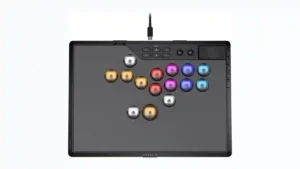
Choose it if you want a premium, tournament-ready leverless controller with excellent 2.4GHz wireless, deep actuation tuning, and sturdy construction. Skip it if loud, tall buttons, a heavy chassis, or...
Pros: overall satisfaction, button quality
Cons: control placement, button noise

Choose the GameSir Cyclone 2 if you want a low-cost PC/Switch/mobile controller with precise sticks, deep customization, and a dock. Skip it if Xbox/PS5 support, premium buttons, or flawless dock/battery...
Pros: value for money, charging dock support
Cons: d-pad feel, compatibility with Xbox