Other features
Ease of use
McHose L7 ProNo score yet
Keychron M3 Mini
5.0
Simple operation and easy configuration make the mouse approachable for everyday users.
2.4GHz connectivity
McHose L7 ProNo score yet
Keychron M3 Mini
4.4
The receiver connection is typically quick and responsive; isolated firmware and receiver problems can interrupt it.
Accessory compatibility
McHose L7 Pro
5.0
The included 8K receiver was successfully paired with another compatible MCHOSE model.
Keychron M3 MiniNo score yet
Cable flexibility
McHose L7 ProNo score yet
Keychron M3 Mini
4.5
The cable is flexible and not overly rigid, which is useful when using the mouse plugged in.
Cursor control
McHose L7 ProNo score yet
Keychron M3 Mini
5.0
Sensitivity adjustment and smooth tracking allow quick, precise cursor movements.
Dedicated DPI switch
McHose L7 ProNo score yet
Keychron M3 Mini
4.5
The underside DPI switch makes sensitivity changes possible without a software visit.
Device switching
McHose L7 ProNo score yet
Keychron M3 Mini
4.0
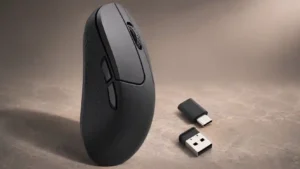
Separate USB-A and USB-C receivers simplify moving between computers, although manually disconnecting a receiver may be necessary.
Fingerprint and smudge resistance
McHose L7 Pro
2.5
The grippy finish can show fingerprints and become shiny or dirty with use.
Keychron M3 MiniNo score yet
FPS gaming suitability
McHose L7 Pro
4.8
Fast flicks and fine corrections make it an excellent FPS mouse, though latency-sensitive players should note conflicting test results.
Keychron M3 MiniNo score yet
Handedness options
McHose L7 ProNo score yet
Keychron M3 Mini
4.0
The symmetrical body accommodates either hand, although the extra buttons are on the left side only.
Included grip tape quality
McHose L7 Pro
2.8
The tape can improve grip on the sides, but the top pieces may provide little traction and the material can feel slippery.
Keychron M3 MiniNo score yet
Launch quality control
McHose L7 ProNo score yet
Keychron M3 Mini
2.5
Early units have exhibited minor shell imperfections and occasional receiver quality-control problems.
MacOS compatibility
McHose L7 ProNo score yet
Keychron M3 Mini
4.6
MacBook owners frequently praise the smooth response and easy compatibility, particularly with USB-C receivers, though receiver failures are possible.
Model naming clarity
McHose L7 ProNo score yet
Keychron M3 Mini
2.0
The Mini name can be misleading because the body is only slightly smaller than the original M3.
Motion latency
McHose L7 Pro
4.5
Movement latency is fast, even in testing that found slower click response.
Keychron M3 MiniNo score yet
Onboard memory
McHose L7 ProNo score yet
Keychron M3 Mini
5.0
Settings and profiles remain stored on the mouse, so the configuration app need not stay open.
Portability
McHose L7 ProNo score yet
Keychron M3 Mini
5.0
A light, compact body slips easily into a laptop bag or briefcase.
Profile switching
McHose L7 ProNo score yet
Keychron M3 Mini
2.0
Switching between stored profiles still requires opening the software on the 4K version.
Repairability
McHose L7 ProNo score yet
Keychron M3 Mini
5.0
The shell is relatively easy to open for maintenance and replacement of the battery or side-button board.
Scroll wheel precision
McHose L7 Pro
4.9
Distinct wheel steps provide reliable feedback and accurate scrolling.
Keychron M3 MiniNo score yet
Scroll wheel usefulness in games
McHose L7 Pro
5.0
Light, distinct wheel steps work particularly well for in-game scrolling in Fortnite.
Keychron M3 MiniNo score yet
Sensor placement
McHose L7 Pro
5.0
The centered sensor gives the mouse a natural feel when moving and aiming.
Keychron M3 MiniNo score yet
Switch quality
McHose L7 ProNo score yet
Keychron M3 Mini
4.0
The inexpensive Huano switches perform well, even though one tester preferred the higher-end switches in the larger model.
USB-C connectivity
McHose L7 ProNo score yet
Keychron M3 Mini
4.4
A dedicated USB-C receiver is particularly convenient for modern laptops on the 1K model, although isolated receiver failures occur.
USB receiver storage
McHose L7 ProNo score yet
Keychron M3 Mini
2.0
There is no convenient onboard storage for the small receivers, making them easier to misplace.
Battery and charging
Battery indicator
McHose L7 ProNo score yet
Keychron M3 Mini
2.9
The charge indicator is handy when working correctly, but its tiny LED is difficult to see and one unit gave premature low-battery warnings.
Charging speed
McHose L7 ProNo score yet
Keychron M3 Mini
3.0
A full charge takes around two hours in one test, which is acceptable rather than especially quick.
Replaceable battery support
McHose L7 ProNo score yet
Keychron M3 Mini
4.5
The internal rechargeable battery can be replaced with some disassembly.
Controls and connectivity
Button count
McHose L7 ProNo score yet
Keychron M3 Mini
4.7
The simple layout provides useful side buttons without a redundant top-mounted DPI control.
Button quality
McHose L7 ProNo score yet
Keychron M3 Mini
3.7
Some owners enjoy the responsive buttons while others find them mushy or cheap-feeling.
Companion software dependence
McHose L7 ProNo score yet
Keychron M3 Mini
5.0
Onboard controls and persistent settings let users avoid keeping companion software running.
Physical controls
McHose L7 ProNo score yet
Keychron M3 Mini
4.5
Dedicated underside controls are convenient, although the small switches can be stiff to operate.
Polling rate customization
McHose L7 ProNo score yet
Keychron M3 Mini
4.8
Polling rate can be changed directly on the mouse, without opening the configuration program.
Programmable buttons
McHose L7 ProNo score yet
Keychron M3 Mini
5.0
Reassignable buttons offer useful shortcuts without requiring a complicated setup.
Software resource usage
McHose L7 ProNo score yet
Keychron M3 Mini
5.0
The lightweight configuration program does not need to run continuously in the background.
Performance
Cleaning ease
McHose L7 Pro
3.0
Fingerprints can accumulate, so occasional cleaning is needed to keep the finish looking fresh.
Keychron M3 MiniNo score yet
Weight specification accuracy
McHose L7 ProNo score yet
Keychron M3 Mini
2.5
Measured weights can run a few grams above the advertised figure, and the 1K packaging and documentation did not consistently agree.
Ownership and support
Dongle-free setup
McHose L7 ProNo score yet
Keychron M3 Mini
5.0
Bluetooth offers a convenient way to use the mouse without plugging in a receiver.
Double-click reliability
McHose L7 Pro
5.0
Unintended double-clicks were not encountered even at zero debounce.
Keychron M3 MiniNo score yet
Firmware reliability
McHose L7 ProNo score yet
Keychron M3 Mini
2.0
Receiver firmware problems have required reflashing on some units, occasionally without resolving dropouts.
Multi-device support
McHose L7 ProNo score yet
Keychron M3 Mini
4.5
The updated software can manage multiple compatible devices conveniently.
Replacement parts availability
McHose L7 ProNo score yet
Keychron M3 Mini
2.0
The unusual skate outline limits the choice of exact-fit aftermarket feet.
Upgrade value
McHose L7 ProNo score yet
Keychron M3 Mini
5.0
The lighter design improves on the original M3, and the 4K version's better battery life and polling options can justify the premium.
Comfort and build
Durability over time
McHose L7 ProNo score yet
Keychron M3 Mini
2.3
Some mice hold up well over months of daily use, while others develop charging, connection or button failures within months.