Other features
Automatic scroll mode switching
Razer Basilisk V3
4.0
Smart-Reel makes long-page navigation easier, but experiences vary widely: some find it intuitive while others disable it because it activates too readily.
Logitech G502 HERONo score yet
Built-in RGB lighting
Razer Basilisk V3
4.9
The underglow, illuminated logo and wheel make the mouse stand out, particularly in dark setups.
Logitech G502 HERONo score yet
Cable drag
Razer Basilisk V3No score yet
Logitech G502 HERO
3.3
The cable is less prone to snagging than older versions, but stiffness and drag still bother some gamers.
Click-and-drag usability
Razer Basilisk V3No score yet
Logitech G502 HERO
1.0
A failing left click can make holding and dragging objects difficult.
Click consistency
Razer Basilisk V3
3.2
Main clicks generally feel consistent, but one tester noticed slightly different click feel and a customer reported unreliable middle clicks.
Logitech G502 HERONo score yet
Connection stability
Razer Basilisk V3No score yet
Logitech G502 HERO
5.0
The wired connection remains stable and responsive through regular use.
Console compatibility
Razer Basilisk V3
4.0
Basic input works on the tested PS5 and Xbox Series X, though console button mapping is limited.
Logitech G502 HERONo score yet
Cross-platform compatibility
Razer Basilisk V3No score yet
Logitech G502 HERO
4.0
Software compatibility with both Windows and macOS makes the mouse flexible across desktop platforms.
Dedicated DPI switch
Razer Basilisk V3No score yet
Logitech G502 HERO
2.0
Dedicated DPI buttons can be accidentally pressed and may feel unnecessary to users with a fixed sensitivity.
Device switching
Razer Basilisk V3
4.4
Saved profiles help when changing computers, though software-dependent scrolling features and the cable can complicate moving between setups.
Logitech G502 HERONo score yet
Grip wear
Razer Basilisk V3No score yet
Logitech G502 HERO
3.0
The side rubber can develop visible wear over years of use, but may remain comfortable and usable.
Included accessories
Razer Basilisk V3No score yet
Logitech G502 HERO
4.0
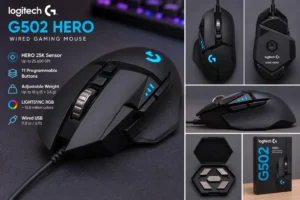
The included weights have their own storage case, keeping unused pieces organized.
Internal component rattle
Razer Basilisk V3No score yet
Logitech G502 HERO
3.5
The wheel or internal components may rattle when shaken, even though the body otherwise feels sturdy.
Learning curve
Razer Basilisk V3No score yet
Logitech G502 HERO
4.0
The larger design may take a little adjustment, especially when coming from a smaller mouse.
Middle click quality
Razer Basilisk V3No score yet
Logitech G502 HERO
2.0
The center wheel button requires more travel than some testers prefer.
MOBA gaming suitability
Razer Basilisk V3
4.3
Configurable controls work well in MOBA titles, though a genre-specific mouse may be preferable for more demanding layouts.
Logitech G502 HERONo score yet
Model naming clarity
Razer Basilisk V3
2.5
The wired original is easy to confuse with similarly named wireless and updated sensor variants; check the exact model.
Logitech G502 HERONo score yet
Motion latency
Razer Basilisk V3
5.0
Movement feels immediate even during large sweeps and quick turns, with virtually no noticeable lag in testing.
Logitech G502 HERONo score yet
Mouse cable detachability
Razer Basilisk V3
2.0
The cable cannot be detached, so it is unsuitable for those who like swapping or replacing mouse cables easily.
Logitech G502 HERONo score yet
Overall satisfaction
Razer Basilisk V3No score yet
Logitech G502 HERO
5.0
The combination of features and comfortable construction earns enthusiastic overall recommendations.
Portability
Razer Basilisk V3
2.0
A broad shell and permanently attached cable make it less convenient to carry between devices than compact wireless mice.
Logitech G502 HERONo score yet
Power cable length
Razer Basilisk V3
5.0
The six-foot cable provides enough reach for most desktop arrangements.
Logitech G502 HERONo score yet
Removable thumb trigger
Razer Basilisk V3
2.9
The fixed trigger is sturdy and cannot get lost, but losing the removable paddle makes fit and reach less flexible.
Logitech G502 HERONo score yet
Scroll acceleration
Razer Basilisk V3
4.3
Accelerated scrolling makes lengthy pages easier to traverse, but can be too aggressive for detailed work or gaming.
Logitech G502 HERONo score yet
Scroll wheel grip texture
Razer Basilisk V3No score yet
Logitech G502 HERO
1.0
The bare metal wheel can be slippery, reducing control during precise scrolling.
Sensor placement
Razer Basilisk V3No score yet
Logitech G502 HERO
5.0
The centrally positioned optical sensor supports precise, balanced tracking.
Spill resistance
Razer Basilisk V3No score yet
Logitech G502 HERO
4.0
One long-term unit survived a coffee incident, although this is not a guarantee of spill protection.
Surface calibration
Razer Basilisk V3
4.9
Automatic surface tracking and optional manual calibration help the sensor perform accurately across different setups.
Logitech G502 HERONo score yet
Switch quality
Razer Basilisk V3
5.0
The optical switches are fast and tactile, with the design avoiding the mechanical debounce delay of traditional switches.
Logitech G502 HERONo score yet
Windows compatibility
Razer Basilisk V3
4.0
Windows users get the full range of Synapse customization, though the software can feel bloated.
Logitech G502 HERONo score yet
Wired connectivity
Razer Basilisk V3
4.0
Wired connectivity delivers a dependable, responsive experience without battery concerns, but it is a compromise for wireless fans.
Logitech G502 HERONo score yet
Wrist and forearm strain relief
Razer Basilisk V3No score yet
Logitech G502 HERO
2.0
Extra weights can increase wrist strain during lifting; another user found the shape painful when dealing with repetitive strain.
Controls and connectivity
Button travel
Razer Basilisk V3No score yet
Logitech G502 HERO
3.5
Primary clicks have very little travel, while the wheel's center button can feel excessively deep.
Companion software dependence
Razer Basilisk V3No score yet
Logitech G502 HERO
5.0
Onboard storage and sensible defaults let users operate the mouse without keeping G HUB installed.
Polling rate customization
Razer Basilisk V3
4.5
Adjustable polling rate adds another layer of control for users who prefer to fine-tune performance.
Logitech G502 HERONo score yet
Scroll wheel customization
Razer Basilisk V3
4.8
Multiple scrolling modes are easy to select and tune, making the wheel more adaptable than a conventional notched design.
Logitech G502 HERONo score yet
Side button tactile indexing
Razer Basilisk V3No score yet
Logitech G502 HERO
5.0
Distinct tactile thumb buttons can be recognized without looking away from the game.
Software and driver support
Razer Basilisk V3
2.3
Synapse unlocks extensive configuration but some features require it to remain running, and Mac users miss out on customization.
Logitech G502 HERONo score yet
Software privacy
Razer Basilisk V3No score yet
Logitech G502 HERO
2.0
One user objects to the privacy agreements and background service required by the software.
Software update frequency
Razer Basilisk V3
2.3
Frequent Synapse updates can be intrusive despite its useful customization options.
Logitech G502 HERONo score yet
Ownership and support
Customer support
Razer Basilisk V3
1.0
One customer reported being denied manufacturer assistance because the mouse came from an unauthorized seller.
Logitech G502 HERONo score yet
Plug-and-play support
Razer Basilisk V3No score yet
Logitech G502 HERO
5.0
Connecting by USB enables immediate use without installing a driver utility for standard controls.
Setup ease
Razer Basilisk V3No score yet
Logitech G502 HERO
5.0
Basic operation requires little or no setup.
Comfort and build
Skate durability
Razer Basilisk V3No score yet
Logitech G502 HERO
2.0
The underside pads showed noticeable wear after several years of regular use.