Battery and charging
Battery life
Razer Basilisk V3No score yet
Keychron M3 Mini
4.3
Battery life is generally good, particularly on the 4K model with its more efficient electronics. Some units have shorter runtimes or misleading charge readings.
Battery indicator
Razer Basilisk V3No score yet
Keychron M3 Mini
2.9
The charge indicator is handy when working correctly, but its tiny LED is difficult to see and one unit gave premature low-battery warnings.
Charging convenience
Razer Basilisk V3No score yet
Keychron M3 Mini
3.5
The mouse remains usable while charging by cable, but an owner experienced an early charging failure.
Charging speed
Razer Basilisk V3No score yet
Keychron M3 Mini
3.0
A full charge takes around two hours in one test, which is acceptable rather than especially quick.
Replaceable battery support
Razer Basilisk V3No score yet
Keychron M3 Mini
4.5
The internal rechargeable battery can be replaced with some disassembly.
Other features
Ease of use
Razer Basilisk V3No score yet
Keychron M3 Mini
5.0
Simple operation and easy configuration make the mouse approachable for everyday users.
2.4GHz connectivity
Razer Basilisk V3No score yet
Keychron M3 Mini
4.4
The receiver connection is typically quick and responsive; isolated firmware and receiver problems can interrupt it.
Acceleration control
Razer Basilisk V3
5.0
Cursor motion follows hand movements accurately without unwanted acceleration.
Keychron M3 MiniNo score yet
Automatic scroll mode switching
Razer Basilisk V3
4.0
Smart-Reel makes long-page navigation easier, but experiences vary widely: some find it intuitive while others disable it because it activates too readily.
Keychron M3 MiniNo score yet
Built-in RGB lighting
Razer Basilisk V3
4.9
The underglow, illuminated logo and wheel make the mouse stand out, particularly in dark setups.
Keychron M3 MiniNo score yet
Connection stability
Razer Basilisk V3No score yet
Keychron M3 Mini
2.4
Many connections are stable, but intermittent dropouts and defective receivers have caused substantial frustration for some owners.
Console compatibility
Razer Basilisk V3
4.0
Basic input works on the tested PS5 and Xbox Series X, though console button mapping is limited.
Keychron M3 MiniNo score yet
Dedicated DPI switch
Razer Basilisk V3No score yet
Keychron M3 Mini
4.5
The underside DPI switch makes sensitivity changes possible without a software visit.
Ecosystem integration
Razer Basilisk V3
4.9
Chroma lighting can synchronize with other Razer peripherals and supported games, making it attractive for matching setups.
Keychron M3 MiniNo score yet
Fingerprint and smudge resistance
Razer Basilisk V3
2.0
Glossy accents pick up fingerprints readily, even though the main shell has a matte finish.
Keychron M3 MiniNo score yet
Firmware updateability
Razer Basilisk V3No score yet
Keychron M3 Mini
2.3
Firmware updates are more cumbersome than necessary because the configuration software does not directly handle them.
FPS gaming suitability
Razer Basilisk V3
5.0
Accurate tracking and fast clicks make it an excellent shooter mouse, with weight the principal competitive compromise.
Keychron M3 MiniNo score yet
Free-spin scrolling
Razer Basilisk V3
4.8
Free spin excels at getting through long pages, documents and spreadsheets without repeated finger movements.
Keychron M3 MiniNo score yet
Horizontal scrolling
Razer Basilisk V3
5.0
Side-to-side wheel input is valuable for large spreadsheets and can also be mapped to shortcuts such as changing browser tabs.
Keychron M3 MiniNo score yet
Included accessories
Razer Basilisk V3No score yet
Keychron M3 Mini
4.9
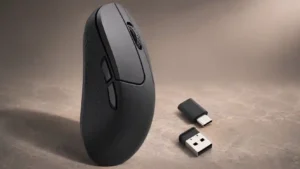
The 1K version includes USB-A and USB-C receivers plus adapters and a cable; the 4K model uses a different receiver arrangement.
Launch quality control
Razer Basilisk V3No score yet
Keychron M3 Mini
2.5
Early units have exhibited minor shell imperfections and occasional receiver quality-control problems.
Lift-off distance
Razer Basilisk V3
5.0
Very low lift-off distance is a strength, with adjustable cutoff settings for players who frequently reposition the mouse.
Keychron M3 MiniNo score yet
MMO gaming suitability
Razer Basilisk V3
4.0
It can handle MMOs well, but dedicated MMO mice have a more specialized array of thumb controls.
Keychron M3 MiniNo score yet
MOBA gaming suitability
Razer Basilisk V3
4.3
Configurable controls work well in MOBA titles, though a genre-specific mouse may be preferable for more demanding layouts.
Keychron M3 MiniNo score yet
Motion latency
Razer Basilisk V3
5.0
Movement feels immediate even during large sweeps and quick turns, with virtually no noticeable lag in testing.
Keychron M3 MiniNo score yet
Mouse cable detachability
Razer Basilisk V3
2.0
The cable cannot be detached, so it is unsuitable for those who like swapping or replacing mouse cables easily.
Keychron M3 MiniNo score yet
Power cable length
Razer Basilisk V3
5.0
The six-foot cable provides enough reach for most desktop arrangements.
Keychron M3 MiniNo score yet
Power efficiency
Razer Basilisk V3No score yet
Keychron M3 Mini
5.0
The 4K version's more efficient controller substantially improves battery performance over the 1K version.
Receiver quality
Razer Basilisk V3No score yet
Keychron M3 Mini
1.8
Receiver failures have affected some units, including a defective 4K dongle and a nonfunctional USB-C receiver.
Removable thumb trigger
Razer Basilisk V3
2.9
The fixed trigger is sturdy and cannot get lost, but losing the removable paddle makes fit and reach less flexible.
Keychron M3 MiniNo score yet
Repairability
Razer Basilisk V3No score yet
Keychron M3 Mini
5.0
The shell is relatively easy to open for maintenance and replacement of the battery or side-button board.
RGB features
Razer Basilisk V3
4.8
Chroma provides extensive customization and an attractive underglow that complements other compatible peripherals.
Keychron M3 MiniNo score yet
Scroll acceleration
Razer Basilisk V3
4.3
Accelerated scrolling makes lengthy pages easier to traverse, but can be too aggressive for detailed work or gaming.
Keychron M3 MiniNo score yet
Scroll wheel precision
Razer Basilisk V3
4.8
The tactile mode provides clearly defined steps for precise item selection or controlled scrolling.
Keychron M3 MiniNo score yet
Scroll wheel usefulness in games
Razer Basilisk V3
4.1
Tactile steps and tilt inputs work well for selecting weapons and abilities. Automatic free spin is less useful in some games and can cause accidental changes.
Keychron M3 MiniNo score yet
Sensitivity clutch usefulness
Razer Basilisk V3
4.5
The sensitivity clutch is handy for precise shots and can be remapped, though some players prefer in-game sensitivity settings and smaller hands can struggle to reach it.
Keychron M3 MiniNo score yet
Surface calibration
Razer Basilisk V3
4.9
Automatic surface tracking and optional manual calibration help the sensor perform accurately across different setups.
Keychron M3 MiniNo score yet
USB-C connectivity
Razer Basilisk V3No score yet
Keychron M3 Mini
4.4
A dedicated USB-C receiver is particularly convenient for modern laptops on the 1K model, although isolated receiver failures occur.
USB receiver storage
Razer Basilisk V3No score yet
Keychron M3 Mini
2.0
There is no convenient onboard storage for the small receivers, making them easier to misplace.
Weight tuning
Razer Basilisk V3
2.3
There is no adjustable weight system, which disappoints people who prefer tuning mouse weight themselves.
Keychron M3 MiniNo score yet
Windows compatibility
Razer Basilisk V3
4.0
Windows users get the full range of Synapse customization, though the software can feel bloated.
Keychron M3 MiniNo score yet
Wireless latency
Razer Basilisk V3No score yet
Keychron M3 Mini
5.0
The receiver connection can feel effectively lag-free during play.
Controls and connectivity
Bluetooth support
Razer Basilisk V3No score yet
Keychron M3 Mini
3.9
Bluetooth is convenient for laptops and travel, although it feels less smooth than the receiver and some owners experience disconnects.
Companion software dependence
Razer Basilisk V3No score yet
Keychron M3 Mini
5.0
Onboard controls and persistent settings let users avoid keeping companion software running.
Debounce customization
Razer Basilisk V3No score yet
Keychron M3 Mini
4.0
Debounce timing can be adjusted to suit gaming, though changing the factory setting is recommended by one tester.
Physical controls
Razer Basilisk V3No score yet
Keychron M3 Mini
4.5
Dedicated underside controls are convenient, although the small switches can be stiff to operate.
Scroll wheel customization
Razer Basilisk V3
4.8
Multiple scrolling modes are easy to select and tune, making the wheel more adaptable than a conventional notched design.
Keychron M3 MiniNo score yet
Software and driver support
Razer Basilisk V3
2.3
Synapse unlocks extensive configuration but some features require it to remain running, and Mac users miss out on customization.
Keychron M3 MiniNo score yet
Software stability
Razer Basilisk V3
5.0
Several reviewers found Synapse stable and reliable in use, with no problems configuring settings.
Keychron M3 MiniNo score yet
Software update frequency
Razer Basilisk V3
2.3
Frequent Synapse updates can be intrusive despite its useful customization options.
Keychron M3 MiniNo score yet
Ownership and support
Dongle-free setup
Razer Basilisk V3No score yet
Keychron M3 Mini
5.0
Bluetooth offers a convenient way to use the mouse without plugging in a receiver.
Double-click reliability
Razer Basilisk V3
4.5
Optical switches are favored for their potential to avoid double-click faults, though some praise is based on design rather than long-term testing.
Keychron M3 MiniNo score yet
Firmware reliability
Razer Basilisk V3No score yet
Keychron M3 Mini
2.0
Receiver firmware problems have required reflashing on some units, occasionally without resolving dropouts.
Macro support
Razer Basilisk V3
4.9
Macros and secondary mappings let users build extensive shortcuts for games and other tasks.
Keychron M3 MiniNo score yet
Multi-device support
Razer Basilisk V3No score yet
Keychron M3 Mini
4.5
The updated software can manage multiple compatible devices conveniently.
Plug-and-play support
Razer Basilisk V3No score yet
Keychron M3 Mini
5.0
Several owners report that it works immediately without fiddly configuration.
Replacement parts availability
Razer Basilisk V3No score yet
Keychron M3 Mini
2.0
The unusual skate outline limits the choice of exact-fit aftermarket feet.
Setup ease
Razer Basilisk V3No score yet
Keychron M3 Mini
2.9
Initial pairing is often quick, but defective receivers and repeated Bluetooth pairing failures can make setup frustrating.
Tilt wheel support
Razer Basilisk V3
4.8
Left and right tilt inputs add two useful commands, with some reviewers preferring their tactile response over competing wheels.
Keychron M3 MiniNo score yet
Warranty
Razer Basilisk V3
4.5
The included two-year limited warranty was viewed favorably.
Keychron M3 MiniNo score yet
Comfort and build
Switch durability
Razer Basilisk V3
4.6
Optical switches are rated for many clicks and are expected to avoid mechanical contact problems; multi-year testing was also favorable.
Keychron M3 MiniNo score yet
Performance
Weight specification accuracy
Razer Basilisk V3No score yet
Keychron M3 Mini
2.5
Measured weights can run a few grams above the advertised figure, and the 1K packaging and documentation did not consistently agree.
Wireless performance
Razer Basilisk V3No score yet
Keychron M3 Mini
4.5
Wireless operation is fast and responsive, with especially strong performance when using the receiver.