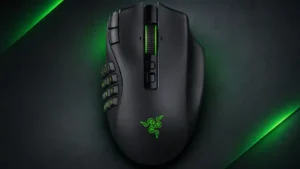
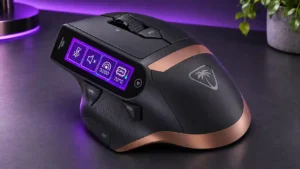
Compare Turtle Beach Command Series MC7 vs Razer Naga V3 Pro

Turtle Beach Command Series MC7

Turtle Beach Command Series MC7

Overall score 3.6 / 5

Based on 12 scored reviews

vs
Razer Naga V3 Pro

Razer Naga V3 Pro

Overall score 4.2 / 5

Based on 24 scored reviews

How we score

Scorata scores summarize analyzed review evidence on a 1–5 scale; they are not laboratory measurements or a simple average of customer star ratings. Feature scores summarize the reviews covering that feature. The overall score averages feature scores within each review, then combines review averages. When both expert and customer evidence are available, those two groups receive equal weight. Products can have different review coverage, so small score gaps do not establish a winner.

Recommendations prioritize important features for the category, with a score of at least 3.5, a gap of at least 0.25 points and at least two supporting reviews per product. Features with widely varying scores or broad connectivity contexts are excluded from recommendations. These safeguards do not establish statistical significance.

Quick verdict

What each product is best for

The review evidence points to a tradeoff: Included accessories and coating quality versus battery life and aesthetic design. Choose according to which strengths matter more to you; the overall score alone does not settle that choice.

Choose Turtle Beach Command Series MC7 for Included accessories and coating quality.

Choose Razer Naga V3 Pro for battery life and aesthetic design.

Why these recommendations?

Turtle Beach Command Series MC7

Where It Has the Edge

  • Included accessories is 5.0 vs 2.6. The spare battery, charging dock, receiver and cable make the package feel well equipped.
  • coating quality is 4.5 vs 2.5. The finish feels pleasant and minimizes fingerprints, making the exterior easy to keep looking clean.
  • polling rate is 4.0 vs 2.9. The 8,000Hz ceiling is praised for precise aiming, but some testers find little real benefit over 1,000Hz.

Razer Naga V3 Pro

Where It Has the Edge

  • battery life is 4.8 vs 4.3. Battery life is a major strength, with some users going weeks between charges. Actual runtime depends on lighting,...
  • aesthetic design is 4.5 vs 1.0. The familiar matte-black design manages to accommodate numerous buttons without looking excessively cluttered.
  • hand support is 5.0 vs 1.5. A dedicated ring-finger platform supports the hand; the physical lock restores a fixed rest when the button is...
Turtle Beach Command Series MC7 3.6 overall score
Razer Naga V3 Pro 4.2 overall score

Compare features

Scores are out of 5. Missing scores mean missing review evidence, not a missing feature.

Scored on both products

Battery and charging

Battery life
Turtle Beach Command Series MC7
4.3

The ability to swap a ready-charged battery earns broad approval, although a single cell has comparatively modest runtime.

Razer Naga V3 Pro
4.8

Battery life is a major strength, with some users going weeks between charges. Actual runtime depends on lighting, polling and connection mode.

Wireless charging support
Turtle Beach Command Series MC7
2.0

One prospective buyer would have preferred a wireless charging dock instead of relying on battery swapping.

Razer Naga V3 Pro
4.7

Optional wireless charging accessories can keep the mouse powered continuously and pair easily.

Charging convenience
Turtle Beach Command Series MC7
4.8

Charging one battery while using the other is intuitive and usually requires only a quick swap, though it still means managing cells.

Razer Naga V3 Pro
4.9

Optional dock or charging mat can eliminate routine cable charging, though the excellent battery life makes them unnecessary for many users.

Comfort and build

Aesthetic design
Turtle Beach Command Series MC7
1.0

The angular, asymmetrical styling and mixed accents attract unusually strong criticism for looking cluttered or unattractive.

Razer Naga V3 Pro
4.5

The familiar matte-black design manages to accommodate numerous buttons without looking excessively cluttered.

Shape comfort
Turtle Beach Command Series MC7
1.7

Some hands enjoy the sloped profile, while others cannot find a natural finger or palm position.

Razer Naga V3 Pro
4.4

The wide, sculpted shell and finger rest feel comfortable for many users, particularly with a palm grip. Its short, bulky shape is not universally appealing.

Ergonomic design
Turtle Beach Command Series MC7
2.6

Ergonomics are highly divisive: some testers find the sloped shell comfortable, while others report awkward finger support and poor handling at speed.

Razer Naga V3 Pro
4.8

The sculpted right-handed body supports a relaxed hand position, especially for palm-grip users.

Hand size compatibility
Turtle Beach Command Series MC7
2.0

The wide chassis and far-reaching touchscreen limit fit for small hands, and some large-handed users struggle too.

Razer Naga V3 Pro
4.1

The broad shape generally suits larger hands. Small or less flexible hands can struggle to reach the extra buttons.

Build quality
Turtle Beach Command Series MC7
3.8

Construction feels solid to several users, though complaints about hard plastic, hollow screen feedback, and internal rattle weaken the premium impression.

Razer Naga V3 Pro
4.9

The construction feels robust, with secure panels and little flex or rattling.

Palm grip comfort
Turtle Beach Command Series MC7
4.0

The large chassis is described as tolerable for relaxed palm gripping despite its weight.

Razer Naga V3 Pro
4.7

A relaxed palm grip is the natural fit for the wide shell and dedicated finger support.

Grip comfort
Turtle Beach Command Series MC7
3.8

The thumb groove or sloped body can feel pleasant, though the button layout makes overall grip comfort inconsistent.

Razer Naga V3 Pro
4.3

Comfortable grip and finger support are a strong point for many users, with caveats for smaller hands and the full grid panel.

Materials quality
Turtle Beach Command Series MC7
3.8

The tactile surface feels solid to several testers, but hard plastic and occasional rattle compromise its premium image.

Razer Naga V3 Pro
3.3

Sturdy internal supports feel reassuring, but some users find the exterior plastics and rubber less refined than expected.

Size
Turtle Beach Command Series MC7
2.0

The unusually large chassis feels cumbersome for quick repositioning, though it can provide a stable working base.

Razer Naga V3 Pro
2.3

The wide, relatively short shell is substantial and can be unwieldy for smaller hands or users who prefer longer mice.

Claw grip comfort
Turtle Beach Command Series MC7
4.0

A relaxed claw grip may accommodate the size, but this is not a nimble ultralight design.

Razer Naga V3 Pro
3.8

Claw grip is workable for many players, though the broad hump can encourage a palm grip or feel awkward.

Long-session comfort
Turtle Beach Command Series MC7
5.0

For long email, browsing and editing sessions, one tester found the substantial mouse comfortable and supportive.

Razer Naga V3 Pro
5.0

The supportive shape and balanced weight are comfortable through extended work and gaming sessions for compatible hand sizes.

Ownership and support

Hand support
Turtle Beach Command Series MC7
1.5

The curved click buttons can leave parts of the fingers unsupported, making a natural resting position difficult.

Razer Naga V3 Pro
5.0

A dedicated ring-finger platform supports the hand; the physical lock restores a fixed rest when the button is unwanted.

Value for money
Turtle Beach Command Series MC7
1.8

The high asking price is the dominant buying objection, since lighter premium mice can offer more comfortable handling.

Razer Naga V3 Pro
3.0

The roughly $180 price is steep, especially with optional accessories. Its versatility is most convincing when it replaces several mice or simplifies complex controls.

Multi-device support
Turtle Beach Command Series MC7
4.0

Several connection modes appeal to people operating more than one computer at a desk.

Razer Naga V3 Pro
5.0

Bluetooth and wireless connectivity make using the mouse with multiple computers convenient.

Macro support
Turtle Beach Command Series MC7
5.0

On-device macros can be launched without leaving a game or task, a clear benefit for customized workflows.

Razer Naga V3 Pro
4.2

Macros and modifier layers expand the available commands considerably. Automation can be against the rules of some online games.

Other features

Accessory compatibility
Turtle Beach Command Series MC7
5.0

Its batteries can be shared with the Stealth Pro II, reducing the number of spares needed in a Turtle Beach setup.

Razer Naga V3 Pro
2.0

The recessed USB connector may be picky about cable compatibility.

Balance and weight distribution
Turtle Beach Command Series MC7
1.7

Several assessments find that the 135g body feels poorly balanced or rattly during quick movements; one user appreciates its stability for work.

Razer Naga V3 Pro
4.3

Well-distributed weight helps the mouse feel stable, although the larger plate or rearward balance can affect agility.

Included accessories
Turtle Beach Command Series MC7
5.0

The spare battery, charging dock, receiver and cable make the package feel well equipped.

Razer Naga V3 Pro
2.6

The box provides the essentials but omits the receiver needed for maximum polling. A storage case for unused panels would also be useful.

Coating quality
Turtle Beach Command Series MC7
4.5

The finish feels pleasant and minimizes fingerprints, making the exterior easy to keep looking clean.

Razer Naga V3 Pro
2.5

The relatively rough shell texture is not universally liked; some prefer smoother plastic or a more grippy coating.

Wired connectivity
Turtle Beach Command Series MC7
5.0

USB operation joins two wireless modes for a flexible connection setup.

Razer Naga V3 Pro
3.3

Wired operation adds flexibility, but the stiff cable makes it less appealing for active gaming.

RGB features
Turtle Beach Command Series MC7
4.8

Adjustable underglow is generally liked for its restrained look and useful low-battery warning.

Razer Naga V3 Pro
3.6

Customizable RGB looks attractive, although the six-button panel lacks backlighting and some lighting effects can distract.

FPS gaming suitability
Turtle Beach Command Series MC7
2.3

Fast controls and reliable tracking earned an enthusiastic endorsement for competitive shooters in one assessment.

Razer Naga V3 Pro
3.4

Shooter performance is technically strong and the two-button layout helps, but weight and bulk limit fast competitive movement for many players.

Polling rate
Turtle Beach Command Series MC7
4.0

The 8,000Hz ceiling is praised for precise aiming, but some testers find little real benefit over 1,000Hz.

Razer Naga V3 Pro
2.9

The included receiver runs at 1,000Hz, which is plenty for most players. Unlocking 8,000Hz requires extra hardware according to most accounts.

Weight
Turtle Beach Command Series MC7
1.8

At around 135g, the mouse is substantially heavier than many gaming alternatives. Its heft can feel steady for office work but cumbersome for esports.

Razer Naga V3 Pro
2.8

Lighter than its predecessor, it remains heavy next to esports mice. Some players appreciate the stability while others struggle with fast movements.

Device switching
Turtle Beach Command Series MC7
4.0

Changing between computers using the available wireless and wired options is appealing for a multi-PC desk.

Razer Naga V3 Pro
5.0

Moving between work laptops and gaming PCs is straightforward.

Onboard memory
Turtle Beach Command Series MC7
4.0

Saved controls and widgets can be drawn from onboard memory as part of touchscreen setup.

Razer Naga V3 Pro
5.0

Onboard profiles reduce the need to keep Synapse running after configuration.

Scroll wheel resistance
Turtle Beach Command Series MC7
5.0

The wheel offers satisfyingly tactile stepped resistance for controlled actions such as weapon changes.

Razer Naga V3 Pro
4.3

The wheel offers useful resistance choices, although free movement can be too easy for some.

Glide smoothness
Turtle Beach Command Series MC7
5.0

Tracking and movement feel notably smooth, with precision during gaming and everyday cursor motion.

Razer Naga V3 Pro
4.3

The feet provide smooth glide on hard surfaces and soft pads, though the charging puck restricts the bottom skate area.

Premium feel
Turtle Beach Command Series MC7
2.7

The shell can feel solid and deliberate, yet rattles, hollow screen feedback and hard plastic make its premium credentials inconsistent.

Razer Naga V3 Pro
3.3

The sturdy, feature-packed construction feels premium to some, but rough plastics and rubber disappoint others.

Grip texture
Turtle Beach Command Series MC7
3.0

The textured thumb rest helps prevent slips but can feel restrictive when reaching for adjacent buttons.

Razer Naga V3 Pro
3.6

Rubber grips help secure the mouse, but the twelve-button panel leaves little thumb-rest space and rubber wear is a concern.

Free-spin scrolling
Turtle Beach Command Series MC7
5.0

The adaptive wheel switches between tactile steps and free spinning, helping with both weapon changes and long pages.

Razer Naga V3 Pro
4.5

Free spin is excellent for long pages and spreadsheets, but it can feel too sensitive or accelerate unexpectedly.

DPI range
Turtle Beach Command Series MC7
4.0

The 30,000-DPI maximum places the sensor among premium gaming hardware, although that ceiling is not necessary for everyone.

Razer Naga V3 Pro
4.5

The broad sensitivity range offers plenty of adjustment, although most players do not need the maximum DPI.

Horizontal scrolling
Turtle Beach Command Series MC7
4.5

Side-to-side wheel tilts are considered useful for navigation and quick control.

Razer Naga V3 Pro
5.0

Horizontal wheel tilt makes spreadsheets, wide webpages and editing timelines easier to navigate.

Wireless latency
Turtle Beach Command Series MC7
5.0

Rapid turns and flicks register with virtually no perceptible wireless delay in a positive test.

Razer Naga V3 Pro
4.5

Wireless response is excellent overall, although Bluetooth can introduce a delay after idling.

Left and right click quality
Turtle Beach Command Series MC7
5.0

The main click buttons are praised for satisfying, snappy feedback, even by reviewers who dislike the mouse shape.

Razer Naga V3 Pro
4.8

Primary clicks are generally crisp, tactile and responsive.

Scroll wheel precision
Turtle Beach Command Series MC7
4.5

Distinct steps and quick adjustment make the adaptive wheel useful for fine navigation.

Razer Naga V3 Pro
4.8

Precision tactile mode gives finer control over scroll steps and weapon selection, though some prefer standard notches.

Scroll wheel quality
Turtle Beach Command Series MC7
4.5

Stepped and free-spin scrolling are widely liked, but a few testers notice a rattle when the mouse is lifted or flicked.

Razer Naga V3 Pro
4.7

The redesigned wheel is a standout for precise notches and fast free spinning. Mode changes and overly sensitive free spin occasionally frustrate.

Connection stability
Turtle Beach Command Series MC7
5.0

Wireless play is reported as stable, although one tester encountered software lag at the highest polling setting.

Razer Naga V3 Pro
4.8

Wireless and panel connections generally stay stable in short-term use.

2.4GHz connectivity
Turtle Beach Command Series MC7
5.0

The 2.4GHz option is part of a versatile three-mode connection system alongside Bluetooth and USB wired use.

Razer Naga V3 Pro
4.9

The 2.4GHz connection feels fast and dependable for games, with straightforward pairing.

Switch feel
Turtle Beach Command Series MC7
5.0

The Titan optical switches deliver a satisfying, snappy mechanical-feeling click.

Razer Naga V3 Pro
4.9

The optical switches feel crisp and deliberate, though opinions about their sound are less favorable.

Switch quality
Turtle Beach Command Series MC7
5.0

Optical switches feel excellent under the fingertips and avoid reported double-click errors.

Razer Naga V3 Pro
4.9

The Gen-4 optical switches feel firm and crisp with fast actuation.

Profile switching
Turtle Beach Command Series MC7
5.0

Touchscreen shortcuts make jumping between saved profiles quick without opening a menu.

Razer Naga V3 Pro
4.9

Game-specific profiles make changing layouts convenient, including automatic switching where configured.

Profile management
Turtle Beach Command Series MC7
4.8

Users can organize settings by game or application, with flexible controls in Swarm II.

Razer Naga V3 Pro
4.7

Profiles and automatic panel recognition make complex configurations practical, though occasional saving or detection problems occur.

Click consistency
Turtle Beach Command Series MC7
5.0

Optical switches consistently register crisp presses without reported double-click errors.

Razer Naga V3 Pro
5.0

Optical switches provide consistent, accurate clicks and clear tactile feedback.

Motion consistency
Turtle Beach Command Series MC7
5.0

The optical sensor is repeatedly described as smooth and consistent without jumps or drift.

Razer Naga V3 Pro
5.0

Motion feels smooth and consistent without noticeable stuttering.

Surface compatibility
Turtle Beach Command Series MC7
5.0

Tracking stays reliable across cloth, hard desk mats and even glass according to hands-on testing.

Razer Naga V3 Pro
5.0

The sensor tracks accurately across varied surfaces, and the feet glide well on both hard and soft pads.

Controls and connectivity

Side button quality
Turtle Beach Command Series MC7
1.5

Reach and accidental presses, rather than responsiveness, are the biggest problems with the side controls.

Razer Naga V3 Pro
4.4

Side buttons are sculpted and tactile, especially on the six-button panel. A few users find the two-button layout mushy or the twelve-button grid difficult to distinguish.

Button placement
Turtle Beach Command Series MC7
1.0

Side controls often require awkward thumb reaches; one tester repeatedly triggered a nearby button by mistake.

Razer Naga V3 Pro
3.8

Most side inputs are easy to reach with the right grip, but the extra edge buttons and dense grid can require awkward stretches.

Software quality
Turtle Beach Command Series MC7
2.2

Swarm II provides plenty of settings, but serious update and polling-related reliability issues undercut its usefulness.

Razer Naga V3 Pro
3.9

Synapse has extensive features and is easy for many to configure, but bugs, resource complaints and lack of web support are notable drawbacks.

Button quality
Turtle Beach Command Series MC7
4.7

Main clicks feel satisfying and crisp even though opinions differ on the shell surrounding them.

Razer Naga V3 Pro
3.4

Button quality is generally good, although edge buttons and the simpler two-button panel can feel mushy.

Software stability
Turtle Beach Command Series MC7
1.4

Some users report the app failing to open after an update or crashing at 8,000Hz polling.

Razer Naga V3 Pro
2.5

Software stability varies: some experience immediate, reliable changes while others lose bindings, encounter profile failures or see sleep-related bugs.

Polling rate customization
Turtle Beach Command Series MC7
4.0

The 8,000Hz setting can be adjusted quickly, though the real benefit of very high rates varies by user.

Razer Naga V3 Pro
5.0

Automatic polling-rate switching is convenient for balancing game response with desktop battery savings.

Button count
Turtle Beach Command Series MC7
5.0

The generous set of programmable controls appeals to anyone who likes having extra commands on the mouse.

Razer Naga V3 Pro
4.3

The unusually high input count is excellent for complex commands, but it is more than many players need.

Button customization
Turtle Beach Command Series MC7
5.0

Mapping multiple physical buttons gives owners alternatives to using the touchscreen for frequently needed commands.

Razer Naga V3 Pro
4.5

Remapping can be extensive and easy, but software failures and restrictions on the AI shortcut can interfere.

Software and driver support
Turtle Beach Command Series MC7
2.5

Companion software offers extensive device settings but crashes or failed launches can prevent reliable customization.

Razer Naga V3 Pro
2.1

Desktop Synapse support is extensive, but the web configurator is unavailable in several accounts, limiting software flexibility.

Software usability
Turtle Beach Command Series MC7
4.5

The settings interface is mostly intuitive and flexible, although occasional slowness and the need for software lessen convenience.

Razer Naga V3 Pro
4.2

Synapse offers powerful, often intuitive configuration, but desktop software dependence and bugs frustrate some users.

DPI customization
Turtle Beach Command Series MC7
4.7

On-mouse sensitivity changes can be quick and useful, although touchscreen access is not comfortable for everyone.

Razer Naga V3 Pro
4.5

The sensor offers extensive sensitivity adjustment for fine tuning.

Bluetooth support
Turtle Beach Command Series MC7
4.5

Bluetooth joins wired USB and 2.4GHz wireless to give the mouse welcome connectivity flexibility.

Razer Naga V3 Pro
4.6

Bluetooth is convenient for work and multiple computers, with excellent endurance and unusually good response for the connection type.

Programmable buttons
Turtle Beach Command Series MC7
5.0

Extra assignable buttons are welcomed for games, browsing, and frequently used commands.

Razer Naga V3 Pro
4.9

Up to 23 programmable inputs and modifier layers provide substantial flexibility for abilities and work shortcuts.

Button responsiveness
Turtle Beach Command Series MC7
5.0

Optical switches consistently earn praise for a snappy, responsive click.

Razer Naga V3 Pro
5.0

The main optical switches respond quickly and register clicks accurately.

Performance

Click noise
Turtle Beach Command Series MC7
3.0

One assessment enjoys the mechanical click sound while another finds the clicks somewhat too loud.

Razer Naga V3 Pro
2.7

Main clicks can sound high-pitched, hollow or loud. Some accept the noise in exchange for responsive feedback.

Gaming performance
Turtle Beach Command Series MC7
4.7

Core sensor and switch performance is solid, and some testers enjoy aiming despite the heavy chassis.

Razer Naga V3 Pro
4.9

Excellent sensor performance and modular controls support many genres, particularly MMO and MOBA play.

Sensor performance
Turtle Beach Command Series MC7
5.0

The Owl-Eye sensor is a consistent highlight for precise, smooth tracking across games and surfaces.

Razer Naga V3 Pro
4.8

The flagship optical sensor tracks smoothly and precisely, with very little perceptible delay.

Productivity performance
Turtle Beach Command Series MC7
5.0

Stable handling, an adaptive scroll wheel and direct shortcuts help with everyday office tasks.

Razer Naga V3 Pro
5.0

The wheel and remappable buttons make everyday work, spreadsheets and editing more efficient.

Wireless performance
Turtle Beach Command Series MC7
5.0

The high-polling wireless connection stays responsive during extended play in a favorable hands-on assessment.

Razer Naga V3 Pro
5.0

Wireless operation is generally fast and dependable, including with the optional charging mat.

Tracking and training

Accuracy and tracking precision
Turtle Beach Command Series MC7
5.0

Tracking draws consistent praise for accuracy, including rapid movements and changes between desk surfaces.

Razer Naga V3 Pro
5.0

Tracking is accurate and consistent even at high sensitivity. The physical weight can make fine aim adjustments harder despite the excellent sensor.

Evidence available for one product

Other features

Ease of use
Turtle Beach Command Series MC7No score yet
Razer Naga V3 Pro
5.0

Setup and customization are straightforward for many users, although mastering the full button grid takes practice.

Acceleration control
Turtle Beach Command Series MC7
4.0

Detailed angle and motion tuning gives enthusiasts more room to personalize movement.

Razer Naga V3 ProNo score yet
AI Prompt Master
Turtle Beach Command Series MC7No score yet
Razer Naga V3 Pro
2.7

The AI Prompt Master shortcut divides opinion: some appreciate workflow efficiencies, while others disable it or find it unnecessary and limited.

Automatic scroll mode switching
Turtle Beach Command Series MC7No score yet
Razer Naga V3 Pro
3.7

Smart-Reel is convenient for some, but oversensitive free spin, audible transitions and occasional mode-switch delays make others prefer manual modes.

Built-in RGB lighting
Turtle Beach Command Series MC7No score yet
Razer Naga V3 Pro
3.9

RGB complements the black design, but only the full twelve-button panel is illuminated.

Cable flexibility
Turtle Beach Command Series MC7No score yet
Razer Naga V3 Pro
2.0

The bundled braided cable is stiff and drags more than a flexible gaming cable.

Cable quality
Turtle Beach Command Series MC7No score yet
Razer Naga V3 Pro
3.3

The included cable receives mixed feedback: one likes it, while another finds it stiff and draggy.

Click latency
Turtle Beach Command Series MC7No score yet
Razer Naga V3 Pro
5.0

Optical switches respond immediately and deliver satisfying feedback.

Color options
Turtle Beach Command Series MC7No score yet
Razer Naga V3 Pro
2.0

Black is the only color available, and an additional finish would have been welcome.

Connectivity versatility
Turtle Beach Command Series MC7No score yet
Razer Naga V3 Pro
5.0

Wired USB, Bluetooth and 2.4GHz wireless make it easy to move between work and gaming setups.

Cross-platform compatibility
Turtle Beach Command Series MC7
4.5

Multiple connection methods are appreciated for moving between compatible computers, though macOS support is a concern.

Razer Naga V3 ProNo score yet
Cursor control
Turtle Beach Command Series MC7No score yet
Razer Naga V3 Pro
2.0

The pointer can feel lethargic when moving quickly compared with a lightweight mouse.

Dedicated DPI switch
Turtle Beach Command Series MC7No score yet
Razer Naga V3 Pro
4.7

Dedicated DPI buttons are useful for quick sensitivity changes, including sniping, when they are easy to reach.

Feet quality
Turtle Beach Command Series MC7No score yet
Razer Naga V3 Pro
3.8

Feet feel smooth on various surfaces, though the puck leaves limited space for replacement skates and early wear marks concern some users.

Fingerprint and smudge resistance
Turtle Beach Command Series MC7
5.0

The finish handles fingerprints well and feels pleasant under the fingertips.

Razer Naga V3 ProNo score yet
Gaming suitability
Turtle Beach Command Series MC7
4.5

For gamers who want customizable controls more than low weight, the feature-rich design has appeal.

Razer Naga V3 ProNo score yet
Interchangeable side panels
Turtle Beach Command Series MC7No score yet
Razer Naga V3 Pro
4.9

Three magnetic side panels make it easy to switch between two, six and twelve thumb buttons. The secure attachment and quick recognition make this flexibility genuinely practical.

Learning curve
Turtle Beach Command Series MC7No score yet
Razer Naga V3 Pro
3.1

The dense twelve-button grid takes practice and muscle memory, although the sculpted six-button layout is easier to learn.

Lift-off distance
Turtle Beach Command Series MC7No score yet
Razer Naga V3 Pro
5.0

Adjustable lift-off behavior helps keep the crosshair stable during wide sweeps.

MacOS compatibility
Turtle Beach Command Series MC7
1.0

The Windows-only configuration makes this a poor choice for users needing full macOS support.

Razer Naga V3 ProNo score yet
MMO gaming suitability
Turtle Beach Command Series MC7No score yet
Razer Naga V3 Pro
4.9

The twelve-button grid and extra modifiers make complex MMO abilities easier to reach without stretching to keyboard shortcuts.

MOBA gaming suitability
Turtle Beach Command Series MC7No score yet
Razer Naga V3 Pro
4.7

Six- and twelve-button panels work well for MOBA abilities and customizable shortcuts.

Motion latency
Turtle Beach Command Series MC7No score yet
Razer Naga V3 Pro
5.0

Motion response is fast and smooth with little perceptible lag.

Mouse sensitivity matching
Turtle Beach Command Series MC7No score yet
Razer Naga V3 Pro
5.0

The sensitivity-matching tool works well for transferring familiar sensitivity settings from another mouse.

Packaging quality and presentation
Turtle Beach Command Series MC7No score yet
Razer Naga V3 Pro
2.0

The plastic packaging feels underwhelming for such an expensive mouse.

Portability
Turtle Beach Command Series MC7No score yet
Razer Naga V3 Pro
4.7

Receiver storage makes taking the mouse on the go more convenient.

Power efficiency
Turtle Beach Command Series MC7No score yet
Razer Naga V3 Pro
5.0

Efficient sensor operation contributes to long battery life, even with substantial daily use.

Repairability
Turtle Beach Command Series MC7No score yet
Razer Naga V3 Pro
4.0

Independently replaceable wheel microswitches are a useful repairability advantage despite the proprietary wheel mechanism.

Repairability
Turtle Beach Command Series MC7No score yet
Razer Naga V3 Pro
4.0

The wheel uses separately replaceable microswitches, which is helpful for repairs.

Responsiveness
Turtle Beach Command Series MC7No score yet
Razer Naga V3 Pro
4.8

The mouse feels responsive and precise, though high-end internals cannot fully compensate for its mass in fast shooters.

Scroll acceleration
Turtle Beach Command Series MC7No score yet
Razer Naga V3 Pro
2.5

Free-spin acceleration can feel excessively fast, making scrolling harder to control.

Scroll wheel usefulness in games
Turtle Beach Command Series MC7No score yet
Razer Naga V3 Pro
4.9

The precision tactile mode is especially useful for weapon swaps and skill cycling.

Sleep mode
Turtle Beach Command Series MC7No score yet
Razer Naga V3 Pro
1.5

An idle or sleep transition can cause unwanted cursor movement or delayed inputs, according to one detailed account.

USB-C connectivity
Turtle Beach Command Series MC7No score yet
Razer Naga V3 Pro
3.5

USB-C is a welcome upgrade, although the recessed port and adapter can restrict third-party cable fit.

USB receiver storage
Turtle Beach Command Series MC7No score yet
Razer Naga V3 Pro
4.8

A hidden receiver compartment under the side panel helps keep the dongle secure when traveling.

Ownership and support

Reliability
Turtle Beach Command Series MC7No score yet
Razer Naga V3 Pro
2.5

The mouse feels dependable in use, but software binding failures and complex internal circuitry introduce caveats.

Double-click reliability
Turtle Beach Command Series MC7
5.0

Tests report responsive optical switches without unwanted double clicks.

Razer Naga V3 ProNo score yet
Firmware reliability
Turtle Beach Command Series MC7No score yet
Razer Naga V3 Pro
1.5

One reported sleep-related cursor movement bug can wake the computer or interrupt display maintenance.

Plug-and-play support
Turtle Beach Command Series MC7No score yet
Razer Naga V3 Pro
5.0

The included receiver connects seamlessly for quick plug-and-play operation.

Product support lifespan
Turtle Beach Command Series MC7No score yet
Razer Naga V3 Pro
2.5

Long-term usefulness depends partly on ongoing companion software support, a concern for a mouse with so many programmable controls.

Replacement parts availability
Turtle Beach Command Series MC7No score yet
Razer Naga V3 Pro
2.5

More separately available side panel options would make the modular design more useful over time.

Setup ease
Turtle Beach Command Series MC7No score yet
Razer Naga V3 Pro
4.9

Setup is generally easy, including pairing with the optional charging mat.

Tilt wheel support
Turtle Beach Command Series MC7No score yet
Razer Naga V3 Pro
4.8

The tilt wheel is useful for horizontal navigation and can also be remapped to in-game commands.

Upgrade value
Turtle Beach Command Series MC7No score yet
Razer Naga V3 Pro
3.7

The lighter body, improved internals and additional controls are worthwhile refinements, but the familiar design makes upgrading from the V2 Pro optional.

Controls and connectivity

Accidental button activation
Turtle Beach Command Series MC7No score yet
Razer Naga V3 Pro
4.0

Accidental presses are a concern on the dense grid and extra ring-finger button, but the latter can be physically locked.

Companion software dependence
Turtle Beach Command Series MC7No score yet
Razer Naga V3 Pro
2.0

Many advanced controls depend on Synapse for setup; users who dislike installed software may find that frustrating.

Debounce customization
Turtle Beach Command Series MC7
4.0

Fine-grained debounce settings appeal to owners who enjoy adjusting switch behavior.

Razer Naga V3 ProNo score yet
Haptic controls
Turtle Beach Command Series MC7No score yet
Razer Naga V3 Pro
5.0

Tactile wheel feedback gives more control over rapid scrolling and item selection.

Lockable ring-finger button
Turtle Beach Command Series MC7No score yet
Razer Naga V3 Pro
4.7

The extra ring-finger button is useful for modifiers and shortcuts, but some hands press it unintentionally. A physical lock turns it into a solid finger rest.

Scroll wheel customization
Turtle Beach Command Series MC7No score yet
Razer Naga V3 Pro
4.6

Distinct wheel modes offer useful flexibility and fine control, although manual mode switching can have a brief delay.

Side button tactile indexing
Turtle Beach Command Series MC7No score yet
Razer Naga V3 Pro
3.5

Sculpted buttons make the grid easier to navigate by touch, especially the six-button layout. Some players still miss a tactile home marker on the twelve-button grid.

Software resource usage
Turtle Beach Command Series MC7No score yet
Razer Naga V3 Pro
1.5

One user felt the desktop software noticeably slowed down their computer.

Touchscreen accidental input
Turtle Beach Command Series MC7
1.8

Several testers report or anticipate unwanted touches and sensitivity changes, while one experienced no accidental inputs at all.

Razer Naga V3 ProNo score yet
Touchscreen display readability
Turtle Beach Command Series MC7
2.7

The display can be bright and responsive, but poor off-angle visibility frequently makes it look washed out.

Razer Naga V3 ProNo score yet
Touchscreen novelty and innovation
Turtle Beach Command Series MC7
3.6

Its uncommon side-mounted touch display is intriguing and creative, even to people who question whether a mouse needs one.

Razer Naga V3 ProNo score yet
Touchscreen reach and usability
Turtle Beach Command Series MC7
2.3

Thumb access is the largest usability disagreement: some find the controls natural, while others must bend fingers or reposition their grip.

Razer Naga V3 ProNo score yet
Touchscreen shortcut customization
Turtle Beach Command Series MC7
4.0

Touch commands support DPI, profiles, macros and OBS, but software limitations prevent some fully custom workflows.

Razer Naga V3 ProNo score yet
Touchscreen usefulness
Turtle Beach Command Series MC7
2.8

The touchscreen divides opinion sharply: streamers and shortcut enthusiasts see real value, while others find it redundant or awkward.

Razer Naga V3 ProNo score yet

Battery and charging

Battery health controls
Turtle Beach Command Series MC7No score yet
Razer Naga V3 Pro
4.8

The optional charging setup includes a charge limit to help manage battery health.

Battery hot-swap system
Turtle Beach Command Series MC7
5.0

The two rechargeable cells and charging dock are the clearest standout. A charged spare replaces the drained battery in seconds, substantially reducing interruptions.

Razer Naga V3 ProNo score yet
Battery indicator
Turtle Beach Command Series MC7
5.0

A red lighting warning and on-screen battery information make it easy to know when a swap is needed.

Razer Naga V3 ProNo score yet
Per-battery runtime
Turtle Beach Command Series MC7
2.5

A single battery lasts substantially less than many flagship alternatives; the spare and dock compensate for that limitation.

Razer Naga V3 ProNo score yet
Rechargeable battery
Turtle Beach Command Series MC7
5.0

Two rechargeable cells keep a spare ready while the other powers the mouse.

Razer Naga V3 ProNo score yet

Comfort and build

Button legend durability
Turtle Beach Command Series MC7No score yet
Razer Naga V3 Pro
4.7

Double-shot molded legends are a welcome upgrade over printed labels and should resist fading with repeated use.

Durability over time
Turtle Beach Command Series MC7No score yet
Razer Naga V3 Pro
2.0

Rubber grips raise concerns about becoming grimy or wearing down over years of use.

Fingertip grip comfort
Turtle Beach Command Series MC7No score yet
Razer Naga V3 Pro
2.4

Fingertip grip is often awkward because of the weight, width and reach required for extra buttons.

Skate durability
Turtle Beach Command Series MC7No score yet
Razer Naga V3 Pro
3.0

Visible marks on the feet after little use raise concerns about wear.

Switch durability
Turtle Beach Command Series MC7No score yet
Razer Naga V3 Pro
4.0

The rated 100-million-click lifespan inspires confidence, but it is not a demonstrated long-term result.

Performance

Scroll wheel noise
Turtle Beach Command Series MC7No score yet
Razer Naga V3 Pro
3.8

Some enjoy the tactile wheel sound, while others dislike the audible click during automatic mode changes.

Other Top Gaming Mice to Consider

#1 ASUS ROG Harpe II Ace
4.6

Choose the ROG Harpe II Ace for ultralight FPS play, precise tracking, smooth glide, and web-based tuning. Skip it if you need palm-grip support, MMO buttons, onboard profiles, or long...

Pros: glide smoothness, weight

Cons: handedness options

#2 Razer Basilisk V3
4.5

Excellent tracking, comfortable right-handed ergonomics and a versatile scroll wheel make the Basilisk V3 a strong gaming and productivity mouse. Its substantial weight, fixed cable and sometimes over-sensitive automatic scrolling...

Pros: scroll wheel quality, RGB features

Cons: weight, handedness options

#3 McHose L7 Pro
4.5

The L7 Pro delivers remarkably light handling, precise aiming and a grippy shell at a budget price. Stock skates are less impressive, and conflicting click-latency measurements warrant caution for latency-sensitive...

Pros: value for money, weight

Cons: wired connectivity

#4 Razer Viper V4 Pro
4.4

Best for ultra-light, competition-focused speed, precise tracking, stable wireless, and long battery life. Skip it if you need quieter clicks, left-handed support, Bluetooth, more buttons, or better value for casual...

Pros: value for money, weight

Cons: click noise, RGB features