If you want better 2.4GHz connectivity
Choose HyperX Pulsefire Haste 2. It scores 4.6 vs 2.0 for 2.4GHz connectivity, with a 4.0 overall score.

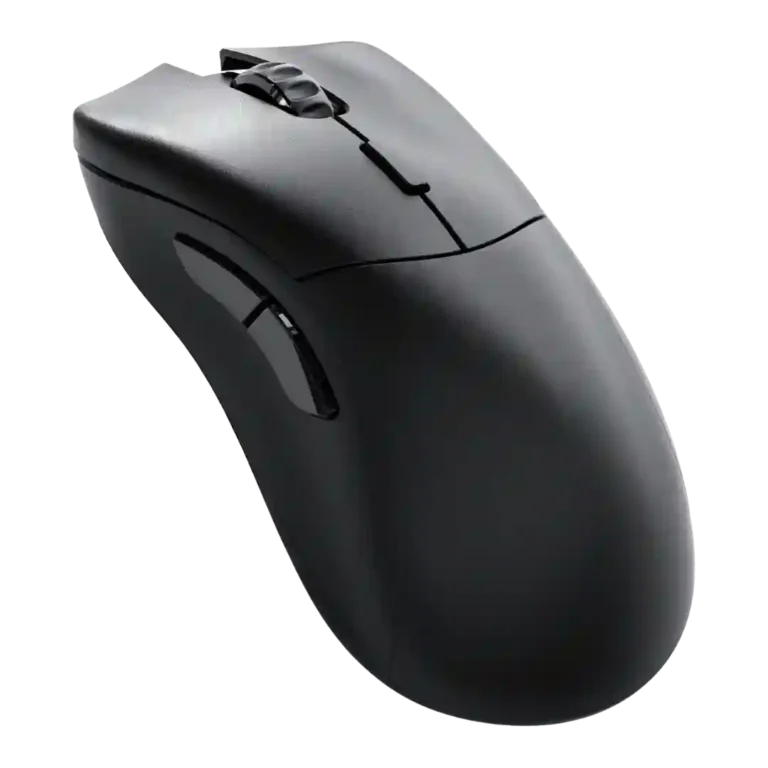
Choose the Glorious Model D 2 Pro if you want a very light right-handed esports mouse with strong tracking and easy software. Skip it if 4K/8K polling, short high-rate battery life, or cheaper-feeling plastics bother you.
Best for right-handed competitive FPS players who prioritize low weight, strong tracking, smooth skates, and high polling-rate options over flashier design or long 4K battery life.
Not for left-handed users, gamers who dislike frequent charging, buyers who want a clearly premium-feeling shell, or anyone unlikely to notice 4K/8K polling gains.
The Glorious Model D 2 Pro 4K/8K is best understood as a focused esports mouse with excellent tracking, low weight, smooth glide, and easy software. Reviewers repeatedly liked the sensor, PTFE feet, right-handed ergonomic shape, and competitive responsiveness. The tradeoff is that its headline polling rate is not universally meaningful: several reviewers could not feel a real difference versus 1,000Hz or 2,000Hz, while high polling sharply reduced battery life. Premium feel, side-button placement, firmware updating, and dongle/charging convenience also drew recurring criticism, making the mouse stronger as a performance tool than as an all-around premium package.
Compared with other Gaming Mice, this product is above average in skate durability, profile switching, switch durability, near average in software usability, switch feel, below average in 2.4GHz connectivity, connection stability, Bluetooth support.
| Attribute | This product | Category average | Difference |
|---|---|---|---|
| 2.4GHz connectivity | 2.0 | 4.4 | -2.4 |
| connection stability | 2.2 | 4.5 | -2.3 |
| Bluetooth support | 1.5 | 3.6 | -2.1 |
| charging convenience | 2.3 | 4.0 | -1.7 |
| RGB features | 2.0 | 3.7 | -1.7 |
| battery life | 2.9 | 4.3 | -1.3 |
| cross-platform compatibility | 2.5 | 4.0 | -1.5 |
| premium feel | 2.9 | 4.0 | -1.1 |
Choose HyperX Pulsefire Haste 2. It scores 4.6 vs 2.0 for 2.4GHz connectivity, with a 4.0 overall score.
Choose Logitech G Pro X2 Superstrike. It scores 4.8 vs 2.3 for charging convenience, with a 4.0 overall score.
Choose Corsair Sabre V2 Pro. It scores 5.0 vs 2.2 for connection stability, with a 3.6 overall score.
Choose Turtle Beach Burst II Air. It scores 4.7 vs 2.3 for firmware reliability, with a 4.3 overall score.
Compared with Glorious Model D 2 Pro 4k/8k
Yes. Reviewers repeatedly praised its light weight, accurate sensor, smooth glide, and high polling options for competitive or FPS use.
Only for very serious competitive players with the right setup. Several reviewers said they could not reliably feel the difference, and high polling reduced battery life.
At 1,000Hz, reviewers found the rated 80 hours solid or good. At 4,000Hz, multiple reviewers complained about much shorter runtime, surprise shutdowns, or battery anxiety.
Mostly for right-handed palm or claw users. The shape earned praise, but side-button placement and certain contours bothered several reviewers.
Glorious Core was usually described as simple, clean, and easy for DPI, polling, profiles, remapping, macros, debounce, and lift-off settings. Firmware updates and macros were less reliable in some reviews.
No reviewer treated it as a good left-handed option. The right-handed shape and side-button placement were repeatedly called out as limiting.
Not consistently. Some reviewers found the build sturdy, but others said the plastic, coating, and plain design felt cheap or less premium than rivals.
These are a few of the reviews included in our analysis.


Choose the ROG Harpe II Ace for ultralight FPS play, precise tracking, smooth glide, and web-based tuning. Skip it if you need palm-grip support, MMO buttons, onboard profiles, or long...
Pros: glide smoothness, weight
Cons: handedness options

Excellent tracking, comfortable right-handed ergonomics and a versatile scroll wheel make the Basilisk V3 a strong gaming and productivity mouse. Its substantial weight, fixed cable and sometimes over-sensitive automatic scrolling...
Pros: scroll wheel quality, RGB features
Cons: weight, handedness options

The L7 Pro delivers remarkably light handling, precise aiming and a grippy shell at a budget price. Stock skates are less impressive, and conflicting click-latency measurements warrant caution for latency-sensitive...
Pros: value for money, weight
Cons: wired connectivity

Best for ultra-light, competition-focused speed, precise tracking, stable wireless, and long battery life. Skip it if you need quieter clicks, left-handed support, Bluetooth, more buttons, or better value for casual...
Pros: value for money, weight
Cons: click noise, RGB features