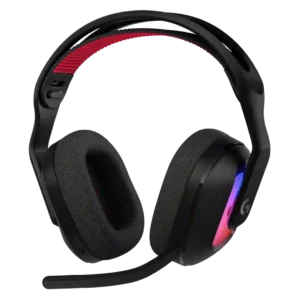
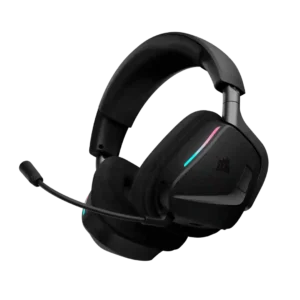
Logitech G Astro A20 X
Where It Has the Edge
- Clamping force comfort is 5.0 vs 4.7. Clamp pressure is generally light and comfortable, helping with long sessions and glasses. The downside is that the...

Scorata scores summarize analyzed review evidence on a 1–5 scale; they are not laboratory measurements or a simple average of customer star ratings. Feature scores summarize the reviews covering that feature. The overall score averages feature scores within each review, then combines review averages. When both expert and customer evidence are available, those two groups receive equal weight. Products can have different review coverage, so small score gaps do not establish a winner.
Recommendations prioritize important features for the category, with a score of at least 3.5, a gap of at least 0.25 points and at least two supporting reviews per product. Features with widely varying scores or broad connectivity contexts are excluded from recommendations. These safeguards do not establish statistical significance.
Quick verdict
The review evidence points to a tradeoff: Clamping force comfort versus Media playback controls. Choose according to which strengths matter more to you; the overall score alone does not settle that choice.
Choose Logitech G Astro A20 X for Clamping force comfort.
Choose Corsair Void v2 MAX for Media playback controls.
Scores are out of 5. Missing scores mean missing review evidence, not a missing feature.
Gaming audio is usually clear, detailed, and immersive, especially after EQ, but the default tuning divides opinion. Some find it excellent immediately, while others call it flat, dull, or below expectations for the price.
74 supporting reviews · Mixed evidence
Browse product reviews for Logitech G Astro A20 XSound quality is generally a major strength, with clear, immersive gaming audio and strong music performance after tuning. A minority of customers report severe distortion or cutouts, and stock EQ is not universally liked.
40 supporting reviews · Mixed evidence
Browse product reviews for Corsair Void v2 MAXNoise cancellation is not a consistent strength: several people expected more isolation or noted that true ANC is absent. A few customers nevertheless described the perceived noise reduction as effective.
6 supporting reviews · Mixed evidence
Browse product reviews for Logitech G Astro A20 XNoise cancelling is generally described as effective, with users saying it cuts distracting household noise and one expert calling it a strong complement to EQ.
4 supporting reviews
Browse product reviews for Corsair Void v2 MAXSoundstage is serviceable to strong depending on the listener, with good left-right spread for gaming. Some experts still find it narrower than open-back or more premium alternatives.
3 supporting reviews · Mixed evidence
Browse product reviews for Logitech G Astro A20 XThe presentation can feel broad and immersive, surrounding the listener and giving games a more cinematic sense of space. That spaciousness pairs well with directional effects.
2 supporting reviews
Browse product reviews for Corsair Void v2 MAXNoise handling ranges from excellent with Blue VO!CE filters enabled to overly sensitive in untreated rooms. Background fans, keyboards, and desk noises can still bleed through depending on settings and mic position.
13 supporting reviews · Mixed evidence
Browse product reviews for Logitech G Astro A20 XBackground-noise handling is a clear strength when supported by NVIDIA Broadcast or the headset’s filtering. Tests and customers report reduced fan, mouse, and room noise even when voice tone itself is not always ideal.
6 supporting reviews
Browse product reviews for Corsair Void v2 MAXBass is highly dependent on tuning and fit: some hear smooth, punchy lows, while others find it weak, overemphasized, or lacking deep rumble. EQ can improve it substantially.
22 supporting reviews · Mixed evidence
Browse product reviews for Logitech G Astro A20 XBass is usually described as punchy, deep, and immersive without drowning out game cues. A few listeners find the stock tuning too bass-heavy or less balanced, so EQ can matter.
8 supporting reviews · Mixed evidence
Browse product reviews for Corsair Void v2 MAXDirectional cues are a strong gaming advantage, with footsteps, gunfire, and enemy locations usually easy to place. Rear positioning and very busy sound mixes can be less precise for some listeners.
18 supporting reviews
Browse product reviews for Logitech G Astro A20 XDirectional audio is a standout gaming strength. Multiple testers could pinpoint footsteps, flanking enemies, and environmental cues early enough to gain a real competitive advantage.
6 supporting reviews
Browse product reviews for Corsair Void v2 MAXPassive isolation is inconsistent, ranging from adequate in quiet rooms to almost ineffective in noisy environments. The breathable fabric pads favor awareness and comfort over a tight acoustic seal.
6 supporting reviews · Mixed evidence
Browse product reviews for Logitech G Astro A20 XPassive isolation is one of the more variable traits. Some users like retaining awareness of the room, while others find the seal weak and say outside sound comes through too easily.
6 supporting reviews · Mixed evidence
Browse product reviews for Corsair Void v2 MAXMeasured tonal balance departs noticeably from the reviewer’s target, especially through the treble. The stock response can make bass feel muddier and vocals less detailed than intended.
1 supporting review · Limited evidence
Browse product reviews for Logitech G Astro A20 XThe stock tuning is not especially neutral. Expert impressions call out mid-heavy or V-shaped balance that favors fun over accuracy and can sound woolly before EQ.
2 supporting reviews
Browse product reviews for Corsair Void v2 MAXSpatial presentation is a strong gaming feature, helping place enemies and environmental sounds convincingly around the player. It is particularly effective in immersive and competitive titles.
2 supporting reviews
Browse product reviews for Logitech G Astro A20 XDolby Atmos and Tempest 3D Audio are praised for sharpening directional awareness and immersion. In competitive games, spatial processing helps make footsteps and positional cues easier to locate.
4 supporting reviews
Browse product reviews for Corsair Void v2 MAXMany units work flawlessly in daily use, but there are meaningful outliers involving battery failure, charging problems, disconnects, and intermittent crackling. Long-term reliability is therefore less consistent than the headset’s day-one performance.
13 supporting reviews · Mixed evidence
Browse product reviews for Logitech G Astro A20 XReliability is the biggest concern. Several customers report cutouts, distorted 2.4GHz audio, mic-mute failures, material failure, or a software update that left the headset unusable.
10 supporting reviews · Mixed evidence
Browse product reviews for Corsair Void v2 MAXThe biggest connectivity limitation is that Bluetooth and LIGHTSPEED cannot play at the same time. Switching is fast, but users who want phone audio mixed with console or PC sound may find this restrictive.
11 supporting reviews
Browse product reviews for Logitech G Astro A20 XSimultaneous 2.4GHz and Bluetooth is one of the headset’s most praised features and often works seamlessly for calls, podcasts, and gaming together. A few users report switching quirks or limited control over the second Bluetooth connection.
14 supporting reviews · Mixed evidence
Browse product reviews for Corsair Void v2 MAXRemovable ear pads are appreciated for cleaning, replacement, and extending the headset’s useful life. Owners who care about maintenance see this as a meaningful practical benefit.
2 supporting reviews
Browse product reviews for Logitech G Astro A20 XThe earpads come off easily, but reinstalling them is described as a bit tedious. Replacement handling is workable rather than effortless.
1 supporting review · Limited evidence
Browse product reviews for Corsair Void v2 MAXFit is the biggest comfort variable: medium and larger heads tend to fare well, while smaller heads can experience slipping and a weak seal. A loose fit can also change bass response and positional consistency.
12 supporting reviews · Mixed evidence
Browse product reviews for Logitech G Astro A20 XFit depends noticeably on head and ear shape. Some users settle into a good fit after break-in, while smaller heads, large ears, or unusual head shapes can leave the cups sitting awkwardly.
4 supporting reviews
Browse product reviews for Corsair Void v2 MAXFirmware updates can improve sound and resolve initial issues, but updating may require connecting directly to a PC. That extra step is useful when it works but not especially seamless.
2 supporting reviews
Browse product reviews for Logitech G Astro A20 XFirmware support is inconsistent. Updates work smoothly for some users, but PC-only access, failed installations, and one report of an update bricking the headset make this a meaningful risk area.
7 supporting reviews · Mixed evidence
Browse product reviews for Corsair Void v2 MAXValue is strongest for people who will actually use PLAYSYNC across two systems; in that use case the convenience can justify the price premium. Single-platform players often see cheaper alternatives or the G522 as the smarter buy.
50 supporting reviews · Mixed evidence
Browse product reviews for Logitech G Astro A20 XValue is usually seen as good for the comfort, battery life, sound, and dual wireless features, especially on sale. At full price, some reviewers feel the software, controls, or reliability issues are hard to justify.
16 supporting reviews · Mixed evidence
Browse product reviews for Corsair Void v2 MAXThe microphone material can discolor or stain over time, creating a cosmetic mismatch with the headset. This was a specific durability concern on one long-term unit.
1 supporting review · Limited evidence
Browse product reviews for Logitech G Astro A20 XThe matte finish handles fingerprints well. One tester specifically notes that it does not collect oils and smudges like glossy plastic.
1 supporting review · Limited evidence
Browse product reviews for Corsair Void v2 MAXThe onboard game/chat mixer is very useful on Xbox and PC and can quickly prioritize teammates or game audio. A few owners found the rocker easy to hit accidentally or reported it failing outright.
11 supporting reviews · Mixed evidence
Browse product reviews for Logitech G Astro A20 XXbox game/chat mixing is a weak point. One expert found the headset disables Xbox’s own mixing options, making party and Discord balance unnecessarily frustrating.
1 supporting review · Limited evidence
Browse product reviews for Corsair Void v2 MAXRemovable earpads make cleaning and eventual replacement easier. That helps preserve comfort and usability over longer ownership.
1 supporting review · Limited evidence
Browse product reviews for Logitech G Astro A20 XEarpad choice is limited compared with some older Corsair models. One owner specifically wishes alternative ear-muff options were available.
1 supporting review · Limited evidence
Browse product reviews for Corsair Void v2 MAXThe suspension band works well for many medium and large heads, but its limited adjustment points can be a poor fit for smaller users. Several people would prefer a more conventional sliding system.
10 supporting reviews · Mixed evidence
Browse product reviews for Logitech G Astro A20 XAdjustment is smooth and accommodating across head sizes. Reviewers praise easy sizing, precise sliding movement, and enough range to create a comfortable fit.
5 supporting reviews
Browse product reviews for Corsair Void v2 MAXThe removable boom is convenient for solo play, travel, and casual listening. Some users would prefer flip-to-mute, and the lack of dedicated storage makes the mic easier to misplace.
14 supporting reviews · Mixed evidence
Browse product reviews for Logitech G Astro A20 XThe fixed boom mic is a consistent annoyance. Multiple reviewers wish it were removable, especially because the attached mic makes the headset bulkier and less suitable away from a gaming desk.
4 supporting reviews
Browse product reviews for Corsair Void v2 MAXGlasses comfort is mixed: some users barely notice interference and praise the light clamp, while others report pressure and soreness. Fit seems especially dependent on head size and pad position.
4 supporting reviews · Mixed evidence
Browse product reviews for Logitech G Astro A20 XGlasses wearers are consistently happy with the fit, reporting little side pressure even after long sessions. The headset also stays comfortable for users who regularly wear glasses during work or gaming.
6 supporting reviews
Browse product reviews for Corsair Void v2 MAXMaximum loudness is a recurring complaint, with several users wishing the headset could play louder or deliver stronger chat volume. The restrained output can be a downside for listeners who prefer high volume.
9 supporting reviews
Browse product reviews for Logitech G Astro A20 XVolume headroom is strong on PC, but it is not universally well judged. One Xbox-focused test found maximum console volume too low, while another customer described the output as excessive.
4 supporting reviews · Mixed evidence
Browse product reviews for Corsair Void v2 MAXTreble can be crisp and non-fatiguing, but several experts found it recessed, uneven, or lacking sparkle in the default tuning. EQ is often needed to restore detail without making the sound harsh.
10 supporting reviews · Mixed evidence
Browse product reviews for Logitech G Astro A20 XTreble is consistently praised as crisp and detailed. High-frequency effects stay clear enough for game cues and music without the headset sounding dull.
5 supporting reviews
Browse product reviews for Corsair Void v2 MAXThe bundle is well organized and includes useful cables and the PLAYSYNC base, but one expert wanted a power adapter and an additional USB cable. It is comprehensive without feeling luxurious.
1 supporting review · Limited evidence
Browse product reviews for Logitech G Astro A20 XThe core transmitter, charging cable, and guide are organized well, but the bundle feels incomplete to some. Missing adapter options and the lack of a storage solution are the main complaints.
4 supporting reviews · Mixed evidence
Browse product reviews for Corsair Void v2 MAXIt can travel and work over Bluetooth or USB, but dependence on the base station for full wireless functionality makes it less travel-friendly than ordinary Bluetooth headphones. It also does not fold flat.
2 supporting reviews · Mixed evidence
Browse product reviews for Logitech G Astro A20 XThe swiveling cups help the headset lie flat and sit comfortably around the neck during breaks. It is more desk-friendly than travel-focused, especially because the microphone remains attached.
1 supporting review · Limited evidence
Browse product reviews for Corsair Void v2 MAXThe included and community EQ presets are useful starting points, particularly for FPS, bass, and media listening. Default profiles are not universally loved, and several users get better results from custom or community tuning.
10 supporting reviews · Mixed evidence
Browse product reviews for Logitech G Astro A20 XPreset quality is mixed. One expert found the stock modes muddy and too mid-heavy, while another found options such as Bass Boost clearly distinct and useful.
2 supporting reviews · Mixed evidence
Browse product reviews for Corsair Void v2 MAXXbox support is a notable strength when it works, including easy use within the same multi-platform setup. One customer, however, reported that their unit would not connect to Xbox at all.
3 supporting reviews · Mixed evidence
Browse product reviews for Logitech G Astro A20 XXbox support is version-specific rather than universal. The Xbox edition generally works well, but the standard model is incompatible and buyers need to choose the correct SKU.
3 supporting reviews · Mixed evidence
Browse product reviews for Corsair Void v2 MAXMidrange performance is mixed: voices and game detail can sound clean, but several experts hear missing detail or recessed presence in the stock tuning. EQ can improve vocal naturalness and balance.
6 supporting reviews · Mixed evidence
Browse product reviews for Logitech G Astro A20 XMidrange performance is mostly solid, especially after tuning, but the stock balance can recess vocals and mids behind bass and treble. Better-tuned examples keep dialogue and game cues easy to follow.
3 supporting reviews · Mixed evidence
Browse product reviews for Corsair Void v2 MAXPLAYSYNC is the headset’s defining strength, making it quick and painless to jump between two gaming systems while also offering Bluetooth and USB options. The main tradeoff is that Bluetooth cannot mix simultaneously with LIGHTSPEED audio.
47 supporting reviews
Browse product reviews for Logitech G Astro A20 XSimultaneous 2.4GHz wireless and Bluetooth, broad device support, and easy phone-plus-game audio make connectivity a major strength. A recurring caveat is the lack of a wired listening option.
8 supporting reviews · Mixed evidence
Browse product reviews for Corsair Void v2 MAXThe detachable 48 kHz boom mic is one of the most consistently praised parts of the headset, often sounding unusually full and clear for wireless gaming gear. A few users found it too sensitive or merely average without tuning.
49 supporting reviews
Browse product reviews for Logitech G Astro A20 XThe microphone is usually good for gaming chat and calls, with many users reporting clear voice quality. It is not studio-grade, and a smaller group reports thin sound, boom-position problems, or outright mute failures.
23 supporting reviews · Mixed evidence
Browse product reviews for Corsair Void v2 MAXThe fabric memory-foam pads are usually praised as soft, breathable, and cooler than leatherette. Some users find the foam too firm, scratchy, hot, or insufficiently plush for long sessions.
26 supporting reviews · Mixed evidence
Browse product reviews for Logitech G Astro A20 XBreathable memory foam and deeper earcups are repeatedly praised for plush comfort. Larger ears and heat buildup can still be issues for some users during extended sessions.
12 supporting reviews
Browse product reviews for Corsair Void v2 MAXWireless performance is usually stable and dependable, with many users reporting clean connections and no dropouts. A small minority reported serious disconnects or intermittent crackling after months of use.
13 supporting reviews · Mixed evidence
Browse product reviews for Logitech G Astro A20 XThe lightweight fit remains secure despite the low mass. Reviewers note that the headset stays put during head movement without needing painful clamp pressure.
2 supporting reviews
Browse product reviews for Corsair Void v2 MAXUSB-C adds useful flexibility for wired audio and charging, and at least one buyer specifically valued that option. It helps keep the headset usable even when wireless power is depleted.
1 supporting review · Limited evidence
Browse product reviews for Logitech G Astro A20 XUSB-C charging is widely welcomed as a convenient upgrade from older Corsair models. The connector itself is a strength, although one included cable is criticized for being too short.
4 supporting reviews
Browse product reviews for Corsair Void v2 MAXThe compact PLAYSYNC base is central to the headset’s convenience and is much smaller than many multi-system docks. Its light weight can make it slide around, and cable placement can become awkward when systems are far apart.
8 supporting reviews · Mixed evidence
Browse product reviews for Logitech G Astro A20 XThe USB transmitter generally works well and can deliver excellent audio, but its USB-A design feels bulky or dated to some. Its larger size is easier to keep track of, which partly offsets the inconvenience.
5 supporting reviews · Mixed evidence
Browse product reviews for Corsair Void v2 MAXIt is especially strong for mixed setups spanning PC, Xbox, PlayStation, Switch, and mobile devices. The single-version approach avoids needing separate console-specific headset variants.
24 supporting reviews
Browse product reviews for Logitech G Astro A20 XPlatform coverage is excellent across PC, PlayStation, Switch, mobile, and dedicated Xbox variants. Users who switch between console and computer generally find the flexibility valuable.
6 supporting reviews
Browse product reviews for Corsair Void v2 MAXRange is generally excellent, staying connected across rooms, around a house, and even through walls in some tests. It compares favorably with several older wireless headsets.
6 supporting reviews
Browse product reviews for Logitech G Astro A20 XWireless range is repeatedly strong, from whole-house roaming to roughly 20–30 feet through walls. Users generally stay connected well beyond a typical desk setup.
7 supporting reviews
Browse product reviews for Corsair Void v2 MAXOverall sentiment is strongly positive for multi-platform gaming, with convenience, comfort, mic clarity, and battery life doing most of the work. Negative experiences cluster around fit, default sound tuning, Bluetooth limitations, and a handful of reliability failures.
101 supporting reviews · Mixed evidence
Browse product reviews for Logitech G Astro A20 XMost owners and experts are very positive, especially about comfort, sound, battery life, and connectivity. The main divide comes from a smaller but serious group reporting audio cutouts, software failures, or hardware defects.
45 supporting reviews · Mixed evidence
Browse product reviews for Corsair Void v2 MAXLIGHTSPEED is consistently described as effectively lag-free for gaming, with quick source changes and tight response. Bluetooth can show more noticeable delay in video use.
12 supporting reviews
Browse product reviews for Logitech G Astro A20 XLow-latency wireless is a clear gaming strength, with the connection described as seamless and part of the dual-wireless feature’s appeal.
2 supporting reviews
Browse product reviews for Corsair Void v2 MAXThe earcups offer useful tilt and swivel for fitting different head shapes. That adjustability helps comfort even though the headset does not fold flat.
1 supporting review · Limited evidence
Browse product reviews for Logitech G Astro A20 XThe 90-degree rotating earcups are a small but useful design win. They let the headset lie flat and sit more naturally around the neck during breaks.
2 supporting reviews
Browse product reviews for Corsair Void v2 MAXPackaging is generally neat, organized, and increasingly eco-conscious, with accessories separated clearly and reduced plastic. Presentation receives positive marks even when extras are sparse.
2 supporting reviews
Browse product reviews for Logitech G Astro A20 XThe packaging is described as sturdy, polished, and protective, with organized internal compartments. It delivers a notably premium unboxing experience.
1 supporting review · Limited evidence
Browse product reviews for Corsair Void v2 MAXBluetooth listening is hampered by the lack of basic playback controls such as play or pause. This makes the headset less convenient away from a computer or console.
2 supporting reviews
Browse product reviews for Logitech G Astro A20 XPlayback controls are convenient for managing media without reaching for a keyboard. One customer notes the media button works most, but not all, of the time.
2 supporting reviews
Browse product reviews for Corsair Void v2 MAXThe LIGHTSYNC lighting is widely liked for adding tasteful visual flair, with strong control through G Hub. It can shorten battery life substantially, and a few software quirks make fully disabling it less straightforward.
33 supporting reviews
Browse product reviews for Logitech G Astro A20 XThe RGB itself is attractive and color customization is fun, but control can be annoying. Some users must open iCUE just to turn the lighting down or off.
3 supporting reviews · Mixed evidence
Browse product reviews for Corsair Void v2 MAXG Hub is a major strength on desktop, offering detailed audio, mic, lighting, battery, and profile controls. The mobile app is useful on consoles but more limited and occasionally less intuitive.
30 supporting reviews
Browse product reviews for Logitech G Astro A20 XiCUE can make sound tuning easy and powerful on PC, but the software experience is sharply divided. Complaints include no mobile app, awkward dependence on PC, and one update-related failure that left a headset unusable.
7 supporting reviews · Mixed evidence
Browse product reviews for Corsair Void v2 MAXEQ control is unusually deep for a gaming headset, including advanced and community-created profiles for both headphone and mic sound. Tuning is often the key to turning the merely decent default sound into something much better.
25 supporting reviews
Browse product reviews for Logitech G Astro A20 XiCUE’s custom EQ, presets, and SoundID can transform or fine-tune the sound, and many users like the flexibility. A minority find SoundID underwhelming or run into software problems that block the benefit.
14 supporting reviews · Mixed evidence
Browse product reviews for Corsair Void v2 MAXMost setups are plug-and-play and PLAYSYNC switching is easy once configured. A minority encountered long Bluetooth pairing attempts, firmware steps that required a PC, or awkward audio-routing quirks.
22 supporting reviews · Mixed evidence
Browse product reviews for Logitech G Astro A20 XBasic pairing is often very easy, especially over the dongle, and iCUE can be straightforward for PC users. The experience becomes less simple when extra apps, PC-only controls, or console-specific steps are required.
10 supporting reviews · Mixed evidence
Browse product reviews for Corsair Void v2 MAXMost physical controls are easy to reach and tactile, including mute, volume, and source switching. Some users dislike the placement of the wheel and buttons because they can be bumped by a chair, hood, or headrest.
15 supporting reviews · Mixed evidence
Browse product reviews for Logitech G Astro A20 XOn-ear controls are convenient when they work well, with some praising tactile volume adjustment and easy access. Others find the buttons or mixer finicky, springy, or unintuitive.
8 supporting reviews · Mixed evidence
Browse product reviews for Corsair Void v2 MAXBluetooth is convenient for phones, calls, and casual listening, but it is not the headset’s strongest connection mode. Some users experienced setup quirks, crackling, or app handoff issues that did not appear over LIGHTSPEED.
11 supporting reviews · Mixed evidence
Browse product reviews for Logitech G Astro A20 XBluetooth is a major part of the headset’s dual-wireless appeal and usually works reliably. A smaller number of users report choppy audio or wish it supported better multi-device Bluetooth management.
11 supporting reviews · Mixed evidence
Browse product reviews for Corsair Void v2 MAXVoice communication is one of the headset’s strongest uses, with crisp, full pickup that can approach a decent USB mic for chats and casual streaming. Software presets can add even more polish.
5 supporting reviews
Browse product reviews for Logitech G Astro A20 XVoice-chat performance is consistently strong in the positive reports. Friends and Discord partners repeatedly describe speech as clear, and one console test found party-chat voice especially crisp.
5 supporting reviews
Browse product reviews for Corsair Void v2 MAXUSB-C charging is generally simple and can be used while playing, with some tests finding recharging reasonably quick. A small number of units suffered serious charging faults.
5 supporting reviews · Mixed evidence
Browse product reviews for Logitech G Astro A20 XUSB-C and fast charging are strong conveniences, with quick top-ups providing hours of play and some users able to listen while plugged in. The main drawback is the short included cable in some units.
9 supporting reviews · Mixed evidence
Browse product reviews for Corsair Void v2 MAXBattery life is a standout feature, commonly landing around 40 hours with RGB and stretching toward 90 hours with lighting off. A few customer units developed battery or charging failures after several months.
38 supporting reviews · Mixed evidence
Browse product reviews for Logitech G Astro A20 XBattery life is one of the headset’s strongest qualities. Long-term users regularly go many days between charges, while expert testing repeatedly supports the very long wireless and Bluetooth runtimes.
21 supporting reviews
Browse product reviews for Corsair Void v2 MAXThe modern, lightweight look and tasteful RGB are broadly liked, especially in the white colorway. Some Astro fans dislike how closely it resembles the G522 and feel the brand has lost part of its visual identity.
20 supporting reviews · Mixed evidence
Browse product reviews for Logitech G Astro A20 XThe angular Void styling and slim RGB strips are widely liked for looking clean and gamer-oriented without being excessive. Several users also praise the matte finish and subtle lighting.
12 supporting reviews
Browse product reviews for Corsair Void v2 MAXClamp pressure is generally light and comfortable, helping with long sessions and glasses. The downside is that the headset can feel less secure on smaller heads or during quick movement.
4 supporting reviews
Browse product reviews for Logitech G Astro A20 XClamping is generally comfortable and secure, with little pressure reported even during long sessions. One tester found it fairly firm out of the box, but most feedback is strongly positive.
5 supporting reviews
Browse product reviews for Corsair Void v2 MAXComfort is generally a major strength thanks to low weight, breathable fabric, and a suspension-style fit. Head shape matters, though: some smaller-head users and a few experts reported slipping, pressure points, or discomfort after extended wear.
61 supporting reviews · Mixed evidence
Browse product reviews for Logitech G Astro A20 XLong-session comfort is an outstanding strength. The light frame, breathable cushions, and low pressure let many users wear it for hours or even full workdays without fatigue.
26 supporting reviews
Browse product reviews for Corsair Void v2 MAXThe sub-300 g design feels notably light and is frequently credited with reducing fatigue during long sessions. For a few users, the very light, loose fit can also make the headset shift around.
41 supporting reviews
Browse product reviews for Logitech G Astro A20 XWeight comfort is exceptionally strong and remarkably consistent. Even users coming from heavier headsets say the light frame disappears on the head during long sessions.
19 supporting reviews
Browse product reviews for Corsair Void v2 MAXThe lightweight plastic frame is usually flexible and solid enough for everyday use, but it does not feel especially premium. Some buyers describe it as cheap or plasticky, while others praise its durability and sturdy feel.
31 supporting reviews · Mixed evidence
Browse product reviews for Logitech G Astro A20 XThe lightweight frame usually feels sturdy enough for daily use, but it rarely feels truly premium. Plastic construction, weak foam or fabric, and one early headband-pad failure create some durability concern.
10 supporting reviews · Mixed evidence
Browse product reviews for Corsair Void v2 MAXRecycled plastic and reduced single-use packaging are meaningful positives, especially for a mainstream gaming headset. The lighter material strategy also supports the headset’s low weight.
3 supporting reviews
Browse product reviews for Logitech G Astro A20 XThe move toward cardboard inserts and cloth protectors is positively received. The environmentally friendlier packaging feels like a welcome improvement.
1 supporting review · Limited evidence
Browse product reviews for Corsair Void v2 MAXThe mobile control app supports Android and is particularly useful for console-first setups that still need EQ, mic, and lighting access. Desktop G Hub remains more powerful.
1 supporting review · Limited evidence
Browse product reviews for Logitech G Astro A20 XNo review summary available for this feature. Missing evidence does not mean the feature is absent.
Browse product reviews for Corsair Void v2 MAXHigh-resolution 24-bit/48 kHz playback on PC is a welcome strength for users who want more than basic wireless game audio. Console output is more limited.
1 supporting review · Limited evidence
Browse product reviews for Logitech G Astro A20 XNo review summary available for this feature. Missing evidence does not mean the feature is absent.
Browse product reviews for Corsair Void v2 MAXNo review summary available for this feature. Missing evidence does not mean the feature is absent.
Browse product reviews for Logitech G Astro A20 XThe included charging cable draws repeated criticism for being too short. That can make it awkward or impossible to keep wearing the headset while charging.
2 supporting reviews
Browse product reviews for Corsair Void v2 MAXNo review summary available for this feature. Missing evidence does not mean the feature is absent.
Browse product reviews for Logitech G Astro A20 XConsole use can be less polished than PC. Reported issues include version-specific Xbox support, low maximum volume, confusing transmitter modes, PC-only firmware/customization access, and EQ settings that cannot be carried back to console.
5 supporting reviews
Browse product reviews for Corsair Void v2 MAXThere is no charging stand or dock, which disappointed at least one buyer coming from a headset that included one. Charging is handled by cable instead.
1 supporting review · Limited evidence
Browse product reviews for Logitech G Astro A20 XNo review summary available for this feature. Missing evidence does not mean the feature is absent.
Browse product reviews for Corsair Void v2 MAXSeparation is a clear gaming strength, keeping gunfire, footsteps, abilities, and ambient effects distinct in busy scenes. This supports accurate tracking in competitive play.
4 supporting reviews
Browse product reviews for Logitech G Astro A20 XNo review summary available for this feature. Missing evidence does not mean the feature is absent.
Browse product reviews for Corsair Void v2 MAXNo review summary available for this feature. Missing evidence does not mean the feature is absent.
Browse product reviews for Logitech G Astro A20 XThe flip-to-mute boom design is a standout convenience for one customer. Raising the mic to mute feels intuitive and useful during gaming.
2 supporting reviews
Browse product reviews for Corsair Void v2 MAXNo review summary available for this feature. Missing evidence does not mean the feature is absent.
Browse product reviews for Logitech G Astro A20 XHigh-volume playback stayed clean in one detailed test, with no distortion even when pushed louder. That supports strong clarity at the top of the volume range.
1 supporting review · Limited evidence
Browse product reviews for Corsair Void v2 MAXSidetone is one of the weaker areas, with complaints about missing or unsatisfactory mic monitoring. In some setups it only becomes available after extra app configuration.
3 supporting reviews
Browse product reviews for Logitech G Astro A20 XNo review summary available for this feature. Missing evidence does not mean the feature is absent.
Browse product reviews for Corsair Void v2 MAXNo review summary available for this feature. Missing evidence does not mean the feature is absent.
Browse product reviews for Logitech G Astro A20 XOne customer specifically dislikes the absence of sound passthrough. Without it, people calling from another room can be impossible to hear.
1 supporting review · Limited evidence
Browse product reviews for Corsair Void v2 MAXBluetooth can show slight lip-sync delay in podcasts or movies when watched closely. LIGHTSPEED is much tighter and is the better choice for video-sensitive use.
1 supporting review · Limited evidence
Browse product reviews for Logitech G Astro A20 XNo review summary available for this feature. Missing evidence does not mean the feature is absent.
Browse product reviews for Corsair Void v2 MAXFootstep cues are usually easy to hear and useful for competitive shooters, especially with the right EQ. Dense mixes can sometimes mask subtler steps, so the advantage is not absolute.
3 supporting reviews
Browse product reviews for Logitech G Astro A20 XNo review summary available for this feature. Missing evidence does not mean the feature is absent.
Browse product reviews for Corsair Void v2 MAXOne owner found that people nearby could clearly hear what was playing. That makes the headset less private in shared rooms.
1 supporting review · Limited evidence
Browse product reviews for Logitech G Astro A20 XNo review summary available for this feature. Missing evidence does not mean the feature is absent.
Browse product reviews for Corsair Void v2 MAXThe keyed mic jack works, but there is no protective cover or dedicated place to store the detached boom. That makes the small microphone easier to lose.
1 supporting review · Limited evidence
Browse product reviews for Logitech G Astro A20 XNo review summary available for this feature. Missing evidence does not mean the feature is absent.
Browse product reviews for Corsair Void v2 MAX