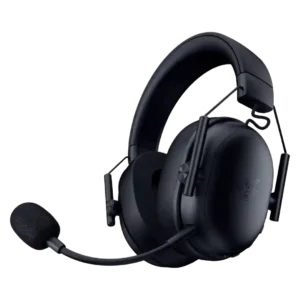
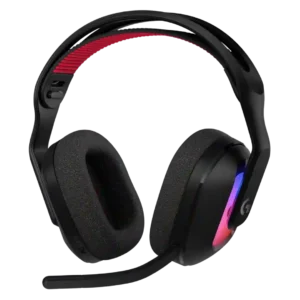
Razer BlackShark V3 X HyperSpeed
Where It Has the Edge
- Sidetone adjustment quality is 3.5 vs 2.0. Sidetone is useful at moderate settings, but the control experience is imperfect: placement can feel odd and the...

Scorata scores summarize analyzed review evidence on a 1–5 scale; they are not laboratory measurements or a simple average of customer star ratings. Feature scores summarize the reviews covering that feature. The overall score averages feature scores within each review, then combines review averages. When both expert and customer evidence are available, those two groups receive equal weight. Products can have different review coverage, so small score gaps do not establish a winner.
Recommendations prioritize important features for the category, with a score of at least 3.5, a gap of at least 0.25 points and at least two supporting reviews per product. Features with widely varying scores or broad connectivity contexts are excluded from recommendations. These safeguards do not establish statistical significance.
Quick verdict
The review evidence points to a tradeoff: Sidetone adjustment quality versus Microphone and Wireless range. Choose according to which strengths matter more to you; the overall score alone does not settle that choice.
Choose Razer BlackShark V3 X HyperSpeed for Sidetone adjustment quality.
Choose Logitech G Astro A20 X for Microphone and Wireless range.
Scores are out of 5. Missing scores mean missing review evidence, not a missing feature.
Most buyers rate the sound highly for gaming, with clear detail and strong directional performance. The less enthusiastic reports describe it as hollow, metallic, thin, or less lively for music and compared with pricier BlackShark models.
Gaming audio is usually clear, detailed, and immersive, especially after EQ, but the default tuning divides opinion. Some find it excellent immediately, while others call it flat, dull, or below expectations for the price.
The tuning is praised for staying balanced rather than chasing exaggerated impact. Strong bass can coexist with clear detail, though one expert still found the extremes a little dull.
Measured tonal balance departs noticeably from the reviewer’s target, especially through the treble. The stock response can make bass feel muddier and vocals less detailed than intended.
Passive isolation is usually effective, with many users saying the large cushions block substantial outside noise. One expert found the seal much leakier to exterior sound, so results may depend on fit.
Passive isolation is inconsistent, ranging from adequate in quiet rooms to almost ineffective in noisy environments. The breathable fabric pads favor awareness and comfort over a tight acoustic seal.
The virtual 7.1 processing did not convincingly widen the presentation for the expert who evaluated it; instead, it sounded thin and artificial.
Soundstage is serviceable to strong depending on the listener, with good left-right spread for gaming. Some experts still find it narrower than open-back or more premium alternatives.
Spatial audio is sharply mixed. Some players love 7.1 for gaming and directional immersion, while others hear little benefit, dislike the artificial sound, or resent extra software and paid processing.
Spatial presentation is a strong gaming feature, helping place enemies and environmental sounds convincingly around the player. It is particularly effective in immersive and competitive titles.
Mic noise reduction is a strong point, with multiple users praising clean voice pickup and effective suppression of keyboard noise, static, or background interference.
Noise handling ranges from excellent with Blue VO!CE filters enabled to overly sensitive in untreated rooms. Background fans, keyboards, and desk noises can still bleed through depending on settings and mic position.
ANC is a clear omission for noise-sensitive buyers. The customers who called it out said passive isolation was not enough to fully shut out busy surroundings.
Noise cancellation is not a consistent strength: several people expected more isolation or noted that true ANC is absent. A few customers nevertheless described the perceived noise reduction as effective.
Bass is generally satisfying, with several buyers praising its punch and depth without masking detail. A few listeners found the low end dull, dry, or weak compared with richer-sounding alternatives.
Bass is highly dependent on tuning and fit: some hear smooth, punchy lows, while others find it weak, overemphasized, or lacking deep rumble. EQ can improve it substantially.
Directional gaming performance is consistently excellent in the comments that test it, especially for footsteps and locating enemies moving from behind or beside the player.
Directional cues are a strong gaming advantage, with footsteps, gunfire, and enemy locations usually easy to place. Rear positioning and very busy sound mixes can be less precise for some listeners.
Output can get plenty loud while retaining the generally good sound character reported by the same buyer.
Maximum loudness is a recurring complaint, with several users wishing the headset could play louder or deliver stronger chat volume. The restrained output can be a downside for listeners who prefer high volume.
The customers who specifically tried Xbox reported failure to connect, making Xbox use a significant caution unless the exact edition and setup are confirmed.
Xbox support is a notable strength when it works, including easy use within the same multi-platform setup. One customer, however, reported that their unit would not connect to Xbox at all.
The cups move freely enough for one expert despite lacking full swivel, but another owner specifically disliked that they do not rotate.
The earcups offer useful tilt and swivel for fitting different head shapes. That adjustability helps comfort even though the headset does not fold flat.
Glasses wearers were consistently positive, saying the headset sits well without excessive pressure and remains comfortable for long sessions.
Glasses comfort is mixed: some users barely notice interference and praise the light clamp, while others report pressure and soreness. Fit seems especially dependent on head size and pad position.
The midrange stays full and clear in the strongest customer feedback, helping voices and game detail remain easy to hear.
Midrange performance is mixed: voices and game detail can sound clean, but several experts hear missing detail or recessed presence in the stock tuning. EQ can improve vocal naturalness and balance.
Packaging experiences are split: one buyer was especially pleased with the presentation, while another found the newer packaging unusually plain.
Packaging is generally neat, organized, and increasingly eco-conscious, with accessories separated clearly and reduced plastic. Presentation receives positive marks even when extras are sparse.
Sidetone is useful at moderate settings, but the control experience is imperfect: placement can feel odd and the highest level can be excessively loud or briefly finicky.
Sidetone is one of the weaker areas, with complaints about missing or unsatisfactory mic monitoring. In some setups it only becomes available after extra app configuration.
The boom mic is functional overall: one expert found it merely serviceable, while another user said positioning took a moment but worked well once adjusted.
The detachable 48 kHz boom mic is one of the most consistently praised parts of the headset, often sounding unusually full and clear for wireless gaming gear. A few users found it too sensitive or merely average without tuning.
The USB-C wireless dongle is a standout practical detail: compact, unobtrusive, and repeatedly described as simply working without blocking nearby ports.
The compact PLAYSYNC base is central to the headset’s convenience and is much smaller than many multi-system docks. Its light weight can make it slide around, and cable placement can become awkward when systems are far apart.
Customers who broke out the frequency ranges praised clear, detailed highs, but the expert assessment was more restrained and found the extreme treble somewhat dull.
Treble can be crisp and non-fatiguing, but several experts found it recessed, uneven, or lacking sparkle in the default tuning. EQ is often needed to restore detail without making the sound harsh.
The dedicated game/chat balance wheel is a premium-style control that an expert was especially pleased to find on a sub-$100 headset.
The onboard game/chat mixer is very useful on Xbox and PC and can quickly prioritize teammates or game audio. A few owners found the rocker easy to hit accidentally or reported it failing outright.
The familiar BlackShark adjustment system generally holds its position and offers useful range, but the mechanism can feel clunky and does not fit every head size equally well.
The suspension band works well for many medium and large heads, but its limited adjustment points can be a poor fit for smaller users. Several people would prefer a more conventional sliding system.
The box can be impressively complete, with useful cables, adapters, and a compact dongle. Two customers, however, received units missing the microphone windscreen/foam.
The bundle is well organized and includes useful cables and the PLAYSYNC base, but one expert wanted a power adapter and an additional USB cable. It is comprehensive without feeling luxurious.
Preset EQ quality is mixed. One buyer found some gaming profiles harsh or muddy, while another liked having several presets alongside custom EQ.
The included and community EQ presets are useful starting points, particularly for FPS, bass, and media listening. Default profiles are not universally loved, and several users get better results from custom or community tuning.
The 2.4GHz connection is usually rock-solid with few or no dropouts. A smaller set of users reported micro-pauses, Bluetooth glitches, or frequent disconnects.
Wireless performance is usually stable and dependable, with many users reporting clean connections and no dropouts. A small minority reported serious disconnects or intermittent crackling after months of use.
In busy gameplay, the drivers separate cues well enough to make individual movement and positioning easier to follow when the scene is not overwhelmed by effects.
Separation is a clear gaming strength, keeping gunfire, footsteps, abilities, and ambient effects distinct in busy scenes. This supports accurate tracking in competitive play.
USB-C is a practical strength here, supporting the headset's very fast charging experience.
USB-C adds useful flexibility for wired audio and charging, and at least one buyer specifically valued that option. It helps keep the headset usable even when wireless power is depleted.
Wireless flexibility is a major appeal, from 2.4GHz and Bluetooth to easy phone switching and freedom from cables. It is less versatile for buyers expecting simultaneous dual-source audio or seamless compatibility with every console.
PLAYSYNC is the headset’s defining strength, making it quick and painless to jump between two gaming systems while also offering Bluetooth and USB options. The main tradeoff is that Bluetooth cannot mix simultaneously with LIGHTSPEED audio.
Range is usually very strong, covering rooms or even a house without signal loss. One owner called it merely okay, but the broader pattern is positive.
Range is generally excellent, staying connected across rooms, around a house, and even through walls in some tests. It compares favorably with several older wireless headsets.
Padding feedback is mostly positive, with many calling the cushions plush, soft, breathable, or cozy. Fit-sensitive users sometimes found the pads too thin, too small, rough inside, or lacking enough depth.
The fabric memory-foam pads are usually praised as soft, breathable, and cooler than leatherette. Some users find the foam too firm, scratchy, hot, or insufficiently plush for long sessions.
A detachable boom is convenient for mobile or non-chat use and one owner especially liked being able to remove it. Another preferred a permanently attached flip-up design and worried about jack wear.
The removable boom is convenient for solo play, travel, and casual listening. Some users would prefer flip-to-mute, and the lack of dedicated storage makes the mic easier to misplace.
The headset worked well across combinations of PC, PlayStation, phones, and other devices in the positive compatibility reports, making it useful beyond a single setup.
It is especially strong for mixed setups spanning PC, Xbox, PlayStation, Switch, and mobile devices. The single-version approach avoids needing separate console-specific headset variants.
Overall sentiment is strongly positive, especially around comfort, battery life, wireless performance, and value. The negative experiences cluster around mic volume, clamping, software friction, console compatibility, and isolated durability problems.
Overall sentiment is strongly positive for multi-platform gaming, with convenience, comfort, mic clarity, and battery life doing most of the work. Negative experiences cluster around fit, default sound tuning, Bluetooth limitations, and a handful of reliability failures.
Wireless latency is exceptionally strong across every opinionated report, with repeated descriptions of no noticeable lag or near-zero delay in gaming.
LIGHTSPEED is consistently described as effectively lag-free for gaming, with quick source changes and tight response. Bluetooth can show more noticeable delay in video use.
Firmware support is a sore point in the one detailed complaint: the owner saw the lack of post-launch updates as a major frustration and wanted ongoing fixes and refinement.
Firmware updates can improve sound and resolve initial issues, but updating may require connecting directly to a PC. That extra step is useful when it works but not especially seamless.
The pads themselves are designed to come off easily, which is useful for maintenance. One customer still wished replacement cushions were more readily offered as part of the ownership experience.
Removable earpads make cleaning and eventual replacement easier. That helps preserve comfort and usability over longer ownership.
Fit is excellent for many users, but size extremes can be awkward. Some smaller-headed users found the headset too loose even at minimum adjustment, while others felt the ear space was cramped.
Fit is the biggest comfort variable: medium and larger heads tend to fare well, while smaller heads can experience slipping and a weak seal. A loose fit can also change bass response and positional consistency.
Value is one of the strongest themes, especially around sale prices from roughly $75 to $100 and the mix of wireless features, comfort, and battery life. Lower scores come from buyers bothered by software paywalls, weak sound, or durability.
Value is strongest for people who will actually use PLAYSYNC across two systems; in that use case the convenience can justify the price premium. Single-platform players often see cheaper alternatives or the G522 as the smarter buy.
A key limitation is the inability to listen to PC/2.4GHz audio and Bluetooth audio simultaneously, which matters for buyers wanting true dual-source playback.
The biggest connectivity limitation is that Bluetooth and LIGHTSPEED cannot play at the same time. Switching is fast, but users who want phone audio mixed with console or PC sound may find this restrictive.
Clamp is highly head-shape dependent. Several users praised the balanced, secure pressure, while others reported squeezed ears, headaches, or pain within minutes.
Clamp pressure is generally light and comfortable, helping with long sessions and glasses. The downside is that the headset can feel less secure on smaller heads or during quick movement.
The clean BlackShark shape, matte finish, and restrained non-RGB look are consistently attractive to the people who commented on design.
The modern, lightweight look and tasteful RGB are broadly liked, especially in the white colorway. Some Astro fans dislike how closely it resembles the G522 and feel the brand has lost part of its visual identity.
Long-session comfort is a major strength for most buyers thanks to the low weight and soft padding. A meaningful minority struggled with tight clamping, limited ear space, or rough inner material.
Comfort is generally a major strength thanks to low weight, breathable fabric, and a suspension-style fit. Head shape matters, though: some smaller-head users and a few experts reported slipping, pressure points, or discomfort after extended wear.
Most owners describe the headset as solid, well made, and impressively finished for the price. Durability is less consistent, with isolated reports of plastic feel, broken controls, and a unit breaking after a short drop.
The lightweight plastic frame is usually flexible and solid enough for everyday use, but it does not feel especially premium. Some buyers describe it as cheap or plasticky, while others praise its durability and sturdy feel.
The lightweight feel is nearly universally praised, often described as disappearing on the head even during long sessions.
The sub-300 g design feels notably light and is frequently credited with reducing fatigue during long sessions. For a few users, the very light, loose fit can also make the headset shift around.
The microphone jack works as a 3.5mm connection, but one owner still disliked the irregular port shape and listed it among the headset’s drawbacks.
The keyed mic jack works, but there is no protective cover or dedicated place to store the detached boom. That makes the small microphone easier to lose.
Charging is quick over USB-C, complementing the already long battery life well.
USB-C charging is generally simple and can be used while playing, with some tests finding recharging reasonably quick. A small number of units suffered serious charging faults.
Battery life is one of the clearest strengths, repeatedly lasting through long sessions and often multiple days between charges. One expert exceeded the 70-hour claim in real use.
Battery life is a standout feature, commonly landing around 40 hours with RGB and stretching toward 90 hours with lighting off. A few customer units developed battery or charging failures after several months.
The mobile app can be handy for EQ and basic settings, but the software experience is uneven. Some found it useful and easy, while others described it as limited, confusing, or needlessly bloated.
G Hub is a major strength on desktop, offering detailed audio, mic, lighting, battery, and profile controls. The mobile app is useful on consoles but more limited and occasionally less intuitive.
Setup is one of the most divisive parts of the headset. Some users were running in minutes, while others fought Synapse, registration, multiple apps, long setup steps, paywalls, or confusing console configuration.
Most setups are plug-and-play and PLAYSYNC switching is easy once configured. A minority encountered long Bluetooth pairing attempts, firmware steps that required a PC, or awkward audio-routing quirks.
Most buyers found the mic clear, crisp, or unusually good for a wireless gaming headset. The main counterpoint is output level: an expert and several users found it quiet, thin, or inconsistent across apps and platforms.
Voice communication is one of the headset’s strongest uses, with crisp, full pickup that can approach a decent USB mic for chats and casual streaming. Software presets can add even more polish.
Custom EQ is one of the most useful software features and can noticeably improve thin or dry stock tuning. Frustrations center on missing mic-EQ options and some EQ features being restricted or paywalled.
EQ control is unusually deep for a gaming headset, including advanced and community-created profiles for both headphone and mic sound. Tuning is often the key to turning the merely decent default sound into something much better.
Bluetooth is useful for phone use and easy switching alongside the 2.4GHz connection. Most experiences were positive, though one buyer reported recurring Bluetooth chopping and glitches.
Bluetooth is convenient for phones, calls, and casual listening, but it is not the headset’s strongest connection mode. Some users experienced setup quirks, crackling, or app handoff issues that did not appear over LIGHTSPEED.
The physical controls are usually simple, tactile, and convenient, especially for mute and volume. There are smaller usability complaints about finding the mute button quickly, plus one broken volume wheel.
Most physical controls are easy to reach and tactile, including mute, volume, and source switching. Some users dislike the placement of the wheel and buttons because they can be bumped by a chair, hood, or headrest.
Many units work flawlessly in daily use, but there are meaningful outliers involving battery failure, charging problems, disconnects, and intermittent crackling. Long-term reliability is therefore less consistent than the headset’s day-one performance.
The mobile control app supports Android and is particularly useful for console-first setups that still need EQ, mic, and lighting access. Desktop G Hub remains more powerful.
High-resolution 24-bit/48 kHz playback on PC is a welcome strength for users who want more than basic wireless game audio. Console output is more limited.
The included charging and port-extension cables earned unusually strong praise for feeling smooth, practical, and well made.
Console flexibility is a weak point: one expert noted separate PlayStation and Xbox editions, and one customer could not connect the unit they bought to either Xbox Series S or PS5.
The microphone material can discolor or stain over time, creating a cosmetic mismatch with the headset. This was a specific durability concern on one long-term unit.
There is no charging stand or dock, which disappointed at least one buyer coming from a headset that included one. Charging is handled by cable instead.
It can travel and work over Bluetooth or USB, but dependence on the base station for full wireless functionality makes it less travel-friendly than ordinary Bluetooth headphones. It also does not fold flat.
Bluetooth can show slight lip-sync delay in podcasts or movies when watched closely. LIGHTSPEED is much tighter and is the better choice for video-sensitive use.
Footstep cues are usually easy to hear and useful for competitive shooters, especially with the right EQ. Dense mixes can sometimes mask subtler steps, so the advantage is not absolute.
One owner found that people nearby could clearly hear what was playing. That makes the headset less private in shared rooms.
The adjustment rods held their tension after weeks of use, although the reviewer noted that BlackShark mechanisms can loosen somewhat over time.
Recycled plastic and reduced single-use packaging are meaningful positives, especially for a mainstream gaming headset. The lighter material strategy also supports the headset’s low weight.
Bluetooth listening is hampered by the lack of basic playback controls such as play or pause. This makes the headset less convenient away from a computer or console.
The LIGHTSYNC lighting is widely liked for adding tasteful visual flair, with strong control through G Hub. It can shorten battery life substantially, and a few software quirks make fully disabling it less straightforward.
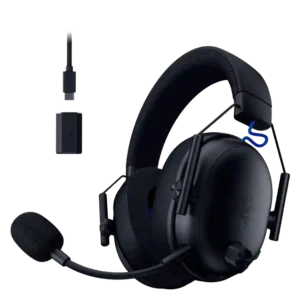
Best for excellent game audio, long-session comfort, clear voice chat, strong battery life, and low-latency wireless. Skip it if you need very high volume, flawless software, or zero tolerance for...
Pros: Overall satisfaction, Sound quality
Cons: Button control usability, Dongle
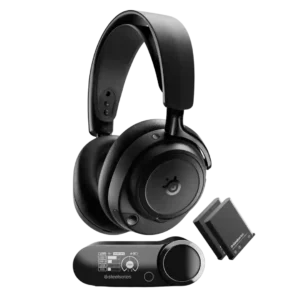
Choose the Arctis Nova Elite if you want top-tier wireless sound, ANC, hot-swap batteries, and multi-device mixing. Skip it if $600 feels excessive, you game on one console, or tight/heavy...
Pros: Sound quality, Connectivity versatility
Cons: Value for money, Carry case quality
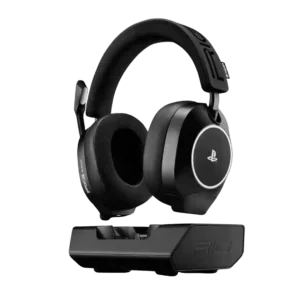
Best for sharp gaming audio, long battery life, an excellent dock, and strong value. Skip it if you need ANC, a detachable mic, maximum console volume, or seamless PS5/Xbox switching.
Pros: Sound quality, Included stand quality
Cons: Detachable microphone convenience
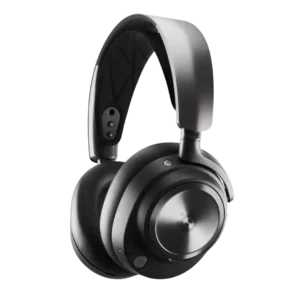
Choose the Arctis Nova Pro Wireless for premium gaming audio, hot-swappable batteries, broad device support, and deep EQ control. Skip it if the high price, mixed mic quality, or uneven...
Pros: Battery, Comfort during long use
Cons: Console compatibility limitations, USB-C