Other features
Microphone quality
Razer BlackShark V3 X HyperSpeedNo score yet
Turtle Beach Stealth 600 (Gen 3)
4.4
Voice communication is generally clear and good for gaming, though some find the microphone slightly muffled, sibilant or less natural than premium options.
Automatic power-off timer
Razer BlackShark V3 X HyperSpeedNo score yet
Turtle Beach Stealth 600 (Gen 3)
4.8
The configurable inactivity timer helps preserve battery life when the headset is left on.
Cable quality
Razer BlackShark V3 X HyperSpeed
5.0
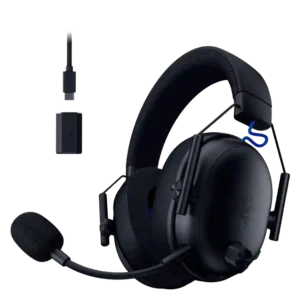
The included charging and port-extension cables earned unusually strong praise for feeling smooth, practical, and well made.
Turtle Beach Stealth 600 (Gen 3)No score yet
Charger compatibility
Razer BlackShark V3 X HyperSpeedNo score yet
Turtle Beach Stealth 600 (Gen 3)
2.0
Some third-party USB-C cables may not fit snugly, making the supplied charging cable worth keeping handy.
Color options
Razer BlackShark V3 X HyperSpeedNo score yet
Turtle Beach Stealth 600 (Gen 3)
3.0
The color selection varies by platform, with the PC model offering fewer choices.
Detachable microphone convenience
Razer BlackShark V3 X HyperSpeed
4.2
A detachable boom is convenient for mobile or non-chat use and one owner especially liked being able to remove it. Another preferred a permanently attached flip-up design and worried about jack wear.
Turtle Beach Stealth 600 (Gen 3)No score yet
Hair snag prevention
Razer BlackShark V3 X HyperSpeedNo score yet
Turtle Beach Stealth 600 (Gen 3)
5.0
The swivel mechanism helps avoid hair tangling when moving the earcups.
Headband padding quality
Razer BlackShark V3 X HyperSpeedNo score yet
Turtle Beach Stealth 600 (Gen 3)
2.8
The thin headband padding is a recurring complaint, particularly for people who feel pressure on the crown during extended wear.
Launch quality control
Razer BlackShark V3 X HyperSpeedNo score yet
Turtle Beach Stealth 600 (Gen 3)
2.0
Early firmware and software bugs indicate that the launch experience could have been better polished.
Learning curve
Razer BlackShark V3 X HyperSpeedNo score yet
Turtle Beach Stealth 600 (Gen 3)
2.5
The crowded controls take time to master even though they offer extensive functionality.
Mac integration
Razer BlackShark V3 X HyperSpeedNo score yet
Turtle Beach Stealth 600 (Gen 3)
2.0
The lack of a macOS desktop app limits access to advanced settings for Mac owners.
Maximum volume clarity
Razer BlackShark V3 X HyperSpeedNo score yet
Turtle Beach Stealth 600 (Gen 3)
2.8
High-volume performance is inconsistent: some find piercing highs and muddy mids, while another test found clean output even at maximum.
Portability/foldability
Razer BlackShark V3 X HyperSpeedNo score yet
Turtle Beach Stealth 600 (Gen 3)
4.3
Lay-flat cups simplify packing, but the relatively bulky headset is not the most convenient travel option.
Power-on readiness
Razer BlackShark V3 X HyperSpeedNo score yet
Turtle Beach Stealth 600 (Gen 3)
5.0
The headset connects to its transmitter almost immediately when powered on.
Simultaneous feature compatibility
Razer BlackShark V3 X HyperSpeedNo score yet
Turtle Beach Stealth 600 (Gen 3)
2.2
Bluetooth and 2.4GHz audio cannot be mixed simultaneously, making the headset less convenient when gaming and taking calls across devices.
Timbre naturalness
Razer BlackShark V3 X HyperSpeedNo score yet
Turtle Beach Stealth 600 (Gen 3)
4.0
Most content can sound natural and reasonably balanced, despite the gaming-oriented tuning.
USB-C
Razer BlackShark V3 X HyperSpeed
4.5
USB-C is a practical strength here, supporting the headset's very fast charging experience.
Turtle Beach Stealth 600 (Gen 3)No score yet
Volume output
Razer BlackShark V3 X HyperSpeed
5.0
Output can get plenty loud while retaining the generally good sound character reported by the same buyer.
Turtle Beach Stealth 600 (Gen 3)No score yet
Ownership and support
Reliability
Razer BlackShark V3 X HyperSpeedNo score yet
Turtle Beach Stealth 600 (Gen 3)
4.0
Wireless connections are often stable, including after long ownership, but intermittent detection and early firmware issues affected some units.
Multipoint connectivity reliability
Razer BlackShark V3 X HyperSpeed
2.0
A key limitation is the inability to listen to PC/2.4GHz audio and Bluetooth audio simultaneously, which matters for buyers wanting true dual-source playback.
Turtle Beach Stealth 600 (Gen 3)No score yet
Upgrade value
Razer BlackShark V3 X HyperSpeedNo score yet
Turtle Beach Stealth 600 (Gen 3)
4.7
Longer battery life, Bluetooth, and customization make Gen 3 a worthwhile refresh, especially from older generations; the upgrade case is less universal from Gen 2.
Performance
Active noise cancellation
Razer BlackShark V3 X HyperSpeed
2.0
ANC is a clear omission for noise-sensitive buyers. The customers who called it out said passive isolation was not enough to fully shut out busy surroundings.
Turtle Beach Stealth 600 (Gen 3)No score yet
Audio distortion
Razer BlackShark V3 X HyperSpeedNo score yet
Turtle Beach Stealth 600 (Gen 3)
3.0
Several listeners hear distortion when the volume is pushed high, although one test found no distortion at maximum volume.
Earpad noise
Razer BlackShark V3 X HyperSpeedNo score yet
Turtle Beach Stealth 600 (Gen 3)
4.5
The earcups move without noticeable creaking in handling.
Footstep sound level scaling feature
Razer BlackShark V3 X HyperSpeedNo score yet
Turtle Beach Stealth 600 (Gen 3)
3.4
Superhuman Hearing helps some players notice footsteps and reloads, while others dislike its hollow, unnatural tone and prefer regular EQ.
Low-volume sound quality
Razer BlackShark V3 X HyperSpeedNo score yet
Turtle Beach Stealth 600 (Gen 3)
2.5
The signature sound can lose bass punch at quieter volumes.
Sound detail and resolution
Razer BlackShark V3 X HyperSpeedNo score yet
Turtle Beach Stealth 600 (Gen 3)
4.1
Detail is impressive for the price in many games, but complex scenes and music expose limits in resolution compared with premium headsets.
Spatial audio
Razer BlackShark V3 X HyperSpeed
3.6
Spatial audio is sharply mixed. Some players love 7.1 for gaming and directional immersion, while others hear little benefit, dislike the artificial sound, or resent extra software and paid processing.
Turtle Beach Stealth 600 (Gen 3)No score yet
Spatial audio quality
Razer BlackShark V3 X HyperSpeedNo score yet
Turtle Beach Stealth 600 (Gen 3)
4.4
Spatial imaging helps create immersive environments and locate sound sources, though one PC test found a driver imbalance with Waves effects enabled.
Controls and connectivity
Bluetooth range
Razer BlackShark V3 X HyperSpeedNo score yet
Turtle Beach Stealth 600 (Gen 3)
2.5
Bluetooth can briefly drop audio at modest distances in some environments.
Companion software dependence
Razer BlackShark V3 X HyperSpeedNo score yet
Turtle Beach Stealth 600 (Gen 3)
2.5
A firmware update and desktop software may be needed to unlock or reliably apply all the settings, which is inconvenient for console-only owners.
Media playback controls
Razer BlackShark V3 X HyperSpeedNo score yet
Turtle Beach Stealth 600 (Gen 3)
5.0
Pausing and skipping tracks over either wireless connection is a useful convenience.
Physical controls
Razer BlackShark V3 X HyperSpeedNo score yet
Turtle Beach Stealth 600 (Gen 3)
4.5
Remappable buttons and a secondary wheel let players put preferred settings at their fingertips, though the physical layout is crowded.
Software and driver support
Razer BlackShark V3 X HyperSpeedNo score yet
Turtle Beach Stealth 600 (Gen 3)
2.5
The early desktop client could lose the headset after source switching or updates; the mobile app was often more stable.
Voice processing naturalness
Razer BlackShark V3 X HyperSpeedNo score yet
Turtle Beach Stealth 600 (Gen 3)
3.4
Speech remains intelligible, but some recordings have slight compression, sibilance or less warmth than higher-end microphones.
Voice prompt feedback
Razer BlackShark V3 X HyperSpeedNo score yet
Turtle Beach Stealth 600 (Gen 3)
2.5
Audio cues provide useful confirmation but can be loud or confusing, including an apparently reversed noise-gate tone in one test.
Battery and charging
Charging
Razer BlackShark V3 X HyperSpeed
5.0
Charging is quick over USB-C, complementing the already long battery life well.
Turtle Beach Stealth 600 (Gen 3)No score yet
Charging speed
Razer BlackShark V3 X HyperSpeedNo score yet
Turtle Beach Stealth 600 (Gen 3)
4.3
Quick charging provides useful extra playback in minutes, although one full-charge test took more than four hours.
Listening while charging
Razer BlackShark V3 X HyperSpeedNo score yet
Turtle Beach Stealth 600 (Gen 3)
4.5
The ability to keep playing while charging helps avoid interruptions when the battery finally runs low.
Comfort and build
Ear heat and sweat buildup
Razer BlackShark V3 X HyperSpeedNo score yet
Turtle Beach Stealth 600 (Gen 3)
4.6
The breathable fabric generally keeps ears cooler and reduces sweat compared with leatherette.
Headband material durability
Razer BlackShark V3 X HyperSpeedNo score yet
Turtle Beach Stealth 600 (Gen 3)
2.5
After a year, one owner noticed material beginning to peel away from the headband.
Microphone port design
Razer BlackShark V3 X HyperSpeed
2.0
The microphone jack works as a 3.5mm connection, but one owner still disliked the irregular port shape and listed it among the headset’s drawbacks.
Turtle Beach Stealth 600 (Gen 3)No score yet