MSI Roamii BE Pro
Where It Has the Edge
- value for money is 4.5 vs 3.8. Value was the strongest consensus: the system combines Wi-Fi 7, multi-gig ports, and broad features at a price...

Scorata scores summarize analyzed review evidence on a 1–5 scale; they are not laboratory measurements or a simple average of customer star ratings. Feature scores summarize the reviews covering that feature. The overall score averages feature scores within each review, then combines review averages. When both expert and customer evidence are available, those two groups receive equal weight. Products can have different review coverage, so small score gaps do not establish a winner.
Recommendations prioritize important features for the category, with a score of at least 3.5, a gap of at least 0.25 points and at least two supporting reviews per product. Features with widely varying scores or broad connectivity contexts are excluded from recommendations. These safeguards do not establish statistical significance.
Quick verdict
The review evidence points to a tradeoff: value for money versus automatic configuration and wireless performance. Choose according to which strengths matter more to you; the overall score alone does not settle that choice.
Choose MSI Roamii BE Pro for value for money.
Choose D-Link Aquila Pro AI R95 for automatic configuration and wireless performance.
Scores are out of 5. Missing scores mean missing review evidence, not a missing feature.
Automatic satellite discovery was unreliable in multiple tests, often forcing manual intervention or lengthy retries.
From creating suitable networks to changing channels and optimizing settings, the R95 handles much of the tuning automatically.
A two-node kit suits small to mid-sized spaces, but limited availability of individual nodes makes larger deployments less straightforward.
Multiple AQUILA PRO AI routers can be connected easily, giving the system room to grow with a larger home.
Garden and far-location results were weak overall, ranging from barely usable speeds to complete connection failure on some devices.
The signal extended into the garden after crossing two thick brick walls, a route the ISP-provided router usually failed to cover.
Some homes saw excellent reach from two nodes, while other tests found far-range performance variable or poor.
The R95 reached a previously troublesome back office and pushed through two thick brick walls into a garden.
Coverage results varied sharply by home: some reviewers achieved excellent whole-house performance, while others found the two-node kit weak at far range.
Adding compatible units is intended to create comprehensive coverage with no dead spots.
The generous Ethernet selection on both nodes stood out, giving users room for multiple wired devices at both mesh locations.
Three 2.5Gb LAN ports provide enough high-speed wired connections for devices such as a gaming PC and NAS.
The platform is designed to grow, but standalone node availability may limit practical expansion in some markets.
The system can grow by linking additional AQUILA PRO AI routers into a broader mesh network.
Separate main, guest, child, and IoT networks provide useful isolation and purpose-based control.
Separating IoT equipment from the main network is viewed as an effective way to integrate smart devices more securely.
The system is positioned well for smart homes with many connected devices and substantial simultaneous traffic.
The router is built for device-heavy homes; reviewers praised its ability to handle demanding users, though that capacity can be excessive for a small flat.
Several reviewers achieved strong speeds throughout multi-room homes, but larger or more difficult properties may need another node.
Mesh claims and real-world range testing both point to broad coverage, including difficult rooms and outdoor space.
At close range, the system reached exceptional multi-gigabit wireless throughput in one test, though another lab found more ordinary results.
Nearby devices reached the full 150Mbps available from the test connection in both download and speed tests.
The two-node design was praised for reaching rooms that previously had little or no usable Wi-Fi.
The Smart Mesh setup is presented as capable of removing dead spots and maintaining a stable connection throughout the home.
Reviewers associated the Wi-Fi 7 implementation with low latency and responsive performance for gaming, calls, and heavy traffic.
Gaming lag was nearly absent, ping times improved, and MLO was credited with keeping interactive traffic highly responsive.
Measured ping stayed low and steady across rooms, including a difficult back-office location.
The move to the R95 produced better ping behavior and almost completely eliminated the random dropouts previously affecting the household.
Coverage analysis and connected-device information make it easier to understand and manage the network.
Continuous network analysis lets the router adjust settings proactively rather than waiting for the user to diagnose performance problems.
In favorable homes, speeds remained consistently high throughout the property with no major dropouts.
Reviewers saw steady speeds, near-elimination of dropouts, and stable service even when the network extended across the home.
Detailed QoS settings let users prioritize specific devices and manage traffic with more control than many consumer mesh kits.
Automatic QoS behavior intelligently prioritizes bandwidth for the traffic that needs it most.
The free FortiSecu tools, network isolation, and built-in protections form a strong security package, with optional third-party traffic scanning as the main caveat.
WPA3, Enhanced Open, and dedicated IoT zones create a security package reviewers describe as reassuring and broadly protective.
One home test maintained excellent speed through a closed door, suggesting strong indoor penetration in favorable layouts.
A test signal passed through two thick brick walls and still reached the garden, outperforming the reviewer’s standard ISP hub.
Pairing experiences ranged from a few manageable minutes to repeated failures and exceptionally long waits.
Compatible AQUILA PRO AI units are described as easy to connect into a larger mesh.
Parental controls are broad, free, and unusually capable, though app instability and limited filtering granularity can reduce their usefulness.
Opinions split sharply: one reviewer found the controls basic and the filtering manual, while others called the family options useful or advanced.
App-led setup ranged from pleasantly simple to frustrating and crash-prone, so the experience appears sensitive to phone platform and firmware state.
The Aquila app earns consistent praise for making network creation and first-time configuration painless.
Nearby Wi-Fi 7 speed can be exceptional, but other testing found mediocre throughput and weak scaling at distance, making overall speed highly environment-dependent.
Its 9.5Gbps-class capacity is repeatedly described as exceptionally fast, easily covering gaming, streaming, and demanding household traffic.
Family and device access tools were viewed positively, with simple ways to control who can use the network.
Family access features are useful in some households, but the limited filtering system keeps them from feeling fully developed.
Reviewers saw full tri-band Wi-Fi 7 as strong future-proofing, especially for homes adding newer phones, laptops, and high-speed broadband.
Wi-Fi 7 is the heart of the R95’s appeal, delivering high capacity, low latency, and strong performance for compatible devices.
The app is feature-rich and intuitive when stable, but crashes and login problems made it unreliable for at least one reviewer.
The app is well designed for onboarding and offers a useful collection of family, guest, and network-reporting tools.
The 2.4GHz band delivered respectable nearby throughput and useful coverage, although it weakened at longer distances.
The combined 2.4GHz/5GHz network immediately reached the full 150Mbps available in the office test.
Overall wireless results ranged from excellent multi-gigabit speeds to merely average throughput, with home layout and client type playing a major role.
Across office tests and busy-home use, the R95 delivers fast, responsive wireless service that reviewers place among the product’s biggest strengths.
The system is built for busy homes and newer Wi-Fi 7 clients, although weaker legacy-band throughput may constrain several simultaneous high-quality streams.
Dozens of clients and mixed household workloads stayed stable, with reviewers reporting smooth service across screens, consoles, calls, and smart-home gear.
Content controls cover broad categories and family use cases, but one reviewer wanted finer domain-level control.
The filtering tools are a weak point because unsuitable sites must be entered manually and there are no preset category filters.
The 2.5GbE ports delivered near-line-rate throughput, making the system well suited to fast broadband and local wired transfers.
High-speed Ethernet ports are expected to provide lag-free, top-speed connections for gaming PCs, consoles, TVs, and NAS devices.
Real-world game downloads held close to the reviewer’s full broadband rate even in a difficult room.
Steam downloads reached the full available connection speed and stayed there consistently.
Value was the strongest consensus: the system combines Wi-Fi 7, multi-gig ports, and broad features at a price below many competing mesh kits.
The R95 offers high-end performance at a competitive or mid-range price for its class, but its premium capacity is hard to justify in a lightly connected small home.
Several reviewers found setup quick and straightforward, but others encountered pairing, login, and platform-specific problems.
QR-led onboarding and the Aquila app make initial setup quick and refreshingly straightforward.
Reviewers consistently praised the all-2.5GbE layout, which supports fast broadband, NAS devices, and wired clients without falling back to gigabit ports.
A 2.5Gb WAN port plus multiple 2.5Gb LAN ports gives the R95 a strong, current wired foundation.
The 320MHz channel capability was viewed as a major Wi-Fi 7 advantage, providing substantial throughput headroom for compatible devices.
Reviewers connect the 320MHz channels directly to the R95’s impressive bandwidth and real-world responsiveness.
Several reviewers described the finished network as dependable and easy to forget about once running.
Connections remained consistent during testing, while MLO and heavy-use results showed a major improvement over older ISP equipment.
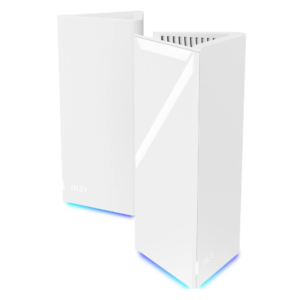
Most reviewers liked the clean triangular towers and subtle RGB lighting, though the bold size and shape may not suit every room.
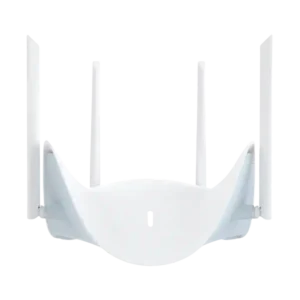
The winged shape is consistently described as striking, sleek, and closer to modern art than a conventional router.
The legacy-device network, which includes 5GHz, delivered the full broadband rate both nearby and in the rear office.
The dedicated 6GHz network immediately reached 150Mbps and maintained full speed throughout testing.
Wireless node-to-node performance can be fast, but one review measured a severe throughput drop when connecting through the secondary node.
Smart Mesh is described as providing stable connectivity across the home rather than merely extending a weak signal.
MU-MIMO is part of the technology mix credited with preserving performance in crowded, device-heavy networks.
OFDMA contributes to stable service when many clients are active at the same time.
Homes full of streaming, gaming, calls, and smart devices ran smoothly without hiccups, making heavy simultaneous use a standout strength.
Adaptive roaming was praised for maintaining connections as users moved around the home.
One reviewer reports a 10Gbps WAN port and presents it as future-ready for ultra-fast fiber service.
Ultra-wide channels are credited with turning the Wi-Fi 7 specification into performance users can actually notice.
The hardware passed an extended stress test without instability and stayed reliable under sustained use.
The installation flow is app-based and simple, with reviewers highlighting the speed and clarity of getting online.
Matter is presented as helping lights, plugs, and cameras communicate more efficiently while reducing strain on the wider network.
MIMO-based operation helps the router stay stable with dozens of connected devices.
Multiple 2.5Gb connections keep the wired side modern and suitable for fast broadband, gaming systems, and storage.
The 2.4GHz, 5GHz, and dedicated 6GHz arrangement earns praise for combining legacy-device support with high-end Wi-Fi 7 speed.
USB 3.0 adds useful storage and NAS flexibility, though reviewers differed on how much practical value it offers.
The router offers unusually broad VPN server support, including several popular protocols and client profile management.
Included brackets, screws, and cable clearance make wall installation unusually convenient for a mesh kit.
Wired backhaul is a major strength, preserving wireless capacity and supporting demanding gaming, storage, and long-distance links.
WPA3 encryption is repeatedly highlighted as an important source of confidence for home-network security.
AI-supported network reports add useful visibility through the Aquila Pro AI app.
Concurrent smart devices, streams, calls, and games remained smooth, while OFDMA and related technologies kept many-client performance stable.
The AI Wi-Fi Optimiser continuously looks for less crowded channels, keeping interference management out of the user’s hands.
The AI Traffic Optimiser directs bandwidth where it is needed most, reducing the need for manual tuning.
Beamforming is cited alongside OFDMA and MU-MIMO as a reason the network remains stable with dozens of devices.
The R95 automatically chooses cleaner channels and can shift frequencies quietly when neighboring Wi-Fi causes interference.
Automatic interference detection and channel changes helped the R95 avoid neighboring-network congestion without requiring user intervention.
The built-in firewall offers extensive controls, including service blocking, rules, URL restrictions, and denial-of-service protection.
Firmware updating was seamless in one test but disrupted app connectivity in another, producing a mixed setup experience.
Low latency, ample speed, and stable multi-device operation make the R95 especially strong for online gaming.
Guest-network options are considered useful for family homes and are easy to reach through the app.
Passive cooling and generous ventilation kept the nodes only slightly warm, with no fan noise reported.
Smart lights, plugs, cameras, and other connected devices integrate smoothly and continue working during demanding household traffic.
Dedicated IoT zones give smart-home devices their own space and add a reassuring layer of separation.
The 2.5Gb LAN ports are praised for delivering top-speed wired connections to demanding local devices.
Even in a difficult rear office, the R95 reached full broadband speed after the previous router could not provide a reliable signal.
Mid-range performance was generally strong for the price and well suited to typical medium-sized homes.
MLO is one of the clearest practical advantages: it lowers lag, strengthens reliability, and makes wireless gaming feel close to Ethernet.
The placement tool is a strong concept and often helpful, but its heatmap can become confusing in multi-floor homes.
Switching between nodes was described as automatic and effectively unnoticeable during normal movement.
The web interface presents advanced controls in a clear, well-organized structure that remains approachable.
RGB lighting is attractive and adjustable, but scheduling behavior was inconsistent across reviews and firmware versions.
Security and parental-control features are available without recurring fees, a clear advantage over several rivals.
The AI Traffic Optimiser receives strong praise for directing bandwidth to the most important activity automatically.
USB storage can serve files through several protocols, but measured NAS speeds were disappointing compared with the 2.5GbE network.
MLO and stable performance reduce interruptions and improve responsiveness during video calls.
Most coverage praises the 2.5Gb WAN connection, while one source describes a 10Gbps WAN port as ready for future ultra-fast fiber.
Wireless backhaul was excellent in some tests and adequate for normal use, though one review found a steep secondary-node slowdown.
The software provides practical per-device bandwidth limiting alongside more advanced traffic controls.
The browser interface was responsive, but the mobile app suffered frequent crashes in one test.
The app can promptly flag new devices and security concerns, adding useful awareness without constant monitoring.
No mandatory cloud account keeps default privacy risk low, while optional security scanning requires sharing traffic with a third party.
Smart-home devices continued running smoothly under load, while dedicated IoT zones and Matter-related efficiency strengthen connected-home use.
The browser interface is stable, responsive, and unusually comprehensive, although a few app-only controls remain unavailable there.
Owners of Wi-Fi 5 and Wi-Fi 6 devices can still use the secondary 2.4GHz/5GHz network without giving up strong performance.
Alongside its Wi-Fi 7 network, the R95 is praised for accommodating older computers and mobile devices on legacy bands.
Opinions were split: one reviewer found the towers lightweight and plasticky, while another considered the construction high quality.
The tall, wide towers may be difficult to place discreetly despite their clean styling.
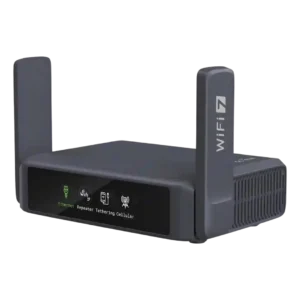
Best for frequent travel, fast VPNs, dual 2.5GbE and resilient multi-WAN. Skip it if you need full 6GHz/320MHz Wi‑Fi 7, mesh, or desktop-class USB storage and long-range indoor coverage.
Pros: VPN client support, value for money
Cons: 6 GHz performance, USB storage sharing
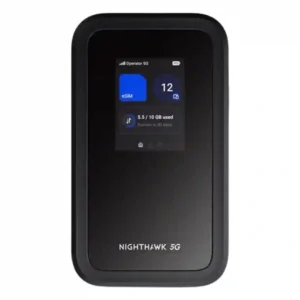
Choose the M7 if you travel often and want flexible eSIM/physical-SIM connectivity, strong multi-device reliability, and workday battery life. Skip it if $499 feels steep, you need built-in Ethernet or...
Pros: eSIM flexibility, cellular connectivity
Cons: interface responsiveness, Ethernet port count
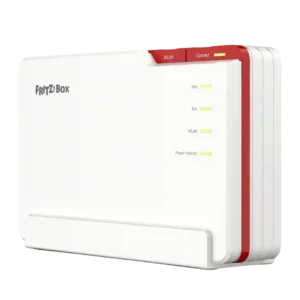
Best for excellent whole-home Wi-Fi 7, integrated DSL/fibre, telephony and smart-home control. Skip it if you need 10GbE/XGS-PON, native Matter today, or the simplest advanced setup.
Pros: telephony features, value for money
Cons: LAN port speed, wall-mounting support