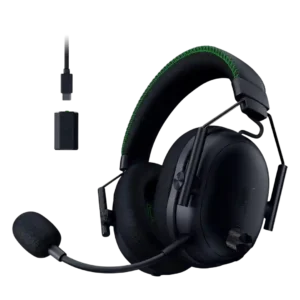
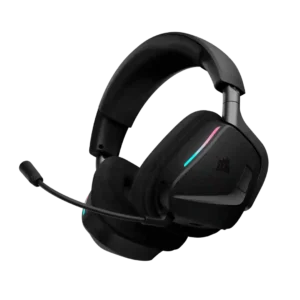
Razer BlackShark V3 Pro
Where It Has the Edge
- Frequency response accuracy is 3.6 vs 2.0. Frequency response was seen as improved but imperfect, with good tonal accuracy or enjoyable tuning offset by V-shaped...

Scorata scores summarize analyzed review evidence on a 1–5 scale; they are not laboratory measurements or a simple average of customer star ratings. Feature scores summarize the reviews covering that feature. The overall score averages feature scores within each review, then combines review averages. When both expert and customer evidence are available, those two groups receive equal weight. Products can have different review coverage, so small score gaps do not establish a winner.
Recommendations prioritize important features for the category, with a score of at least 3.5, a gap of at least 0.25 points and at least two supporting reviews per product. Features with widely varying scores or broad connectivity contexts are excluded from recommendations. These safeguards do not establish statistical significance.
Quick verdict
The review evidence points to a tradeoff: Frequency response accuracy versus Treble clarity and Microphone quality for calls. Choose according to which strengths matter more to you; the overall score alone does not settle that choice.
Choose Razer BlackShark V3 Pro for Frequency response accuracy.
Choose Corsair Void v2 MAX for Treble clarity and Microphone quality for calls.
Scores are out of 5. Missing scores mean missing review evidence, not a missing feature.
Reviewers broadly praised the headset for strong gaming sound, with several calling it fantastic or greatly improved, while a few found it less convincing for music or all-around use.
13 supporting reviews
Browse product reviews for Razer BlackShark V3 ProSound quality is generally a major strength, with clear, immersive gaming audio and strong music performance after tuning. A minority of customers report severe distortion or cutouts, and stock EQ is not universally liked.
40 supporting reviews · Mixed evidence
Browse product reviews for Corsair Void v2 MAXFrequency response was seen as improved but imperfect, with good tonal accuracy or enjoyable tuning offset by V-shaped balance and treble/bass issues.
4 supporting reviews
Browse product reviews for Razer BlackShark V3 ProThe stock tuning is not especially neutral. Expert impressions call out mid-heavy or V-shaped balance that favors fun over accuracy and can sound woolly before EQ.
2 supporting reviews
Browse product reviews for Corsair Void v2 MAXSoundstage impressions were mostly positive for gaming, with reviewers hearing wider or more open presentation, though one found it narrower and another said it was not open-back wide.
6 supporting reviews
Browse product reviews for Razer BlackShark V3 ProThe presentation can feel broad and immersive, surrounding the listener and giving games a more cinematic sense of space. That spaciousness pairs well with directional effects.
2 supporting reviews
Browse product reviews for Corsair Void v2 MAXMic noise reduction was highly variable, from excellent background suppression to complaints about weak rejection or EQ/noise tools changing the voice tone.
5 supporting reviews · Mixed evidence
Browse product reviews for Razer BlackShark V3 ProBackground-noise handling is a clear strength when supported by NVIDIA Broadcast or the headset’s filtering. Tests and customers report reduced fan, mouse, and room noise even when voice tone itself is not always ideal.
6 supporting reviews
Browse product reviews for Corsair Void v2 MAXSpatial audio was usually positive for immersion and positional depth, though some reviewers preferred stereo for competitive play or found ANC narrowed the presentation.
9 supporting reviews
Browse product reviews for Razer BlackShark V3 ProDolby Atmos and Tempest 3D Audio are praised for sharpening directional awareness and immersion. In competitive games, spatial processing helps make footsteps and positional cues easier to locate.
4 supporting reviews
Browse product reviews for Corsair Void v2 MAXPassive isolation was mixed because the cloth pads and fit can leak noise, though one reviewer thought passive isolation was enough for typical gaming.
4 supporting reviews
Browse product reviews for Razer BlackShark V3 ProPassive isolation is one of the more variable traits. Some users like retaining awareness of the room, while others find the seal weak and say outside sound comes through too easily.
6 supporting reviews · Mixed evidence
Browse product reviews for Corsair Void v2 MAXANC drew strong praise from many reviewers for blocking fans, AC, transit, or household noise, but some found it weaker or dependent on seal and pad design.
13 supporting reviews
Browse product reviews for Razer BlackShark V3 ProNoise cancelling is generally described as effective, with users saying it cuts distracting household noise and one expert calling it a strong complement to EQ.
4 supporting reviews
Browse product reviews for Corsair Void v2 MAXBass was generally viewed as punchy and useful for games, though some reviewers said it was only above average, too boosted, or not a true bass-monster.
10 supporting reviews
Browse product reviews for Razer BlackShark V3 ProBass is usually described as punchy, deep, and immersive without drowning out game cues. A few listeners find the stock tuning too bass-heavy or less balanced, so EQ can matter.
8 supporting reviews · Mixed evidence
Browse product reviews for Corsair Void v2 MAXPositional audio was a standout strength, with reviewers repeatedly locating footsteps, gunshots, enemies, and environmental cues accurately.
10 supporting reviews
Browse product reviews for Razer BlackShark V3 ProDirectional audio is a standout gaming strength. Multiple testers could pinpoint footsteps, flanking enemies, and environmental cues early enough to gain a real competitive advantage.
6 supporting reviews
Browse product reviews for Corsair Void v2 MAXGame/chat balance control was praised as an extremely welcome and practical control, especially for quickly shifting focus between chat and gameplay.
3 supporting reviews
Browse product reviews for Razer BlackShark V3 ProXbox game/chat mixing is a weak point. One expert found the headset disables Xbox’s own mixing options, making party and Discord balance unnecessarily frustrating.
1 supporting review · Limited evidence
Browse product reviews for Corsair Void v2 MAXTransparency or ambient mode had limited but positive evidence, with one reviewer valuing it for hearing surroundings while wearing the headset.
1 supporting review · Limited evidence
Browse product reviews for Razer BlackShark V3 ProOne customer specifically dislikes the absence of sound passthrough. Without it, people calling from another room can be impossible to hear.
1 supporting review · Limited evidence
Browse product reviews for Corsair Void v2 MAXReplaceable earpads had limited positive evidence, with one reviewer noting the pads are user-serviceable.
1 supporting review · Limited evidence
Browse product reviews for Razer BlackShark V3 ProEarpad choice is limited compared with some older Corsair models. One owner specifically wishes alternative ear-muff options were available.
1 supporting review · Limited evidence
Browse product reviews for Corsair Void v2 MAXTreble was the most repeated audio caveat: several reviewers found harshness, distortion, spiky peaks, or fatiguing high-end energy despite some tunability.
5 supporting reviews
Browse product reviews for Razer BlackShark V3 ProTreble is consistently praised as crisp and detailed. High-frequency effects stay clear enough for game cues and music without the headset sounding dull.
5 supporting reviews
Browse product reviews for Corsair Void v2 MAXIncluded accessories had limited positive evidence, with one reviewer appreciating the included 3.5mm cable for passive use.
1 supporting review · Limited evidence
Browse product reviews for Razer BlackShark V3 ProThe core transmitter, charging cable, and guide are organized well, but the bundle feels incomplete to some. Missing adapter options and the lack of a storage solution are the main complaints.
4 supporting reviews · Mixed evidence
Browse product reviews for Corsair Void v2 MAXPortability was weak because the headset does not fold or rotate flat and is not ideal for travel or handheld setups with the dongle.
2 supporting reviews
Browse product reviews for Razer BlackShark V3 ProThe swiveling cups help the headset lie flat and sit comfortably around the neck during breaks. It is more desk-friendly than travel-focused, especially because the microphone remains attached.
1 supporting review · Limited evidence
Browse product reviews for Corsair Void v2 MAXStability was mixed: one reviewer had game-audio reliability issues, while another praised the wireless range and signal performance.
2 supporting reviews · Mixed evidence
Browse product reviews for Razer BlackShark V3 ProThe lightweight fit remains secure despite the low mass. Reviewers note that the headset stays put during head movement without needing painful clamp pressure.
2 supporting reviews
Browse product reviews for Corsair Void v2 MAXMaximum-volume clarity was mixed: one reviewer heard off-sounds at higher volume or peaks, while another heard no crackle or distortion even very loud.
2 supporting reviews · Mixed evidence
Browse product reviews for Razer BlackShark V3 ProHigh-volume playback stayed clean in one detailed test, with no distortion even when pushed louder. That supports strong clarity at the top of the volume range.
1 supporting review · Limited evidence
Browse product reviews for Corsair Void v2 MAXDetachable microphone convenience had limited evidence and was mildly negative because one reviewer disliked detachable mic design as a personal preference.
1 supporting review · Limited evidence
Browse product reviews for Razer BlackShark V3 ProThe fixed boom mic is a consistent annoyance. Multiple reviewers wish it were removable, especially because the attached mic makes the headset bulkier and less suitable away from a gaming desk.
4 supporting reviews
Browse product reviews for Corsair Void v2 MAXPreset EQ evidence was negative from SoundGuys, especially for the Music preset, which they said worsened balance and listening quality.
1 supporting review · Limited evidence
Browse product reviews for Razer BlackShark V3 ProPreset quality is mixed. One expert found the stock modes muddy and too mid-heavy, while another found options such as Bass Boost clearly distinct and useful.
2 supporting reviews · Mixed evidence
Browse product reviews for Corsair Void v2 MAXThe added swivel/rotation was welcomed as a comfort and fit improvement, even if the headset still does not rotate fully flat.
2 supporting reviews
Browse product reviews for Razer BlackShark V3 ProThe 90-degree rotating earcups are a small but useful design win. They let the headset lie flat and sit more naturally around the neck during breaks.
2 supporting reviews
Browse product reviews for Corsair Void v2 MAXDongle feedback was the clearest hardware complaint: most reviewers disliked the wired/bulky dongle, though one praised its technology and range.
6 supporting reviews
Browse product reviews for Razer BlackShark V3 ProThe USB transmitter generally works well and can deliver excellent audio, but its USB-A design feels bulky or dated to some. Its larger size is easier to keep track of, which partly offsets the inconvenience.
5 supporting reviews · Mixed evidence
Browse product reviews for Corsair Void v2 MAXHeadband adjustment had limited positive evidence, with one reviewer finding the sliding earcup mechanism refreshingly different and effective.
1 supporting review · Limited evidence
Browse product reviews for Razer BlackShark V3 ProAdjustment is smooth and accommodating across head sizes. Reviewers praise easy sizing, precise sliding movement, and enough range to create a comfortable fit.
5 supporting reviews
Browse product reviews for Corsair Void v2 MAXOne reviewer found the available volume headroom initially disappointing until changing PC audio settings.
1 supporting review · Limited evidence
Browse product reviews for Razer BlackShark V3 ProVolume headroom is strong on PC, but it is not universally well judged. One Xbox-focused test found maximum console volume too low, while another customer described the output as excessive.
4 supporting reviews · Mixed evidence
Browse product reviews for Corsair Void v2 MAXCable quality had one clear negative note: the USB-C-to-3.5mm cable produced distracting cable noise when brushing clothing.
1 supporting review · Limited evidence
Browse product reviews for Razer BlackShark V3 ProThe included charging cable draws repeated criticism for being too short. That can make it awkward or impossible to keep wearing the headset while charging.
2 supporting reviews
Browse product reviews for Corsair Void v2 MAXConnectivity versatility was a major selling point because reviewers valued Bluetooth, 2.4GHz, USB, analog, simultaneous audio, and broad device flexibility.
4 supporting reviews
Browse product reviews for Razer BlackShark V3 ProSimultaneous 2.4GHz wireless and Bluetooth, broad device support, and easy phone-plus-game audio make connectivity a major strength. A recurring caveat is the lack of a wired listening option.
8 supporting reviews · Mixed evidence
Browse product reviews for Corsair Void v2 MAXWireless latency was one of the strongest technical positives, repeatedly described as ultra-low, imperceptible, and among the fastest available.
7 supporting reviews
Browse product reviews for Razer BlackShark V3 ProLow-latency wireless is a clear gaming strength, with the connection described as seamless and part of the dual-wireless feature’s appeal.
2 supporting reviews
Browse product reviews for Corsair Void v2 MAXMidrange comments leaned positive, with reviewers noting natural voices, present mids, and improved accuracy compared with earlier tuning.
3 supporting reviews
Browse product reviews for Razer BlackShark V3 ProMidrange performance is mostly solid, especially after tuning, but the stock balance can recess vocals and mids behind bass and treble. Better-tuned examples keep dialogue and game cues easy to follow.
3 supporting reviews · Mixed evidence
Browse product reviews for Corsair Void v2 MAXMicrophone quality was the most divisive feature: some reviewers found it clear or excellent, while others saw it as muffled, stuffy, or a downgrade from V2 Pro.
14 supporting reviews · Mixed evidence
Browse product reviews for Razer BlackShark V3 ProThe microphone is usually good for gaming chat and calls, with many users reporting clear voice quality. It is not studio-grade, and a smaller group reports thin sound, boom-position problems, or outright mute failures.
23 supporting reviews · Mixed evidence
Browse product reviews for Corsair Void v2 MAXEar cup padding was praised for breathability, sweat control, and softness, though one reviewer found the pads getting warm after about an hour.
5 supporting reviews
Browse product reviews for Razer BlackShark V3 ProBreathable memory foam and deeper earcups are repeatedly praised for plush comfort. Larger ears and heat buildup can still be issues for some users during extended sessions.
12 supporting reviews
Browse product reviews for Corsair Void v2 MAXMulti-platform compatibility had limited but very positive evidence, with one reviewer saying it could cover an entire gaming ecosystem.
1 supporting review · Limited evidence
Browse product reviews for Razer BlackShark V3 ProPlatform coverage is excellent across PC, PlayStation, Switch, mobile, and dedicated Xbox variants. Users who switch between console and computer generally find the flexibility valuable.
6 supporting reviews
Browse product reviews for Corsair Void v2 MAXCall and chat mic quality was split: PCMag praised Discord clarity after EQ, while other reviewers found it muffled or merely usable.
3 supporting reviews
Browse product reviews for Razer BlackShark V3 ProVoice-chat performance is consistently strong in the positive reports. Friends and Discord partners repeatedly describe speech as clear, and one console test found party-chat voice especially crisp.
5 supporting reviews
Browse product reviews for Corsair Void v2 MAXThe companion apps and software were useful for EQ and mobile/PC control, but one reviewer found the app workflow awkward in simultaneous mode.
4 supporting reviews
Browse product reviews for Razer BlackShark V3 ProiCUE can make sound tuning easy and powerful on PC, but the software experience is sharply divided. Complaints include no mobile app, awkward dependence on PC, and one update-related failure that left a headset unusable.
7 supporting reviews · Mixed evidence
Browse product reviews for Corsair Void v2 MAXSoftware/setup simplicity was mixed to negative: setup could be easy, but Synapse and mode switching were described as finicky, clunky, or buggy.
6 supporting reviews
Browse product reviews for Razer BlackShark V3 ProBasic pairing is often very easy, especially over the dongle, and iCUE can be straightforward for PC users. The experience becomes less simple when extra apps, PC-only controls, or console-specific steps are required.
10 supporting reviews · Mixed evidence
Browse product reviews for Corsair Void v2 MAXPhysical controls were generally useful and snappy, but reviewers disagreed on usability, with some loving them and others finding buttons hard to distinguish or unintuitive.
5 supporting reviews
Browse product reviews for Razer BlackShark V3 ProOn-ear controls are convenient when they work well, with some praising tactile volume adjustment and easy access. Others find the buttons or mixer finicky, springy, or unintuitive.
8 supporting reviews · Mixed evidence
Browse product reviews for Corsair Void v2 MAXBluetooth was consistently valued for simultaneous or extra-device audio, with reviewers calling it a huge win or a blessing despite some implementation quirks.
6 supporting reviews
Browse product reviews for Razer BlackShark V3 ProBluetooth is a major part of the headset’s dual-wireless appeal and usually works reliably. A smaller number of users report choppy audio or wish it supported better multi-device Bluetooth management.
11 supporting reviews · Mixed evidence
Browse product reviews for Corsair Void v2 MAXEQ customization was a major strength, with reviewers praising onboard EQ, 10-band controls, Synapse depth, and game-specific tuning flexibility.
8 supporting reviews
Browse product reviews for Razer BlackShark V3 ProiCUE’s custom EQ, presets, and SoundID can transform or fine-tune the sound, and many users like the flexibility. A minority find SoundID underwhelming or run into software problems that block the benefit.
14 supporting reviews · Mixed evidence
Browse product reviews for Corsair Void v2 MAXBuild quality was strongly praised across reviews, with comments on sturdiness, premium finish, improved robustness, and well-built construction.
7 supporting reviews
Browse product reviews for Razer BlackShark V3 ProThe lightweight frame usually feels sturdy enough for daily use, but it rarely feels truly premium. Plastic construction, weak foam or fabric, and one early headband-pad failure create some durability concern.
10 supporting reviews · Mixed evidence
Browse product reviews for Corsair Void v2 MAXWeight comfort was generally good because the headset does not feel too heavy, though a few reviewers noted lighter alternatives or extra weight from new features.
5 supporting reviews
Browse product reviews for Razer BlackShark V3 ProWeight comfort is exceptionally strong and remarkably consistent. Even users coming from heavier headsets say the light frame disappears on the head during long sessions.
19 supporting reviews
Browse product reviews for Corsair Void v2 MAXClamp comfort evidence was limited but positive, with one reviewer appreciating the reduced clamp force for longer wear.
1 supporting review · Limited evidence
Browse product reviews for Razer BlackShark V3 ProClamping is generally comfortable and secure, with little pressure reported even during long sessions. One tester found it fairly firm out of the box, but most feedback is strongly positive.
5 supporting reviews
Browse product reviews for Corsair Void v2 MAXComfort was one of the strongest consensus positives, with many reviewers wearing it for long sessions without fatigue, pressure, or discomfort.
13 supporting reviews
Browse product reviews for Razer BlackShark V3 ProLong-session comfort is an outstanding strength. The light frame, breathable cushions, and low pressure let many users wear it for hours or even full workdays without fatigue.
26 supporting reviews
Browse product reviews for Corsair Void v2 MAXDesign and aesthetics were highly praised for the aviation-inspired look, premium finish, sleek styling, and recognizable BlackShark identity.
6 supporting reviews
Browse product reviews for Razer BlackShark V3 ProThe angular Void styling and slim RGB strips are widely liked for looking clean and gamer-oriented without being excessive. Several users also praise the matte finish and subtle lighting.
12 supporting reviews
Browse product reviews for Corsair Void v2 MAXBattery life was mostly praised as long or solid, though some reviewers noted feature use can reduce runtime and that the 70-hour claim is not always the whole story.
10 supporting reviews
Browse product reviews for Razer BlackShark V3 ProBattery life is one of the headset’s strongest qualities. Long-term users regularly go many days between charges, while expert testing repeatedly supports the very long wireless and Bluetooth runtimes.
21 supporting reviews
Browse product reviews for Corsair Void v2 MAXEarpad replacement evidence was limited but mildly positive because removable pads support repairability, even if the clip mechanism could be better.
1 supporting review · Limited evidence
Browse product reviews for Razer BlackShark V3 ProThe earpads come off easily, but reinstalling them is described as a bit tedious. Replacement handling is workable rather than effortless.
1 supporting review · Limited evidence
Browse product reviews for Corsair Void v2 MAXFit and seal were mixed: one reviewer liked the seal, while SoundGuys found the yoke and fabric made a reliable seal difficult.
2 supporting reviews · Mixed evidence
Browse product reviews for Razer BlackShark V3 ProFit depends noticeably on head and ear shape. Some users settle into a good fit after break-in, while smaller heads, large ears, or unusual head shapes can leave the cups sitting awkwardly.
4 supporting reviews
Browse product reviews for Corsair Void v2 MAXValue was sharply split: some reviewers said the premium was justified or competitive, while others preferred cheaper V2 or non-Pro alternatives.
13 supporting reviews · Mixed evidence
Browse product reviews for Razer BlackShark V3 ProValue is usually seen as good for the comfort, battery life, sound, and dual wireless features, especially on sale. At full price, some reviewers feel the software, controls, or reliability issues are hard to justify.
16 supporting reviews · Mixed evidence
Browse product reviews for Corsair Void v2 MAXMultipoint and simultaneous audio reliability was mostly strong, with reviewers noting calls and dual-device mixing worked well; one found the switching implementation clunky.
5 supporting reviews
Browse product reviews for Razer BlackShark V3 ProSimultaneous 2.4GHz and Bluetooth is one of the headset’s most praised features and often works seamlessly for calls, podcasts, and gaming together. A few users report switching quirks or limited control over the second Bluetooth connection.
14 supporting reviews · Mixed evidence
Browse product reviews for Corsair Void v2 MAXNo review summary available for this feature. Missing evidence does not mean the feature is absent.
Browse product reviews for Razer BlackShark V3 ProReliability is the biggest concern. Several customers report cutouts, distorted 2.4GHz audio, mic-mute failures, material failure, or a software update that left the headset unusable.
10 supporting reviews · Mixed evidence
Browse product reviews for Corsair Void v2 MAXNo review summary available for this feature. Missing evidence does not mean the feature is absent.
Browse product reviews for Razer BlackShark V3 ProFirmware support is inconsistent. Updates work smoothly for some users, but PC-only access, failed installations, and one report of an update bricking the headset make this a meaningful risk area.
7 supporting reviews · Mixed evidence
Browse product reviews for Corsair Void v2 MAXAudio-video sync evidence was limited but excellent, with SoundGuys reporting no noticeable delay on the low-latency wireless connection.
1 supporting review · Limited evidence
Browse product reviews for Razer BlackShark V3 ProNo review summary available for this feature. Missing evidence does not mean the feature is absent.
Browse product reviews for Corsair Void v2 MAXFootstep scaling divided reviewers: some liked it as a competitive extra, while others found it gimmicky, game-dependent, or disruptive to other sounds.
4 supporting reviews · Mixed evidence
Browse product reviews for Razer BlackShark V3 ProNo review summary available for this feature. Missing evidence does not mean the feature is absent.
Browse product reviews for Corsair Void v2 MAXNo review summary available for this feature. Missing evidence does not mean the feature is absent.
Browse product reviews for Razer BlackShark V3 ProUSB-C and fast charging are strong conveniences, with quick top-ups providing hours of play and some users able to listen while plugged in. The main drawback is the short included cable in some units.
9 supporting reviews · Mixed evidence
Browse product reviews for Corsair Void v2 MAXNo review summary available for this feature. Missing evidence does not mean the feature is absent.
Browse product reviews for Razer BlackShark V3 ProConsole use can be less polished than PC. Reported issues include version-specific Xbox support, low maximum volume, confusing transmitter modes, PC-only firmware/customization access, and EQ settings that cannot be carried back to console.
5 supporting reviews
Browse product reviews for Corsair Void v2 MAXNo review summary available for this feature. Missing evidence does not mean the feature is absent.
Browse product reviews for Razer BlackShark V3 ProGlasses wearers are consistently happy with the fit, reporting little side pressure even after long sessions. The headset also stays comfortable for users who regularly wear glasses during work or gaming.
6 supporting reviews
Browse product reviews for Corsair Void v2 MAXInstrument separation and detail were praised, especially by reviewers who heard clearer instruments, better tonal separation, and less congestion than older models.
3 supporting reviews
Browse product reviews for Razer BlackShark V3 ProNo review summary available for this feature. Missing evidence does not mean the feature is absent.
Browse product reviews for Corsair Void v2 MAXNo review summary available for this feature. Missing evidence does not mean the feature is absent.
Browse product reviews for Razer BlackShark V3 ProThe flip-to-mute boom design is a standout convenience for one customer. Raising the mic to mute feels intuitive and useful during gaming.
2 supporting reviews
Browse product reviews for Corsair Void v2 MAXNo review summary available for this feature. Missing evidence does not mean the feature is absent.
Browse product reviews for Razer BlackShark V3 ProMost owners and experts are very positive, especially about comfort, sound, battery life, and connectivity. The main divide comes from a smaller but serious group reporting audio cutouts, software failures, or hardware defects.
45 supporting reviews · Mixed evidence
Browse product reviews for Corsair Void v2 MAXNo review summary available for this feature. Missing evidence does not mean the feature is absent.
Browse product reviews for Razer BlackShark V3 ProThe packaging is described as sturdy, polished, and protective, with organized internal compartments. It delivers a notably premium unboxing experience.
1 supporting review · Limited evidence
Browse product reviews for Corsair Void v2 MAXReplaceable ear plates were viewed as easy and potentially cool, but some reviewers considered them limited or not very useful out of the box.
4 supporting reviews
Browse product reviews for Razer BlackShark V3 ProNo review summary available for this feature. Missing evidence does not mean the feature is absent.
Browse product reviews for Corsair Void v2 MAXSidetone adjustment was mixed: some reviewers found it fuzzy or unpleasant, while others liked its real-time performance and usability.
4 supporting reviews · Mixed evidence
Browse product reviews for Razer BlackShark V3 ProNo review summary available for this feature. Missing evidence does not mean the feature is absent.
Browse product reviews for Corsair Void v2 MAXNo review summary available for this feature. Missing evidence does not mean the feature is absent.
Browse product reviews for Razer BlackShark V3 ProThe matte finish handles fingerprints well. One tester specifically notes that it does not collect oils and smudges like glossy plastic.
1 supporting review · Limited evidence
Browse product reviews for Corsair Void v2 MAXNo review summary available for this feature. Missing evidence does not mean the feature is absent.
Browse product reviews for Razer BlackShark V3 ProUSB-C charging is widely welcomed as a convenient upgrade from older Corsair models. The connector itself is a strength, although one included cable is criticized for being too short.
4 supporting reviews
Browse product reviews for Corsair Void v2 MAXNo review summary available for this feature. Missing evidence does not mean the feature is absent.
Browse product reviews for Razer BlackShark V3 ProWireless range is repeatedly strong, from whole-house roaming to roughly 20–30 feet through walls. Users generally stay connected well beyond a typical desk setup.
7 supporting reviews
Browse product reviews for Corsair Void v2 MAXNo review summary available for this feature. Missing evidence does not mean the feature is absent.
Browse product reviews for Razer BlackShark V3 ProXbox support is version-specific rather than universal. The Xbox edition generally works well, but the standard model is incompatible and buyers need to choose the correct SKU.
3 supporting reviews · Mixed evidence
Browse product reviews for Corsair Void v2 MAXHinge durability evidence was mixed: reviewers noted smoother or reinforced parts, but one still wished the earlier weak spot had been better addressed.
3 supporting reviews
Browse product reviews for Razer BlackShark V3 ProNo review summary available for this feature. Missing evidence does not mean the feature is absent.
Browse product reviews for Corsair Void v2 MAXNo review summary available for this feature. Missing evidence does not mean the feature is absent.
Browse product reviews for Razer BlackShark V3 ProThe move toward cardboard inserts and cloth protectors is positively received. The environmentally friendlier packaging feels like a welcome improvement.
1 supporting review · Limited evidence
Browse product reviews for Corsair Void v2 MAXNo review summary available for this feature. Missing evidence does not mean the feature is absent.
Browse product reviews for Razer BlackShark V3 ProPlayback controls are convenient for managing media without reaching for a keyboard. One customer notes the media button works most, but not all, of the time.
2 supporting reviews
Browse product reviews for Corsair Void v2 MAXNo review summary available for this feature. Missing evidence does not mean the feature is absent.
Browse product reviews for Razer BlackShark V3 ProThe RGB itself is attractive and color customization is fun, but control can be annoying. Some users must open iCUE just to turn the lighting down or off.
3 supporting reviews · Mixed evidence
Browse product reviews for Corsair Void v2 MAX