Compare Turtle Beach Kone II Air vs Turtle Beach Command Series MC7

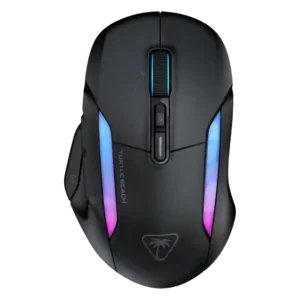
Turtle Beach Kone II Air

Turtle Beach Kone II Air

Overall score 4.3 / 5

Based on 19 scored reviews

vs
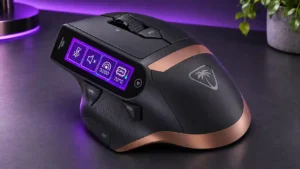
Turtle Beach Command Series MC7

Turtle Beach Command Series MC7

Overall score 3.6 / 5

Based on 12 scored reviews

How we score

Scorata scores summarize analyzed review evidence on a 1–5 scale; they are not laboratory measurements or a simple average of customer star ratings. Feature scores summarize the reviews covering that feature. The overall score averages feature scores within each review, then combines review averages. When both expert and customer evidence are available, those two groups receive equal weight. Products can have different review coverage, so small score gaps do not establish a winner.

Recommendations prioritize important features for the category, with a score of at least 3.5, a gap of at least 0.25 points and at least two supporting reviews per product. Features with widely varying scores or broad connectivity contexts are excluded from recommendations. These safeguards do not establish statistical significance.

Quick verdict

What each product is best for

The review evidence points to a tradeoff: battery life and side button quality versus polling rate and macro support. Choose according to which strengths matter more to you; the overall score alone does not settle that choice.

Choose Turtle Beach Kone II Air for battery life and side button quality.

Choose Turtle Beach Command Series MC7 for polling rate and macro support.

Why these recommendations?

Turtle Beach Kone II Air

Where It Has the Edge

  • battery life is 4.7 vs 4.3. Battery life was heavily praised across reviews, often lasting a week or more, though one reviewer measured less...
  • side button quality is 4.5 vs 1.5. Side buttons were usually praised for placement and reachability, although a few reviewers found some Easy-Shift combinations awkward...
  • value for money is 3.7 vs 1.8. Value for money was mixed: reviewers liked the feature set and pricing versus some rivals, but several found...

Turtle Beach Command Series MC7

Where It Has the Edge

  • polling rate is 4.0 vs 2.5. The 8,000Hz ceiling is praised for precise aiming, but some testers find little real benefit over 1,000Hz.
  • macro support is 5.0 vs 4.5. On-device macros can be launched without leaving a game or task, a clear benefit for customized workflows.
  • RGB features is 4.8 vs 4.3. Adjustable underglow is generally liked for its restrained look and useful low-battery warning.
Turtle Beach Kone II Air 4.3 overall score
Turtle Beach Command Series MC7 3.6 overall score

Compare features

Scores are out of 5. Missing scores mean missing review evidence, not a missing feature.

Scored on both products

Battery and charging

Battery life
Turtle Beach Kone II Air
4.7

Battery life was heavily praised across reviews, often lasting a week or more, though one reviewer measured less than the advertised 130 hours.

Turtle Beach Command Series MC7
4.3

The ability to swap a ready-charged battery earns broad approval, although a single cell has comparatively modest runtime.

Charging convenience
Turtle Beach Kone II Air
4.6

Charging convenience was praised for flexible cables, easy wired charging, and the ability to keep playing while charging.

Turtle Beach Command Series MC7
4.8

Charging one battery while using the other is intuitive and usually requires only a quick swap, though it still means managing cells.

Controls and connectivity

Software stability
Turtle Beach Kone II Air
5.0

Software stability had limited but strong evidence from one reviewer who reported no crashes or issues.

Turtle Beach Command Series MC7
1.4

Some users report the app failing to open after an update or crashing at 8,000Hz polling.

Side button quality
Turtle Beach Kone II Air
4.5

Side buttons were usually praised for placement and reachability, although a few reviewers found some Easy-Shift combinations awkward or dependent on hand size.

Turtle Beach Command Series MC7
1.5

Reach and accidental presses, rather than responsiveness, are the biggest problems with the side controls.

Debounce customization
Turtle Beach Kone II Air
4.8

Debounce customization was praised in one review because SWARM II explained debounce and related settings clearly.

Turtle Beach Command Series MC7
4.0

Fine-grained debounce settings appeal to owners who enjoy adjusting switch behavior.

Bluetooth support
Turtle Beach Kone II Air
4.0

Bluetooth support was useful for versatility and long battery life, but reviewers warned it is not the best mode for competitive performance.

Turtle Beach Command Series MC7
4.5

Bluetooth joins wired USB and 2.4GHz wireless to give the mouse welcome connectivity flexibility.

Button customization
Turtle Beach Kone II Air
4.6

Button customization was consistently praised, especially Easy-Shift and profile-based control, though one review wanted more useful default secondary functions.

Turtle Beach Command Series MC7
5.0

Mapping multiple physical buttons gives owners alternatives to using the touchscreen for frequently needed commands.

Button responsiveness
Turtle Beach Kone II Air
4.6

Button responsiveness was widely praised, with reviewers calling clicks quick, responsive, purposeful, soft, and fast enough for gaming.

Turtle Beach Command Series MC7
5.0

Optical switches consistently earn praise for a snappy, responsive click.

Programmable buttons
Turtle Beach Kone II Air
4.9

Programmable buttons were praised for expanding commands and making the mouse versatile for work, FPS, MMO, and macro-heavy use.

Turtle Beach Command Series MC7
5.0

Extra assignable buttons are welcomed for games, browsing, and frequently used commands.

Software usability
Turtle Beach Kone II Air
4.6

Software usability was a major strength: SWARM II was repeatedly called clean, intuitive, easy, powerful, and much improved.

Turtle Beach Command Series MC7
4.5

The settings interface is mostly intuitive and flexible, although occasional slowness and the need for software lessen convenience.

Comfort and build

Shape comfort
Turtle Beach Kone II Air
4.5

Shape comfort was one of the strongest themes for medium-to-large hands, though smaller-hand reviewers sometimes found the shape too large to feel natural.

Turtle Beach Command Series MC7
1.7

Some hands enjoy the sloped profile, while others cannot find a natural finger or palm position.

Ergonomic design
Turtle Beach Kone II Air
4.8

Ergonomic design was a standout strength, repeatedly described as comfortable, supremely ergonomic, and well suited to larger hands.

Turtle Beach Command Series MC7
2.6

Ergonomics are highly divisive: some testers find the sloped shell comfortable, while others report awkward finger support and poor handling at speed.

Build quality
Turtle Beach Kone II Air
4.6

Build quality was consistently praised as sturdy, solid, flex-free, and improved versus older Roccat/Turtle Beach hardware.

Turtle Beach Command Series MC7
3.8

Construction feels solid to several users, though complaints about hard plastic, hollow screen feedback, and internal rattle weaken the premium impression.

Palm grip comfort
Turtle Beach Kone II Air
4.8

Palm grip comfort was praised strongly, with reviewers repeatedly saying the large Kone shape suits palm grip especially well.

Turtle Beach Command Series MC7
4.0

The large chassis is described as tolerable for relaxed palm gripping despite its weight.

Materials quality
Turtle Beach Kone II Air
3.2

Materials quality was mixed in limited evidence, with one reviewer saying the plastic finish drew divided reactions.

Turtle Beach Command Series MC7
3.8

The tactile surface feels solid to several testers, but hard plastic and occasional rattle compromise its premium image.

Claw grip comfort
Turtle Beach Kone II Air
4.5

Claw grip comfort was positive for medium-to-large hands, with reviewers able to claw it easily despite the large shell.

Turtle Beach Command Series MC7
4.0

A relaxed claw grip may accommodate the size, but this is not a nimble ultralight design.

Long-session comfort
Turtle Beach Kone II Air
4.7

Long-session comfort was strongly positive for larger hands, with reviewers reporting no strain, secure grip, and hours of comfortable use, though one noticed fatigue.

Turtle Beach Command Series MC7
5.0

For long email, browsing and editing sessions, one tester found the substantial mouse comfortable and supportive.

Other features

Balance and weight distribution
Turtle Beach Kone II Air
4.0

Weight distribution was mixed-positive, with praise for balance and low center of gravity but one reviewer finding the rear-heavy feel unbalanced.

Turtle Beach Command Series MC7
1.7

Several assessments find that the 135g body feels poorly balanced or rattly during quick movements; one user appreciates its stability for work.

Motion consistency
Turtle Beach Kone II Air
3.0

Motion consistency was mixed due to one reviewer noticing minor low-speed tracking jitter despite otherwise strong performance.

Turtle Beach Command Series MC7
5.0

The optical sensor is repeatedly described as smooth and consistent without jumps or drift.

Cross-platform compatibility
Turtle Beach Kone II Air
2.8

Cross-platform compatibility was limited because full customization was described as Windows-only.

Turtle Beach Command Series MC7
4.5

Multiple connection methods are appreciated for moving between compatible computers, though macOS support is a concern.

Polling rate
Turtle Beach Kone II Air
2.5

Polling rate drew criticism: multiple reviewers noted the 1000Hz ceiling or inconsistency as a weak point versus higher-end competitive mice.

Turtle Beach Command Series MC7
4.0

The 8,000Hz ceiling is praised for precise aiming, but some testers find little real benefit over 1,000Hz.

Premium feel
Turtle Beach Kone II Air
4.2

Premium feel was mostly positive, with praise for a more premium chassis and premium mouse feel, but one review preferred the older Kone XP Air's feel.

Turtle Beach Command Series MC7
2.7

The shell can feel solid and deliberate, yet rattles, hollow screen feedback and hard plastic make its premium credentials inconsistent.

Weight
Turtle Beach Kone II Air
3.1

Weight was the most divisive trait: some reviewers accepted or liked the planted feel, while many found 110g heavy, bulky, or less versatile.

Turtle Beach Command Series MC7
1.8

At around 135g, the mouse is substantially heavier than many gaming alternatives. Its heft can feel steady for office work but cumbersome for esports.

FPS gaming suitability
Turtle Beach Kone II Air
3.4

FPS gaming suitability was mixed: some reviewers found shooters fine or enjoyable, while others said the size, weight, and performance ceiling hurt faster competitive play.

Turtle Beach Command Series MC7
2.3

Fast controls and reliable tracking earned an enthusiastic endorsement for competitive shooters in one assessment.

Wireless latency
Turtle Beach Kone II Air
4.0

Wireless latency was mixed: some reviewers praised low-latency or lag-free use, while one measured noticeable latency and wavering during quick movement.

Turtle Beach Command Series MC7
5.0

Rapid turns and flicks register with virtually no perceptible wireless delay in a positive test.

Grip texture
Turtle Beach Kone II Air
3.9

Grip texture was mixed: the shape and optional tape helped, but several reviewers found the smooth plastic slippery, polarizing, or less grippy than expected.

Turtle Beach Command Series MC7
3.0

The textured thumb rest helps prevent slips but can feel restrictive when reaching for adjacent buttons.

Switch feel
Turtle Beach Kone II Air
4.2

Switch feel was mostly positive for tactile, clicky, snappy presses, though some reviewers found the feel mushier or fatiguing in frantic moments.

Turtle Beach Command Series MC7
5.0

The Titan optical switches deliver a satisfying, snappy mechanical-feeling click.

DPI range
Turtle Beach Kone II Air
4.6

DPI range was viewed positively because reviewers found the 26K ceiling and fine adjustment easy to tailor, even if extreme DPI was impractical for some.

Turtle Beach Command Series MC7
4.0

The 30,000-DPI maximum places the sensor among premium gaming hardware, although that ceiling is not necessary for everyone.

RGB features
Turtle Beach Kone II Air
4.3

RGB features were generally liked for sharp, bold, or gorgeous lighting, though a few reviewers wanted more flair or noticed choppy transitions.

Turtle Beach Command Series MC7
4.8

Adjustable underglow is generally liked for its restrained look and useful low-battery warning.

Acceleration control
Turtle Beach Kone II Air
4.5

Acceleration control was praised in one review through the mouse's balanced handling, which helped acceleration and stopping feel controlled.

Turtle Beach Command Series MC7
4.0

Detailed angle and motion tuning gives enthusiasts more room to personalize movement.

Onboard memory
Turtle Beach Kone II Air
4.5

Onboard memory was praised in one review for saving settings directly to the mouse for use on other computers.

Turtle Beach Command Series MC7
4.0

Saved controls and widgets can be drawn from onboard memory as part of touchscreen setup.

Surface compatibility
Turtle Beach Kone II Air
4.5

Surface compatibility had limited but positive evidence from one reviewer who found the sensor tracked easily across different surfaces.

Turtle Beach Command Series MC7
5.0

Tracking stays reliable across cloth, hard desk mats and even glass according to hands-on testing.

Profile switching
Turtle Beach Kone II Air
4.6

Profile switching was praised for five profiles and work/game setups, especially for users who move between games or devices.

Turtle Beach Command Series MC7
5.0

Touchscreen shortcuts make jumping between saved profiles quick without opening a menu.

2.4GHz connectivity
Turtle Beach Kone II Air
4.9

2.4GHz connectivity was praised as the preferred low-latency, high-performance wireless mode for gaming.

Turtle Beach Command Series MC7
5.0

The 2.4GHz option is part of a versatile three-mode connection system alongside Bluetooth and USB wired use.

Scroll wheel quality
Turtle Beach Kone II Air
4.4

The scroll wheel was a major strength overall, with praise for smooth/free-spin usefulness and satisfying feel, balanced by a few complaints about loud clicks or excess play.

Turtle Beach Command Series MC7
4.5

Stepped and free-spin scrolling are widely liked, but a few testers notice a rattle when the mouse is lifted or flicked.

Connection stability
Turtle Beach Kone II Air
4.9

Connection stability was one of the clearest strengths, with reviewers reporting no hitches, no input delay, flawless switching, and no letdowns.

Turtle Beach Command Series MC7
5.0

Wireless play is reported as stable, although one tester encountered software lag at the highest polling setting.

Glide smoothness
Turtle Beach Kone II Air
5.0

Glide smoothness was consistently praised, with reviewers describing smooth, responsive, fluid, and amazing glide on mousepads and other surfaces.

Turtle Beach Command Series MC7
5.0

Tracking and movement feel notably smooth, with precision during gaming and everyday cursor motion.

Left and right click quality
Turtle Beach Kone II Air
5.0

Left and right clicks were strongly praised for feeling perfect, balanced, fast, and responsive.

Turtle Beach Command Series MC7
5.0

The main click buttons are praised for satisfying, snappy feedback, even by reviewers who dislike the mouse shape.

Ownership and support

Value for money
Turtle Beach Kone II Air
3.7

Value for money was mixed: reviewers liked the feature set and pricing versus some rivals, but several found it pricey, best on sale, or less compelling than the wired model.

Turtle Beach Command Series MC7
1.8

The high asking price is the dominant buying objection, since lighter premium mice can offer more comfortable handling.

Macro support
Turtle Beach Kone II Air
4.5

Macro support was viewed positively because SWARM II made macro creation or recording accessible, with built-in and custom macro options.

Turtle Beach Command Series MC7
5.0

On-device macros can be launched without leaving a game or task, a clear benefit for customized workflows.

Tracking and training

Accuracy and tracking precision
Turtle Beach Kone II Air
4.5

Reviewers generally found tracking accurate and precise, with praise for smooth tracking and pinpoint control, though one noted only modest accuracy and another reported minor jitter.

Turtle Beach Command Series MC7
5.0

Tracking draws consistent praise for accuracy, including rapid movements and changes between desk surfaces.

Performance

Sensor performance
Turtle Beach Kone II Air
4.7

The Owl-Eye sensor was usually praised as excellent, upgraded, and top-tier for most use, though comments focused more on comfort than esports-grade speed.

Turtle Beach Command Series MC7
5.0

The Owl-Eye sensor is a consistent highlight for precise, smooth tracking across games and surfaces.

Wireless performance
Turtle Beach Kone II Air
4.8

Wireless performance was strongly positive overall, with reviewers reporting reliable wireless behavior and favorite-mouse-level performance, though size limited gaming appeal for one.

Turtle Beach Command Series MC7
5.0

The high-polling wireless connection stays responsive during extended play in a favorable hands-on assessment.

Click noise
Turtle Beach Kone II Air
3.2

Click noise was mixed-low in one review because the clicks were described as hollow sounding.

Turtle Beach Command Series MC7
3.0

One assessment enjoys the mechanical click sound while another finds the clicks somewhat too loud.

Evidence available for one product

Other features

Accessory compatibility
Turtle Beach Kone II AirNo score yet
Turtle Beach Command Series MC7
5.0

Its batteries can be shared with the Stealth Pro II, reducing the number of spares needed in a Turtle Beach setup.

Cable flexibility
Turtle Beach Kone II Air
4.4

Cable flexibility was praised in most evidence, especially for lightweight, flexible charging or wired use, though one reviewer questioned durability and length.

Turtle Beach Command Series MC7No score yet
Click consistency
Turtle Beach Kone II AirNo score yet
Turtle Beach Command Series MC7
5.0

Optical switches consistently register crisp presses without reported double-click errors.

Click latency
Turtle Beach Kone II Air
4.5

Click latency evidence was positive in one review, where the optical switches were described as quick and responsive during play.

Turtle Beach Command Series MC7No score yet
Coating quality
Turtle Beach Kone II AirNo score yet
Turtle Beach Command Series MC7
4.5

The finish feels pleasant and minimizes fingerprints, making the exterior easy to keep looking clean.

Device switching
Turtle Beach Kone II AirNo score yet
Turtle Beach Command Series MC7
4.0

Changing between computers using the available wireless and wired options is appealing for a multi-PC desk.

Ecosystem integration
Turtle Beach Kone II Air
4.5

Ecosystem integration was praised in one review for syncing effects across Roccat/Turtle Beach devices.

Turtle Beach Command Series MC7No score yet
Fingerprint and smudge resistance
Turtle Beach Kone II AirNo score yet
Turtle Beach Command Series MC7
5.0

The finish handles fingerprints well and feels pleasant under the fingertips.

Free-spin scrolling
Turtle Beach Kone II AirNo score yet
Turtle Beach Command Series MC7
5.0

The adaptive wheel switches between tactile steps and free spinning, helping with both weapon changes and long pages.

Gaming suitability
Turtle Beach Kone II AirNo score yet
Turtle Beach Command Series MC7
4.5

For gamers who want customizable controls more than low weight, the feature-rich design has appeal.

Horizontal scrolling
Turtle Beach Kone II AirNo score yet
Turtle Beach Command Series MC7
4.5

Side-to-side wheel tilts are considered useful for navigation and quick control.

Included accessories
Turtle Beach Kone II AirNo score yet
Turtle Beach Command Series MC7
5.0

The spare battery, charging dock, receiver and cable make the package feel well equipped.

Lift-off distance
Turtle Beach Kone II Air
3.0

Lift-off distance customization was mixed because the software offered calibration, but one reviewer disliked that it did not clearly show the resulting distance.

Turtle Beach Command Series MC7No score yet
MacOS compatibility
Turtle Beach Kone II AirNo score yet
Turtle Beach Command Series MC7
1.0

The Windows-only configuration makes this a poor choice for users needing full macOS support.

MMO gaming suitability
Turtle Beach Kone II Air
4.6

MMO gaming suitability was strong, with reviewers praising the command count and customization for RPG/MMO-style ability access.

Turtle Beach Command Series MC7No score yet
Portability
Turtle Beach Kone II Air
3.8

Portability was mixed: dongle storage, Bluetooth, and profiles helped, but size and an unsecured dongle slot reduced confidence.

Turtle Beach Command Series MC7No score yet
Profile management
Turtle Beach Kone II AirNo score yet
Turtle Beach Command Series MC7
4.8

Users can organize settings by game or application, with flexible controls in Swarm II.

Scroll wheel precision
Turtle Beach Kone II AirNo score yet
Turtle Beach Command Series MC7
4.5

Distinct steps and quick adjustment make the adaptive wheel useful for fine navigation.

Scroll wheel resistance
Turtle Beach Kone II AirNo score yet
Turtle Beach Command Series MC7
5.0

The wheel offers satisfyingly tactile stepped resistance for controlled actions such as weapon changes.

Switch quality
Turtle Beach Kone II AirNo score yet
Turtle Beach Command Series MC7
5.0

Optical switches feel excellent under the fingertips and avoid reported double-click errors.

Wired connectivity
Turtle Beach Kone II AirNo score yet
Turtle Beach Command Series MC7
5.0

USB operation joins two wireless modes for a flexible connection setup.

Comfort and build

Aesthetic design
Turtle Beach Kone II AirNo score yet
Turtle Beach Command Series MC7
1.0

The angular, asymmetrical styling and mixed accents attract unusually strong criticism for looking cluttered or unattractive.

Durability over time
Turtle Beach Kone II Air
4.4

Durability over time was positive but limited, with reviewers noting months of sturdy use and reliable scroll wheel behavior.

Turtle Beach Command Series MC7No score yet
Fingertip grip comfort
Turtle Beach Kone II Air
3.9

Fingertip grip comfort was more context-dependent: one reviewer found it maneuverable, while another experienced fatigue with a fingertip/claw hybrid.

Turtle Beach Command Series MC7No score yet
Grip comfort
Turtle Beach Kone II AirNo score yet
Turtle Beach Command Series MC7
3.8

The thumb groove or sloped body can feel pleasant, though the button layout makes overall grip comfort inconsistent.

Hand size compatibility
Turtle Beach Kone II AirNo score yet
Turtle Beach Command Series MC7
2.0

The wide chassis and far-reaching touchscreen limit fit for small hands, and some large-handed users struggle too.

Size
Turtle Beach Kone II AirNo score yet
Turtle Beach Command Series MC7
2.0

The unusually large chassis feels cumbersome for quick repositioning, though it can provide a stable working base.

Switch durability
Turtle Beach Kone II Air
4.5

Switch durability received positive but limited evidence, with one reviewer saying the mouse felt built to last.

Turtle Beach Command Series MC7No score yet

Battery and charging

Battery hot-swap system
Turtle Beach Kone II AirNo score yet
Turtle Beach Command Series MC7
5.0

The two rechargeable cells and charging dock are the clearest standout. A charged spare replaces the drained battery in seconds, substantially reducing interruptions.

Battery indicator
Turtle Beach Kone II AirNo score yet
Turtle Beach Command Series MC7
5.0

A red lighting warning and on-screen battery information make it easy to know when a swap is needed.

Per-battery runtime
Turtle Beach Kone II AirNo score yet
Turtle Beach Command Series MC7
2.5

A single battery lasts substantially less than many flagship alternatives; the spare and dock compensate for that limitation.

Rechargeable battery
Turtle Beach Kone II AirNo score yet
Turtle Beach Command Series MC7
5.0

Two rechargeable cells keep a spare ready while the other powers the mouse.

Wireless charging support
Turtle Beach Kone II AirNo score yet
Turtle Beach Command Series MC7
2.0

One prospective buyer would have preferred a wireless charging dock instead of relying on battery swapping.

Controls and connectivity

Button count
Turtle Beach Kone II AirNo score yet
Turtle Beach Command Series MC7
5.0

The generous set of programmable controls appeals to anyone who likes having extra commands on the mouse.

Button placement
Turtle Beach Kone II AirNo score yet
Turtle Beach Command Series MC7
1.0

Side controls often require awkward thumb reaches; one tester repeatedly triggered a nearby button by mistake.

Button quality
Turtle Beach Kone II AirNo score yet
Turtle Beach Command Series MC7
4.7

Main clicks feel satisfying and crisp even though opinions differ on the shell surrounding them.

DPI customization
Turtle Beach Kone II AirNo score yet
Turtle Beach Command Series MC7
4.7

On-mouse sensitivity changes can be quick and useful, although touchscreen access is not comfortable for everyone.

Polling rate customization
Turtle Beach Kone II AirNo score yet
Turtle Beach Command Series MC7
4.0

The 8,000Hz setting can be adjusted quickly, though the real benefit of very high rates varies by user.

Software and driver support
Turtle Beach Kone II AirNo score yet
Turtle Beach Command Series MC7
2.5

Companion software offers extensive device settings but crashes or failed launches can prevent reliable customization.

Software quality
Turtle Beach Kone II AirNo score yet
Turtle Beach Command Series MC7
2.2

Swarm II provides plenty of settings, but serious update and polling-related reliability issues undercut its usefulness.

Tilt gesture controls
Turtle Beach Kone II Air
4.5

Tilt gesture controls received positive limited evidence because the 4D wheel tilt added another layer of control for navigation.

Turtle Beach Command Series MC7No score yet
Touchscreen accidental input
Turtle Beach Kone II AirNo score yet
Turtle Beach Command Series MC7
1.8

Several testers report or anticipate unwanted touches and sensitivity changes, while one experienced no accidental inputs at all.

Touchscreen display readability
Turtle Beach Kone II AirNo score yet
Turtle Beach Command Series MC7
2.7

The display can be bright and responsive, but poor off-angle visibility frequently makes it look washed out.

Touchscreen novelty and innovation
Turtle Beach Kone II AirNo score yet
Turtle Beach Command Series MC7
3.6

Its uncommon side-mounted touch display is intriguing and creative, even to people who question whether a mouse needs one.

Touchscreen reach and usability
Turtle Beach Kone II AirNo score yet
Turtle Beach Command Series MC7
2.3

Thumb access is the largest usability disagreement: some find the controls natural, while others must bend fingers or reposition their grip.

Touchscreen shortcut customization
Turtle Beach Kone II AirNo score yet
Turtle Beach Command Series MC7
4.0

Touch commands support DPI, profiles, macros and OBS, but software limitations prevent some fully custom workflows.

Touchscreen usefulness
Turtle Beach Kone II AirNo score yet
Turtle Beach Command Series MC7
2.8

The touchscreen divides opinion sharply: streamers and shortcut enthusiasts see real value, while others find it redundant or awkward.

Ownership and support

Double-click reliability
Turtle Beach Kone II AirNo score yet
Turtle Beach Command Series MC7
5.0

Tests report responsive optical switches without unwanted double clicks.

Hand support
Turtle Beach Kone II AirNo score yet
Turtle Beach Command Series MC7
1.5

The curved click buttons can leave parts of the fingers unsupported, making a natural resting position difficult.

Multi-device support
Turtle Beach Kone II AirNo score yet
Turtle Beach Command Series MC7
4.0

Several connection modes appeal to people operating more than one computer at a desk.

Performance

Gaming performance
Turtle Beach Kone II AirNo score yet
Turtle Beach Command Series MC7
4.7

Core sensor and switch performance is solid, and some testers enjoy aiming despite the heavy chassis.

Productivity performance
Turtle Beach Kone II AirNo score yet
Turtle Beach Command Series MC7
5.0

Stable handling, an adaptive scroll wheel and direct shortcuts help with everyday office tasks.

Other Top Gaming Mice to Consider

#1 ASUS ROG Harpe II Ace
4.6

Choose the ROG Harpe II Ace for ultralight FPS play, precise tracking, smooth glide, and web-based tuning. Skip it if you need palm-grip support, MMO buttons, onboard profiles, or long...

Pros: glide smoothness, weight

Cons: handedness options

#2 Razer Viper V4 Pro
4.4

Best for ultra-light, competition-focused speed, precise tracking, stable wireless, and long battery life. Skip it if you need quieter clicks, left-handed support, Bluetooth, more buttons, or better value for casual...

Pros: value for money, weight

Cons: click noise, RGB features

#3 Corsair Scimitar Elite Wireless SE
4.4

Choose it if you want a premium MMO/productivity mouse with 12 adjustable side buttons, strong battery life, and Stream Deck integration. Skip it if you need an ultralight FPS mouse,...

Pros: button customization, MMO gaming suitability

Cons: FPS gaming suitability

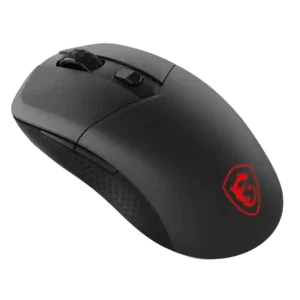
#4 MSI Versa 300 Wireless 8K
4.4

Best for precise wireless tracking, smooth glide, strong battery life, and unusually good 8K value. Skip it if you need polished software, quiet snappy clicks, true left-handed controls, or gentle...

Pros: software usability, sensor performance

Cons: RGB features, scroll wheel quality