Scorata scores summarize analyzed review evidence on a 1–5 scale; they are not laboratory measurements or a simple average of customer star ratings. Feature scores summarize the reviews covering that feature. The overall score averages feature scores within each review, then combines review averages. When both expert and customer evidence are available, those two groups receive equal weight. Products can have different review coverage, so small score gaps do not establish a winner.
Recommendations prioritize important features for the category, with a score of at least 3.5, a gap of at least 0.25 points and at least two supporting reviews per product. Features with widely varying scores or broad connectivity contexts are excluded from recommendations. These safeguards do not establish statistical significance.
Quick verdict
What each product is best for
The review evidence points to a tradeoff: ergonomic design and charging convenience versus value for money and handedness options. Choose according to which strengths matter more to you; the overall score alone does not settle that choice.
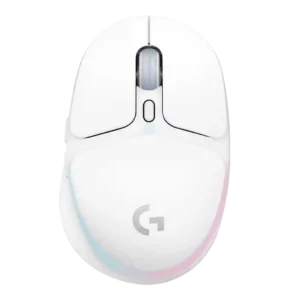
Choose Logitech G705 for ergonomic design and charging convenience.
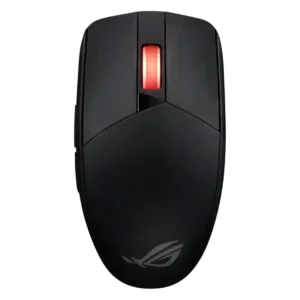
Choose ASUS ROG Strix Impact III Wireless for value for money and handedness options.
Why these recommendations?
Logitech G705
Where It Has the Edge
ergonomic design is 4.4 vs 3.5. Ergonomics were strong for small hands, with praise for thumb support and contouring, but reviewers repeatedly warned larger...
charging convenience is 4.3 vs 3.6. Charging convenience was well received thanks to USB-C, fast recharge mentions, and the ability to keep using the...
RGB features is 4.1 vs 3.5. RGB was often praised for soft Aurora styling and striking pastel effects, though some reviewers found it limited,...
ASUS ROG Strix Impact III Wireless
Where It Has the Edge
value for money is 4.6 vs 2.8. Value for money is a major strength, with reviewers calling it excellent for the price, a great deal,...
handedness options is 3.7 vs 2.1. Handedness options are mixed because the symmetrical shell can work left-handed, but side buttons mainly favor right-handed use.
DPI range is 4.7 vs 3.4. The DPI range is treated as more than enough for high-resolution and fast gaming use, though one reviewer’s...
Logitech G7053.8 overall score
ASUS ROG Strix Impact III Wireless4.2 overall score
Compare features
Scores are out of 5. Missing scores mean missing review evidence, not a missing feature.
Scored on both products
Battery and charging
Battery life
Logitech G705
3.5
Battery life was polarizing: some reviewers found a weekly charge acceptable or strong, while others called 40 hours with RGB disappointing beside competitors.
ASUS ROG Strix Impact III Wireless
4.6
Battery life is one of the strongest repeated positives, with reviewers reporting held-up estimates, no dwindling after weeks, and extremely long runtime.
Charging convenience
Logitech G705
4.3
Charging convenience was well received thanks to USB-C, fast recharge mentions, and the ability to keep using the mouse while charging.
ASUS ROG Strix Impact III Wireless
3.6
Power and charging convenience is mixed: some reviewers like easy-to-buy batteries, while others dislike needing spares or missing an internal rechargeable battery.
Ownership and support
Value for money
Logitech G705
2.8
Value for money was the biggest concern: reviewers liked the mouse but often felt $80-$100 was high for its specs, size, and battery life.
ASUS ROG Strix Impact III Wireless
4.6
Value for money is a major strength, with reviewers calling it excellent for the price, a great deal, and strong value despite some caveats.
Macro support
Logitech G705
4.4
Macro support was positively tied to G Hub, with reviewers noting commands, macros, and media controls could be assigned to buttons.
ASUS ROG Strix Impact III Wireless
4.3
Macro support is supported by the software evidence, where macro creation sits alongside profiles and other user-friendly customization tools.
Other features
Handedness options
Logitech G705
2.1
Handedness was a recurring weakness because the contoured shape clearly favors right-handed users, with no true left-handed version.
ASUS ROG Strix Impact III Wireless
3.7
Handedness options are mixed because the symmetrical shell can work left-handed, but side buttons mainly favor right-handed use.
Motion consistency
Logitech G705
3.5
Motion consistency was mixed, with one reviewer praising no DPI offset while another found the shell could rock and trigger movement.
ASUS ROG Strix Impact III Wireless
4.9
Motion consistency is praised through comments about stability, no jitter, no disruption, and no noticeable lag or stuttering.
Balance and weight distribution
Logitech G705
2.9
Weight balance split reviewers: one liked its stopping power for aiming, while others felt the balance or lightness reduced control.
ASUS ROG Strix Impact III Wireless
4.3
Weight distribution has limited but positive evidence, with one reviewer saying the AA setup felt normal and did not tilt when lifted.
DPI range
Logitech G705
3.4
DPI range was mixed: everyday users found 8,200 DPI adequate, while competitive or spec-focused reviewers found it low for the price.
ASUS ROG Strix Impact III Wireless
4.7
The DPI range is treated as more than enough for high-resolution and fast gaming use, though one reviewer’s praise ties the range mainly to precision.
Profile switching
Logitech G705
3.3
Profile switching was mixed: software profiles were useful, but GamesRadar criticized that cycling profiles could not be done directly on the mouse.
ASUS ROG Strix Impact III Wireless
4.4
Profile switching is positively supported by the ability to switch saved profiles easily.
Weight
Logitech G705
3.4
Weight was divisive: some liked the light, portable feel, while competitive reviewers said 85g was heavy for such a small FPS mouse.
ASUS ROG Strix Impact III Wireless
4.2
Weight is mostly praised as light or featherweight, though multiple reviewers caution that the advertised 57g excludes the battery and is somewhat misleading.
RGB features
Logitech G705
4.1
RGB was often praised for soft Aurora styling and striking pastel effects, though some reviewers found it limited, covered by the palm, or not special enough.
ASUS ROG Strix Impact III Wireless
3.5
RGB feedback is mixed: reviewers like the subtle personalization, but several note that lighting is limited, not very bright, or only on the wheel.
FPS gaming suitability
Logitech G705
3.8
FPS suitability was mixed: some reviewers played shooters comfortably, while competitive-focused reviewers criticized weight, sensor ceiling, or tournament readiness.
ASUS ROG Strix Impact III Wireless
4.3
FPS gaming suitability is generally strong because reviewers praise fast shooters, fast FPS use, and flick-shot tracking, though one multi-user review was more cautious.
Polling rate
Logitech G705
3.7
Polling rate was strong over the dongle at 1,000Hz but criticized when consistency varied or Bluetooth limited the report rate.
ASUS ROG Strix Impact III Wireless
4.3
Polling-rate evidence is positive overall: 1000Hz is praised as high performance, while Bluetooth polling is described as lower but still usable.
Cable flexibility
Logitech G705
2.0
The included cable received a clear complaint for rigidity, especially given the small, portable mouse body.
ASUS ROG Strix Impact III Wireless
2.4
Cable flexibility scores poorly because reviewers point out that the wireless model cannot be used in wired mode.
Cross-platform compatibility
Logitech G705
4.2
Cross-platform use was a plus, especially Bluetooth use with phones/tablets/iPad, though Ars wanted better multi-Bluetooth profile support.
ASUS ROG Strix Impact III Wireless
4.5
Cross-platform compatibility has limited but positive evidence from stored settings that allow easier use across different PCs and devices.
Scroll wheel quality
Logitech G705
4.2
Scroll wheel quality was mostly positive for responsiveness and controlled force, with one reviewer finding it a bit too stiff.
ASUS ROG Strix Impact III Wireless
4.5
The scroll wheel is generally praised for no wobble, clear cutoffs, precise resistance, and a nice feel.
Ecosystem integration
Logitech G705
4.3
Ecosystem integration was praised when the G705 could share Aurora/Logitech receivers or pair with another LIGHTSPEED device on one dongle.
ASUS ROG Strix Impact III Wireless
4.6
Ecosystem integration is positive thanks to the ROG Omni Receiver and SpeedNova compatibility with other ROG peripherals.
Click latency
Logitech G705
4.5
Click latency evidence was limited but positive, with one reviewer calling the clicks precise and fast during play.
ASUS ROG Strix Impact III Wireless
4.8
Click-latency comments are strongly positive, with reviewers pointing to near-zero latency and very little gap or travel before actuation.
Onboard memory
Logitech G705
4.3
Onboard memory was praised for preserving tweaks/profiles without needing to redo settings every time.
ASUS ROG Strix Impact III Wireless
4.5
Onboard memory is treated positively because reviewers connect it with saved presets, calibration, profile storage, and portability across devices.
Left and right click quality
Logitech G705
4.4
Left/right click quality was praised for light actuation, tactile feel, and easy clicking.
ASUS ROG Strix Impact III Wireless
4.6
Left and right click quality is a clear strength, with reviewers praising softness, precision, tactile response, and nice PBT click feel.
Lift-off distance
Logitech G705
4.5
Lift-off distance had limited but positive evidence, contributing to good gaming and work performance.
ASUS ROG Strix Impact III Wireless
4.3
Lift-off distance is viewed positively where tested, with one reviewer pleased by surface performance without extra adjustment and another satisfied with the low setting.
Surface compatibility
Logitech G705
4.3
Surface compatibility was positive where reviewers said it moved smoothly over most surfaces, pads, and tabletops.
ASUS ROG Strix Impact III Wireless
4.1
Surface compatibility is mixed-positive: non-glass desks and pads worked well, but glass caused noticeable control loss.
Switch feel
Logitech G705
4.4
Switch feel was consistently positive, with clicky, tactile, sharp, and satisfying wording across multiple reviews.
ASUS ROG Strix Impact III Wireless
4.5
Switch feel is described as clear, informative, tactile, crisp, and clicky, giving the main buttons a satisfying feel.
Wireless latency
Logitech G705
4.6
Wireless latency was consistently strong on LIGHTSPEED, with reviewers reporting no lag, low latency, and responsive control.
ASUS ROG Strix Impact III Wireless
4.7
Wireless latency is praised as very low, with several reviewers reporting wired-like responsiveness or no delay issues.
2.4GHz connectivity
Logitech G705
4.8
Reviewers praised LIGHTSPEED/2.4GHz as fast, snappy, and seamless, with several recommending the dongle for gaming over Bluetooth.
ASUS ROG Strix Impact III Wireless
4.7
2.4GHz connectivity is praised for stable SpeedNova/Omni performance, a strong signal, and responsive operation.
Glide smoothness
Logitech G705
4.5
Glide smoothness was consistently praised, with large feet/skates helping the mouse move smoothly across mats and other surfaces.
ASUS ROG Strix Impact III Wireless
4.5
Glide smoothness is consistently positive, with reviewers describing easy, smooth, uninterrupted movement on suitable surfaces.
Portability
Logitech G705
4.3
Portability was a clear strength thanks to the compact body, wireless options, USB-C, and easy bag/laptop use.
ASUS ROG Strix Impact III Wireless
4.4
Portability is positive thanks to receiver storage, travel use, and a small travel bag, though evidence is not as broad as performance-related attributes.
Grip texture
Logitech G705
4.4
Grip texture evidence was positive but limited, centered on the matte plastic giving enough grip and feeling pleasant to touch.
ASUS ROG Strix Impact III Wireless
4.4
Grip texture is a strength, with reviewers saying textured or rough side surfaces improve grip and prevent slipping.
Premium feel
Logitech G705
4.7
Premium feel was strong where reviewers praised the cohesive package, premium plastics, and impressive in-hand feel.
ASUS ROG Strix Impact III Wireless
4.7
Premium feel is supported by reviewers describing it as top-tier, extremely reliable, accurate, and fantastic-feeling.
Connection stability
Logitech G705
4.7
Connection stability was a strength, with reviewers reporting seamless switching, parity across modes, and no connectivity issues.
ASUS ROG Strix Impact III Wireless
4.7
Connection stability is strong where tested, with reviewers reporting no signal loss, no connectivity issues, and a strong signal.
Tracking and training
Accuracy and tracking precision
Logitech G705
3.8
Tracking was generally described as precise and responsive, though multiple reviewers said the 8,200 DPI ceiling reduced peak precision versus higher-end mice.
ASUS ROG Strix Impact III Wireless
4.8
Reviewers consistently describe the mouse as precise and accurate, with fast shot alignment, responsive tracking, and no obvious tracking issues.
Comfort and build
Long-session comfort
Logitech G705
3.8
Long-session comfort depended heavily on hand size: small-hand reviewers praised it, while larger-hand reviewers reported wrist ache or inadequate support.
ASUS ROG Strix Impact III Wireless
2.8
Long-session comfort is a recurring caveat, especially for larger hands or users needing more ergonomic support during long gaming sessions.
Durability over time
Logitech G705
3.7
Durability evidence was mixed, with robust workmanship and long-life confidence offset by concern about seams collecting dust over time.
ASUS ROG Strix Impact III Wireless
4.6
Durability over time is positive, supported by long-life switch evidence, reliability comments, and one reviewer’s expectation that it will last a long time.
Ergonomic design
Logitech G705
4.4
Ergonomics were strong for small hands, with praise for thumb support and contouring, but reviewers repeatedly warned larger hands may struggle.
ASUS ROG Strix Impact III Wireless
3.5
Ergonomic design is mixed: the size suits many grips, but reviewers also cite flatness, limited support, and right-click leverage issues for some users.
Materials quality
Logitech G705
4.0
Materials quality was mostly positive for pleasant plastics and finish, though one reviewer warned the small seams may collect grime.
ASUS ROG Strix Impact III Wireless
4.5
Materials quality is strong, with reviewers praising practical plastics, PBT, pleasant matte texture, and high-quality material feel.
Fingertip grip comfort
Logitech G705
4.2
Fingertip grip could work because of the small, light body, though evidence was less extensive than for claw grip.
ASUS ROG Strix Impact III Wireless
4.8
Fingertip grip comfort is one of the clearest comfort strengths, especially for users who hold the mouse with fingers rather than palm contact.
Palm grip comfort
Logitech G705
2.9
Palm grip comfort was mixed to poor for larger hands; some reviewers found it possible, but several said the short body made palm grip less ideal.
ASUS ROG Strix Impact III Wireless
2.6
Palm grip comfort is weak because reviewers say full palm grip only suits very small hands or is not suitable for large-hand full coverage.
Build quality
Logitech G705
4.5
Build quality drew strong praise for solid construction, robust workmanship, and a tank-like shell, with only minor seam/dirt caveats elsewhere.
ASUS ROG Strix Impact III Wireless
4.7
Build quality is repeatedly praised as high, sturdy, well-fitted, reliable, and free of wobble or looseness.
Shape comfort
Logitech G705
3.5
Shape comfort was the central tradeoff: excellent for small hands and some claw/fingertip users, but frequently too small or strange for medium-to-large hands.
ASUS ROG Strix Impact III Wireless
3.6
Shape comfort is mixed: several smaller-hand users found it comfortable, while others disliked the flat or stubby shape.
Claw grip comfort
Logitech G705
4.2
Claw grip comfort was one of the better-supported grip styles, especially for small-to-medium hands, although it depended strongly on hand size.
ASUS ROG Strix Impact III Wireless
4.4
Claw grip comfort is positive, with reviewers repeatedly identifying claw or partial claw as an ideal or suitable grip style.
Performance
Click noise
Logitech G705
4.5
Click noise had limited evidence, but the scroll-wheel click was praised as quiet and non-disruptive.
ASUS ROG Strix Impact III Wireless
3.9
Click noise is moderate rather than silent, with reviewers describing crisp audible clicks or minimal noise depending on the review.
Wireless performance
Logitech G705
4.3
Wireless performance was broadly positive in real use, though not always enough to overcome concerns around price, sensor spec, or weight.
ASUS ROG Strix Impact III Wireless
4.7
Wireless performance is a major strength, with reviewers saying the wireless signal is stable, smooth, responsive, and close to wired feel.
Sensor performance
Logitech G705
4.6
Sensor performance was generally strong in practical gaming, with accurate tracking and good implementation despite the non-flagship sensor.
ASUS ROG Strix Impact III Wireless
4.7
The sensor receives broad praise as excellent, capable, and exceptionally accurate, with only glass surfaces called out as a weakness in one review.
Controls and connectivity
Bluetooth support
Logitech G705
3.8
Bluetooth was useful and often flawless, but a few reviewers hit setup confusion or lower polling-rate limitations compared with the dongle.
ASUS ROG Strix Impact III Wireless
4.4
Bluetooth support is positive for everyday flexibility and long battery life, though one reviewer notes lower Bluetooth polling compared with 2.4GHz.
Software usability
Logitech G705
3.9
Software usability was divided: G Hub was often called intuitive or feature-rich, but multi-app fragmentation and per-device setup made it frustrating for some.
ASUS ROG Strix Impact III Wireless
4.4
Software usability is generally positive, with reviewers calling it user-friendly, easy to set up, and broad enough to control key settings.
Programmable buttons
Logitech G705
4.0
Programmable buttons were useful and full-featured for a small mouse, but the six-button limit hurt MMO/MOBA-heavy use.
ASUS ROG Strix Impact III Wireless
4.4
Programmable buttons are framed as useful because the configurable buttons add gameplay versatility through Armoury Crate.
Side button quality
Logitech G705
4.4
Side buttons were praised for placement, snappiness, and quality, with no major issues reported.
ASUS ROG Strix Impact III Wireless
4.1
Side buttons are mostly liked for clear actuation and placement, but one reviewer found them mushier than the main clicks.
Button responsiveness
Logitech G705
4.4
Buttons were consistently described as easy to reach, responsive, and satisfying, especially for the intended small-hand audience.
ASUS ROG Strix Impact III Wireless
4.7
Button responsiveness is repeatedly praised, especially for fast, accurate, light, crisp clicks that register reliably.
Button customization
Logitech G705
4.3
Button customization was viewed positively through G Hub remapping and macro assignment, though some praise was tied to the software experience rather than the hardware alone.
ASUS ROG Strix Impact III Wireless
4.5
Button customization is a strength, with reviewers highlighting unusually good customization for the price, gameplay versatility, and broad control in software.
Evidence available for one product
Other features
MMO gaming suitability
Logitech G705
2.3
MMO suitability was weak because the six-button layout was considered insufficient for MMO-heavy use.
ASUS ROG Strix Impact III WirelessNo score yet
MOBA gaming suitability
Logitech G705
2.4
MOBA suitability was weak for the same reason: reviewers wanted more buttons for MOBA-style play.
ASUS ROG Strix Impact III WirelessNo score yet
Weight tuning
Logitech G705No score yet
ASUS ROG Strix Impact III Wireless
4.3
Weight tuning is positive where reviewers discuss AA/AAA battery flexibility, especially because they like being able to use either battery size.
Controls and connectivity
Software stability
Logitech G705
2.5
Software stability was criticized in one review for system burden from multiple Logitech apps and processes.
ASUS ROG Strix Impact III WirelessNo score yet
Comfort and build
Switch durability
Logitech G705No score yet
ASUS ROG Strix Impact III Wireless
4.6
Switch durability is strong in reviewer evidence thanks to long-life switches and replaceable sockets that can extend usable life or fix dead clickers.
Choose the ROG Harpe II Ace for ultralight FPS play, precise tracking, smooth glide, and web-based tuning. Skip it if you need palm-grip support, MMO buttons, onboard profiles, or long...
Excellent tracking, comfortable right-handed ergonomics and a versatile scroll wheel make the Basilisk V3 a strong gaming and productivity mouse. Its substantial weight, fixed cable and sometimes over-sensitive automatic scrolling...
The L7 Pro delivers remarkably light handling, precise aiming and a grippy shell at a budget price. Stock skates are less impressive, and conflicting click-latency measurements warrant caution for latency-sensitive...
Best for ultra-light, competition-focused speed, precise tracking, stable wireless, and long battery life. Skip it if you need quieter clicks, left-handed support, Bluetooth, more buttons, or better value for casual...