Scorata scores summarize analyzed review evidence on a 1–5 scale; they are not laboratory measurements or a simple average of customer star ratings. Feature scores summarize the reviews covering that feature. The overall score averages feature scores within each review, then combines review averages. When both expert and customer evidence are available, those two groups receive equal weight. Products can have different review coverage, so small score gaps do not establish a winner.
Recommendations prioritize important features for the category, with a score of at least 3.5, a gap of at least 0.25 points and at least two supporting reviews per product. Features with widely varying scores or broad connectivity contexts are excluded from recommendations. These safeguards do not establish statistical significance.
Quick verdict
What each product is best for
The review evidence points to a tradeoff: FPS gaming suitability and weight versus RGB features and macro support. Choose according to which strengths matter more to you; the overall score alone does not settle that choice.
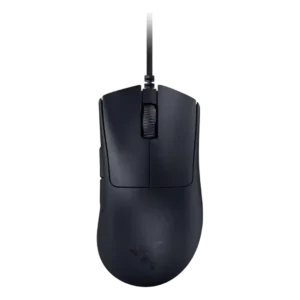
Choose Razer DeathAdder V3 for FPS gaming suitability and weight.
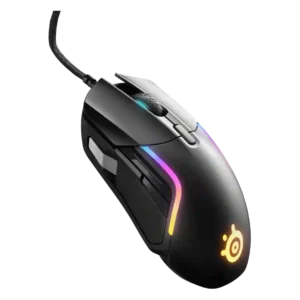
Choose SteelSeries Rival 5 for RGB features and macro support.
Why these recommendations?
Razer DeathAdder V3
Where It Has the Edge
FPS gaming suitability is 5.0 vs 3.9. FPS gaming suitability was one of the strongest areas, with repeated praise for speed, weight, clicks, tracking, and...
weight is 5.0 vs 4.2. Weight was one of the clearest strengths, with reviewers repeatedly praising the sub-60g build as light, fast, and...
click latency is 5.0 vs 4.2. Click latency was strongly praised, with reviewers describing the wired optical-switch setup as very fast and responsive.
SteelSeries Rival 5
Where It Has the Edge
RGB features is 4.6 vs 3.0. RGB features were widely praised for rich zones and customization, though some reviewers found the lighting distracting, too...
macro support is 4.8 vs 3.5. Macro support was praised where tested, with reviewers finding macro creation intuitive, comfortable, or reliable even for longer...
programmable buttons is 4.3 vs 3.5. Programmable buttons were generally valued for multi-genre play, though some reviewers felt awkward placement reduced how many were...
Razer DeathAdder V34.4 overall score
SteelSeries Rival 54.2 overall score
Compare features
Scores are out of 5. Missing scores mean missing review evidence, not a missing feature.
Scored on both products
Controls and connectivity
Side button quality
Razer DeathAdder V3
4.7
Side button quality was mostly praised for placement, tactile feel, and low accidental-press risk, though one reviewer struggled with reach.
SteelSeries Rival 5
3.0
Side-button quality was the most divisive area: some liked the paddle or natural placement, while many struggled with the front/silver button or crowded layout.
Software usability
Razer DeathAdder V3
3.5
Software usability was mixed: Synapse was useful and intuitive for settings, but one reviewer called it bloated and frustrating.
SteelSeries Rival 5
4.6
Software usability was a major strength overall, especially for SteelSeries GG/Engine customization, though a few reviewers found the layout cluttered.
Programmable buttons
Razer DeathAdder V3
3.5
Programmable-button feedback was mixed because the buttons are useful and remappable, but reviewers also saw the mouse as basic with few extra inputs.
SteelSeries Rival 5
4.3
Programmable buttons were generally valued for multi-genre play, though some reviewers felt awkward placement reduced how many were truly usable.
Button customization
Razer DeathAdder V3
4.1
Button customization was positive overall through Synapse remapping and Hypershift, but reviewers still considered overall customization limited.
SteelSeries Rival 5
4.9
Button customization was a strength, with reviewers praising remapping, media controls, and broad function assignment through software.
Button responsiveness
Razer DeathAdder V3
5.0
Button responsiveness was praised across reviews, especially for fast feedback and tight repeated clicking during games.
SteelSeries Rival 5
4.7
Button responsiveness was strongly positive, with reviewers reporting tactile clicks, no repeated clicks, and no meaningful double-click or travel problems.
Other features
RGB features
Razer DeathAdder V3
3.0
RGB feedback was context-dependent: some reviewers missed RGB, while esports-focused reviewers liked or accepted the no-RGB design.
SteelSeries Rival 5
4.6
RGB features were widely praised for rich zones and customization, though some reviewers found the lighting distracting, too bright, or partially hidden during use.
Profile switching
Razer DeathAdder V3
3.3
Profile switching was mixed, with convenient profile toggling offset by complaints about the underside DPI/profile button placement.
SteelSeries Rival 5
4.5
Profile switching evidence was positive but limited, centered on easy game-specific switching and automatic settings changes.
FPS gaming suitability
Razer DeathAdder V3
5.0
FPS gaming suitability was one of the strongest areas, with repeated praise for speed, weight, clicks, tracking, and esports focus.
SteelSeries Rival 5
3.9
FPS suitability was mixed: tracking and speed were praised, but several reviewers said side-button reach or layout made it less ideal for dedicated FPS use.
Weight
Razer DeathAdder V3
5.0
Weight was one of the clearest strengths, with reviewers repeatedly praising the sub-60g build as light, fast, and fatigue-reducing.
SteelSeries Rival 5
4.2
Most reviewers liked the 85g weight as light or balanced for the feature set, while a few wished it were lighter or disagreed with the marketing emphasis.
Click latency
Razer DeathAdder V3
5.0
Click latency was strongly praised, with reviewers describing the wired optical-switch setup as very fast and responsive.
SteelSeries Rival 5
4.2
Click latency was mostly seen as fine or negligible, though one test-oriented reviewer said it lagged behind some competitors.
Polling rate
Razer DeathAdder V3
4.1
Polling-rate feedback was positive overall, but mixed in practice: reviewers liked 8,000Hz support while some saw little benefit or stuttering.
SteelSeries Rival 5
3.3
Polling-rate feedback was limited and mixed: one reviewer valued the adjustable feedback, while another treated the polling rate as a comparative weakness.
DPI range
Razer DeathAdder V3
5.0
DPI range evidence was positive, with reviewers treating the 30K ceiling and wider adjustment range as a precision benefit.
SteelSeries Rival 5
4.2
The wide DPI/CPI range was viewed as useful and flexible, although several reviewers noted the highest settings were more than they personally needed.
Onboard memory
Razer DeathAdder V3
3.3
Onboard memory was mixed because profiles exist, but one reviewer criticized internal memory limitations for button assignments.
SteelSeries Rival 5
2.7
Onboard memory was a recurring weakness because RGB or broader profiles often required software, though one reviewer found saved DPI and polling adequate for events.
Acceleration control
Razer DeathAdder V3
5.0
Acceleration-related performance was praised in the broader performance package, with reviewers reporting no concerns and strong online-game responsiveness.
SteelSeries Rival 5
4.5
Acceleration-related controls were praised as unusually advanced and useful for fine-tuning, especially through SteelSeries software.
Balance and weight distribution
Razer DeathAdder V3
4.0
Balance was slightly front-heavy in two reviews, but reviewers generally described the imbalance as minor and not disruptive.
SteelSeries Rival 5
4.5
Balance and weight distribution had limited but positive evidence, with one reviewer calling the mouse well balanced for its feature set.
Cable flexibility
Razer DeathAdder V3
4.0
Cable flexibility was highly divisive, ranging from light and unobtrusive to stiff, heavy, or merely passable.
SteelSeries Rival 5
3.5
Cable flexibility was highly mixed: some praised low drag or flexibility, while many criticized stiffness, non-detachability, or non-paracord feel.
Grip texture
Razer DeathAdder V3
4.3
Grip texture was mostly praised as smooth, grippy, or improved, though a few reviewers found it slippery or requiring extra force.
SteelSeries Rival 5
3.9
Grip texture was generally helpful for stability, although one reviewer preferred a competitor’s more textured side grips.
Left and right click quality
Razer DeathAdder V3
4.1
Main click quality was mixed: several reviewers liked the left and right clicks, while one found them floaty with too much movement.
SteelSeries Rival 5
4.5
Left and right clicks were praised for a deep, tactile, well-weighted feel with good actuation force.
Portability
Razer DeathAdder V3
2.2
Portability was a weakness because reviewers cited the large body, fixed cable, and wired setup as inconvenient for travel.
SteelSeries Rival 5
2.5
Portability had limited negative evidence because software-dependent settings could become a hassle when carrying the mouse to tournaments or other systems.
Glide smoothness
Razer DeathAdder V3
4.4
Glide smoothness was generally strong thanks to PTFE feet and smooth movement, though a few reviewers disliked or replaced the stock skates.
SteelSeries Rival 5
4.6
Glide smoothness was strongly positive, with reviewers repeatedly reporting smooth, low-friction movement on mouse pads and surfaces.
Motion consistency
Razer DeathAdder V3
5.0
Motion consistency evidence was limited but very positive, with one reviewer reporting no stutters, missed movements, or unexpected shifts.
SteelSeries Rival 5
4.9
Motion consistency received strong praise, with reviewers reporting smooth, predictable movement and little to no dragging, drifting, or missed tracking.
Scroll wheel quality
Razer DeathAdder V3
3.6
Scroll wheel quality was one of the more mixed areas, ranging from smooth and reliable to soft, indistinct, loose, or insufficiently clicky.
SteelSeries Rival 5
3.7
Scroll wheel feedback was mixed, with some finding it satisfying and tactile while others disliked the middle-of-the-road resistance for games or documents.
Lift-off distance
Razer DeathAdder V3
4.4
Lift-off distance was viewed as a useful tuning feature, though some reviewers framed it as niche or only useful for advanced users.
SteelSeries Rival 5
4.3
Lift-off behavior was generally praised as effective or near-perfect, with a minority caveat that medium or non-adjustable lift-off could bother some users.
Switch feel
Razer DeathAdder V3
4.6
Switch feel was generally positive thanks to crisp or satisfying optical clicks, though a few reviewers found them hollow, mushy, or less pleasant than mechanical switches.
SteelSeries Rival 5
4.6
Switch feel was broadly praised as crisp, deliberate, snappy, and satisfying, with only minor force-preference caveats.
Premium feel
Razer DeathAdder V3
4.8
Premium feel was praised in limited evidence, particularly for the logo finish and improved coating feel.
SteelSeries Rival 5
4.8
Premium feel was praised in limited but strong evidence, with reviewers saying the mouse looked or felt more expensive than expected.
Surface compatibility
Razer DeathAdder V3
5.0
Surface compatibility evidence was limited but positive, with one reviewer praising gliding on different surfaces.
SteelSeries Rival 5
5.0
Surface compatibility had limited but very positive evidence, with reviewers saying the Rival 5 gripped or skated well across surfaces.
Comfort and build
Palm grip comfort
Razer DeathAdder V3
4.8
Palm grip comfort was strongly praised, with reviewers repeatedly identifying palm grip and medium-to-large hands as the best fit.
SteelSeries Rival 5
3.2
Palm grip comfort was mixed: one reviewer strongly favored it, while others reported palm pinching or desk contact.
Fingertip grip comfort
Razer DeathAdder V3
2.6
Fingertip grip comfort was mixed-to-negative because the large hump and body often limited fingertip control for smaller hands.
SteelSeries Rival 5
3.5
Fingertip grip comfort was split, with one reviewer finding it excellent and another warning the mouse was too large for fingertip users.
Shape comfort
Razer DeathAdder V3
4.0
Shape comfort was strong for the right user but divisive, praised for large or palm-oriented hands and criticized by some smaller-hand or fingertip users.
SteelSeries Rival 5
4.6
Shape comfort was mostly positive, with reviewers praising the hand fit and general comfort, though size and edge geometry did not suit everyone.
Build quality
Razer DeathAdder V3
5.0
Build quality was strongly praised, with reviewers repeatedly reporting no creaking, flex, rattling, or quality-control issues.
SteelSeries Rival 5
4.7
Build quality was a clear strength, with reviewers repeatedly describing the mouse as sturdy, solid, and free from flex or rattling.
Ergonomic design
Razer DeathAdder V3
4.9
Ergonomic design was a standout strength, repeatedly described as comfortable, hand-friendly, and effective for longer gaming sessions.
SteelSeries Rival 5
4.8
Ergonomic design was praised for thumb support, rounded edges, and a comfortable grip profile.
Long-session comfort
Razer DeathAdder V3
4.8
Long-session comfort was praised, especially for large-hand users who benefit from the low weight and ergonomic shape.
SteelSeries Rival 5
4.8
Long-session comfort was positive where discussed, with reviewers noting comfortable extended use and fewer pressure issues.
Claw grip comfort
Razer DeathAdder V3
4.0
Claw grip comfort was mixed-to-positive, working well for some larger-hand users but less naturally for others.
SteelSeries Rival 5
4.0
Claw grip comfort was mostly positive for suitable hand sizes, but at least one reviewer with smaller hands found it too big to claw comfortably.
Durability over time
Razer DeathAdder V3
5.0
Durability over time evidence was positive but limited, with reviewers expecting stable construction to last through years of gaming.
SteelSeries Rival 5
5.0
Durability over time was praised through switch durability language and expectations that the switches would last rigorous use.
Materials quality
Razer DeathAdder V3
3.0
Materials quality was mixed, with criticism of cable fit or cheap-looking underside balanced against otherwise solid construction.
SteelSeries Rival 5
3.0
Materials quality was mixed because the plastic shell was expected and serviceable, but reviewers did not always find it premium.
Switch durability
Razer DeathAdder V3
5.0
Switch durability evidence was limited but positive, with the high click-life rating treated as a strong durability point.
SteelSeries Rival 5
5.0
Switch durability had limited but strongly positive evidence, focused on the high durability rating compared with many mice.
Ownership and support
Macro support
Razer DeathAdder V3
3.5
Macro support was adequate but limited: Hypershift helped, while the small number of extra macro inputs held it back.
SteelSeries Rival 5
4.8
Macro support was praised where tested, with reviewers finding macro creation intuitive, comfortable, or reliable even for longer macros.
Value for money
Razer DeathAdder V3
4.8
Value for money was strong overall, especially at lower prices, though one reviewer thought the feature set made the price a little high.
SteelSeries Rival 5
4.5
Value for money was the strongest consensus point: most reviewers found the Rival 5 well priced or feature-rich, with only a few dissenting value judgments.
Performance
Click noise
Razer DeathAdder V3
5.0
Click noise evidence was limited but positive, with one reviewer saying the clicks were quieter than a comparable Razer mouse.
SteelSeries Rival 5
4.5
Click noise was viewed positively, with reviewers describing the switches or pressure points as quiet or pleasant rather than distracting.
Sensor performance
Razer DeathAdder V3
5.0
Sensor performance was a major strength, with reviewers repeatedly calling the Focus Pro 30K implementation accurate, responsive, stable, or flawless.
SteelSeries Rival 5
4.7
The TrueMove Air sensor was one of the most consistently praised parts, described as strong, accurate, responsive, and problem-free across reviews.
Tracking and training
Accuracy and tracking precision
Razer DeathAdder V3
5.0
Reviewers consistently praised tracking accuracy and in-game precision, with no meaningful complaints about aim or cursor accuracy.
SteelSeries Rival 5
4.8
Reviewers consistently found the Rival 5 precise and accurate in gaming and general use, with repeated praise for controlled aiming and tracking.
Evidence available for one product
Battery and charging
Charging convenience
Razer DeathAdder V3
5.0
Charging convenience was praised because the wired design avoids charging and battery maintenance entirely.
SteelSeries Rival 5No score yet
Other features
Cross-platform compatibility
Razer DeathAdder V3No score yet
SteelSeries Rival 5
4.8
Cross-platform compatibility had limited positive evidence, including Xbox support and software working across macOS and Windows.
Ecosystem integration
Razer DeathAdder V3No score yet
SteelSeries Rival 5
4.2
Ecosystem integration was positive but conditional, with reviewers valuing lighting sync and brand-wide software most when already using SteelSeries gear.
Handedness options
Razer DeathAdder V3
2.0
Handedness options were a limitation because reviewers repeatedly emphasized the right-handed-only shape.
SteelSeries Rival 5No score yet
MMO gaming suitability
Razer DeathAdder V3No score yet
SteelSeries Rival 5
4.1
MMO suitability was generally positive for a multi-genre mouse, but reviewers still saw dedicated MMO mice as better for heavy hotkey users.
MOBA gaming suitability
Razer DeathAdder V3No score yet
SteelSeries Rival 5
3.9
MOBA suitability was moderately positive because side buttons could map abilities, though the learning curve and limited usable buttons were caveats.
Weight tuning
Razer DeathAdder V3No score yet
SteelSeries Rival 5
2.2
Weight tuning scored poorly because reviewers repeatedly noted the lack of tunable or customizable weights as a tradeoff versus some competitors.
Controls and connectivity
Software stability
Razer DeathAdder V3
4.5
Software stability evidence was limited but positive, with one reviewer reporting no issues with settings being forgotten.
SteelSeries Rival 5No score yet
Tilt gesture controls
Razer DeathAdder V3
2.0
Tilt gesture control support was a weakness because one reviewer specifically wished the scroll wheel had tilt functionality.
Choose the ROG Harpe II Ace for ultralight FPS play, precise tracking, smooth glide, and web-based tuning. Skip it if you need palm-grip support, MMO buttons, onboard profiles, or long...
Excellent tracking, comfortable right-handed ergonomics and a versatile scroll wheel make the Basilisk V3 a strong gaming and productivity mouse. Its substantial weight, fixed cable and sometimes over-sensitive automatic scrolling...
The L7 Pro delivers remarkably light handling, precise aiming and a grippy shell at a budget price. Stock skates are less impressive, and conflicting click-latency measurements warrant caution for latency-sensitive...
Best for ultra-light, competition-focused speed, precise tracking, stable wireless, and long battery life. Skip it if you need quieter clicks, left-handed support, Bluetooth, more buttons, or better value for casual...