Scorata scores summarize analyzed review evidence on a 1–5 scale; they are not laboratory measurements or a simple average of customer star ratings. Feature scores summarize the reviews covering that feature. The overall score averages feature scores within each review, then combines review averages. When both expert and customer evidence are available, those two groups receive equal weight. Products can have different review coverage, so small score gaps do not establish a winner.
Recommendations prioritize important features for the category, with a score of at least 3.5, a gap of at least 0.25 points and at least two supporting reviews per product. Features with widely varying scores or broad connectivity contexts are excluded from recommendations. These safeguards do not establish statistical significance.
Quick verdict
What each product is best for
The review evidence points to a tradeoff: palm grip comfort and switch durability versus fingertip grip comfort and value for money. Choose according to which strengths matter more to you; the overall score alone does not settle that choice.
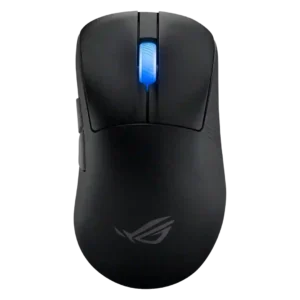
Choose ASUS ROG Keris II Ace for palm grip comfort and switch durability.
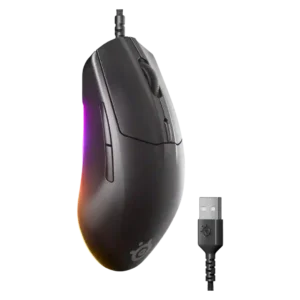
Choose SteelSeries Rival 3 Gen 2 Wired for fingertip grip comfort and value for money.
Why these recommendations?
ASUS ROG Keris II Ace
Where It Has the Edge
palm grip comfort is 4.2 vs 2.3. Palm grip comfort was positive for average or compatible hands, though not universal for larger hands.
switch durability is 4.5 vs 3.8. Switch durability was scored where reviewers linked optical switches to double-click prevention, hot-swapping, or durability.
weight is 4.9 vs 4.3. Weight was consistently praised as very light, impressive, and control-friendly.
SteelSeries Rival 3 Gen 2 Wired
Where It Has the Edge
fingertip grip comfort is 4.5 vs 3.3. Fingertip grip comfort was strong, with the low-profile shape repeatedly described as comfortable or ideal for that style.
value for money is 4.6 vs 3.6. Value was the strongest consensus point, with reviewers repeatedly praising the mouse as budget-friendly, cost-effective, and a strong...
left and right click quality is 4.8 vs 4.2. Primary click quality was praised as firm, balanced, and close to best-in-class for feel and performance.
ASUS ROG Keris II Ace4.2 overall score
SteelSeries Rival 3 Gen 2 Wired4.1 overall score
Compare features
Scores are out of 5. Missing scores mean missing review evidence, not a missing feature.
Scored on both products
Comfort and build
Palm grip comfort
ASUS ROG Keris II Ace
4.2
Palm grip comfort was positive for average or compatible hands, though not universal for larger hands.
SteelSeries Rival 3 Gen 2 Wired
2.3
Palm grip comfort was the clearest fit issue, with reviewers saying palm users may find it too small or should look elsewhere.
Fingertip grip comfort
ASUS ROG Keris II Ace
3.3
Fingertip grip comfort was mixed; some found it possible, while others found the ergonomic shell awkward for fingertip use.
SteelSeries Rival 3 Gen 2 Wired
4.5
Fingertip grip comfort was strong, with the low-profile shape repeatedly described as comfortable or ideal for that style.
Switch durability
ASUS ROG Keris II Ace
4.5
Switch durability was scored where reviewers linked optical switches to double-click prevention, hot-swapping, or durability.
SteelSeries Rival 3 Gen 2 Wired
3.8
Switch durability evidence was mixed: one review reported a lodged switch issue, while another described consistent long-term performance.
Long-session comfort
ASUS ROG Keris II Ace
4.8
Long-session comfort was strongly positive where reviewers mentioned low strain, no hand pain, or reduced fatigue.
SteelSeries Rival 3 Gen 2 Wired
4.3
Long-session comfort was repeatedly positive for workday use, prolonged use, and reduced sweat or fatigue.
Durability over time
ASUS ROG Keris II Ace
4.0
Long-term durability was not directly tested, but switch durability and repairability evidence supported limited durability scoring.
SteelSeries Rival 3 Gen 2 Wired
4.5
Durability over time was supported by comments about consistent switch performance in long-term use.
Shape comfort
ASUS ROG Keris II Ace
4.2
Shape comfort was generally praised, especially for right-handed ergonomic users, but hand size and finger length created caveats.
SteelSeries Rival 3 Gen 2 Wired
3.8
Shape comfort was generally good but not universal: reviewers liked the in-hand feel while noting limited contouring for some grips.
Build quality
ASUS ROG Keris II Ace
4.5
Build quality was mostly strong, with repeated praise for rigidity and lack of flex, though one reviewer reported average build with creaking.
SteelSeries Rival 3 Gen 2 Wired
4.8
Build quality was praised as sturdy and solid, including zero flex or creaking in one hands-on teardown-oriented review.
Claw grip comfort
ASUS ROG Keris II Ace
4.4
Claw-grip comfort was generally positive, especially relaxed claw, though hand size affected comfort.
SteelSeries Rival 3 Gen 2 Wired
4.5
Claw grip users were well served, with multiple reviewers calling the shape comfortable or ideal for claw-style handling.
Ergonomic design
ASUS ROG Keris II Ace
4.5
The ergonomic design was broadly praised for right-handed comfort, while left-handed users were consistently excluded.
SteelSeries Rival 3 Gen 2 Wired
4.5
Ergonomics were mostly positive, with reviewers describing the wired mouse as comfortable and improved, though not highly sculpted.
Materials quality
ASUS ROG Keris II Ace
4.5
Materials quality was scored through reviewer judgments about the nylon/PBT shell, coating, and perceived premium or slippery feel.
SteelSeries Rival 3 Gen 2 Wired
4.5
Materials were praised as thick, textured matte plastic, with another review describing improved build materials.
Skate durability
ASUS ROG Keris II Ace
4.0
Skate durability had limited evidence, but one reviewer said the skates held up well on glass.
SteelSeries Rival 3 Gen 2 Wired
4.0
Skate durability and serviceability were mildly positive because divots helped remove the feet without damage.
Ownership and support
Value for money
ASUS ROG Keris II Ace
3.6
Value was mixed: reviewers praised the feature set but often called the price expensive or hard to justify.
SteelSeries Rival 3 Gen 2 Wired
4.6
Value was the strongest consensus point, with reviewers repeatedly praising the mouse as budget-friendly, cost-effective, and a strong class option.
Other features
Handedness options
ASUS ROG Keris II Ace
2.0
Handedness scored low because reviewers repeatedly noted the right-handed ergonomic shape and lack of a left-handed option.
SteelSeries Rival 3 Gen 2 Wired
3.0
Handedness support was mixed because the shape is symmetrical but one review said it is optimized for right-handed use.
Weight
ASUS ROG Keris II Ace
4.9
Weight was consistently praised as very light, impressive, and control-friendly.
SteelSeries Rival 3 Gen 2 Wired
4.3
Weight was generally praised for quick movements and reduced fatigue, though reviewers noted it is not ultralight compared with some rivals.
Grip texture
ASUS ROG Keris II Ace
3.4
Grip texture was the most divided attribute, ranging from non-slip praise to strong complaints about slippery coating.
SteelSeries Rival 3 Gen 2 Wired
4.0
Grip texture was mostly positive for matte, grippy plastic, though one review wished the side grooves were deeper.
Left and right click quality
ASUS ROG Keris II Ace
4.2
Left and right click quality was mostly positive, with praise for consistency and similar actuation between sides.
SteelSeries Rival 3 Gen 2 Wired
4.8
Primary click quality was praised as firm, balanced, and close to best-in-class for feel and performance.
Acceleration control
ASUS ROG Keris II Ace
4.5
The acceleration spec was only scored where a reviewer connected the 50g capability to confident fast maneuvers in FPS play.
SteelSeries Rival 3 Gen 2 Wired
4.0
Acceleration settings were considered easy to understand in SteelSeries GG, with clear graphs and sliders.
Ecosystem integration
ASUS ROG Keris II Ace
4.5
Ecosystem integration was praised where reviewers used the Omni receiver or Aura Sync-style setup without delays.
SteelSeries Rival 3 Gen 2 Wired
4.0
SteelSeries GG and Prism integration was treated as a useful bonus for adding personal RGB and settings touches.
FPS gaming suitability
ASUS ROG Keris II Ace
4.8
FPS suitability was one of the strongest areas, with repeated praise for competitive aiming, speed, and esports performance.
SteelSeries Rival 3 Gen 2 Wired
4.3
FPS gaming suitability was strong across reviews, with positive examples from Call of Duty, Counter-Strike 2, Valorant, and similar aim-focused testing.
Portability
ASUS ROG Keris II Ace
4.5
Portability was supported by dongle storage, Bluetooth, and multi-device/travel use.
SteelSeries Rival 3 Gen 2 Wired
4.0
Portability was a plus for users who value a smaller mouse, even if that is a performance tradeoff for some.
Switch feel
ASUS ROG Keris II Ace
4.1
Switch feel was mixed but often positive, with some crisp/punchy praise and some dull or mushy complaints.
SteelSeries Rival 3 Gen 2 Wired
4.5
Switch feel was praised as crisp, clicky, balanced, and responsive without being too heavy.
Surface compatibility
ASUS ROG Keris II Ace
4.9
Surface compatibility was strongly praised, including glass, mouse pads, tables, and varied surfaces.
SteelSeries Rival 3 Gen 2 Wired
4.5
Surface compatibility was positive, with smooth feet described as gliding across most surfaces.
Scroll wheel quality
ASUS ROG Keris II Ace
3.6
Scroll wheel quality was mixed, ranging from excellent and distinct to average, light, or prone to overscrolling.
SteelSeries Rival 3 Gen 2 Wired
4.0
The scroll wheel was considered simple but well suited, with distinct notches and usable firmness.
Polling rate
ASUS ROG Keris II Ace
4.4
Polling rate support was widely praised, especially 4K wireless and included booster access, with some debate over 8K usefulness.
SteelSeries Rival 3 Gen 2 Wired
4.0
Polling-rate feedback was mixed but generally adequate: 1,000Hz was called standard or delay-free, while PCMag called it low but acceptable.
Premium feel
ASUS ROG Keris II Ace
3.5
Premium feel was mixed: some found the mouse premium, while others felt the coating or hollow shell hurt the premium impression.
SteelSeries Rival 3 Gen 2 Wired
3.2
Premium feel was mixed: reviewers liked the fundamentals but said it lacked higher-end flair or felt less premium than Aerox models.
Cross-platform compatibility
ASUS ROG Keris II Ace
4.8
Cross-platform use was praised through Bluetooth multi-device pairing and easy movement between PCs, laptops, tablets, and handhelds.
SteelSeries Rival 3 Gen 2 Wired
4.5
Cross-system use was supported by onboard settings, with one review calling personal settings seamless across different computers.
Onboard memory
ASUS ROG Keris II Ace
4.8
Onboard control and memory features were praised when reviewers could change settings or avoid software.
SteelSeries Rival 3 Gen 2 Wired
4.5
Onboard memory was useful for preserving settings across computers without relying on local software.
Profile switching
ASUS ROG Keris II Ace
3.3
Profile switching was mixed, with praise for onboard switching but criticism of the underside DPI/profile button placement.
SteelSeries Rival 3 Gen 2 Wired
3.0
Profile switching was somewhat limited because there is no dedicated profile button by default, though remapping is possible.
DPI range
ASUS ROG Keris II Ace
4.0
The DPI ceiling was seen as technically impressive, but one reviewer found very high DPI practically unusable.
SteelSeries Rival 3 Gen 2 Wired
3.8
The 8,500 DPI ceiling was usually considered enough for gaming, though one reviewer warned the lower peak sensitivity could matter to some users.
Glide smoothness
ASUS ROG Keris II Ace
4.6
Glide smoothness was consistently praised across stock PTFE feet and multiple surfaces.
SteelSeries Rival 3 Gen 2 Wired
4.5
Glide was consistently praised, with PTFE feet and smooth skates keeping movement low-friction across mousepads and surfaces.
Cable flexibility
ASUS ROG Keris II Ace
4.5
The cable was usually praised as flexible, free-flowing, and low-friction, with one reviewer calling it a bit stiff.
SteelSeries Rival 3 Gen 2 Wired
4.6
The braided/paracord-style cable drew consistent praise for staying unobtrusive, avoiding friction, and feeling almost unnoticeable in fast play.
RGB features
ASUS ROG Keris II Ace
4.4
RGB was generally appreciated as a rare lightweight-mouse touch, though a few reviewers disliked the implementation.
SteelSeries Rival 3 Gen 2 Wired
4.4
RGB was a consistent wired-model strength, with praise for tasteful underglow and extensive customization.
Click latency
ASUS ROG Keris II Ace
4.5
Click latency was praised as very low or competitive, including measured or perceived fast response.
SteelSeries Rival 3 Gen 2 Wired
4.5
Latency impressions were positive, with reviewers reporting no lag or missed inputs and direct, delay-free movement response.
Connection stability
ASUS ROG Keris II Ace
5.0
Connection stability was strongly praised, with reviewers reporting no dropouts, hiccups, or interference.
SteelSeries Rival 3 Gen 2 Wired
5.0
The wired setup was praised for stable, consistent performance without connection drops or battery-related interruptions.
Motion consistency
ASUS ROG Keris II Ace
4.5
Motion consistency was praised through comments about precise recognition, consistent tracking, and polling stability.
SteelSeries Rival 3 Gen 2 Wired
4.5
Motion consistency was strong, with easy recoil control and predictable responses in low-DPI/high-sensitivity play.
Controls and connectivity
Software usability
ASUS ROG Keris II Ace
2.9
Software usability was the clearest weakness, with repeated complaints about Armoury Crate being bloated, slow, or needing improvement.
SteelSeries Rival 3 Gen 2 Wired
3.5
Software usability was mixed: GG was praised by some, but other reviewers found it cluttered or unintuitive.
Button responsiveness
ASUS ROG Keris II Ace
4.8
Button responsiveness was praised for snappy, reliable, and fast actuation in several reviews.
SteelSeries Rival 3 Gen 2 Wired
4.3
Buttons were generally satisfying and responsive, with reviewers praising rapid tapping, quick rebound, and a lack of accidental presses.
Software stability
ASUS ROG Keris II Ace
4.0
Software stability had limited evidence, with Armoury Crate Gear praised for not affecting system performance.
SteelSeries Rival 3 Gen 2 Wired
3.8
Software stability and performance were acceptable, with comments that GG was not resource-heavy and functioned well at its core.
Side button quality
ASUS ROG Keris II Ace
3.8
Side button quality was mixed: several reviewers praised crisp placement, while others found them small, high, or stiff.
SteelSeries Rival 3 Gen 2 Wired
3.6
Side button quality was mixed, ranging from thin and less premium to easily accessible and functional.
Button customization
ASUS ROG Keris II Ace
4.0
Customization was considered adequate to strong where reviewers described remapping, DPI, and profile tools as straightforward or sufficient.
SteelSeries Rival 3 Gen 2 Wired
4.0
Button customization was seen as giving useful flexibility and control over play style through software adjustments.
Programmable buttons
ASUS ROG Keris II Ace
4.0
Programmable buttons were considered competitive and sufficient for this class, though not extensive like MMO mice.
SteelSeries Rival 3 Gen 2 Wired
4.0
Programmable buttons were seen as adding practical flexibility and control when customized in software.
Performance
Sensor performance
ASUS ROG Keris II Ace
4.9
Sensor performance was one of the best-reviewed areas, repeatedly described as accurate, top-tier, or flawless.
SteelSeries Rival 3 Gen 2 Wired
4.3
Sensor performance was broadly positive for a budget mouse, with snappy response, smooth tracking, and satisfying gaming performance.
Click noise
ASUS ROG Keris II Ace
4.2
Click noise impressions were mixed, from quiet and pleasant to fairly loud, depending on reviewer and switch comparison.
SteelSeries Rival 3 Gen 2 Wired
4.0
Click noise was acceptable: the switches were described as crisp without being overly loud or heavy.
Tracking and training
Accuracy and tracking precision
ASUS ROG Keris II Ace
4.5
Reviewers consistently praised tracking accuracy and precision, with only one reviewer warning that extreme DPI values became irregular.
SteelSeries Rival 3 Gen 2 Wired
4.4
Accuracy was a major strength: reviewers reported precise swipes, strong aim-trainer results, and little practical impact from the modest sensor ceiling.
Evidence available for one product
Battery and charging
Battery life
ASUS ROG Keris II Ace
4.2
Battery life was generally praised as good to excellent, with caveats that high polling rates and active use drain it faster.
SteelSeries Rival 3 Gen 2 WiredNo score yet
Charging convenience
ASUS ROG Keris II Ace
3.8
Charging and dongle convenience were mixed: USB-C and cable placement helped, but the booster/dongle setup could feel chunky.
SteelSeries Rival 3 Gen 2 WiredNo score yet
Other features
2.4GHz connectivity
ASUS ROG Keris II Ace
4.5
Reviewers discussed the 2.4GHz receiver mainly as part of the broader wireless setup, with praise for low-latency use when paired with the booster.
SteelSeries Rival 3 Gen 2 WiredNo score yet
Balance and weight distribution
ASUS ROG Keris II Ace
4.7
Weight distribution was usually praised as well balanced, though one reviewer found the mouse slightly forward-balanced.
SteelSeries Rival 3 Gen 2 WiredNo score yet
Lift-off distance
ASUS ROG Keris II Ace
3.8
Lift-off distance was mixed: one reviewer liked the low setting, while another found low too low and high too high.
SteelSeries Rival 3 Gen 2 WiredNo score yet
MMO gaming suitability
ASUS ROG Keris II Ace
4.0
MMO suitability had limited but positive evidence from FFXIV/raid use and button mapping comments.
SteelSeries Rival 3 Gen 2 WiredNo score yet
Wireless latency
ASUS ROG Keris II Ace
4.1
Wireless latency was praised in 2.4GHz mode but Bluetooth was criticized as too latent for competitive gaming.
SteelSeries Rival 3 Gen 2 WiredNo score yet
Controls and connectivity
Bluetooth support
ASUS ROG Keris II Ace
4.5
Bluetooth was viewed as a useful convenience for work, travel, and multi-device use, not as the preferred competitive mode.
SteelSeries Rival 3 Gen 2 WiredNo score yet
Ownership and support
Macro support
ASUS ROG Keris II AceNo score yet
SteelSeries Rival 3 Gen 2 Wired
4.0
Macro support was viewed as flexible, with side buttons able to be macroed through SteelSeries software.
Performance
Wireless performance
ASUS ROG Keris II Ace
4.8
Wireless performance was repeatedly praised as low-latency, stable, and responsive.
Choose the ROG Harpe II Ace for ultralight FPS play, precise tracking, smooth glide, and web-based tuning. Skip it if you need palm-grip support, MMO buttons, onboard profiles, or long...
Excellent tracking, comfortable right-handed ergonomics and a versatile scroll wheel make the Basilisk V3 a strong gaming and productivity mouse. Its substantial weight, fixed cable and sometimes over-sensitive automatic scrolling...
The L7 Pro delivers remarkably light handling, precise aiming and a grippy shell at a budget price. Stock skates are less impressive, and conflicting click-latency measurements warrant caution for latency-sensitive...
Best for ultra-light, competition-focused speed, precise tracking, stable wireless, and long battery life. Skip it if you need quieter clicks, left-handed support, Bluetooth, more buttons, or better value for casual...