Scorata scores summarize analyzed review evidence on a 1–5 scale; they are not laboratory measurements or a simple average of customer star ratings. Feature scores summarize the reviews covering that feature. The overall score averages feature scores within each review, then combines review averages. When both expert and customer evidence are available, those two groups receive equal weight. Products can have different review coverage, so small score gaps do not establish a winner.
Recommendations prioritize important features for the category, with a score of at least 3.5, a gap of at least 0.25 points and at least two supporting reviews per product. Features with widely varying scores or broad connectivity contexts are excluded from recommendations. These safeguards do not establish statistical significance.
Quick verdict
What each product is best for
The review evidence points to a tradeoff: profile switching and onboard memory versus palm grip comfort and value for money. Choose according to which strengths matter more to you; the overall score alone does not settle that choice.
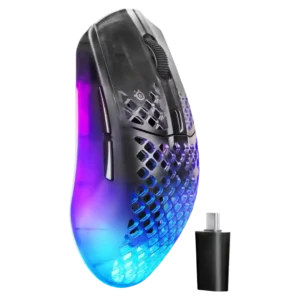
Choose SteelSeries Aerox 3 Wireless Gen 2 for profile switching and onboard memory.
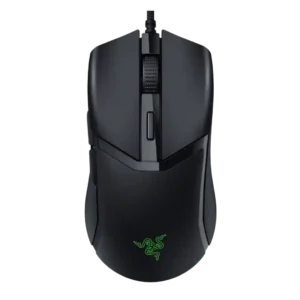
Choose Razer Cobra for palm grip comfort and value for money.
Why these recommendations?
SteelSeries Aerox 3 Wireless Gen 2
Where It Has the Edge
profile switching is 4.5 vs 2.5. Profile switching was praised for game-specific saved settings and automatic profile changes that adjust DPI, macros, and polling...
onboard memory is 4.3 vs 2.3. Onboard memory was seen as practical because saved profiles can make settings easier to carry across systems without...
click noise is 4.1 vs 2.3. Click noise drew mixed but mostly positive comments: one reviewer loved the sound, another found switches loud, and...
Razer Cobra
Where It Has the Edge
palm grip comfort is 4.8 vs 3.0. Palm grip comfort was positive in the reviews that tested it, especially for medium or smaller hands.
value for money is 4.6 vs 4.1. Value was a consistent strength, with reviewers calling the Cobra affordable, impressive for the price, or a strong...
weight is 4.7 vs 4.2. Weight was consistently praised as light, comfortable, and well suited to fast movement without feeling cheap.
SteelSeries Aerox 3 Wireless Gen 24.3 overall score
Razer Cobra4.2 overall score
Compare features
Scores are out of 5. Missing scores mean missing review evidence, not a missing feature.
Scored on both products
Other features
Profile switching
SteelSeries Aerox 3 Wireless Gen 2
4.5
Profile switching was praised for game-specific saved settings and automatic profile changes that adjust DPI, macros, and polling behavior.
Razer Cobra
2.5
Profile switching was a drawback because reviewers noted the single-profile limit or friction when changing scenarios.
Onboard memory
SteelSeries Aerox 3 Wireless Gen 2
4.3
Onboard memory was seen as practical because saved profiles can make settings easier to carry across systems without software.
Razer Cobra
2.3
Onboard memory was a clear limitation, with reviews noting only one profile or no saved settings across computers.
Cross-platform compatibility
SteelSeries Aerox 3 Wireless Gen 2
4.5
Cross-platform evidence was positive but limited, tied to easy device connectivity and onboard profiles that simplify software-free use.
Razer Cobra
3.0
Cross-platform compatibility was mixed because the mouse works on Windows and Mac, but the software support was described as Windows-only.
Balance and weight distribution
SteelSeries Aerox 3 Wireless Gen 2
3.4
Balance impressions were split: one reviewer found it spot-on, while another felt the internals made the mouse rear-weighted.
Razer Cobra
4.5
One review praised the centered weight balance for keeping the mouse stable.
Acceleration control
SteelSeries Aerox 3 Wireless Gen 2
4.3
Acceleration and precision controls were viewed as useful advanced tuning options, especially for players who want movement behavior matched to their style.
Razer Cobra
5.0
High-speed movement and acceleration did not cause sensor skip in the reviewer evidence.
Left and right click quality
SteelSeries Aerox 3 Wireless Gen 2
4.5
Main click quality was praised by reviewers who found the left/right clicks satisfying, solid, and consistent.
Razer Cobra
3.8
Left and right click quality was mixed, ranging from firm and clean to hollow or weaker than expected.
Switch feel
SteelSeries Aerox 3 Wireless Gen 2
4.4
Switch feel was mostly praised as tactile, crisp, clicky, and satisfying, although some reviewers noted a louder or heavier mechanical character.
Razer Cobra
3.8
Switch feel was mixed-positive: many liked the satisfying optical clicks, while some found them hollow or unusual at first.
Polling rate
SteelSeries Aerox 3 Wireless Gen 2
4.5
The 4K polling rate was widely treated as a major performance upgrade, especially for competitive play, though a few reviewers called it a nice-to-have for casual use.
Razer Cobra
4.0
Polling rate was viewed as suitable for most gamers rather than elite or unusually high-end.
Weight
SteelSeries Aerox 3 Wireless Gen 2
4.2
Most reviewers liked the light 68g-class weight, but a few considered it heavier or less competitive by current ultralight standards.
Razer Cobra
4.7
Weight was consistently praised as light, comfortable, and well suited to fast movement without feeling cheap.
FPS gaming suitability
SteelSeries Aerox 3 Wireless Gen 2
4.7
FPS suitability was a standout strength, with reviewers repeatedly praising shooter responsiveness, tracking, and competitive capability.
Razer Cobra
4.3
FPS suitability was positive for small to medium hands and lightweight preferences, though one reviewer suggested top-tier FPS players may want a better sensor.
Scroll wheel quality
SteelSeries Aerox 3 Wireless Gen 2
4.4
Scroll wheel feedback was broadly positive, with reviewers praising tactile bumps, grippier texture, responsiveness, and quieter operation.
Razer Cobra
4.0
Scroll wheel quality was mixed: several reviewers liked the tactile or firm feel, but others found it mushy, low, or weak.
Glide smoothness
SteelSeries Aerox 3 Wireless Gen 2
4.5
Glide smoothness was consistently praised on mousepads and desks, with PTFE feet described as smooth, snag-free, and reliable.
Razer Cobra
4.8
Glide smoothness was strongly praised across reviews, with repeated comments about low drag, smooth feet, and easy movement.
DPI range
SteelSeries Aerox 3 Wireless Gen 2
4.0
The 26K DPI range was valued for flexibility and on-the-fly tuning, though several reviewers said extreme DPI levels could feel jumpy or unnecessary.
Razer Cobra
4.3
DPI and sensitivity were considered sufficient for most users, with reviewers finding the 8500 DPI range smooth or workable in practice.
Motion consistency
SteelSeries Aerox 3 Wireless Gen 2
4.8
Motion consistency was praised in gaming and daily use, with reviewers reporting smooth movement and no missed tracking.
Razer Cobra
5.0
Motion consistency was excellent in the tested evidence, with reviewers reporting no lag, jitters, skip, or sensor dropout.
Grip texture
SteelSeries Aerox 3 Wireless Gen 2
3.6
Grip texture was split: some found the rougher texture grippy and improved, while others found the sides slippery or not grippy enough.
Razer Cobra
3.8
Grip texture was mixed: several reviewers liked the grippy texture, while others wished for more rubber or found the coating low-grip.
RGB features
SteelSeries Aerox 3 Wireless Gen 2
4.4
RGB impressions were mostly positive for brightness, zones, style, and customization, though one reviewer found active lighting distracting.
Razer Cobra
4.3
RGB features were generally praised for subtle, attractive lighting and customization, with one reviewer personally less enthusiastic.
Cable flexibility
SteelSeries Aerox 3 Wireless Gen 2
4.6
Cable flexibility was praised for the Super Mesh or braided cable, with reviewers finding it smooth, flexible, and useful on the desk.
Razer Cobra
4.4
The SpeedFlex-style cable was repeatedly praised as flexible, light, and low-drag, making the wired design less intrusive.
Surface compatibility
SteelSeries Aerox 3 Wireless Gen 2
4.1
Surface compatibility was mostly good across mousepads, desks, and mats, but one reviewer noted possible edge scratching under hard pressure.
Razer Cobra
4.0
Surface compatibility was positive, with reviewers finding it usable on desk mats, wood, mouse pads, and other materials, despite more drag on rough wood.
Premium feel
SteelSeries Aerox 3 Wireless Gen 2
4.2
Premium feel was mostly positive, with reviewers citing excellent updates, solid feel, and a premium impression, while one called it only decent.
Razer Cobra
4.1
Premium feel was mostly positive for the price, though one first-impression review felt the clicks made the mouse seem mediocre.
Ecosystem integration
SteelSeries Aerox 3 Wireless Gen 2
4.4
Ecosystem integration was positive where discussed, especially GG suite integration and coordinated SteelSeries setup styling.
Razer Cobra
4.5
Synapse integration was described as seamless in one review, supporting the broader Razer accessory/software ecosystem.
Click latency
SteelSeries Aerox 3 Wireless Gen 2
4.8
One reviewer specifically praised the click response as hair-trigger fast, supporting a strong click-latency score.
Razer Cobra
4.8
Click latency evidence was positive, with reviewers emphasizing optical-switch responsiveness, zero debounce, and reduced delay.
Performance
Click noise
SteelSeries Aerox 3 Wireless Gen 2
4.1
Click noise drew mixed but mostly positive comments: one reviewer loved the sound, another found switches loud, and one noted a quieter scroll wheel.
Razer Cobra
2.3
Click noise was a repeated drawback, with reviewers noting the clicks are loud enough to bother people in quiet spaces.
Sensor performance
SteelSeries Aerox 3 Wireless Gen 2
4.7
Sensor feedback was strongly positive: reviewers described the TrueMove 26K as precise, snappy, reliable, and consistently strong in games.
Razer Cobra
4.9
Sensor performance was strongly positive overall, with reviewers praising responsiveness, stability, calibration, and real-world tracking.
Comfort and build
Palm grip comfort
SteelSeries Aerox 3 Wireless Gen 2
3.0
Palm grip comfort was mixed-to-negative overall; smaller-hand palm use worked for one reviewer, but several said larger palm-grip users should look elsewhere.
Razer Cobra
4.8
Palm grip comfort was positive in the reviews that tested it, especially for medium or smaller hands.
Fingertip grip comfort
SteelSeries Aerox 3 Wireless Gen 2
3.2
Fingertip comfort was divisive, with some reviewers grouping it with claw-friendly use and others finding the flared rear awkward.
Razer Cobra
4.5
Fingertip grip comfort was positive in the one review that tested it directly.
Long-session comfort
SteelSeries Aerox 3 Wireless Gen 2
4.3
Long-session comfort was generally positive due to low weight and comfort, though at least one reviewer reported hand or pinky discomfort.
Razer Cobra
5.0
Long-session comfort was praised in the review that noted extended play without hand strain.
Claw grip comfort
SteelSeries Aerox 3 Wireless Gen 2
4.1
Claw grip comfort was the strongest grip-style fit, with several reviewers saying the shape comes alive or works best in claw grip.
Razer Cobra
4.5
Claw grip comfort was positive in the reviews that tested it, especially for small to medium hands.
Shape comfort
SteelSeries Aerox 3 Wireless Gen 2
4.2
Shape comfort was polarizing, ranging from favorite-shape praise to criticism of the flared rear and grip-specific comfort issues.
Razer Cobra
4.5
Shape comfort was broadly positive for small to medium hands, although large-handed users may find the mouse too small.
Ergonomic design
SteelSeries Aerox 3 Wireless Gen 2
4.4
Ergonomic design was praised by reviewers with smaller hands and those who liked the flat symmetrical shape, but it is not universal.
Razer Cobra
4.6
Ergonomics were broadly praised, with reviewers describing the mouse as comfortable, well shaped, and easy for fingertips or hands to settle into.
Build quality
SteelSeries Aerox 3 Wireless Gen 2
4.5
Build quality was generally praised for fit, finish, solid shell feel, no creaking, and improved construction.
Razer Cobra
4.7
Build quality was one of the strongest themes, with most reviewers calling the Cobra solid, durable, sturdy, or well made.
Materials quality
SteelSeries Aerox 3 Wireless Gen 2
4.6
Materials quality was positive where discussed, with reviewers calling out quality plastics and carefully assembled elements.
Razer Cobra
4.5
Materials were praised where reviewed, especially the robust and sturdy plastic feel.
Switch durability
SteelSeries Aerox 3 Wireless Gen 2
4.5
Switch durability evidence was positive, with one reviewer noting consistent clicks over heavy use and another valuing the 80-million-click rating.
Razer Cobra
4.5
Switch durability evidence was positive, centered on the optical switch lifespan and double-click resistance discussed by reviewers.
Durability over time
SteelSeries Aerox 3 Wireless Gen 2
4.5
Durability was praised through drop resistance, rugged shell impressions, travel toughness, and confidence in daily abuse.
Razer Cobra
4.5
Durability impressions were positive, though mostly based on build, switch lifespan claims, and reviewer confidence rather than long-term abuse testing.
Controls and connectivity
Side button quality
SteelSeries Aerox 3 Wireless Gen 2
3.9
Side button feedback was mixed: several reviewers liked the improved feel and reach, while others found them too long or easy to hit accidentally.
Razer Cobra
3.1
Side button quality was mixed, with praise for placement and speed but criticism of free play, hollowness, or loudness in some reviews.
Button customization
SteelSeries Aerox 3 Wireless Gen 2
4.6
Button customization was praised through GG software, free configuration, remapping options, and practical use of side buttons in daily workflows.
Razer Cobra
4.4
Button remapping and customization were praised through Synapse, though one first-impression review was less enthusiastic overall.
Software usability
SteelSeries Aerox 3 Wireless Gen 2
4.5
SteelSeries GG software was strongly praised for clean usability, sensitivity tools, customization depth, and practical profile/game tuning.
Razer Cobra
4.3
Software usability was generally positive for customization, RGB, DPI, calibration, and profiles, though Mac software support was limited.
Programmable buttons
SteelSeries Aerox 3 Wireless Gen 2
4.4
Programmable-button evidence was limited but positive, tied to useful side-button configuration for daily workflows.
Razer Cobra
4.3
Programmable buttons were praised as customizable through Synapse and useful for standard gaming mouse controls.
Button responsiveness
SteelSeries Aerox 3 Wireless Gen 2
4.6
Button responsiveness was generally strong, with reviewers describing the buttons as clicky, responsive, crisp, and easy to press.
Razer Cobra
4.6
Button responsiveness was generally strong, especially where reviewers praised optical switches, low debounce, and effortless clicking.
Ownership and support
Value for money
SteelSeries Aerox 3 Wireless Gen 2
4.1
Value was mixed-positive: many reviewers saw competitive mid-range pricing, while a few thought cheaper or lighter rivals make it harder to recommend.
Razer Cobra
4.6
Value was a consistent strength, with reviewers calling the Cobra affordable, impressive for the price, or a strong budget buy.
Tracking and training
Accuracy and tracking precision
SteelSeries Aerox 3 Wireless Gen 2
4.7
Reviewers repeatedly praised accurate tracking, precise headshots, and clean fast-flick behavior, with only high-DPI settings sometimes needing adjustment.
Razer Cobra
5.0
Reviewers consistently reported accurate tracking, with no missed beats, no skipping, and strong precision even in games or daily use.
Evidence available for one product
Battery and charging
Battery life
SteelSeries Aerox 3 Wireless Gen 2
4.2
Battery life was broadly strong at 1K/Bluetooth, but reviewers consistently noted the 4K polling and RGB tradeoff.
Razer CobraNo score yet
Charging convenience
SteelSeries Aerox 3 Wireless Gen 2
4.2
Charging convenience was positive overall thanks to wired-use charging and long cables, though peak-performance polling requires more frequent charging.
Razer CobraNo score yet
Other features
2.4GHz connectivity
SteelSeries Aerox 3 Wireless Gen 2
4.6
2.4GHz connectivity was praised for enabling the best polling experience and for reliable dongle placement close to the mouse.
Razer CobraNo score yet
Connection stability
SteelSeries Aerox 3 Wireless Gen 2
4.8
Connection stability was positive in the limited direct evidence, with reviewers reporting stable modes and reliable connection behavior.
Razer CobraNo score yet
Portability
SteelSeries Aerox 3 Wireless Gen 2
4.1
Portability was strong for travel durability and Bluetooth use, but lack of onboard dongle storage hurt tournament/travel convenience.
Razer CobraNo score yet
Water and dust resistance
SteelSeries Aerox 3 Wireless Gen 2
4.5
Water and dust resistance was praised as genuinely useful, especially for spill protection, IP54 protection, and the dunk-test survival evidence.
Razer CobraNo score yet
Wireless latency
SteelSeries Aerox 3 Wireless Gen 2
4.6
Wireless latency was praised as low or unnoticeable at 2.4GHz/4K, although one reviewer personally could not feel the difference from 1K.
Razer CobraNo score yet
Controls and connectivity
Bluetooth support
SteelSeries Aerox 3 Wireless Gen 2
4.3
Bluetooth support was valued for versatility and travel, but reviewers noted advanced performance settings are limited outside 2.4GHz or wired mode.
Razer CobraNo score yet
Ownership and support
Macro support
SteelSeries Aerox 3 Wireless Gen 2
4.4
Macro support was only clearly evaluated in one review, where automatic game profiles applying macros was treated as useful.
Razer CobraNo score yet
Performance
Wireless performance
SteelSeries Aerox 3 Wireless Gen 2
4.7
Wireless performance was one of the strongest areas, with reviewers describing fast, responsive, reliable, smooth, and stutter-free behavior.
Choose the ROG Harpe II Ace for ultralight FPS play, precise tracking, smooth glide, and web-based tuning. Skip it if you need palm-grip support, MMO buttons, onboard profiles, or long...
Excellent tracking, comfortable right-handed ergonomics and a versatile scroll wheel make the Basilisk V3 a strong gaming and productivity mouse. Its substantial weight, fixed cable and sometimes over-sensitive automatic scrolling...
The L7 Pro delivers remarkably light handling, precise aiming and a grippy shell at a budget price. Stock skates are less impressive, and conflicting click-latency measurements warrant caution for latency-sensitive...
Best for ultra-light, competition-focused speed, precise tracking, stable wireless, and long battery life. Skip it if you need quieter clicks, left-handed support, Bluetooth, more buttons, or better value for casual...