Scorata scores summarize analyzed review evidence on a 1–5 scale; they are not laboratory measurements or a simple average of customer star ratings. Feature scores summarize the reviews covering that feature. The overall score averages feature scores within each review, then combines review averages. When both expert and customer evidence are available, those two groups receive equal weight. Products can have different review coverage, so small score gaps do not establish a winner.
Recommendations prioritize important features for the category, with a score of at least 3.5, a gap of at least 0.25 points and at least two supporting reviews per product. Features with widely varying scores or broad connectivity contexts are excluded from recommendations. These safeguards do not establish statistical significance.
Quick verdict
What each product is best for
The review evidence points to a tradeoff: palm grip comfort and Accuracy and tracking precision versus click noise and fingertip grip comfort. Choose according to which strengths matter more to you; the overall score alone does not settle that choice.
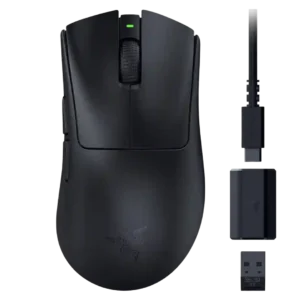
Choose Razer DeathAdder V3 HyperSpeed for palm grip comfort and Accuracy and tracking precision.
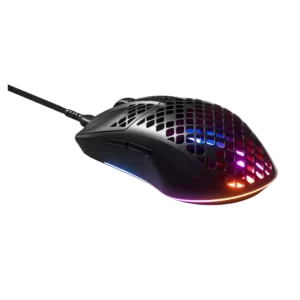
Choose SteelSeries Aerox 3 for click noise and fingertip grip comfort.
Why these recommendations?
Razer DeathAdder V3 HyperSpeed
Where It Has the Edge
palm grip comfort is 4.3 vs 1.8. Palm grip comfort was good for many users, particularly smaller-to-medium hands, though size and side flares made it...
Accuracy and tracking precision is 4.9 vs 4.5. Tracking precision drew strong praise, with reviewers reporting pinpoint aiming, better enemy tracking, and accurate gaming-session control.
weight is 4.9 vs 4.5. Weight was a standout strength, with reviewers repeatedly praising the 53-55g body as featherweight, effortless, nimble, and easy...
SteelSeries Aerox 3
Where It Has the Edge
click noise is 4.0 vs 2.2. Click noise was acceptable to good, with one review saying the clicks were not annoying or overly loud.
fingertip grip comfort is 4.0 vs 2.8. Fingertip grip comfort was generally positive, with reviewers finding the shape suitable for fingertip users.
RGB features is 4.3 vs 3.5. RGB was consistently one of the strongest positives, though one review found lighting configuration less intuitive.
Razer DeathAdder V3 HyperSpeed4.3 overall score
SteelSeries Aerox 33.8 overall score
Compare features
Scores are out of 5. Missing scores mean missing review evidence, not a missing feature.
Scored on both products
Battery and charging
Battery life
Razer DeathAdder V3 HyperSpeed
4.6
Battery life was consistently strong in testing or use, with reviewers saying the 100-hour claim felt believable or that charging was rarely needed.
SteelSeries Aerox 3
4.5
Battery life was viewed positively where the wireless version avoided dramatic battery-life loss despite weight savings.
Comfort and build
Palm grip comfort
Razer DeathAdder V3 HyperSpeed
4.3
Palm grip comfort was good for many users, particularly smaller-to-medium hands, though size and side flares made it less universal.
SteelSeries Aerox 3
1.8
Palm grip comfort was weak in reviews that said the mouse was too small or unsuitable for palm use.
Build quality
Razer DeathAdder V3 HyperSpeed
4.9
Build quality was a major strength, with reviewers repeatedly reporting a solid shell, little or no flex, and a surprisingly sturdy lightweight chassis.
SteelSeries Aerox 3
3.3
Build quality was highly divisive, ranging from solid and durable to flexy, creaky, and not great.
Fingertip grip comfort
Razer DeathAdder V3 HyperSpeed
2.8
Fingertip grip comfort was more limited: some reviewers could make it work, but several advised fingertip users or smaller/larger hand extremes to be careful.
SteelSeries Aerox 3
4.0
Fingertip grip comfort was generally positive, with reviewers finding the shape suitable for fingertip users.
Materials quality
Razer DeathAdder V3 HyperSpeed
3.5
Materials quality was mixed-to-positive: reviewers liked the premium feel but noted grease, grime, fingerprints, or clammy plastic in some conditions.
SteelSeries Aerox 3
4.3
Materials quality was mostly positive, with praise for the matte finish, coating, and high-quality look.
Switch durability
Razer DeathAdder V3 HyperSpeed
4.3
Switch durability received limited positive evidence from reviewers who treated optical switches as longer-lasting or suitable for years of use.
SteelSeries Aerox 3
5.0
Switch durability was rated strongly where the review emphasized the Aerox 3 switches exceeding average rated click life.
Ergonomic design
Razer DeathAdder V3 HyperSpeed
4.4
The ergonomic design was generally praised for right-handed support, palm contouring, and comfort, while a few shape-specific caveats remained.
SteelSeries Aerox 3
5.0
Ergonomic design scored well where comfort over use was directly praised.
Claw grip comfort
Razer DeathAdder V3 HyperSpeed
4.2
Claw grip comfort was broadly positive for small-to-medium hands, though larger hands or aggressive claw users sometimes found the shape less ideal.
SteelSeries Aerox 3
4.0
Claw grip comfort was generally positive, with reviewers calling the shape suitable or comfortable for claw use.
Shape comfort
Razer DeathAdder V3 HyperSpeed
4.2
Shape comfort was the most context-dependent attribute: many liked the smaller ergonomic shell, while some disliked the front flare, smaller size, or hand-fit tradeoffs.
SteelSeries Aerox 3
4.4
Shape comfort was generally positive, especially for users who liked the Rival-style low profile.
Long-session comfort
Razer DeathAdder V3 HyperSpeed
4.8
Long-session comfort was positive, with reviewers citing long play sessions, reduced wrist stress, and comfort over extended gaming or work use.
SteelSeries Aerox 3
4.7
Long-session comfort was a strength, with reviewers praising comfort and reduced fatigue from the low weight.
Controls and connectivity
Bluetooth support
Razer DeathAdder V3 HyperSpeed
2.0
Bluetooth was a repeated drawback: reviewers liked the wireless performance but noted the lack of Bluetooth reduced multi-device versatility.
SteelSeries Aerox 3
4.5
Bluetooth support contributed positively to avoiding cable dependence in the wireless model.
Side button quality
Razer DeathAdder V3 HyperSpeed
4.7
Side button quality was widely praised for placement, spacing, access, and responsiveness, with a few reviews noting mushiness or preference caveats.
SteelSeries Aerox 3
3.3
Side-button feedback ranged from sharp, uncomfortable buttons to comfortable placement with no accidental activation.
Button responsiveness
Razer DeathAdder V3 HyperSpeed
4.7
Button responsiveness was praised for fast actuation, rapid firing, and easy operation during play.
SteelSeries Aerox 3
3.4
Responsiveness was mostly praised, but some reviewers reported misclicks or click travel that hurt gaming.
Software usability
Razer DeathAdder V3 HyperSpeed
4.2
Software usability was generally useful for DPI, remapping, Dynamic Sensitivity, and rotation tools, though Synapse could feel unwieldy or bloated.
SteelSeries Aerox 3
3.3
Software usability was mixed: some praised SteelSeries Engine, while others found it awkward or missing expected settings.
Button customization
Razer DeathAdder V3 HyperSpeed
4.1
Button customization and rebinding were useful through Synapse, although most of the praise was tied to practical remapping rather than a large button count.
SteelSeries Aerox 3
4.5
Button customization was considered valuable through SteelSeries Engine configuration flexibility.
Programmable buttons
Razer DeathAdder V3 HyperSpeed
3.6
Programmable-button evidence was mixed: reviewers valued practical FPS-side-button use, but criticized the claimed button count as essentially standard.
SteelSeries Aerox 3
4.0
Programmable buttons were viewed as sufficiently flexible for gaming and everyday use.
Software stability
Razer DeathAdder V3 HyperSpeed
2.7
Software stability had mixed evidence: one reviewer found Synapse more reliable, while others called it erratic or resource-heavy.
SteelSeries Aerox 3
2.5
Software stability was criticized where users reported occasional stability problems.
Other features
Motion consistency
Razer DeathAdder V3 HyperSpeed
5.0
Motion consistency was praised in testing where movement appeared accurate, smooth, and consistent.
SteelSeries Aerox 3
2.8
Motion consistency ranged from spot-on to distracting cursor jiggle that could throw off shots.
Left and right click quality
Razer DeathAdder V3 HyperSpeed
4.8
Left and right click quality was strongly praised for tactile, satisfying, crisp, or solid main clicks, with only minor preference-based caveats.
SteelSeries Aerox 3
2.7
Primary-click quality was mixed: satisfying in one review but criticized elsewhere for wobble, post-travel, and in-game annoyance.
Onboard memory
Razer DeathAdder V3 HyperSpeed
3.2
Onboard memory was mixed: saving settings was useful, but the single onboard profile limited travel or multi-game convenience.
SteelSeries Aerox 3
2.0
Onboard memory drew criticism because one reviewer could not get settings to save to the device.
FPS gaming suitability
Razer DeathAdder V3 HyperSpeed
4.8
FPS gaming suitability was excellent overall, with reviewers praising flickability, low-latency clicks, accurate tracking, and strong competitive-shooter performance.
SteelSeries Aerox 3
3.8
FPS suitability was mixed: some called it shooter-ready, while others said sensor or lift-off problems could hurt precise play.
Acceleration control
Razer DeathAdder V3 HyperSpeed
4.2
Dynamic Sensitivity was widely treated as useful for low-sensitivity FPS play and quick turns, though a few reviewers called it niche, unnatural, or gimmicky.
SteelSeries Aerox 3
5.0
Acceleration control was praised where exact tracking without hardware acceleration was tied to a cleaner gaming feel.
RGB features
Razer DeathAdder V3 HyperSpeed
3.5
RGB evidence was mixed: some reviewers liked the performance-first, no-distraction approach, while others missed Razer Chroma or visual flair.
SteelSeries Aerox 3
4.3
RGB was consistently one of the strongest positives, though one review found lighting configuration less intuitive.
Portability
Razer DeathAdder V3 HyperSpeed
4.8
Portability benefited from lightweight design and onboard dongle storage, which reviewers found convenient for travel or switching systems.
SteelSeries Aerox 3
4.0
Portability was praised because the detachable cable helped with travel and laptop use.
Lift-off distance
Razer DeathAdder V3 HyperSpeed
3.6
Lift-off distance and smart tracking received useful but narrower praise, especially for maintaining accuracy or surface consistency; one review wanted more advanced tweaks.
SteelSeries Aerox 3
2.8
Lift-off distance was divisive, with one reviewer seeing no issues and two others calling high lift-off or cursor jiggle a real problem.
Premium feel
Razer DeathAdder V3 HyperSpeed
4.7
Premium feel was stronger than the HyperSpeed label implied, with reviewers saying the mouse felt high-tier, well-built, and close to Razer's pro models.
SteelSeries Aerox 3
4.0
Premium feel was positive in some reviews but undermined by critics who expected more from SteelSeries.
DPI range
Razer DeathAdder V3 HyperSpeed
4.0
The 26K DPI ceiling was considered enough for nearly all gamers, even though some reviewers noted it is lower than flagship sensors or impractical at the top end.
SteelSeries Aerox 3
4.5
The DPI range was valued where it translated into fast, precise cursor movement over long distances.
Cable flexibility
Razer DeathAdder V3 HyperSpeed
2.1
The included cable was one of the clearest complaints, described as stiff, short, rubbery, cheap-feeling, or impractical for wired play.
SteelSeries Aerox 3
2.6
Cable flexibility was a common weakness: one review praised flexibility, but several called the cable basic, stiff, or bad.
2.4GHz connectivity
Razer DeathAdder V3 HyperSpeed
5.0
Reviewers who discussed the 2.4GHz link found it responsive, with solid signal behavior and wired-like performance when using the dongle.
SteelSeries Aerox 3
4.5
2.4GHz connectivity contributed positively to avoiding cable dependence in the wireless model.
Connection stability
Razer DeathAdder V3 HyperSpeed
5.0
Connection stability was a strength, with reviewers reporting no lag, no signal issues, and stable wireless behavior in gaming.
SteelSeries Aerox 3
4.5
Connection stability was positive where the detachable cable did not disconnect during quick movements.
Weight
Razer DeathAdder V3 HyperSpeed
4.9
Weight was a standout strength, with reviewers repeatedly praising the 53-55g body as featherweight, effortless, nimble, and easy to flick.
SteelSeries Aerox 3
4.5
The mouse's low weight was repeatedly praised for agility, maneuverability, and quick movements.
Wireless latency
Razer DeathAdder V3 HyperSpeed
4.7
Wireless latency was praised as low, imperceptible, or quick enough for competitive gaming, even before optional high-polling upgrades.
SteelSeries Aerox 3
5.0
Wireless latency was praised in the review that described lossless, latency-free gaming.
Glide smoothness
Razer DeathAdder V3 HyperSpeed
4.6
Glide smoothness was one of the strongest attributes, with large PTFE feet repeatedly praised for smooth, controlled movement across pads or surfaces.
SteelSeries Aerox 3
4.3
Glide smoothness was broadly praised, though one reviewer found the feet only okay.
Grip texture
Razer DeathAdder V3 HyperSpeed
4.1
Grip texture was polarizing: many liked the smooth-touch coating, but sweaty hands, clamminess, or slipperiness remained concerns in several reviews.
SteelSeries Aerox 3
3.8
Grip texture was split between praise for the coating and criticism of slippery side surfaces.
Switch feel
Razer DeathAdder V3 HyperSpeed
4.7
Switch feel was strongly positive overall, with reviewers praising crisp, tactile, satisfying, snappy optical switches, despite individual firmness preferences.
SteelSeries Aerox 3
4.5
Click feel was positively received where the main buttons produced satisfying clicks.
Scroll wheel quality
Razer DeathAdder V3 HyperSpeed
4.3
Scroll wheel quality was generally solid and precise, though a few reviewers found middle click awkward or document scrolling tedious.
SteelSeries Aerox 3
4.3
Scroll-wheel quality received positive remarks for feel and performance when specifically judged.
Click latency
Razer DeathAdder V3 HyperSpeed
5.0
Click latency was praised as extremely low or imperceptible, with measured wireless results supporting fast competitive use.
SteelSeries Aerox 3
5.0
One review described the gaming experience as latency-free, supporting a strong click-latency impression.
Surface compatibility
Razer DeathAdder V3 HyperSpeed
4.8
Surface compatibility was positive where tested, with reviewers reporting smooth feet across multiple mousepads or surfaces.
SteelSeries Aerox 3
4.8
Surface compatibility was strong overall, with praise for responsive tracking or smooth glide across surfaces and pads.
Ownership and support
Value for money
Razer DeathAdder V3 HyperSpeed
4.7
Value for money was one of the strongest consensus points, with reviewers repeatedly calling it a great, competitive, or top-tier value at around $100.
SteelSeries Aerox 3
2.8
Value for money was highly split, from 'great value' praise to strong complaints that the price was not justified.
Macro support
Razer DeathAdder V3 HyperSpeed
3.4
Macro support was mixed: software allowed macro-style reassignment, but one reviewer criticized the practical usefulness of the bottom button for macros.
SteelSeries Aerox 3
4.5
Macro support was treated positively as part of a broader customization setup reviewers valued.
Performance
Click noise
Razer DeathAdder V3 HyperSpeed
2.2
Click noise was a drawback in several reviews, especially outside headset gaming, where the primary clicks could sound loud or grating.
SteelSeries Aerox 3
4.0
Click noise was acceptable to good, with one review saying the clicks were not annoying or overly loud.
Sensor performance
Razer DeathAdder V3 HyperSpeed
4.8
Sensor performance was a major strength, with the Focus X 26K repeatedly described as flawless, fast, precise, or essentially indistinguishable in real play.
SteelSeries Aerox 3
3.8
Sensor impressions ranged from excellent, latency-free tracking to harsh criticism of lift-off behavior and sensor shortcomings.
Wireless performance
Razer DeathAdder V3 HyperSpeed
4.8
Wireless performance was consistently positive, with reviewers describing the mouse as free-feeling, reliable, flawless, or strong in gaming.
SteelSeries Aerox 3
4.5
Wireless performance was positively described where the wireless model avoided cable dependence thanks to connection options.
Tracking and training
Accuracy and tracking precision
Razer DeathAdder V3 HyperSpeed
4.9
Tracking precision drew strong praise, with reviewers reporting pinpoint aiming, better enemy tracking, and accurate gaming-session control.
SteelSeries Aerox 3
4.5
Reviewers split sharply: some praised precise, responsive tracking, while one found the sensor-placement concern mostly overblown after adjustment.
Evidence available for one product
Other features
Balance and weight distribution
Razer DeathAdder V3 HyperSpeed
5.0
Weight balance was praised as well-centered and controlled, helping the mouse feel nimble rather than unstable despite its low mass.
SteelSeries Aerox 3No score yet
Ecosystem integration
Razer DeathAdder V3 HyperSpeed
2.5
Ecosystem integration was mixed because HyperPolling dongle compatibility and naming created confusion or fragmentation across Razer mice.
SteelSeries Aerox 3No score yet
Handedness options
Razer DeathAdder V3 HyperSpeed
2.0
Handedness options were limited because the shape favors right-handed users, making it unsuitable for left-handed gamers.
SteelSeries Aerox 3No score yet
Polling rate
Razer DeathAdder V3 HyperSpeed
3.8
Polling-rate evidence was mixed-positive: 1,000Hz was widely considered enough, while the separate HyperPolling dongle was a repeated caveat.
SteelSeries Aerox 3No score yet
Profile switching
Razer DeathAdder V3 HyperSpeed
2.8
Profile switching was limited by the single onboard profile, forcing more manual settings changes for different games or PCs.
SteelSeries Aerox 3No score yet
Water and dust resistance
Razer DeathAdder V3 HyperSpeedNo score yet
SteelSeries Aerox 3
4.0
Water and dust resistance was praised for protection, though one review worried the open shell could collect dust and dirt.
Battery and charging
Charging convenience
Razer DeathAdder V3 HyperSpeed
3.2
Charging itself was convenient by USB-C, but the short or unpleasant cable hurt the charging-and-play experience for some reviewers.
SteelSeries Aerox 3No score yet
Comfort and build
Durability over time
Razer DeathAdder V3 HyperSpeedNo score yet
SteelSeries Aerox 3
4.5
Durability over time was supported by a short-term drop outcome where the mouse held up without visible damage.
Skate durability
Razer DeathAdder V3 HyperSpeedNo score yet
SteelSeries Aerox 3
2.7
Skate durability and foot quality were mixed, with concerns about rough-surface wear, sound, and snagging.
Ownership and support
Firmware reliability
Razer DeathAdder V3 HyperSpeedNo score yet
SteelSeries Aerox 3
2.0
Firmware reliability was criticized when RGB settings reverted after closing the software.
Choose the ROG Harpe II Ace for ultralight FPS play, precise tracking, smooth glide, and web-based tuning. Skip it if you need palm-grip support, MMO buttons, onboard profiles, or long...
Excellent tracking, comfortable right-handed ergonomics and a versatile scroll wheel make the Basilisk V3 a strong gaming and productivity mouse. Its substantial weight, fixed cable and sometimes over-sensitive automatic scrolling...
The L7 Pro delivers remarkably light handling, precise aiming and a grippy shell at a budget price. Stock skates are less impressive, and conflicting click-latency measurements warrant caution for latency-sensitive...
Best for ultra-light, competition-focused speed, precise tracking, stable wireless, and long battery life. Skip it if you need quieter clicks, left-handed support, Bluetooth, more buttons, or better value for casual...