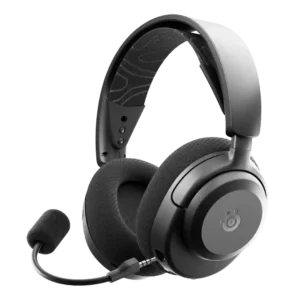
SteelSeries Arctis Nova 3 Gaming Headset
Where It Has the Edge
- Bluetooth is 4.2 vs 1.0. Bluetooth was viewed positively when tested, especially for painless switching, mobile use, and fallback connectivity.

Scorata scores summarize analyzed review evidence on a 1–5 scale; they are not laboratory measurements or a simple average of customer star ratings. Feature scores summarize the reviews covering that feature. The overall score averages feature scores within each review, then combines review averages. When both expert and customer evidence are available, those two groups receive equal weight. Products can have different review coverage, so small score gaps do not establish a winner.
Recommendations prioritize important features for the category, with a score of at least 3.5, a gap of at least 0.25 points and at least two supporting reviews per product. Features with widely varying scores or broad connectivity contexts are excluded from recommendations. These safeguards do not establish statistical significance.
Quick verdict
The review evidence points to a tradeoff: Bluetooth versus Sound quality and Frequency response accuracy. Choose according to which strengths matter more to you; the overall score alone does not settle that choice.
Choose SteelSeries Arctis Nova 3 Gaming Headset for Bluetooth.
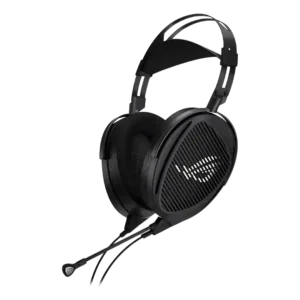
Choose ASUS ROG Kithara for Sound quality and Frequency response accuracy.
Scores are out of 5. Missing scores mean missing review evidence, not a missing feature.
Reviewers generally liked the sound, especially after EQ, describing it as detailed, immersive, or impressive for the price; a few wired-model notes called the default profile merely fine.
Clarity, speed, detail, and natural presentation are the Kithara’s defining strengths across games, music, and media. Most listeners rate it above typical gaming headsets, though a minority finds the sound underwhelming or poorly suited to music.
Spatial audio was praised for gaming immersion and directionality, especially through Sonar or console spatial systems.
There is no built-in virtual surround or spatial-audio processing. The natural open-back stage can still feel immersive, and external options such as Dolby Atmos may work well.
Frequency-response commentary was mixed: the tuning served gaming clarity, but some reviewers found music tonal balance less accurate or less pleasant.
Channel matching and overall response consistency are repeatedly praised. The velour pads provide the more linear midrange, while the stock presentation stays close to a neutral studio-style target.
Passive isolation was acceptable for quieter rooms but not strong, with reviewers saying it blocked some outside sound while leaving plenty of awareness.
The extremely open cups provide little to no passive isolation. Household sounds, fans, conversations, and other room noise remain easy to hear.
ANC was a weakness because reviewers noted its absence and framed that omission as disappointing or baffling at this price.
There is no active noise cancellation. The open-back design is intentionally built for awareness rather than blocking the room.
Soundstage was serviceable but not universally expansive, with one review saying it lacked full wraparound immersion and another calling the stage wide enough.
The open-back planar design creates a broad, airy, highly detailed stage that often feels more speaker-like than conventional gaming headsets. A few FPS users disagree sharply about its directional usefulness.
Sound leakage was the clearest serious drawback, with one reviewer calling leakage shockingly bad even at low volumes.
Sound freely escapes the open earcups and can be audible to people nearby. A few users find leakage less severe than expected, but shared rooms remain a poor fit.
Microphone noise reduction was one of the stronger mic-related areas, with multiple reviewers praising barking, room, episode, keyboard, or background-noise suppression.
Hardware noise rejection works well in several tests without software processing, especially against steady background noise and keyboards. Other users report substantial room pickup, so placement and environment matter.
Bass feedback was mixed: wireless reviews often praised boom and thump, while several wired or measurement-focused reviews noted restrained sub-bass, boxiness, or less low-end impact.
Bass is fast, clean, and easy to separate from the rest of the mix, but stock sub-bass and physical rumble divide listeners. A DAC or modest EQ can add satisfying impact without obvious muddiness.
Positional audio was a strength for gaming, with many reviewers hearing footsteps, gunfire, reloads, and directional cues clearly.
Most users hear footsteps, reloads, and distant movement with excellent precision, making the headset strong for competitive play. A smaller group reports merely average or even poor directional placement, so game and listener fit can affect results.
Bluetooth was viewed positively when tested, especially for painless switching, mobile use, and fallback connectivity.
This is a fully wired headset with no Bluetooth. Buyers who prioritize wireless freedom will need a different model.
Setup simplicity was mixed: wired setup was plug-and-play, but PC software routing could become confusing.
The analog plug-and-play design requires no Armoury Crate or other app. That simplicity appeals to purists but removes built-in EQ, RGB, and surround controls.
Control usability was mostly simple and easy, but some reviewers disliked crowded or less intuitive one-hand control layouts.
The inline mute and volume controls are convenient, but the wheel can be overly sensitive and some users heard clicks or artifacts when toggling the mic.
Call and chat voice quality was generally clear, with reviewers reporting adequate Zoom/call performance and clear detailed mic sound.
Voice clarity is good for Discord, Teams, and ordinary calls, but it still sounds like a headset mic and is not a substitute for a dedicated streaming or podcast microphone.
EQ customization was a strength overall, especially on PC and mobile, although some mobile implementations lacked a true custom equalizer.
Although there is no dedicated app, the planar drivers respond extremely well to external EQ. Small bass adjustments can add substantial low-end weight without obvious distortion.
Game/chat balance was useful where available, though one reviewer disliked the hold-and-wheel implementation compared with a dedicated wheel.
There is no dedicated game/chat mix control, which makes the physical control set feel sparse compared with feature-rich gaming headsets.
Xbox compatibility was positive for the 3X variant, though buyers must choose the Xbox-capable version.
Xbox support is a major limitation: audio can work through a controller, but microphone support is absent or requires awkward workarounds.
Stability evidence was positive in one review that said the headset did not slip accidentally.
The headset can slide or drop a notch when the clamp or suspension sliders are loose, especially on smaller heads. Properly adjusted replacement units may remain stable.
Included accessories were a weak point in one review because the included charging cable fell short of expectations.
The box is unusually complete, with two pad sets, multiple cables, modular plugs, a USB-C adapter, and a unit-specific tuning card. Several buyers consider the bundle a major part of the value.
The wired model’s USB DAC was useful mainly for extra volume and software access rather than a broad hi-res claim.
The USB-C adapter adds convenient digital connectivity, but its power and quality are inconsistent; the included DAC can feel weak and power-hungry.
Console compatibility limitations were limited in current evidence; one Switch 2 concern was followed by successful firmware testing.
Console support is not fully plug-and-play: PlayStation mic use may require USB-C, controllers can sound underpowered, and Xbox microphone support is the biggest gap.
Detachable cable convenience was split between praise for replaceable/removable cables and criticism of a nonstandard aux-style cable.
The mic cable is easy to remove and exchange for the dedicated listening cable, making it simple to move between gaming and music setups.
Portability was helped by folding/flat ear cups and an understated look, though this was more prominent on wired or travel-adjacent comments.
The cups can rotate flat, but the large wired open-back design is desk-bound and poorly suited to commuting or travel.
Cable comments were negative, mostly because reviewers disliked the short charging cable or stiff wired headset cables.
The modular audiophile cable feels premium and the connection options are extensive. The mic cable draws more criticism for feeling cheaper, being cumbersome, or running slightly short.
Detachable mic convenience was mixed: reviewers liked the cleaner/travel-friendly look, but some preferred retractable mics or worried about losing the boom.
The removable boom mic is useful when switching to music-only listening. Its cable-based design is practical, though balanced listening cannot be combined with the mic in some setups.
Separation was generally adequate, but one reviewer noted it could feel jumbled during dense action scenes.
Layering, detail retrieval, and frequency separation are major strengths. Busy game scenes, instruments, dialogue, and subtle environmental sounds remain easy to distinguish.
Headband feedback was mostly positive for pressure distribution and adjustability, but some reviewers noted sweet-spot or large-head limitations.
The suspension band offers broad sizing and can fit very large heads, but loose early units and slipping sliders are a repeated concern. Later replacement or retail units sometimes hold their position correctly.
Microphone feedback was generally good for gaming chat, ranging from exceptional to adequate, with some caveats about fuzziness or headset-like tone.
The detachable MEMS mic is clear enough for chat, calls, and meetings, but opinions range from excellent to disappointing. Common complaints include nasal tone, plosive sensitivity, position dependence, and room pickup.
Swivel and rotation were praised for comfort, neck wear, and fit flexibility.
The large cups offer generous rotation and can sit naturally on the head or lay flat for packing.
Treble drew mixed responses: some heard clearer highs, but others found high tones shouty, recessed, or occasionally irritating.
Treble is highly detailed and often cleaner than sharper planar rivals, but the tuning varies with pads and can sound bright, forward, restrained, or fatiguing depending on the listener.
One reviewer praised maximum-volume bass clarity, noting thump without distortion.
The planar drivers maintain very low distortion and tolerate aggressive volume or bass EQ cleanly, providing substantial headroom when properly driven.
Midrange was usually clear enough for voices and dialogue, though one measurement-focused reviewer found it recessed before tuning.
Midrange detail is generally clean and well separated, but pad choice changes the presentation. Velour sounds more linear, while some listeners hear vocals and instruments sitting slightly farther back.
USB-C was viewed as a useful upgrade because it enabled better connectivity and subtle sound/software advantages.
The included USB-C adapter expands phone, laptop, Switch, PlayStation, and PC compatibility and supports high-resolution playback. It can add volume, but it is not consistently powerful enough to replace a dedicated DAC/amp.
Volume output was a mild weakness in the evidence, with reviewers calling the default output quieter or less efficient than some competitors.
Volume is highly source-dependent. Some devices drive it extremely loudly, while controllers and motherboard outputs may require the USB-C adapter or a dedicated DAC/amp.
Multi-platform compatibility was one of the strongest positives, especially for the 3X model and cross-console/mobile use.
PC, PlayStation, Switch, phones, and DAC setups are broadly supported, but the required cable or adapter changes by device. Console microphone support is the main complication.
Connectivity versatility was a clear strength, with reviewers praising broad platform use, USB-C, Bluetooth, 2.4GHz, and wired options depending on model.
The swappable 3.5mm, 4.4mm, 6.3mm, dual-3.5mm, and USB-C options cover PCs, consoles, phones, DACs, and amps. The flexibility comes with more cables and setup complexity than a typical gaming headset.
Preset EQ profiles were repeatedly praised for game-specific tuning and live switching, with only minor caveats that not every preset made a big difference.
The stock tuning favors clarity, speed, and competitive detail over heavy bass. Many enjoy it immediately, while others prefer a small low-shelf boost or find it better for gaming than music.
Dongle feedback was mixed: reviewers liked the low-latency, slim, offset design, but some disliked port blocking or lack of onboard storage.
The included USB-C adapter improves compatibility and often raises volume, but results vary by device and some users report limited power or inconsistent Windows behavior.
Ear cup padding was usually praised for memory foam, fabric, breathability, and glasses comfort, though one reviewer found the material hot and not plush enough.
Both leatherette-mesh and velour pads are plush, roomy, and generally comfortable. Velour runs cooler, while a few users find the pads scratchy, thin, pressure-inducing, or insufficiently durable.
Durability evidence around hinges and arms was positive, with reviewers highlighting flexible construction and stress-resistant support.
The metal headband and hinges usually feel robust, yet broader quality-control failures make long-term confidence uneven.
Weight comfort was a major strength, with many reviewers emphasizing the headset’s lightness and reduced fatigue.
The 420-gram build is objectively heavy, yet the suspension strap distributes it well for many users. Others feel top pressure, jaw pressure, or fatigue, especially when the fit is loose.
Clamp comfort was mostly positive, balancing secure fit and comfort, though one review described the fit as tight.
Clamp is relaxed and comfortable for many large-headed users, but it is often too weak for smaller heads and can let the headset slide during movement.
Build quality was mostly solid for plastic construction, but reviewers also noted plasticky feel or merely steady construction.
The metal-heavy frame, hinges, and premium finish impress most users, but several customers report serious quality-control failures such as dead drivers, popping, and defective adapters.
Comfort over long sessions was one of the strongest consensus positives, with many reviewers wearing it for full workdays, long gaming sessions, or glasses use comfortably.
Most users find the suspension headband and huge pads exceptionally comfortable for multi-hour sessions. Comfort becomes less reliable on smaller heads or for those sensitive to the 420-gram weight.
Design and aesthetics were broadly liked, especially the soft color options, clean look, and less aggressive gaming style.
The restrained metal-and-open-grille styling looks premium and mature to many buyers, though the tall frame and oversized cups can look awkward or comically large on smaller heads.
Replaceable earpads were praised for interchangeability and long-term support.
Two pad sets are included and meaningfully change comfort and tonality. Velour is softer and smoother, while the hybrid set offers a tighter seal and stronger focus.
Fit/seal reliability was a small caveat because one lab review found sound quality sensitive to positioning and fit.
The oversized frame works especially well for large heads and glasses, but smaller heads may struggle to achieve a secure fit. The low clamp can cause slipping even when the acoustic seal remains forgiving.
Value was a strong consensus positive across nearly every review, with reviewers repeatedly calling it a good budget or midrange buy.
At around $299, many buyers see unusually strong audiophile sound, comfort, and accessories for the price. Others consider it too expensive once a DAC/amp is added or when compared with more convenient wireless headsets.
The app/software was a major value driver because reviewers praised mobile presets, Sonar, GG customization, and usefulness, despite a few complexity complaints.
RGB customization was mostly praised on wired models as subtle, customizable, and tasteful, with one reviewer saying options were limited.
Battery life was generally strong for the wireless model, commonly described as enough for days or long sessions, though one lab test found less than the advertised 2.4GHz rating.
Fast charging was one of the clearest strengths, with reviewers repeatedly praising the 15-minute charge usefulness.
A recurring complaint is that no carrying case or hard case is included, despite the large headset and extensive cable bundle.
Smudge resistance had limited but positive evidence from one reviewer praising the non-fingerprint-prone ear plate surface.
The roomy pads and forgiving planar bass work well with glasses, with little loss of low-end response from an imperfect seal.
The integrated retractable mic on the wired model was praised as convenient and clean when not in use.
Most buyers are enthusiastic about the clarity, comfort, and unusual audiophile-gaming blend, often calling it a favorite or endgame headset. Returns and low scores are concentrated around mic limitations, insecure fit, and quality-control failures.
The premium box, sound-signature certificate, and organized presentation make the unboxing feel special, though the large number of parts can initially feel overwhelming.
Sidetone quality was a strength in the few reviews that discussed it, especially for real-time, clear monitoring.
Wireless latency was consistently praised, with 2.4GHz and Bluetooth testing producing low-latency or no-lag impressions.
Footstep-focused preset evidence was positive, with one reviewer saying the preset made footsteps more pronounced in stealth gameplay.
Multipoint reliability was a caveat: reviewers liked switching modes, but several criticized the lack of true simultaneous Bluetooth or device limitations.
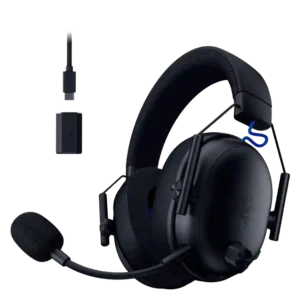
Best for excellent game audio, long-session comfort, clear voice chat, strong battery life, and low-latency wireless. Skip it if you need very high volume, flawless software, or zero tolerance for...
Pros: Overall satisfaction, Sound quality
Cons: Button control usability, Dongle
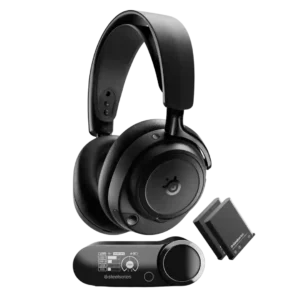
Choose the Arctis Nova Elite if you want top-tier wireless sound, ANC, hot-swap batteries, and multi-device mixing. Skip it if $600 feels excessive, you game on one console, or tight/heavy...
Pros: Sound quality, Connectivity versatility
Cons: Value for money, Carry case quality
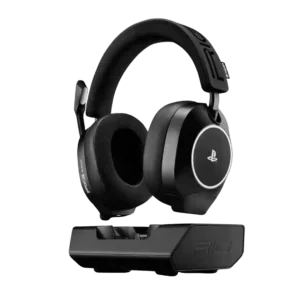
Best for sharp gaming audio, long battery life, an excellent dock, and strong value. Skip it if you need ANC, a detachable mic, maximum console volume, or seamless PS5/Xbox switching.
Pros: Sound quality, Included stand quality
Cons: Detachable microphone convenience
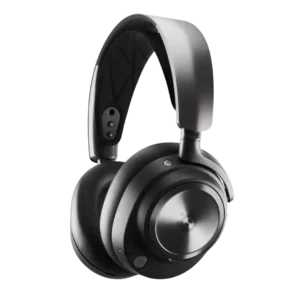
Choose the Arctis Nova Pro Wireless for premium gaming audio, hot-swappable batteries, broad device support, and deep EQ control. Skip it if the high price, mixed mic quality, or uneven...
Pros: Battery, Comfort during long use
Cons: Console compatibility limitations, USB-C