Scorata scores summarize analyzed review evidence on a 1–5 scale; they are not laboratory measurements or a simple average of customer star ratings. Feature scores summarize the reviews covering that feature. The overall score averages feature scores within each review, then combines review averages. When both expert and customer evidence are available, those two groups receive equal weight. Products can have different review coverage, so small score gaps do not establish a winner.
Recommendations prioritize important features for the category, with a score of at least 3.5, a gap of at least 0.25 points and at least two supporting reviews per product. Features with widely varying scores or broad connectivity contexts are excluded from recommendations. These safeguards do not establish statistical significance.
Quick verdict
What each product is best for
The review evidence points to a tradeoff: Touchscreen and Lock/unlock speed versus Smart-home integration (Alexa, Google, Siri, HomeKit, Matter, Thread) and Voice control. Choose according to which strengths matter more to you; the overall score alone does not settle that choice.
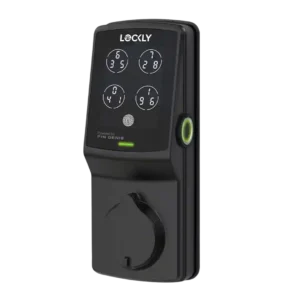
Choose Lockly Secure Plus Smart Lock for Touchscreen and Lock/unlock speed.
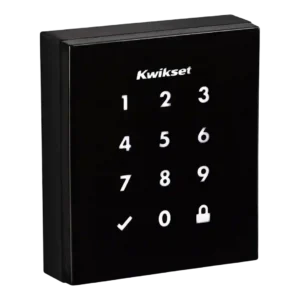
Choose Kwikset Obsidian Smart Lock for Smart-home integration (Alexa, Google, Siri, HomeKit, Matter, Thread) and Voice control.
Why these recommendations?
Lockly Secure Plus Smart Lock
Where It Has the Edge
Touchscreen is 5.0 vs 3.9. The touchscreen evidence is positive, with reviewers praising seamless operation and responsive keypad behavior.
Lock/unlock speed is 4.6 vs 3.8. Lock and unlock speed was consistently positive, with instant app response or unlocks taking only a couple of...
App is 4.2 vs 3.5. The app was generally considered easy, clear, and responsive, though one review separated that from a difficult guest-code...
Kwikset Obsidian Smart Lock
Where It Has the Edge
Smart-home integration (Alexa, Google, Siri, HomeKit, Matter, Thread) is 3.7 vs 1.9. Smart-home integration was useful but ecosystem-dependent: Z-Wave, SmartThings, Wink, Alexa, and other platforms worked well in some cases,...
Voice control is 3.7 vs 2.0. Voice control worked well when supported, especially Alexa locking and status checks, but other reviews emphasized that Alexa...
Industrial design is 4.5 vs 3.6. Design was the strongest consensus attribute, with repeated praise for the sleek, minimalist, modern, key-free look.
Lockly Secure Plus Smart Lock3.8 overall score
Kwikset Obsidian Smart Lock3.7 overall score
Compare features
Scores are out of 5. Missing scores mean missing review evidence, not a missing feature.
Scored on both products
Other features
Locking motor
Lockly Secure Plus Smart Lock
4.5
Motor evidence is limited, but PCMag praised the lock for relatively quiet operation.
Kwikset Obsidian Smart Lock
2.5
The locking motor drew a clear complaint for being quite loud, even though the same review did not report jams.
Weather resistance
Lockly Secure Plus Smart Lock
4.5
Weather resistance evidence is positive but limited to one review that judged the casing able to handle harsh conditions.
Kwikset Obsidian Smart Lock
2.5
Sun and heat exposure was a concern in one user review because the black exterior became uncomfortable for children to touch.
Remote access
Lockly Secure Plus Smart Lock
2.0
Remote access is a repeated limitation because the lock lacks built-in internet control and needs extra Wi-Fi hardware.
Kwikset Obsidian Smart Lock
3.3
Remote access depended heavily on the platform: it worked well through Wink in one review, but other evidence tied remote control to a more expensive hub-enabled setup.
Lock/unlock speed
Lockly Secure Plus Smart Lock
4.6
Lock and unlock speed was consistently positive, with instant app response or unlocks taking only a couple of seconds.
Kwikset Obsidian Smart Lock
3.8
Locking speed was mixed, with one review praising prompt Alexa locking while another noticed the lock ran a bit slower than normal.
Hub requirement
Lockly Secure Plus Smart Lock
2.3
The hub requirement is a drawback because remote and voice features require added hardware and cost.
Kwikset Obsidian Smart Lock
3.0
Hub requirements split reviewers: Z-Wave was welcomed by smart-home users, while others treated the required hub as an added burden.
Auto-lock
Lockly Secure Plus Smart Lock
5.0
Auto-lock has limited but strong evidence, with PCMag reporting that the feature worked very well in testing.
Kwikset Obsidian Smart Lock
4.3
Auto-lock was reliable and easy to set up in stronger reviews, though one transcript noted that changing related customization switches required a screwdriver.
Fingerprint
Lockly Secure Plus Smart Lock
4.7
Fingerprint access is the strongest feature across reviews, described as fast, accurate, responsive, effective, and unusually good.
Kwikset Obsidian Smart Lock
4.4
Fingerprint-related security earned consistent praise because SecureScreen and coating features reduced the risk of visible touch patterns revealing codes.
Guest Codes and Access
Lockly Secure Plus Smart Lock
3.7
Guest access is mixed: several reviewers liked the flexible access options, while one found temporary-code delivery convoluted and buggy.
Kwikset Obsidian Smart Lock
3.8
Guest access was one of the most mixed areas: reviewers liked multiple codes and temporary scheduling in some versions, but criticized limited code counts and remote-code gaps in others.
Keypad
Lockly Secure Plus Smart Lock
4.4
The keypad and PIN Genie concept were widely praised for security and usability, although one reviewer found the shifting layout disorienting.
Kwikset Obsidian Smart Lock
4.5
The keypad was praised for intuitive everyday locking and unlocking.
Security features (encryption)
Lockly Secure Plus Smart Lock
4.3
Security evidence is positive, with praise for hack resistance and unusually comprehensive account-security setup.
Kwikset Obsidian Smart Lock
4.3
Security features were praised across reviews, especially SecureScreen, which reviewers said worked well and helped prevent code guessing from fingerprints.
User access management
Lockly Secure Plus Smart Lock
3.5
User access management is mixed, combining flexible access options with one strong complaint about difficult PIN assignment.
Kwikset Obsidian Smart Lock
3.4
User access management varied sharply by version and platform, from strong scheduled and one-time code support to complaints about no expiring codes or no app-based code changes.
Door compatibility (deadbolt fit)
Lockly Secure Plus Smart Lock
4.0
Compatibility evidence is positive but limited, with reviewers noting standard-door fit and successful single-doorknob replacement.
Kwikset Obsidian Smart Lock
4.0
Door fit looked favorable for standard replacements, with the reviewer saying it should be almost as easy to install in most standard lock enclosures.
Smart-home integration is one of the clearest weaknesses, with repeated criticism of missing or limited platform support.
Kwikset Obsidian Smart Lock
3.7
Smart-home integration was useful but ecosystem-dependent: Z-Wave, SmartThings, Wink, Alexa, and other platforms worked well in some cases, while HomeKit and Google limitations hurt compatibility.
Voice control
Lockly Secure Plus Smart Lock
2.0
Voice control is limited because it is not built in and depends on extra Wi-Fi hardware that reviewers criticized.
Kwikset Obsidian Smart Lock
3.7
Voice control worked well when supported, especially Alexa locking and status checks, but other reviews emphasized that Alexa or Google control required a Z-Wave hub.
Bluetooth
Lockly Secure Plus Smart Lock
4.5
Bluetooth evidence is positive, with stable connectivity and unusually quick app response over Bluetooth range.
Kwikset Obsidian Smart Lock
3.0
Bluetooth was a mild drawback rather than a dealbreaker: one reviewer did not mind its absence, but warned it could deter buyers who want phone proximity unlocking.
Touchscreen
Lockly Secure Plus Smart Lock
5.0
The touchscreen evidence is positive, with reviewers praising seamless operation and responsive keypad behavior.
Kwikset Obsidian Smart Lock
3.9
Touchscreen feedback was mostly positive for responsiveness and security, but reviewers also noted wake-up misses and glossy smudging.
App
Lockly Secure Plus Smart Lock
4.2
The app was generally considered easy, clear, and responsive, though one review separated that from a difficult guest-code workflow.
Kwikset Obsidian Smart Lock
3.5
Reviewers liked app-based control when a compatible platform supported it, but the lock lost points because it lacks its own app and some hub apps could not manage codes.
Battery and charging
Battery
Lockly Secure Plus Smart Lock
4.5
Battery evidence is limited to one long-term review, but that reviewer called performance stellar after about a year of use.
Kwikset Obsidian Smart Lock
2.8
Battery feedback was mixed: one preview praised warning before batteries died, while later user-oriented evidence reported six-month or five-month battery life concerns.
Comfort and build
Industrial design
Lockly Secure Plus Smart Lock
3.6
Design opinions are mixed: reviewers liked the attractive, premium look, but several also called the lock large, bulky, or obvious.
Kwikset Obsidian Smart Lock
4.5
Design was the strongest consensus attribute, with repeated praise for the sleek, minimalist, modern, key-free look.
Build quality and durability
Lockly Secure Plus Smart Lock
4.4
Build quality was repeatedly praised as sturdy, well-built, strong, and rock solid.
Kwikset Obsidian Smart Lock
4.5
Build quality was praised in the clearest durability evidence, with the lock described as sturdy and jam-free during testing.
Ownership and support
Locking reliability
Lockly Secure Plus Smart Lock
3.8
Locking reliability is mixed: some testing found smooth, great performance, while Digital Trends encountered unresolved calibration errors.
Kwikset Obsidian Smart Lock
4.5
Locking reliability was positive overall, with reviewers reporting that auto-relock worked every time, the bolt worked fine after setup, and the mechanism did not jam.
Value and Price
Lockly Secure Plus Smart Lock
2.4
Value is a common concern because reviewers repeatedly describe the lock, hub path, or overall package as expensive.
Kwikset Obsidian Smart Lock
3.0
Value was divided: some reviewers considered it expensive once hubs or non-connected limitations were included, while one YouTube reviewer called the price good for a keyless Z-Wave lock.
Installation and Setup
Lockly Secure Plus Smart Lock
3.8
Installation is sharply mixed, ranging from simple, app-guided, and quick to unusually complicated and frustrating.
Kwikset Obsidian Smart Lock
3.5
Installation ranged from simple and thoughtfully guided to frustrating, with one reviewer blaming unclear instructions and bolt machining while others completed setup easily.
Evidence available for one product
Other features
Access logs
Lockly Secure Plus Smart Lock
4.3
Reviewers who discussed logs liked the recordkeeping, citing accurate history entries and even a year of usable activity history.
Kwikset Obsidian Smart LockNo score yet
Existing hardware reuse
Lockly Secure Plus Smart LockNo score yet
Kwikset Obsidian Smart Lock
4.5
Existing hardware reuse was a strength in the replacement scenario, where the reviewer installed it easily after removing a prior Kwikset lock.
Physical attack resistance
Lockly Secure Plus Smart LockNo score yet
Kwikset Obsidian Smart Lock
4.5
Physical attack resistance was praised because the keywayless design removes common keyed-entry attack paths.
Pick/drill resistance (if rated)
Lockly Secure Plus Smart LockNo score yet
Kwikset Obsidian Smart Lock
4.5
Pick and bump-key resistance was praised because ditching the keyway removed the risk of picking or forced entry with a bump key.
Ownership and support
Key override reliability
Lockly Secure Plus Smart Lock
4.3
Key backup evidence is positive, with reviewers valuing physical-key and backup access as a practical fallback.
Kwikset Obsidian Smart LockNo score yet
Warranty and support
Lockly Secure Plus Smart Lock
5.0
Warranty evidence is strongly positive, with Digital Trends calling it one of the best in the smart-lock market.
Kwikset Obsidian Smart LockNo score yet
Controls and connectivity
Notifications
Lockly Secure Plus Smart Lock
1.5
Notifications are a weakness in the limited evidence, with PCMag specifically missing push notification support.
Kwikset Obsidian Smart LockNo score yet
Wi-Fi
Lockly Secure Plus Smart Lock
2.6
Wi-Fi is mixed: the lack of built-in Wi-Fi is criticized, but one review found hub-connected Wi-Fi response very fast.
Choose the Aqara U400 if you want hands-free UWB unlocking, strong Apple Home integration, and many backup entry methods. Skip it if you dislike bulky smart-lock hardware or need a...
Choose the Tapo DL110 if you want fast fingerprint entry, strong app control, long battery life, and premium features under a lower price. Skip it if your door/strike alignment is...
Choose the Wyze Lock Bolt v2 for low-cost Wi-Fi, fast fingerprint entry, and flexible codes. Skip it if you need Matter/HomeKit support, rechargeable batteries, or stronger door-sense behavior.
Good if you want one polished lock, camera, and doorbell with excellent fingerprint access. Skip it if short battery life, screen/storm doors, or a narrow camera view would frustrate you.
Pros: Camera and doorbell performance, Installation and Setup
Cons: Keyway quality, Door compatibility (deadbolt fit)