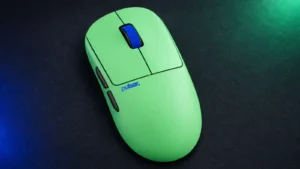
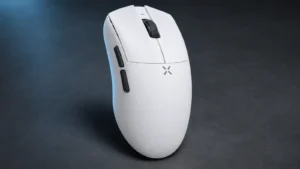
Compare Pulsar X2 CrazyLight vs Hitscan Hyperlight

Pulsar X2 CrazyLight

Pulsar X2 CrazyLight

Overall score 4.3 / 5

Based on 7 scored reviews

vs
Hitscan Hyperlight

Hitscan Hyperlight

Overall score 4.4 / 5

Based on 17 scored reviews

How we score

Scorata scores summarize analyzed review evidence on a 1–5 scale; they are not laboratory measurements or a simple average of customer star ratings. Feature scores summarize the reviews covering that feature. The overall score averages feature scores within each review, then combines review averages. When both expert and customer evidence are available, those two groups receive equal weight. Products can have different review coverage, so small score gaps do not establish a winner.

Recommendations prioritize important features for the category, with a score of at least 3.5, a gap of at least 0.25 points and at least two supporting reviews per product. Features with widely varying scores or broad connectivity contexts are excluded from recommendations. These safeguards do not establish statistical significance.

Quick verdict

What each product is best for

The review evidence points to a tradeoff: materials quality and polling rate versus battery life and hand size compatibility. Choose according to which strengths matter more to you; the overall score alone does not settle that choice.

Choose Pulsar X2 CrazyLight for materials quality and polling rate.

Choose Hitscan Hyperlight for battery life and hand size compatibility.

Why these recommendations?

Pulsar X2 CrazyLight

Where It Has the Edge

  • materials quality is 4.7 vs 3.5. Lightweight ABS construction remains impressively solid rather than flimsy.
  • polling rate is 4.5 vs 4.1. High wireless polling rates are well implemented, while wired operation is limited to 1,000 Hz.
  • glide smoothness is 5.0 vs 4.8. The feet glide smoothly across pads, helping the ultralight mouse move with little effort.

Hitscan Hyperlight

Where It Has the Edge

  • battery life is 4.3 vs 2.5. Battery life is good at 1K, with some users exceeding expectations; higher polling substantially reduces runtime.
  • hand size compatibility is 4.3 vs 3.3. The shape works across many hand sizes, but the compact dimensions favor smaller hands or fingertip users.
  • aesthetic design is 5.0 vs 4.0. The minimalist shell design is clean and appealing.
Pulsar X2 CrazyLight 4.3 overall score
Hitscan Hyperlight 4.4 overall score

Compare features

Scores are out of 5. Missing scores mean missing review evidence, not a missing feature.

Scored on both products

Battery and charging

Battery life
Pulsar X2 CrazyLight
2.5

The small battery requires more frequent charging at high polling rates. Runtime is nevertheless impressive relative to its capacity.

Hitscan Hyperlight
4.3

Battery life is good at 1K, with some users exceeding expectations; higher polling substantially reduces runtime.

Battery indicator
Pulsar X2 CrazyLight
2.0

The displayed battery percentage can fluctuate unexpectedly, making the remaining charge less trustworthy.

Hitscan Hyperlight
3.8

The software battery reading is useful, but the receiver's late red warning can leave too little time to plug in.

Ownership and support

Reliability
Pulsar X2 CrazyLight
5.0

A month of use was trouble-free for the owner who reported their experience.

Hitscan Hyperlight
5.0

One detailed test found no physical, mechanical or technical faults during use.

Skate replacement ease
Pulsar X2 CrazyLight
5.0

Integrated removal ramps make replacing the stock skates straightforward.

Hitscan Hyperlight
4.3

Choosing and installing skates is convenient for some, while others struggle with alignment and would prefer factory installation.

Value for money
Pulsar X2 CrazyLight
4.0

The included 8K receiver and excellent construction justify the price for some buyers, but cheaper alternatives offer comparable gaming performance.

Hitscan Hyperlight
4.5

The base mouse is competitive at around $90, although the extra high-rate receiver cuts into the savings.

Hand support
Pulsar X2 CrazyLight
4.0

The rear hump can lock the palm in place with claw grip, but its support is minimal for some hands.

Hitscan Hyperlight
4.0

The subtle hump provides an anchor without forcing full palm contact, though some players want more knuckle support.

Other features

Accessory compatibility
Pulsar X2 CrazyLight
5.0

The larger skate recesses accommodate a wider range of aftermarket feet, including donut skates.

Hitscan Hyperlight
2.0

Some soft replacement cables and mouse bungees are incompatible with the port or thick stock cable.

Premium feel
Pulsar X2 CrazyLight
3.0

Despite excellent rigidity, the ultra-light shell can feel hollow rather than substantial.

Hitscan Hyperlight
5.0

Its solid build and light construction create a surprisingly premium impression.

Scroll wheel grip texture
Pulsar X2 CrazyLight
3.0

The revised dotted wheel surface provides adequate grip for some players, but others prefer the more rounded texture of earlier models.

Hitscan Hyperlight
5.0

The textured wheel ring is easy to grip and scroll.

Included accessories
Pulsar X2 CrazyLight
5.0

The included high-polling receiver and alternate skates make the package more complete without a separate dongle purchase.

Hitscan Hyperlight
3.1

Two skate options are appreciated, but the separate 8K receiver and lack of some protective accessories are drawbacks.

Fingerprint and smudge resistance
Pulsar X2 CrazyLight
2.0

The grippy coating readily attracts oils and grime, especially on darker finishes.

Hitscan Hyperlight
3.8

White hides fingerprints well; black can show oils and smudges despite the grippy finish.

Receiver quality
Pulsar X2 CrazyLight
4.0

The transparent receiver housing is visually appealing.

Hitscan Hyperlight
5.0

The rubberized receiver base stays anchored on the desk.

Repairability
Pulsar X2 CrazyLight
4.0

Opening the mouse for maintenance is fairly straightforward, although complete disassembly is more restricted than on earlier models.

Hitscan Hyperlight
5.0

Opening and servicing the mouse is relatively straightforward compared with some other ultralight models.

Scroll wheel usefulness in games
Pulsar X2 CrazyLight
4.0

The wheel feels safe and comfortable during gaming, with little risk of unwanted scroll inputs.

Hitscan Hyperlight
5.0

Defined scroll steps and easy movement help with quick weapon changes in games.

Left and right click quality
Pulsar X2 CrazyLight
4.0

The main buttons are crisp and quick, although some units exhibit minor side-to-side wobble.

Hitscan Hyperlight
4.9

The main buttons are crisp, light and satisfying, with little movement getting in the way of gameplay.

Scroll wheel resistance
Pulsar X2 CrazyLight
3.0

The wheel is controllable but its detents may feel weaker than preferred.

Hitscan Hyperlight
3.9

Wheel tension divides opinion: some enjoy the resistance, while others prefer firmer, more tactile steps.

Coating quality
Pulsar X2 CrazyLight
4.0

The chalky coating is a major improvement for some players, though others find it slightly slippery.

Hitscan Hyperlight
4.8

The matte, slightly chalky coating is a standout for grip and comfort, with some variation for very dry or sweaty hands.

Grip texture
Pulsar X2 CrazyLight
4.0

The dry, chalky texture generally provides secure grip even with sweaty hands, but preferences vary.

Hitscan Hyperlight
4.8

The chalky coating gives excellent traction, especially with slight moisture, though grip preferences vary.

Click consistency
Pulsar X2 CrazyLight
4.0

Main click actuation is generally consistent, although pressing farther up the button increases the force needed.

Hitscan Hyperlight
4.7

Main clicks feel fairly consistent across the button surface, with minor variation in actuation force.

Connection stability
Pulsar X2 CrazyLight
4.5

Wireless tracking is stable during testing, including at elevated polling rates.

Hitscan Hyperlight
5.0

Connections are generally rock solid without dropouts during extended testing.

Motion latency
Pulsar X2 CrazyLight
5.0

Sensor latency is exceptionally low for fast competitive movements.

Hitscan Hyperlight
4.5

Sensor latency is low enough to avoid obvious delays in gameplay.

Scroll wheel precision
Pulsar X2 CrazyLight
4.5

Scroll steps provide enough definition to control movement and avoid unwanted scrolling during middle clicks.

Hitscan Hyperlight
5.0

Defined wheel steps make individual scrolls and weapon switches predictable.

Sensor placement
Pulsar X2 CrazyLight
5.0

The centrally positioned sensor avoids the unusual offset found on some competing mice.

Hitscan Hyperlight
4.5

The forward sensor makes wrist flicks and front-grip movements feel reactive, though some find the positioning awkward.

Switch quality
Pulsar X2 CrazyLight
4.5

The optical switches are a marked improvement over previous Pulsar implementations and feel excellent in games.

Hitscan Hyperlight
5.0

Omron optical switches are implemented particularly well and feel crisp in use.

Unit-to-unit quality control
Pulsar X2 CrazyLight
3.7

Early samples are generally solid, though some have minor click wobble and retail consistency is less certain.

Hitscan Hyperlight
3.3

Some units are well assembled and flat, but repeated wheel roughness across replacements raises quality-control concerns.

Balance and weight distribution
Pulsar X2 CrazyLight
4.3

Weight is generally well distributed, with only a slight forward or lateral bias reported.

Hitscan Hyperlight
4.7

Weight generally feels evenly distributed, although a forward fingertip grip can make the rear feel heavier.

Polling rate
Pulsar X2 CrazyLight
4.5

High wireless polling rates are well implemented, while wired operation is limited to 1,000 Hz.

Hitscan Hyperlight
4.1

The standard 1K rate is already capable, while optional higher rates can improve responsiveness at the expense of battery life and sometimes stutter.

Cursor control
Pulsar X2 CrazyLight
4.7

The low weight and compact grip can improve aim control, particularly when paired with a control pad.

Hitscan Hyperlight
5.0

Cursor movements feel crisp and repeatable when making fine adjustments.

Glide smoothness
Pulsar X2 CrazyLight
5.0

The feet glide smoothly across pads, helping the ultralight mouse move with little effort.

Hitscan Hyperlight
4.8

The stock PTFE feet glide smoothly and allow fast but controllable movement.

Motion consistency
Pulsar X2 CrazyLight
4.5

Movement is consistently tracked, with smoother wireless implementation than some budget rivals.

Hitscan Hyperlight
4.8

Fast swipes and direction changes generally remain consistent without skipping or stuttering.

Overall satisfaction
Pulsar X2 CrazyLight
4.6

Overall satisfaction is high thanks to the solid lightweight construction, responsive controls and excellent gaming feel, with minor fit and feature caveats.

Hitscan Hyperlight
4.8

Overall satisfaction is very high thanks to the sturdy ultralight shell, responsive performance and accessible price, with some wheel and accessory caveats.

Weight
Pulsar X2 CrazyLight
4.8

At roughly 36–38 g in hands-on testing, the mouse is exceptionally easy to lift, flick and reposition. Some players prefer a more substantial feel.

Hitscan Hyperlight
5.0

At roughly 40 grams, the mouse is unusually easy to flick and reposition without sacrificing a solid shell.

Click latency
Pulsar X2 CrazyLight
5.0

Click latency is exceptionally low, making rapid inputs feel immediate.

Hitscan Hyperlight
4.9

Clicks register rapidly enough for competitive play.

FPS gaming suitability
Pulsar X2 CrazyLight
5.0

The extremely light shell and responsive sensor are especially well suited to shooters.

Hitscan Hyperlight
4.9

Fast tracking, responsive clicks and low inertia suit shooter games especially well.

Scroll wheel quality
Pulsar X2 CrazyLight
3.7

The wheel feels stable and responsive, although its revised rubber texture and detents divide opinion.

Hitscan Hyperlight
3.8

The wheel is often smooth and well defined, but scratchy metallic scrolling developed on multiple units in one review.

Cable drag
Pulsar X2 CrazyLight
2.0

The stiff cable can interfere with handling during wired use.

Hitscan Hyperlight
2.0

The straight, rigid cable can drag against the mousepad.

Cable flexibility
Pulsar X2 CrazyLight
2.0

The thicker stock cable is more rigid and less flexible than previous Pulsar cables.

Hitscan Hyperlight
2.0

The supplied cable is stiff enough to interfere with comfortable wired play.

Cable quality
Pulsar X2 CrazyLight
2.0

The included cable is a downgrade from earlier versions because of its thicker, rougher construction.

Hitscan Hyperlight
2.0

The included USB-C cable is repeatedly criticized for thickness and rigidity.

Dust resistance
Pulsar X2 CrazyLight
2.0

The open underside exposes internals and battery adhesive to dust and debris.

Hitscan Hyperlight
2.0

The open underside exposes the internals to dust and hair.

Feet quality
Pulsar X2 CrazyLight
4.8

The larger stock PTFE skates are smooth and generally good enough to keep, while aftermarket options remain attractive.

Hitscan Hyperlight
4.8

Both included PTFE skate styles are well regarded for their smooth glide, though one user wanted more balanced surface area.

Handedness options
Pulsar X2 CrazyLight
3.0

The symmetrical shell is usable left-handed, but the side buttons are only accessible conveniently to right-handed users.

Hitscan Hyperlight
3.0

The symmetrical shell can be held left-handed, but the side buttons are unavailable to that grip.

Middle click quality
Pulsar X2 CrazyLight
3.5

Middle-click force is reasonable, but the pillar switch has less satisfying rebound than full-size switches.

Hitscan Hyperlight
3.5

Middle click divides opinion, with some finding it comfortable and others too stiff or mushy.

Power efficiency
Pulsar X2 CrazyLight
5.0

Power optimization is unusually good for the small 200 mAh battery.

Hitscan Hyperlight
5.0

Power management is efficient, particularly at lower polling rates.

Responsiveness
Pulsar X2 CrazyLight
5.0

Low input delay gives the mouse a very responsive feel.

Hitscan Hyperlight
5.0

The mouse responds promptly to fast movements and clicks.

Switch feel
Pulsar X2 CrazyLight
4.6

The new optical switches are snappy, tactile and easy to spam, though mechanical-switch fans may prefer a different feel.

Hitscan Hyperlight
4.6

Omron optical switches feel snappy and easy to spam, although mechanical-switch fans may prefer a more tactile click.

Wired connectivity
Pulsar X2 CrazyLight
2.0

Wired polling is limited to 1,000 Hz despite much higher wireless rates.

Hitscan Hyperlight
2.0

Wired operation is possible, but the stiff cable detracts from handling.

Controls and connectivity

Accidental button activation
Pulsar X2 CrazyLight
3.5

Light clicks can avoid accidental presses, but too-low debounce may cause false inputs.

Hitscan Hyperlight
5.0

The sturdy shell and well-positioned buttons generally prevent accidental presses during intense play.

Physical controls
Pulsar X2 CrazyLight
4.0

Simplified underside controls help shave weight without eliminating necessary adjustments.

Hitscan Hyperlight
2.8

The power switch can feel stiff and creaky compared with the rest of the mouse.

Software stability
Pulsar X2 CrazyLight
3.0

Battery percentage fluctuations can make the software feel inconsistent.

Hitscan Hyperlight
2.0

One long-term user encountered failed profile loading, inconsistent detection and unexpected application closures.

Button travel
Pulsar X2 CrazyLight
3.7

Button travel varies: side buttons can be very responsive, while some main and rear side clicks have more post-travel.

Hitscan Hyperlight
4.6

Button travel is usually minimal, though heavier presses can reveal noticeable post-travel.

Software quality
Pulsar X2 CrazyLight
4.0

Software is generally straightforward and capable, including a well-liked browser option, though battery readouts can be inconsistent.

Hitscan Hyperlight
4.6

The lightweight utility offers the key configuration options, although one user experienced reliability and polish problems.

Side button quality
Pulsar X2 CrazyLight
4.4

Side buttons are tactile and stable, though rear-button post-travel is noticeable on some units.

Hitscan Hyperlight
4.6

Side buttons are mostly crisp and stable, though one comparison found them cheaper-feeling than premium alternatives.

Software usability
Pulsar X2 CrazyLight
4.7

The settings layout is simple to navigate, and browser-based configuration is especially convenient for some users.

Hitscan Hyperlight
4.7

The utility is usually intuitive and quick to configure, but device detection and profile loading can be frustrating on some setups.

Button responsiveness
Pulsar X2 CrazyLight
5.0

Rapid rebound and responsive side buttons make repeated inputs easy.

Hitscan Hyperlight
5.0

Light, quick actuation makes repeated clicks easy.

Comfort and build

Materials quality
Pulsar X2 CrazyLight
4.7

Lightweight ABS construction remains impressively solid rather than flimsy.

Hitscan Hyperlight
3.5

Internal construction is solid, although the lightweight plastic can feel less substantial than costlier models.

Hand size compatibility
Pulsar X2 CrazyLight
3.3

Fit depends heavily on hand size and grip style, with the compact shell favoring small and medium hands.

Hitscan Hyperlight
4.3

The shape works across many hand sizes, but the compact dimensions favor smaller hands or fingertip users.

Aesthetic design
Pulsar X2 CrazyLight
4.0

Distinctive color choices and the transparent receiver contribute to an appealing design.

Hitscan Hyperlight
5.0

The minimalist shell design is clean and appealing.

Grip comfort
Pulsar X2 CrazyLight
4.0

Grip is generally secure, although the flat, relatively wide sides are not ideal for everyone.

Hitscan Hyperlight
5.0

The front grooves and finger ledges provide a secure and comfortable grip.

Size
Pulsar X2 CrazyLight
3.0

The small size is excellent for fingertip movement but restrictive for users who need more palm support.

Hitscan Hyperlight
4.0

The small size is highly appealing to compact-mouse fans, although it can feel too small for certain grips.

Claw grip comfort
Pulsar X2 CrazyLight
3.8

Claw grip can feel natural and locked in for smaller hands, but the short shell can cramp larger or relaxed claw grips.

Hitscan Hyperlight
4.7

Relaxed and aggressive claw grips work well for many users, particularly those with smaller hands.

Durability over time
Pulsar X2 CrazyLight
4.0

The first month of ownership was trouble-free.

Hitscan Hyperlight
3.3

The shell and coating can hold up well over time, but recurring wheel roughness is a notable durability concern.

Palm grip comfort
Pulsar X2 CrazyLight
2.5

Palm grip is mainly practical for smaller hands; larger hands cannot get enough support.

Hitscan Hyperlight
3.1

Palm grip can work for very small hands but is less comfortable for larger hands.

Shape comfort
Pulsar X2 CrazyLight
4.3

The compact rear-hump shape is especially appealing for fingertip and smaller claw grips, although some prefer narrower sides.

Hitscan Hyperlight
4.9

The compact, relatively flat-sided shell and subtle hump allow a variety of comfortable finger positions.

Fingertip grip comfort
Pulsar X2 CrazyLight
5.0

The compact shell and very low weight make fingertip grip a particular strength.

Hitscan Hyperlight
4.9

Low buttons and fairly straight sides make fingertip grip especially comfortable and agile.

Build quality
Pulsar X2 CrazyLight
4.9

The remarkably rigid shell is a standout for such a lightweight mouse, with little flex or creaking across tested units.

Hitscan Hyperlight
4.9

The shell is impressively rigid for its low weight, with little creaking or flex under normal pressure.

Long-session comfort
Pulsar X2 CrazyLight
5.0

The ultralight design helps reduce the effort of repeatedly moving the mouse during longer gaming sessions.

Hitscan Hyperlight
5.0

The low mass and comfortable grip reduce fatigue in extended sessions.

Performance

Click noise
Pulsar X2 CrazyLight
4.0

Click sound is generally pleasant, with occasional metallic ping from one button.

Hitscan Hyperlight
3.5

Main clicks have a satisfying tone for some users, while others find them loud or springy.

Weight specification accuracy
Pulsar X2 CrazyLight
4.0

Measured weight is close to the advertised specifications once the installed skate configuration is considered.

Hitscan Hyperlight
3.5

The advertised weight can exclude the skates; measured installed weights vary and can exceed the quoted range.

Wireless performance
Pulsar X2 CrazyLight
4.7

Wireless operation is well optimized, particularly at 2K and 4K polling, and feels responsive in games.

Hitscan Hyperlight
5.0

Wireless use is responsive and dependable during extended gaming.

Gaming performance
Pulsar X2 CrazyLight
4.8

Gaming performance is excellent, with smooth tracking, low latency and effortless movement helping players aim confidently.

Hitscan Hyperlight
4.9

Gaming performance is consistently strong, with responsive controls and accurate tracking.

Sensor performance
Pulsar X2 CrazyLight
4.8

The XS-1 sensor delivers excellent tracking without introducing major new capabilities over other high-end implementations.

Hitscan Hyperlight
4.8

The PAW3395 tracks reliably despite being an older sensor; most players will not miss a newer chip.

Cleaning ease
Pulsar X2 CrazyLight
4.0

Surface grime can be removed easily with a microfiber cloth.

Hitscan Hyperlight
4.0

The coating wipes clean easily, but the exposed bottom cutouts are harder to clean thoroughly.

Tracking and training

Accuracy and tracking precision
Pulsar X2 CrazyLight
5.0

Fast, accurate tracking and easy aim adjustments make the mouse particularly strong in shooters.

Hitscan Hyperlight
5.0

Precise tracking makes quick flicks and small corrections feel controllable.

Evidence available for one product

Other features

Ease of use
Pulsar X2 CrazyLight
5.0

The compact mouse is easy to pick up and handle.

Hitscan HyperlightNo score yet
2.4GHz connectivity
Pulsar X2 CrazyLightNo score yet
Hitscan Hyperlight
5.0

The standard wireless receiver already provides responsive competitive play.

Color options
Pulsar X2 CrazyLight
4.5

Distinctive color options stand out, and lighter finishes hide grime better.

Hitscan HyperlightNo score yet
Firmware updateability
Pulsar X2 CrazyLight
5.0

Firmware updates for the mouse and receiver can be handled directly within the software.

Hitscan HyperlightNo score yet
Free-spin scrolling
Pulsar X2 CrazyLightNo score yet
Hitscan Hyperlight
2.0

A free-running wheel is missing, limiting convenience for office scrolling.

Gaming suitability
Pulsar X2 CrazyLight
4.7

This is an excellent gaming mouse for players who prioritize light, quick movement and a compact grip.

Hitscan HyperlightNo score yet
Grip wear
Pulsar X2 CrazyLightNo score yet
Hitscan Hyperlight
5.0

The coating has remained grippy with little visible wear over extended testing.

High polling system overhead
Pulsar X2 CrazyLightNo score yet
Hitscan Hyperlight
2.5

Higher polling can increase system load and cost frames on less powerful PCs.

Included documentation completeness
Pulsar X2 CrazyLightNo score yet
Hitscan Hyperlight
5.0

A full paper manual is a welcome inclusion.

Internal component rattle
Pulsar X2 CrazyLightNo score yet
Hitscan Hyperlight
5.0

Shaking the mouse generally reveals no internal rattles or loose parts.

Learning curve
Pulsar X2 CrazyLight
4.0

Adapting to the shape can be quick, but players coming from much heavier mice may need time to adjust their aim.

Hitscan HyperlightNo score yet
Lift-off distance
Pulsar X2 CrazyLightNo score yet
Hitscan Hyperlight
5.0

A low lift-off distance keeps the cursor steady when repositioning.

Maintenance frequency
Pulsar X2 CrazyLightNo score yet
Hitscan Hyperlight
3.0

Occasional cleaning is advisable because the open base attracts dust.

MMO gaming suitability
Pulsar X2 CrazyLightNo score yet
Hitscan Hyperlight
3.0

Occasional MMO play is manageable, but the limited button layout restricts complex action binds.

MOBA gaming suitability
Pulsar X2 CrazyLightNo score yet
Hitscan Hyperlight
5.0

Quick clicks and precise movement make it a good MOBA mouse.

Model naming clarity
Pulsar X2 CrazyLight
2.0

The numerous X2 variants differ substantially in size, shape and specifications, making the lineup confusing.

Hitscan HyperlightNo score yet
Onboard memory
Pulsar X2 CrazyLightNo score yet
Hitscan Hyperlight
5.0

Settings stay on the mouse, so the utility need not remain open.

Open underside protection
Pulsar X2 CrazyLightNo score yet
Hitscan Hyperlight
2.1

Weight-saving cutouts leave the underside exposed to debris, although the upper shell remains solid.

Packaging quality and presentation
Pulsar X2 CrazyLightNo score yet
Hitscan Hyperlight
3.5

The packaging is presentable but can be awkward to open because the lid fits tightly.

Portability
Pulsar X2 CrazyLightNo score yet
Hitscan Hyperlight
5.0

Its compact, rigid body is easy to carry in a bag.

Profile management
Pulsar X2 CrazyLightNo score yet
Hitscan Hyperlight
2.0

One user reported profiles sometimes failing to load in the configuration utility.

Profile switching
Pulsar X2 CrazyLightNo score yet
Hitscan Hyperlight
5.0

Switching DPI profiles is convenient for design and desktop work.

Retail availability
Pulsar X2 CrazyLightNo score yet
Hitscan Hyperlight
2.5

Batch-based sales may make stock availability inconsistent.

Scroll precision
Pulsar X2 CrazyLightNo score yet
Hitscan Hyperlight
5.0

Clearly defined wheel steps allow precise weapon switching.

Sensor angle adjustment
Pulsar X2 CrazyLight
2.0

Sensor rotation adjustment is missing, a drawback for players with angled grips.

Hitscan HyperlightNo score yet
Specification clarity
Pulsar X2 CrazyLight
2.0

The headline 35 g figure can mislead buyers because installed skates bring actual weight closer to 36–38 g.

Hitscan HyperlightNo score yet
Surface compatibility
Pulsar X2 CrazyLightNo score yet
Hitscan Hyperlight
5.0

Tracking remains clean across a range of tested mousepads.

USB-C connectivity
Pulsar X2 CrazyLightNo score yet
Hitscan Hyperlight
1.8

The recessed USB-C port makes some replacement cables difficult or impossible to seat properly.

Wireless latency
Pulsar X2 CrazyLightNo score yet
Hitscan Hyperlight
5.0

Wireless input lag is difficult to notice in normal gameplay.

Wrist and forearm strain relief
Pulsar X2 CrazyLightNo score yet
Hitscan Hyperlight
5.0

Low weight can reduce wrist and finger fatigue during extended gaming.

Controls and connectivity

Angle snapping
Pulsar X2 CrazyLightNo score yet
Hitscan Hyperlight
2.0

Angle snapping can interfere with natural aim and is best left off by players who dislike assistance.

Bluetooth support
Pulsar X2 CrazyLightNo score yet
Hitscan Hyperlight
2.5

Bluetooth would make the mouse more useful for office and general-purpose work.

Button count
Pulsar X2 CrazyLightNo score yet
Hitscan Hyperlight
2.0

The limited button count is a drawback for MMO players who rely on many mouse-bound commands.

Button placement
Pulsar X2 CrazyLightNo score yet
Hitscan Hyperlight
5.0

Side buttons are conveniently positioned and easy to reach without misclicking.

Button quality
Pulsar X2 CrazyLight
5.0

Buttons are well implemented without grinding or loose movement on the tested sample.

Hitscan HyperlightNo score yet
Companion software dependence
Pulsar X2 CrazyLightNo score yet
Hitscan Hyperlight
5.0

Onboard settings allow the configuration application to be closed after setup.

Debounce customization
Pulsar X2 CrazyLight
3.0

A 3 ms debounce setting may be needed to prevent unintended clicks on the new optical switches.

Hitscan HyperlightNo score yet
DPI customization
Pulsar X2 CrazyLight
4.0

Fine DPI increments give players useful control over sensitivity.

Hitscan HyperlightNo score yet
Main button side play
Pulsar X2 CrazyLightNo score yet
Hitscan Hyperlight
4.4

Main buttons generally feel stable, although some units show minor side-to-side play.

Polling rate customization
Pulsar X2 CrazyLightNo score yet
Hitscan Hyperlight
4.0

The utility adds selectable higher polling levels when the optional receiver is installed.

Software resource usage
Pulsar X2 CrazyLightNo score yet
Hitscan Hyperlight
5.0

The lightweight utility uses little system overhead and can be closed after configuration.

Battery and charging

Battery life specification accuracy
Pulsar X2 CrazyLightNo score yet
Hitscan Hyperlight
5.0

Some low-polling tests exceeded the advertised 75-hour runtime.

Charging convenience
Pulsar X2 CrazyLightNo score yet
Hitscan Hyperlight
2.0

The stiff cable and late low-battery warning can make charging during play inconvenient.

Ownership and support

Customer support
Pulsar X2 CrazyLightNo score yet
Hitscan Hyperlight
5.0

Replacement service was excellent when a user encountered repeated scroll-wheel problems.

Drag click support
Pulsar X2 CrazyLight
5.0

Drag clicking is easy on the grippy shell.

Hitscan HyperlightNo score yet
High-polling receiver value
Pulsar X2 CrazyLightNo score yet
Hitscan Hyperlight
2.7

The separate $25 receiver can improve responsiveness, but many players find the standard 1K setup sufficient.

Setup ease
Pulsar X2 CrazyLightNo score yet
Hitscan Hyperlight
5.0

Pairing the optional receiver is quick and straightforward.

Upgrade value
Pulsar X2 CrazyLight
4.3

The weight and click improvements are worthwhile for some existing users, but owners of a good lightweight mouse may not need to upgrade.

Hitscan HyperlightNo score yet
Warranty
Pulsar X2 CrazyLightNo score yet
Hitscan Hyperlight
3.0

The one-year warranty is ordinary rather than a standout selling point.

Comfort and build

Ergonomic design
Pulsar X2 CrazyLight
4.0

The compact shape feels comfortable when matched to the right hand size and grip.

Hitscan HyperlightNo score yet
Switch durability
Pulsar X2 CrazyLightNo score yet
Hitscan Hyperlight
4.8

The optical clicks show little wear in extended use.

Performance

Motion Sync performance
Pulsar X2 CrazyLightNo score yet
Hitscan Hyperlight
2.0

Motion Sync adds perceptible input delay and smoothing; disabling it feels more direct.

Productivity performance
Pulsar X2 CrazyLightNo score yet
Hitscan Hyperlight
4.5

It handles ordinary office tasks well and is precise enough for creative work.

Scroll wheel noise
Pulsar X2 CrazyLightNo score yet
Hitscan Hyperlight
3.2

Wheel noise ranges from quiet and smooth to a recurring scratchy metallic rasp on some units.

Other Top Gaming Mice to Consider

#1 ASUS ROG Harpe II Ace
4.6

Choose the ROG Harpe II Ace for ultralight FPS play, precise tracking, smooth glide, and web-based tuning. Skip it if you need palm-grip support, MMO buttons, onboard profiles, or long...

Pros: glide smoothness, weight

Cons: handedness options

#2 Razer Basilisk V3
4.5

Excellent tracking, comfortable right-handed ergonomics and a versatile scroll wheel make the Basilisk V3 a strong gaming and productivity mouse. Its substantial weight, fixed cable and sometimes over-sensitive automatic scrolling...

Pros: scroll wheel quality, RGB features

Cons: weight, handedness options

#3 McHose L7 Pro
4.5

The L7 Pro delivers remarkably light handling, precise aiming and a grippy shell at a budget price. Stock skates are less impressive, and conflicting click-latency measurements warrant caution for latency-sensitive...

Pros: value for money, weight

Cons: wired connectivity

#4 Razer Viper V4 Pro
4.4

Best for ultra-light, competition-focused speed, precise tracking, stable wireless, and long battery life. Skip it if you need quieter clicks, left-handed support, Bluetooth, more buttons, or better value for casual...

Pros: value for money, weight

Cons: click noise, RGB features