Other features
Ease of use
Pulsar X2 CrazyLight
5.0
The compact mouse is easy to pick up and handle.
McHose L7 UltraNo score yet
2.4GHz connectivity
Pulsar X2 CrazyLightNo score yet
McHose L7 Ultra
5.0
The 2.4 GHz connection is the preferred option for low-latency gaming.
Accessory compatibility
Pulsar X2 CrazyLight
5.0
The larger skate recesses accommodate a wider range of aftermarket feet, including donut skates.
McHose L7 UltraNo score yet
Cable drag
Pulsar X2 CrazyLight
2.0
The stiff cable can interfere with handling during wired use.
McHose L7 UltraNo score yet
Cable flexibility
Pulsar X2 CrazyLight
2.0
The thicker stock cable is more rigid and less flexible than previous Pulsar cables.
McHose L7 UltraNo score yet
Color options
Pulsar X2 CrazyLight
4.5
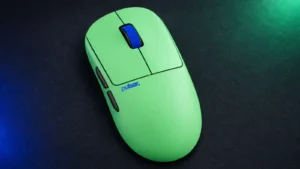
Distinctive color options stand out, and lighter finishes hide grime better.
McHose L7 UltraNo score yet
Connectivity versatility
Pulsar X2 CrazyLightNo score yet
McHose L7 Ultra
5.0
Bluetooth, 2.4 GHz and wired options offer flexibility for gaming and everyday work.
Dust resistance
Pulsar X2 CrazyLight
2.0
The open underside exposes internals and battery adhesive to dust and debris.
McHose L7 UltraNo score yet
Ecosystem integration
Pulsar X2 CrazyLightNo score yet
McHose L7 Ultra
2.0
The software ecosystem and support maturity lag those of established peripheral brands.
Fingerprint and smudge resistance
Pulsar X2 CrazyLight
2.0
The grippy coating readily attracts oils and grime, especially on darker finishes.
McHose L7 UltraNo score yet
Free-spin scrolling
Pulsar X2 CrazyLightNo score yet
McHose L7 Ultra
2.0
There is no free-spin mode, making lengthy office scrolling less convenient.
Gaming suitability
Pulsar X2 CrazyLight
4.7
This is an excellent gaming mouse for players who prioritize light, quick movement and a compact grip.
McHose L7 UltraNo score yet
High polling system overhead
Pulsar X2 CrazyLightNo score yet
McHose L7 Ultra
3.0
Maximum polling can increase system workload and battery consumption, making lower rates more practical on some setups.
Included grip tape quality
Pulsar X2 CrazyLightNo score yet
McHose L7 Ultra
4.7
The included grip tape adds traction and is a welcome extra for fingertip or claw grip.
Learning curve
Pulsar X2 CrazyLight
4.0
Adapting to the shape can be quick, but players coming from much heavier mice may need time to adjust their aim.
McHose L7 UltraNo score yet
Lift-off distance
Pulsar X2 CrazyLightNo score yet
McHose L7 Ultra
3.0
The 0.7 mm lift-off setting offers little noticeable advantage over the higher setting for some players.
MMO gaming suitability
Pulsar X2 CrazyLightNo score yet
McHose L7 Ultra
2.0
Two side buttons limit suitability for MMO games requiring many bindings.
MOBA gaming suitability
Pulsar X2 CrazyLightNo score yet
McHose L7 Ultra
3.0
Remapping and macros help with MOBA play, but the two side buttons limit available shortcuts.
Packaging quality and presentation
Pulsar X2 CrazyLightNo score yet
McHose L7 Ultra
5.0
The packaging feels sturdy and neatly presented.
Portability
Pulsar X2 CrazyLightNo score yet
McHose L7 Ultra
5.0
Bluetooth and USB-C make this a convenient secondary or travel mouse.
Repairability
Pulsar X2 CrazyLight
4.0
Opening the mouse for maintenance is fairly straightforward, although complete disassembly is more restricted than on earlier models.
McHose L7 UltraNo score yet
Retail availability
Pulsar X2 CrazyLightNo score yet
McHose L7 Ultra
3.0
The model has returned to production after interruptions, but stock history is not entirely stable.
Scroll wheel grip texture
Pulsar X2 CrazyLight
3.0
The revised dotted wheel surface provides adequate grip for some players, but others prefer the more rounded texture of earlier models.
McHose L7 UltraNo score yet
Scroll wheel precision
Pulsar X2 CrazyLight
4.5
Scroll steps provide enough definition to control movement and avoid unwanted scrolling during middle clicks.
McHose L7 UltraNo score yet
Scroll wheel usefulness in games
Pulsar X2 CrazyLight
4.0
The wheel feels safe and comfortable during gaming, with little risk of unwanted scroll inputs.
McHose L7 UltraNo score yet
Sensor angle adjustment
Pulsar X2 CrazyLight
2.0
Sensor rotation adjustment is missing, a drawback for players with angled grips.
McHose L7 UltraNo score yet
Switch quality
Pulsar X2 CrazyLight
4.5
The optical switches are a marked improvement over previous Pulsar implementations and feel excellent in games.
McHose L7 UltraNo score yet
Wireless latency
Pulsar X2 CrazyLightNo score yet
McHose L7 Ultra
4.3
Low-latency wireless response is a strength, with one isolated report of unusual latency in a crowded setup.
Wrist and forearm strain relief
Pulsar X2 CrazyLightNo score yet
McHose L7 Ultra
5.0
One player found the lightweight mouse comfortable without wrist discomfort.
Controls and connectivity
Accidental button activation
Pulsar X2 CrazyLight
3.5
Light clicks can avoid accidental presses, but too-low debounce may cause false inputs.
McHose L7 UltraNo score yet
Bluetooth support
Pulsar X2 CrazyLightNo score yet
McHose L7 Ultra
3.5
Bluetooth adds casual-use flexibility, although the 2.4 GHz receiver is preferable for competitive play.
Button count
Pulsar X2 CrazyLightNo score yet
McHose L7 Ultra
3.0
Two side buttons suffice for basic gaming and navigation, but not for extensive MMO bindings.
Button customization
Pulsar X2 CrazyLightNo score yet
McHose L7 Ultra
4.0
Button remapping adds flexibility for gaming and general work.
DPI customization
Pulsar X2 CrazyLight
4.0
Fine DPI increments give players useful control over sensitivity.
McHose L7 UltraNo score yet
Physical controls
Pulsar X2 CrazyLight
4.0
Simplified underside controls help shave weight without eliminating necessary adjustments.
McHose L7 UltraNo score yet
Polling rate customization
Pulsar X2 CrazyLightNo score yet
McHose L7 Ultra
4.0
Adjustable polling settings allow a practical balance between speed and battery use.
Battery and charging
Battery indicator
Pulsar X2 CrazyLight
2.0
The displayed battery percentage can fluctuate unexpectedly, making the remaining charge less trustworthy.
McHose L7 UltraNo score yet
Comfort and build
Chassis height comfort
Pulsar X2 CrazyLightNo score yet
McHose L7 Ultra
5.0
Low button height supports fingertip micro-adjustments and precise aim.
Durability over time
Pulsar X2 CrazyLight
4.0
The first month of ownership was trouble-free.
McHose L7 UltraNo score yet
Ergonomic design
Pulsar X2 CrazyLight
4.0
The compact shape feels comfortable when matched to the right hand size and grip.
McHose L7 UltraNo score yet
Long-session comfort
Pulsar X2 CrazyLight
5.0
The ultralight design helps reduce the effort of repeatedly moving the mouse during longer gaming sessions.
McHose L7 UltraNo score yet
Size
Pulsar X2 CrazyLight
3.0
The small size is excellent for fingertip movement but restrictive for users who need more palm support.
McHose L7 UltraNo score yet
Switch durability
Pulsar X2 CrazyLightNo score yet
McHose L7 Ultra
4.3
Optical actuation offers a durability advantage over conventional mechanical contacts, although actual lifespan is not established.
Performance
Cleaning ease
Pulsar X2 CrazyLight
4.0
Surface grime can be removed easily with a microfiber cloth.
McHose L7 UltraNo score yet
Click noise
Pulsar X2 CrazyLight
4.0
Click sound is generally pleasant, with occasional metallic ping from one button.
McHose L7 UltraNo score yet
Productivity performance
Pulsar X2 CrazyLightNo score yet
McHose L7 Ultra
2.5
General work is possible, but the lack of free scrolling and tilt inputs reduces office versatility.
Scroll wheel noise
Pulsar X2 CrazyLightNo score yet
McHose L7 Ultra
3.5
The wheel can sound slightly louder, although its tactile feedback and reliability help offset that.
Ownership and support
Double-click reliability
Pulsar X2 CrazyLightNo score yet
McHose L7 Ultra
4.0
Optical main switches avoid traditional mechanical contact chatter, though this does not guarantee every button will remain trouble-free.
Drag click support
Pulsar X2 CrazyLight
5.0
Drag clicking is easy on the grippy shell.
McHose L7 UltraNo score yet
Macro support
Pulsar X2 CrazyLightNo score yet
McHose L7 Ultra
4.0
Macros help make the limited button layout more useful for MMO and MOBA play.
Tilt wheel support
Pulsar X2 CrazyLightNo score yet
McHose L7 Ultra
2.0
The wheel lacks left-right tilt, limiting productivity shortcuts.
Warranty
Pulsar X2 CrazyLightNo score yet
McHose L7 Ultra
2.0
The one-year warranty is less reassuring than protection from pricier established brands.