Average score
Logitech G502 X Lightspeed
4.2
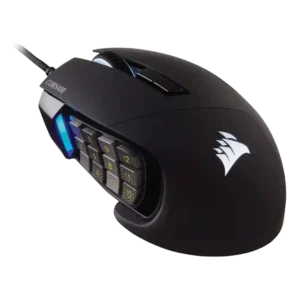
Corsair Scimitar RGB Elite Wired
3.9
switch durability
Logitech G502 X Lightspeed
4.4
Switch durability was viewed favorably because the hybrid/optical design was expected to reduce double-click wear and mechanical wear over time.
Corsair Scimitar RGB Elite Wired
2.0
Switch durability evidence was limited and negative from long-term use, where buttons reportedly became soft over time.
fingertip grip comfort
Logitech G502 X Lightspeed
4.5
Fingertip grip comfort had limited but positive evidence, with one reviewer saying fingertip grip felt good.
Corsair Scimitar RGB Elite Wired
2.3
Fingertip grip comfort was weak, with reviewers saying the weight and side keypad made fingertip use fatiguing or awkward.
tilt gesture controls
Logitech G502 X Lightspeed
4.0
Tilt gesture controls had limited but positive evidence as extra left-right scroll-wheel actions and keybind functionality.
Corsair Scimitar RGB Elite Wired
2.0
Tilt controls were a noted limitation in one review, which said the absence of tilt scroll could be a deal breaker for editing use.
software stability
Logitech G502 X Lightspeed
1.5
Software stability had a clear negative data point when one reviewer reassigned a button and the game profile went haywire.
Corsair Scimitar RGB Elite Wired
3.4
Software stability was mixed: some reviewers called iCUE stable and reliable, while others reported hassle, crashes, or frustrations.
durability over time
Logitech G502 X Lightspeed
5.0
Durability over time had limited but positive evidence from drop testing that found no damage or issues.
Corsair Scimitar RGB Elite Wired
3.2
Durability evidence was mixed: short-term build and feet impressions were positive, but long-term reviews reported scroll-button and button-softening issues.
acceleration control
Logitech G502 X Lightspeed
5.0
Acceleration control was praised where tested, with multiple reviewers emphasizing zero acceleration, smoothing, or filtering issues.
Corsair Scimitar RGB Elite Wired
3.5
Acceleration evidence was limited but positive: one reviewer found sensor acceleration behavior within an acceptable range during testing.
premium feel
Logitech G502 X Lightspeed
2.5
Premium feel had limited negative evidence, with one reviewer expecting more from a premium-priced mouse.
Corsair Scimitar RGB Elite Wired
3.8
Premium feel was positive overall, though one reviewer felt some cheaper-looking areas held it back.
FPS gaming suitability
Logitech G502 X Lightspeed
3.7
FPS suitability was polarized: reviewers praised accuracy, latency, and control, but some said weight and crowded buttons make it weaker for esports or FPS specialists.
Corsair Scimitar RGB Elite Wired
2.5
FPS suitability was mixed-to-negative: several reviewers found it usable, but most said weight, width, and side buttons make it poorly suited to competitive shooters.
onboard memory
Logitech G502 X Lightspeed
4.8
Onboard memory was considered useful for tournaments, LAN parties, and moving settings between computers.
Corsair Scimitar RGB Elite Wired
3.7
Onboard memory was useful but mixed: reviewers liked storing settings, while one found three profiles low for such a configurable mouse.
ergonomic design
Logitech G502 X Lightspeed
4.9
Ergonomic design was praised for comfort, long-use fit, and no hand fatigue in the reviews that focused on it.
Corsair Scimitar RGB Elite Wired
3.8
Ergonomics were mostly praised for the right-hand palm-oriented shape, though one long-term reviewer found it imperfect.
claw grip comfort
Logitech G502 X Lightspeed
4.5
Claw grip comfort had limited but positive evidence, with one reviewer saying claw grip felt good.
Corsair Scimitar RGB Elite Wired
3.5
Claw grip comfort was context-dependent, working well for some larger-hand reviewers but feeling compromised or secondary to palm grip for others.
polling rate
Logitech G502 X Lightspeed
3.5
The 1000Hz polling rate was considered usable for most players, but one reviewer said it is beginning to trail newer high-polling competitors.
Corsair Scimitar RGB Elite Wired
4.5
Polling-rate evidence was positive, with reviewers calling 1,000Hz responsive and suitable for gaming.
value for money
Logitech G502 X Lightspeed
3.3
Value for money was mixed: reviewers liked the feature load and sale pricing, but several called it pricey, worse at MSRP, or not worth $140.
Corsair Scimitar RGB Elite Wired
4.0
Value was context-dependent: reviewers liked the price for MMO users, but questioned the upgrade value and cost if the side buttons go unused.
click noise
Logitech G502 X Lightspeed
3.3
Click noise was mixed, with one reviewer criticizing cheap, echoey clicks and another praising the click sound.
Corsair Scimitar RGB Elite Wired
4.0
Click and scroll noise evidence was limited but positive, with one reviewer specifically calling the scroll wheel quiet.
build quality
Logitech G502 X Lightspeed
4.0
Build quality was split: some reviewers called it robust or sturdy, while others criticized loose buttons or a plasticky feel.
Corsair Scimitar RGB Elite Wired
4.7
Build quality was one of the strongest themes, with reviewers describing the mouse as solid, sturdy, reinforced, and well finished.
cable flexibility
Logitech G502 X Lightspeed
3.9
Cable flexibility was acceptable rather than standout, with one reviewer finding it soft and supple and another praising cable texture.
Corsair Scimitar RGB Elite Wired
3.2
Cable impressions were mixed: some reviewers found it flexible and unobtrusive, while others criticized the braided cable as stiff or impeding.
weight
Logitech G502 X Lightspeed
3.3
Weight drew mixed reactions: some reviewers liked the heft or found it reasonable, while others called it too heavy for ultralight or FPS-focused preferences.
Corsair Scimitar RGB Elite Wired
2.6
Weight was frequently criticized as heavy or sluggish, though a few reviewers found it acceptable for MMO play.
RGB features
Logitech G502 X Lightspeed
3.5
RGB opinions were limited and mixed: the base Lightspeed skips RGB, which one reviewer did not mind for weight and battery, while the Plus lighting looked good but was often covered.
Corsair Scimitar RGB Elite Wired
4.1
RGB was generally liked as customizable, crisp, and tasteful, though lighting control was not always best-in-class.
glide smoothness
Logitech G502 X Lightspeed
4.4
Glide smoothness was generally positive across desks and mousepads, although one reviewer found the stock skates merely fine compared with premium skates.
Corsair Scimitar RGB Elite Wired
3.9
Glide was generally smooth, with some reviewers praising easy movement and others finding the stock feet merely standard or in need of improvement.
click latency
Logitech G502 X Lightspeed
5.0
Click latency was praised, with reviewers describing instant click registration and excellent click-and-movement latency.
Corsair Scimitar RGB Elite Wired
4.5
Click latency evidence was positive, with reviewers reporting no noticeable latency and latency similar to a comparison mouse.
motion consistency
Logitech G502 X Lightspeed
5.0
Motion consistency scored strongly because reviewers reported no jitter, no phantom movement, and no acceleration-related issues.
Corsair Scimitar RGB Elite Wired
4.5
Motion consistency was praised in the clearest test, with no unpredictable movements despite the large body.
profile switching
Logitech G502 X Lightspeed
5.0
Profile switching was praised as easy when moving between onboard and software profiles.
Corsair Scimitar RGB Elite Wired
4.5
Profile switching was praised where evaluated, especially for swapping game/app configurations and DPI/profile setups.
sensor performance
Logitech G502 X Lightspeed
5.0
Sensor performance was a consistent strength, with reviewers citing strong Logitech sensors, no jitter or acceleration, 1:1 tracking, and efficient Hero 25K behavior.
Corsair Scimitar RGB Elite Wired
4.5
Sensor performance was strongly praised across reviews, with comments about flawless behavior, strong responsiveness, and excellent tracking.
side button quality
Logitech G502 X Lightspeed
3.1
Side button quality was mixed: reviewers liked the improved/swappable sniper-style button, but several struggled with reach or accidental fat-fingering.
Corsair Scimitar RGB Elite Wired
3.6
Side button quality was the most divided core feature: reviewers liked texture and tactility, but some struggled with crowding, reach, or accidental presses.
macro support
Logitech G502 X Lightspeed
4.8
Macro support was praised in the reviews that tested it, especially for program-specific macros and drag-and-drop command assignment.
Corsair Scimitar RGB Elite Wired
4.4
Macro support was a major strength, especially for MMO/MOBA hotkeys, though one older review noted software macro limitations.
switch feel
Logitech G502 X Lightspeed
4.3
Switch feel was mostly positive for crispness, bounce, and fast actuation, but one reviewer found the feel hard to distinguish and another wanted a clickier, more tactile press.
Corsair Scimitar RGB Elite Wired
4.0
Switch feel was mostly positive for click resistance and tactile feel, though one FPS-focused reviewer wanted snappier clicks.
left and right click quality
Logitech G502 X Lightspeed
4.2
Main left and right click quality was generally positive, with rapid clicking and spring-tension precision outweighing the slightly heavier press.
Corsair Scimitar RGB Elite Wired
4.5
Left and right click quality evidence was limited but positive, with reviewers finding the main clicks smooth and non-janky.
materials quality
Logitech G502 X Lightspeed
3.7
Materials quality was mixed, with praise for soft-touch and matte finishes balanced by complaints about glossy grease pickup and plastic feel.
Corsair Scimitar RGB Elite Wired
4.0
Materials were often described as premium and sturdy, but soft-touch coating and glossy surfaces raised wear and fingerprint concerns.
shape comfort
Logitech G502 X Lightspeed
4.5
Shape comfort was broadly positive, especially for larger hands and thumb support, though a few reviewers noted shape, reach, or weight caveats.
Corsair Scimitar RGB Elite Wired
4.1
Shape comfort was mostly positive for medium-to-large right hands, but some reviewers found the width or hand fit odd.
software usability
Logitech G502 X Lightspeed
3.4
Software usability was mixed: G Hub enables useful tuning, profiles, macros, and battery estimates, but reviewers also found it bad, buried, unavailable, or limiting.
Corsair Scimitar RGB Elite Wired
3.7
Software usability was split between deep, powerful customization and complaints that iCUE is clunky, required, or unintuitive.
long-session comfort
Logitech G502 X Lightspeed
5.0
Long-session comfort was strongly positive in the one review that explicitly covered extended use without fatigue or discomfort.
Corsair Scimitar RGB Elite Wired
4.8
Long-session comfort was a standout for palm users, with reviewers reporting comfortable long matches and no hand fatigue.
MOBA gaming suitability
Logitech G502 X Lightspeed
4.5
MOBA gaming suitability had limited positive evidence, with one reviewer saying MOBA players should not have trouble.
Corsair Scimitar RGB Elite Wired
4.8
MOBA suitability was also strong, with reviewers praising the button-heavy layout for Dota-style ability access and macro-heavy games.
programmable buttons
Logitech G502 X Lightspeed
4.5
Programmable buttons were one of the clearest strengths for control, MMO use, and keyboard relief, though one reviewer felt the 13-button setup was excessive.
Corsair Scimitar RGB Elite Wired
4.7
Programmable buttons were repeatedly praised as the main attraction, giving deep control for games and productivity.
Accuracy and tracking precision
Logitech G502 X Lightspeed
4.9
Reviewers praised precise tracking for aiming and movement, describing exact hand tracking, pin-point aim control, and accurate movement at both fast and slow speeds.
Corsair Scimitar RGB Elite Wired
4.7
Reviewers consistently praised tracking precision, smooth aiming, and lack of lag or consistency concerns across gaming tests.
MMO gaming suitability
Logitech G502 X Lightspeed
4.9
MMO gaming suitability was a clear strength because reviewers repeatedly praised the many programmable buttons for MMO-style skill assignments.
Corsair Scimitar RGB Elite Wired
4.7
MMO suitability was the product's clearest strength; reviewers repeatedly called it excellent, advantageous, or among the best for MMO play.
scroll wheel quality
Logitech G502 X Lightspeed
3.5
Scroll wheel quality was sharply mixed: free-scroll and dual-mode behavior were praised, while ratcheted feel, sound, and cheap-feeling actuation drew repeated complaints.
Corsair Scimitar RGB Elite Wired
3.7
Scroll wheel quality was mixed: some praised its texture and smoothness, while others found it average, noisy, stiff, or prone to failure.
DPI range
Logitech G502 X Lightspeed
4.1
DPI control was viewed as flexible and easy to tune, though one reviewer noted the full 25K-style range is more than most users would ever maximize.
Corsair Scimitar RGB Elite Wired
4.3
Reviewers viewed the high DPI range and sensitivity options as impressive, though not always practically necessary.
ecosystem integration
Logitech G502 X Lightspeed
4.2
Ecosystem integration was positive, especially one-receiver pairing, Logitech-device syncing, and reduced cable or USB clutter.
Corsair Scimitar RGB Elite Wired
4.0
Ecosystem evidence was limited but positive, centered on iCUE syncing the mouse with other Corsair parts.
button customization
Logitech G502 X Lightspeed
4.4
Button customization was strong across reviews thanks to removable, swappable, remappable, and software-assignable controls.
Corsair Scimitar RGB Elite Wired
4.6
The sliding keypad and customization options were repeatedly praised for adapting the 12-button grid to different hands and workflows.
surface compatibility
Logitech G502 X Lightspeed
3.9
Surface compatibility was adequate to good, with reviewers saying it worked alright on desks and felt better or incredible on mousepads.
Corsair Scimitar RGB Elite Wired
4.0
Surface compatibility evidence was positive where mentioned, especially through iCUE surface calibration and added precision.
button responsiveness
Logitech G502 X Lightspeed
4.9
Button responsiveness was a major positive, with reliable registration, light actuation, fast optical behavior, and precise control.
Corsair Scimitar RGB Elite Wired
5.0
Button responsiveness was strongly positive where tested, especially for the mechanical side buttons in game use.
grip texture
Logitech G502 X Lightspeed
4.4
Grip texture was received positively, with textured sides, grippy lines, and rubberized/coated areas helping hand control.
Corsair Scimitar RGB Elite Wired
4.4
Grip texture was widely liked, especially the rubberized right-side rest and textured side-button rows that improved hold and navigation.
palm grip comfort
Logitech G502 X Lightspeed
4.4
Palm grip comfort was generally strong, with reviewers calling it comfortable or ideal, but reach issues appeared for certain hand sizes.
Corsair Scimitar RGB Elite Wired
4.4
Palm grip comfort was consistently strong, with the shape, ring-finger rest, and wide body suiting palm users particularly well.
2.4GHz connectivity
Logitech G502 X Lightspeed
4.9
2.4GHz connectivity was rated highly where discussed, with reviewers describing the Lightspeed connection as solid, fast, and wired-like.
Corsair Scimitar RGB Elite WiredNo score yet
balance and weight distribution
Logitech G502 X LightspeedNo score yet
Corsair Scimitar RGB Elite Wired
4.3
Balance was praised as centered and predictable despite the mouse's asymmetric MMO shape and heavy body.
battery life
Logitech G502 X Lightspeed
4.8
Battery life was one of the strongest consensus positives, repeatedly matching or exceeding expectations and allowing long use between charges.
Corsair Scimitar RGB Elite WiredNo score yet
charging convenience
Logitech G502 X Lightspeed
4.8
Charging convenience was praised for USB-C, PowerPlay-style charging support, and not needing to think much about recharging.
Corsair Scimitar RGB Elite WiredNo score yet
connection stability
Logitech G502 X Lightspeed
5.0
Connection stability was strong, with reviewers reporting no dropped connections and no issues in their testing.
Corsair Scimitar RGB Elite WiredNo score yet
cross-platform compatibility
Logitech G502 X Lightspeed
1.5
Cross-platform compatibility had a notable Mac issue, with one reviewer unable to get a MacBook Air M1 to detect the mouse.
Corsair Scimitar RGB Elite WiredNo score yet
handedness options
Logitech G502 X LightspeedNo score yet
Corsair Scimitar RGB Elite Wired
1.5
Handedness was consistently negative for left-handed users because the design is right-hand only.
lift-off distance
Logitech G502 X LightspeedNo score yet
Corsair Scimitar RGB Elite Wired
4.3
Lift-off distance was praised where tested, with one reviewer calling it impressive and another saying it was good enough for MMO use.
portability
Logitech G502 X Lightspeed
4.3
Portability was helped by the dongle storage compartment, which reviewers liked for transport and avoiding lost receivers.
Corsair Scimitar RGB Elite WiredNo score yet
skate durability
Logitech G502 X LightspeedNo score yet
Corsair Scimitar RGB Elite Wired
4.5
Skate durability evidence was limited but positive, with one reviewer seeing no discernible wear after weeks of use.
weight tuning
Logitech G502 X LightspeedNo score yet
Corsair Scimitar RGB Elite Wired
2.0
Weight tuning was a clear weakness where mentioned, with reviewers wishing the Scimitar offered adjustable weight.
wireless latency
Logitech G502 X Lightspeed
5.0
Wireless latency was a clear strength, with reviewers reporting no spikes, no lag, and no practical difference from wired use.
Corsair Scimitar RGB Elite WiredNo score yet
wireless performance
Logitech G502 X Lightspeed
5.0
Wireless performance was praised as instant, lag-free, and convincing enough to feel wired-like in use.
Corsair Scimitar RGB Elite WiredNo score yet