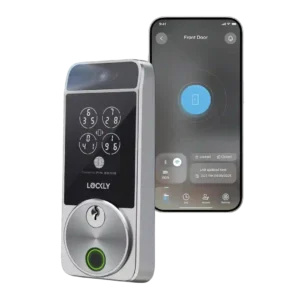
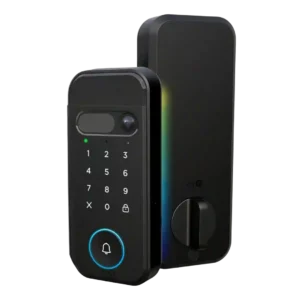
Lockly Visage Zeno Series Smart Lock
Where It Has the Edge
- Value and Price is 3.8 vs 3.3. Value opinions were context-dependent: reviewers saw strong feature value, but the high price, missing video, and battery caveats...

Scorata scores summarize analyzed review evidence on a 1–5 scale; they are not laboratory measurements or a simple average of customer star ratings. Feature scores summarize the reviews covering that feature. The overall score averages feature scores within each review, then combines review averages. When both expert and customer evidence are available, those two groups receive equal weight. Products can have different review coverage, so small score gaps do not establish a winner.
Recommendations prioritize important features for the category, with a score of at least 3.5, a gap of at least 0.25 points and at least two supporting reviews per product. Features with widely varying scores or broad connectivity contexts are excluded from recommendations. These safeguards do not establish statistical significance.
Quick verdict
The review evidence points to a tradeoff: Value and Price versus Camera and doorbell performance and Industrial design. Choose according to which strengths matter more to you; the overall score alone does not settle that choice.
Choose Lockly Visage Zeno Series Smart Lock for Value and Price.
Choose myQ Secure View 3-in-1 Smart Lock for Camera and doorbell performance and Industrial design.
Scores are out of 5. Missing scores mean missing review evidence, not a missing feature.
Camera and doorbell feedback was mostly about absence: reviewers liked the lock but wished the price included video surveillance, package awareness, or doorbell-style features.
Camera and doorbell evidence was positive, with praise for clear visitor video, a wide-angle view, and the integrated 2K camera-doorbell design.
Smart-home integration was broadly praised, especially Apple HomeKit/Home Key and Alexa routines, though one reviewer noted Matter and Thread were absent.
Integration evidence was split: myQ ecosystem control was praised, but multiple reviews criticized or warned about limited popular smart-home platform support.
Touchscreen evidence was limited but positive, with PCMag reporting touchpad entries were processed immediately.
The touch-sensitive keypad divided preference, with one reviewer noting some people may prefer physical buttons instead.
The app drew mixed reactions: reviewers liked the newer interface or slick setup tools, but several found it undercooked, confusing, or only mostly reliable.
The app setup experience was praised as simple, with phone control presented as easy to use.
Notifications worked, but reviewers could find them excessive when both lock and smart-home platforms sent alerts.
Notification evidence was mixed: one review praised context-aware alerts, while another noted unsubscribed alerts lacked detection details.
Reviewers split on the design: one called it Lockly's least attractive smart lock, another saw the newer design as more attractive, and a video reviewer still found it not especially attractive.
The lock’s integrated design was praised for reducing separate-device clutter and for looking slick and well designed.
Build quality was generally praised as sturdy, sleek, and more substantial than some alternatives.
Reviewers praised the physical construction, describing the lock as a great quality product and super well built.
Door-sense was the most consistent hardware complaint: it worked accurately for some reviewers, but many disliked the exposed wired sensor or complicated sensor alternatives.
Door-sense worked in the reviewer’s test, with the app state updating once the door closed.
Motor feedback was mixed: one reviewer praised the quieter operation, while another said the deadbolt mechanism was not as smooth as a cheaper alternative.
The interior locking action received strong praise from a reviewer who described it as super smooth.
Remote access was divided, with quick on-demand actions in one review and Wi-Fi inaccessibility in another.
Remote access was praised for letting someone enter without needing a physical key handoff.
Fingerprint performance was mostly strong, but not universal: several reviewers found it fast and accurate, while others disliked placement or had hit-and-miss scans.
Fingerprint access performed well in hands-on testing, with the reviewer saying the biometrics worked completely.
Access-log evidence was limited but positive, with one reviewer valuing real-time lock-activity monitoring.
Access-log evidence was limited but positive, with one reviewer noting individual pins can show who opened the door.
Deadbolt fit was mostly manageable as a direct swap, but reviewers warned that the door and bolt need to move smoothly or the lock may struggle to auto-lock.
Door-fit evidence was limited but positive: one reviewer’s older steel door prep worked with the included jig and deadbolt drilling guidance.
Guest access was useful for family or visitors, with reviewers praising custom codes, iCloud sharing, and easier guest entry.
Guest access was praised for service or pet-care scenarios where the owner could let someone in without sharing a key.
Lock and unlock speed was a major strength, especially facial recognition, with reviewers repeatedly describing access as nearly instant, quick, or within seconds.
Speed was a standout: one article cited two-second unlock latency, while a hands-on reviewer found face recognition extremely fast.
The keypad was viewed as secure thanks to PIN Genie, though reviewers also said it can slow entry or make code entry less convenient.
Keypad evidence was mixed: one reviewer preferred physical buttons, while another confirmed the pin code worked.
Security evidence was strong for anti-spoofing and privacy, with reviewers unable to fool face unlock using photos and one citing encryption as a strength.
Security handling for face scans was praised because the reviewer said scans stay on the device rather than going to the cloud.
Auto-lock worked well in favorable installs, but one reviewer warned it becomes unreliable when the deadbolt does not slide smoothly.
Auto-lock support was viewed as useful and configurable, though the evidence centers on one reviewer’s setup experience.
Facial recognition was the clearest consensus win, with reviewers repeatedly describing it as fast, accurate, reliable, and difficult to fool.
Facial recognition drew some of the strongest praise, with reviewers calling it cool, incredible, and very fast.
User access management was generally strong after app updates, but initial user setup could be confusing.
User access management was described as easy for users, PIN codes, and alerts.
Installation was usually described as easy, painless, or straightforward, but several reviewers noted setup pain from cabling, Bluetooth timing, or deadbolt alignment.
Hands-on reviewers generally found installation approachable, praising complete hardware, easy installation, clear directions, and a smooth process, with one longer install still going fairly smoothly.
Value opinions were context-dependent: reviewers saw strong feature value, but the high price, missing video, and battery caveats kept it from being an easy buy for everyone.
Value depends heavily on use case: reviewers praised the feature bundle and recommendations, but flagged overkill, subscriptions, and fee concerns.
Overall locking reliability was one of the strongest themes, with reviewers saying the lock worked perfectly, performed well, or kept working every time.
A hands-on reviewer tested multiple unlock methods and found them working successfully.
The physical keys were a reliable backup in the reviews that discussed them, with one saying they were easy to use and another saying they turned smoothly.
The hidden key backup was viewed positively, and another reviewer liked that the lock still had multiple fallback options.
Battery impressions were split between praise for the two rechargeable packs and complaints about short life under always-on scanning or default settings.
Battery impressions were mixed: reviewers liked the rechargeable pack, but one noted a long initial charge time.
Bluetooth feedback was mixed, with complaints about short setup windows and Bluetooth 4.2 alongside one Apple Home user finding response times surprisingly good.
Voice control worked well in the reviews that tested it, with PCMag and Tom's Guide reporting responsive or snappy results.
Wi-Fi was a recurring caveat, including failed syncing, 2.4GHz-only support, spotty remote access, and battery-drain tradeoffs.
Feature-update evidence was limited to ZDNET, which said app updates improved user management and usability.
Review evidence for hub requirement was positive: TechRadar specifically liked not needing a separate hub.
Keyway quality evidence was limited to one reviewer who said rekeying was possible but harder and more time-consuming than expected.
Weather protection was praised through the exterior gasket, which a reviewer said sealed well to keep moisture out.
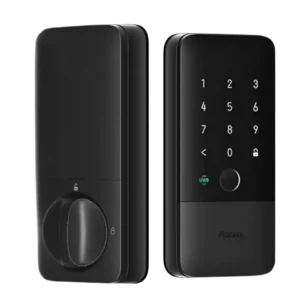
Choose the Aqara U400 if you want hands-free UWB unlocking, strong Apple Home integration, and many backup entry methods. Skip it if you dislike bulky smart-lock hardware or need a...
Pros: Battery, Smart-home integration (Alexa, Google, Siri, HomeKit, Matter, Thread)
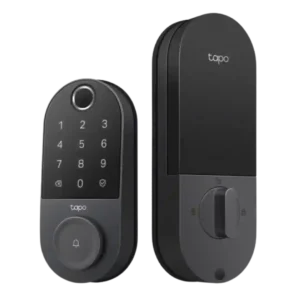
Choose the Tapo DL110 if you want fast fingerprint entry, strong app control, long battery life, and premium features under a lower price. Skip it if your door/strike alignment is...
Pros: App, Guest Codes and Access
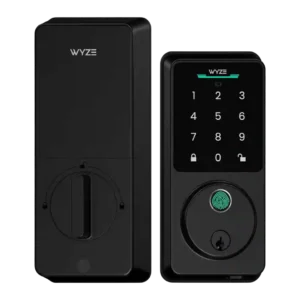
Choose the Wyze Lock Bolt v2 for low-cost Wi-Fi, fast fingerprint entry, and flexible codes. Skip it if you need Matter/HomeKit support, rechargeable batteries, or stronger door-sense behavior.
Pros: Fingerprint, Value and Price
Cons: Smart-home integration (Alexa, Google, Siri, HomeKit, Matter, Thread)
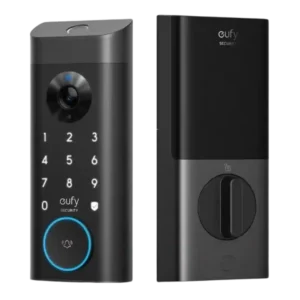
Good if you want one polished lock, camera, and doorbell with excellent fingerprint access. Skip it if short battery life, screen/storm doors, or a narrow camera view would frustrate you.
Pros: Camera and doorbell performance, Installation and Setup
Cons: Keyway quality, Door compatibility (deadbolt fit)