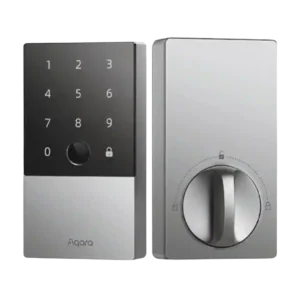
Aqara Smart Lock U100
Where It Has the Edge
No clear scored advantage over the other product.

Scorata scores summarize analyzed review evidence on a 1–5 scale; they are not laboratory measurements or a simple average of customer star ratings. Feature scores summarize the reviews covering that feature. The overall score averages feature scores within each review, then combines review averages. When both expert and customer evidence are available, those two groups receive equal weight. Products can have different review coverage, so small score gaps do not establish a winner.
Recommendations prioritize important features for the category, with a score of at least 3.5, a gap of at least 0.25 points and at least two supporting reviews per product. Features with widely varying scores or broad connectivity contexts are excluded from recommendations. These safeguards do not establish statistical significance.
Quick verdict
The available evidence supports the recommendation below, but does not establish an overall winner. Check the remaining features against your priorities.
There is not enough comparable review evidence to recommend Aqara Smart Lock U100 over the other product.
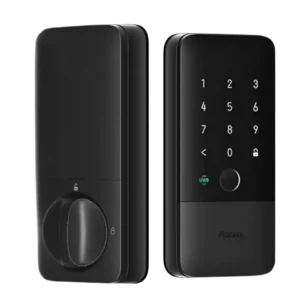
Choose Aqara UWB Smart Lock U400 for Remote access and Hub requirement.
No clear scored advantage over the other product.
Scores are out of 5. Missing scores mean missing review evidence, not a missing feature.
Keyway quality was the clearest mechanical weak spot because multiple reviewers found re-keying difficult or effectively not practical.
The keyway/cylinder was viewed positively because the reviewer liked that it could be rekeyed rather than forcing a full lock replacement.
Firmware updates were a tradeoff: one long-term reviewer said they improved performance, while another found the update process frustrating.
Feature-update evidence was limited but positive, with one reviewer saying Aqara is good about firmware updates.
Auto-lock evidence was mixed, ranging from flawless or cool performance to beta-feature delays and at least one lockout caused by latch behavior.
Auto-lock was broadly praised and often described as reliable or well implemented, though one reviewer found Aqara app close-detection sometimes delayed.
Remote access worked best with an Aqara hub or Apple home hub, but reviewers noted important limitations when controlling settings away from the lock.
Remote access was useful when configured, with one reviewer praising fast remote unlock and another noting Aqara-app remote control needs an Aqara hub.
Fit was strongest on standard deadbolt doors; reviewers praised a perfect fit in one install but warned that other lock types or unusual deadbolts can complicate replacement.
Door fit flexibility was helped by adapters/cross-bore support, with reviewers calling the physical fit detail useful for nonstandard openings.
Hub requirements were the biggest ecosystem tradeoff: some saw the bundled hub as a no-brainer, while others disliked needing extra hardware for remote and Matter features.
Hub requirements were mixed: reviewers liked avoiding an Aqara hub in Apple Home, but still emphasized the need for a Thread border router for full functionality.
Physical attack evidence was limited, but one reviewer framed the lock’s lowest BHMA grade as still providing meaningful durability.
Physical attack resistance drew a caveat: the reviewer appreciated certification but clearly wished the U400 had a stronger Grade 2 rating instead of Grade 3.
Guest access was useful for one-time, temporary, and shared passcodes, but several reviewers wanted more flexible schedules or noted user/password limits.
Guest access was praised through Home app PIN management and temporary/neighbor-style access options.
Door-sense was useful and often praised, though one reviewer estimated it at about 80% accuracy and used an extra contact sensor for certainty.
Door-sense evidence was limited but positive, centered on the built-in gyroscope knowing when the door closes so it can lock without an added sensor.
Security features drew positive comments around AES encryption and local fingerprint storage.
Security features were praised around UWB precision, encryption-related safeguards, and prevention of unintended inside unlocks or relay-style weaknesses.
Weather resistance drew positive comments, including confidence in outdoor exposure and one reviewer reporting no issue during freezing conditions.
Weather resistance came across well: reviewers said it could face the elements, and one real-world test cited rain, snow, ice, and no missed performance.
The keypad was generally well liked for responsiveness, readability, and satisfying operation, with minor complaints about extra confirmation steps or fingerprint wear concerns.
The keypad was generally usable and responsive, but reviewers also found that it could take extra taps or touches to wake in some cases.
One reviewer reused an existing strike plate successfully, suggesting some prior hardware can work when the bolt alignment is already right.
One reviewer valued that the lock could mount without the kind of door drilling required by the previous lock, making the install feel friendlier to existing doors.
Fingerprint unlocking was the strongest area of agreement, with reviewers repeatedly calling it fast, accurate, reliable, and often their preferred method.
Fingerprint access was consistently praised as quick, accurate, consistent, or convenient, especially as a backup when UWB is unavailable.
Locking and unlocking were repeatedly described as quick, especially through Siri, Home Key, and the fast motorized action.
Lock/unlock speed was one of the strongest themes, especially with UWB; reviewers described fast reactions, instant Home app response, and few delay caveats.
User access management was usually praised for clear controls, remote management, and multiple user types, despite app and code-management caveats.
User access management was positively reviewed for adequate household limits, more granular Aqara controls, and approachable local fingerprint setup.
Bluetooth performance was acceptable to strong in short-range use, with minimal latency and stable connections reported despite general reservations about Bluetooth smart-home devices.
Bluetooth-only use was judged weak for this lock because reviewers saw the U400's main value in Thread/UWB rather than basic Bluetooth operation.
The touch surface was praised for feel, visibility, and brightness in both direct sunlight and hands-on use.
Touchscreen evidence was mixed, with one reviewer naming wake-up attempts as the main complaint.
The Aqara app offered deep control and setup help, but reviewers also criticized slow status updates, long-press controls, and a frustrating firmware process.
The Aqara app was seen as useful and feature-rich, but reviewers also flagged setup complexity, a Matter-code issue, and a learning curve for customization.
Smart-home integration was a major strength, especially HomeKit/Home Key and Matter potential, but Alexa setup and Home Key lock limitations created caveats.
Smart-home integration was a major strength, with reviewers praising Apple Home, Matter over Thread, responsiveness, major ecosystem support, and future-looking compatibility.
Notifications and alerts were considered useful for knowing who unlocked the door, whether it was left open, or whether automations fired.
Notifications earned praise for adding Apple Watch/iPhone confirmation and a quick relock option after UWB unlocks.
Voice control worked well in the cited tests, including Siri and Alexa examples, with voice access framed as one of several convenient unlock or lock methods.
Voice control received limited but positive evidence, with a reviewer saying they wished they had the supported voice-control lock routine at home.
Reliability was split: early testing was flawless for some reviewers, while longer-term users reported offline states, wrong status, and unresponsive behavior.
Locking reliability was strongly praised, with reviewers repeatedly reporting flawless, rock-solid, or consistently smooth hands-free unlocking.
The physical key remained a useful backup, but reviewers framed it more as emergency insurance than a primary access method.
Reviewers liked retaining a physical-key fallback, framing it as a useful mechanical backup rather than a compromised smart-only design.
Most reviewers found installation straightforward or easy, though one noted older or unusual deadbolt doors may require extra measuring or creative fitting.
Installation was usually described as straightforward and fast, with several reviewers finishing quickly, though a few noted tight wiring, small screw holes, or a latch-area snag.
Value was broadly praised because the U100 packs Home Key, fingerprint, keypad, and smart integrations at a lower price than several named alternatives, though hub costs can raise the total.
Value sentiment was favorable but conditional: reviewers called it worth the upgrade or routine-changing, while also noting the price can feel high.
Battery impressions were mixed: some reported excellent life or no early drain, while others saw quick drain or disliked the lack of clear low-battery awareness.
Battery feedback was mostly positive for USB-C charging, removable/rechargeable design, and long runtime, tempered by concerns about spare or replacement batteries.
Finish impressions were mixed: some praised resistance to fingerprints and keypad marks, while a long-term reviewer said the dark finish scratched easily.
The exterior finish earned a positive note for resisting fingerprints better than expected.
Reviewers consistently described the lock as solid, heavy, sturdy, or well-built, with only cosmetic design or material caveats in a few cases.
Build quality was viewed positively, with reviewers describing a step up from earlier Aqara locks and solid, well-made hardware.
Activity logs were useful for seeing who used the lock, but HomeKit-sourced events were less detailed about the exact unlock method.
The built-in speaker/alarm was viewed as useful rather than extremely loud, with reviewers appreciating open-door and warning alerts.
Failed-attempt lockout was consistently viewed positively, with reviewers saying it worked as intended and helped deter brute-force attempts.
Geofencing was possible but evidence was cautious: one reviewer used it successfully, while another warned location automations were beta-like and risky.
Pick-resistance evidence was limited and skeptical, with one reviewer assuming the U100 could still be defeated like many smart locks.
Camera and doorbell integration was described as practical when paired with Aqara or Apple Home video devices, letting users see visitors and unlock from one screen.
Industrial design was the most mixed area: reviewers liked the sleeker, more mature, minimal look, but others called it bulky, plain, or plastic-looking.
The lack of built-in Wi-Fi was a recurring limitation because remote control and long-distance features require a hub or router workaround.
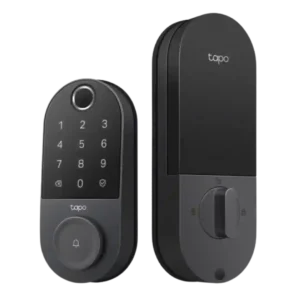
Choose the Tapo DL110 if you want fast fingerprint entry, strong app control, long battery life, and premium features under a lower price. Skip it if your door/strike alignment is...
Pros: App, Guest Codes and Access
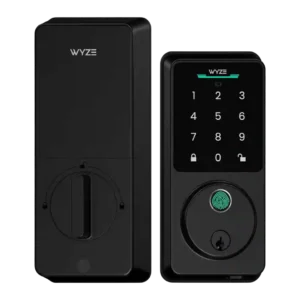
Choose the Wyze Lock Bolt v2 for low-cost Wi-Fi, fast fingerprint entry, and flexible codes. Skip it if you need Matter/HomeKit support, rechargeable batteries, or stronger door-sense behavior.
Pros: Fingerprint, Value and Price
Cons: Smart-home integration (Alexa, Google, Siri, HomeKit, Matter, Thread)
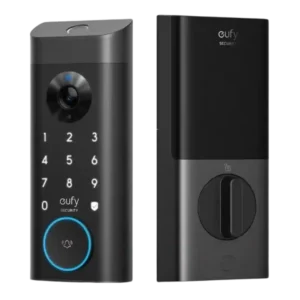
Good if you want one polished lock, camera, and doorbell with excellent fingerprint access. Skip it if short battery life, screen/storm doors, or a narrow camera view would frustrate you.
Pros: Camera and doorbell performance, Installation and Setup
Cons: Keyway quality, Door compatibility (deadbolt fit)
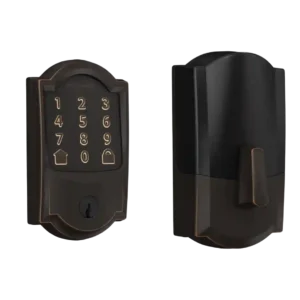
Choose the Schlage Encode if you want a sturdy, hub-free Wi-Fi deadbolt with strong codes, logs, and remote access. Skip it if you need geofencing, HomeKit/IFTTT, quiet motor noise, or...
Pros: Installation and Setup, App
Cons: Battery, Locking motor