Average score
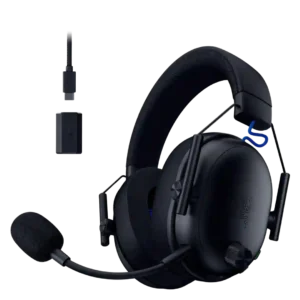
Turtle Beach Atlas Air Wireless Gaming Headset
3.9
Built-in DAC and hi-res playback
Turtle Beach Atlas Air Wireless Gaming Headset
4.6
Hi-res and 24-bit PC playback are praised for adding detail and clarity, especially when high-bandwidth audio is enabled on PC.
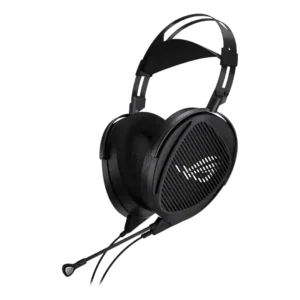
ASUS ROG Kithara
2.0
The USB-C adapter adds convenient digital connectivity, but its power and quality are inconsistent; the included DAC can feel weak and power-hungry.
Bluetooth
Turtle Beach Atlas Air Wireless Gaming Headset
3.6
Bluetooth is useful for phones and switching, but reviewers repeatedly note it is weaker than the dongle for gaming or lacks simultaneous audio.
ASUS ROG Kithara
1.0
This is a fully wired headset with no Bluetooth. Buyers who prioritize wireless freedom will need a different model.
Ear cup swivel/rotation range
Turtle Beach Atlas Air Wireless Gaming Headset
2.5
Swivel and foldability are limited because the floating cups do not rotate flat, which hurts desk, neck, and travel convenience.
ASUS ROG Kithara
5.0
The large cups offer generous rotation and can sit naturally on the head or lay flat for packing.
Spatial audio
Turtle Beach Atlas Air Wireless Gaming Headset
4.3
Spatial audio is strong overall, especially on PC with Waves 3D, though not every reviewer found it more precise than alternatives.
ASUS ROG Kithara
1.8
There is no built-in virtual surround or spatial-audio processing. The natural open-back stage can still feel immersive, and external options such as Dolby Atmos may work well.
Software/setup simplicity
Turtle Beach Atlas Air Wireless Gaming Headset
2.6
Software and setup are inconsistent; some reviewers found Swarm II simple and easy, while others hit bugs, confusing navigation, or default-setting issues.
ASUS ROG Kithara
5.0
The analog plug-and-play design requires no Armoury Crate or other app. That simplicity appeals to purists but removes built-in EQ, RGB, and surround controls.
Earpad replacement ease
Turtle Beach Atlas Air Wireless Gaming Headset
4.4
Earpad replacement is viewed positively where mentioned because the pads can be removed, cleaned, or swapped.
ASUS ROG Kithara
2.0
The included pads can be swapped, but the small proprietary clips feel fiddly and potentially fragile. Aftermarket choices are also limited by the mounting system.
Packaging quality
Turtle Beach Atlas Air Wireless Gaming Headset
2.5
Packaging drew limited criticism from one reviewer who felt the folder insert was unnecessary rather than useful.
ASUS ROG Kithara
4.7
The premium box, sound-signature certificate, and organized presentation make the unboxing feel special, though the large number of parts can initially feel overwhelming.
Carry case quality
Turtle Beach Atlas Air Wireless Gaming Headset
3.0
The included pouch is appreciated for scratch protection but not considered a highly protective travel case.
ASUS ROG Kithara
1.0
A recurring complaint is that no carrying case or hard case is included, despite the large headset and extensive cable bundle.
Clamping force comfort
Turtle Beach Atlas Air Wireless Gaming Headset
4.5
Most reviewers praise the light clamp for comfort, especially with glasses, though a few say the loose clamp can hurt stability.
ASUS ROG Kithara
2.9
Clamp is relaxed and comfortable for many large-headed users, but it is often too weak for smaller heads and can let the headset slide during movement.
Hinge durability
Turtle Beach Atlas Air Wireless Gaming Headset
4.0
Hinge durability is a relative strength because the floating elastic design avoids traditional hinge failure points, though metal sturdiness is limited.
ASUS ROG Kithara
2.6
The metal headband and hinges usually feel robust, yet broader quality-control failures make long-term confidence uneven.
Fit/seal reliability
Turtle Beach Atlas Air Wireless Gaming Headset
2.7
Fit reliability is mixed because the light clamp is comfortable but can shift, budge, or feel too loose for movement.
ASUS ROG Kithara
4.0
The oversized frame works especially well for large heads and glasses, but smaller heads may struggle to achieve a secure fit. The low clamp can cause slipping even when the acoustic seal remains forgiving.
Weight comfort
Turtle Beach Atlas Air Wireless Gaming Headset
4.9
Weight comfort is excellent, with reviewers repeatedly praising the lightweight 300g-class build for long gaming sessions and glasses use.
ASUS ROG Kithara
3.6
The 420-gram build is objectively heavy, yet the suspension strap distributes it well for many users. Others feel top pressure, jaw pressure, or fatigue, especially when the fit is loose.
Preset EQ profile quality
Turtle Beach Atlas Air Wireless Gaming Headset
3.3
Preset EQ quality is mixed: Signature Sound earns praise, while Superhuman Hearing and preset handling draw complaints.
ASUS ROG Kithara
4.5
The stock tuning favors clarity, speed, and competitive detail over heavy bass. Many enjoy it immediately, while others prefer a small low-shelf boost or find it better for gaming than music.
Xbox compatibility
Turtle Beach Atlas Air Wireless Gaming Headset
2.8
Xbox compatibility is a limitation because wireless Xbox support is absent, though wired analog use still works well.
ASUS ROG Kithara
1.6
Xbox support is a major limitation: audio can work through a controller, but microphone support is absent or requires awkward workarounds.
Cable quality
Turtle Beach Atlas Air Wireless Gaming Headset
4.8
Cable quality receives consistent praise, especially for braided USB and analog cables that feel premium and avoid distracting cable noise.
ASUS ROG Kithara
3.7
The modular audiophile cable feels premium and the connection options are extensive. The mic cable draws more criticism for feeling cheaper, being cumbersome, or running slightly short.
Detachable cable convenience
Turtle Beach Atlas Air Wireless Gaming Headset
4.0
The detachable/wired cable option is a practical convenience for backup wired use, especially when wireless or Xbox support is limited.
ASUS ROG Kithara
5.0
The mic cable is easy to remove and exchange for the dedicated listening cable, making it simple to move between gaming and music setups.
Game/Chat balance control
Turtle Beach Atlas Air Wireless Gaming Headset
2.0
Game/chat balance is a recurring weakness because controls are mostly software-based, lack physical mixing, or fail to feel useful in practice.
ASUS ROG Kithara
1.0
There is no dedicated game/chat mix control, which makes the physical control set feel sparse compared with feature-rich gaming headsets.
Stability
Turtle Beach Atlas Air Wireless Gaming Headset
3.0
Stability is mixed because the headset feels secure enough for desk gaming but can shift with stronger movement due to the light clamp.
ASUS ROG Kithara
2.1
The headset can slide or drop a notch when the clamp or suspension sliders are loose, especially on smaller heads. Properly adjusted replacement units may remain stable.
Volume output
Turtle Beach Atlas Air Wireless Gaming Headset
2.6
Volume output is a recurring complaint because several reviewers found the range too quiet below high settings or too uneven to fine-tune.
ASUS ROG Kithara
3.5
Volume is highly source-dependent. Some devices drive it extremely loudly, while controllers and motherboard outputs may require the USB-C adapter or a dedicated DAC/amp.
Frequency response accuracy
Turtle Beach Atlas Air Wireless Gaming Headset
4.1
Frequency response is generally natural and well-measured, but reviewers mention treble unevenness, limited sub-bass, or non-studio accuracy caveats.
ASUS ROG Kithara
5.0
Channel matching and overall response consistency are repeatedly praised. The velour pads provide the more linear midrange, while the stock presentation stays close to a neutral studio-style target.
Sound leakage
Turtle Beach Atlas Air Wireless Gaming Headset
2.2
Sound leakage is an unavoidable tradeoff, with reviewers repeatedly warning that audio leaks out and can be heard nearby.
ASUS ROG Kithara
1.4
Sound freely escapes the open earcups and can be audible to people nearby. A few users find leakage less severe than expected, but shared rooms remain a poor fit.
Headband adjustability
Turtle Beach Atlas Air Wireless Gaming Headset
4.0
Headband adjustability is comfortable and clever, but the Velcro-style adjustment raises concerns about convenience and long-term tension stability.
ASUS ROG Kithara
3.1
The suspension band offers broad sizing and can fit very large heads, but loose early units and slipping sliders are a repeated concern. Later replacement or retail units sometimes hold their position correctly.
Microphone
Turtle Beach Atlas Air Wireless Gaming Headset
4.0
Microphone quality is generally good to great for a gaming headset, but some reviewers report tinny sound, Bluetooth weakness, or minor artifacts.
ASUS ROG Kithara
3.3
The detachable MEMS mic is clear enough for chat, calls, and meetings, but opinions range from excellent to disappointing. Common complaints include nasal tone, plosive sensitivity, position dependence, and room pickup.
Multi-platform compatibility
Turtle Beach Atlas Air Wireless Gaming Headset
3.7
Multi-platform compatibility is good across PC, PlayStation, Switch, mobile, and wired Xbox, but full feature support is not equal everywhere.
ASUS ROG Kithara
4.4
PC, PlayStation, Switch, phones, and DAC setups are broadly supported, but the required cable or adapter changes by device. Console microphone support is the main complication.
Replaceable earpads
Turtle Beach Atlas Air Wireless Gaming Headset
4.4
Replaceable earpads are a convenience win where mentioned, since reviewers note the pads can be removed or interchanged.
ASUS ROG Kithara
5.0
Two pad sets are included and meaningfully change comfort and tonality. Velour is softer and smoother, while the hybrid set offers a tighter seal and stronger focus.
Equalizer customization
Turtle Beach Atlas Air Wireless Gaming Headset
3.8
EQ customization is powerful but inconsistent: reviewers value the 10-band EQ, yet some report preset overwrites, artifacts, or app-related limits.
ASUS ROG Kithara
4.4
Although there is no dedicated app, the planar drivers respond extremely well to external EQ. Small bass adjustments can add substantial low-end weight without obvious distortion.
Dongle
Turtle Beach Atlas Air Wireless Gaming Headset
3.0
The dongle works well for low-latency wireless, but one reviewer disliked the always-flashing transmitter light.
ASUS ROG Kithara
3.6
The included USB-C adapter improves compatibility and often raises volume, but results vary by device and some users report limited power or inconsistent Windows behavior.
Build quality
Turtle Beach Atlas Air Wireless Gaming Headset
4.3
Build quality is generally good for a lightweight plastic headset, with praise for durability and flexibility balanced by a few less-premium feel complaints.
ASUS ROG Kithara
3.7
The metal-heavy frame, hinges, and premium finish impress most users, but several customers report serious quality-control failures such as dead drivers, popping, and defective adapters.
Active noise cancellation
Turtle Beach Atlas Air Wireless Gaming Headset
1.5
Reviewers treat noise cancellation as a poor fit because the open-back design does not block the room and cannot substitute for ANC headphones.
ASUS ROG Kithara
1.0
There is no active noise cancellation. The open-back design is intentionally built for awareness rather than blocking the room.
Maximum volume clarity
Turtle Beach Atlas Air Wireless Gaming Headset
4.5
Maximum volume clarity is good when loud enough, with no distortion reported at maximum in one review, though volume output itself is uneven.
ASUS ROG Kithara
5.0
The planar drivers maintain very low distortion and tolerate aggressive volume or bass EQ cleanly, providing substantial headroom when properly driven.
Value for money
Turtle Beach Atlas Air Wireless Gaming Headset
4.4
Value is favorable for users who want wireless open-back sound and comfort under $200, but software and feature tradeoffs keep it from universal appeal.
ASUS ROG Kithara
3.9
At around $299, many buyers see unusually strong audiophile sound, comfort, and accessories for the price. Others consider it too expensive once a DAC/amp is added or when compared with more convenient wireless headsets.
Ear cup padding quality
Turtle Beach Atlas Air Wireless Gaming Headset
4.8
Earcup padding is a major comfort strength, with reviewers praising the soft cloth, memory foam, plush feel, and glasses-friendly cushioning.
ASUS ROG Kithara
4.3
Both leatherette-mesh and velour pads are plush, roomy, and generally comfortable. Velour runs cooler, while a few users find the pads scratchy, thin, pressure-inducing, or insufficiently durable.
Noise isolation (passive)
Turtle Beach Atlas Air Wireless Gaming Headset
1.8
Passive isolation is intentionally poor due to the open-back design, making the headset best for quiet rooms rather than noisy spaces.
ASUS ROG Kithara
1.4
The extremely open cups provide little to no passive isolation. Household sounds, fans, conversations, and other room noise remain easy to hear.
Detachable microphone convenience
Turtle Beach Atlas Air Wireless Gaming Headset
4.6
The detachable flip-to-mute microphone is considered convenient, easy to set up, and useful when users want to remove or quickly mute it.
ASUS ROG Kithara
5.0
The removable boom mic is useful when switching to music-only listening. Its cable-based design is practical, though balanced listening cannot be combined with the mic in some setups.
Positional audio accuracy
Turtle Beach Atlas Air Wireless Gaming Headset
4.6
Positional accuracy is a major strength, with reviewers hearing footsteps, distance, direction, and spatial cues clearly in games.
ASUS ROG Kithara
4.3
Most users hear footsteps, reloads, and distant movement with excellent precision, making the headset strong for competitive play. A smaller group reports merely average or even poor directional placement, so game and listener fit can affect results.
Button control usability
Turtle Beach Atlas Air Wireless Gaming Headset
3.4
Controls are split: several reviewers liked the easy left-cup layout, while others criticized similar-feeling buttons, stiff presses, cheap volume feel, or delayed adjustment.
ASUS ROG Kithara
3.0
The inline mute and volume controls are convenient, but the wheel can be overly sensitive and some users heard clicks or artifacts when toggling the mic.
Microphone noise reduction
Turtle Beach Atlas Air Wireless Gaming Headset
3.9
Microphone noise reduction is useful and often effective, but not perfect; reviewers mention compression dips, artifacts, and background noise limits.
ASUS ROG Kithara
4.2
Hardware noise rejection works well in several tests without software processing, especially against steady background noise and keyboards. Other users report substantial room pickup, so placement and environment matter.
Soundstage width
Turtle Beach Atlas Air Wireless Gaming Headset
4.5
Soundstage is one of the defining strengths, with reviewers describing wider, more open, more immersive presentation than typical closed-back headsets.
ASUS ROG Kithara
4.8
The open-back planar design creates a broad, airy, highly detailed stage that often feels more speaker-like than conventional gaming headsets. A few FPS users disagree sharply about its directional usefulness.
Bass performance
Turtle Beach Atlas Air Wireless Gaming Headset
3.4
Bass impressions are mixed: some reviewers found punch and clean low end, but many said open-back tuning limits rumble, impact, and bass-heavy excitement.
ASUS ROG Kithara
3.7
Bass is fast, clean, and easy to separate from the rest of the mix, but stock sub-bass and physical rumble divide listeners. A DAC or modest EQ can add satisfying impact without obvious muddiness.
Treble clarity
Turtle Beach Atlas Air Wireless Gaming Headset
3.7
Treble clarity is mixed: highs can be clean and non-piercing, but several reviewers mention brightness, sibilance, or harshness.
ASUS ROG Kithara
4.0
Treble is highly detailed and often cleaner than sharper planar rivals, but the tuning varies with pads and can sound bright, forward, restrained, or fatiguing depending on the listener.
Console compatibility limitations
Turtle Beach Atlas Air Wireless Gaming Headset
2.3
Console limitations center on Xbox wireless and PC-only software features, while wired fallback keeps it usable beyond PC and PlayStation.
ASUS ROG Kithara
2.0
Console support is not fully plug-and-play: PlayStation mic use may require USB-C, controllers can sound underpowered, and Xbox microphone support is the biggest gap.
Instrument separation
Turtle Beach Atlas Air Wireless Gaming Headset
4.6
Instrument separation is praised for keeping busy mixes, instruments, vocals, and game effects identifiable instead of blurred together.
ASUS ROG Kithara
4.8
Layering, detail retrieval, and frequency separation are major strengths. Busy game scenes, instruments, dialogue, and subtle environmental sounds remain easy to distinguish.
Included accessories
Turtle Beach Atlas Air Wireless Gaming Headset
4.7
Included accessories are considered generous and premium for the price, especially the braided cables, pouch, mic, dongle, and cable options.
ASUS ROG Kithara
4.9
The box is unusually complete, with two pad sets, multiple cables, modular plugs, a USB-C adapter, and a unit-specific tuning card. Several buyers consider the bundle a major part of the value.
Design and Aesthetics
Turtle Beach Atlas Air Wireless Gaming Headset
4.4
The design is widely seen as distinctive, clean, and innovative thanks to the open-back floating earcup layout, though restrained styling is not flashy.
ASUS ROG Kithara
4.1
The restrained metal-and-open-grille styling looks premium and mature to many buyers, though the tall frame and oversized cups can look awkward or comically large on smaller heads.
Midrange clarity
Turtle Beach Atlas Air Wireless Gaming Headset
4.4
Midrange clarity is a strength, especially for dialogue and busy game mixes, with reviewers saying mids stay clean and detailed.
ASUS ROG Kithara
4.3
Midrange detail is generally clean and well separated, but pad choice changes the presentation. Velour sounds more linear, while some listeners hear vocals and instruments sitting slightly farther back.
Connectivity versatility
Turtle Beach Atlas Air Wireless Gaming Headset
4.3
Connectivity is versatile across dongle, Bluetooth, wired use, and quick switching, though some reviewers want simultaneous source mixing.
ASUS ROG Kithara
4.3
The swappable 3.5mm, 4.4mm, 6.3mm, dual-3.5mm, and USB-C options cover PCs, consoles, phones, DACs, and amps. The flexibility comes with more cables and setup complexity than a typical gaming headset.
Microphone quality for calls
Turtle Beach Atlas Air Wireless Gaming Headset
4.4
Call and chat quality is strong overall, with Discord and party-chat users reporting clear, understandable voice capture.
ASUS ROG Kithara
4.5
Voice clarity is good for Discord, Teams, and ordinary calls, but it still sounds like a headset mic and is not a substitute for a dedicated streaming or podcast microphone.
Comfort during long use
Turtle Beach Atlas Air Wireless Gaming Headset
4.8
Comfort is the strongest consensus point: reviewers repeatedly call it extremely comfortable, featherweight, cool-wearing, and suitable for long sessions.
ASUS ROG Kithara
4.7
Most users find the suspension headband and huge pads exceptionally comfortable for multi-hour sessions. Comfort becomes less reliable on smaller heads or for those sensitive to the 420-gram weight.
Sound quality
Turtle Beach Atlas Air Wireless Gaming Headset
4.8
Sound quality is broadly praised as detailed, natural, balanced, spacious, and unusually strong for a wireless gaming headset.
ASUS ROG Kithara
4.8
Clarity, speed, detail, and natural presentation are the Kithara’s defining strengths across games, music, and media. Most listeners rate it above typical gaming headsets, though a minority finds the sound underwhelming or poorly suited to music.
Portability/foldability
Turtle Beach Atlas Air Wireless Gaming Headset
2.5
Portability is limited because the open-back design is poor for streets or noisy public spaces and the cups do not fold flat.
ASUS ROG Kithara
2.5
The cups can rotate flat, but the large wired open-back design is desk-bound and poorly suited to commuting or travel.
Android compatibility
Turtle Beach Atlas Air Wireless Gaming Headset
4.0
Android support is viewed positively where discussed through the Swarm II app, which reviewers said offers robust customization across Android, iOS, Windows, and PC.
ASUS ROG KitharaNo score yet
App
Turtle Beach Atlas Air Wireless Gaming Headset
3.2
Swarm II app feedback is mixed: reviewers like its customization depth when it works, but report PC-only limits, navigation problems, connection issues, and bugs.
ASUS ROG KitharaNo score yet
Battery
Turtle Beach Atlas Air Wireless Gaming Headset
4.6
Battery life is one of the clearest strengths, with reviewers reporting multi-day use, 50-plus-hour endurance, and little need to worry about charging.
ASUS ROG KitharaNo score yet
Charging
Turtle Beach Atlas Air Wireless Gaming Headset
4.4
Charging is viewed positively because full charges are quick, quick charge helps, and the headset can be used for long stretches between charges.
ASUS ROG KitharaNo score yet
Footstep sound level scaling feature
Turtle Beach Atlas Air Wireless Gaming Headset
3.2
The footstep-enhancing Superhuman Hearing feature is divisive, with some benefit for cues but frequent complaints about artificial or fatiguing sound.
ASUS ROG KitharaNo score yet
Glasses and hat compatibility
Turtle Beach Atlas Air Wireless Gaming HeadsetNo score yet
ASUS ROG Kithara
4.8
The roomy pads and forgiving planar bass work well with glasses, with little loss of low-end response from an imperfect seal.
Multipoint connectivity reliability
Turtle Beach Atlas Air Wireless Gaming Headset
2.2
Multipoint and simultaneous connectivity are weak because reviewers repeatedly wanted Bluetooth plus game audio at the same time.
ASUS ROG KitharaNo score yet
Overall satisfaction
Turtle Beach Atlas Air Wireless Gaming HeadsetNo score yet
ASUS ROG Kithara
4.2
Most buyers are enthusiastic about the clarity, comfort, and unusual audiophile-gaming blend, often calling it a favorite or endgame headset. Returns and low scores are concentrated around mic limitations, insecure fit, and quality-control failures.
Sidetone adjustment quality
Turtle Beach Atlas Air Wireless Gaming Headset
2.8
Sidetone or mic monitoring is mixed to weak: some reviewers like the lack of hiss, while others find it too quiet, eerie, or ineffective.
ASUS ROG KitharaNo score yet
USB-C
Turtle Beach Atlas Air Wireless Gaming HeadsetNo score yet
ASUS ROG Kithara
4.5
The included USB-C adapter expands phone, laptop, Switch, PlayStation, and PC compatibility and supports high-resolution playback. It can add volume, but it is not consistently powerful enough to replace a dedicated DAC/amp.
Wireless latency
Turtle Beach Atlas Air Wireless Gaming Headset
4.7
Wireless latency and stability are good over the 2.4GHz dongle, with reviewers reporting low-latency gaming and no dropout issues.
ASUS ROG KitharaNo score yet