Android compatibility
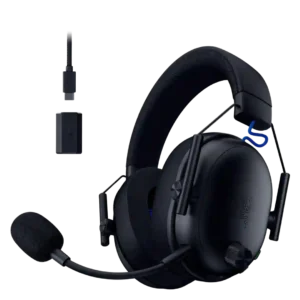
Razer Barracuda X
4.6
Android compatibility was consistently positive when mentioned, with reviewers appreciating USB-C or wireless use on Android phones.
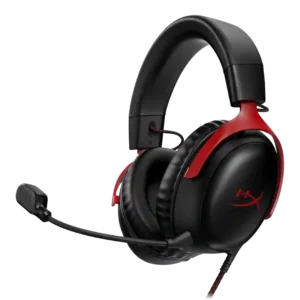
HyperX Cloud III
2.5
Android compatibility was mixed-to-poor in the one direct review because unsupported Android devices behaved patchily.
Preset EQ profile quality
Razer Barracuda X
3.3
Preset EQ profiles were mixed, with useful game/music options offset by hit-or-miss tuning and some presets pushing bass or highs too far.
HyperX Cloud III
1.5
Preset EQ evidence was strongly negative in the one direct review, which called the included presets junk.
Detachable cable convenience
Razer Barracuda X
4.5
The detachable analog cable was useful for broad compatibility, especially for wired fallback on devices without wireless support.
HyperX Cloud III
2.9
Detachable-cable convenience was mostly a weakness, with several wired or wireless reviews wishing for removability or wired fallback.
Included accessories
Razer Barracuda X
4.4
Included accessories were usually well received, especially the generous cables, adapters, setup guide, and complete-feeling package.
HyperX Cloud III
2.8
Included accessories were mixed-to-negative, especially where reviewers missed a pouch, velour pads, longer cable, or extra pads.
Cable quality
Razer Barracuda X
5.0
Cable quality was praised where evaluated, especially the included long, high-quality charging and adapter cables.
HyperX Cloud III
3.6
Cable impressions were mixed: some liked the braided, low-noise feel, while others complained about cable noise or unwieldy length.
Connectivity versatility
Razer Barracuda X
4.7
Connectivity versatility was one of the clearest strengths, with reviewers praising the ability to use the headset across many devices and connection types.
HyperX Cloud III
3.4
Connectivity versatility was polarized: wired models were flexible, but wireless dongle-only limits and missing wired/Bluetooth options hurt versatility.
Portability/foldability
Razer Barracuda X
3.6
Portability was mixed: light weight, flat cups, and removable mic helped, but odd swivel behavior, no case, and dongle storage issues hurt travel convenience.
HyperX Cloud III
2.3
Portability was weak because the headset was described as bulky, non-folding, or less suited for travel.
Fit/seal reliability
Razer Barracuda X
3.5
Fit and seal reliability was mixed, ranging from good self-adjusting fit to weak clamp that slid forward when leaning over.
HyperX Cloud III
4.8
Fit and seal were strong in the few direct mentions, supporting comfort, glasses use, and noise blocking.
Dongle
Razer Barracuda X
3.2
The dongle enabled broad USB-C wireless use, but reviewers frequently criticized its width, port blocking, storage issues, or occasional reconnection problems.
HyperX Cloud III
2.0
Dongle reliance was a common concern because reviewers disliked patchy behavior, easy loss, and dependence on one connection method.
Bluetooth
Razer Barracuda X
3.7
Bluetooth was praised on newer/Chroma models for convenience, but older-model reviews missed it and one long-term 2022 review found Bluetooth switching disruptive.
HyperX Cloud III
2.5
Bluetooth evidence was sharply mixed because most wireless reviews criticized its absence, while one review praised a Bluetooth mode in its transcript.
Multi-platform compatibility
Razer Barracuda X
4.8
Multi-platform compatibility was one of the strongest consensus positives, with repeated praise for PC, PlayStation, Switch, Android, Mac, iOS, and wired fallback.
HyperX Cloud III
3.6
Multi-platform compatibility was broad but imperfect: reviewers praised wide platform support while repeatedly noting dongle-only or Xbox gaps.
Xbox compatibility
Razer Barracuda X
2.6
Xbox compatibility was consistently limited: reviewers said Xbox required a 3.5mm cable or lacked native wireless support.
HyperX Cloud III
1.5
Xbox compatibility was a clear weakness for wireless reviews, repeatedly called absent or disappointing.
Charging
Razer Barracuda X
4.0
Charging evidence was positive but mixed: quick charge and use-while-charging were praised, while one Chroma review called charging speed middling.
HyperX Cloud III
3.0
Charging evidence was limited, with one reviewer criticizing the included charging cable length.
Sound leakage
Razer Barracuda X
4.5
Sound leakage evidence was limited but positive, with one reviewer finding leakage barely audible even at high volume.
HyperX Cloud III
3.5
Sound leakage evidence was limited and mixed, with one review praising low leakage while another noted audible leakage outside the headset.
Value for money
Razer Barracuda X
4.6
Value for money was strongly positive, with many reviewers calling it a bargain, no-brainer, winner, or strong performer at its price.
HyperX Cloud III
3.9
Value opinions ranged from excellent budget value and home-run pricing to complaints that the wireless version needed more features for its price.
Wireless latency
Razer Barracuda X
4.2
Wireless latency was usually low enough for gaming, with several reviews calling it lag-free or well synced, though one cloud-gaming case and one range test were weaker.
HyperX Cloud III
4.9
Wireless latency was consistently praised where tested, with reviewers reporting low or nonexistent lag.
Software/setup simplicity
Razer Barracuda X
3.8
Setup simplicity was often praised as plug-and-play, but app requirements, missing controls, and a long-term reconnection problem kept it from being universally simple.
HyperX Cloud III
3.1
Setup simplicity varied, ranging from easy plug-and-play to painful setup or USB sound-card issues.
Noise isolation (passive)
Razer Barracuda X
3.4
Passive isolation was useful in quiet rooms and some home settings, but reviewers repeatedly warned that voices, traffic, or travel noise still came through.
HyperX Cloud III
4.1
Passive isolation was consistently useful, with earcups and cushioning blocking or shutting out outside noise without active cancellation.
Weight comfort
Razer Barracuda X
4.6
Weight comfort was strongly praised; reviewers repeatedly described the headset as light, weightless, or easy to wear for long sessions.
HyperX Cloud III
4.0
Weight comfort was mostly positive thanks to lightness, though a few reviewers found the wireless model heavier or fatiguing over time.
Headband adjustability
Razer Barracuda X
3.9
Headband adjustability and padding were generally solid and secure, though a few reviewers wanted plusher or thicker padding.
HyperX Cloud III
3.3
Headband adjustability was usable, but the evidence was mixed because one reviewer found notches somewhat flimsy.
Battery
Razer Barracuda X
4.2
Battery life was mostly praised as long or excellent, especially 50-70 hour models, though RGB use and older models reduced that advantage.
HyperX Cloud III
4.8
Battery life was a standout strength, with many wireless reviews praising week-plus use, roughly 100-hour endurance, or 120-hour claims.
Detachable microphone convenience
Razer Barracuda X
4.3
The detachable microphone was usually praised for convenience, easy removal, stable positioning, or making the headset work better as everyday headphones.
HyperX Cloud III
3.8
Detachable microphone convenience was mostly positive for flexibility, though one review warned the detachable mic could be misplaced.
App
Razer Barracuda X
3.4
App support was useful for EQ, gaming mode, lighting, or battery status, but multiple reviewers disliked separate apps, limited Synapse control, or app dependence.
HyperX Cloud III
2.8
App evidence was mixed-to-negative: a few found it straightforward, while others reported detection issues, limited features, or unusable support.
Soundstage width
Razer Barracuda X
3.6
Soundstage and spatial width were mixed: some reviewers praised immersion and spaciousness, while others found it closed or less wide than pricier headsets.
HyperX Cloud III
3.0
Soundstage was a recurring limitation, with multiple reviewers calling it narrow, confined, or one-dimensional despite a few acceptable impressions.
Microphone noise reduction
Razer Barracuda X
3.7
Microphone noise handling was mixed-positive: several reviewers praised voice focus or rejected background noise, while others heard background noise or quality drops with processing.
HyperX Cloud III
4.3
Microphone noise reduction was a strength overall, with several reviewers saying background noise, keyboard sounds, or distractions were reduced well.
Positional audio accuracy
Razer Barracuda X
4.3
Positional audio was frequently praised for footsteps, shots, direction, and game awareness, with only a few caveats about imperfect precision.
HyperX Cloud III
3.8
Positional audio was mixed: several reviewers heard precise placement, while others struggled with directionality and in-game localization.
Midrange clarity
Razer Barracuda X
3.9
Midrange clarity was usually strong for voices, melodies, and game detail, with isolated criticism that bass could bleed into the mids or leave them recessed.
HyperX Cloud III
3.4
Midrange performance was usually clear enough for dialogue and vocals, but some reviewers heard recessed or weak mids that hurt music fullness.
Sidetone adjustment quality
Razer Barracuda X
2.5
Sidetone and mic monitoring were weak overall: one review valued sidetone, but others criticized delay or lack of adjustment.
HyperX Cloud III
3.0
Sidetone and mic monitoring were highly inconsistent, ranging from useful or best-ever sidetone to non-working monitoring toggles.
Stability
Razer Barracuda X
3.5
Stability was mixed: several reviewers praised solid wireless or secure wear, but others reported drops, sliding, or 2022 connection problems.
HyperX Cloud III
4.0
Stability evidence was limited but positive, with one review noting the fit remained stable despite light clamping pressure.
Spatial audio
Razer Barracuda X
3.8
Spatial audio was useful for directionality and immersion in supported setups, though some reviewers found it less precise, app-dependent, or not worth the hassle.
HyperX Cloud III
3.3
Spatial audio was divisive: some praised precision and immersion, while others found DTS subtle, bad-sounding, or PC-limited.
Clamping force comfort
Razer Barracuda X
4.2
Clamping comfort was usually well balanced and secure without too much pressure, but one review found the clamp too weak and prone to sliding.
HyperX Cloud III
4.6
Clamping force was widely described as comfortable, light-to-medium, or well balanced for stability without pressure.
Carry case quality
Razer Barracuda X
2.9
Carry case support was inconsistent, with praise when a pouch or bag was included and criticism when the headset shipped without even a basic pouch.
HyperX Cloud III
2.5
Carry case quality evidence was limited and negative, with one review saying the bag did not really protect the headset.
Audio-video sync accuracy
Razer Barracuda X
4.1
Audio-video sync and response were mostly strong, with app gaming modes, low-latency wireless, and quick response praised across several reviews.
HyperX Cloud III
4.5
One review directly praised sync behavior, saying wireless audio cues stayed aligned with on-screen action.
Microphone
Razer Barracuda X
3.8
Microphone performance varied by model and reviewer: Chroma and several X reviews were positive, while some older or integrated mic reviews were merely passable or poor.
HyperX Cloud III
4.1
Microphone quality was one of the most commonly praised attributes, though a few reviews found it merely fine, flat, or lacking body.
Sound quality
Razer Barracuda X
4.2
Reviewers generally found the headset's sound good to excellent for gaming and everyday listening, though a few budget-model reviews called it merely fine or not class-leading.
HyperX Cloud III
3.9
Reviewers broadly found the Cloud III clear and enjoyable for gaming, but several described the sound as merely serviceable or flawed for music and higher-end listening.
Bass performance
Razer Barracuda X
3.8
Bass was often described as punchy, warm, or strong, but several reviewers noted limits such as less sub-bass depth, less rumble, or occasional overemphasis.
HyperX Cloud III
3.6
Bass evidence was split: some reviewers praised deep impact and oomph, while others found the low end lacking, flat, or not satisfying for music.
USB-C
Razer Barracuda X
4.2
USB-C was praised for broad dongle and charging convenience, but a few reviews noted limitations such as port blocking or no USB-C audio data mode.
HyperX Cloud III
4.4
USB-C support was viewed positively, especially when paired with included USB-A adapters and broader platform use.
Treble clarity
Razer Barracuda X
3.8
Treble was commonly called crisp or clean without harshness, though some presets or use cases made upper frequencies airy, thin, or less detailed.
HyperX Cloud III
3.6
Treble drew mixed reactions, ranging from crisp and detailed to bright, tinny, piercing, or overly high depending on the review and model.
Equalizer customization
Razer Barracuda X
3.3
Equalizer customization was mixed: mobile or Synapse EQ could be useful, but some models lacked PC EQ or any meaningful equalizer support.
HyperX Cloud III
3.5
EQ customization was useful for tailoring sound, but reviewers criticized broken toggles, bad custom EQ behavior, missing onboard EQ, and poor presets.
Microphone quality for calls
Razer Barracuda X
4.0
Call and chat microphone quality was often clear enough for Discord, Zoom, voice calls, or streaming in a pinch, but a few reviews found it merely serviceable.
HyperX Cloud III
3.8
Call and chat voice quality was generally clear enough, though a few reviewers mentioned flat tone or low gain concerns.
Ear cup padding quality
Razer Barracuda X
4.2
Ear cup padding was mostly praised for memory foam, fabric, breathability, and softness, though a few reviewers found it thin, shallow, or slightly harsh.
HyperX Cloud III
4.1
Earcup padding was generally praised as plush, thick, soft, or spacious, though pleather warmth and spicy ears were noted.
Design and Aesthetics
Razer Barracuda X
4.5
Design was a major strength: reviewers repeatedly liked the subtle, understated, non-gamery look, with Chroma lighting adding style for RGB fans.
HyperX Cloud III
4.4
Design was generally well liked, with reviewers praising the sleeker, premium, simple, or all-black look.
Button control usability
Razer Barracuda X
3.8
Controls were usually easy to reach and precise, but reviewers disliked loose volume wheels, unclear mute state, or awkward volume positioning.
HyperX Cloud III
4.0
On-headset controls were usually praised for ease and convenience, though some reviewers disliked the mute location or loud mute-button noise.
Ear cup swivel/rotation range
Razer Barracuda X
2.5
Ear cup swivel and rotation were a recurring annoyance because several reviewers felt the cups folded or rotated the wrong way.
HyperX Cloud III
2.4
Swivel and rotation range was a repeated weakness, with reviewers wishing HyperX had added more swivel.
Volume output
Razer Barracuda X
4.1
Volume output was generally strong, with several reviewers saying it got loud or had enough power, although one review found USB-C wireless quieter.
HyperX Cloud III
4.0
Volume was usually loud enough, but some PlayStation and out-of-box experiences were called lower or underwhelming.
Build quality
Razer Barracuda X
4.4
Build quality was generally solid for the price, with many reviewers praising sturdy plastic, metal reinforcement, or strong construction despite budget materials.
HyperX Cloud III
4.5
Build quality was a strong point, repeatedly described as robust, premium-feeling, sturdy, solid, or excellent.
Console compatibility limitations
Razer Barracuda X
2.6
Console limitations centered on Xbox, where reviewers repeatedly noted that wireless support was unavailable and a cable was required.
HyperX Cloud III
2.5
Console limitations centered on PC-only virtual surround/EQ behavior and reduced console-side adjustability.
Instrument separation
Razer Barracuda X
3.9
Instrument and sound separation was mostly positive, especially in busy game and music mixes, with only one review saying small details were hard to hear.
HyperX Cloud III
4.0
Layering and separation were positively noted in a few game and music examples, though this was not a major theme across the evidence.
Comfort during long use
Razer Barracuda X
4.6
Comfort over long sessions was one of the strongest areas, with repeated praise for multi-hour or all-day use and very few serious comfort complaints.
HyperX Cloud III
4.6
Comfort was one of the strongest areas, repeatedly praised for long sessions, soft padding, and an easy-to-forget fit.
Maximum volume clarity
Razer Barracuda X
4.3
At high volume, reviewers usually reported clean playback with little or no distortion, supporting good maximum-volume clarity.
HyperX Cloud III
4.3
A few reviewers said the headset kept detail or held up well at higher gain/volume, supporting good maximum-volume behavior.
Active noise cancellation
Razer Barracuda X
2.0
Active noise cancellation was treated as an absent premium feature, with one reviewer saying buyers who need ANC should consider another model.
HyperX Cloud III
2.0
The lack of active noise cancellation was specifically criticized as a noticeable omission at the wireless model’s price tier.
Frequency response accuracy
Razer Barracuda X
3.5
Frequency response evidence was limited to one measured-style review, which found it acceptable for gaming with some bass and treble deviations.
HyperX Cloud III
3.5
Frequency-response impressions leaned neutral or refined in some reviews, but distortion and a less exciting tonal balance appeared as caveats.
Hinge durability
Razer Barracuda X
5.0
Hinge and structural durability were praised in the limited evidence, with reviewers noting no rattles, weak feeling, or cracking concerns.
HyperX Cloud III
5.0
Hinge durability evidence was positive where discussed, emphasizing the Cloud line’s tank-like construction reputation.
aptX
Razer Barracuda X
1.5
aptX support was explicitly criticized as absent, with one review calling the lack of AAC or aptX a letdown.
HyperX Cloud IIINo score yet
Codec support
Razer Barracuda X
2.0
Codec support was a weak point in reviews that discussed it, because Bluetooth was limited to SBC rather than higher-quality codecs.
HyperX Cloud IIINo score yet
Earpad noise
Razer Barracuda X
2.5
Earpad noise was a limited but negative finding, with one reviewer noting audible skin-versus-material contact noise.
HyperX Cloud IIINo score yet
Earpad replacement ease
Razer Barracuda XNo score yet
HyperX Cloud III
4.3
Earpad replacement ease was positive in video evidence, with removable cups or compatible universal pads mentioned approvingly.
Integrated microphone
Razer Barracuda X
2.5
The integrated microphone evidence was limited to the non-X Barracuda-style review and was negative compared with the rest of the headset.
HyperX Cloud IIINo score yet
Multipoint connectivity reliability
Razer Barracuda X
4.0
SmartSwitch and dual-wireless behavior were praised when they worked quickly, but one long-term reviewer reported unreliable reconnection and tiresome dongle reseating.
HyperX Cloud IIINo score yet
Packaging quality
Razer Barracuda X
3.7
Packaging impressions ranged from simple and easy to nicely presented, with one reviewer comparing the budget box to Amazon Basics.
HyperX Cloud IIINo score yet
Replaceable earpads
Razer Barracuda XNo score yet
HyperX Cloud III
4.3
Replaceable earpads received positive evidence from reviews noting removable earcups or compatible replacement pads.
RGB lighting customization
Razer Barracuda X
4.3
RGB customization was a Chroma strength, with reviewers liking the look and options, though some disliked app dependence or limited interactivity.
HyperX Cloud IIINo score yet
Smudge resistance
Razer Barracuda X
3.3
Smudge resistance was mixed, with one Chroma review praising fingerprint resistance while another Barracuda review found the finish fingerprint-prone.
HyperX Cloud IIINo score yet